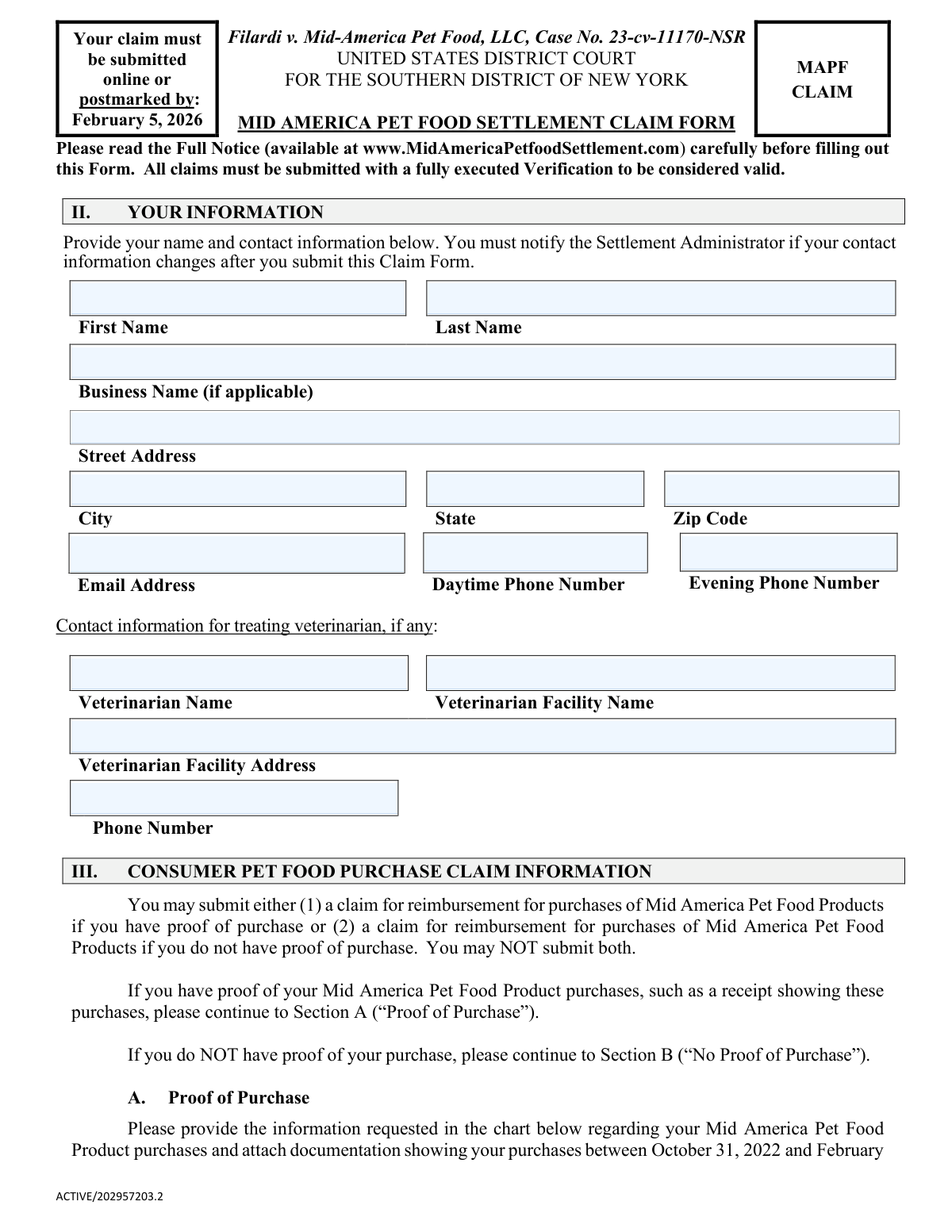
Yes! You can use AI to fill out Mid America Pet Food Settlement Claim Form, Filardi v. Mid-America Pet Food, LLC, Case No. 23-cv-11170-NSR

This form is for individuals seeking reimbursement from the class action settlement in the case of Filardi v. Mid-America Pet Food, LLC. Claimants can file for compensation for recalled pet food products purchased or for losses and expenses due to a pet's illness or death from suspected Salmonella contamination. Today, this form can be filled out quickly and accurately using AI-powered services like Instafill.ai, which can also convert non-fillable PDF versions into interactive fillable forms.
Our AI automatically handles information lookup, data retrieval, formatting, and form filling.
It takes less than a minute to fill out MAPF Claim Form using our AI form filling.
Securely upload your data. Information is encrypted in transit and deleted immediately after the form is filled out.

Form specifications

Form name: Mid America Pet Food Settlement Claim Form, Filardi v. Mid-America Pet Food, LLC, Case No. 23-cv-11170-NSR
Number of pages: 6
Language: English
Categories: VA claim forms, LLC forms
main-image

Instafill Demo: How to fill out PDF forms in seconds with AI

How to Fill Out MAPF Claim Form Online for Free in 2026

Are you looking to fill out a MAPF CLAIM FORM form online quickly and accurately? Instafill.ai offers the #1 AI-powered PDF filling software of 2026, allowing you to complete your MAPF CLAIM FORM form in just 37 seconds or less.
Follow these steps to fill out your MAPF CLAIM FORM form online using Instafill.ai:
  1. 1 Navigate to Instafill.ai and upload the Mid America Pet Food Settlement Claim Form or select it from their library.
  2. 2 Use the AI assistant to accurately fill in your personal contact information in Part II.
  3. 3 Complete the appropriate claim section: Part III for Consumer Pet Food Purchases (with or without proof) or Part IV for Pet Injury Claims, detailing expenses and losses.
  4. 4 Upload any required supporting documents, such as receipts, invoices, or veterinary records, directly to the form.
  5. 5 Choose your preferred payment method in Part V, such as PayPal, Venmo, or a physical check.
  6. 6 Carefully review all the information entered for accuracy, then electronically sign and date the verification statement in Part VI.
  7. 7 Submit the completed and signed claim form with all attachments electronically before the February 5, 2026 deadline.

Our AI-powered system ensures each field is filled out correctly, reducing errors and saving you time.

Why Choose Instafill.ai for Your Fillable MAPF Claim Form Form?

Speed

Complete your MAPF Claim Form in as little as 37 seconds.

Up-to-Date

Always use the latest 2026 MAPF Claim Form form version.

Cost-effective

No need to hire expensive lawyers.

Accuracy

Our AI performs 10 compliance checks to ensure your form is error-free.

Security

Your personal information is protected with bank-level encryption.

Frequently Asked Questions About Form MAPF Claim Form

This form is for the Mid America Pet Food Settlement, allowing you to claim money if you purchased recalled pet food products. You should fill it out if you bought one of the specified products recalled in late 2023 due to potential Salmonella contamination.

Your claim form must be submitted online or postmarked by mail on or before February 5, 2026. Late submissions will not be considered valid.

A Consumer Food Purchase Claim is for reimbursement for the cost of the pet food itself. A Pet Injury Claim is for expenses related to your pet's sickness or death resulting from consuming the recalled food, such as vet bills.

You can still file a claim without proof of purchase. You may claim a reimbursement of $20 per bag for up to two bags by attesting to the purchase details under penalty of perjury.

Yes, you can submit a Pet Injury Claim without documentation for $50 for an ill pet or $100 for a deceased pet. You must submit a declaration under penalty of perjury, and the claim is subject to review for credibility.

You must submit documents like receipts, invoices, or veterinarian records showing screening or treatment for an illness consistent with Salmonella. Simply listing an expense without documentation is not a guarantee of reimbursement.

No, only one claim is allowed per household, which includes all persons sharing a physical address. You must combine your claims onto a single form.

Yes, you can file a claim if you did not sign a release of claims. However, the amount you were already reimbursed will be deducted from any settlement payment you receive.

You can choose to receive payment via PayPal, Venmo, Zelle, a virtual prepaid card, or a physical check. You must select your preferred payment method in Section V of the form.

You can submit the form online at www.MidAmericaPetfoodSettlement.com or by mailing the physical form to the Settlement Administrator's address in Philadelphia, PA. Both methods have a deadline of February 5, 2026.

No, submitting a claim does not guarantee payment. All claims are subject to audit and review for accuracy and validity by the Settlement Administrator.

Yes, services like Instafill.ai use AI to accurately auto-fill form fields, which can save you time and help avoid errors. You can upload the form, and the AI will help populate your information.

To fill this form online, you can upload the PDF to the Instafill.ai platform. The AI will identify all the fields, allowing you to enter your information and have the form filled out automatically for easy submission.

If you have a non-fillable or 'flat' PDF, you can use a service like Instafill.ai to convert it into an interactive, fillable form. This allows you to type your answers directly into the fields before printing or submitting.

Compliance MAPF Claim Form
Validation Checks by Instafill.ai

1
Claimant Information Completeness
This check verifies that the claimant's first name, last name, and full mailing address (street, city, state, ZIP code) are all provided. This information is essential for identifying the claimant and mailing a physical check if selected. A failure will prevent form submission and prompt the user to fill in the missing required fields.
2
Mutually Exclusive Food Purchase Claim Sections
Validates that the claimant has provided information for either Part III Section A (Proof of Purchase) or Section B (No Proof of Purchase), but not both. The form rules explicitly state a claimant cannot submit both types of food purchase claims. If both sections contain data, an error message will be displayed requiring the user to clear one of the sections before proceeding.
3
Purchase Date Range for Documented Claims
For claims with proof of purchase (Part III-A), this check ensures that the 'Date of Purchase' for each entry is a valid date and falls between October 31, 2022, and February 29, 2024. This is critical because only purchases within this timeframe are eligible for reimbursement under the settlement terms. Any date outside this range will be flagged as invalid.
4
Documentation Upload for Proof of Purchase
If a claimant fills out any part of the 'Proof of Purchase' table in Section III-A, this validation ensures that at least one corresponding document file has been uploaded. The claim is considered 'Fully Documented' only with this proof. If this section is filled but no files are attached, the submission will be blocked until documentation is provided.
5
Claim Limit for No Proof of Purchase
This check enforces the rule for claims without proof of purchase (Part III-B), where reimbursement is limited to a maximum of two bags of food. It validates that the value entered in the 'Number of Bags Purchased' field is a whole number and is not greater than 2. An entry exceeding this limit will trigger an error, as it violates the settlement's terms for undocumented claims.
6
Mutually Exclusive Pet Injury Claim Sections
This validation ensures a claimant has filled out either Part IV Section A (Pet Injury Claim with no supporting documentation) or Section B (Pet Injury Claim with Documentation), but not both. Submitting both is not permitted by the claim rules. If data is present in both sections, the system will require the user to choose one and clear the other.
7
Veterinarian Information for Pet Injury Claims
If a claimant submits a Pet Injury Claim under Part IV (either with or without documentation), this check verifies that the veterinarian's contact information in Part II is complete. This information is crucial for the Settlement Administrator to investigate and validate the pet injury claim. If Part IV is filled, the veterinarian fields in Part II become mandatory.
8
Pet Injury Claim Total Expense Cap
For documented Pet Injury Claims in Part IV-B, this validation calculates the sum of all values entered in the 'EXPENSE/LOSS AMOUNT' column. It then verifies that this total does not exceed the $100,000.00 cap specified in the settlement. If the total is over the cap, the system will alert the user that their claimed amount exceeds the maximum allowable reimbursement.
9
Payment Selection and Conditional Field Requirement
This check ensures that exactly one payment option is selected in Part V and that the corresponding information is provided in the correct format. For example, if 'PayPal' is selected, the system validates that the provided text is a valid email address. This prevents payment failures due to missing or incorrectly formatted payment details.
10
Duplicate Household Claim Prevention
This validation cross-references the claimant's physical address from Part II against a database of all previously submitted claims. It enforces the rule that each household may only submit one Consumer Food Purchase Claim. If a claim from the same address is already on file, this new claim will be flagged for manual review or rejected as a duplicate.
11
Verification Signature and Date
Ensures that the claimant has provided a signature and a valid date in the Verification section (Part VI). A signed declaration under penalty of perjury is a legal requirement for the claim to be considered valid. The system will not allow submission unless the signature field is checked/signed and the date field contains a complete, valid date.
12
Business Claim Consistency Check
This check validates that if the 'Business Name' field in Part II is filled out, the corresponding business signature block in Part VI is also completed. This ensures that claims made on behalf of a business are properly authorized by an individual representative. If the business name is present but the business signature is missing, an error will be shown.

Common Mistakes in Completing MAPF Claim Form

Forgetting to Sign and Date the Verification Section

Claimants often complete all the detailed sections but forget to sign and date the verification in Section VI. An unsigned or undated form is considered incomplete and will be automatically rejected by the Settlement Administrator, invalidating the entire claim. To avoid this, make it the final step to review the entire form and place your signature and the current date in the designated fields before mailing or uploading.

Submitting Claims for Both 'Proof of Purchase' and 'No Proof of Purchase'

In Section III, the form explicitly states that claimants may submit a claim under Section A (Proof of Purchase) or Section B (No Proof of Purchase), but not both. Filling out both sections creates confusion and will delay the processing of your claim, as the administrator will have to seek clarification or may reject one or both parts. Carefully choose the single option that best represents your situation and only complete that specific section.

Failing to Attach Required Supporting Documentation

For claims with proof of purchase (Section III-A) or documented pet injuries (Section IV-B), claimants must attach all corresponding receipts, invoices, and veterinary records. A common error is to list expenses without providing the required proof, which will result in that portion of the claim being reduced to a lower, undocumented value or denied entirely. Before submitting, create a checklist of every document needed to support your claim and ensure each one is included with your submission.

Entering Incorrect Digital Payment Information

In Section V, a simple typo in a PayPal email address, Venmo phone number, or Zelle contact information can lead to significant payment delays or the payment being sent to the wrong person. Since this information is not always automatically validated, the error may not be caught until the payment fails. To prevent this, triple-check every character of the email address or phone number associated with your chosen payment method before finalizing your form.

Submitting Multiple Claims from the Same Household

The settlement rules clearly state that only one claim form may be submitted per household. Families sometimes submit separate claims for different pets or purchases, which violates the terms and can lead to all associated claims being flagged and potentially rejected. To avoid this, all members of a household should coordinate to file a single, consolidated claim that includes all eligible purchases and pet injuries.

Providing Incomplete or Inaccurate Veterinarian Details

When filing a Pet Injury Claim (Section IV), providing complete and correct information for the treating veterinarian in Section II is critical for verification. Missing phone numbers, incorrect facility names, or incomplete addresses will prevent the Settlement Administrator from contacting the vet to validate the claim, likely leading to its denial. Always have your vet's records or business card on hand to accurately transcribe their full name, facility name, address, and phone number.

Claiming for Purchases Outside the Eligible Date Range

The settlement only covers products purchased between October 31, 2022, and February 29, 2024. People often misremember purchase dates or include receipts from outside this specific window, which will cause those line items to be rejected. Carefully review your proof of purchase to confirm the date falls within the eligible period before adding it to your claim. AI-powered tools like Instafill.ai can help by automatically reading dates from uploaded receipts and flagging those that are out of range.

Missing the Submission Deadline

The form clearly states that claims must be submitted online or postmarked by February 5, 2026. Procrastination is a major reason claims are missed, as people underestimate the time needed to gather documents and fill out the form. Any claim submitted after this hard deadline will be forfeited, with no exceptions. To avoid this, mark the deadline on your calendar and plan to complete and submit your form several weeks in advance.

Submitting an Illegible Handwritten Form

When a form is only available as a non-fillable PDF, people often print it and fill it out by hand, but poor handwriting can lead to data entry errors by the administrator. An illegible address, name, or payment detail could cause your check to be lost or your claim to be rejected. It is highly recommended to submit online, or if you must mail it, use a tool like Instafill.ai to convert the PDF into a fillable format so you can type your answers clearly.

Failing to Provide Business Records for Breeding Animals

The form specifies that claimants seeking reimbursement for losses related to breeding animals must provide business records like sales records, tax documents, or a commercial license. Many claimants overlook this requirement and only submit veterinary bills, which is insufficient for a business-related loss. This will result in the claim being treated as a non-commercial pet injury, significantly reducing the potential reimbursement. Ensure all required business documentation is gathered and submitted along with the veterinary proof.
Saved over 80 hours a year

“I was never sure if my IRS forms like W-9 were filled correctly. Now, I can complete the forms accurately without any external help.”

Kevin Martin Green

Your data stays secure with advanced protection from Instafill and our subprocessors

Robust compliance program

Transparent business model

You’re not the product. You always know where your data is and what it is processed for.

ISO 27001, HIPAA, and GDPR

Our subprocesses adhere to multiple compliance standards, including but not limited to ISO 27001, HIPAA, and GDPR.

Security & privacy by design

We consider security and privacy from the initial design phase of any new service or functionality. It’s not an afterthought, it’s built-in, including support for two-factor authentication (2FA) to further protect your account.

Fill out MAPF Claim Form with Instafill.ai

Worried about filling PDFs wrong? Instafill securely fills mid-america-pet-food-settlement-claim-form-filardi-v-mid-america-pet-food-llc-case-no-23-cv-11170-nsr forms, ensuring each field is accurate.