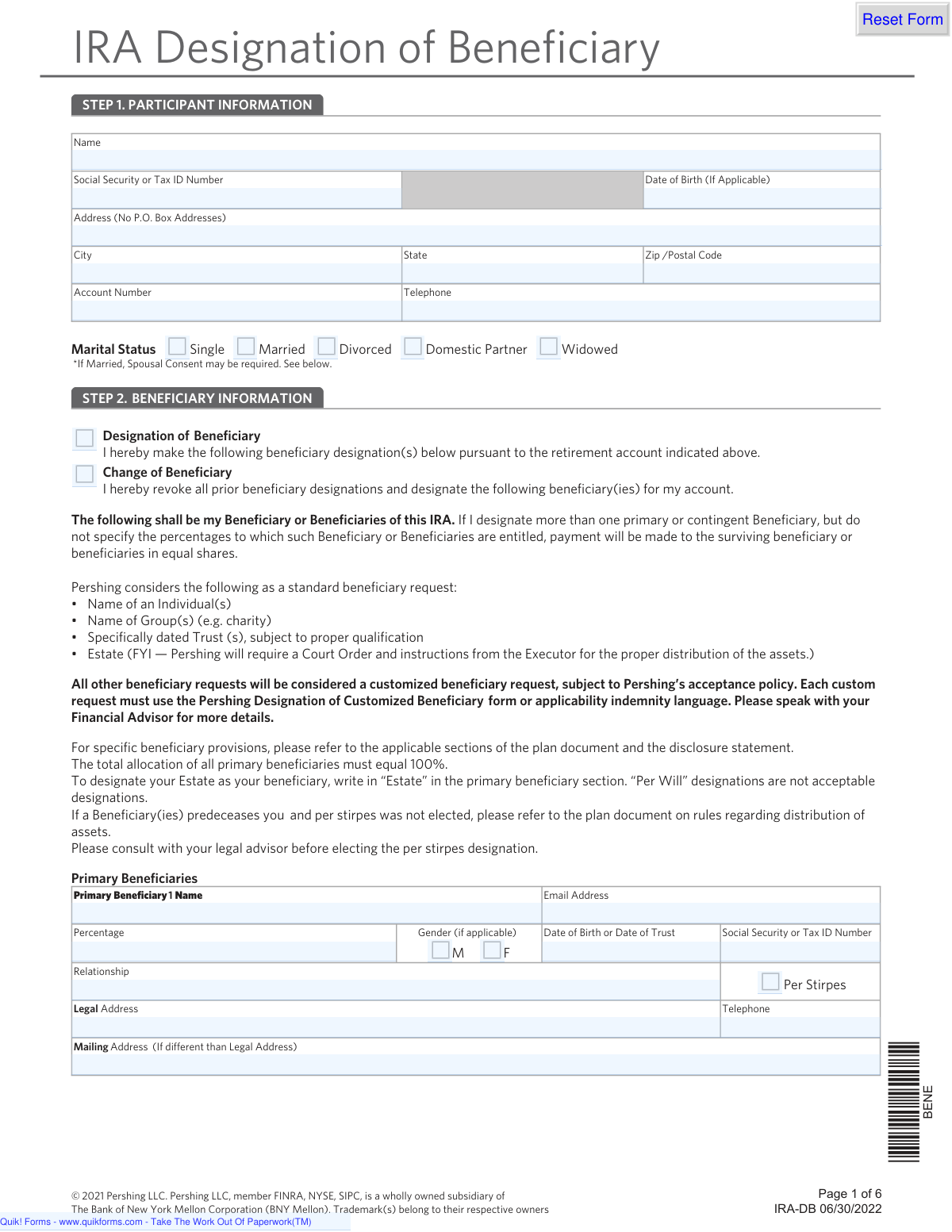
Yes! You can use AI to fill out Pershing LLC IRA Designation of Beneficiary
The IRA Designation of Beneficiary form from Pershing LLC is a legal document that allows an Individual Retirement Account (IRA) holder to specify who will receive the assets in their account upon their death. Properly completing this form is essential for ensuring your assets are distributed according to your wishes and can help your heirs avoid probate. Today, this form can be filled out quickly and accurately using AI-powered services like Instafill.ai, which can also convert non-fillable PDF versions into interactive fillable forms.
Our AI automatically handles information lookup, data retrieval, formatting, and form filling.
It takes less than a minute to fill out IRA-DB using our AI form filling.
Securely upload your data. Information is encrypted in transit and deleted immediately after the form is filled out.
Form specifications
| Form name: | Pershing LLC IRA Designation of Beneficiary |
| Number of pages: | 1 |
| Language: | English |
| Categories: | beneficiary forms, LLC forms, IRA forms, beneficiary designation forms |
Instafill Demo: How to fill out PDF forms in seconds with AI
How to Fill Out IRA-DB Online for Free in 2026
Are you looking to fill out a IRA-DB form online quickly and accurately? Instafill.ai offers the #1 AI-powered PDF filling software of 2026, allowing you to complete your IRA-DB form in just 37 seconds or less.
Follow these steps to fill out your IRA-DB form online using Instafill.ai:
- 1 Navigate to Instafill.ai and upload the IRA Designation of Beneficiary form or select it from the template library.
- 2 Complete Step 1 by providing your personal participant information, such as name, Social Security Number, date of birth, and address.
- 3 In Step 2, list your primary beneficiaries, including their names, relationship, percentage allocation (totaling 100%), and other required details.
- 4 Optionally, designate contingent beneficiaries who will inherit the assets if the primary beneficiaries are unable to. Ensure their percentage allocation also totals 100%.
- 5 Review the 'Per Stirpes' section and provide the name of a responsible individual if you elect this option for your beneficiaries.
- 6 In Step 3, carefully review all information, then print your name, sign, and date the form in the Participant Signature section.
- 7 If you are married and reside in a community property state, ensure your spouse completes the 'Spousal Consent' section by signing and dating the form.
Our AI-powered system ensures each field is filled out correctly, reducing errors and saving you time.
Why Choose Instafill.ai for Your Fillable IRA-DB Form?
Speed
Complete your IRA-DB in as little as 37 seconds.
Up-to-Date
Always use the latest 2026 IRA-DB form version.
Cost-effective
No need to hire expensive lawyers.
Accuracy
Our AI performs 10 compliance checks to ensure your form is error-free.
Security
Your personal information is protected with bank-level encryption.
Frequently Asked Questions About Form IRA-DB
This form is used to officially name the people, trusts, or organizations who will inherit the assets in your IRA account after your death. It can also be used to update or completely replace any previous beneficiary designations you have made.
Any IRA account holder with Rich Capital Financial Services who wants to designate beneficiaries for the first time or change their existing beneficiaries should complete this form.
Primary beneficiaries are the first to inherit your IRA assets. Contingent beneficiaries will only receive the assets if all of the primary beneficiaries have passed away before you.
If you list multiple beneficiaries but do not assign percentages, the form states that the assets will be divided in equal shares among the surviving beneficiaries in that group.
Choosing 'per stirpes' means that if one of your beneficiaries dies before you, their designated share of the IRA will pass directly to their children or heirs. The form advises consulting a legal advisor before making this choice.
You must have your spouse sign the consent section if you are married, live in a community property state (AZ, CA, ID, LA, NV, NM, TX, WA, WI), and you are naming someone other than your spouse as your sole primary beneficiary.
To designate your estate, simply write the word 'Estate' in the name field for the primary beneficiary. The form specifies that writing 'Per Will' is not an acceptable designation.
Yes, you can name a specifically dated trust as a beneficiary. You will need to provide the full name of the trust, its creation date, and its Tax ID number in the beneficiary section.
For each individual beneficiary, you will need their full name, Social Security Number, date of birth, relationship to you, and their legal address. The form also asks for their email and phone number.
Yes, you can change your beneficiaries at any time by submitting a new, completed IRA Designation of Beneficiary form. This new form will revoke all prior designations.
This refers to any non-standard beneficiary designation, such as one with complex conditions, that is not a simple individual, trust, or estate. These requests require a special form and you should speak with your Financial Advisor for more information.
Yes, services like Instafill.ai use AI to help you accurately auto-fill form fields with your personal and beneficiary information, which can save time and help prevent errors.
You can upload the IRA Designation of Beneficiary PDF to the Instafill.ai platform. The service will make the form fillable online, allowing you to securely enter your information and complete it digitally.
If you have a non-fillable or 'flat' PDF, you can use a service like Instafill.ai. It can convert the document into an interactive, fillable form that you can easily complete on your computer.
Compliance IRA-DB
Validation Checks by Instafill.ai
1
Primary Beneficiary Percentage Summation
This check verifies that the sum of the 'Percentage' fields for all designated Primary Beneficiaries equals exactly 100%. This is critical to ensure the participant's assets are fully allocated without ambiguity. If the total is not 100%, the form submission will be rejected with an error message prompting the user to correct the percentages.
2
Contingent Beneficiary Percentage Summation
This validation ensures that if any Contingent Beneficiaries are designated, the sum of their 'Percentage' fields equals exactly 100%. This rule applies independently of the primary beneficiaries and is necessary for clear instructions if all primary beneficiaries are deceased. A failure to sum to 100% will block submission and require the user to adjust the contingent allocation.
3
Spousal Consent Requirement Logic
This is a conditional check that activates if the participant's 'Marital Status' is 'Married' and their address is in a community property state (AZ, CA, ID, LA, NV, NM, TX, WA, WI). If these conditions are met and someone other than the spouse is named as the sole primary beneficiary, the 'Spousal Consent' signature and date fields become mandatory. Failure to provide the spousal consent when required will result in a validation error, as it is a legal requirement to waive spousal rights to the assets.
4
Participant and Beneficiary SSN/TIN Format
This check validates that the Social Security Number or Tax ID Number for the participant and each listed beneficiary follows the correct format (XXX-XX-XXXX for SSN or XX-XXXXXXX for TIN). Correctly formatted identification numbers are essential for tax reporting and proper identification of all parties. An invalid format will trigger an error, preventing submission until the number is corrected.
5
Participant Address Physical Location Requirement
This validation enforces the form's explicit rule that the participant's address cannot be a P.O. Box. The system will scan the address fields for 'P.O. Box' or similar patterns. This is important for legal and identity verification purposes, which often require a physical residential address. If a P.O. Box is detected, the form will be flagged with an error.
6
Prohibition of 'Per Will' Designation
This check ensures that the beneficiary name field does not contain the phrase 'Per Will', as this is explicitly disallowed. Such designations are ambiguous and can lead to legal challenges and delays in asset distribution. If 'Per Will' is entered, the system will reject the entry and inform the user that they must name a specific individual, trust, or their estate.
7
Conditional Requirement for Per Stirpes Responsible Individual
This validation checks if the 'Per Stirpes' option has been selected for any beneficiary. If it has, the 'Name of Responsible Individual' field in the Per Stirpes Information section becomes mandatory. This ensures that there is a designated person to consult regarding the distribution to a deceased beneficiary's heirs. If 'Per Stirpes' is checked but the responsible individual is not named, the submission will fail.
8
Participant Signature and Date Presence
This check confirms that the 'Participant Signature' and 'Date' fields in Step 3 are not empty. The participant's signature legally authorizes the beneficiary designation, making it one of the most critical fields on the form. An unsigned or undated form is legally invalid and will be rejected immediately upon submission.
9
Beneficiary Record Completeness
For each beneficiary row that is partially filled (e.g., a name is entered), this check ensures all associated required fields are also completed, including Percentage, Date of Birth/Trust, SSN/TIN, and Legal Address. This prevents incomplete beneficiary records, which would be unusable for asset distribution. The system will highlight the specific missing fields for the user to complete.
10
Date of Birth and Trust Date Validity
This validation verifies that all date fields, including the participant's Date of Birth and each beneficiary's 'Date of Birth or Date of Trust', are in a valid format (e.g., MM/DD/YYYY) and represent a logical past date. The check ensures the date is not in the future and is within a reasonable timeframe (e.g., not more than 120 years ago). This prevents data entry errors and ensures the provided information is plausible.
11
Account Number Presence and Validation
This check ensures the 'Account Number' field is filled and, if possible, validates it against a known format or a database of existing accounts. This is crucial for linking the beneficiary designation form to the correct IRA account. A missing or invalid account number would make the entire form useless, so submission is blocked until a valid number is provided.
12
Beneficiary Type Validation
This check ensures the beneficiary designation is a 'standard' type as defined by Pershing: an individual, a group/charity, a specifically dated trust, or the participant's 'Estate'. It flags non-standard designations that would require a different form or special review. This helps streamline processing and ensures compliance with the custodian's policies, preventing re-papering later.
Common Mistakes in Completing IRA-DB
Users often make calculation errors, resulting in the total percentage for primary or contingent beneficiaries not equaling exactly 100%. This happens due to simple math mistakes or misunderstanding the requirement. An incorrect total will cause the form to be rejected, delaying the processing of your beneficiary designation and potentially leaving your previous designation in effect. Always double-check that the sum of percentages for each beneficiary group (primary and contingent) is precisely 100%.
Married participants residing in community property states (like CA, TX, WA) often forget to obtain their spouse's signature when naming someone other than their spouse as the sole primary beneficiary. This is a critical legal requirement to waive the spouse's potential rights to the asset. Failure to secure this consent can invalidate the entire beneficiary designation, leading to legal disputes and distribution of assets contrary to the participant's wishes. Always review Step 3 carefully to see if spousal consent applies to your situation.
It is common for participants to list a beneficiary's name but omit crucial identifying details like their Social Security Number (SSN) or Tax ID Number (TIN), full date of birth, and complete legal address. This information is vital for the financial institution to locate and verify the beneficiary without ambiguity upon the participant's death. Missing data can cause significant delays, require court intervention, and create immense stress for your heirs. Before filling out the form, gather all required details for each person you plan to designate.
Participants sometimes write 'As per my will' or 'See will for details' in the beneficiary name field, assuming their will dictates the IRA distribution. However, this form explicitly states that 'Per Will' designations are not acceptable and that beneficiary designations on this form supersede a will. This mistake can lead to the designation being rejected or, in a worst-case scenario, the assets being distributed according to the IRA's default rules, not your will. To designate your estate, you must write 'Estate' in the beneficiary name field.
The term 'Per Stirpes' is a legal concept that many people don't fully understand, yet they may check the box without consulting an advisor. Electing per stirpes means that if a beneficiary predeceases you, their share will automatically pass to their children. Misunderstanding this can lead to assets being distributed to unintended individuals, and failing to name the 'Responsible Individual' on page 5 can further complicate the process for your executor. It is crucial to consult a legal advisor before making this election.
The participant's IRA account number is required on every page of the form, but it is frequently overlooked, especially on pages 2 through 6. Without the account number, the financial institution cannot link your beneficiary designation to the correct account, rendering the form useless. This simple oversight means your wishes will not be recorded, and any prior designations will remain in effect. AI-powered tools like Instafill.ai can help prevent this by auto-populating recurring information across all pages of the form.
The form explicitly states 'No P.O. Box Addresses' for the participant's address in Step 1, yet people often enter one out of habit. Financial institutions require a physical residential address for legal and identity verification purposes (e.g., complying with the USA PATRIOT Act). Using a P.O. Box will lead to the form being returned for correction, causing unnecessary delays. Always provide your full physical street address.
Forgetting to physically sign and date the form in Step 3 is a surprisingly common and fatal error. An unsigned form is not legally binding and will be immediately rejected by the financial institution. This means your beneficiary designation will not be updated, and your assets will be distributed based on a prior designation or the plan's default rules. Always perform a final review to ensure all required signature and date fields are completed.
When designating a trust as a beneficiary, the form requires a 'Specifically dated Trust'. People often just write the name of the trust (e.g., 'The Smith Family Trust') but omit the execution date. This date is a critical identifier that distinguishes it from any other trusts with similar names, preventing ambiguity and potential legal challenges. Failure to provide the date can cause the designation to be considered a 'customized request' requiring additional paperwork or rejection. Always include the full, legally recorded name and date of the trust.
This form is a non-fillable PDF, which often leads to illegible handwriting, missed fields, and data entry errors when filled out by hand. Poor handwriting can cause names or numbers to be misinterpreted, leading to serious processing issues down the line. Using a tool like Instafill.ai can convert this flat PDF into a smart, fillable form, ensuring all entries are clear, legible, and validated, which significantly reduces the chance of rejection due to simple human error.
Saved over 80 hours a year
“I was never sure if my IRS forms like W-9 were filled correctly. Now, I can complete the forms accurately without any external help.”
Kevin Martin Green
Your data stays secure with advanced protection from Instafill and our subprocessors

Robust compliance program
Transparent business model
You’re not the product. You always know where your data is and what it is processed for.
ISO 27001, HIPAA, and GDPR
Our subprocesses adhere to multiple compliance standards, including but not limited to ISO 27001, HIPAA, and GDPR.
Security & privacy by design
We consider security and privacy from the initial design phase of any new service or functionality. It’s not an afterthought, it’s built-in, including support for two-factor authentication (2FA) to further protect your account.
Fill out IRA-DB with Instafill.ai
Worried about filling PDFs wrong? Instafill securely fills pershing-llc-ira-designation-of-beneficiary forms, ensuring each field is accurate.