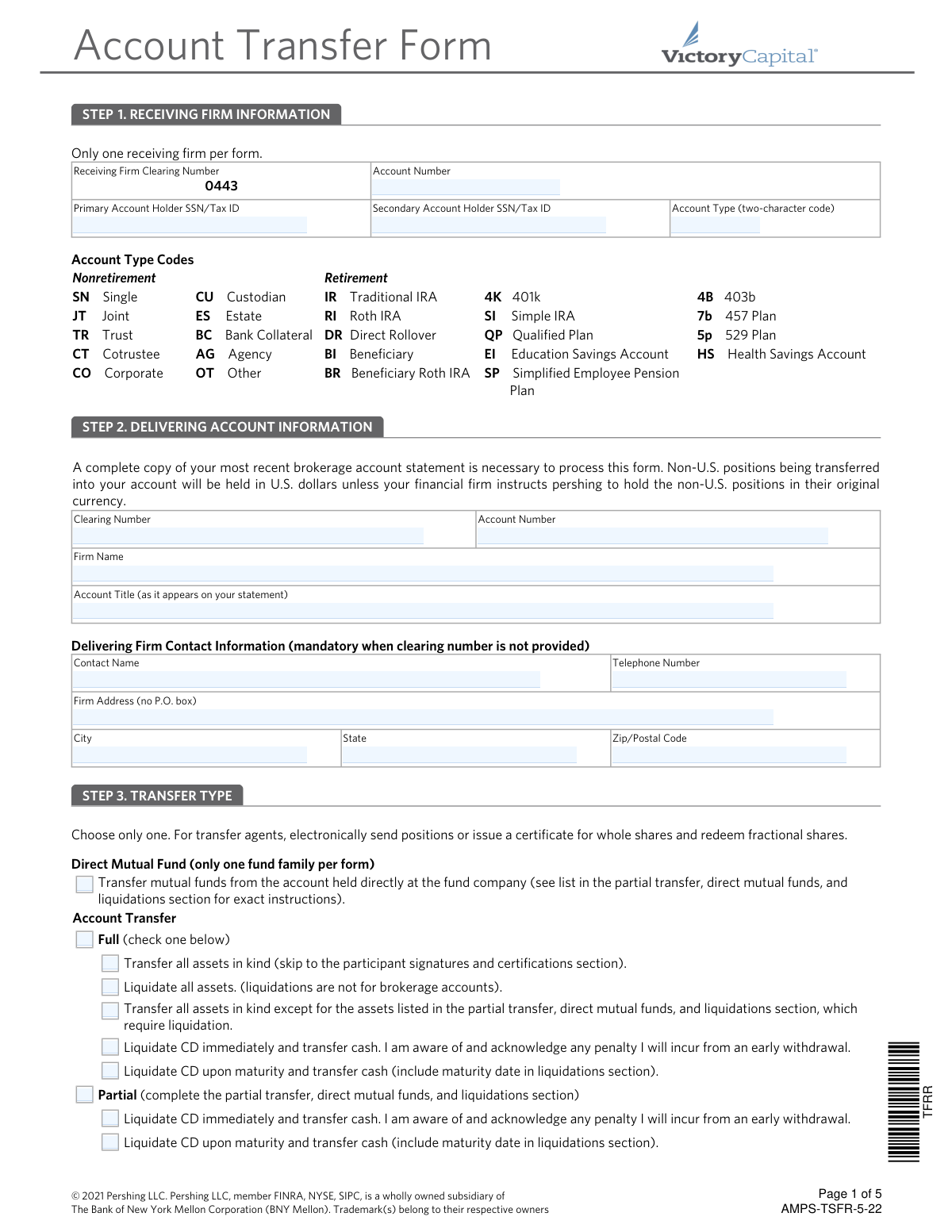
Yes! You can use AI to fill out Pershing LLC Account Transfer Form

The Account Transfer Form is a document required by financial institutions to formally request and authorize the transfer of assets, such as stocks, bonds, and mutual funds, from an account at a delivering firm to a new or existing account at a receiving firm. It ensures that the transfer is processed correctly, securely, and in compliance with industry regulations. Today, this form can be filled out quickly and accurately using AI-powered services like Instafill.ai, which can also convert non-fillable PDF versions into interactive fillable forms.
Our AI automatically handles information lookup, data retrieval, formatting, and form filling.
It takes less than a minute to fill out AMPS-TSFR-5-22 using our AI form filling.
Securely upload your data. Information is encrypted in transit and deleted immediately after the form is filled out.

Form specifications

Form name: Pershing LLC Account Transfer Form
Number of pages: 1
Language: English
Categories: LLC forms, account transfer forms, transfer forms
main-image

Instafill Demo: How to fill out PDF forms in seconds with AI

How to Fill Out AMPS-TSFR-5-22 Online for Free in 2026

Are you looking to fill out a AMPS-TSFR-5-22 form online quickly and accurately? Instafill.ai offers the #1 AI-powered PDF filling software of 2026, allowing you to complete your AMPS-TSFR-5-22 form in just 37 seconds or less.
Follow these steps to fill out your AMPS-TSFR-5-22 form online using Instafill.ai:
  1. 1 Navigate to Instafill.ai and upload the Account Transfer Form PDF or select it from the platform's library.
  2. 2 Use the AI tool to automatically populate Step 1 with the receiving firm's information, including your new account number and tax ID.
  3. 3 Provide the delivering account information in Step 2 by referencing your most recent brokerage statement, which you must attach to the form.
  4. 4 In Step 3, clearly indicate the transfer type by selecting whether it's a full or partial transfer and how the assets should be handled (e.g., in-kind or liquidated).
  5. 5 If performing a partial transfer or liquidating specific assets, detail each item in Step 4, including quantity, CUSIP/Symbol, and instructions.
  6. 6 Complete the retirement plan certifications in Step 5 if applicable, and the 'One and the Same Person Certification' in Step 6 if your name varies between accounts.
  7. 7 Review all entered data for accuracy, then use the platform to securely sign and date the form in Step 7 before submitting it to your financial organization.

Our AI-powered system ensures each field is filled out correctly, reducing errors and saving you time.

Why Choose Instafill.ai for Your Fillable AMPS-TSFR-5-22 Form?

Speed

Complete your AMPS-TSFR-5-22 in as little as 37 seconds.

Up-to-Date

Always use the latest 2026 AMPS-TSFR-5-22 form version.

Cost-effective

No need to hire expensive lawyers.

Accuracy

Our AI performs 10 compliance checks to ensure your form is error-free.

Security

Your personal information is protected with bank-level encryption.

Frequently Asked Questions About Form AMPS-TSFR-5-22

This form is used to transfer your financial assets, such as stocks, mutual funds, or cash, from another financial institution to your account with a firm that clears through Pershing.

You must attach a complete copy of your most recent brokerage account statement from the account you are transferring. This is not required for an internal transfer where both firms clear through Pershing.

A 'Full Transfer' moves all assets from your old account to the new one. A 'Partial Transfer' moves only the specific assets that you list in Step 4 of the form.

Yes, if you are age 72 or older, you must take your required minimum distribution (RMD) for the year before rolling over the assets. You must also certify that you understand the rollover rules and have paid any termination fees to your prior custodian.

You must complete Step 6, the 'One and the Same Person Certification.' By signing this section, you certify that both names, despite minor differences like an initial or suffix, refer to the same individual.

You can submit the form securely through your financial organization's online message center, or you can mail it to the appropriate Pershing address listed on the final page of the form.

Yes, for certain assets like direct mutual funds or CDs, you can request liquidation on the form. However, for brokerage accounts, the form notes the quickest way to liquidate is to call your existing financial organization directly.

A list of account type codes is provided directly below the input fields in Step 1. For example, you would use 'IR' for a Traditional IRA or 'JT' for a Joint account.

Yes, the form recommends contacting a U.S.-based investment specialist for guidance. You can reach them at 1-800-235-8396 for prompt support with the transfer process.

In Step 4, you can choose to have dividends and capital gains paid in cash or reinvested. If you do not make a selection, Pershing will automatically process the request with the 'reinvest' option.

The 'Signature Guaranteed' section is marked for internal use by your financial institution. You only need to sign and date the form in Step 7; your firm will handle the guarantee if it is required for the transfer.

Yes, services like Instafill.ai use AI to accurately auto-fill form fields, which can save you time and help reduce errors. This is especially helpful for complex forms with many fields.

You can use a service like Instafill.ai to fill out the form online. Simply upload the PDF, and the platform will make it interactive, allowing you to type your information directly into the fields.

If you have a non-fillable or 'flat' PDF, you can use a tool like Instafill.ai. It can convert the non-fillable PDF into an interactive, fillable form that you can easily complete on your computer.

Compliance AMPS-TSFR-5-22
Validation Checks by Instafill.ai

1
SSN/TIN Format Validation
This check ensures that the 'Primary Account Holder SSN/Tax ID' and 'Secondary Account Holder SSN/Tax ID' fields contain a valid 9-digit number. This is critical for tax reporting and identity verification as required by financial regulations. If the input does not match the standard XXX-XX-XXXX or XXXXXXXXX format, the submission will be flagged for correction to prevent processing delays and rejections.
2
Joint Account Completeness
Verifies that if the 'Account Type' is selected as 'JT' (Joint) or 'CT' (Cotrustee), then the 'Secondary Account Holder SSN/Tax ID' and 'Secondary Account Holder Signature' fields are mandatory. This is essential for ensuring all legal owners of the account have provided authorization for the transfer. An omission would render the request legally incomplete and cause it to be rejected.
3
Valid Account Type Code
This validation confirms that the 'Account Type' field in Step 1 contains one of the specific two-character codes listed on the form (e.g., 'IR', 'JT', '4K'). Using a valid code is crucial for correctly classifying the account for regulatory and tax purposes. An invalid code would result in a processing exception, requiring manual intervention and delaying the account transfer.
4
Conditional Delivering Firm Information
This check enforces the rule that either a 'Clearing Number' must be provided, or the 'Firm Name', 'Contact Name', and 'Telephone Number' fields must all be completed. This logic ensures that the receiving firm has a guaranteed method to contact the delivering firm to execute the transfer. If neither set of information is complete, the transfer cannot be initiated due to insufficient information.
5
Partial Transfer Asset Specification
Confirms that if the 'Partial' transfer option is selected in Step 3, the user has provided details for at least one asset in the Step 4 table. This check prevents ambiguous submissions where a user indicates a partial transfer but fails to specify which assets to move. Without this information, the transfer request is incomplete and cannot be processed.
6
CD Maturity Date Requirement
Validates that if a user selects 'Liquidate CD upon maturity and transfer cash', a valid future date is entered in the 'Maturity Date' column in Step 4. This ensures the instruction is clear, actionable, and prevents either a premature liquidation with penalties or an indefinite hold on the transfer. A missing or past date would cause the instruction to be rejected as invalid.
7
Signature Date Recency
Verifies that the signature date provided in Step 7 is not more than 180 days in the past from the date the form is received. This is a compliance requirement to ensure the client's authorization is current and intentional. An expired signature would invalidate the entire form, forcing the client to re-sign and resubmit the request.
8
Mandatory Brokerage Statement Attachment
For a digital submission, this check ensures a file has been uploaded for the required 'most recent brokerage account statement'. This document is essential for verifying the account details and assets being transferred. A submission without this attachment is considered 'not in good order' and will be immediately rejected pending receipt of the statement.
9
P.O. Box Prohibition for Firm Address
Scans the 'Firm Address' field in Step 2 to ensure it does not contain 'P.O. Box'. Financial institutions often require a physical street address for legal and delivery purposes. This validation enforces the form's explicit instruction and prevents processing delays or rejections that would occur if a non-physical address were submitted.
10
Exclusive Transfer Type Selection
Ensures that the user has selected only one primary transfer type from the main categories: 'Direct Mutual Fund', 'Account Transfer', or 'DRS/DRIP'. This check prevents conflicting or ambiguous instructions that would make the request impossible to process. If more than one option is selected, the form should return an error until a single choice is made.
11
DRS Liquidation Restriction
This validation cross-references selections in Step 3 and Step 4 to prevent an invalid request. It checks that if the transfer type is 'DRS/DRIP', the 'Liquidate' instruction is not selected for any assets in Step 4, as the form explicitly states 'DRS items cannot be liquidated'. This prevents a request that is guaranteed to fail during processing.
12
Account Number Consistency
Validates that the 'Account Number' entered in the header of pages 2, 3, and 4 matches the 'Receiving Firm Account Number' from Step 1. This check ensures data consistency across the multi-page document, reducing the risk of errors from manual entry. An inconsistency could lead to confusion or misapplication of funds, making this check vital for accuracy.

Common Mistakes in Completing AMPS-TSFR-5-22

Forgetting to Attach the Required Brokerage Statement

The form explicitly states that a complete copy of the most recent brokerage account statement is necessary to process the transfer. Applicants often overlook this critical instruction, assuming the data entered on the form is sufficient. Without the statement, the receiving firm cannot verify the assets, account title, and account number, leading to an immediate rejection of the transfer request and significant delays. Always attach a clear, complete copy of your most recent statement when submitting the form.

Entering an Inaccurate Delivering Account Title

In Step 2, users must provide the 'Account Title (as it appears on your statement).' A common error is to enter their name in a slightly different format (e.g., 'John Doe' instead of 'John A. Doe, Trustee') or to misspell it. Any discrepancy between the title on the form and the title on the statement will cause a mismatch and likely lead to the transfer being rejected. To avoid this, carefully copy the account title exactly as it is printed on your delivering firm's statement.

Using an Incorrect Account Type Code

Step 1 requires a specific two-character code to classify the receiving account (e.g., 'IR' for Traditional IRA, 'JT' for Joint). People may guess, choose a similar but incorrect code, or leave it blank due to uncertainty. This mistake can lead to the account being set up incorrectly, causing tax reporting errors or compliance issues down the line. Carefully review the list of codes provided and select the one that precisely matches your account type.

Providing Incomplete Information for Partial Transfers

When requesting a partial transfer in Step 4, applicants must list each asset with its quantity, description, and CUSIP/Symbol. It's common for people to omit the CUSIP/Symbol or quantity, making it impossible for the firm to identify the specific assets to be transferred. This results in the partial transfer request being rejected or delayed until the correct information is provided. To prevent this, have your account statement handy and meticulously copy all required details for each asset into the table.

Making Conflicting Selections in the Transfer Type Section

Step 3 requires the user to 'Choose only one' primary transfer type (e.g., Account Transfer) and then select sub-options. Users sometimes check multiple conflicting boxes, such as selecting both 'Full' and 'Partial' transfer, creating ambiguity. This forces the processing agent to reject the form and seek clarification, delaying the entire process. Read the section carefully and make only one primary selection that reflects your intent.

Missing Required Signatures or Dates

A form without a valid signature and date is legally incomplete, yet this is one of the most frequent errors. Applicants forget to sign, date, or, in the case of a joint account, obtain the signature of the secondary account holder in Step 7. This simple oversight is a primary cause for rejection, forcing the entire process to restart. Always perform a final check to ensure all required signature and date fields are completed by all account holders.

Ignoring the 'One and the Same Person' Certification

If the name on the delivering account (e.g., 'William Smith') differs slightly from the receiving account (e.g., 'Bill Smith' or 'William Smith Jr.'), the transfer can be flagged for a name mismatch. Step 6 is designed to resolve this but is often overlooked. Failing to complete this certification when needed will cause the transfer to be rejected. If there are any variations in your name between the two accounts, you must complete Step 6 to certify they belong to the same person.

Ignoring Required Minimum Distribution (RMD) Rules

Step 5 clearly warns that individuals age 72 or older must take their Required Minimum Distribution (RMD) *before* rolling over assets from a qualified plan. Many people are unaware of this rule or forget to do it, which can lead to significant tax penalties and compliance issues. If you are age 72 or older, you must confirm with your distributing plan that your RMD for the year has been satisfied before initiating the transfer.

Failing to Provide Delivering Firm Contact Details

In Step 2, if the delivering firm's clearing number is not known or not applicable, the form requires the firm's name, contact person, and telephone number. Applicants often provide an incorrect clearing number or leave the contact fields blank when the number is unknown. This lack of information prevents the receiving firm from contacting the delivering firm, halting the transfer process. If you don't know the clearing number, you must provide the full contact information to avoid delays.

Leaving Dividend and Capital Gain Options Blank

For mutual fund transfers in Step 4, the form provides options to receive dividends and capital gains in cash or to reinvest them. The form defaults to 'Reinvest' if left blank, which may not align with the investor's strategy. An applicant might want cash distributions but forget to check the box, leading to unintended reinvestments. To ensure your assets are managed according to your wishes, explicitly check either 'Cash' or 'Reinvest' for both options for each mutual fund. AI-powered form filling tools like Instafill.ai can help prevent this by flagging incomplete option sets.

Misinterpreting Liquidation Instructions for Brokerage Accounts

The instructions in Step 3 state that 'liquidations are not for brokerage accounts' and that the quickest way is to place a sell order directly. However, the form still provides liquidation checkboxes, which can be confusing. Users may check 'Liquidate all assets' for a standard brokerage account, which will be rejected, or misunderstand that the liquidation price is not guaranteed. This leads to rejection or unexpected financial outcomes due to market fluctuations. For brokerage assets, it is best to select 'Transfer all assets in kind' and manage any liquidations directly with the financial institution.
Saved over 80 hours a year

“I was never sure if my IRS forms like W-9 were filled correctly. Now, I can complete the forms accurately without any external help.”

Kevin Martin Green

Your data stays secure with advanced protection from Instafill and our subprocessors

Robust compliance program

Transparent business model

You’re not the product. You always know where your data is and what it is processed for.

ISO 27001, HIPAA, and GDPR

Our subprocesses adhere to multiple compliance standards, including but not limited to ISO 27001, HIPAA, and GDPR.

Security & privacy by design

We consider security and privacy from the initial design phase of any new service or functionality. It’s not an afterthought, it’s built-in, including support for two-factor authentication (2FA) to further protect your account.

Fill out AMPS-TSFR-5-22 with Instafill.ai

Worried about filling PDFs wrong? Instafill securely fills pershing-llc-account-transfer-form forms, ensuring each field is accurate.