Yes! You can use AI to fill out ADP Retirement Services Beneficiary Designation Form
This form is a legal document provided by ADP Retirement Services that allows a retirement plan participant to officially designate their beneficiaries. It is a critical part of estate planning, ensuring that your retirement assets are distributed according to your wishes, potentially avoiding probate court. Today, this form can be filled out quickly and accurately using AI-powered services like Instafill.ai, which can also convert non-fillable PDF versions into interactive fillable forms.
Rather not fill this in by hand? Instafill is an online form filler that completes PDF forms automatically — upload the blank form, answer a few questions, and the AI fills every field.
Form specifications
| Form name: | ADP Retirement Services Beneficiary Designation Form |
| Number of pages: | 1 |
| Language: | English |
Our AI automatically handles information lookup, data retrieval, formatting, and form filling.
It takes less than a minute to fill out 99-4052-P-0121 using our AI form filling.
Securely upload your data. Information is encrypted in transit and deleted immediately after the form is filled out.
Instafill Demo: How to fill out PDF forms in seconds with AI
How to Fill Out 99-4052-P-0121 Online for Free in 2026
Are you looking to fill out a 99-4052-P-0121 form online quickly and accurately? Instafill.ai offers the #1 AI-powered PDF filling software of 2026, allowing you to complete your 99-4052-P-0121 form in just 37 seconds or less.
Follow these steps to fill out your 99-4052-P-0121 form online using Instafill.ai:
- 1 Navigate to Instafill.ai and upload or select the ADP Beneficiary Designation Form.
- 2 Provide your personal details, including your full name, Social Security number, and retirement plan account number.
- 3 Enter the full legal name, date of birth, and relationship for each primary beneficiary you wish to designate.
- 4 Allocate the percentage of your retirement assets each primary beneficiary will receive, making sure the total adds up to 100%.
- 5 Optionally, list contingent beneficiaries who will inherit your assets if all primary beneficiaries predecease you.
- 6 Carefully review all the information populated by the AI for accuracy, then electronically sign and date the form.
- 7 Download the completed form and submit it to ADP Retirement Services according to their instructions.
Our AI-powered system ensures each field is filled out correctly, reducing errors and saving you time.
Why Choose Instafill.ai for Your Fillable 99-4052-P-0121 Form?
Speed
Complete your 99-4052-P-0121 in as little as 37 seconds.
Up-to-Date
Always use the latest 2026 99-4052-P-0121 form version.
Cost-effective
No need to hire expensive lawyers.
Accuracy
Our AI performs 10 compliance checks to ensure your form is error-free.
Security
Your personal information is protected with bank-level encryption.
Frequently Asked Questions About 99-4052-P-0121
Designating a beneficiary ensures that the assets from your retirement savings account are distributed to the person, people, or entity you choose upon your death. It is a crucial part of managing your financial wellness.
You should keep your beneficiary information current to reflect major life events, such as marriage, divorce, or the birth of a child. This ensures your assets are distributed according to your most recent wishes.
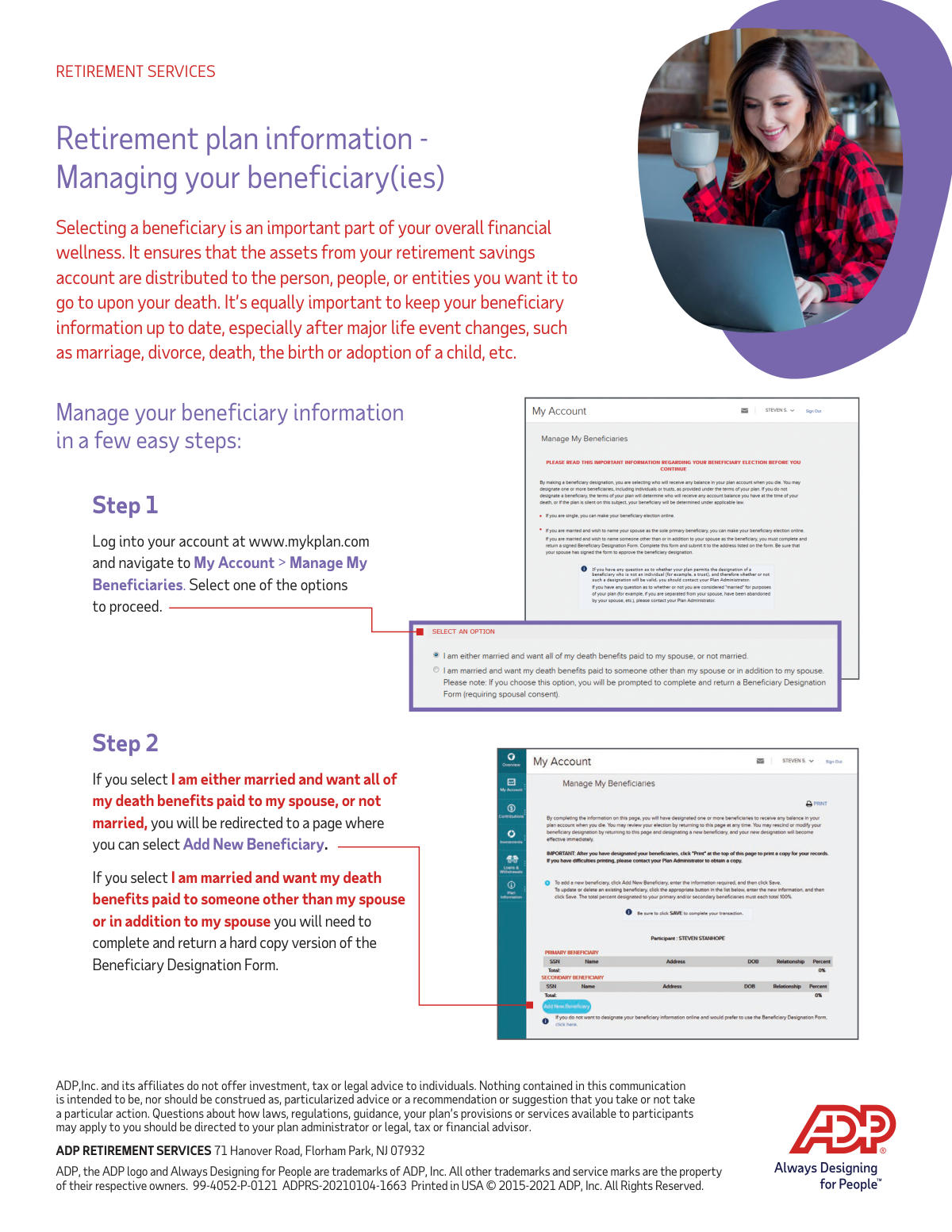
Log into your account at www.mykplan.com, navigate to 'My Account', and then select 'Manage My Beneficiaries'. From there, you can follow the on-screen prompts to update your information.
Yes, if you are not married, you can add or update your beneficiary directly through the online portal after logging into your account.
Yes, if you are married and want all of your death benefits paid to your spouse, you can complete this designation online through your account portal.
If you are married and want to name someone other than or in addition to your spouse, you cannot complete the process online. You must complete and return a hard copy of the Beneficiary Designation Form.
ADP does not provide legal or tax advice. For questions about how laws or your plan's provisions apply to you, you should contact your plan administrator or a legal, tax, or financial advisor.
If you do not designate a beneficiary, your retirement assets will be distributed according to your plan's default rules or state law, which may not align with your wishes.
The form indicates you can name a person, people, or 'entities' as beneficiaries. To name a trust or charity, you may need to use the hard copy form and should consult your plan documents for specific rules.
Yes, services like Instafill.ai use AI to help you accurately auto-fill form fields. This can save you time and help prevent errors when completing the paperwork.
If you have a digital copy of the Beneficiary Designation Form, you can upload it to Instafill.ai. The platform allows you to fill out the form on your computer and uses AI to help populate your information quickly.
You can use a service like Instafill.ai to make the form interactive. Simply upload the non-fillable PDF, and the tool will convert it into a fillable format that you can complete online.
Compliance 99-4052-P-0121
Validation Checks by Instafill.ai
1
Marital Status Selection Required
This check ensures that the user has selected a marital status (e.g., 'Married' or 'Not Married'). This selection is critical as it determines the subsequent workflow, such as requiring spousal consent for non-spouse beneficiaries. Failure to select a status will prevent the user from proceeding, as the system cannot apply the correct legal and plan-specific rules.
2
Spousal Designation and Consent Logic
If the user indicates they are married but designates less than 100% of the assets to their spouse, this validation triggers. It informs the user that a hard copy form with spousal consent is required, as per plan rules and federal law (ERISA). This check is crucial to ensure the designation is legally valid and to protect spousal rights, preventing submission of an incomplete or non-compliant online form.
3
Primary Beneficiary Percentage Summation
This validation calculates the sum of the allocation percentages for all designated primary beneficiaries. The total must equal exactly 100%. This is essential to ensure there is no ambiguity in how the assets are to be distributed upon death. If the total is not 100%, the form submission will be blocked with an error message prompting the user to correct the allocations.
4
Contingent Beneficiary Percentage Summation
This check verifies that the allocation percentages for all contingent beneficiaries, if any are designated, sum to exactly 100%. This ensures a clear and complete secondary distribution plan in the event that no primary beneficiaries are able to inherit. An incorrect total would create legal and administrative complications, so the system will prevent submission until the percentages are corrected.
5
Beneficiary SSN or TIN Format
This validation ensures that the Social Security Number (for a person) or Taxpayer Identification Number (for an entity like a trust) is entered in the correct format (e.g., XXX-XX-XXXX or XX-XXXXXXX). A valid identifier is legally required for tax reporting and to uniquely identify the beneficiary for asset distribution. An invalid format will trigger an error and require correction before the form can be saved.
6
Beneficiary Date of Birth Validity
For any beneficiary who is a person, this check validates that the Date of Birth is a real, valid date and is not in the future. This information helps to further verify the beneficiary's identity and distinguish them from others with a similar name. If the date is invalid or in the future, the system will display an error, as it indicates a data entry mistake.
7
At Least One Primary Beneficiary Designated
This check ensures that the user has designated at least one primary beneficiary with an allocation percentage greater than zero. The entire purpose of the form is to name a beneficiary, so submitting it without one would render it useless. The system will prevent submission if no primary beneficiaries are listed, ensuring the account does not lack a primary designation.
8
Beneficiary Type Selection
This validation confirms that a beneficiary type (e.g., 'Person', 'Trust', 'Estate', 'Charity') has been selected for each entry. This selection is mandatory because it determines which subsequent fields are required, such as Date of Birth for a person versus a Tax ID for a trust. Failure to select a type will result in an incomplete record and prevent the user from saving the beneficiary's information.
9
Beneficiary Full Legal Name Requirement
This check ensures the beneficiary name field is not left blank and encourages the use of a full legal name rather than nicknames or abbreviations. A full legal name is critical for the plan administrator to accurately identify and locate the correct individual or entity for asset payout. The system may display a warning for short names or common initials to prompt the user for a complete name.
10
No Duplicate Beneficiary Entries
This validation scans all beneficiary entries to ensure the same individual or entity is not listed more than once in the same category (primary or contingent). Duplication is usually a data entry error that would cause confusion and could lead to incorrect allocation calculations. If a duplicate is found based on name and SSN/TIN, the system will flag it and require the user to remove the redundant entry.
11
Beneficiary Relationship Completeness
This check verifies that the 'Relationship' field (e.g., Spouse, Child, Parent, Trust) is filled out for every beneficiary. This information is important for administrative purposes and for cross-validating other data, such as ensuring a beneficiary marked as 'Spouse' aligns with the participant's marital status. An empty relationship field will trigger an error, requiring the user to make a selection.
12
Signature Date Cannot Be in the Future
This validation ensures that the signature date entered on the form is not a future date. The signature date legally attests to the participant's wishes on that specific day. A future date is invalid and would call the legal standing of the document into question, so the system will reject any future dates and require the user to enter the current date or a past date.
Common Mistakes in Completing 99-4052-P-0121
People often set beneficiaries once and forget to review them after life changes like marriage, divorce, the birth of a child, or a beneficiary's death. This can result in assets being distributed contrary to the account holder's final wishes, such as to an ex-spouse. To avoid this, review your beneficiary designations annually and immediately after any significant life event to ensure they reflect your current intentions.
Simple data entry errors like misspelling a beneficiary's name, entering an incorrect Social Security Number (SSN), or a wrong date of birth are very common. These mistakes can cause significant delays and legal challenges for your heirs when they attempt to claim the assets. To avoid this, carefully proofread all entries before submission. AI-powered tools like Instafill.ai can help prevent these errors by validating data formats and ensuring all required fields are completed.
Account holders frequently name a primary beneficiary but forget to designate a contingent (secondary) one. If the primary beneficiary predeceases the account holder or disclaims the inheritance, the assets may go into the deceased's estate and be subject to the lengthy and public probate process. Always name at least one contingent beneficiary to create a clear line of succession and ensure a smoother transfer of assets.
As the instructions indicate, married individuals naming someone other than their spouse must often use a hard copy form to obtain spousal consent. Federal law (ERISA) grants spouses rights to retirement assets, and failing to get a signed, notarized waiver invalidates the non-spouse beneficiary designation. This would cause the assets to legally default to the spouse, regardless of the form you filled out.
When naming multiple beneficiaries, the percentage shares assigned must total exactly 100% for primary and 100% for contingent beneficiaries. People sometimes make mathematical errors, which can invalidate the entire designation and force the plan administrator to use default rules. Carefully double-check your math to ensure the allocations sum correctly. AI-powered form filling tools can also help by automatically flagging any allocations that do not sum to 100%.
Listing a minor child directly as a beneficiary can create legal complications, as minors cannot legally own financial assets directly. This often requires a court to appoint a guardian to manage the funds until the child reaches the age of majority, which is a costly and time-consuming process. To avoid this, consider establishing a trust for the minor or consulting a legal advisor to ensure the funds are managed as intended.
Using general terms like 'my children' instead of specific legal names can create ambiguity and lead to legal disputes, especially with blended families or children born after the form was signed. This can delay the distribution of assets as the court determines who qualifies as 'a child'. Always use the full legal name, date of birth, and relationship for each individual beneficiary to ensure your intentions are clear and legally binding.
When a hard copy form is required, forgetting to sign and date it is a simple but critical error that invalidates the document. An unsigned form means your beneficiary update will be rejected, and the plan will revert to your previous designation or its default rules. If the form is a non-fillable PDF, tools like Instafill.ai can convert it into a fillable version, making it easier to complete accurately before printing for a physical signature.
The instructions detail separate procedures for different beneficiary choices, with some requiring a paper form. A common mistake is attempting a designation online that requires a hard copy form (like naming a non-spouse beneficiary while married) and assuming the change was successful when it was not processed. It is vital to read the instructions carefully and follow the specific process for your situation to ensure the designation is validly recorded.
Some people mistakenly name their own estate as the beneficiary, believing it simplifies distribution via their will. However, this forces the retirement assets through probate, a public, expensive, and lengthy court process that can erode the value of the inheritance. It can also result in less favorable tax treatment for heirs, so it is almost always better to name individuals or a trust directly.
Saved over 80 hours a year
“I was never sure if my IRS forms like W-9 were filled correctly. Now, I can complete the forms accurately without any external help.”
Kevin Martin Green
Your data stays secure with advanced protection from Instafill and our subprocessors




Robust compliance program
Transparent business model
You’re not the product. You always know where your data is and what it is processed for.
ISO 27001, HIPAA, and GDPR
Our subprocesses adhere to multiple compliance standards, including but not limited to ISO 27001, HIPAA, and GDPR.
Security & privacy by design
We consider security and privacy from the initial design phase of any new service or functionality. It’s not an afterthought, it’s built-in, including support for two-factor authentication (2FA) to further protect your account.
Fill out 99-4052-P-0121 with Instafill.ai
Worried about filling PDFs wrong? Instafill securely fills adp-retirement-services-beneficiary-designation-form forms, ensuring each field is accurate.
