
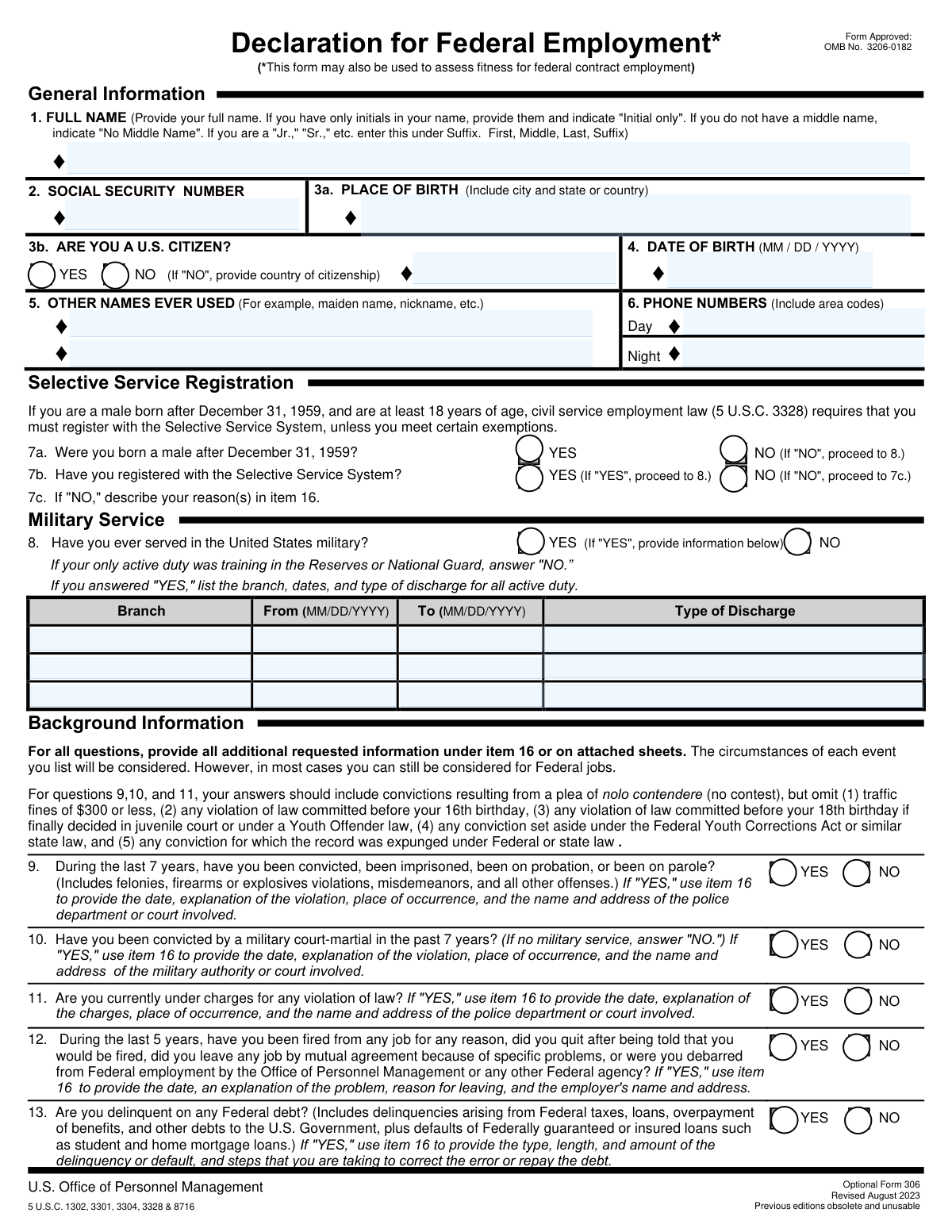
Yes! You can use AI to fill out Optional Form 306, Declaration for Federal Employment
Don't type 56 fields by hand. Tell our AI about yourself, or upload your resume, and it fills every field in seconds. You check it, then download, print or sign.
The AI does the filling. You just check it.
No typing into boxes, nothing to install.
What this form asks for
The AI fills all of it, from your answers or your documents.
The AI checks your answers before you download
14 checks built for this form, so a wrong date or a missing answer is caught before anyone else sees it.
This check verifies that the Social Security Number field is not empty and contains exactly nine digits. The SSN is critical for accurately identifying individuals and processing the application, as stated in the Privacy Act information. If the SSN is missing or incorrectly formatted, the application cannot be processed and will be rejected pending correction.
This validation ensures the Date of Birth is entered in the correct MM/DD/YYYY format, represents a real calendar date, and is not in the future. It also checks that the applicant's age is plausible for employment (e.g., over 16 years old). An invalid or illogical date of birth would prevent verification of identity and eligibility, halting the hiring process.
This check enforces a conditional rule on the citizenship section. If the applicant selects 'NO' for question 3b ('ARE YOU A U.S. CITIZEN?'), the 'Country of Citizenship' text field must be completed. This information is essential for determining employment eligibility and for potential security clearance processing. Failure to provide the country of citizenship when required will result in an incomplete application.
This validation checks the logical flow of question 7. If the applicant answers 'YES' to 7a (born male after 12/31/1959), they must answer 7b. If they then answer 'NO' to 7b (not registered), an explanation must be provided in the continuation space (item 16). This is a legal requirement for federal employment under 5 U.S.C. 3328, and failure to comply or explain will make the applicant ineligible.
This check ensures that if an applicant answers 'YES' to question 8 ('Have you ever served in the United States military?'), they must provide the details for at least one period of service. The Branch, From date, To date, and Type of Discharge fields must be filled for that service period. Missing this information prevents the verification of military service history, which can affect benefits and suitability determinations.
This validation verifies that for each military service entry in question 8, the 'To' date is not earlier than the 'From' date. This ensures the logical and chronological accuracy of the service record provided by the applicant. An illogical date range would indicate a data entry error and require correction before the service history can be properly evaluated.
And 8 more checks
- Court-Martial Consistency with Military Service
- Continuation Space Requirement for 'Yes' Answers
- Federal Debt Delinquency Explanation
- Full Name Completeness and Formatting
- Phone Number Presence and Format
- Signature and Date of Signature Requirement
- Appointee Previous Employment Date Logic
- Life Insurance Waiver Explanation Requirement
Let AI fill out your OF 306
No typing. Every field filled in seconds, checked, ready to sign.
How to Fill Out OF 306 Online for Free in 2026
What the AI walks you through.
- Navigate to Instafill.ai and upload or select the OF 306 form.
- Provide your personal details in the General Information section, including your full name, Social Security Number, date and place of birth, and contact information.
- Complete the sections on Selective Service registration and any prior military service history.
- Answer the background information questions regarding your legal history, past employment separations, and any delinquent federal debts.
- Use the continuation space (Item 16) to provide detailed explanations for any questions you answered "YES" to, as instructed.
- Carefully review all your answers for accuracy and completeness before proceeding to the certification section.
- Electronically sign and date the form in the appropriate applicant or appointee section to certify that your statements are true and complete.
Common Mistakes in Completing OF 306
The ones the AI is built to catch.
Failing to Provide Explanations in Item 16
Misunderstanding the Scope of Background Questions
Improperly Formatting the Full Name Field
Omitting Previous or Other Names Used
Incomplete Selective Service Registration Information
Signing the Incorrect Certification Line
Misinterpreting 'Federal Debt' in Item 13
Incorrectly Reporting Military Service
Using an Incorrect Date Format
Providing Vague Details in the Continuation Space
Failing to Update the Form Before Appointment
Frequently Asked Questions About OF 306
Is it really free for 7 days?
Can I fill other forms too?
How do I cancel?
How does the AI fill out OF 306?
What happens to my information?
How complex is OF 306 to fill out?
What is the purpose of the Declaration for Federal Employment (OF 306)?
Who needs to fill out this form?
What happens if I provide false information on this form?
Do I have to provide my Social Security Number?
I am a male born after 1959 but did not register for Selective Service. What should I do?
For the background questions (9-11), what types of offenses do I need to report?
I was fired from a job four years ago. Do I have to disclose this on the form?
I am delinquent on a federal student loan. Will this automatically disqualify me?
What should I do if I need more space to answer a question?
How should I fill out the form if I don't have a middle name?
How long does it typically take to complete this form?
Can I use an AI tool to help me fill out this form?
How can I fill out the OF 306 form online?
The PDF version of the form I received is not fillable. What can I do?
Get your OF 306 filled out by AI
$0 today. Cancel before Nov 10 and you pay nothing.
Other forms like this one
employment forms: Form I-765, Application for Employment Authorization, Form CMS L564, Request for Employment Info, Form OF-306, Declaration for Federal Employment, Form NYS DHR, Employment Complaint Form, Form AO 78, Application for Employment, Illinois State Board of Education (ISBE) Application for Employment (ISBE 61-08), Prudential Group Disability Insurance – Education and Employment History Form (GL.2009.009, Ed. 06/2017), HR-Pol-Rec&Res-04 Employment Application Form (Recruitment of Permanent Employees), City of Carlinville Application for Employment (An Equal Opportunity Employer), U.S. Equal Employment Opportunity Commission (EEOC) Form 453, Recommendation for Recognition, The Prudential Insurance Company of America Group Disability Insurance – Education and Employment History Form (GL.2009.009, Ed. 06/2017), St. Paul’s Hospital Application for Employment (職位申請表) – SPHF-HRD-035, U.S. Equal Employment Opportunity Commission (EEOC) Form 453, Recommendation for Recognition, Prudential Group Disability Insurance – Education and Employment History Form (GL.2009.009, Ed. 06/2017), Claim for Special Employment Advance (SU514), New York State Employment Application: Part 1 – Pre-Interview (Form #S1000), New York State Employment Application Form, Sidney Sussex College Cambridge, Application for Employment, Z83, Application for Employment in the Republic of South Africa Government Department, ENVIRONMENTAL MONITORING LABORATORY, LLC Employment Application
federal forms: Form CA-1, Federal Employee's Notice of Traumatic Injury, Form 720, Quarterly Federal Excise Tax Return, Form OF-306, Declaration for Federal Employment, Form 945, Annual Return of Withheld Federal Income Tax, Form 941, Employer’s Quarterly Federal Tax Return, Form 941-X (Rev. April 2023), Adjusted Employer’s QUARTERLY Federal Tax Return or Claim for Refund, Personal Financial Statement (REV 06/2018) – Northwest Federal Credit Union, Income-Driven Repayment (IDR) Plan Request (PAYE, IBR, and ICR) — William D. Ford Federal Direct Loan (Direct Loan) Program and Federal Family Education Loan (FFEL) Programs (OMB No. 1845-0102), Direct Consolidation Loan Request to Add Loans (William D. Ford Federal Direct Loan Program) (OMB No. 1845-0007), Form 941, Employer's QUARTERLY Federal Tax Return (Rev. March 2025), Loan Rehabilitation: Income and Expense Information, William D. Ford Federal Direct Loan (Direct Loan) Program/Federal Family Education Loan (FFEL) Program, 2026–27 FAFSA® Form, Free Application for Federal Student Aid, Form OF-612, Optional Application for Federal Employment, Navy Federal Voluntary Removal of Joint Owner Request, FS Form 5179, Legacy Treasury Direct Security Transfer Request, Formato de Inscripción al Registro Federal De Contribuyentes a Través de Oficina Virtual, Free Application for Federal Student Aid (FAFSA), Navy Federal Change of Information/Add Joint Owner (for primary account holders 18 and over), Form 941-X, Adjusted Employer’s QUARTERLY Federal Tax Return or Claim for Refund, Form AO 243, Motion to Vacate, Set Aside, or Correct a Sentence
federal employment forms: Form OF-306, Declaration for Federal Employment, Form OF-612, Optional Application for Federal Employment, Form SS-8, Determination of Worker Status
Let AI fill out your OF 306
Your trial starts once a card is added. You pay nothing before Nov 10.
Our AI already knows this form, all 56 fields of it. Skip the typing: tell it about yourself, or upload what you have, and it fills the whole form in seconds.
- AI fills every field on all 3 pages, tables and checkboxes included
- No typing into boxes: answer a few questions, or upload your resume, an old copy of this form, a photo of a document
- The AI checks the answers; you review and change anything before you download
- Download the finished PDF, print it, or sign it online
- Encrypted, and never used to train AI
Cancel before Nov 10 and you pay nothing.
A card is needed to start the trial. Cancel in two clicks from your account.
Terms · Privacy