Yes! You can use AI to fill out Pennsylvania Application for Subsidized Child Care (CY 868)

The Pennsylvania Application for Subsidized Child Care (CY 868) is the official application used by families to request financial assistance to help pay for child care services through Pennsylvania’s subsidized child care program. It collects information about the parent/caretaker, household members, children needing care, work/education/training schedules, and income/expenses so the ELRC can determine eligibility and calculate any required copayment. The form also includes permissions to verify information and (optionally) share the application with other early learning programs such as Pre-K Counts, Head Start, or Early Head Start. Signing the affidavit is legally important because it certifies the information provided is true and complete and acknowledges reporting responsibilities.
Our AI automatically handles information lookup, data retrieval, formatting, and form filling.
It takes less than a minute to fill out CY 868 using our AI form filling.
Securely upload your data. Information is encrypted in transit and deleted immediately after the form is filled out.

Form specifications

Form name: Pennsylvania Application for Subsidized Child Care (CY 868)
Number of pages: 12
Filled form examples: Form CY 868 Examples
Language: English
Categories: CAR forms, child care forms
main-image

Instafill Demo: filling out a legal form in seconds

How to Fill Out CY 868 Online for Free in 2026

Are you looking to fill out a CY 868 form online quickly and accurately? Instafill.ai offers the #1 AI-powered PDF filling software of 2026, allowing you to complete your CY 868 form in just 37 seconds or less.
Follow these steps to fill out your CY 868 form online using Instafill.ai:
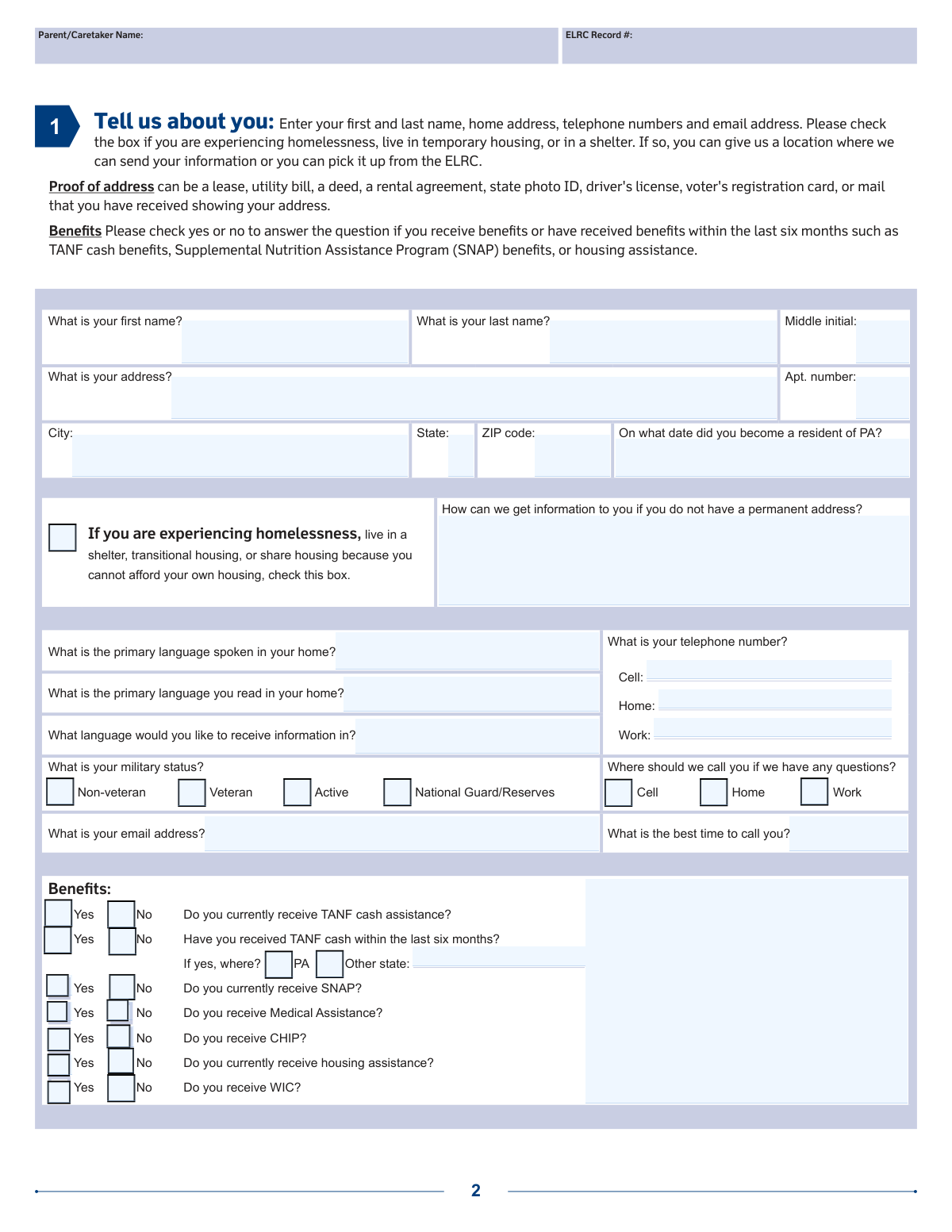
  1. 1 Enter parent/caretaker details: name, Pennsylvania address (or homelessness/temporary housing status and alternate mailing method), contact information, language preferences, and military status.
  2. 2 Complete benefits questions (TANF, SNAP, Medical Assistance, CHIP, housing assistance, WIC) and note any recent TANF history and state if applicable.
  3. 3 List all household members (including yourself, spouse/second adult, and children): names, DOB, sex, relationship, optional SSN, and race/ethnicity; then list each child needing care, citizenship/lawful presence status, and the days care is needed.
  4. 4 Provide child-related certifications and details: immunization certification and any additional child circumstances (e.g., English learner, Head Start history, referrals, migrant moves, absent parent status).
  5. 5 Fill out employment/education/training information for yourself and spouse/live-in parent: employer/training location, whether child care is needed during those activities, and prepare proof of schedules/hours and pay frequency.
  6. 6 Report household income and allowable expenses: income sources, amounts and frequency, last received date, medical expenses, child support/alimony paid, and assets over $1 million; gather supporting documents (pay stubs, award letters, court orders, tax returns if self-employed).
  7. 7 Review and sign required authorizations and the affidavit: permission to share (optional), release of information, alternate contacts, and the affidavit on page 7; then submit the application to the local ELRC (mail, fax, hand-deliver, or online if available) and be ready to provide verification documents when requested.

Our AI-powered system ensures each field is filled out correctly, reducing errors and saving you time.

Why Choose Instafill.ai for Your Fillable CY 868 Form?

Speed

Complete your CY 868 in as little as 37 seconds.

Up-to-Date

Always use the latest 2026 CY 868 form version.

Cost-effective

No need to hire expensive lawyers.

Accuracy

Our AI performs 10 compliance checks to ensure your form is error-free.

Security

Your personal information is protected with bank-level encryption.

Frequently Asked Questions About Form CY 868

This is the Pennsylvania application for subsidized child care. It is used by the Early Learning Resource Center (ELRC) to determine whether your family qualifies for help paying child care costs.

A parent or caretaker who lives in Pennsylvania and needs child care while working or attending an education or training program should complete it. The person applying must sign and date the affidavit on page 7.

Yes. You must be a Pennsylvania resident and apply in the county where you live.

Yes, you generally must need child care while working or attending an education or training program. The form notes a minimum of 20 hours per week (which can include 10 hours of work and 10 hours of training).

Yes. If you are a teen parent, you must be enrolled in school full-time, and you should indicate whether you need child care while attending your education program.

You can submit the completed application by mail, fax, or hand-deliver it to your local ELRC. You may also apply online at www.compass.state.pa.us.

After you submit the application, the ELRC will ask you to show documents to verify the information you provided. They will tell you exactly what documents are needed and the deadline to submit them.

Acceptable proof includes a lease, utility bill, deed, rental agreement, state photo ID, driver’s license, voter registration card, or mail you received showing your address.

Examples include birth certificates, custody orders, medical records or a physician statement, or school records. Foster parents must submit a letter from the county DHS or Children Youth and Families (CYF) approving the foster child to be in care.

No—SSNs are listed as optional on the household member section. If you provide an SSN, it will only be used to identify your case.

List each child who needs care, indicate whether the child is a U.S. citizen or lawfully in the U.S., and check the days of the week care is needed. The ELRC will review and confirm your child care schedule with you.

You must indicate whether you (and a spouse/live-in parent, if applicable) are employed, self-employed, or in training, and whether child care is needed during those times. You must submit proof showing the employer/school/program name, your days and hours, total weekly hours, and (for employment) how often you are paid, signed and dated by an authorized representative.

Answer whether anyone in the home receives income (do not list earned income of minor children), then list the person, type, amount, and frequency. Proof may include pay stubs, employer statements, benefit letters (SSI/Social Security), unemployment letters, child support/alimony documentation, or prior-year tax returns and supporting documents for self-employment.

Yes. Families generally pay a weekly copayment to the provider, and the amount is based on income and family size.

Check the box indicating homelessness/temporary housing/shelter and provide a way to receive information (a location to send mail or arrangements to pick up information from the ELRC). You can still apply even if you do not have a permanent address.

Compliance CY 868
Validation Checks by Instafill.ai

1
Parent/Caretaker identity fields are complete (name + PA address)
Validates that the applicant’s first name, last name, street address, city, state, and ZIP code are provided (unless homelessness is indicated). These fields are required to establish identity and residency in the correct county/ELRC service area. If missing or incomplete, the submission should be rejected or routed to a “needs follow-up” queue because eligibility cannot be determined without a valid applicant record.
2
Pennsylvania residency date is a valid date and not in the future
Checks that the “date you became a resident of PA” is present and formatted as a real calendar date (MM/DD/YY or MM/DD/YYYY) and is not later than today. This supports the program requirement that the family lives in Pennsylvania. If the date is invalid or in the future, the system should flag the application for correction and prevent eligibility determination until resolved.
3
Homelessness indicator requires alternate contact/delivery method
If the homelessness/temporary housing/shelter checkbox is selected, validates that the applicant provides a way to receive information (e.g., a mailing location, pickup preference, or other contact instructions). This ensures the ELRC can communicate next steps and verification requests. If missing, the application should be flagged as incomplete because the agency may be unable to contact the applicant.
4
Phone number format and preferred callback selection consistency
Validates that any provided phone numbers (cell/home/work) match an acceptable format (e.g., 10 digits with optional separators) and that the “Where should we call you?” selection corresponds to a non-empty number of that type. This prevents failed outreach and delays in scheduling or verification. If the preferred phone type is selected but the number is missing/invalid, the system should require correction or prompt for an alternate reachable number.
5
Email address format validation (if provided)
Checks that the email address, when entered, conforms to standard email syntax (e.g., [email protected]) and does not contain obvious invalid characters or missing parts. Email is often used for notices and follow-up, so invalid addresses cause communication failures. If invalid, the system should block submission or mark the email field as needing correction while allowing submission if email is not required.
6
Household member roster completeness and role requirements
Validates that the household list includes at minimum the applicant (“You”) and at least one child needing care, and that each listed person has first/last name, date of birth, sex (M/F), and relationship to applicant. This is essential for determining family size, eligibility, and which children are authorized for care. If required members or required fields are missing, the application should be considered incomplete and not processed.
7
Date of birth validation and age reasonableness for household members
Checks that each household member DOB is a valid date in the required format and is not in the future, and applies basic reasonableness rules (e.g., children should not be older than typical child-care eligibility ranges; adults should be at least a plausible adult age). This reduces data entry errors that can miscalculate eligibility, copay, or program fit. If DOB fails validation, the record should be rejected or flagged for manual review before eligibility is computed.
8
Optional SSN format validation and uniqueness across people
If an SSN is provided for any person, validates it is 9 digits (allowing hyphens) and is not an obviously invalid pattern (e.g., all zeros), and checks that the same SSN is not entered for multiple household members. SSNs are used for case identification and duplicates can cause misidentification or fraud risk. If invalid or duplicated, the system should not accept the SSN value and should prompt for correction or remove it while allowing the application to proceed if SSN is truly optional.
9
Race/ethnicity selection rules (single ethnicity, valid race options)
Validates that exactly one ethnicity option is selected per person where the form states “CHECK ONLY ONE” (Hispanic or Non-Hispanic), and that any race selections are limited to the provided categories. This ensures consistent demographic reporting and avoids ambiguous entries. If multiple ethnicities are selected or invalid values appear, the system should require correction before final submission.
10
Child needing service: citizenship question and care-days selection required
For each child listed as needing service, validates that the U.S. citizen/lawfully present question is answered Yes/No and that at least one day of the week is checked for needed care. These are core eligibility and authorization inputs used to set up care schedules and determine program participation. If either is missing, the application should be flagged as incomplete because the ELRC cannot authorize care without a schedule and required status response.
11
Immunization certificate selection and signature/date completeness
Validates that exactly one immunization certification statement is selected (age-appropriate immunizations OR not age-appropriate with a reason) and that the parent signature and date are present. This is a compliance and health/safety requirement for child care participation. If not selected or unsigned/undated, the system should block submission or mark the application as incomplete pending correction.
12
Employment/Training/Education eligibility trigger and child-care-need consistency
Checks that at least one qualifying activity is indicated for the applicant and/or spouse/live-in parent (employed, in training, or teen parent in school) and that “needs child care while working/training/attending education” is consistent with the activity marked Yes. The program requires a need for care tied to work/training/education, so contradictory answers can invalidate eligibility. If no qualifying activity is selected or need-for-care is marked Yes without an activity, the system should flag for review and request clarification.
13
Benefits section Yes/No completeness and conditional “where” field for TANF history
Validates that each benefits question (TANF current, TANF last 6 months, SNAP, Medical Assistance, CHIP, housing assistance, WIC) has a Yes/No response, and if TANF within last six months is Yes, the “where” field is completed (PA or other state specified). Benefit participation can affect eligibility pathways and verification requirements. If responses are missing or conditional details are absent, the system should mark the application incomplete and prompt for the missing information.
14
Income details required when household income is indicated
If “Does anyone in your home receive income?” is Yes, validates that at least one income type is checked and that each income entry includes recipient name, type/source, frequency, amount, and date last received with valid formats (currency for amount; valid date for last received). These fields are necessary to calculate gross income and copay accurately. If any required income detail is missing or malformed, the system should prevent eligibility calculation and request corrected income data.
15
Expense/asset follow-up requirements (medical expenses, support paid, assets over $1M)
Validates that the medical expense, child support/alimony paid, and assets-over-$1M questions are answered Yes/No, and if Yes for support paid, requires an amount/frequency or at minimum an attachment indicator/reference (since proof is required). These items can affect eligibility and deductions and are explicitly called out in program rules. If Yes is selected without required supporting details, the system should flag the application for documentation follow-up and treat the case as pending.
16
Required signatures and dates: releases, permission to share, and affidavit
Checks that the application includes the parent/caretaker signature and date on the key authorization sections (permission to share selection with signature/date, release of information signature/date) and the affidavit signature/date on page 7. Signatures legally attest to truthfulness and authorize verification; without them the ELRC cannot proceed. If any required signature/date is missing, the system should reject the submission as incomplete and request re-signing before processing.

Common Mistakes in Completing CY 868

Forgetting to sign and date the Affidavit (Page 7)

Applicants often complete all sections but miss the required affidavit signature(s) and date(s) on page 7 because it appears near the end and there are multiple signature lines throughout the packet. An unsigned/undated affidavit typically makes the application incomplete and can delay processing or require resubmission. Before submitting, use the form’s checklist and confirm the parent/caretaker signature and date are present on the affidavit section (and any other required signature blocks).

Leaving the Pennsylvania residency date blank or using the wrong format

The question “On what date did you become a resident of PA?” is frequently skipped or answered with a vague year (e.g., “2019”) instead of a full date. Missing or unclear residency information can slow eligibility determination because residency is a basic requirement. Enter a complete date in the requested format (MM/DD/YY or MM/DD/YYYY if allowed) and be prepared to match it with proof of address documents.

Providing a mailing address that doesn’t match the living situation (homeless/temporary housing)

People experiencing homelessness or temporary housing sometimes write a prior address, leave the address blank, or forget to check the homelessness/temporary housing box. This can cause missed mail, inability to contact you, and delays in scheduling the face-to-face meeting or requesting documents. If you do not have a permanent address, check the box and clearly state where information should be sent or that you will pick it up at the ELRC.

Inconsistent contact information (phone/email) or not selecting the best number to call

Applicants often list multiple phone numbers but don’t indicate where the ELRC should call, or they provide disconnected numbers/typos in email addresses. When the ELRC cannot reach you, document requests and appointment scheduling stall, which can delay approval. Double-check every digit/character, select Cell/Home/Work for the best contact number, and include a realistic “best time to call.”

Misreporting benefits by checking only “currently receive” and ignoring the “last six months” TANF question

The TANF section asks both whether you currently receive TANF and whether you received TANF cash within the last six months, but applicants frequently answer only one or assume they are the same. Incorrect benefit history can lead to incorrect routing, verification requests, or eligibility delays. Answer each Yes/No line separately and, if “Yes,” specify where (PA or other state) as requested.

Incomplete household roster (missing members, wrong relationships, or missing DOB/sex)

A common error is listing only the children needing care and forgetting other household members you are responsible for, or leaving relationship/DOB/sex fields blank. Household size and composition affect income limits and copay calculations, so omissions can cause incorrect determinations or later corrections. List every household member as instructed, include full names, relationship to you, DOB in MM/DD/YY, and M/F, and use page 10 if you need more space.

Confusion about race/ethnicity selections (checking multiple when it says “check only one” for ethnicity)

Applicants often check multiple ethnicity boxes or leave ethnicity blank because the form also lists race categories and the layout is easy to misread. This can trigger follow-up questions or data cleanup by the ELRC. Follow the instruction “ETHNICITY (CHECK ONLY ONE)” by selecting either Hispanic or Non-Hispanic, then complete the race section as applicable (or choose Unknown/Other if needed).

Not clearly identifying which child(ren) need care and the days of care needed

People sometimes list children in the household section but fail to complete the “List name of child needing service” and the day-of-week schedule, or they check every day “just in case.” The ELRC uses this to discuss and authorize care; unclear schedules can delay authorization or result in an approval that doesn’t match your actual need. For each child needing care, write the child’s name and check only the days you truly need care; be ready to confirm hours during the ELRC meeting.

Skipping the child citizenship/lawful presence question or marking it incorrectly

The “Is the child a U.S. Citizen or in the U.S. lawfully?” Yes/No is sometimes left blank due to uncertainty or privacy concerns. Missing answers can pause processing because the form explicitly requests a response for each child needing service. Answer Yes/No for each child as required; if you are unsure what qualifies as “lawfully,” contact the ELRC for guidance before submitting.

Employment/training section completed without required proof of schedule and pay frequency

Applicants often check “Yes” for employment/training but do not provide the employer/school name, actual days/hours, total weekly hours, or pay frequency details that the proof letter/form must include. Without this verification, the ELRC cannot confirm the work/training requirement (e.g., at least 20 hours/week) or calculate eligibility accurately, causing delays. Ensure the employer/school letter is signed/dated and includes the schedule (e.g., Mon–Fri 9–5), total weekly hours, and how often you are paid (weekly/bi-weekly/twice monthly/monthly/annually).

Income section errors: listing net instead of gross, missing frequency, or including minor child earnings

A frequent mistake is reporting take-home (net) pay rather than gross earnings, leaving out how often income is received, or listing earned income of minor children even though the form says not to. These errors can lead to incorrect income calculations, wrong copay amounts, and additional verification requests. Report gross amounts, specify the frequency (weekly/bi-weekly/etc.), include the date last received, and exclude minor children’s earned income as instructed.

Overlooking deductible expenses questions (medical expenses, child support/alimony paid) and not attaching proof

Applicants commonly answer “No” or leave blank the questions about unpaid medical expenses and child support/alimony paid, not realizing these may reduce countable income. Missing these details can increase the calculated copay or make a family appear over income when they might qualify. Answer these questions carefully and attach proof (bills, court orders, payment records) when you answer “Yes.”
Saved over 80 hours a year

“I was never sure if my IRS forms like W-9 were filled correctly. Now, I can complete the forms accurately without any external help.”

Kevin Martin Green

Your data stays secure with advanced protection from Instafill and our subprocessors

Robust compliance program

Transparent business model

You’re not the product. You always know where your data is and what it is processed for.

ISO 27001, HIPAA, and GDPR

Our subprocesses adhere to multiple compliance standards, including but not limited to ISO 27001, HIPAA, and GDPR.

Security & privacy by design

We consider security and privacy from the initial design phase of any new service or functionality. It’s not an afterthought, it’s built-in, including support for two-factor authentication (2FA) to further protect your account.

Fill out CY 868 with Instafill.ai

Worried about filling PDFs wrong? Instafill securely fills pennsylvania-application-for-subsidized-child-care forms, ensuring each field is accurate.