
Yes! You can use AI to fill out Department of Children and Family Services (DCFS) Day Care Service Eligibility Application
Don't type 301 fields by hand. Tell our AI about yourself, or upload a document you already have, and it fills every field in seconds. You check it, then download, print or sign.
The AI does the filling. You just check it.
No typing into boxes, nothing to install.
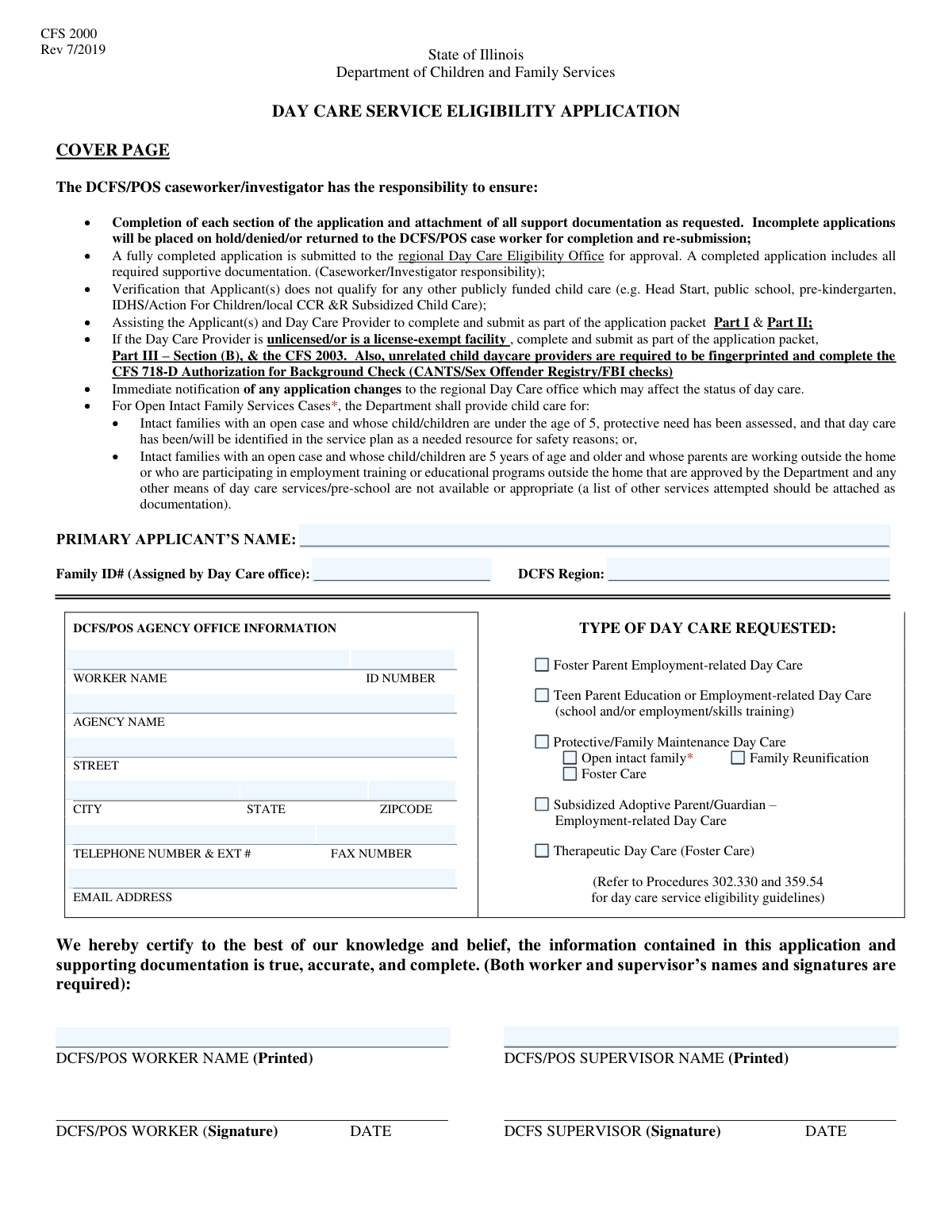
What this form asks for
The AI fills all of it, from your answers or your documents.
The AI checks your answers before you download
14 checks built for this form, so a wrong date or a missing answer is caught before anyone else sees it.
This check verifies that the 'SSN Last Four Digits' for both the primary applicant and co-applicant contain exactly four numeric digits. It is important for data consistency and to ensure the field is not accidentally left blank or filled with incorrect information. If the validation fails, the user will be prompted to enter a valid 4-digit number, preventing form submission until corrected.
This validation ensures that all ZIP code fields (for the agency, applicant, and provider) adhere to a standard 5-digit or 9-digit (ZIP+4) format. Correctly formatted ZIP codes are crucial for mail delivery, location-based services, and data accuracy. An invalid entry will trigger an error message requesting the user to correct the format to 'XXXXX' or 'XXXXX-XXXX'.
This check enforces the rule that the sub-type checkboxes 'Open intact family', 'Family Reunification', or 'Foster Care' can only be selected if the main 'Protective/Family Maintenance Day Care' checkbox is also checked. This maintains logical consistency within the 'Type of Day Care Requested' section. If a user tries to select a sub-type without its parent, the system will prevent it and display a message explaining the dependency.
This validation ensures that the sections for 'Child Information' and 'Day Care Arrangements' are only filled out if the 'Initial Day Care Service Eligibility application' checkbox is selected. This prevents irrelevant data from being entered for other application reasons like an address change. If the initial application box is not checked, these sections should be disabled or hidden to guide the user correctly.
This check verifies that the 'Provider Identification' and related provider details sections are only completed when the 'Change of Day Care Provider' reason for application is selected. This logic prevents users from entering new provider information when it's not relevant to their application type. If the condition is not met, these fields will be locked or hidden, streamlining the user experience.
This validation ensures that if a provider type like 'LICENSED DAY CARE CENTER' is checked, the corresponding 'DCFS DCC License Number' and 'DCFS DCC License Expiration Date' fields must be filled. This rule is critical for verifying the provider's credentials and legal status to operate. Failure to provide the license details when required will block form submission and prompt the user to complete the necessary information.
And 8 more checks
- Provider License Expiration Date Validity
- Child Service Date Consistency
- Co-applicant Information Completeness
- Mandatory Applicant Certifications
- Child Age Eligibility from Date of Birth
- Mutually Exclusive Provider Type Selection
- Worker and Supervisor Name Consistency
- Schedule Entry or Variation Check
Let AI fill out your DCFS Day Care Service Eligibility Application
No typing. Every field filled in seconds, checked, ready to sign.
How to Fill Out DCFS Day Care Service Eligibility Application Online for Free in 2026
What the AI walks you through.
- Navigate to Instafill.ai and upload the DCFS Day Care Service Eligibility Application, or select it from the template library.
- Enter the primary applicant's personal information, contact details, marital status, and employment or school schedule.
- If applicable, provide information for a co-applicant. List all children requiring day care, including their names, dates of birth, and DCFS case IDs.
- Indicate the reason for the application and the type of day care requested (e.g., employment-related, protective services, teen parent).
- Provide detailed information about the chosen day care provider, including their license type, contact information, and background check status. Detail the specific care schedule and charges for each child.
- Carefully review and check off all required certifications for both the applicant and the day care provider to confirm understanding and compliance with program rules.
- Use Instafill.ai's AI to review the entire application for completeness and accuracy, then download the finalized document for submission to the appropriate DCFS office.
Common Mistakes in Completing DCFS Day Care Service Eligibility Application
The ones the AI is built to catch.
Selecting the Incorrect 'Reason for Application'
Ignoring Conditional Field Dependencies
Mixing Up Applicant, Agency, and Provider Information
Entering Vague or Inconsistent Schedules
Inconsistent Child Information Across Sections
Incorrectly Entering Various ID Numbers
Skipping Required Certification Checkboxes
Confusing Provider SSN and FEIN
Omitting a Separate Mailing Address
Ambiguous Time Entry for Child Care
Frequently Asked Questions About DCFS Day Care Service Eligibility Application
Is it really free for 7 days?
Can I fill other forms too?
How do I cancel?
How does the AI fill out DCFS Day Care Service Eligibility Application?
What happens to my information?
How complex is DCFS Day Care Service Eligibility Application to fill out?
What is the purpose of this Day Care Service Eligibility form?
Who needs to fill out this form?
What information do I need to have ready before I start?
What should I do if my work or school schedule varies?
When do I need to provide co-applicant information?
How do I add a new child to my existing day care application?
What if my day care provider is an unlicensed relative?
What am I agreeing to in the 'Applicant Certifications' section?
The PDF form I have isn't fillable. How can I fill it out on my computer?
Can I use an AI tool to help me fill out this form?
How can I fill this form out online?
What is the 'Family ID Number' and where do I find it?
What do I do if I need to request day care for more than six children?
What background checks are required for my day care provider?
Do I need to fill out the provider information if I'm submitting an initial application?
Get your DCFS Day Care Service Eligibility Application filled out by AI
$0 today. Cancel before Nov 10 and you pay nothing.
Other forms like this one
CAR forms: Form SSA-44, Medicare Income-Related Monthly Adjustment Amount - Life-Changing Event, Form I-90, Application to Replace Permanent Resident Card, Form 2441, Child and Dependent Care Expenses, Form WH-380-E, Certification of Health Care Provider, Form 4137, Social Security and Medicare Tax on Unreported Tip Income, Form 8959, Additional Medicare Tax, Form 8919, Uncollected Social Security and Medicare Tax, Form CMS-1763, Request for Termination of Medicare Coverage, Form CMS-855O, Medicare Enrollment Application, Form CMS-460, Medicare Participation Agreement, Form CMS-4040, Request for Enrollment in Medicare Part B, Form WH-380-F, Certification of Health Care Provider, Form W-10, Dependent Care Provider’s Identification, Form 1099-K, Payment Card and Third Party Network Transactions, Form CMS-40B, Application for Enrollment in Medicare Part B, Form SS-5-FS, Application for a Social Security Card, Form REG 195, Disabled Person Placard, Form AR-11, Alien's Change of Address Card, Form I-905, Application for Authorization to Issue Certification for Health Care Workers, Form I-131A, Application for Carrier Documentation
child care forms: Form 2441, Child and Dependent Care Expenses, California Department of Social Services (CDSS) Community Care Licensing Child Care Forms Packet (LIC 9150, LIC 282, LIC 627, LIC 700, LIC 995A, CDPH 286, LIC 9227), State of Illinois Department of Human Services (IDHS) – Bureau of Child Care and Development Child Care Application (Form IL444-3455), State of Illinois Department of Children and Family Services Medical Report on an Adult in a Child Care Facility (CFS 602), Carer Payment and Carer Allowance – Medical Report (SA431) for a child under 16 years, Pennsylvania Application for Subsidized Child Care (CY 868), Form OCFS-6001, Child Care Provider, Staff, Volunteer and Household Member Information, Form T-3, Children with Special Health Care Needs (CSHCN) Services Program Application, Physician's Report for Child Care, Relationship and Child Care Arrangement Details Form, Level of Care (LOC) Assessment for Children in Foster Care, Intact Family Services Child Care Referral Form, Authorization for Background Check for Child Care, JFS 01443, Request for Payment for Special Services for Children in Out-of-Home Care, Form AD 838, Statement of Monies Paid for 24-Hour Care of Children, Superior Court of New Jersey Certification in Support of Request for Excuse from Jury Service: Personal Obligation to Provide Care for Minor Child(ren)
L.A. Care forms: Form SSA-44, Medicare Income-Related Monthly Adjustment Amount - Life-Changing Event, Form 2441, Child and Dependent Care Expenses, Form WH-380-E, Certification of Health Care Provider, Form 4137, Social Security and Medicare Tax on Unreported Tip Income, Form 8959, Additional Medicare Tax, Form 8919, Uncollected Social Security and Medicare Tax, Form CMS-1763, Request for Termination of Medicare Coverage, Form CMS-855O, Medicare Enrollment Application, Form CMS-460, Medicare Participation Agreement, Form CMS-4040, Request for Enrollment in Medicare Part B, Form WH-380-F, Certification of Health Care Provider, Form W-10, Dependent Care Provider’s Identification, Form CMS-40B, Application for Enrollment in Medicare Part B, Form I-905, Application for Authorization to Issue Certification for Health Care Workers, DHS-6696-ENG, Minnesota Health Care Programs Application (MNsure/DHS), California Department of Social Services (CDSS) Community Care Licensing Child Care Forms Packet (LIC 9150, LIC 282, LIC 627, LIC 700, LIC 995A, CDPH 286, LIC 9227), State of Illinois Department of Human Services (IDHS) – Bureau of Child Care and Development Child Care Application (Form IL444-3455), Form CH-006: PA-BH-Res-PCS, Oregon Behavioral Health Support Program Plan of Care Authorization (Plan of Care Request for Behavioral Health Residential or Personal Care Services), State of Illinois Department of Children and Family Services Medical Report on an Adult in a Child Care Facility (CFS 602), Carer Payment and Carer Allowance – Medical Report (SA431) for a child under 16 years
Let AI fill out your DCFS Day Care Service Eligibility Application
Your trial starts once a card is added. You pay nothing before Nov 10.
Our AI already knows this form, all 301 fields of it. Skip the typing: tell it about yourself, or upload what you have, and it fills the whole form in seconds.
- AI fills every field on all 6 pages, tables and checkboxes included
- No typing into boxes: answer a few questions, or upload a document you already have, an old copy of this form, a photo of a document
- The AI checks the answers; you review and change anything before you download
- Download the finished PDF, print it, or sign it online
- Encrypted, and never used to train AI
Cancel before Nov 10 and you pay nothing.
A card is needed to start the trial. Cancel in two clicks from your account.
Terms · Privacy