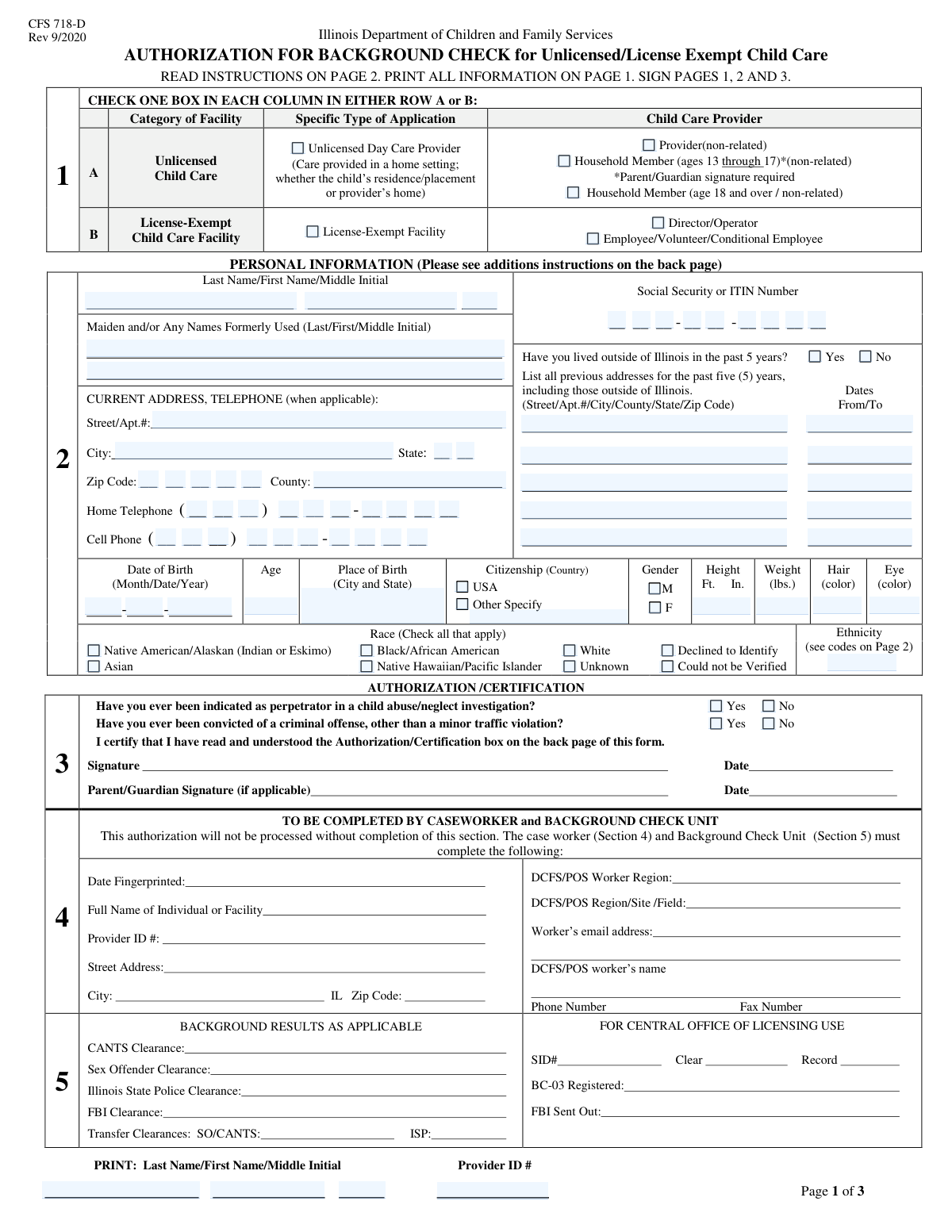
Yes! You can use AI to fill out Authorization for Background Check for Child Care

The Authorization for Background Check for Child Care is a mandatory Illinois state form used to obtain consent from individuals for a comprehensive background screening. This screening is required for anyone working or residing in an unlicensed or license-exempt child care environment to ensure the safety of children by checking for criminal history and any record of child abuse or neglect. Today, this form can be filled out quickly and accurately using AI-powered services like Instafill.ai, which can also convert non-fillable PDF versions into interactive fillable forms.
Illinois Child Care Background Check is part of the authorization forms, CAR forms, child care forms and L.A. Care forms categories on Instafill.
Our AI automatically handles information lookup, data retrieval, formatting, and form filling.
It takes less than a minute to fill out Illinois Child Care Background Check using our AI form filling.
Securely upload your data. Information is encrypted in transit and deleted immediately after the form is filled out.

Form specifications

Form name: Authorization for Background Check for Child Care
Number of fields: 112
Number of pages: 3
Filled form examples: Form Illinois Child Care Background Check Examples
Language: English
main-image

Instafill Demo: How to fill out PDF forms in seconds with AI

How to Fill Out Illinois Child Care Background Check Online for Free in 2026

Are you looking to fill out a ILLINOIS CHILD CARE BACKGROUND CHECK form online quickly and accurately? Instafill.ai offers the #1 AI-powered PDF filling software of 2026, allowing you to complete your ILLINOIS CHILD CARE BACKGROUND CHECK form in just 37 seconds or less.
Follow these steps to fill out your ILLINOIS CHILD CARE BACKGROUND CHECK form online using Instafill.ai:
  1. 1 Navigate to Instafill.ai and upload or select the Authorization for Background Check for Child Care form.
  2. 2 Select your applicant type, such as Unlicensed Day Care Provider or License-Exempt Facility Employee, by checking the appropriate box.
  3. 3 Enter your complete personal information, including your full name, any formerly used names, current address, Social Security Number, and date of birth.
  4. 4 Answer the residency question and provide details for all previous addresses if you have lived outside of Illinois in the past 5 years.
  5. 5 Complete the physical description, citizenship, race, and ethnicity sections accurately.
  6. 6 Answer the mandatory 'Yes' or 'No' questions regarding past child abuse/neglect indications and criminal convictions.
  7. 7 Carefully review all the information you've provided for accuracy before printing the form for your signature and submission to the appropriate agency.

Our AI-powered system ensures each field is filled out correctly, reducing errors and saving you time.

Why Choose Instafill.ai for Your Fillable Illinois Child Care Background Check Form?

Speed

Complete your Illinois Child Care Background Check in as little as 37 seconds.

Up-to-Date

Always use the latest 2026 Illinois Child Care Background Check form version.

Cost-effective

No need to hire expensive lawyers.

Accuracy

Our AI performs 10 compliance checks to ensure your form is error-free.

Security

Your personal information is protected with bank-level encryption.

Frequently Asked Questions About Form Illinois Child Care Background Check

This form is an application used to conduct a background check for individuals involved in unlicensed or license-exempt child care settings in Illinois. It gathers personal information to ensure the safety and well-being of children.

This form must be completed by unlicensed day care providers, their non-related household members (ages 13 and up), and various personnel at license-exempt facilities, such as directors, operators, employees, and volunteers.

Yes, if you are a non-related household member between the ages of 13 and 17, you must complete this form for a background check. A parent or guardian signature will also be required.

An 'Unlicensed Day Care Provider' typically offers care in a home setting, either the child's or the provider's. A 'License-Exempt Facility' is a center or organization that is not required to have a state license but still must meet certain requirements, including background checks for staff.

You should have your personal details (full name, DOB, SSN), physical description, and a complete list of your addresses from the past 5 years. Also, be prepared to list any formerly used names, such as a maiden name.

You must check 'Yes' to the previous residency question and provide the full address and dates of residency for all places you have lived outside of Illinois in the past five years.

Your Social Security Number or ITIN is required to accurately conduct the comprehensive background check, which is a mandatory part of the application process for child care providers.

You must disclose if you have ever been convicted of a criminal offense, other than a minor traffic violation. Be honest, as the background check will verify this information.

If you have not yet been assigned a Provider ID, you should leave this field blank or follow any specific instructions provided by the agency you are submitting the form to.

The form indicates that the Ethnicity Code is referenced on Page 2 of the document. You will need to refer to that page to find the correct code to enter in this field.

Yes, services like Instafill.ai use AI to accurately auto-fill your personal information onto the form, which can save you time and help prevent errors.

You can use a service like Instafill.ai to upload the form and fill it out on your computer. The service allows you to type directly into the fields, add your signature, and then download the completed document.

If your PDF is a flat, non-fillable file, you can upload it to a service like Instafill.ai. It can convert the document into an interactive, fillable form for you to complete online.

Compliance Illinois Child Care Background Check
Validation Checks by Instafill.ai

1
Exclusive Application Type Selection
This validation ensures that an applicant selects roles from either the 'Unlicensed Child Care Application' group or the 'License-Exempt Facility Application' group, but not both. This is important for routing the application to the correct processing workflow and applying the right set of rules. If an applicant selects roles from both categories, the form submission should be blocked with an error message prompting them to choose only one application type.
2
Age and Date of Birth Consistency
This check calculates the applicant's age based on the provided 'Date of Birth' and compares it to the value entered in the 'Age' field. This is crucial for verifying identity and ensuring eligibility for certain roles, such as the age-restricted household member category. If the calculated age and the entered age do not match, the submission should be flagged for review or rejected, asking the user to correct the discrepancy.
3
Social Security Number Structure and Validity
This validation verifies that the Social Security Number is entered correctly across its separate fields, totaling 9 digits, and that all characters are numeric. It's a critical check for identity verification and running mandatory background checks. A failure in this validation, such as an incorrect number of digits or non-numeric characters, would prevent the form from being submitted until a valid 9-digit number is provided.
4
Conditional Previous Address Requirement
This check enforces a conditional logic based on the answer to the 'Previous Residency Question'. If the applicant checks 'Yes' (indicating they have lived outside of Illinois in the past 5 years), the validation ensures that at least one 'Previous Address' section is completed. This is necessary to gather complete residency history for background checks. If 'Yes' is checked and no address is provided, an error should prevent submission.
5
Age-Specific Role Validation
This validation cross-references the applicant's age with their selected role. Specifically, if the 'Household Member (ages 13-17, non-related)' checkbox is selected, the applicant's calculated age must be between 13 and 17, inclusive. This ensures that applicants are correctly categorized based on legal requirements for background checks. If the age is outside this range, the user must correct either their date of birth or their role selection.
6
Conditional Citizenship Specification
This validation ensures that if the 'Other Specify' checkbox for citizenship is selected, the corresponding 'Other Citizenship Country' text field is not left empty. This is important for accurately recording the applicant's legal status and country of origin for official records. If 'Other Specify' is checked but the country is not provided, the form submission should be blocked until the field is filled.
7
Mandatory Binary Question Response
This check verifies that for critical yes/no questions, such as the 'Perpetrator Indication Question' and 'Criminal Conviction Question', exactly one option ('Yes' or 'No') is selected. These questions are mandatory for assessing applicant suitability and risk. A failure to answer, or selecting both options, would result in an error message requiring the user to provide a single, definitive answer before proceeding.
8
Complete Applicant Name Requirement
This validation ensures that the 'Last Name' and 'First Name' fields are not empty and contain only valid characters (e.g., letters, hyphens, apostrophes). A full, legal name is fundamental for all identification and background check processes. If these required fields are empty or contain invalid characters like numbers or symbols, the submission will be rejected until valid names are entered.
9
Telephone Number Structure
This check validates that the components of the home and cell phone numbers are in the correct format: a 3-digit area code, a 3-digit prefix, and a 4-digit line number. All parts must be numeric. This ensures the contact information is valid and usable for communication. An error will be displayed if any part has the wrong number of digits or contains non-numeric characters.
10
Zip Code Format Validation
This validation ensures the 'Zip Code' field contains either a 5-digit or a 9-digit (ZIP+4) numeric value. A valid zip code is essential for mail delivery, address verification, and geographic-based data analysis. Submissions with improperly formatted zip codes (e.g., too few digits, containing letters) should be blocked until a valid format is entered.
11
Previous Address Date Logic
For any previous addresses provided, this check ensures the 'From' date is chronologically before the 'To' date. This maintains logical consistency in the applicant's residency history, which is vital for accurate background screening. If a 'To' date is earlier than its corresponding 'From' date, an error message should prompt the user to correct the timeline.
12
Mutually Exclusive Race Selection
This validation enforces rules on the 'Race' selection checkboxes. If an applicant selects a mutually exclusive option like 'Declined to Identify' or 'Unknown', no other race categories (e.g., 'White', 'Asian') should be selected. This ensures data integrity and respects the applicant's choice not to specify. The system should alert the user to deselect other options if they choose a mutually exclusive one.
13
At Least One Role Must Be Selected
This validation confirms that the applicant has selected at least one checkbox that defines their role (e.g., 'Provider (non-related)', 'Director/Operator', 'Employee/Volunteer'). The application is meaningless without knowing the capacity in which the person is applying. If no role is selected, the form cannot be processed and should display an error message instructing the user to select their role.

Common Mistakes in Completing Illinois Child Care Background Check

Incorrect Application Type Selection

Applicants often get confused between the 'Unlicensed Day Care Provider' and 'License-Exempt Facility' categories, or between roles like 'Provider' and 'Household Member'. This initial error can route the application through the wrong review process, causing significant delays or outright rejection. To avoid this, carefully read the definitions for each checkbox and select the one that precisely matches your situation and role.

Incomplete 'Formerly Used Names' Section

Many applicants forget to list all previous legal names, most commonly maiden names after marriage or other legal name changes. Omitting a formerly used name can flag a background check as incomplete or potentially fraudulent, as it hinders a thorough search of records. Ensure you list all legal names you have ever used to prevent processing delays and verification issues.

Fragmented Phone/SSN Entry Errors

The form requires phone numbers and Social Security Numbers to be entered into separate, fragmented boxes (e.g., area code, prefix, line number). This format makes it easy to transpose digits or place parts of the number in the wrong field, leading to invalid contact information or failed identity verification. To prevent this, double-check each segment of the number before moving on. AI-powered tools like Instafill.ai can automatically parse and place this data correctly, reducing the risk of manual entry errors.

Missing Apartment or Unit Number

Applicants frequently omit their apartment, suite, or unit number in the 'Current Address' and 'Previous Address' sections. This seemingly small omission can lead to returned mail and failed address verification, which is a critical part of the background check process. Always include the full address detail to ensure all correspondence is received and your residency history can be confirmed.

Mishandling the Previous Residency Section

When an applicant checks 'Yes' to having lived outside of Illinois in the past 5 years, they often fail to provide a complete, continuous 5-year address history as required. Gaps in the timeline or missing addresses for the required period will halt the application, as a full background check cannot be completed. It is crucial to gather all previous addresses from the last five years and enter them completely and accurately.

Incorrect Height Format

The form specifically asks for height in total inches, but applicants commonly enter it in a feet-and-inches format (e.g., '5 ft 6 in' instead of '66'). This formatting error can cause data entry validation failures on the processing end, requiring clarification and delaying the application. To avoid this, convert your height into total inches before filling out the form.

Omitting the Required Ethnicity Code

The form requires applicants to find an 'Ethnicity Code' on a separate page (Page 2) and enter it into the corresponding field. People often overlook this instruction and either leave the field blank, guess, or write their ethnicity instead of the code. This mistake leads to an incomplete application that must be returned for correction, so always reference the specified page to find the correct code.

Misunderstanding the Criminal Conviction Question

Applicants can misinterpret the question about criminal convictions, either by incorrectly disclosing minor traffic violations that are explicitly excluded or by failing to disclose reportable offenses. This can lead to perceptions of dishonesty or an inaccurate risk assessment, jeopardizing the application's approval. Carefully read the question's scope and answer truthfully and accurately regarding all relevant convictions.

Missing or Incorrect Provider ID

The 'Provider ID' is a key identifier for linking the applicant to a specific facility or provider record, but applicants may not know their ID or may leave the field blank. An incorrect or missing Provider ID can prevent the system from associating the background check with the correct employer or entity, causing major processing delays. Always confirm the correct Provider ID with your employer or the licensing agency before submitting the form.

Inconsistent Name Usage Across the Form

An applicant might use a legal name in one section but a nickname or a slightly different version of their name in another, such as the 'Printed Name' section. This inconsistency creates confusion and can trigger red flags during the identity verification process, requiring manual review and follow-up. To avoid this, use your full, legal name consistently across all name fields on the application. If the form is a non-fillable PDF, a tool like Instafill.ai can convert it to a fillable version and use saved profile data to ensure consistency.
Saved over 80 hours a year

“I was never sure if my IRS forms like W-9 were filled correctly. Now, I can complete the forms accurately without any external help.”

Kevin Martin Green

Your data stays secure with advanced protection from Instafill and our subprocessors

Robust compliance program

Transparent business model

You’re not the product. You always know where your data is and what it is processed for.

ISO 27001, HIPAA, and GDPR

Our subprocesses adhere to multiple compliance standards, including but not limited to ISO 27001, HIPAA, and GDPR.

Security & privacy by design

We consider security and privacy from the initial design phase of any new service or functionality. It’s not an afterthought, it’s built-in, including support for two-factor authentication (2FA) to further protect your account.

Fill out Illinois Child Care Background Check with Instafill.ai

Worried about filling PDFs wrong? Instafill securely fills authorization-for-background-check-for-child-care forms, ensuring each field is accurate.