
Yes! You can use AI to fill out Form AD 838, Statement of Monies Paid for 24-Hour Care of Children
Don't type 143 fields by hand. Tell our AI about yourself, or upload a document you already have, and it fills every field in seconds. You check it, then download, print or sign.
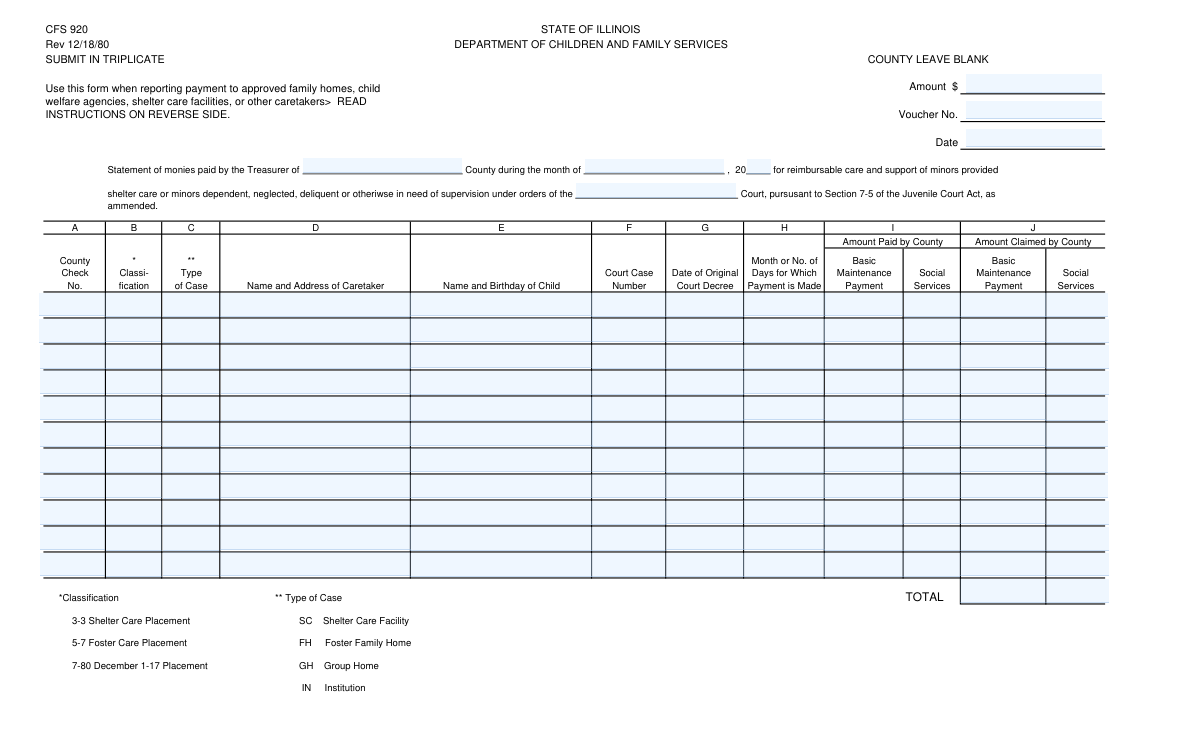
The AI does the filling. You just check it.
No typing into boxes, nothing to install.
What this form asks for
The AI fills all of it, from your answers or your documents.
The AI checks your answers before you download
13 checks built for this form, so a wrong date or a missing answer is caught before anyone else sees it.
This check verifies that the 'Total Basic Maintenance Payment Paid by County' field is the correct sum of all individual 'Basic Maintenance Payment' fields across all filled payment records. This is crucial for ensuring mathematical accuracy and preventing financial discrepancies in reporting. If the total does not match the sum of its parts, the form submission should be rejected and the user prompted to correct the amounts.
This validation confirms that the 'Total Social Services Payment Paid by County' field accurately equals the sum of all individual 'Social Services Payment' fields from each payment record. Maintaining correct totals is critical for auditing and financial reconciliation. A mismatch will trigger an error, requiring the user to review and fix the individual or total payment amounts before proceeding.
This check ensures that for each payment record, the 'Original Court Decree Date' is on or before the date implied by the 'Statement Month' and 'Statement Year'. This logical validation prevents impossible scenarios where a payment is recorded for a period before the legal decree authorizing it was issued. A failure would indicate a data entry error and require correction of one or both dates.
This validation verifies that the 'Statement Year Last Two Digits' field contains exactly two numeric digits (00-99). This is crucial for correctly constructing the full year for date-based calculations and record-keeping. Submissions with non-numeric characters, or more or less than two digits, will be flagged as invalid to ensure data integrity.
For each 'Child Name and Birthday' field, this check validates that the birthday portion is a real, parsable date (e.g., MM/DD/YYYY) and that the date is in the past. This prevents the entry of nonsensical dates like 'February 30th' or future birthdays. Ensuring valid birth dates is essential for eligibility verification and accurate record-keeping.
This validation ensures that if any field within a specific payment record (e.g., 'First Payment Record') is filled, then all other required fields for that same record (like 'Child Name', 'Court Case Number', and payment amounts) are also filled. This prevents the submission of incomplete or orphaned data for a payment entry. An incomplete record would be flagged, requiring the user to either complete the record or clear it entirely.
And 7 more checks
- Monetary Amount Format Validation
- Claimed vs. Paid Amount Consistency
- Court Case Number Format
- Classification Code Validation
- Type of Case Code Validation
- Statement Month Validity
- Payment Period Format
Let AI fill out your AD 838
No typing. Every field filled in seconds, checked, ready to sign.
How to Fill Out AD 838 Online for Free in 2026
What the AI walks you through.
- Navigate to Instafill.ai and upload your AD 838 form, or select it from our library of templates.
- Enter the general statement details at the top of the form, including the treasurer's name and the statement month and year.
- For each individual payment record, provide the child's information, including their name, birthday, court case number, and caretaker details.
- Input the specific financial data for each record, detailing the amounts paid and claimed by the county for both basic maintenance and social services.
- Use the AI-assisted tool to automatically calculate and populate the total payment fields at the bottom of the form, ensuring accuracy.
- Review all entered information for completeness and correctness. The AI can help flag potential errors or omissions before finalization.
- Download, print, or securely share the completed AD 838 form for official submission to the appropriate state department.
Common Mistakes in Completing AD 838
The ones the AI is built to catch.
Confusing 'Paid' vs. 'Claimed' Amounts
Manual Calculation Errors in Total Fields
Data Inconsistency Across Repetitive Records
Ignoring 'Leave Blank' Instructions
Using Incorrect Year Format
Incomplete Combined Field Data
Using Descriptions Instead of Codes
Inconsistent Date Formatting
Ambiguous Payment Period Entry
Filling a Non-Fillable PDF Manually
Frequently Asked Questions About AD 838
Is it really free for 7 days?
Can I fill other forms too?
How do I cancel?
How does the AI fill out AD 838?
What happens to my information?
How complex is AD 838 to fill out?
What is the purpose of this form?
Who is responsible for filling out this form?
What is the difference between 'Amount Paid by County' and 'Amount Claimed by County'?
Where do I find the codes for 'Classification' and 'Type of Case'?
What should I do if I have more than eleven payments to report in one month?
Should I write anything in the 'Amount (County Leave Blank)' field at the top?
How do I correctly fill out the 'Payment Period' or 'Month or Number of Days' field?
What is the 'Original Court Decree Date'?
Can I list two children from the same family in one payment record section?
How are the 'Total' fields at the end of the form calculated?
Can I use an AI tool to help fill out this form?
How can I fill this form online using Instafill.ai?
The PDF I have is not fillable. What can I do?
Get your AD 838 filled out by AI
$0 today. Cancel before Nov 11 and you pay nothing.
Other forms like this one
CAR forms: Form SSA-44, Medicare Income-Related Monthly Adjustment Amount - Life-Changing Event, Form I-90, Application to Replace Permanent Resident Card, Form 2441, Child and Dependent Care Expenses, Form WH-380-E, Certification of Health Care Provider, Form 4137, Social Security and Medicare Tax on Unreported Tip Income, Form 8959, Additional Medicare Tax, Form 8919, Uncollected Social Security and Medicare Tax, Form CMS-1763, Request for Termination of Medicare Coverage, Form CMS-855O, Medicare Enrollment Application, Form CMS-460, Medicare Participation Agreement, Form CMS-4040, Request for Enrollment in Medicare Part B, Form WH-380-F, Certification of Health Care Provider, Form W-10, Dependent Care Provider’s Identification, Form 1099-K, Payment Card and Third Party Network Transactions, Form CMS-40B, Application for Enrollment in Medicare Part B, Form SS-5-FS, Application for a Social Security Card, Form REG 195, Disabled Person Placard, Form AR-11, Alien's Change of Address Card, Form I-905, Application for Authorization to Issue Certification for Health Care Workers, Form I-131A, Application for Carrier Documentation
child care forms: Form 2441, Child and Dependent Care Expenses, California Department of Social Services (CDSS) Community Care Licensing Child Care Forms Packet (LIC 9150, LIC 282, LIC 627, LIC 700, LIC 995A, CDPH 286, LIC 9227), State of Illinois Department of Human Services (IDHS) – Bureau of Child Care and Development Child Care Application (Form IL444-3455), State of Illinois Department of Children and Family Services Medical Report on an Adult in a Child Care Facility (CFS 602), Carer Payment and Carer Allowance – Medical Report (SA431) for a child under 16 years, Pennsylvania Application for Subsidized Child Care (CY 868), Form OCFS-6001, Child Care Provider, Staff, Volunteer and Household Member Information, Form T-3, Children with Special Health Care Needs (CSHCN) Services Program Application, Physician's Report for Child Care, Relationship and Child Care Arrangement Details Form, Level of Care (LOC) Assessment for Children in Foster Care, Intact Family Services Child Care Referral Form, Department of Children and Family Services (DCFS) Day Care Service Eligibility Application, Authorization for Background Check for Child Care, JFS 01443, Request for Payment for Special Services for Children in Out-of-Home Care, Superior Court of New Jersey Certification in Support of Request for Excuse from Jury Service: Personal Obligation to Provide Care for Minor Child(ren)
PA state forms: Form 1095-A, Health Insurance Marketplace Statement, Form W-2, Wage and Tax Statement, Form 593, Real Estate Withholding, Form 8938, Statement of Specified Foreign Financial Assets, Form CMS-2567, Statement of Deficiencies, Form 1098, Mortgage Interest Statement, Form 1098-T, Tuition Statement, Form 1099-S, Proceeds From Real Estate Transactions, Form 1098-E, Student Loan Interest Statement, Form DS-3053, Statement of Consent, Form DS-86, Statement of Non-Receipt of a U.S. Passport, Form DS-86, Statement of Non-Receipt of a U.S. Passport, Form 108, Statement of Intention, Form 107, Statement of Financial Affairs, Form 121, Statement About Your SSNs, Form 122A-1, Chapter 7 Statement of Current Monthly Income, Center for Infertility & Reproductive Surgery – New Patient Questionnaire and Patient/Guarantor Statement (Brigham and Women’s Hospital, Department of Obstetrics and Gynecology), Adult Travel Document Application for Stateless and Protected Persons in Canada (16 years of age or over) (PPTC 190), Form W-8IMY (Rev. October 2021), Certificate of Foreign Intermediary, Foreign Flow-Through Entity, or Certain U.S. Branches for United States Tax Withholding and Reporting, Form W-2, Wage and Tax Statement (2025)
L.A. Care forms: Form SSA-44, Medicare Income-Related Monthly Adjustment Amount - Life-Changing Event, Form 2441, Child and Dependent Care Expenses, Form WH-380-E, Certification of Health Care Provider, Form 4137, Social Security and Medicare Tax on Unreported Tip Income, Form 8959, Additional Medicare Tax, Form 8919, Uncollected Social Security and Medicare Tax, Form CMS-1763, Request for Termination of Medicare Coverage, Form CMS-855O, Medicare Enrollment Application, Form CMS-460, Medicare Participation Agreement, Form CMS-4040, Request for Enrollment in Medicare Part B, Form WH-380-F, Certification of Health Care Provider, Form W-10, Dependent Care Provider’s Identification, Form CMS-40B, Application for Enrollment in Medicare Part B, Form I-905, Application for Authorization to Issue Certification for Health Care Workers, DHS-6696-ENG, Minnesota Health Care Programs Application (MNsure/DHS), California Department of Social Services (CDSS) Community Care Licensing Child Care Forms Packet (LIC 9150, LIC 282, LIC 627, LIC 700, LIC 995A, CDPH 286, LIC 9227), State of Illinois Department of Human Services (IDHS) – Bureau of Child Care and Development Child Care Application (Form IL444-3455), Form CH-006: PA-BH-Res-PCS, Oregon Behavioral Health Support Program Plan of Care Authorization (Plan of Care Request for Behavioral Health Residential or Personal Care Services), State of Illinois Department of Children and Family Services Medical Report on an Adult in a Child Care Facility (CFS 602), Carer Payment and Carer Allowance – Medical Report (SA431) for a child under 16 years
NJ state forms: Form 1095-A, Health Insurance Marketplace Statement, Form W-2, Wage and Tax Statement, Form 593, Real Estate Withholding, Form 8938, Statement of Specified Foreign Financial Assets, Form CMS-2567, Statement of Deficiencies, Form 1098, Mortgage Interest Statement, Form 1098-T, Tuition Statement, Form 1099-S, Proceeds From Real Estate Transactions, Form 1098-E, Student Loan Interest Statement, Form DS-3053, Statement of Consent, Form DS-86, Statement of Non-Receipt of a U.S. Passport, Form DS-86, Statement of Non-Receipt of a U.S. Passport, Form 108, Statement of Intention, Form 107, Statement of Financial Affairs, Form 121, Statement About Your SSNs, Form 122A-1, Chapter 7 Statement of Current Monthly Income, Center for Infertility & Reproductive Surgery – New Patient Questionnaire and Patient/Guarantor Statement (Brigham and Women’s Hospital, Department of Obstetrics and Gynecology), Adult Travel Document Application for Stateless and Protected Persons in Canada (16 years of age or over) (PPTC 190), Form W-8IMY (Rev. October 2021), Certificate of Foreign Intermediary, Foreign Flow-Through Entity, or Certain U.S. Branches for United States Tax Withholding and Reporting, Form W-2, Wage and Tax Statement (2025)
state ID forms: Application for Renewal or Duplicate of Alabama Driver License or ID card, Form 1095-A, Health Insurance Marketplace Statement, Form W-2, Wage and Tax Statement, Form 593, Real Estate Withholding, Form 8938, Statement of Specified Foreign Financial Assets, Form CMS-2567, Statement of Deficiencies, Form 1098, Mortgage Interest Statement, Form 1098-T, Tuition Statement, Form 1099-S, Proceeds From Real Estate Transactions, Form 1098-E, Student Loan Interest Statement, Form DS-3053, Statement of Consent, Form DS-86, Statement of Non-Receipt of a U.S. Passport, Form 108, Statement of Intention, Form 107, Statement of Financial Affairs, Form 121, Statement About Your SSNs, Form 122A-1, Chapter 7 Statement of Current Monthly Income, Center for Infertility & Reproductive Surgery – New Patient Questionnaire and Patient/Guarantor Statement (Brigham and Women’s Hospital, Department of Obstetrics and Gynecology), Adult Travel Document Application for Stateless and Protected Persons in Canada (16 years of age or over) (PPTC 190), Form W-8IMY (Rev. October 2021), Certificate of Foreign Intermediary, Foreign Flow-Through Entity, or Certain U.S. Branches for United States Tax Withholding and Reporting, Form W-2, Wage and Tax Statement (2025)
Let AI fill out your AD 838
Your trial starts once a card is added. You pay nothing before Nov 11.
Our AI already knows this form, all 143 fields of it. Skip the typing: tell it about yourself, or upload what you have, and it fills the whole form in seconds.
- AI fills every field on the form, tables and checkboxes included
- No typing into boxes: answer a few questions, or upload a document you already have, an old copy of this form, a photo of a document
- The AI checks the answers; you review and change anything before you download
- Download the finished PDF, print it, or sign it online
- Encrypted, and never used to train AI
Cancel before Nov 11 and you pay nothing.
A card is needed to start the trial. Cancel in two clicks from your account.
Terms · Privacy