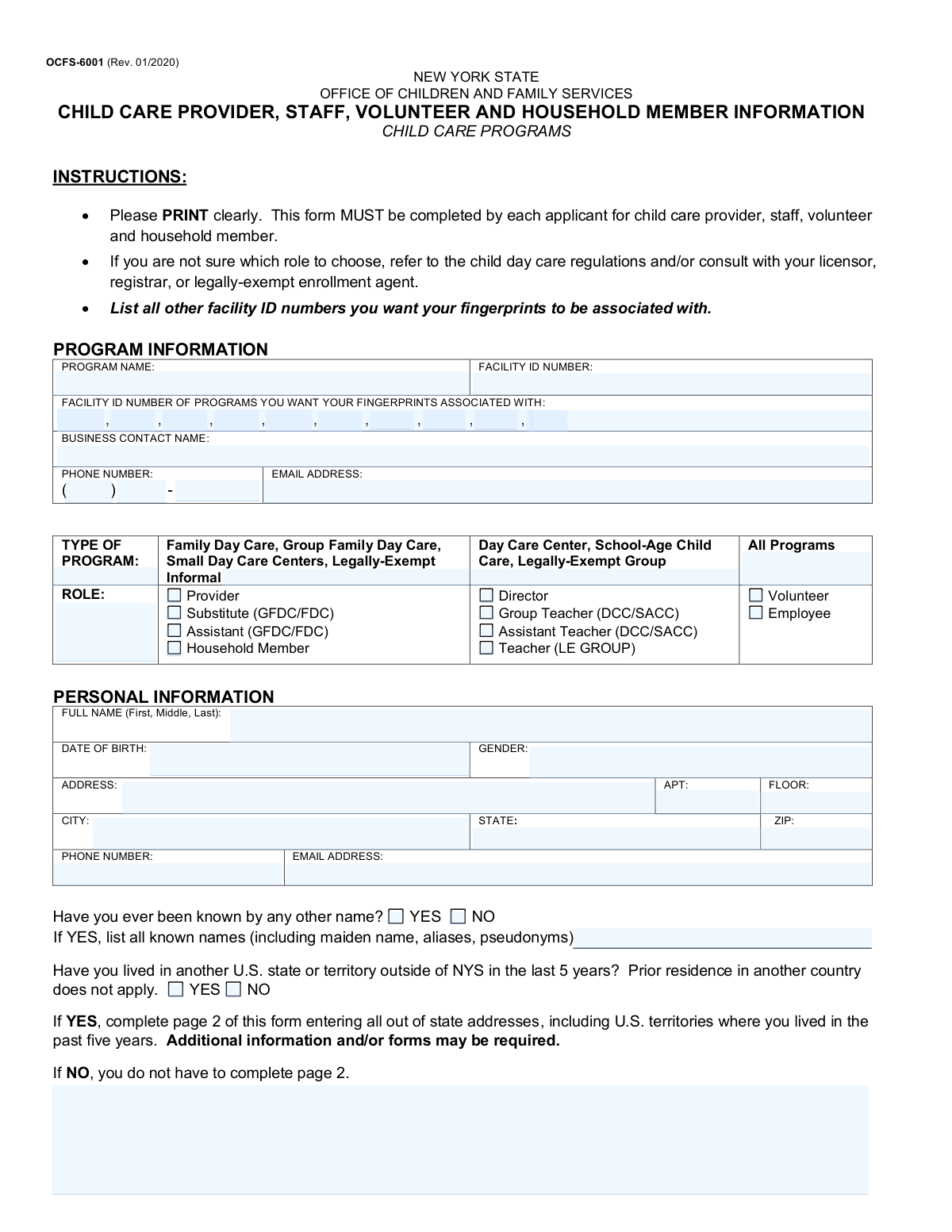
Yes! You can use AI to fill out Form OCFS-6001, Child Care Provider, Staff, Volunteer and Household Member Information
Form OCFS-6001 is a document required by the New York State Office of Children and Family Services (OCFS) to collect essential personal and professional information from individuals involved in child care programs, including providers, staff, volunteers, and household members. This information is used for background checks and to associate fingerprints with specific child care facilities, ensuring the safety and welfare of children. Today, this form can be filled out quickly and accurately using AI-powered services like Instafill.ai, which can also convert non-fillable PDF versions into interactive fillable forms.
Our AI automatically handles information lookup, data retrieval, formatting, and form filling.
It takes less than a minute to fill out OCFS-6001 using our AI form filling.
Securely upload your data. Information is encrypted in transit and deleted immediately after the form is filled out.
Form specifications
| Form name: | Form OCFS-6001, Child Care Provider, Staff, Volunteer and Household Member Information |
| Number of pages: | 2 |
| Language: | English |
| Categories: | CAR forms, child care forms, L.A. Care forms |
Instafill Demo: How to fill out PDF forms in seconds with AI
How to Fill Out OCFS-6001 Online for Free in 2026
Are you looking to fill out a OCFS-6001 form online quickly and accurately? Instafill.ai offers the #1 AI-powered PDF filling software of 2026, allowing you to complete your OCFS-6001 form in just 37 seconds or less.
Follow these steps to fill out your OCFS-6001 form online using Instafill.ai:
- 1 Navigate to Instafill.ai and upload or select the OCFS-6001 form.
- 2 Enter the child care program's information, including the program name and all relevant facility ID numbers.
- 3 Select your specific role in the child care program, such as Provider, Staff, Volunteer, or Household Member.
- 4 Provide your complete personal information, including your full name, date of birth, contact details, and current address.
- 5 Answer the questions regarding any other names you have used and whether you have lived outside of New York State in the past five years.
- 6 If you have lived out of state, complete page 2 by listing all previous addresses in other U.S. states or territories from the last five years.
- 7 Review all the information auto-filled by the AI for accuracy, make any necessary corrections, and then finalize the form for submission.
Our AI-powered system ensures each field is filled out correctly, reducing errors and saving you time.
Why Choose Instafill.ai for Your Fillable OCFS-6001 Form?
Speed
Complete your OCFS-6001 in as little as 37 seconds.
Up-to-Date
Always use the latest 2026 OCFS-6001 form version.
Cost-effective
No need to hire expensive lawyers.
Accuracy
Our AI performs 10 compliance checks to ensure your form is error-free.
Security
Your personal information is protected with bank-level encryption.
Frequently Asked Questions About Form OCFS-6001
This form is used by the NYS Office of Children and Family Services to collect essential information from individuals involved with child care programs for background check purposes. It must be completed by each provider, staff member, volunteer, and household member.
Every applicant for a child care provider, staff, or volunteer role, as well as any household member over 18 in a home-based program, must complete this form. If you are unsure of your specific role, you should consult with your licensor or registrar.
If you work or volunteer at multiple child care programs, you can list their Facility ID numbers on this form. This allows your single set of fingerprints and background check to be linked to all associated programs, saving you time and effort.
No, providing your SSN is voluntary. However, it is used to confirm your identity with other states, and the form notes that failure to disclose it may affect or delay the completion of your application.
No, page 2 is only for listing addresses in other U.S. states or territories where you have lived in the past five years. Residence in another country does not apply and should not be listed.
You must list all other names you have ever been known by, which includes maiden names, previous married names, aliases, or any pseudonyms. This is critical for ensuring a thorough and accurate background check.
The form advises you to refer to the child day care regulations or speak with your licensor, registrar, or legally-exempt enrollment agent. They can help you determine the correct role based on your position and program type.
You should submit the completed form to the person or agency that requires it for your background check, such as your program director, licensor, or enrollment agent. They will handle the next steps in the process.
A 'Household Member' is generally any person 18 years of age or older who resides in a home where family or group family day care is provided. They must also complete this form for a background check.
Yes, you can use AI-powered services like Instafill.ai to help fill out this form. These tools can accurately auto-fill your information, saving time and helping to prevent common errors.
To fill out this form online, you can upload it to a platform like Instafill.ai. The service will make the document interactive, allowing you to type your information directly into the fields before printing.
If you have a non-fillable PDF, you can use a service like Instafill.ai to convert it into an interactive, fillable form. This allows you to easily type in your information for a clean and legible submission.
You will need the child care program's name and Facility ID number, your full personal details, any other names you have used, and a list of your out-of-state addresses from the last five years.
Compliance OCFS-6001
Validation Checks by Instafill.ai
1
Validates Social Security Number Format
This check ensures that if the 'Applicant Social Security Number' is provided, it consists of exactly nine digits. Although voluntary, providing an incorrectly formatted SSN can cause identity verification failures. If the field is not empty and does not contain nine digits, the submission should be flagged for correction to prevent downstream processing errors.
2
Verifies Applicant's Minimum Age
This validation calculates the applicant's age based on the 'Date of Birth' to ensure they meet the minimum age requirement (e.g., 18 years old) for child care staff. This is a critical compliance check to ensure all personnel are legally old enough to work in this role. If the applicant is underage, the form submission should be rejected.
3
Conditional Requirement for Other Names
This check enforces a conditional rule based on the question 'Have you ever been known by any other name?'. If the user selects 'YES', this validation ensures that the corresponding text field for listing other names is not left blank. This is crucial for conducting a thorough background check, and failure to provide the names will halt the process until the information is supplied.
4
Conditional Requirement for Out-of-State Address History
If the applicant answers 'YES' to 'Have you lived in another U.S. state or territory outside of NYS in the last 5 years?', this validation confirms that at least one complete address is entered on page 2. This information is mandatory for initiating out-of-state clearance checks. An error should be triggered if 'YES' is selected but no addresses are provided.
5
Ensures at Least One Role is Selected
This validation verifies that the applicant has selected at least one checkbox in the 'ROLE' section. The applicant's role is fundamental to determining the scope of background checks and required qualifications. The form cannot be processed without a defined role, so the submission must be blocked until a selection is made.
6
Validates Phone Number Structure
This check confirms that both the 'Business Phone Number' and the personal 'Phone Number' fields are entered in a valid 10-digit format. It may check that the area code, prefix, and line number fields are all numeric and have the correct length (3, 3, and 4 digits respectively). This ensures that contact information is accurate and usable for communication, preventing delays if the program needs to contact the applicant.
7
Validates Email Address Format
This check ensures that the 'Email Address' fields in both the Program and Personal Information sections adhere to a standard email format (e.g., '[email protected]'). Correct email formatting is essential for electronic communication, notifications, and sending additional required forms. An invalid format would prevent the applicant from receiving critical information, so the entry must be corrected before submission.
8
Completeness of Personal Information
This validation ensures that all mandatory fields in the 'PERSONAL INFORMATION' section are filled out, including 'Full Name', 'Date of Birth', 'Address', 'City', 'State', and 'ZIP'. Incomplete personal data will prevent the system from performing a successful background check. The form submission should be blocked with a message indicating which required fields are missing.
9
Logical Date Order for Out-of-State Addresses
For each address listed in the 'OUT OF STATE ADDRESSES' section, this validation ensures the 'From (Mo/Yr)' date is chronologically before the 'To (Mo/Yr)' date. An illogical date range (e.g., From: 05/2018, To: 03/2017) indicates a data entry error. This check maintains data integrity for the applicant's residency history, and any row with an invalid date range should be flagged for correction.
10
Verifies Out-of-State Address Dates are Within 5 Years
This check confirms that all dates entered in the 'OUT OF STATE ADDRESSES' section fall within the last five years from the date of form submission. The form specifically requests addresses from this time frame for background check purposes. Any address with dates older than five years should be flagged as it may be irrelevant or a data entry error.
11
Name Consistency Between Sections
This validation compares the 'Full Name' field from the 'PERSONAL INFORMATION' section on page 1 with the 'APPLICANT NAME' field on page 2. The names must match exactly to ensure data consistency and proper record-keeping. A mismatch could lead to confusion or errors in the background check process, so an alert should be raised if the names differ.
12
Exclusion of NYS in Out-of-State Address History
This check validates that the 'State' field for every entry in the 'OUT OF STATE ADDRESSES' table is not 'NY' or 'New York'. The purpose of this section is to collect non-NYS addresses for specific clearance procedures. Entering a New York address here is redundant and indicates a misunderstanding of the form, so the entry should be rejected.
13
Mandatory Program Information Check
This validation ensures that critical fields in the 'PROGRAM INFORMATION' section, such as 'PROGRAM NAME' and 'FACILITY ID NUMBER', are not empty. This information is essential for associating the applicant with the correct child care program. The form submission should fail if this core identifying information is missing.
14
Validates Facility ID Number Format
This check ensures the primary 'FACILITY ID NUMBER' and any 'ASSOCIATED FACILITY ID' numbers adhere to the expected format (e.g., a specific number of digits, alphanumeric pattern). Using a valid format is crucial for linking the applicant to the correct program(s) in the state's database. An invalid ID would cause a record mismatch, so the format must be corrected before submission.
Common Mistakes in Completing OCFS-6001
Applicants often enter the wrong Facility ID Number or forget to list all other facility IDs where they want their fingerprints associated. This happens when they don't have the information readily available or misunderstand the purpose of associating fingerprints. This error can delay the background check process, as clearances may not be linked to all required programs, necessitating resubmission. To avoid this, confirm all relevant Facility ID numbers with the program director or licensor before filling out the form.
The form lists multiple specific roles with acronyms (e.g., GFDC, DCC, SACC), leading to confusion and incorrect selections. An individual might select 'Assistant' when the more specific 'Assistant Teacher (DCC/SACC)' is appropriate for their program type. This can cause processing delays and require clarification from the licensing agency, as different roles may have different clearance requirements. Carefully review the definitions in the child day care regulations or consult with your program's director to select the precise role.
Applicants frequently provide only their first and last name, omitting their middle name or initial, even though the form asks for the 'FULL NAME'. This occurs out of habit, but for background checks and official records, the full legal name is crucial for accurate identification. An incomplete name can cause mismatches in state and federal databases, delaying the clearance process. Always enter your name exactly as it appears on your government-issued identification, including your full middle name.
A very common mistake is checking 'NO' to having been known by another name, or checking 'YES' but failing to list all applicable names, such as maiden names, previous married names, or legal name changes. This omission can be flagged during the background check, leading to significant delays and questions about the applicant's truthfulness. To prevent this, gather all previous legal names and list them completely in the designated section to ensure a smooth and transparent screening process.
Applicants often make one of two critical errors: they either answer 'YES' to living out of state in the last 5 years but forget to complete page 2, or they incorrectly answer 'NO'. This renders the application incomplete and immediately halts processing until the missing information is provided. This mistake requires the agency to return the form, significantly delaying the applicant's approval. Before submitting, double-check your answer and ensure page 2 is fully completed if you have lived in any other U.S. state or territory in the past five years.
When filling out the 'OUT OF STATE ADDRESSES' on page 2, applicants often leave gaps between residency periods or fail to account for the entire 5-year history. This happens when recalling exact move-in and move-out dates is difficult. An incomplete history is a major red flag for background checks and will require follow-up and correction, delaying clearance. It is essential to list all out-of-state addresses chronologically with no gaps in time to ensure the application is processed without issue.
The 'From (Mo/Yr)' and 'To (Mo/Yr)' fields on the address history section frequently cause errors, with applicants writing out the month (e.g., 'June 2019') instead of the required numerical format (e.g., '06/2019'). This formatting error can lead to data entry mistakes by the processing agency, potentially causing issues with the background check timeline. Always use the two-digit month and four-digit year format as indicated to ensure clarity and accuracy. AI-powered tools like Instafill.ai can automatically format this data correctly, preventing such errors.
Since the form instructs users to 'PRINT clearly,' it is often filled out by hand, leading to illegible entries for names, addresses, and numbers. Poor handwriting can be misinterpreted during data entry, causing incorrect information to be entered into the system, which can delay background checks or result in mail being sent to the wrong address. To avoid this, print slowly and clearly in block letters. Alternatively, using a tool like Instafill.ai can convert this non-fillable PDF into a fillable version, allowing you to type your answers for perfect legibility.
Although providing a Social Security Number (SSN) is listed as voluntary, many applicants choose to skip it without understanding the consequences. The form states the SSN is used as a unique identifier to confirm identity, as many people share the same name and date of birth. Omitting the SSN can significantly slow down the background check process, especially for out-of-state clearances, as it forces the agency to use less reliable methods for verification. Providing your SSN is the fastest way to ensure an accurate and timely identity check.
Applicants who have lived abroad sometimes list their international addresses on page 2, despite the form's instruction that 'Prior residence in another country does not apply.' This mistake occurs from a misunderstanding of the scope of the required background check, which is focused on U.S. states and territories. Including irrelevant foreign addresses clutters the form and may cause confusion for the processor. Only list addresses within the United States or its territories (like Puerto Rico or Guam) from the last five years.
Saved over 80 hours a year
“I was never sure if my IRS forms like W-9 were filled correctly. Now, I can complete the forms accurately without any external help.”
Kevin Martin Green
Your data stays secure with advanced protection from Instafill and our subprocessors

Robust compliance program
Transparent business model
You’re not the product. You always know where your data is and what it is processed for.
ISO 27001, HIPAA, and GDPR
Our subprocesses adhere to multiple compliance standards, including but not limited to ISO 27001, HIPAA, and GDPR.
Security & privacy by design
We consider security and privacy from the initial design phase of any new service or functionality. It’s not an afterthought, it’s built-in, including support for two-factor authentication (2FA) to further protect your account.
Fill out OCFS-6001 with Instafill.ai
Worried about filling PDFs wrong? Instafill securely fills form-ocfs-6001-child-care-provider-staff-volunteer-and-household-member-information forms, ensuring each field is accurate.