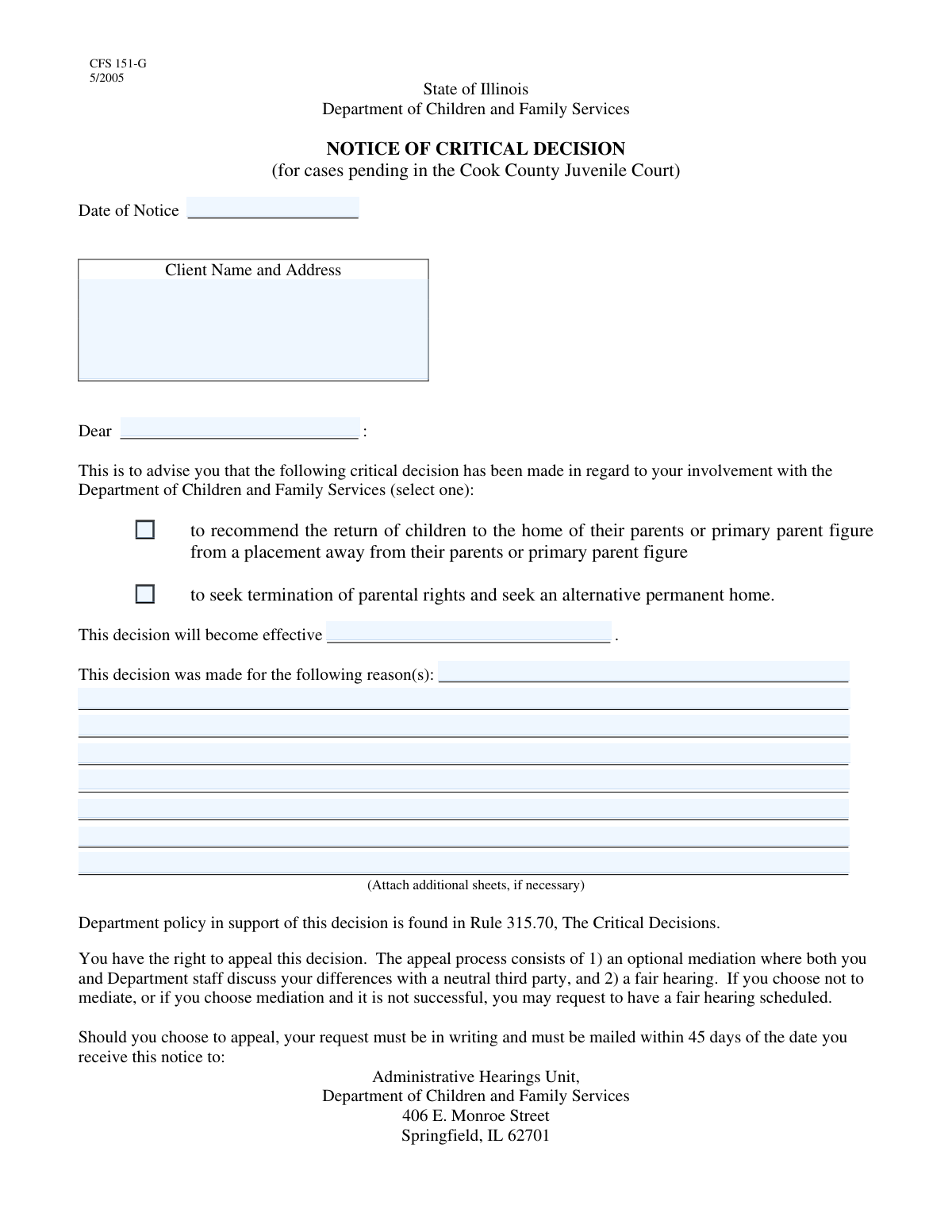
Yes! You can use AI to fill out OCFS-4001, Notice of Critical Decision

The OCFS-4001, Notice of Critical Decision, is a crucial document used by the New York State Office of Children and Family Services (OCFS). It officially notifies parents or guardians of significant case decisions, such as recommending a child's return home or initiating proceedings to terminate parental rights. This notice ensures that families are formally aware of actions that will profoundly affect their future and outlines their rights. Today, this form can be filled out quickly and accurately using AI-powered services like Instafill.ai, which can also convert non-fillable PDF versions into interactive fillable forms.
OCFS-4001 is part of the OCFS forms category on Instafill.
Our AI automatically handles information lookup, data retrieval, formatting, and form filling.
It takes less than a minute to fill out OCFS-4001 using our AI form filling.
Securely upload your data. Information is encrypted in transit and deleted immediately after the form is filled out.

Form specifications

Form name: OCFS-4001, Notice of Critical Decision
Number of fields: 17
Number of pages: 2
Filled form examples: Form OCFS-4001 Examples
Language: English
main-image

Instafill Demo: How to fill out PDF forms in seconds with AI

How to Fill Out OCFS-4001 Online for Free in 2026

Are you looking to fill out a OCFS-4001 form online quickly and accurately? Instafill.ai offers the #1 AI-powered PDF filling software of 2026, allowing you to complete your OCFS-4001 form in just 37 seconds or less.
Follow these steps to fill out your OCFS-4001 form online using Instafill.ai:
  1. 1 Navigate to Instafill.ai and upload or select the OCFS-4001 form.
  2. 2 Enter the date of the notice, and the client's (agency's) name and address.
  3. 3 Input the full name and address of the recipient (parent or guardian).
  4. 4 Check the appropriate box to indicate the critical decision: recommending the return of children or seeking termination of parental rights.
  5. 5 Provide the effective date for the decision and write a detailed explanation for the reasons in the space provided.
  6. 6 Fill in the social worker's telephone number and the TDD number for hearing-impaired assistance.
  7. 7 Review all the information for accuracy with the AI-powered validator, then securely download, print, or share the completed form.

Our AI-powered system ensures each field is filled out correctly, reducing errors and saving you time.

Why Choose Instafill.ai for Your Fillable OCFS-4001 Form?

Speed

Complete your OCFS-4001 in as little as 37 seconds.

Up-to-Date

Always use the latest 2026 OCFS-4001 form version.

Cost-effective

No need to hire expensive lawyers.

Accuracy

Our AI performs 10 compliance checks to ensure your form is error-free.

Security

Your personal information is protected with bank-level encryption.

Frequently Asked Questions About Form OCFS-4001

This form serves as a formal "Notice of Critical Decision" to inform clients and other relevant parties about a major decision in a child welfare case, such as returning a child home or seeking to terminate parental rights.

A social worker, case manager, or an authorized representative of a child welfare agency who is making the critical decision is responsible for completing and distributing this form.

The 'Client' is the individual or family at the center of the case, whose information is listed in the 'Client Name and Address' field. The 'Recipient' is the person or entity receiving the notice, such as a parent, guardian, or attorney.

These are two distinct, critical decisions. 'Recommend Return of Children' indicates a plan to reunify the family, while 'Seek Termination of Parental Rights' begins the legal process to permanently end the parent-child relationship.

No, you must choose only one. These decisions are mutually exclusive and represent two different legal and procedural paths for the case.

The 'Date of Notice' is the day you are preparing and sending the form. The 'Effective Date' is the future date on which the stated decision will officially go into effect.

Provide a clear, factual, and detailed explanation for the decision being made. Reference specific events, assessments, and progress or lack thereof that supports this critical decision in the child's best interest.

Yes, services like Instafill.ai use AI to help you accurately auto-fill form fields with client data, dates, and other information, which can save significant time and reduce errors.

You can use a tool like Instafill.ai to solve this problem. It can convert flat, non-fillable PDFs into interactive, fillable forms that you can complete easily on your computer.

First, upload the form to the Instafill.ai platform. The AI will automatically detect the fields, allowing you to click and type, use auto-fill suggestions, and add your signature before downloading the completed document.

TDD stands for Telecommunications Device for the Deaf. It is a dedicated phone line for a teletypewriter (TTY) that enables individuals with hearing or speech impairments to communicate via text.

You will need the client's full name and address, the recipient's name, the specific dates for the notice and decision, and a well-documented reason for the decision. You will also need your work phone number and the TDD number if available.

These fields are likely designated for additional information such as worker signatures, supervisor approvals, or specific court details. Always refer to your agency's specific guidelines for completing these sections.

Compliance OCFS-4001
Validation Checks by Instafill.ai

1
Valid Date of Notice Format
This check verifies that the 'Date of Notice' is entered in a valid date format, such as MM/DD/YYYY. It is important for record-keeping and establishing a clear timeline for legal proceedings. If the date is invalid, the form submission will be rejected, and the user will be prompted to correct the format to ensure data integrity.
2
Date of Notice is Not a Future Date
This validation ensures the 'Date of Notice' is not set to a future date. A notice cannot be issued on a day that has not yet occurred, as this would be logically and legally inconsistent. If a future date is entered, the system will display an error message asking the user to provide the current or a past date.
3
Client Name and Address Completeness
This check confirms that the 'Client Name and Address' field is not empty. This information is critical for identifying the subject of the notice and for official correspondence. A failure to provide this information would render the notice incomplete and legally insufficient, so the form cannot be submitted without it.
4
Recipient Name is Required
This validation verifies that the 'Recipient Name' field has been filled out. It is essential to know who the notice is officially addressed to for legal and communication purposes. An empty recipient field would make the notice undeliverable and invalid, so the submission will be blocked until a name is provided.
5
At Least One Critical Decision Selected
This validation ensures that at least one of the two critical decision checkboxes ('Recommend Return of Children' or 'Seek Termination of Parental Rights') is selected. The purpose of the form is to communicate a critical decision, so one must be chosen. If neither is selected, the user will be prompted to choose the decision that applies.
6
Mutually Exclusive Critical Decisions
This check prevents both 'Recommend Return of Children' and 'Seek Termination of Parental Rights' from being selected simultaneously. These are opposing legal actions and cannot both be pursued in the same notice. If a user attempts to select both, an error will be shown, forcing them to choose only one option to maintain logical consistency.
7
Decision Effective Date is Required
This validation confirms that the 'Effective Date' field is not left blank. This date is crucial as it marks when the specified critical decision officially takes effect, which has significant legal and practical implications. The form submission will be blocked if this mandatory date is missing.
8
Effective Date is Logically Valid
This check ensures the 'Effective Date' is on or after the 'Date of Notice'. A decision cannot become effective before the notice about it is even dated, as this would be chronologically impossible. If the effective date precedes the notice date, the system will flag it as an error and require correction.
9
Reason for Decision is Provided
This check ensures that the 'Reasons for Decision' text area is not empty. Providing a detailed justification is a fundamental requirement for due process and transparency in such critical matters. A submission without a reason would be procedurally flawed, so the system will require the user to enter a justification.
10
Worker's Telephone Number is Required
This check confirms that the 'Worker's Telephone Number' field is filled out. This contact information is essential for the recipient or other involved parties to ask questions or seek clarification about the notice. The form will not be submittable without this number to ensure a point of contact is always available.
11
Worker's Telephone Number Format
This validation verifies that the 'Worker's Telephone Number' is entered in a recognizable U.S. phone number format (e.g., XXX-XXX-XXXX or (XXX) XXX-XXXX). This ensures the contact information is usable and can be correctly parsed by other systems. If the format is incorrect, the user will be asked to re-enter the number.
12
Valid TDD Telephone Number Format
This check validates the format of the 'TDD Telephone Number' if a value is provided. While the field may be optional, any entered number must conform to a standard phone number format to be useful for hearing-impaired individuals. An invalid entry will trigger an error, prompting the user to either correct the number or clear the field.

Common Mistakes in Completing OCFS-4001

Confusing 'Date of Notice' with 'Effective Date'

Users often enter the same date in both fields, failing to distinguish between the date the notice is prepared and the date the decision legally takes effect. This can create legal ambiguity regarding timelines for appeals or actions, potentially invalidating the notice. To avoid this, understand that the 'Date of Notice' is today's date, while the 'Effective Date' is a future date when the decision is enacted.

Providing an Incomplete or Inaccurate Client Address

A frequent error is omitting apartment numbers, using incorrect zip codes, or making typos in the street name. This mistake can lead to the notice being returned as undeliverable, which means the client was not legally notified of a life-altering decision. Always double-check the address for completeness and accuracy, and use address validation tools to ensure deliverability. AI-powered form fillers like Instafill.ai can help by auto-completing and verifying addresses.

Selecting Both or Neither Critical Decision Checkbox

The form requires a single, clear decision: either recommending the return of children or seeking termination of parental rights. Checking both boxes, or leaving both blank, makes the notice's purpose completely ambiguous and legally void. This critical error requires re-issuing the notice, causing significant delays. Carefully review the case file and select only one option that reflects the official decision.

Writing Vague or Subjective Reasons for the Decision

In the 'Reasons for Decision' section, users may provide brief, subjective, or emotionally-charged explanations instead of objective, factual details. This weakens the legal standing of the decision and makes it vulnerable to appeal, as it fails to provide a clear, evidence-based justification. To avoid this, cite specific facts, dates, observed behaviors, and progress (or lack thereof) on case plan goals in a professional tone.

Using an Informal Name for the Client or Recipient

Entering a nickname or an abbreviated name instead of the full legal name can create identification issues and potential legal challenges. Official notices require precise identification to be valid. Always use the full legal name as it appears on official documents like birth certificates or court records. AI tools can help maintain consistency by saving and reusing correct legal names across documents.

Incorrectly Formatting Telephone Numbers

People often enter phone numbers without an area code or use inconsistent separators like dots or spaces instead of hyphens. This can make the number difficult to read or use in automated systems, creating a barrier for clients or attorneys who need to contact the worker. Always use a standard format like (XXX) XXX-XXXX. Tools like Instafill.ai can automatically format phone numbers into the correct, consistent layout.

Text Overflowing in the 'Reasons for Decision' Field

When filling out a non-fillable PDF, detailed explanations often exceed the visible space of the text boxes, causing the text to be cut off when printed or saved. This results in an incomplete official record of the justification for the decision. To prevent this, use a tool like Instafill.ai that can convert flat PDFs into fillable forms with auto-resizing text fields, or attach a clearly labeled addendum if necessary.

Omitting the TDD Telephone Number

Leaving the TDD (Telecommunications Device for the Deaf) number blank is a common oversight. This denies hearing-impaired individuals an accessible means of communication, which can be a violation of accessibility laws like the ADA. Always provide the designated TDD number if one is available for your agency to ensure equal access for all parties involved.

Incorrectly Identifying the Notice Recipient

A critical mistake is addressing the notice to the wrong party, such as sending it to the client directly when it should be sent to their legal representative. This can invalidate the service of notice, as the legally required party was not properly informed. Carefully verify the correct recipient and their address from the case file before filling out the form to ensure compliance with legal notification requirements.

Using an Ambiguous or Incorrect Date Format

Entering dates in a non-standard format (e.g., 01.02.2024) can cause confusion, especially between MM/DD/YYYY and DD/MM/YYYY conventions. An incorrect date can affect legal deadlines and the validity of the notice. To avoid this, use the standard MM/DD/YYYY format unless specified otherwise, and double-check the month, day, and year for accuracy. Using a calendar picker in a digital form can prevent this error.
Saved over 80 hours a year

“I was never sure if my IRS forms like W-9 were filled correctly. Now, I can complete the forms accurately without any external help.”

Kevin Martin Green

Your data stays secure with advanced protection from Instafill and our subprocessors

Robust compliance program

Transparent business model

You’re not the product. You always know where your data is and what it is processed for.

ISO 27001, HIPAA, and GDPR

Our subprocesses adhere to multiple compliance standards, including but not limited to ISO 27001, HIPAA, and GDPR.

Security & privacy by design

We consider security and privacy from the initial design phase of any new service or functionality. It’s not an afterthought, it’s built-in, including support for two-factor authentication (2FA) to further protect your account.

Fill out OCFS-4001 with Instafill.ai

Worried about filling PDFs wrong? Instafill securely fills ocfs-4001-notice-of-critical-decision forms, ensuring each field is accurate.