Yes! You can use AI to fill out Relationship and Child Care Arrangement Details Form

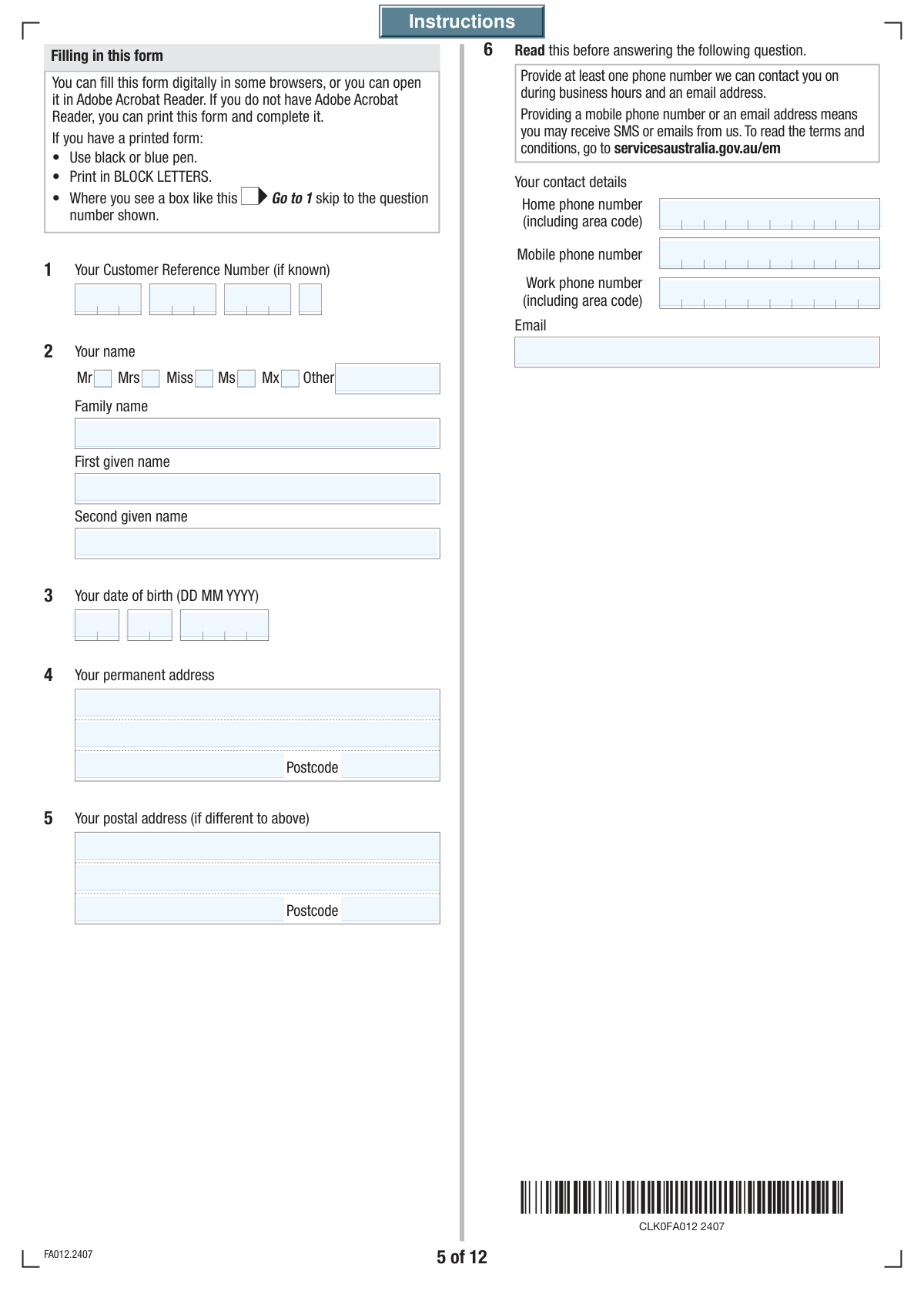
This form is a comprehensive declaration to Services Australia (Centrelink) detailing an individual's relationship status, partner information, and specific care arrangements for dependent children. It is crucial for accurately determining eligibility and payment rates for benefits such as the Family Tax Benefit and Child Care Subsidy, especially in cases of separation or shared care. Today, this form can be filled out quickly and accurately using AI-powered services like Instafill.ai, which can also convert non-fillable PDF versions into interactive fillable forms.
Centrelink Relationship and Child Care Details is part of the CAR forms, child care forms, ETA forms and L.A. Care forms categories on Instafill.
Our AI automatically handles information lookup, data retrieval, formatting, and form filling.
It takes less than a minute to fill out Centrelink Relationship and Child Care Details using our AI form filling.
Securely upload your data. Information is encrypted in transit and deleted immediately after the form is filled out.

Form specifications

Form name: Relationship and Child Care Arrangement Details Form
Number of fields: 247
Number of pages: 12
Language: English
main-image

Instafill Demo: How to fill out PDF forms in seconds with AI

How to Fill Out Centrelink Relationship and Child Care Details Online for Free in 2026

Are you looking to fill out a CENTRELINK RELATIONSHIP AND CHILD CARE DETAILS form online quickly and accurately? Instafill.ai offers the #1 AI-powered PDF filling software of 2026, allowing you to complete your CENTRELINK RELATIONSHIP AND CHILD CARE DETAILS form in just 37 seconds or less.
Follow these steps to fill out your CENTRELINK RELATIONSHIP AND CHILD CARE DETAILS form online using Instafill.ai:
  1. 1 Navigate to Instafill.ai and upload or select the Relationship and Child Care Arrangement Details form.
  2. 2 Provide your personal information, including your name, date of birth, address, and Customer Reference Number (CRN).
  3. 3 Detail your current relationship status, providing dates and partner information if you are married, in a de facto relationship, or separated.
  4. 4 For each child, enter their personal details and describe your care arrangements, including parenting plans and the percentage of care you provide.
  5. 5 Answer questions regarding your eligibility and claims for Family Tax Benefit and Child Care Subsidy.
  6. 6 Review all the information entered by you and the AI for accuracy, ensuring all details about your partner, children, and care schedules are correct.
  7. 7 Electronically sign the declaration and download the completed form, ready to be submitted to Services Australia.

Our AI-powered system ensures each field is filled out correctly, reducing errors and saving you time.

Why Choose Instafill.ai for Your Fillable Centrelink Relationship and Child Care Details Form?

Speed

Complete your Centrelink Relationship and Child Care Details in as little as 37 seconds.

Up-to-Date

Always use the latest 2026 Centrelink Relationship and Child Care Details form version.

Cost-effective

No need to hire expensive lawyers.

Accuracy

Our AI performs 10 compliance checks to ensure your form is error-free.

Security

Your personal information is protected with bank-level encryption.

Frequently Asked Questions About Form Centrelink Relationship and Child Care Details

This form is used to collect or update your personal details, relationship status, and specific child care arrangements, likely to assess your eligibility for government payments like the Family Tax Benefit or Child Care Subsidy.

You should complete this form if you need to provide details about your relationship status and child care arrangements, especially if your circumstances have changed while applying for or receiving government support.

Your Customer Reference Number (CRN) is a unique ID used for government services. You can find it on letters you've received from the agency, on your concession card, or by logging into your online services account.

A 'registered relationship' is one that has been formally registered with an Australian state or territory government. A 'de facto' relationship is when you live together as a couple but are not married or in a registered relationship.

You should indicate that you have a written agreement, but then specify that the arrangements are NOT being followed. You will then need to provide details of the actual care arrangements as they currently exist.

If you are unsure of the care percentage, the form allows you to provide the number of nights, weeks, or hours the child spends with you and the other carer. The agency will use this information to calculate the percentage for you.

Yes, if you are married, in a registered relationship, or in a de facto relationship, you must provide your partner's details. This information is required to assess your household circumstances.

This section asks for your consent to allow the agency to speak with your partner about your payments and information. If you select 'No', they will only be able to discuss your case directly with you.

You must complete the detailed care arrangement section for each child. The form includes sections for a second child and indicates you should attach a separate sheet if you have more children with shared care arrangements.

You should fill out the form with the care details as you understand them and check 'No' for question 33, which asks if arrangements are agreed upon. You can use the space in question 34 to explain any concerns or disagreements.

Yes, services like Instafill.ai use AI to help you fill out forms accurately and save time. These tools can auto-fill your personal information, reducing manual entry and potential errors.

Simply upload the PDF form to the Instafill.ai website. The AI will make the form fillable online, and you can use its features to automatically populate your information from your saved profile.

You can use a service like Instafill.ai, which can instantly convert non-fillable PDFs into interactive forms. This allows you to type your answers directly into the fields instead of printing and writing by hand.

Compliance Centrelink Relationship and Child Care Details
Validation Checks by Instafill.ai

1
Relationship Status Exclusivity
This validation ensures that only one relationship status (e.g., 'Married', 'De facto', 'Separated', 'Never married') can be selected. It is critical because the applicant's relationship status dictates which subsequent sections of the form are required, such as partner details or separation dates. If multiple statuses are selected, the form submission will be rejected with an error asking the user to select only one option.
2
Conditional Partner Information Requirement
This check verifies that if the applicant's relationship status is 'Married', 'Registered relationship', or 'De facto', then all mandatory partner detail fields (e.g., Partner's Name, Partner's Date of Birth) are completed. These details are essential for assessing household income and eligibility for certain benefits. If the status is selected but partner details are missing, the user will be prompted to complete the required partner information before proceeding.
3
Date of Birth Logical Validity
This validation confirms that the 'Day', 'Month', and 'Year' of birth fields combine to form a valid, realistic date. The check ensures the date is in the past and that the applicant is of a reasonable age, typically over 16 and less than 110 years old. This prevents data entry errors and ensures the applicant is legally old enough to enter into agreements or claim benefits. An invalid or illogical date will trigger an error message.
4
Chronological Date Check (Birth vs. Relationship)
This check ensures logical consistency between dates by verifying that the 'Date of Marriage/Reconciliation' or 'Date Relationship Started' is after the applicant's 'Date of Birth'. It is impossible for someone to get married before they are born, so this check prevents significant data errors. If the relationship date precedes the birth date, the system will flag an error and require the user to correct one or both dates.
5
Chronological Date Check (Relationship vs. Separation)
This validation confirms that the 'Date of Last Separation' occurs after the 'Date Married or Last Reconciled' or 'Date Relationship Started'. A separation cannot logically happen before a relationship begins. This check maintains the integrity of the applicant's relationship timeline, which is crucial for legal and benefit-related purposes. A validation failure will require the user to correct the dates to reflect a logical sequence of events.
6
Email Address Format Validation
This check ensures that the value entered in the 'Email' field follows the standard format of a valid email address (e.g., '[email protected]'). This is important for ensuring that communications sent to the applicant will be successfully delivered. If the format is invalid, the user will be shown an error message indicating that the email address is not in a recognizable format and must be corrected.
7
Australian Postcode Format
This validation verifies that all postcode fields ('Permanent Postcode', 'Postal Postcode', 'Partner's Postcode') contain a 4-digit number, consistent with the Australian postcode format. Correct postcodes are essential for mail delivery and for demographic or service area analysis. An entry that is not four digits long or contains non-numeric characters will be rejected, prompting the user to enter a valid postcode.
8
Conditional 'Other Title' Entry
This check ensures that if the 'Q2.Title_Mx' (or a similar 'Other' option) checkbox is selected for the applicant's title, the corresponding 'Other Title' text field is not empty. This rule ensures that when a user indicates a non-standard title, they specify what it is. If 'Mx' is checked and the text field is left blank, a validation error will appear, requiring the user to provide their title.
9
Care Percentage Summation
This validation checks that the 'Your Care Percentage' and the 'Other Parent Care Percentage' fields sum to exactly 100%. This is a critical logical check to ensure the full care arrangement for a child is accounted for, which directly impacts benefit calculations. If the sum is not 100%, an error will be displayed, instructing the user to adjust the percentages until they total 100.
10
Child and Parent Age Consistency
This check validates that a child's date of birth is logically after the applicant's date of birth, ensuring the applicant is old enough to be the parent or carer. The system will calculate the age difference and flag any entry where the child is not at least 14-16 years younger than the applicant. This serves as a sanity check to catch major data entry errors. A failure would prompt the user to review and correct the birth dates.
11
Care Arrangement Date Sequence
This validation ensures the 'Care Arrangement Start Date' is after the 'Child's Date of Birth' and that the 'Care Arrangement End/Change Date', if provided, is after the start date. This maintains a logical timeline for the child's care, which is essential for determining benefit periods. If the dates are out of sequence, the system will prevent submission and require the user to correct the timeline.
12
Declaration Date Finality
This check verifies that the 'Declaration Date' is not in the future and is on or after all other event dates entered on the form (e.g., birth, marriage, separation). The declaration is a confirmation of the information's accuracy at the time of signing, so it must be the final event in the form's timeline. A declaration date that precedes other events will trigger an error, requiring the user to enter a valid date.
13
Mandatory Contact Information
This validation ensures that at least one method of contact—either 'Mobile Phone Number' or 'Email'—is provided by the applicant. This is crucial for the organization to be able to communicate with the applicant regarding their submission. If all primary contact fields are left empty, the form will not be accepted and will display a message requiring the user to provide at least one contact method.
14
Conditional Relationship Date Requirement
This check ensures that if a relationship status like 'Married', 'Divorced', or 'Separated' is selected, the corresponding date fields are filled out. For example, selecting 'Married' makes the 'Date Married or Last Reconciled' fields mandatory. This is vital for establishing key dates in the applicant's history for eligibility purposes. Failure to provide the required date will result in an error message prompting for completion.

Common Mistakes in Completing Centrelink Relationship and Child Care Details

Incorrectly Segmenting Reference Numbers

The form requires the Customer Reference Number (CRN) to be split across four separate fields, which often leads to errors. Applicants frequently enter the entire number into the first box, misplace digits, or transpose parts of the number between the boxes. This error guarantees a data mismatch and will lead to immediate processing delays or rejection as the system cannot identify the applicant. To avoid this, carefully enter each segment of the CRN into its corresponding box, double-checking each part before moving on.

Contradictory Relationship Status and Dates

The form asks for a single relationship status (e.g., Married, De facto) and a corresponding date, but the complexity leads to errors. A frequent mistake is selecting a status but providing an illogical or missing date, or selecting multiple conflicting statuses like 'Married' and 'Separated'. Such inconsistencies require manual clarification, significantly delaying the application process. Ensure you select only one current status and provide the accurate, complete date in the corresponding fields.

Failing to Complete Conditional Partner Sections

When a relationship status of 'Married', 'De facto', or 'Registered relationship' is selected, a large section for the partner's details becomes mandatory. Applicants often overlook this or provide incomplete information, assuming it's optional or not readily available. Missing partner details, especially their name, date of birth, and CRN, will halt the assessment process until the information is provided. Always complete all partner-related fields fully if your relationship status requires it.

Splitting Dates Incorrectly Across Fields

Many dates on this form are split into separate Day, Month, and Year fields, with the marriage date even splitting the year into two parts ('First Two Digits' and 'Last Two Digits'). This format is highly prone to error, with users often entering the full year in one box or transposing day and month. An invalid date format can cause the form to be rejected by automated systems or flagged for manual review. To prevent this, carefully enter each component of the date into its specific field as requested.

Miscalculating Child Care Percentages

The form asks for care arrangements as a percentage and also as a number of nights/hours, which can be confusing to calculate. Users often guess the percentage or provide a breakdown of nights and hours that doesn't mathematically align with the percentage they've stated. An incorrect care percentage is a critical error that directly impacts benefit calculations and can lead to incorrect payments or rejection. Use the provided guidance to calculate the percentage accurately, or if unsure, provide the detailed breakdown of nights and hours and let the agency calculate it.

Ignoring Form Skip Logic Instructions

The form contains several 'Go To Question X' instructions based on 'Yes' or 'No' answers, which are crucial for navigating its complexity. Users filling out a paper or non-interactive PDF version often miss these cues, resulting in them filling out irrelevant sections or skipping mandatory ones. This creates a confusing and incomplete submission that will be rejected or require follow-up. AI-powered tools like Instafill.ai can convert flat PDFs into fillable versions with interactive logic to guide you through the correct questions, preventing this error.

Using Informal Names Instead of Legal Names

The form requires legal names as they appear on official documents, but applicants sometimes enter a preferred nickname, a shortened version of their name, or forget to include a middle name. This causes a mismatch during identity verification, leading to processing delays while the agency requests corrected information and proof of identity. Always use your full, official legal name in all name fields to ensure a smooth verification process.

Leaving 'Other' Fields Blank

Several questions, such as 'Title' and 'Relationship to Child', offer an 'Other' option with a corresponding text field for explanation. A common mistake is to select 'Other' but then forget to write in the required details. This leaves the form processor with incomplete information, making it impossible to correctly categorize your situation and forcing them to contact you for clarification. If you select an 'Other' checkbox, always ensure you fill in the associated text box with a clear and concise description.

Omitting Details of Other Carers

When a child spends time with another parent or carer, the form requires their full name and contact details. Applicants may be hesitant to provide this, not have it readily available, or simply forget, which is a critical omission. The agency cannot verify care arrangements or calculate entitlements correctly without the other party's information, leading to significant delays or denial of the claim. Before starting the form, gather the full name, address, and phone number for any other person involved in the child's care.

Confusing Permanent and Postal Addresses

The form requests both a permanent residential address and a separate postal address. People often fill in only one, assuming the other is not needed if they are the same, or they accidentally switch the information between the two sections. This can lead to important correspondence being sent to the wrong location and returned as undeliverable. Carefully fill out both address sections, even if they are identical, to ensure you receive all communications without delay.
Saved over 80 hours a year

“I was never sure if my IRS forms like W-9 were filled correctly. Now, I can complete the forms accurately without any external help.”

Kevin Martin Green

Your data stays secure with advanced protection from Instafill and our subprocessors

Robust compliance program

Transparent business model

You’re not the product. You always know where your data is and what it is processed for.

ISO 27001, HIPAA, and GDPR

Our subprocesses adhere to multiple compliance standards, including but not limited to ISO 27001, HIPAA, and GDPR.

Security & privacy by design

We consider security and privacy from the initial design phase of any new service or functionality. It’s not an afterthought, it’s built-in, including support for two-factor authentication (2FA) to further protect your account.

Fill out Centrelink Relationship and Child Care Details with Instafill.ai

Worried about filling PDFs wrong? Instafill securely fills relationship-and-child-care-arrangement-details-form forms, ensuring each field is accurate.