Yes! You can use AI to fill out USACC Form 104-R, Planned Academic Program Worksheet

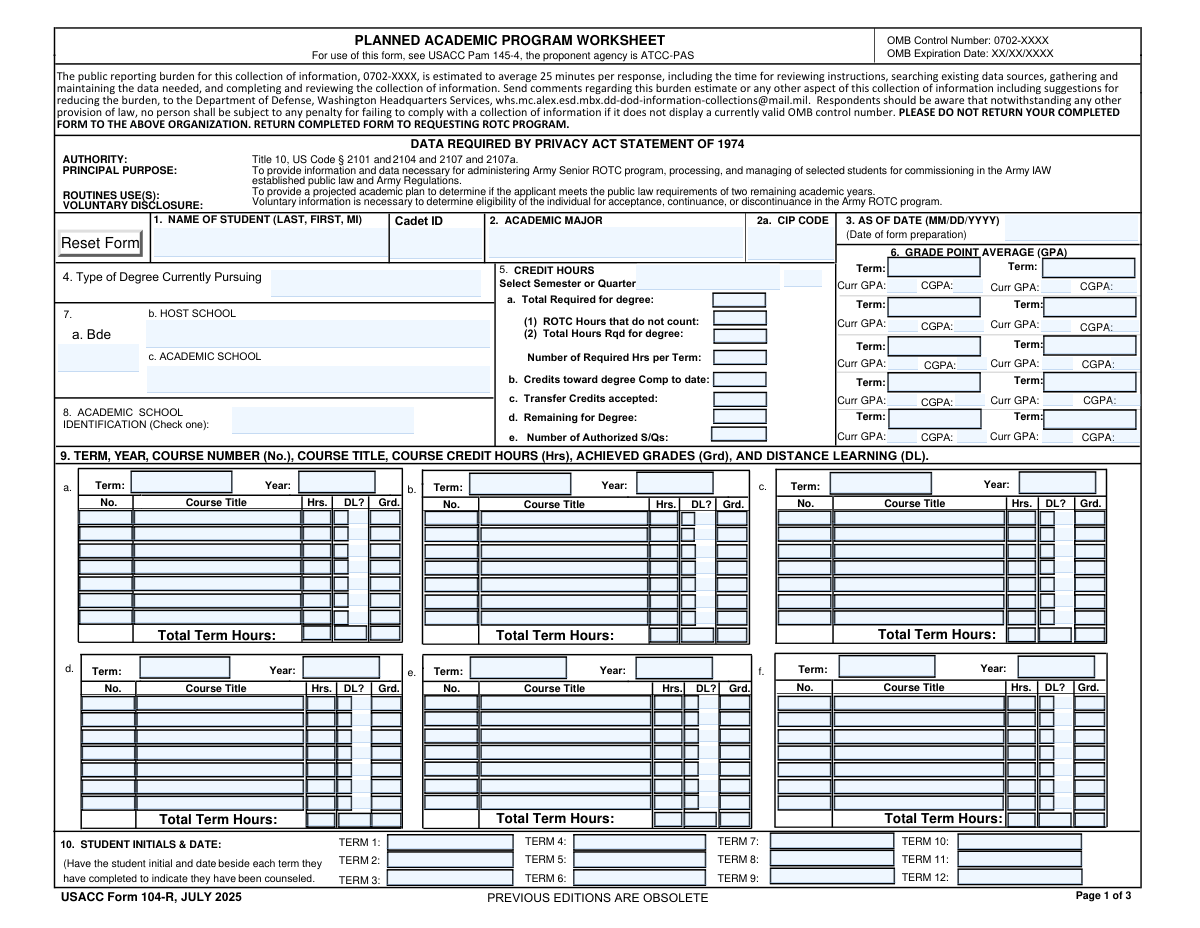
USACC Form 104-R is an official Army Cadet Command (USACC) worksheet used to plan and verify a cadet’s remaining academic program, including degree type, required credit hours, term GPAs, and a term-by-term list of courses (with credit hours, grades, and distance learning indicators). It supports ROTC program administration and helps confirm the cadet can meet public-law requirements (generally two remaining academic years) and scholarship/commissioning timelines, with required reviews and signatures from the cadet and school/ROTC officials. The form also includes a Statement of Understanding that documents responsibilities and approval requirements for changes to the degree plan. Today, this form can be filled out quickly and accurately using AI-powered services like Instafill.ai, which can also convert non-fillable PDF versions into interactive fillable forms.
Our AI automatically handles information lookup, data retrieval, formatting, and form filling.
It takes less than a minute to fill out USACC 104-R using our AI form filling.
Securely upload your data. Information is encrypted in transit and deleted immediately after the form is filled out.

Form specifications

Form name: USACC Form 104-R, Planned Academic Program Worksheet
Number of pages: 3
Filled form examples: Form USACC 104-R Examples
Language: English
Categories: ROTC forms, Army forms, USACC forms, Military forms
main-image

Instafill Demo: filling out a legal form in seconds

How to Fill Out USACC 104-R Online for Free in 2026

Are you looking to fill out a USACC 104-R form online quickly and accurately? Instafill.ai offers the #1 AI-powered PDF filling software of 2026, allowing you to complete your USACC 104-R form in just 37 seconds or less.
Follow these steps to fill out your USACC 104-R form online using Instafill.ai:
  1. 1 Go to Instafill.ai and upload/select “USACC Form 104-R (Planned Academic Program Worksheet)” from the form library.
  2. 2 Let the AI detect and map fields, then enter/import the cadet’s identifying information (name, Cadet ID), academic major, and (if applicable) CIP code and “as of” date.
  3. 3 Complete school and program details (brigade, host school, academic school, and academic school identification such as Host/Extension Unit/Cross-Town).
  4. 4 Enter degree and credit-hour planning data (degree type, total hours required, ROTC hours not counted, completed credits, transfer credits, remaining credits, and authorized semesters/quarters) and verify calculated outputs.
  5. 5 Fill in term-by-term academic performance (current and cumulative GPA for completed terms) and add planned/required courses for each term (term/year, course number, title, credit hours, DL indicator, and grades when completed).
  6. 6 Record counseling acknowledgments by adding student initials and dates for each completed term, then complete the review section (confirm courses required, expected completion/graduation date, degree type/discipline).
  7. 7 Apply required signatures and dates (student, registrar/ROTC advisor/certifying official, and Statement of Understanding signatures including the Professor of Military Science), then download/export and submit to the requesting ROTC program.

Our AI-powered system ensures each field is filled out correctly, reducing errors and saving you time.

Why Choose Instafill.ai for Your Fillable USACC 104-R Form?

Speed

Complete your USACC 104-R in as little as 37 seconds.

Up-to-Date

Always use the latest 2026 USACC 104-R form version.

Cost-effective

No need to hire expensive lawyers.

Accuracy

Our AI performs 10 compliance checks to ensure your form is error-free.

Security

Your personal information is protected with bank-level encryption.

Frequently Asked Questions About Form USACC 104-R

This form documents a cadet’s projected academic plan so Army ROTC can verify the cadet can complete the degree and meet public law requirements (generally two remaining academic years) for commissioning. It is used to administer, process, and manage ROTC students under USACC Pam 145-4.

Contracted Army ROTC cadets (and often scholarship cadets) typically must complete it, and it must be reviewed at least annually. Your ROTC program will tell you when it’s required for contracting, scholarship actions, or continued enrollment.

Disclosure is voluntary, but the form states the information is necessary to determine eligibility for acceptance, continuance, or discontinuance in the Army ROTC program. If you don’t provide it, your ROTC program may not be able to process your status or benefits.

Have your full name, Cadet ID, academic major (and CIP code if applicable), degree type, school information (brigade/host/academic school), and your degree requirements. You’ll also need your planned course schedule by term (course number, title, credit hours, and whether it’s distance learning).

The CIP Code is the Classification of Instructional Programs code tied to your major. The instructions note it is only used for HQ STEM Scholarships and is not necessary for most other scholarships.

Block 5 uses your degree’s total required hours, ROTC hours that do not count toward the degree, completed credits, and accepted transfer credits to calculate remaining hours and the number of scholarship terms needed. Make sure you select the correct semester/quarter and degree plan in the dropdown so the calculations work correctly.

Enter ROTC credit hours that your school does not apply toward your degree requirements (for example, ROTC labs or classes that are not counted in your program of study). If you’re unsure, confirm with your academic advisor/registrar or ROTC advisor.

Each group represents one academic term: select the term (Fall/Winter/Spring/Summer) and year, then list each course with course number, title, credit hours, and mark DL if it’s online. After the term is completed, add the achieved grades for those courses.

“DL” stands for Distance Learning. Check the DL box for any course taken online or through a distance-learning format, consistent with how your school classifies the course.

You should enter the term GPA and cumulative GPA for each term you have completed. If a term hasn’t occurred yet, leave those GPA fields blank until you have official grades.

The student initials and date next to each completed term indicate the cadet has been counseled and the plan has been reviewed. Initial and date only for terms you have completed (as directed by your ROTC program).

The cadet signs and dates the worksheet, and a registrar/examiner of credentials or ROTC advisor (or other certifying school official) signs and dates to authenticate the academic plan. The Statement of Understanding is signed and dated by the cadet and the Professor of Military Science (PMS).

The Statement of Understanding says any changes to the degree plan, adding/dropping classes, or a change of major must be discussed and approved with the PMS first. You will typically need to update/revise the 104-R and have it re-authenticated by the appropriate school official.

Do not send it to the DoD email listed for burden comments; the form instructs you to return it to the requesting ROTC program. Processing time varies by program and time of year, so ask your ROTC cadre when it will be reviewed and uploaded/accepted.

Yes—AI tools can help reduce errors and save time by auto-filling repetitive fields (like term headers, course rows, and credit totals) from your degree plan and transcript; services like Instafill.ai are designed to auto-fill form fields accurately. To use Instafill.ai, upload the PDF, map or confirm the key fields (student info, Block 5 credit hours, and term course tables), let the AI populate the form, then review for accuracy before downloading and submitting to your ROTC program.

If the PDF isn’t interactive, you can still complete it by printing and handwriting, or by using a tool that converts flat PDFs into fillable forms. Instafill.ai can convert non-fillable PDFs into interactive fillable forms and then help auto-fill the fields.

Compliance USACC 104-R
Validation Checks by Instafill.ai

1
Student Name format and completeness (Last, First, MI)
Validates that the Student Name is present and follows the required ordering: last name, first name, and middle initial (if provided). The check should reject entries that are only a single token (e.g., just a last name) or that include invalid characters (numbers, excessive punctuation). If validation fails, the submission should be blocked and the user prompted to re-enter the name in the required format to prevent identity mismatches across ROTC and school records.
2
Cadet ID required and conforms to expected ID pattern
Ensures Cadet ID is provided and matches the organization’s expected format (e.g., numeric-only with a defined length, or an approved alphanumeric pattern). This prevents duplicate or unresolvable records when the form is used for scholarship term calculations and program management. If the Cadet ID is missing or malformed, the system should flag the field as invalid and prevent submission until corrected.
3
Academic Major required and consistent with CIP Code presence rules
Checks that Academic Major is not blank and is a meaningful major name (not placeholders like 'N/A' or 'Undecided' unless explicitly allowed by policy). Also enforces the form instruction that CIP Code is only required for HQ STEM scholarships; if a STEM scholarship indicator exists in the workflow, CIP must be present, otherwise CIP may be optional. If the rule fails, the system should require correction or an explicit exception/override reason to ensure scholarship eligibility determinations are supportable.
4
CIP Code format validation (standard CIP structure)
Validates that the CIP Code, when provided, matches a standard CIP format (commonly a 6-digit code with a decimal, such as '14.0901', or an accepted variant defined by the program). This reduces downstream errors when categorizing majors for STEM scholarship processing and reporting. If the CIP Code does not match the accepted pattern, the system should reject the value and request a corrected CIP code.
5
All date fields use MM/DD/YYYY and are real calendar dates
Validates that all date fields (As of Date, Student Signature Date, Registrar Signature Date, Cadet Signature Date on the Statement of Understanding, and PMS Signature Date) follow MM/DD/YYYY and represent valid calendar dates. This prevents ambiguous or non-parsable dates that break audit trails and annual review requirements. If validation fails, the system should block submission and highlight the specific date field(s) needing correction.
6
Signature dates are logically ordered and not in the future
Ensures signature dates are not later than the current system date (unless future-dating is explicitly permitted) and that the certifying official’s date is on or after the student’s signature date for the same section. This supports authenticity and prevents invalid certification sequences. If the ordering is violated, the system should flag the inconsistency and require corrected dates or re-signing.
7
Degree type selection constrained to allowed values
Validates that Type of Degree Currently Pursuing (and Degree Type in the review section, if separate) is selected from the allowed set: Bachelors, Masters, or Associates (MJC only), per the instructions. Free-text or unrecognized degree types can cause incorrect scholarship term calculations and policy misapplication. If validation fails, the system should require the user to choose a valid degree type and, if needed, capture an exception justification.
8
Academic School Identification is one of Host / Extension Unit / Cross-Town
Checks that Academic School Identification is selected and matches one of the defined options: Host, Extension Unit, or Cross-Town. This is important because ROTC attendance rules differ depending on whether the academic school is the host or a partner school. If the value is missing or outside the allowed set, the system should prevent submission and prompt for a valid selection.
9
Host School and Academic School required; conditional consistency with identification
Ensures Host School and Academic School names are provided and applies a consistency rule: if Academic School Identification is 'Host', Academic School must match Host School; if 'Extension Unit' or 'Cross-Town', Academic School should be different from Host School (unless an explicit exception is recorded). This prevents misrouting and incorrect assumptions about where ROTC classes are taken. If validation fails, the system should flag the mismatch and require correction or an exception note.
10
Credit hour fields are numeric, non-negative, and within reasonable bounds
Validates that all credit-hour inputs (total required, ROTC hours not counted, completed-to-date, transfer credits, remaining, required per term, authorized semesters/quarters, and per-course hours) are numeric and not negative. It should also enforce reasonable upper bounds (e.g., total degree hours typically 30–200; per-course hours typically 0–6) to catch data entry errors. If validation fails, the system should reject the offending value and require correction.
11
Credit hour arithmetic consistency (required, ROTC excluded, remaining)
Checks that Academic Total Hours Required for Degree equals Total Credit Hours Required for Degree plus ROTC Hours That Do Not Count (per the form’s described calculation), and that Credits Remaining for Degree equals Academic Total Hours Required minus (Completed to Date + Transfer Credits Accepted). This ensures the scholarship term calculation and graduation feasibility are based on coherent totals. If the math does not reconcile, the system should flag the conflicting fields and require correction before submission.
12
Semester/Quarter selection drives authorized term logic
Validates that the user selects whether the school uses semesters or quarters and that Number of Authorized Semesters or Quarters is consistent with that selection (e.g., integer count, within a plausible range such as 1–12). This is important because Block 5 calculations depend on the correct term system and term count. If validation fails, the system should require a valid term system selection and a corrected authorized term count.
13
GPA format and range validation (current and cumulative)
Ensures each entered GPA is numeric with an allowed precision (e.g., 0.00–4.00 or 0.00–5.00 depending on institutional scale, as configured) and not negative. It should also enforce that cumulative GPA is not blank when a term is marked completed and that values like 'A' or 'Pass' are not entered in GPA fields. If validation fails, the system should prompt for a valid numeric GPA and, if needed, require selection of the correct GPA scale.
14
Term GPA entries align with term completion and initials/date counseling
Checks that if a term has a Current GPA/Cumulative GPA entered (indicating completion), the corresponding Student Initials & Date for that term is present, and vice versa. This supports the requirement that completed terms are counseled and documented. If the alignment fails, the system should flag the specific term and require either the missing initials/date or removal of completion indicators.
15
Course row completeness per term (No., Title, Hours; Grade required if completed)
Validates that for each course row where any field is entered, the minimum required set is present: Course Number (or identifier), Course Title, and Credit Hours. Additionally, if the term is marked completed (via GPA entry or initials/date), each listed course must have an Achieved Grade populated. If validation fails, the system should highlight incomplete rows and prevent submission to avoid unusable academic plans.
16
Total Term Hours equals sum of course hours for that term
Ensures the Total Term Hours field for each term matches the sum of the Credit Hours for all populated course rows in that term. This prevents incorrect workload projections and downstream scholarship term calculations. If the total does not match, the system should either auto-calculate and overwrite the total (preferred) or block submission and request correction.
17
Distance Learning (DL) indicator is boolean and consistent across duplicate DL fields
Validates that DL indicators are captured as true/false (checked/unchecked) and resolves cases where the form has both a checkbox and a separate 'Distance Learning' field for the same row. If both exist, they must not conflict (e.g., checkbox checked but 'Distance Learning' says 'No'). If validation fails, the system should require the user to reconcile the DL status to ensure accurate compliance and reporting.
18
Review section requires exactly one of Yes/No and enforces exceptions requirement
Checks that the Review question (all courses required for degree) has exactly one selection: Yes or No (not both, not neither). If 'No' is selected, the system should require an exceptions entry (e.g., an attached note, reverse-side text field, or an exceptions list) and still require Completion Date (Month, Year) and Academic Discipline. If validation fails, the system should block submission until the review choice and required supporting details are provided.

Common Mistakes in Completing USACC 104-R

Name/Cadet ID entered in the wrong format or inconsistent across pages

Cadets often type their name as “First Last” instead of the required “LAST, FIRST, MI,” or they use a nickname on one page and a legal name on another. Cadet ID is also frequently mistyped (missing digits, transposed numbers) or left blank because it’s easy to overlook. This can cause the worksheet to be rejected or misfiled, delaying scholarship/contract actions and counseling documentation. Use the exact legal name format everywhere it appears and copy the Cadet ID directly from official records; AI-powered tools like Instafill.ai can auto-populate repeated identity fields and validate consistent formatting.

Incorrect or missing CIP code (Block 2a) for STEM scholarship tracking

People commonly leave the CIP code blank, enter a department abbreviation (e.g., “CS”), or use an outdated/incorrect CIP that doesn’t match the school’s official program listing. This happens because CIP codes aren’t commonly used by students and may require looking up the exact code from the registrar or catalog. An incorrect CIP can lead to scholarship misclassification (especially for HQ STEM scholarships) and additional back-and-forth with ROTC/administrative staff. Confirm the CIP code from the university’s official CIP listing or registrar documentation; Instafill.ai can help by enforcing numeric/standard CIP formatting and flagging entries that don’t match expected patterns.

Dates not in MM/DD/YYYY (or using the wrong “As of” date)

A frequent error is entering dates as DD/MM/YYYY, using a two-digit year, or putting the term start date instead of the form preparation/update date in the “As of Date” field. Signatures are also often dated inconsistently (student date earlier/later than certifying official in a way that doesn’t reflect the actual signing sequence). Incorrect date formats or mismatched dates can trigger administrative rejection and require re-signing, which delays processing. Always use MM/DD/YYYY and ensure the “As of Date” reflects when the worksheet was prepared/updated; Instafill.ai can automatically format dates correctly and validate that required date fields are present.

Wrong selection of Semester vs Quarter (breaks Block 5 calculations)

Cadets often select the wrong academic calendar type (semester vs quarter) or choose an incorrect dropdown option for the degree plan, especially if they transferred schools or the institution uses nonstandard terms. Because Block 5 calculations depend on that selection, a wrong choice can produce incorrect “authorized S/Qs” and scholarship term estimates. The consequence is an inaccurate graduation timeline and potential scholarship/contract planning issues that require correction by the ROTC program. Verify the school’s official academic calendar and term structure before selecting; Instafill.ai can reduce these errors by prompting for the correct term system and validating downstream calculated fields.

Credit-hour math errors (total required, ROTC non-counting hours, remaining hours)

A common mistake is double-counting ROTC hours, entering “total required for degree” without subtracting ROTC hours that do not count, or mixing attempted hours with earned hours. Transfer credits are also frequently entered as “sent” rather than “accepted,” which changes the remaining-hours calculation. These errors can make it appear the cadet will not meet the two-academic-year requirement or can misstate scholarship term needs, leading to counseling corrections and rework. Use the degree audit/official catalog totals, enter only accepted transfer credits, and re-check that remaining hours reconcile; Instafill.ai can automatically validate totals and flag inconsistencies (e.g., remaining hours not equaling required minus completed minus transfer).

GPA fields mixed up (term GPA vs cumulative GPA) or entered for future terms

Cadets often put cumulative GPA into the “Current GPA” field, repeat the same GPA across multiple terms, or enter projected GPAs for terms not yet completed. This happens because the form repeats “Curr GPA” and “CGPA” many times and the layout is easy to misread. Incorrect GPA reporting can affect eligibility reviews, counseling records, and may require the registrar/advisor to re-verify the worksheet. Only enter term GPA and cumulative GPA for completed terms using the transcript as the source; Instafill.ai can help by labeling/validating numeric ranges and preventing entry in fields that should be blank for future terms.

Course plan entries missing required components (term/year, course number, hours, grade, DL flag)

In Blocks 9 and 11, people frequently omit the year, leave course numbers blank, enter informal titles (e.g., “Calc 1”), or forget credit hours. For completed terms, grades are often missing or entered in inconsistent formats (e.g., “Pass” vs “P,” “A-” vs “A minus”), and the DL? checkbox is commonly skipped for online courses. Missing or inconsistent course details can prevent the ROTC program and school official from confirming degree applicability and progress, causing delays and revisions. Use the official course catalog naming, include term + year for every group, and record grades exactly as shown on the transcript; Instafill.ai can standardize course/grade formats and ensure each row has the required fields before submission.

Total Term Hours not matching the sum of listed course hours

Many submissions have “Total Term Hours” left blank or filled with a number that doesn’t equal the sum of the credit hours listed for that term. This happens when cadets update courses but forget to update the total, or when labs/0-credit requirements are handled inconsistently. Incorrect totals can distort the calculated pace-to-graduate and scholarship term needs, prompting the advisor/registrar to reject or return the form for correction. Recalculate totals after every edit and ensure the total reflects only the credit-bearing hours counted for that term; Instafill.ai can automatically compute and validate term totals from the entered course hours.

Academic school identification (Host/Extension/Cross-Town) selected incorrectly

Cadets often check “Host” by default even when their academic school is a partner institution, or they confuse “Extension Unit” vs “Cross-Town” (manned vs unmanned). This is common because the terms are ROTC-specific and not intuitive to students. Selecting the wrong identification can create compliance issues with the note that ROTC classes must be taken at the Host or nearest manned Extension Unit, and it can trigger administrative follow-up. Confirm whether the academic school is the host or a partner and whether it is manned; Instafill.ai can help by prompting clarifying questions and preventing incompatible selections.

Missing initials/dates for completed terms (counseling acknowledgment)

Block 10 is frequently incomplete—students forget to initial and date beside each completed term, or they initial future terms. This happens because the initials section is separated from the course tables and is easy to miss during updates. Missing initials/dates can invalidate the counseling documentation trail and may require the cadet to return to re-initial, delaying file completion. Initial and date only the terms that have been completed and counseled, and review this block before signatures; Instafill.ai can flag missing acknowledgments for completed terms and prevent initials being placed on future terms.

Review/Graduation information incomplete (Yes/No, degree type, discipline, completion date)

In Block 12, people often forget to check Yes/No, omit the expected graduation month/year, or leave “Degree Type” and “Academic Discipline” blank because they assume it’s already stated earlier. If “No” is selected, exceptions are often not listed on the reverse as required. Incomplete review information prevents the certifying official and ROTC program from confirming that the listed courses meet degree requirements and can lead to rejection or rework. Ensure the review box is checked, provide the expected completion month/year, and document exceptions when applicable; Instafill.ai can enforce required-field completion and prompt for exception details when “No” is selected.

Signature and certifying official issues (missing, wrong role, or wrong order)

Common problems include missing cadet signature/date, using a non-authorized signer (someone other than registrar/examiner/ROTC advisor or approved certifying official), or leaving the Statement of Understanding signatures (cadet and PMS) incomplete. This often happens when the form is routed informally or scanned before all parties sign. Missing/incorrect signatures can make the worksheet invalid for official use and require re-collection of signatures, delaying contracting/scholarship actions. Confirm who is authorized to sign, collect all signatures on Pages 2–3, and date them in MM/DD/YYYY; if the form is provided as a flat non-fillable PDF, Instafill.ai can convert it into a fillable version and help ensure all required signature/date fields are completed before submission.
Saved over 80 hours a year

“I was never sure if my IRS forms like W-9 were filled correctly. Now, I can complete the forms accurately without any external help.”

Kevin Martin Green

Your data stays secure with advanced protection from Instafill and our subprocessors

Robust compliance program

Transparent business model

You’re not the product. You always know where your data is and what it is processed for.

ISO 27001, HIPAA, and GDPR

Our subprocesses adhere to multiple compliance standards, including but not limited to ISO 27001, HIPAA, and GDPR.

Security & privacy by design

We consider security and privacy from the initial design phase of any new service or functionality. It’s not an afterthought, it’s built-in, including support for two-factor authentication (2FA) to further protect your account.

Fill out USACC 104-R with Instafill.ai

Worried about filling PDFs wrong? Instafill securely fills usacc-form-104-r-planned-academic-program-worksheet forms, ensuring each field is accurate.