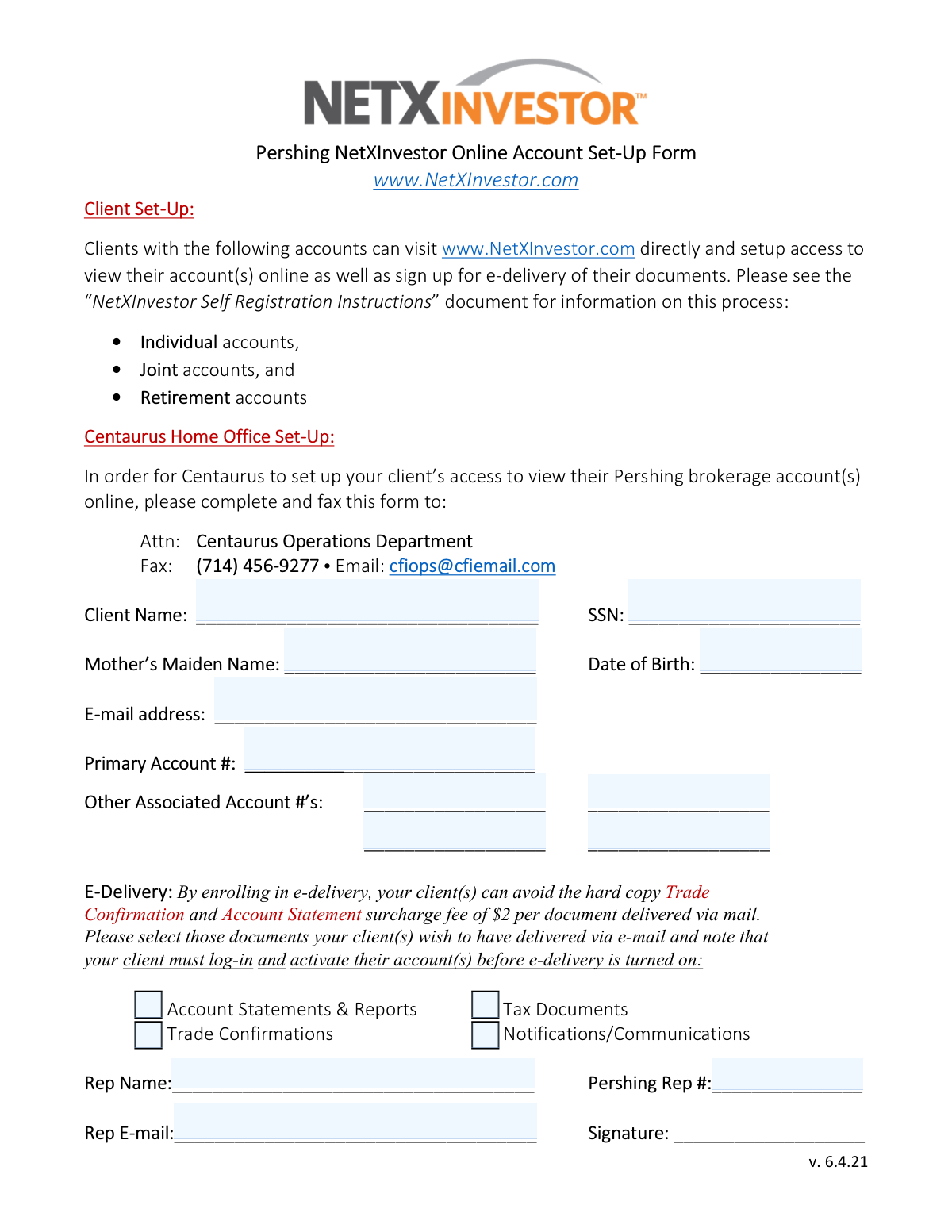
Yes! You can use AI to fill out Pershing NetXInvestor Online Account Set-Up Form
This form is used by financial representatives to request online account access for their clients through Pershing's NetXInvestor platform. Completing it allows clients to view their brokerage accounts, manage settings, and enroll in e-delivery for important documents like statements and tax forms. Today, this form can be filled out quickly and accurately using AI-powered services like Instafill.ai, which can also convert non-fillable PDF versions into interactive fillable forms.
Our AI automatically handles information lookup, data retrieval, formatting, and form filling.
It takes less than a minute to fill out Pershing NetXInvestor Account Set-Up using our AI form filling.
Securely upload your data. Information is encrypted in transit and deleted immediately after the form is filled out.
Form specifications
| Form name: | Pershing NetXInvestor Online Account Set-Up Form |
| Number of pages: | 1 |
| Language: | English |
Instafill Demo: How to fill out PDF forms in seconds with AI
How to Fill Out Pershing NetXInvestor Account Set-Up Online for Free in 2026
Are you looking to fill out a PERSHING NETXINVESTOR ACCOUNT SET-UP form online quickly and accurately? Instafill.ai offers the #1 AI-powered PDF filling software of 2026, allowing you to complete your PERSHING NETXINVESTOR ACCOUNT SET-UP form in just 37 seconds or less.
Follow these steps to fill out your PERSHING NETXINVESTOR ACCOUNT SET-UP form online using Instafill.ai:
- 1 Navigate to Instafill.ai and upload or select the Pershing NetXInvestor Online Account Set-Up Form.
- 2 Provide the client's personal information, including their full name, Social Security Number, date of birth, and mother's maiden name.
- 3 Enter the client's email address and the primary Pershing account number.
- 4 List any other associated account numbers that should be linked to the online access.
- 5 Select the checkboxes for the documents the client wishes to receive via e-delivery, such as account statements, tax documents, and trade confirmations.
- 6 Fill in the representative's details, including name, Pershing representative number, and email address.
- 7 Review all the information populated by the AI for accuracy, then sign and submit the form to the Centaurus Operations Department via fax or email as instructed.
Our AI-powered system ensures each field is filled out correctly, reducing errors and saving you time.
Why Choose Instafill.ai for Your Fillable Pershing NetXInvestor Account Set-Up Form?
Speed
Complete your Pershing NetXInvestor Account Set-Up in as little as 37 seconds.
Up-to-Date
Always use the latest 2026 Pershing NetXInvestor Account Set-Up form version.
Cost-effective
No need to hire expensive lawyers.
Accuracy
Our AI performs 10 compliance checks to ensure your form is error-free.
Security
Your personal information is protected with bank-level encryption.
Frequently Asked Questions About Form Pershing NetXInvestor Account Set-Up
This form is used to establish online access to your Pershing brokerage account(s) through the NetXInvestor portal. It also allows you to enroll in e-delivery for documents like statements, trade confirmations, and tax forms.
Clients with Individual, Joint, or Retirement accounts can self-register directly on the NetXInvestor website. For all other account types, your financial advisor must submit this form on your behalf.
You will need to provide your full name, Social Security Number (SSN), date of birth, mother's maiden name, and email address. You also need to provide your primary account number and any other associated account numbers you wish to link.
Enrolling in e-delivery allows you to receive documents electronically and avoid the $2 surcharge fee for each hard copy Trade Confirmation and Account Statement sent by mail. E-delivery is activated only after you log in to your new online account.
This form must be completed and submitted by your financial representative. They will fax it to the Centaurus Operations Department at (714) 456-9277 or email it to [email protected].
No, online self-registration is limited to Individual, Joint, and Retirement accounts. For a trust account, your financial advisor must complete and submit this form to the Centaurus Home Office to set up your access.
If you answer too many questions incorrectly, the system will prevent you from proceeding for security reasons. You can either try again later or contact your financial advisor for assistance with setting up your account.
You must click the link in the email within three days of receiving it to make your user ID permanent and complete the registration process. If you miss this window, you may need to restart the process.
Yes. If you self-register, you can link additional accounts under your SSN using the 'Settings' icon after logging in. If your advisor is setting up access, they can list your other accounts on this form.
'Client Set-Up' describes the self-registration process for clients with eligible accounts. 'Centaurus Home Office Set-Up' is the process where your advisor fills out this form for you, which is required for other account types.
Yes, services like Instafill.ai use AI to accurately auto-fill form fields, which can save time and reduce errors. This is especially helpful for your representative who may be filling out many of these forms.
Simply upload the Pershing NetXInvestor form to the Instafill.ai platform. The AI will identify the fields, allowing you to quickly fill them in, add a signature, and then download or share the completed form for submission.
You can use a service like Instafill.ai, which can convert flat, non-fillable PDFs into interactive, fillable forms. This allows you to easily type your information directly into the fields before printing or sending it.
Compliance Pershing NetXInvestor Account Set-Up
Validation Checks by Instafill.ai
1
SSN Format Validation
This check verifies that the Social Security Number (SSN) field contains exactly nine digits, optionally formatted with hyphens (XXX-XX-XXXX). Proper formatting is crucial for matching the client to their account records and for identity verification. A failure in this validation would prevent the form from being processed, as the SSN is a primary key for client identification.
2
Date of Birth Format and Plausibility
This validation ensures the Date of Birth is entered in a valid date format (e.g., MM/DD/YYYY) and represents a plausible age for a financial account holder, such as being over 18 years old and not a future date. This is important for both identity verification and legal compliance regarding account ownership. An invalid or implausible date would trigger an error and require correction before submission.
3
Client Email Address Validity
This check validates that the client's email address follows the standard '[email protected]' format. Since critical setup instructions and a confirmation link are sent to this address, its accuracy is paramount for the client to complete the registration process. If the format is invalid, the submission will be rejected to ensure the client can receive the necessary communications.
4
Primary Account Number Completeness
This validation ensures that the 'Primary Account #' field is not empty. This number is the core identifier for the brokerage account the client wishes to access online. Without it, the system cannot locate the correct account, making the entire setup request impossible to fulfill.
5
Required Client Information Completeness
This check verifies that the 'Client Name', 'SSN', 'Mother’s Maiden Name', and 'Date of Birth' fields are all populated. These fields are essential for the identity verification process that secures the client's account. Missing any of this information would result in a failed submission, as the identity cannot be confirmed.
6
E-Delivery and Email Address Consistency
This is a logical check to ensure that if any of the e-delivery checkboxes are selected, the 'E-mail address' field is also filled out. Electronic documents cannot be delivered without a valid destination address. If this validation fails, the user would be prompted to either provide an email address or deselect the e-delivery options.
7
Required Representative Information Completeness
This validation confirms that the 'Rep Name', 'Pershing Rep #', and 'Rep E-mail' fields are all completed. This information is mandatory for the Centaurus Home Office to process the request, as it identifies the authorized representative making the request on behalf of the client. An incomplete representative section would cause the request to be rejected for internal processing.
8
Representative Email Address Format
This check validates that the 'Rep E-mail' field contains a properly formatted email address. This ensures that Centaurus Operations can communicate with the representative regarding the status of the setup request, including any issues or confirmations. An invalid format would block submission to prevent communication failures.
9
Client Name Character Validation
This check ensures the 'Client Name' field contains only valid characters, such as letters, spaces, and hyphens, and is free from numbers or excessive special characters. This maintains data integrity for legal and official communication purposes. A name with invalid characters would be flagged for review and correction.
10
Mother's Maiden Name Presence
This validation confirms that the 'Mother's Maiden Name' field is not left blank. This piece of information is a common security question used for identity verification during the online setup process. Failure to provide it would halt the registration as a key security requirement is missing.
11
Pershing Rep Number Format
This check verifies that the 'Pershing Rep #' follows a specific, predefined format (e.g., a certain length, alphanumeric pattern). This number is a unique identifier for the representative within the Pershing system, and its accuracy is vital for tracking, compliance, and proper association. An incorrectly formatted number would lead to a processing error.
12
Associated Account Number Format Validation
This validation applies if any of the 'Other Associated Account #’s' fields are filled in. It checks that each entered account number conforms to the expected format, similar to the primary account. This ensures that any additional accounts to be linked are valid identifiers, preventing errors in linking the wrong accounts or failing to link accounts due to typos.
13
Backend Account and SSN Match
This is a logical validation that checks the backend system to confirm that the provided 'Primary Account #' is a valid, existing account associated with the client's 'SSN'. This is a critical security and accuracy check to ensure the request is legitimate and for the correct individual. A mismatch would result in an immediate rejection of the setup request pending investigation.
Common Mistakes in Completing Pershing NetXInvestor Account Set-Up
Users often make typos like 'gamil.com' or enter an email address they no longer use. Since the online setup process requires clicking an activation link sent via email within three days, an incorrect address will completely halt the registration. To avoid this, carefully proofread the email address before submission. AI-powered form fillers like Instafill.ai can help by validating the email format and auto-filling from a saved profile to ensure accuracy.
Transposing digits or entering an incomplete SSN is a frequent and critical error. The SSN is used for identity verification and to link all associated accounts, so any mistake will cause the setup to fail. This often happens due to rushing or manual data entry errors. Always double-check each digit of the SSN against your official records before submitting the form.
The form clearly states that enrolling in e-delivery helps avoid a $2 surcharge per mailed document, but many people overlook the checkboxes. This results in unexpected fees for paper trade confirmations and account statements. To prevent this, be sure to check the boxes for all documents you wish to receive electronically, such as 'Account Statements' and 'Tax Documents'.
When the form is printed and filled out by hand for faxing or emailing, poor handwriting can make critical data like account numbers, SSN, and email addresses unreadable. This leads to processing delays or outright rejection by the Centaurus Operations Department. To avoid this, print clearly in block letters. Alternatively, tools like Instafill.ai can convert flat PDFs into digitally fillable forms, ensuring all information is perfectly legible.
Applicants sometimes enter a preferred name or nickname instead of their full legal name as it appears on the account. This causes a mismatch during the identity verification process, leading to failure and delays. Always use your full legal name exactly as it is registered with the financial institution to ensure a smooth setup.
These fields are used as security questions for identity verification during the online registration process. A simple typo in the date of birth (e.g., MM/DD/YY instead of MM/DD/YYYY) or a misspelling of the maiden name will cause the verification to fail. Carefully review this personal information for accuracy before proceeding.
The primary account number is the key piece of information used to initiate the online access setup. Entering an incorrect number, or a number for a secondary account in the primary field, will prevent the system from finding your profile. Locate your most recent account statement to confirm the correct primary account number before filling out the form.
The self-registration instructions specify that the user must click a link in the confirmation email within three days to make the user ID permanent. People often miss this email or forget to act on it in time, causing the temporary registration to expire and forcing them to restart the entire process. Set a reminder to check your email and click the activation link as soon as you complete the initial setup.
The document outlines two distinct processes: one for reps to fax in ('Centaurus Home Office Set-Up') and one for clients ('Client Online Self-Registration'). Clients may mistakenly fill out the top portion and fax it themselves, or a representative might instruct a client with an ineligible account type (e.g., a trust) to self-register. This confusion leads to failed attempts and requires contacting support. Carefully read the instructions to determine which setup method applies to your specific account type.
When the representative fills out the form for the 'Home Office Set-Up', they may enter an incorrect 'Pershing Rep #' or misspell their own name. This can cause delays as the operations department may struggle to identify the submitting representative or link the request to the correct advisor. Representatives should use a saved profile or template to ensure their information is consistent and accurate on every form. Using a tool like Instafill.ai can automate this, eliminating manual errors.
Saved over 80 hours a year
“I was never sure if my IRS forms like W-9 were filled correctly. Now, I can complete the forms accurately without any external help.”
Kevin Martin Green
Your data stays secure with advanced protection from Instafill and our subprocessors

Robust compliance program
Transparent business model
You’re not the product. You always know where your data is and what it is processed for.
ISO 27001, HIPAA, and GDPR
Our subprocesses adhere to multiple compliance standards, including but not limited to ISO 27001, HIPAA, and GDPR.
Security & privacy by design
We consider security and privacy from the initial design phase of any new service or functionality. It’s not an afterthought, it’s built-in, including support for two-factor authentication (2FA) to further protect your account.
Fill out Pershing NetXInvestor Account Set-Up with Instafill.ai
Worried about filling PDFs wrong? Instafill securely fills pershing-netxinvestor-online-account-set-up-form forms, ensuring each field is accurate.