
Yes! You can use AI to fill out Vanguard Institutional Investor Group Redemption Form
Don't type 68 fields by hand. Tell our AI about yourself, or upload a document you already have, and it fills every field in seconds. You check it, then download, print or sign.
The AI does the filling. You just check it.
No typing into boxes, nothing to install.
What this form asks for
The AI fills all of it, from your answers or your documents.
The AI checks your answers before you download
12 checks built for this form, so a wrong date or a missing answer is caught before anyone else sees it.
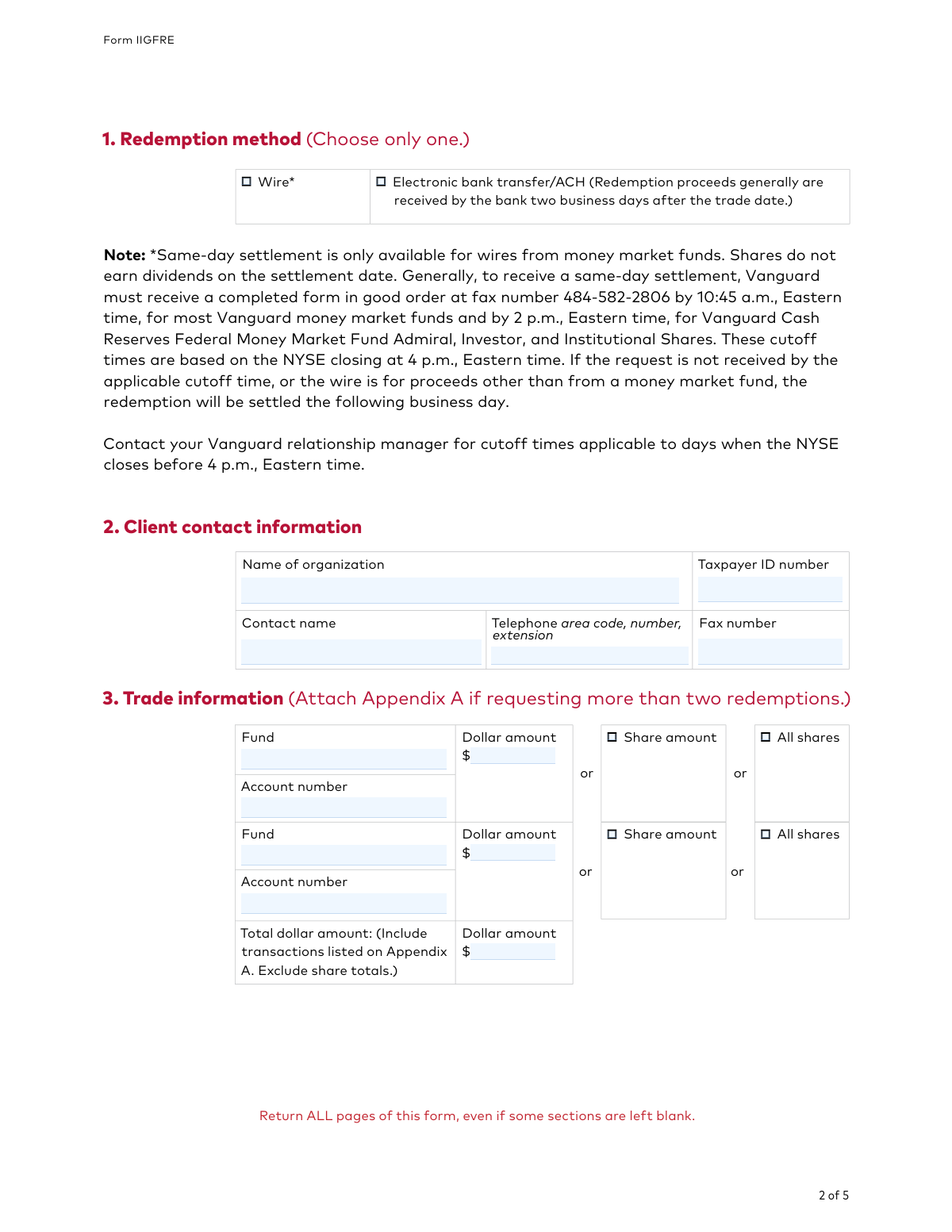
This check ensures that in Section 1, exactly one redemption method ('Wire' or 'Electronic bank transfer/ACH') is selected. It is critical to prevent ambiguity in how the proceeds should be sent. If no method is chosen or both are chosen, the transaction cannot be processed and must be rejected for clarification.
Validates that the 'Name of organization' and 'Taxpayer ID number' in Section 2 are both provided and match an existing client record in the Vanguard Institutional Investor Group system. This is a fundamental security and identification check to ensure the redemption is applied to the correct entity. A mismatch or missing information will cause the form to be rejected to prevent fraud or processing errors.
For each redemption request in Section 3 and Appendix A, this check verifies that exactly one redemption type ('Dollar amount', 'Share amount', or 'All shares') is selected. This prevents ambiguity in the trade instruction. If none or multiple options are selected for a single fund, that specific trade request is invalid and cannot be executed.
This check confirms that for every trade listed, the provided 'Fund' and 'Account number' combination corresponds to an actual account holding for the specified organization. This is essential to ensure the redemption is drawn from the correct source. If the fund/account pair does not exist or does not belong to the client, the transaction will fail.
When a 'Dollar amount' or 'Share amount' is specified for a redemption, this validation checks that the requested amount does not exceed the client's available balance in that specific fund. This prevents overdrafts and transaction failures. If the requested amount is greater than the available balance, the transaction will be rejected or placed on hold pending client instruction.
This check verifies that the 'Total dollar amount' field in Section 3 accurately reflects the sum of all individual 'Dollar amount' redemptions listed in both Section 3 and Appendix A. This serves as a crucial cross-check to catch clerical errors and ensure the client's intended total withdrawal matches the itemized requests. A discrepancy will require clarification and delay processing.
And 6 more checks
- Existing Bank Account Verification
- Bank Routing Number Format
- Authorized Signature Presence and Completeness
- Signer Authority Verification
- Trade Date Validity Check
- Contact Information Completeness
Let AI fill out your IIGFRE
No typing. Every field filled in seconds, checked, ready to sign.
How to Fill Out IIGFRE Online for Free in 2026
What the AI walks you through.
- Navigate to Instafill.ai and upload the Vanguard Institutional Investor Group Redemption Form, or select it from their template library.
- Use the AI assistant to fill in Section 2 with your organization's name, Taxpayer ID, and contact details.
- In Section 3, specify the redemption method and provide the trade information, including the fund, account number, and the amount to redeem.
- If applicable, complete Section 4 to direct the redemption proceeds to a specific bank account on file.
- Proceed to Section 5, where an authorized person must provide their name, title, and signature as required.
- Review all the auto-filled information for accuracy, make any necessary corrections, and then download or submit the completed form according to Vanguard's instructions.
Common Mistakes in Completing IIGFRE
The ones the AI is built to catch.
Using an Unauthorized Signatory
Providing Conflicting Redemption Instructions
Misunderstanding Same-Day Wire Cutoff Times
Attempting to Add a New Bank Account via the Form
Forgetting to Update the Total Redemption Amount
Submitting an Incomplete Set of Pages
Using Illegible Handwriting
Future-Dating the Signature or Request
Failing to Attach a Required Certified Resolution
Entering Incorrect Fund or Account Numbers
Frequently Asked Questions About IIGFRE
Is it really free for 7 days?
Can I fill other forms too?
How do I cancel?
How does the AI fill out IIGFRE?
What happens to my information?
How complex is IIGFRE to fill out?
What is the purpose of the Institutional Investor Group Redemption Form?
Who is eligible to use this form?
Who needs to sign this form?
What is the deadline to submit this form for today's trade date?
What's the difference between a wire and an electronic bank transfer (ACH)?
Can I use this form to send money to a new bank account?
What if I need to redeem shares from more than two funds?
I'm planning a very large redemption. Is there anything special I need to do?
How do I submit the completed form?
How can I get my money on the same day I make the redemption?
Can I use an AI tool to help me fill out this form?
How can I fill out this Vanguard form online?
The PDF I downloaded isn't fillable. What should I do?
What happens if I don't specify a bank account in Section 4?
Get your IIGFRE filled out by AI
$0 today. Cancel before Nov 4 and you pay nothing.
Other forms like this one
Vanguard forms: Gift of Nonretirement Assets to Existing Vanguard Account Form, Vanguard VRPA Transfer Request Form, Vanguard Personal Investor – Transfer form, Vanguard Asset Transfer Authorization Form for the Emory University Retirement Plan, Retirement Transfer Between Existing Vanguard Accounts, Vanguard Personal Investor – Transfer initiation form – Transfer out, Vanguard Asset Transfer Authorization, Moving your Vanguard funds to a Vanguard Brokerage Account Disclosure statement, Make a contribution - Vanguard Charitable, Vanguard Transfer Form, Vanguard Full Agent Authorization, Vanguard Transfer on Death Plan Form, The Vanguard 529 College Savings Plan: Power of Attorney, Vanguard Direct Rollover IRA Adoption Agreement, Vanguard Limited Agent Authorization, The Vanguard 529 College Savings Plan Agent Authorization/Limited Power of Attorney, The Vanguard 529 College Savings Plan Direct Rollover Out to Roth IRA Form, The Vanguard 529 College Savings Plan Transfer Due to Death of Account Owner Form, Your guide to completing a rollover - Vanguard, Vanguard IRA Distribution Kit (including IRA Distribution Form RRDFT and Form W-4R)
institutional investor forms: Institutional Investors Organization Resolution Form, Northern Trust Institutional Investor Application
institutional forms: Institutional Website Access Authorization Form, Institutional Investors Organization Resolution Form, Institutional Bank Transfer Form - Vanguard Workplace Solutions, TD Ameritrade Institutional Account Transfer Form, Fidelity Institutional CHET Advisor 529 Plan New Account Application, Form IIGAREG, Institutional Account Registration Form, Option Information — Corporate and Institutional Accounts; Sole Proprietorship Accounts; Merrill Lynch Trust Accounts, Fidelity Institutional 529 College Savings Plan Beneficiary Change, Northern Trust Institutional Investor Application, CMS-855A, Medicare Enrollment Application for Institutional Providers, Form CMS-855A, Medicare Enrollment Application for Institutional Providers
investor forms: Vanguard Personal Investor – Transfer form, Vanguard Personal Investor – Transfer initiation form – Transfer out, Vanguard Personal Investor authorisation to provide account information form, Vanguard Personal Investor – Authorised representative form, Institutional Investors Organization Resolution Form, Vanguard Personal Investor Withdrawal form, Transamerica Premier Funds Direct Rollover IRA Application (704-TRS Investor Class), Vanguard Account Opening Form for Individual Investors, Vanguard Personal Investor – Unregulated Trust details – Account information update, Merrill Edge® Self‑Directed Business Investor Account (BIA Account) Account Application Booklet and Agreements, AwardChoice Limited Individual Investor Account Form, Merrill Business Investor Account (BIA) and Working Capital Management Account (WCMA) Account Application Booklet and Agreements, Merrill AwardChoice® Individual Investor Account Application Form for U.S. Persons, Pershing NetXInvestor Online Account Set-Up Form, Investor Application and Subscription Agreement for The Wyoming Reserve Opportunity Zone Fund Corporation, Pomona Investment Fund Investor Initial Application (Class A & Class I Shares), AML/CTF Investor Identification Information Form, Application Form: Legal Entities | Qualified Investor Hedge Fund, EDAWN Investor Application, Investor Application and Subscription Agreement for Shares of Common Stock in Oxford Park Income Fund, Inc.
Let AI fill out your IIGFRE
Your trial starts once a card is added. You pay nothing before Nov 4.
Our AI already knows this form, all 68 fields of it. Skip the typing: tell it about yourself, or upload what you have, and it fills the whole form in seconds.
- AI fills every field on all 4 pages, checkboxes included
- No typing into boxes: answer a few questions, or upload a document you already have, an old copy of this form, a photo of a document
- The AI checks the answers; you review and change anything before you download
- Download the finished PDF, print it, or sign it online
- Encrypted, and never used to train AI
Cancel before Nov 4 and you pay nothing.
A card is needed to start the trial. Cancel in two clicks from your account.
Terms · Privacy