Yes! You can use AI to fill out Institutional Website Access Authorization Form
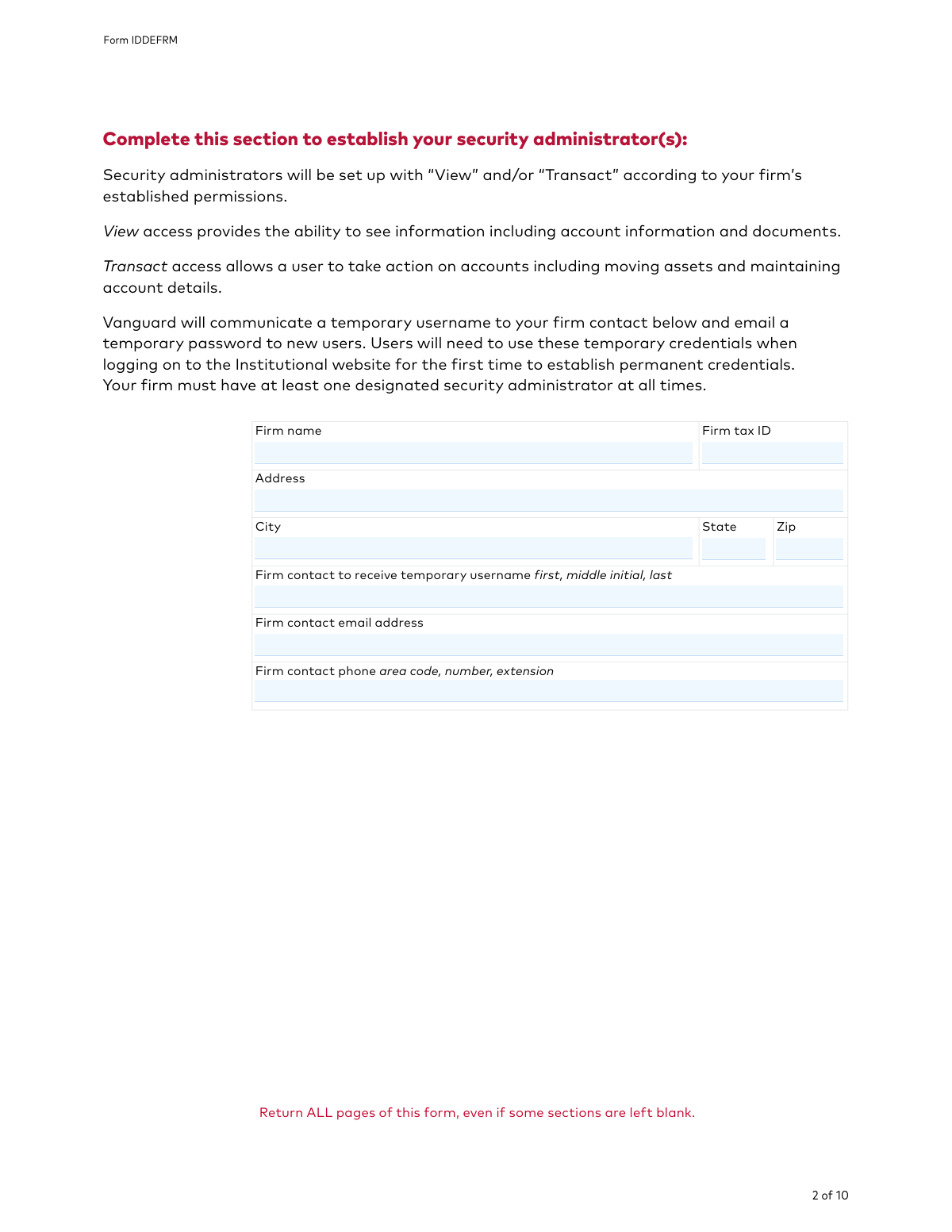
Form IDDEFRM is a document used by institutional clients of Vanguard to manage user access and security for their online portal. It allows a firm to designate specific individuals as 'security administrators' who are then responsible for creating, modifying, and deleting user profiles and permissions for the Vanguard Institutional website. This ensures that only authorized personnel can view or transact on the firm's accounts. Today, this form can be filled out quickly and accurately using AI-powered services like Instafill.ai, which can also convert non-fillable PDF versions into interactive fillable forms.
Our AI automatically handles information lookup, data retrieval, formatting, and form filling.
It takes less than a minute to fill out Form IDDEFRM using our AI form filling.
Securely upload your data. Information is encrypted in transit and deleted immediately after the form is filled out.
Form specifications
| Form name: | Institutional Website Access Authorization Form |
| Number of pages: | 1 |
| Language: | English |
Instafill Demo: How to fill out PDF forms in seconds with AI
How to Fill Out Form IDDEFRM Online for Free in 2026
Are you looking to fill out a FORM IDDEFRM form online quickly and accurately? Instafill.ai offers the #1 AI-powered PDF filling software of 2026, allowing you to complete your FORM IDDEFRM form in just 37 seconds or less.
Follow these steps to fill out your FORM IDDEFRM form online using Instafill.ai:
- 1 Navigate to Instafill.ai and upload the Institutional Website Access Authorization Form, or select it from their library of templates.
- 2 Use the AI assistant to automatically fill in your firm's information, including the legal name, tax ID, and address.
- 3 Provide the details of the firm contact who will receive temporary usernames for new security administrators.
- 4 In the main section, specify whether you are adding, maintaining, or removing a security administrator and enter their personal details such as name, email, and phone number.
- 5 Complete the required certifications for each administrator, indicating any affiliations with FINRA or status as a control person of a public company.
- 6 Optionally, configure the multiple authorization settings for online transactions if your firm requires dual approval.
- 7 Review the completed form for accuracy, then allow an authorized signatory to apply a legally binding e-signature and date before submitting to Vanguard.
Our AI-powered system ensures each field is filled out correctly, reducing errors and saving you time.
Why Choose Instafill.ai for Your Fillable Form IDDEFRM Form?
Speed
Complete your Form IDDEFRM in as little as 37 seconds.
Up-to-Date
Always use the latest 2026 Form IDDEFRM form version.
Cost-effective
No need to hire expensive lawyers.
Accuracy
Our AI performs 10 compliance checks to ensure your form is error-free.
Security
Your personal information is protected with bank-level encryption.
Frequently Asked Questions About Form Form IDDEFRM
This form is used to add, maintain, or remove security administrator access for your firm's users on the Vanguard Institutional website. A security administrator is responsible for managing other users' permissions and access.
A security administrator is a person designated by your firm to manage security permissions for all users on the Vanguard Institutional website. They can create user profiles, manage access levels, reset passwords, and deactivate users.
Yes, the form states that your firm must have at least one designated security administrator at all times to manage online access for your team.
Complete a user section on pages 3-6 with the individual's information, then check the box for 'Add a security administrator' or 'Remove a security administrator'. If you need to add more users than the form allows, include extra copies of these pages.
This form must be signed by an authorized signatory from your firm, as identified in Section 2 of the Vanguard Institutional Investors Organization Resolution Form that is on file with Vanguard.
Vanguard will send a temporary username to the firm contact listed on the form, and a temporary password will be emailed directly to the new user. They must use these temporary credentials to log in for the first time and set up permanent ones.
This optional feature adds a layer of security by requiring two different users to approve online mutual fund transactions. One user initiates the transaction, and a second must approve it before it is processed.
You must check the appropriate box in that user's section. For users associated with a FINRA member firm, you are also required to submit a letter from their compliance officer approving the authority being granted.
You can submit the signed form by fax, mail, or by uploading it directly to the website if you are an existing user. You must return all pages of the form, even those that are left blank.
Yes, services like Instafill.ai use AI to accurately auto-fill form fields, which can save you time and reduce errors. This is particularly helpful for entering repetitive firm or user information.
Simply upload the PDF to the Instafill.ai platform. You can then type your information directly into the interactive fields, add your digital signature, and download the completed document for submission.
If you have a non-fillable or 'flat' PDF, you can use a service like Instafill.ai. It can convert the static document into an interactive, fillable form that you can easily complete on your computer.
Compliance Form IDDEFRM
Validation Checks by Instafill.ai
1
Validates Firm Tax ID Format
This check ensures that the 'Firm tax ID' field is populated and follows the standard format for a U.S. Employer Identification Number (EIN), which is typically XX-XXXXXXX. Correctly formatting this ID is crucial for accurate legal and financial record-keeping and for matching the firm against existing records. A failure would prevent the form from being processed until a valid Tax ID is provided.
2
Ensures Security Administrator Action is Selected
For every security administrator section that is filled out (pages 3-6), this validation confirms that exactly one action checkbox ('Add', 'Maintain', or 'Remove') has been selected. This is critical to prevent ambiguity and ensure the system knows what action to take for that user. If no box or multiple boxes are checked for a user entry, the form submission will be rejected for clarification.
3
Conditional Requirement for Control Person Details
This check is triggered if the 'control person or an affiliate of a public company' box is checked for a security administrator. It then verifies that the 'Name of company' and 'Trading symbol' fields are both filled out. This information is required for SEC Rule 144 compliance, and failure to provide it results in an incomplete and non-compliant submission.
4
Signature Date Validity and Logic
This validation verifies that the 'Date' field in the signature section is not only a valid date in MM/DD/YYYY format but also that the date is not in the future. This is important for establishing the legal date of authorization. A form with a future date or an invalid format would be considered void and rejected.
5
Completeness of 'Add' or 'Maintain' Administrator Information
If 'Add a security administrator' or 'Maintain a security administrator' is selected, this check ensures the corresponding 'Name', 'Email', and 'Phone' fields are all completed. This information is essential for creating a new user profile or updating an existing one, including sending temporary credentials. Incomplete entries will halt the user setup process.
6
Firm Name Consistency Across Form
This validation compares the 'Firm name' entered in the main information section (page 2) with the 'Firm name' entered in the signature section (page 9). The names must match exactly to ensure the signatory is authorizing the form on behalf of the correct entity. A mismatch could indicate an error or a fraudulent submission and will cause the form to be flagged for manual review.
7
Minimum One Security Administrator Business Rule
This is a critical business rule check that ensures the net result of the form's actions (adding and removing users) does not leave the firm with zero security administrators. The form explicitly states a firm must have at least one administrator at all times. If a submission attempts to remove the last administrator without adding a replacement, it will be rejected to prevent the firm from being locked out of its account management capabilities.
8
Valid Email Address Format
This check validates that all email address fields ('Firm contact email address' and administrator 'Email') follow the standard '[email protected]' format. Since temporary passwords and other communications are sent via email, a valid address is non-negotiable for account setup and security. An invalid email format will cause the submission to fail.
9
At Least One Signature Block is Complete
This validation ensures that at least one of the two signature blocks on page 9 is fully completed with the 'Firm's authorized signature', 'Date', 'Authorized signatory first, middle initial, last', and 'Title'. This confirms that a duly authorized person has legally signed off on the requests in the form. An unsigned or incomplete form lacks legal standing and will be rejected.
10
Conditional Requirement for FINRA Affiliation
If the checkbox indicating a user is an 'employee of FINRA' or an 'associated person' is checked, this validation flags the submission to ensure a required letter from a compliance officer is included. While the system cannot read the letter, it can enforce the business rule that the submission is incomplete without it. This is essential for meeting regulatory obligations for accounts with potential conflicts of interest.
11
Valid Phone Number Structure
This check ensures that all phone number fields on the form are populated with a valid number of digits, typically 10 for a US number (area code + number), plus any optional extension. This ensures that contact information is correctly formatted and usable should Vanguard need to contact the firm or user directly. Incorrectly formatted phone numbers will be flagged for correction.
12
Completeness of Multiple Authorization Plan Numbers
In the 'Multiple authorizations' section, if an 'Add' or 'Remove' checkbox is selected next to a 'Plan number' field, this validation ensures that the 'Plan number' field itself is not empty. This prevents ambiguous instructions where an action is requested but the target plan is not specified. Such an entry would be rejected as incomplete.
13
Full Page Submission Verification
This check verifies that all 10 pages of the form have been received as part of the submission, as explicitly instructed on each page. This is important to ensure that no information, instructions, or legal disclaimers are missing. A submission with missing pages would be considered incomplete and returned to the sender.
Common Mistakes in Completing Form IDDEFRM
The signature section requires the form to be signed by an authorized signatory listed on the firm's 'Vanguard Institutional Investors Organization Resolution Form'. Firms often make the mistake of having a manager or the new administrator themselves sign, rather than the officially designated person. This will cause the form to be immediately rejected, delaying the setup of user access. To avoid this, always verify the authorized signatories on file with Vanguard before signing and submitting the form.
The instructions repeatedly state, 'Return ALL pages of this form, even if some sections are left blank.' A common error is to only send back the pages that were filled out, such as the signature page and the administrator details page. Vanguard's processing system requires the full 10-page document for validation, and submitting a partial form will lead to rejection and processing delays. Always ensure all 10 pages are included in your submission, whether by fax or mail.
On the security administrator pages, there are checkboxes for individuals associated with FINRA or who are 'control persons' of a public company. A frequent mistake is checking one of these boxes but failing to include the mandatory supporting documentation, such as a letter from a compliance officer. The form is explicit that this documentation is required, and its absence will halt the user's setup until it is provided, creating significant delays for time-sensitive access needs.
For each security administrator listed, the user must check a box to 'Add', 'Maintain', or 'Remove' them. People often forget to check any box, leaving Vanguard unsure of the intended action. This ambiguity forces Vanguard to either reject the form or contact the firm for clarification, delaying the request. Before submitting, double-check that exactly one action is selected for each administrator listed on the form.
New security administrators receive their temporary password via email. A simple typo or illegible handwriting in the email address field is a very common but critical error. This mistake prevents the user from receiving their login credentials, locking them out of the system and requiring a new request or a support call to resolve. Using an AI-powered tool like Instafill.ai can prevent this by ensuring contact information is typed clearly and validated for correct formatting.
The form states that a firm must have at least one designated security administrator at all times. A mistake occurs when a firm with only one administrator submits a form to 'Remove' that person without simultaneously 'Adding' a new one. This violates Vanguard's policy and will result in the rejection of the removal request. Always ensure a replacement administrator is being added on the same form if you are removing the last one.
In the 'Multiple authorizations' section, users may check 'Add' or 'Remove' but then fail to specify which plans are affected. The form requires the user to either check 'All plans' or list individual plan numbers. Leaving this part blank renders the instruction incomplete, and as the form notes, 'no plans will be enrolled.' This leads to the desired security protocol not being implemented, potentially exposing the firm to risk.
An authorized person will often provide a signature but forget to fill in the adjacent fields for their printed name, title, and the date. All of these fields are required to validate the signature and the authorization. An incomplete signature block can render the entire form invalid, forcing the firm to fill out and re-submit a new form from scratch. Always complete every field in the signature block.
The form explicitly instructs users to 'Print in capital letters and use black ink.' Submissions with cursive, lowercase, or illegible handwriting, or those filled out in blue ink, can be difficult for processors to read accurately, leading to data entry errors for names, emails, or plan numbers. In some cases, non-compliant forms may be rejected outright. To avoid this, it is best to type directly onto the form. Since this is a non-fillable PDF, a tool like Instafill.ai can convert it into a fillable version, ensuring all entries are perfectly legible.
Saved over 80 hours a year
“I was never sure if my IRS forms like W-9 were filled correctly. Now, I can complete the forms accurately without any external help.”
Kevin Martin Green
Your data stays secure with advanced protection from Instafill and our subprocessors

Robust compliance program
Transparent business model
You’re not the product. You always know where your data is and what it is processed for.
ISO 27001, HIPAA, and GDPR
Our subprocesses adhere to multiple compliance standards, including but not limited to ISO 27001, HIPAA, and GDPR.
Security & privacy by design
We consider security and privacy from the initial design phase of any new service or functionality. It’s not an afterthought, it’s built-in, including support for two-factor authentication (2FA) to further protect your account.
Fill out Form IDDEFRM with Instafill.ai
Worried about filling PDFs wrong? Instafill securely fills institutional-website-access-authorization-form forms, ensuring each field is accurate.