Fill out IT forms
with AI.
IT forms are the backbone of organizational security and digital governance, serving as the formal mechanism for managing system permissions and administrative oversight. This category encompasses a range of documents, from access request forms to institutional authorization protocols, all designed to ensure that sensitive data remains in the right hands. By standardizing how permissions are granted and revoked, these forms help organizations maintain a clear audit trail and comply with internal security policies and external regulatory requirements.
By continuing, you acknowledge Instafill's Privacy Policy and agree to get occasional product update and promotional emails.
About IT forms
Typically, these forms are utilized by IT managers, security administrators, and corporate officers who need to designate specific roles or grant system access within a company. For example, when a firm needs to authorize a security administrator for an institutional financial portal, these documents define exactly who has the power to create or modify user profiles. Proper documentation is essential in these scenarios to prevent unauthorized access and to ensure that administrative responsibilities are clearly delegated and documented across the team.
While these administrative forms are necessary for security, the manual process of completing them can be tedious and prone to errors. Tools like Instafill.ai use AI to fill these forms in under 30 seconds, processing your data accurately and securely to save valuable time. This automated approach reduces the risk of clerical mistakes, ensuring that your institutional authorizations are handled with the precision required for high-stakes IT environments.
Every form on this page can be completed without typing. Instafill is form filling software that reads a PDF and fills it for you — including flat and scanned documents that carry no fillable fields at all.
Forms in This Category
The forms in this category have a median Form Complexity Index of 50/100 (Moderate), measured across 1 forms by field count, input difficulty, length, conditional logic and structure. See how it is calculated.
| Form Name | Pages | FCI | |
|---|---|---|---|
| 1. | Institutional Website Access Authorization Form | 1 | Moderate 50 |
- Enterprise-grade security & data encryption
- 99%+ accuracy powered by AI
- 1,000+ forms from all industries
- Complete forms in under 60 seconds
How to Choose the Right Form
Navigating administrative IT forms is essential for maintaining secure and efficient operations within an organization. Whether you are managing internal access or external financial portals, choosing the correct authorization document ensures that security protocols are followed and sensitive data remains protected.
Managing Institutional Portal Access
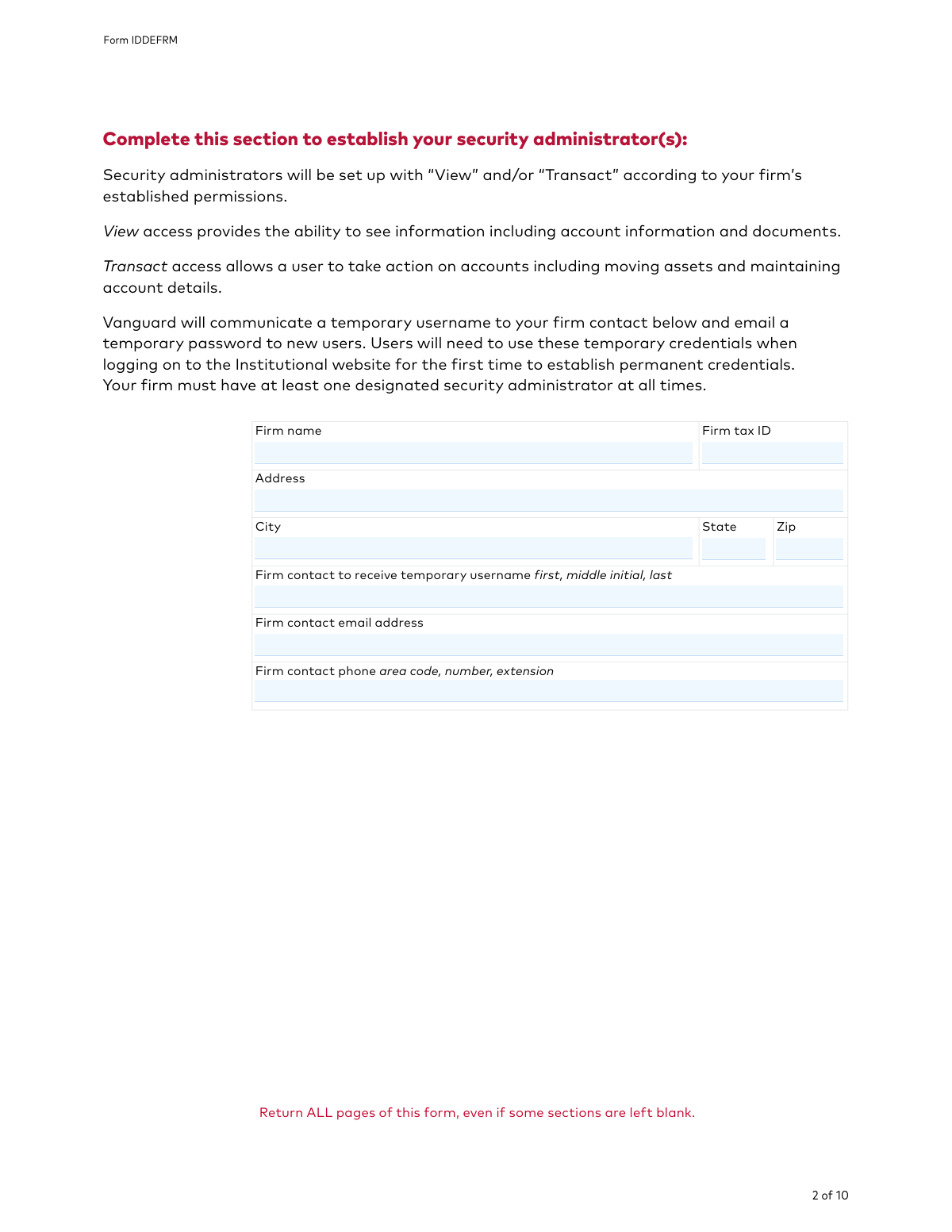
If your organization manages accounts through Vanguard’s institutional platform, the primary document you will need is the Institutional Website Access Authorization Form (Form IDDEFRM). This form is specifically designed for institutional clients to manage user access and security for their online portal.
You should choose this form if you need to:
- Designate Security Administrators: Assign specific individuals within your firm the authority to manage digital permissions for the entire organization.
- Control User Permissions: Establish which staff members can view account balances, perform transactions, or access sensitive financial data.
- Maintain Security Protocols: Ensure that only authorized personnel have active profiles, allowing for the immediate modification or deletion of access for former employees.
When to Use This Form
While general IT forms might cover internal hardware or software requests, the Institutional Website Access Authorization Form is specialized for external institutional portal management. You should select this form if you are a Vanguard institutional client and your goal is to delegate administrative control over web access to a trusted team member.
Simplify Your Filing Process
Filling out complex institutional forms manually can lead to errors that delay critical access. By using Instafill.ai, you can quickly complete the Institutional Website Access Authorization Form with AI assistance. Our platform helps you navigate the technical fields of the IDDEFRM, ensuring your security administrators are authorized without unnecessary administrative friction.
Form Comparison
| Form | Primary Purpose | Who Files It | Key Functionality |
|---|---|---|---|
| Institutional Website Access Authorization Form — Form IDDEFRM | Authorize security administrators to manage user access for Vanguard's institutional online portal. | Institutional clients or authorized firm representatives managing Vanguard accounts. | Designate administrators responsible for creating, modifying, and deleting user profiles and permissions. |
Tips for IT forms
Since security administrators have the power to manage all other user permissions, select individuals who are likely to remain in their roles long-term. This minimizes the need to frequently resubmit authorization forms whenever internal staffing changes occur.
A common mistake is granting broad access to users who only require view-only permissions. Carefully review the specific access levels requested to ensure your institution maintains a 'least privilege' security posture.
AI-powered tools like Instafill.ai can complete these complex IT authorization forms in under 30 seconds with high accuracy. Your sensitive data stays secure during the process, making it a reliable way to handle multiple institutional requests quickly.
IT and institutional forms often require signatures from specific officers or authorized signers already on file. Double-check that the individual signing the authorization form has the legal authority to grant system access for the entire firm.
Keep copies of all submitted access forms to simplify future security audits and internal reviews. Having a clear record of who requested what access—and when—helps resolve disputes and streamlines the onboarding of new staff members.
Many institutional forms are distributed as non-fillable flat files, which are tedious to complete by hand. Using a tool to convert these into interactive fields saves time and prevents the legibility issues that often lead to processing delays.
To avoid processing errors, ensure that all account numbers and employee identification details are entered exactly as they appear in the provider's system. Even minor discrepancies in firm names or ID numbers can result in the immediate rejection of the authorization request.
Frequently Asked Questions
These forms are used to manage and regulate user permissions for sensitive online portals, ensuring that only authorized personnel can access financial or administrative data. They act as a formal record of who has the right to view, edit, or execute transactions on behalf of an organization.
Usually, a high-ranking official or an authorized signatory of the organization must sign these forms to grant permissions. This ensures that access levels are approved by management and comply with the firm's internal security protocols.
A Security Administrator is a designated individual within an organization who has the authority to manage other users' access. They are responsible for creating, modifying, and deleting user profiles to maintain strict control over who can interact with the institution's digital services.
Updates should occur whenever there is a change in personnel, such as when an employee leaves the company or changes roles. Regular audits of these forms are recommended to ensure that former employees no longer have access to secure institutional systems.
Yes, AI tools like Instafill.ai can process IT and institutional forms in under 30 seconds. The AI accurately extracts data from your source documents and places it into the correct fields, reducing the risk of manual entry errors.
While manual completion can take 15 to 20 minutes depending on the complexity, using an AI-powered service can complete the process in less than a minute. These tools streamline the workflow by identifying required fields and populating them automatically from your existing records.
You will typically need to provide organization details, specific account numbers, and the personal information of the individuals being granted access. This often includes names, email addresses, and specific roles or permission levels required for each user.
Many modern institutions accept digital signatures, though requirements vary by organization. It is important to check the specific submission guidelines of the institution to ensure that an electronic signature meets their security standards.
Designating multiple administrators ensures continuity of access management if one person is unavailable or leaves the organization. It prevents administrative bottlenecks and ensures that user permissions can be updated promptly to maintain security.
Most forms are submitted directly to the institution's secure portal or via a verified email or fax number provided in the form instructions. Always verify the submission channel to ensure your sensitive organizational data is handled securely.
If an error is found, the institution will typically reject the request and require a corrected version to be submitted by an authorized signatory. Using AI tools can help prevent these delays by ensuring that data is extracted and placed accurately from the start.
Glossary
- Form Complexity Index
- Instafill’s 0–100 measure of how much effort a form takes to complete, calculated deterministically from the form’s own structure rather than estimated. It combines the number of fillable fields (the largest factor), how difficult those fields are to complete based on their type, the number of pages that contain fields, the amount of conditional “fill-only-if” logic, and how many sections the form is divided into, then adds modifiers for tables and repeating lists, bundled instruction pages, and dense page layouts. A higher score means the form is harder to fill out by hand. The forms in this category have a median Form Complexity Index of 50/100 (Moderate). See exactly how it is calculated.
- Security Administrator
- An individual designated by an organization to manage, grant, and revoke website access and permissions for other employees within the firm.
- Institutional Client
- A large organization, such as a corporation, pension fund, or non-profit, that manages accounts on behalf of a group rather than an individual.
- User Permissions
- Specific settings that determine what actions an individual can perform on a portal, such as viewing account balances or executing financial transactions.
- Transaction Authority
- A specific level of access that allows a user to initiate financial activities, such as buying, selling, or transferring assets, within the institutional portal.
- Access Provisioning
- The administrative process of creating, modifying, and managing user identities and their corresponding rights to digital resources.
- Form IDDEFRM
- The unique document identifier used to track and process the Institutional Website Access Authorization Form for security administrator designations.
- Audit Trail
- A chronological record of activities or changes made by users and administrators, used to track who authorized specific access modifications for security purposes.
- Multi-Factor Authentication (MFA)
- A security process requiring users to provide two or more verification factors to gain access to the institutional website, often managed by the security administrator.