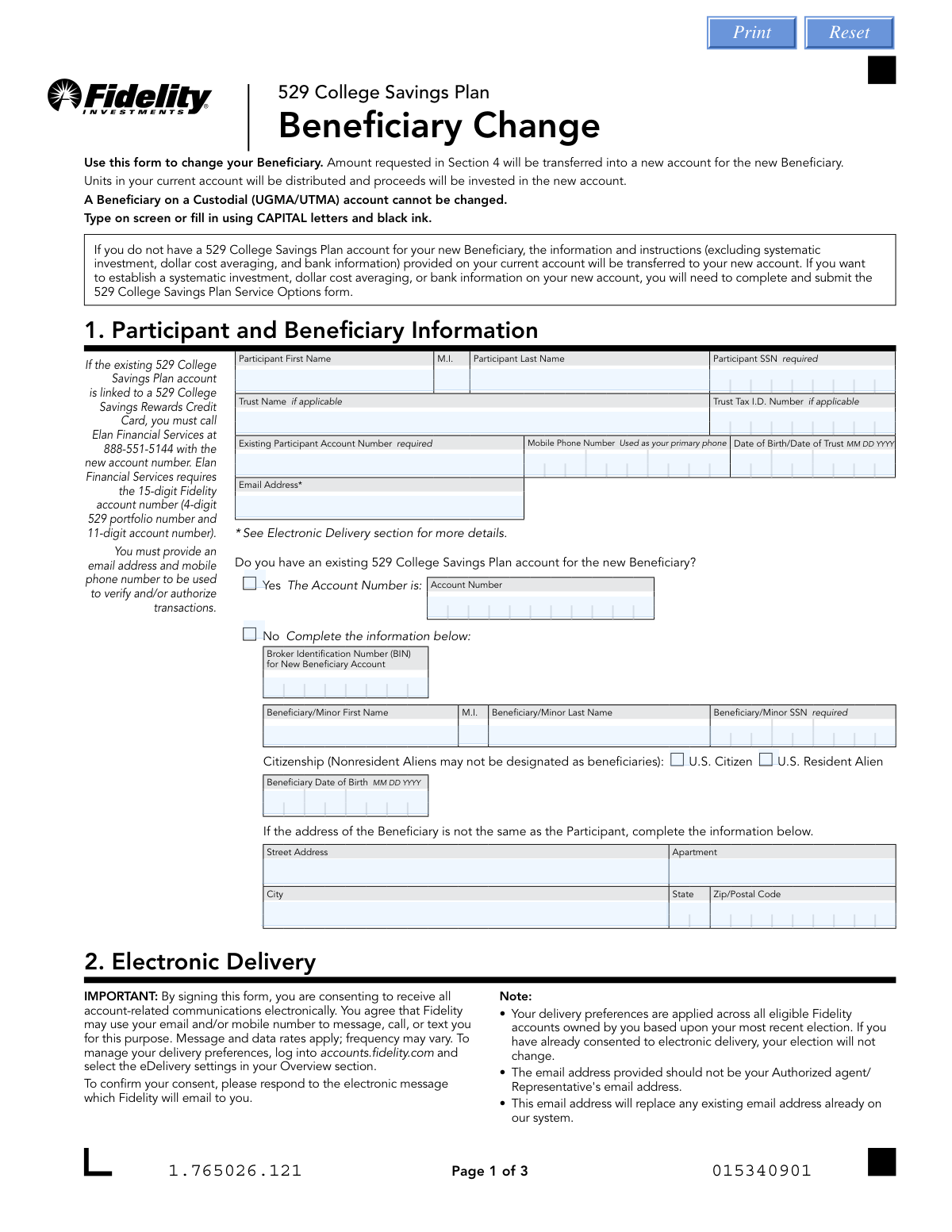
Yes! You can use AI to fill out Fidelity Institutional 529 College Savings Plan Beneficiary Change

This form allows the participant (account owner) of a Fidelity Institutional 529 College Savings Plan to change the designated beneficiary. It's a crucial document for updating your savings plan to reflect changes in family circumstances, ensuring the funds are directed to the intended individual, and may have tax implications depending on the relationship between beneficiaries. Today, this form can be filled out quickly and accurately using AI-powered services like Instafill.ai, which can also convert non-fillable PDF versions into interactive fillable forms.
Our AI automatically handles information lookup, data retrieval, formatting, and form filling.
It takes less than a minute to fill out Fidelity 529 Beneficiary Change using our AI form filling.
Securely upload your data. Information is encrypted in transit and deleted immediately after the form is filled out.

Form specifications

Form name: Fidelity Institutional 529 College Savings Plan Beneficiary Change
Number of pages: 1
Language: English
Categories: beneficiary forms, college HR forms, Fidelity forms, 529 plan forms, college savings forms, institutional forms, savings plan forms
main-image

Instafill Demo: How to fill out PDF forms in seconds with AI

How to Fill Out Fidelity 529 Beneficiary Change Online for Free in 2026

Are you looking to fill out a FIDELITY 529 BENEFICIARY CHANGE form online quickly and accurately? Instafill.ai offers the #1 AI-powered PDF filling software of 2026, allowing you to complete your FIDELITY 529 BENEFICIARY CHANGE form in just 37 seconds or less.
Follow these steps to fill out your FIDELITY 529 BENEFICIARY CHANGE form online using Instafill.ai:
  1. 1 Navigate to Instafill.ai and upload or select the Fidelity 529 Beneficiary Change form.
  2. 2 Use the AI assistant to automatically fill in your Participant Information, including your name, SSN, and existing account number.
  3. 3 Provide the new beneficiary's personal details, such as their full name, Social Security Number, and date of birth.
  4. 4 Specify the relationship between the original and new beneficiaries to determine tax implications for the transfer.
  5. 5 Complete the instructions section to indicate whether you are transferring all or a partial amount of the account balance.
  6. 6 Review all the information pre-filled and entered by the AI for accuracy, making any necessary corrections.
  7. 7 Electronically sign and date the form before submitting it to Fidelity through the platform's secure submission options.

Our AI-powered system ensures each field is filled out correctly, reducing errors and saving you time.

Why Choose Instafill.ai for Your Fillable Fidelity 529 Beneficiary Change Form?

Speed

Complete your Fidelity 529 Beneficiary Change in as little as 37 seconds.

Up-to-Date

Always use the latest 2026 Fidelity 529 Beneficiary Change form version.

Cost-effective

No need to hire expensive lawyers.

Accuracy

Our AI performs 10 compliance checks to ensure your form is error-free.

Security

Your personal information is protected with bank-level encryption.

Frequently Asked Questions About Form Fidelity 529 Beneficiary Change

This form is used to change the beneficiary on your 529 College Savings Plan. It facilitates the transfer of funds from your current account into a new account for the new beneficiary.

When you submit this form, the investment units in your current account are sold (distributed). The proceeds are then used to purchase investments in the new account established for the new beneficiary.

If the new beneficiary is a 'Member of Family' of the original beneficiary, the transfer is generally income-tax-free. However, if the new beneficiary is not a family member, the earnings portion of the transfer is considered a non-qualified distribution and may be subject to income tax and a 10% federal penalty.

No, the form explicitly states that a beneficiary on a Custodial (UGMA/UTMA) account cannot be changed.

If you don't have an account for the new beneficiary, Fidelity will create one using the information you provide in Section 1. Most settings from your current account will be transferred to the new one.

To establish a systematic investment plan or add bank information for the new account, you must complete and submit the separate '529 College Savings Plan Service Options' form.

You will need your existing 529 account number, as well as the full names, Social Security numbers, and dates of birth for both the account participant and the new beneficiary.

Yes, in Section 5, you can specify a partial dollar amount to transfer. If you do not make a selection, all units from the specified portfolio will be transferred by default.

You must call Elan Financial Services at 888-551-5144 with the new 15-digit Fidelity account number to ensure your rewards continue to be linked correctly.

You can upload the form online through your Fidelity account, fax it, or mail it to the address provided. Note that if a signature guarantee or notary is required, you must mail the original physical form.

The '529 College Savings Plan Service Options' form is used to add or modify features on an existing account, such as setting up automatic investments (Systematic Investment Program) or withdrawals, and adding or changing bank information.

Yes, services like Instafill.ai use AI to accurately auto-fill form fields with your information, which can save you time and help reduce errors.

You can use a service like Instafill.ai to fill out the form online. Simply upload the PDF, and the tool will allow you to type your information directly into the fields before printing for signature.

If you have a non-fillable or 'flat' PDF, a tool like Instafill.ai can convert it into an interactive, fillable form. This allows you to easily type your answers instead of printing and filling it out by hand.

Compliance Fidelity 529 Beneficiary Change
Validation Checks by Instafill.ai

1
Participant SSN Format and Requirement
This check verifies that the Participant's Social Security Number in Section 1 is provided and follows the standard 9-digit format (XXX-XX-XXXX or XXXXXXXXX). This is a critical piece of personally identifiable information required for tax reporting and account identification. If the SSN is missing or invalid, the form cannot be processed, and the beneficiary change will be rejected.
2
Existing Account Number Validation
This validation ensures the 'Existing Participant Account Number' in Section 1 is not empty and matches the expected format for a Fidelity 529 account. The number is essential for locating the correct source account from which to transfer funds. A missing or incorrect account number will result in a processing failure, as Fidelity cannot identify the participant's holdings.
3
Conditional New Beneficiary Details Requirement
This check enforces a conditional rule in Section 1. If the user indicates 'No' to having an existing 529 account for the new beneficiary, then all fields for the new beneficiary (First Name, Last Name, SSN, Citizenship, and Date of Birth) become mandatory. This is crucial for creating the new beneficiary account correctly. Failure to provide this information will halt the process as the new account cannot be established.
4
Beneficiary Citizenship Eligibility
This validation confirms that the 'Citizenship' for a new beneficiary in Section 1 is marked as either 'U.S. Citizen' or 'U.S. Resident Alien'. The form explicitly states that Nonresident Aliens are ineligible to be beneficiaries. This check prevents the creation of an invalid account and ensures compliance with plan rules, avoiding immediate rejection of the application.
5
Family Relationship Description Requirement
This check ensures that if the 'Member of Family' box is checked in Section 4, the corresponding 'Describe Relationship' field is filled out. This information is vital for determining if the transfer is income-tax-free, as per IRS regulations for 529 plans. An empty description for a family member transfer could lead to processing delays or incorrect tax treatment of the distribution.
6
Partial Transfer Amount Presence
This validation applies to the transfer instructions in Section 5. If the 'Part' option is selected for a portfolio transfer, the corresponding 'Dollar Amount' field must contain a positive numeric value. This ensures that the instruction is clear and executable. If the amount is missing, the system cannot determine how much to transfer, causing the instruction to be rejected as incomplete.
7
Signature and Date Presence
This check verifies that the 'Account Owner/Trustee Signature' and 'Date' fields in Section 6 are both completed. The form explicitly states it cannot be processed without these elements, as they provide legal authorization for the transaction. A missing signature or date will result in an immediate rejection of the entire form submission.
8
ABA Routing Number Validity
For the 'Service Options' form, this check validates that the 'ABA Routing Number' in Section 4 is a valid 9-digit number that passes the standard checksum algorithm. This is critical for ensuring electronic fund transfers via Money Line are sent to the correct financial institution. An invalid routing number will cause ACH transactions to fail, preventing the setup of systematic investments or withdrawals.
9
Conditional Notarization for Bank Information
This is a complex logical check on the 'Service Options' form. If the bank account owner listed in Section 4 is different from the 529 account owner, the system must verify that the required bank owner signatures in Section 9 and the corresponding notary sections are completed. This is a fraud prevention measure, and failure to provide the required notarization will cause the Money Line setup to be rejected.
10
Systematic Withdrawal Amount Limit
This check validates that any systematic withdrawal amount requested in Section 3 of the 'Service Options' form does not exceed the stated daily ACH withdrawal limit of $100,000 per fund. This rule is in place for security and risk management. A request exceeding this limit would be rejected or require an alternative distribution method.
11
Required Documentation for Withdrawal Reason
This validation flags submissions where the distribution reason in Section 3 is 'Disability of the Beneficiary' or 'Receipt of a scholarship'. The form requires specific documentation (a doctor's note or scholarship letter) for these cases to waive certain fees or penalties. The system should verify that these documents are attached or flag the submission for manual review to ensure completeness.
12
Email Address Format and Ownership
This check verifies that the email address provided in Section 1 of either form is in a valid format (e.g., [email protected]). It also enforces the rule that the email address should not belong to the Financial Representative. This ensures the account owner directly receives important notifications and consents for electronic delivery, which is critical for account security and communication.
13
Pool Number Validity
This validation ensures that all 'Pool Number' fields across both forms (e.g., in transfer, investment, or withdrawal sections) contain a valid number from the 'Investment Options' list. Using an invalid pool number would make the investment instruction impossible to execute. This check prevents transaction failures by ensuring all investment selections correspond to actual, available portfolios.
14
Date of Birth Plausibility
This check validates that the Beneficiary's Date of Birth in Section 1 is a valid, logical date that is in the past. It prevents data entry errors such as future dates or dates from over a century ago. Ensuring a plausible date of birth is important for determining eligibility for age-based portfolios and for general record-keeping accuracy.

Common Mistakes in Completing Fidelity 529 Beneficiary Change

Forgetting Signature and Date

Applicants often forget to sign and date the form in Section 6 (Beneficiary Change) or Section 8 (Service Options). This is one of the most common reasons for immediate rejection, as an unsigned form is legally invalid. To avoid this, always perform a final review of all signature blocks before submission. Since this form is a non-fillable PDF, using a tool like Instafill.ai can convert it into an interactive, fillable version that can highlight required signature fields to prevent such oversights.

Incorrectly Specifying Beneficiary Relationship

In Section 4 of the Beneficiary Change form, failing to check a box defaults the relationship to 'Other Relationship'. This oversight has significant financial consequences, as the transfer is then treated as a non-qualified distribution, making the earnings subject to income tax and a 10% federal penalty. Always carefully select 'Member of Family' if applicable and describe the relationship to ensure the transfer remains tax-free.

Missing Required Notarization for Bank Information

When setting up the Money Line feature (Service Options, Section 4), if the bank account owner is not a listed owner on the 529 account, the form requires signatures from all bank account owners to be notarized. This requirement is often missed, leading to the rejection of the form and a delay in setting up electronic fund transfers. Carefully read the instructions in Section 4 and Section 9 to determine if notarization is necessary for your situation.

Entering Incorrect Pool or Account Numbers

These forms require users to enter multi-digit account numbers and reference a separate page for specific 'Pool Numbers' for investments. Manual data entry frequently leads to transposed digits or selecting the wrong number, causing transactions to be rejected or applied to the wrong fund. Double-check all numbers before submitting. AI-powered tools like Instafill.ai can help by validating number formats and cross-referencing data to reduce the likelihood of such errors.

Missing or Incorrect Social Security Numbers (SSN)

The forms clearly mark Participant and Beneficiary SSN fields as 'required'. Applicants may accidentally skip these fields or enter them incorrectly. An absent or invalid SSN will halt the processing of the entire application, as this information is essential for tax reporting and identity verification by the financial institution. Always verify that all SSNs are entered completely and accurately.

Submitting the Form via the Wrong Method

The submission instructions on the final page state that if an original signature guarantee or notary is required, the form must be mailed. Many users overlook this and attempt to upload or fax the notarized document. This results in rejection, as the institution requires the original 'wet' signature or notary stamp. Always mail forms that have been notarized to the physical address provided.

Using a Financial Representative's Email Address

Both forms explicitly warn against using an authorized agent's or representative's email address in the participant information sections. Participants may do this for convenience, but it prevents them from receiving critical account alerts and the electronic consent confirmation email from Fidelity. This can lead to missed communications about account changes and a failure to properly consent to electronic delivery, causing future issues.

Failing to Update 529 Credit Card Link

A callout box in Section 1 of the Beneficiary Change form instructs participants with a linked 529 Rewards Credit Card to call Elan Financial Services with the new account number. This is a separate, manual step that is easily forgotten after submitting the form. Forgetting to do this means that rewards earned on the credit card will continue to be deposited into the old, potentially closed account, instead of the new beneficiary's account.

Ambiguous Systematic Program Instructions

When establishing a Systematic Investment or Withdrawal Program (Service Options, Sections 2 & 3), users must specify the pool number, amount, start date, and frequency. Leaving any of these fields blank or providing invalid information will cause the system to apply default settings (e.g., monthly on the 15th) which may not match the user's intent. To avoid this, ensure every field for each systematic transaction is filled out completely and accurately.

Misunderstanding the Annual Exchange Limit

In Section 6 of the Service Options form, the instructions note that establishing a Dollar Cost Averaging (DCA) plan counts as one of the two portfolio exchanges allowed per calendar year. Users who are unaware of this rule may be surprised when a subsequent attempt to reallocate funds within the same year is denied. This can limit your ability to react to market changes, so it's crucial to plan your exchanges and DCA setup accordingly.
Saved over 80 hours a year

“I was never sure if my IRS forms like W-9 were filled correctly. Now, I can complete the forms accurately without any external help.”

Kevin Martin Green

Your data stays secure with advanced protection from Instafill and our subprocessors

Robust compliance program

Transparent business model

You’re not the product. You always know where your data is and what it is processed for.

ISO 27001, HIPAA, and GDPR

Our subprocesses adhere to multiple compliance standards, including but not limited to ISO 27001, HIPAA, and GDPR.

Security & privacy by design

We consider security and privacy from the initial design phase of any new service or functionality. It’s not an afterthought, it’s built-in, including support for two-factor authentication (2FA) to further protect your account.

Fill out Fidelity 529 Beneficiary Change with Instafill.ai

Worried about filling PDFs wrong? Instafill securely fills fidelity-institutional-529-college-savings-plan-beneficiary-change forms, ensuring each field is accurate.