
Yes! You can use AI to fill out Institutional Investors Organization Resolution Form
Don't type 148 fields by hand. Tell our AI about yourself, or upload a document you already have, and it fills every field in seconds. You check it, then download, print or sign.
The AI does the filling. You just check it.
No typing into boxes, nothing to install.
What this form asks for
The AI fills all of it, from your answers or your documents.
The AI checks your answers before you download
14 checks built for this form, so a wrong date or a missing answer is caught before anyone else sees it.
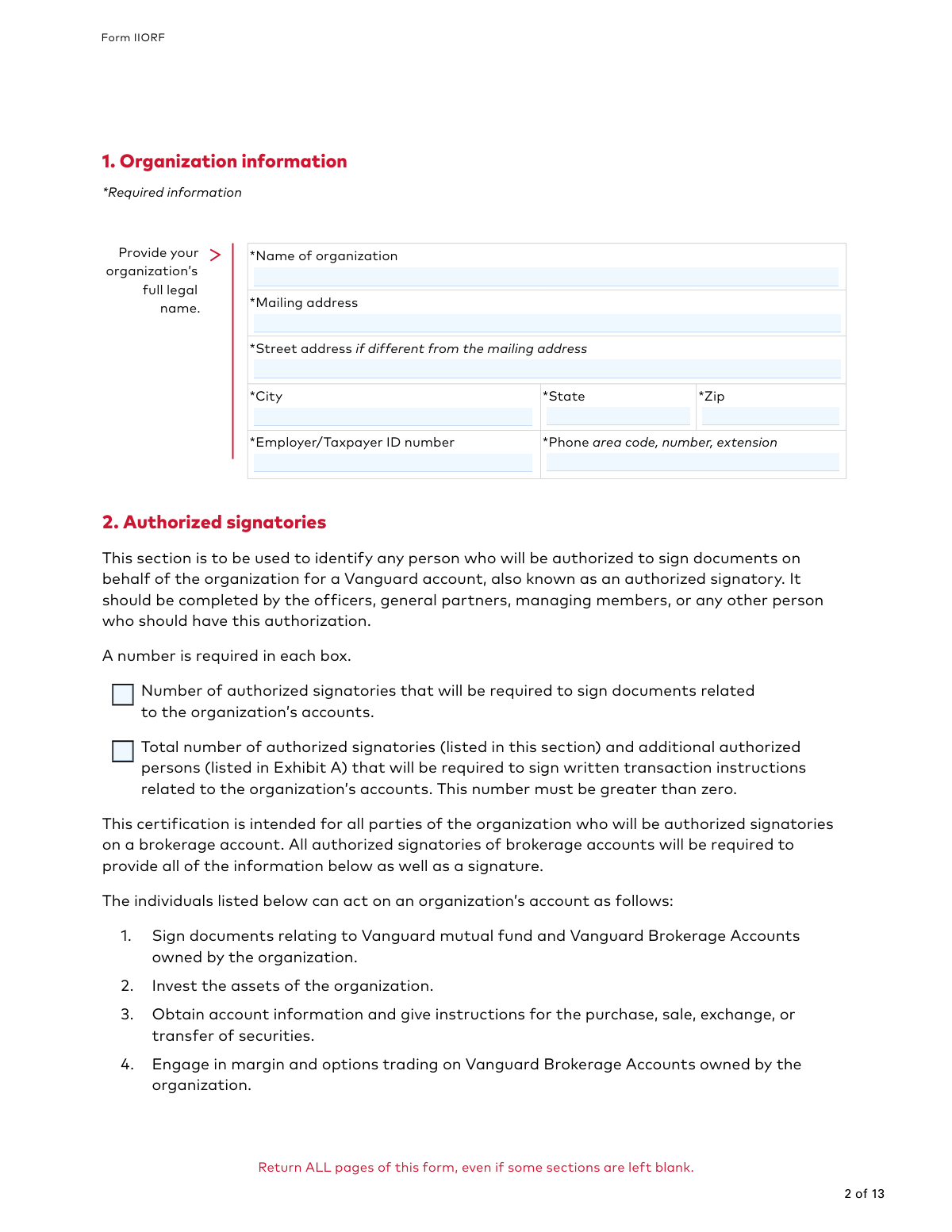
This check verifies that the 'Name of organization' field in Section 1 is not empty, as it is marked as required. Providing the full legal name is crucial for correct account setup, legal compliance, and tax reporting. Failure to provide this required information will prevent the form from being processed and the account from being properly configured.
This validation ensures the 'Employer/Taxpayer ID number' in Section 1 is entered in a valid format, such as the 9-digit structure (XX-XXXXXXX) for a US EIN. A correct Tax ID is essential for regulatory compliance, tax reporting to the IRS, and uniquely identifying the business entity. An invalid or missing ID will lead to processing rejection and potential tax-related issues.
This check confirms that the number entered for 'Total number of authorized signatories... required to sign written transaction instructions' in Section 2 is greater than zero. This is a critical control to ensure that transactions cannot be authorized without the required number of approvals. A value of zero would create a logical impossibility for transaction processing and must be corrected.
This validation verifies that for every authorized signatory listed in Section 2, all required personal details are provided, including full name, primary residence address, date of birth, and SSN or ITIN. This information is mandated by Know Your Customer (KYC) regulations to prevent fraud and money laundering. Incomplete signatory profiles will halt the form processing until all required data is supplied.
This check ensures the 'Date of birth' for each authorized person is in the correct 'mm/dd/yyyy' format and represents a plausible date (e.g., not in the future, and the person is over 18 years old). This is vital for identity verification and compliance with legal age requirements for financial account authority. An invalid or future date will cause the submission to be rejected for correction.
This validation checks that the Social Security Number (SSN) or Individual Taxpayer Identification Number (ITIN) for each person in Section 2 and Exhibit A is provided in a valid 9-digit format. This number is a critical personal identifier required for regulatory reporting and identity verification under federal law. An incorrectly formatted or missing number will result in processing failure.
And 8 more checks
- Ensures Control Person Details are Provided When Affiliation is Declared
- Verifies Required Signatures in Certification Section
- Ensures Signature Dates are Present and Valid
- Validates Conditional Requirement for Third-Party Certification
- Ensures Consistency of Organization Information Across Form and Exhibit A
- Cross-references Total Authorized Persons with Listed Individuals
- Ensures Two Distinct Officers Sign the Certification Section
- Verifies Signatories in Certification are Listed in Section 2
Let AI fill out your IIORF
No typing. Every field filled in seconds, checked, ready to sign.
How to Fill Out IIORF Online for Free in 2026
What the AI walks you through.
- Navigate to Instafill.ai and upload the Vanguard Form IIORF PDF or select it from the available templates.
- Use the AI to automatically populate Section 1 with your organization's information, such as its legal name, address, and Taxpayer ID number.
- In Section 2, provide the personal details for each authorized signatory, including their name, address, date of birth, and SSN.
- Complete the Certification and Indemnification section, which requires signatures from two authorized officers or signatories.
- If the organization has only one authorized signatory, complete the Third-Party Certification section with the required information from a bank officer, attorney, or other qualified individual.
- If applicable, fill out Exhibit A to list any additional authorized persons who can conduct transactions on the accounts.
- Review all the information populated by the AI for accuracy, make any necessary corrections, and then download or submit the completed form as instructed by Vanguard.
Common Mistakes in Completing IIORF
The ones the AI is built to catch.
Submitting an Incomplete Page Set
Using an Incorrect or Abbreviated Organization Name
Mishandling Signature Requirements
Forgetting Required Supplemental Documents
Confusing Authorized Signatories and Authorized Persons
Providing Incorrect Personal Information
Overlooking Financial and Corporate Affiliation Disclosures
Leaving Signatory Count Boxes Blank
Incorrect Individuals Signing Exhibit A Certification
Ignoring Formatting and Legibility Instructions
Frequently Asked Questions About IIORF
Is it really free for 7 days?
Can I fill other forms too?
How do I cancel?
How does the AI fill out IIORF?
What happens to my information?
How complex is IIORF to fill out?
What is the purpose of the Institutional Investors Organization Resolution Form?
Who needs to fill out this form?
What is the difference between an 'Authorized Signatory' in Section 2 and an 'Additional Authorized Person' in Exhibit A?
How many signatures are required to complete this form?
What if my organization only has one officer or authorized person?
Do I need to submit any other documents with this form?
How do I add or remove an authorized person in the future?
Do I need to return all 13 pages of the form?
How can I submit the completed form to Vanguard?
What information is required for each authorized person listed?
What should I do if the PDF form is not fillable on my computer?
Can I use an AI tool to help me fill out this form?
How can I fill out the Institutional Investors Organization Resolution Form online?
Get your IIORF filled out by AI
$0 today. Cancel before Nov 1 and you pay nothing.
Other forms like this one
institutional investor forms: Vanguard Institutional Investor Group Redemption Form, Northern Trust Institutional Investor Application
institutional forms: Institutional Website Access Authorization Form, Vanguard Institutional Investor Group Redemption Form, Institutional Bank Transfer Form - Vanguard Workplace Solutions, TD Ameritrade Institutional Account Transfer Form, Fidelity Institutional CHET Advisor 529 Plan New Account Application, Form IIGAREG, Institutional Account Registration Form, Option Information — Corporate and Institutional Accounts; Sole Proprietorship Accounts; Merrill Lynch Trust Accounts, Fidelity Institutional 529 College Savings Plan Beneficiary Change, Northern Trust Institutional Investor Application, CMS-855A, Medicare Enrollment Application for Institutional Providers, Form CMS-855A, Medicare Enrollment Application for Institutional Providers
investor forms: Vanguard Personal Investor – Transfer form, Vanguard Personal Investor – Transfer initiation form – Transfer out, Vanguard Personal Investor authorisation to provide account information form, Vanguard Personal Investor – Authorised representative form, Vanguard Personal Investor Withdrawal form, Vanguard Institutional Investor Group Redemption Form, Transamerica Premier Funds Direct Rollover IRA Application (704-TRS Investor Class), Vanguard Account Opening Form for Individual Investors, Vanguard Personal Investor – Unregulated Trust details – Account information update, Merrill Edge® Self‑Directed Business Investor Account (BIA Account) Account Application Booklet and Agreements, AwardChoice Limited Individual Investor Account Form, Merrill Business Investor Account (BIA) and Working Capital Management Account (WCMA) Account Application Booklet and Agreements, Merrill AwardChoice® Individual Investor Account Application Form for U.S. Persons, Pershing NetXInvestor Online Account Set-Up Form, Investor Application and Subscription Agreement for The Wyoming Reserve Opportunity Zone Fund Corporation, Pomona Investment Fund Investor Initial Application (Class A & Class I Shares), AML/CTF Investor Identification Information Form, Application Form: Legal Entities | Qualified Investor Hedge Fund, EDAWN Investor Application, Investor Application and Subscription Agreement for Shares of Common Stock in Oxford Park Income Fund, Inc.
Let AI fill out your IIORF
Your trial starts once a card is added. You pay nothing before Nov 1.
Our AI already knows this form, all 148 fields of it. Skip the typing: tell it about yourself, or upload what you have, and it fills the whole form in seconds.
- AI fills every field on all 13 pages, checkboxes included
- No typing into boxes: answer a few questions, or upload a document you already have, an old copy of this form, a photo of a document
- The AI checks the answers; you review and change anything before you download
- Download the finished PDF, print it, or sign it online
- Encrypted, and never used to train AI
Cancel before Nov 1 and you pay nothing.
A card is needed to start the trial. Cancel in two clicks from your account.
Terms · Privacy