
Yes! You can use AI to fill out Fidelity Distribution—Rollover
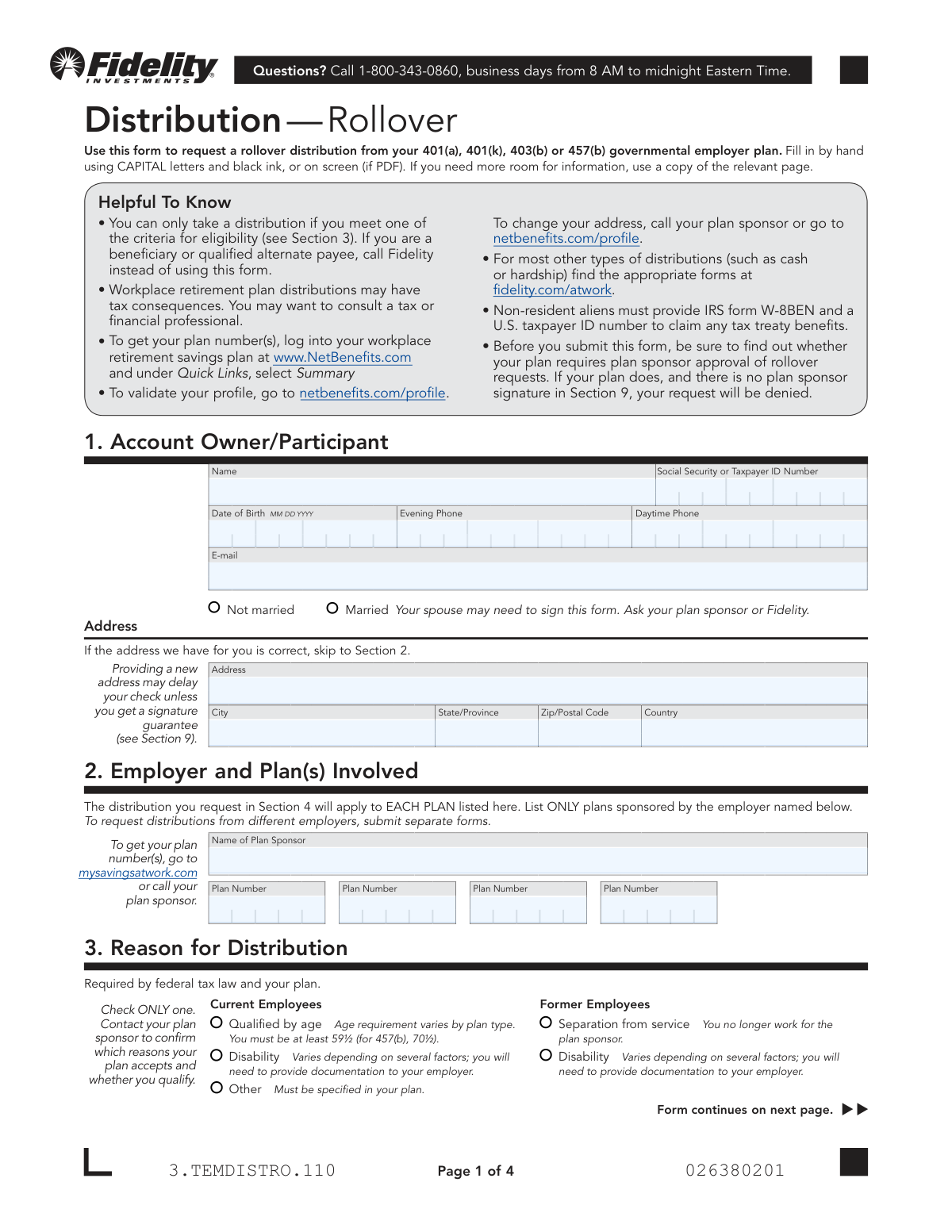
Don't type 87 fields by hand. Tell our AI about yourself, or upload a document you already have, and it fills every field in seconds. You check it, then download, print or sign.
The AI does the filling. You just check it.
No typing into boxes, nothing to install.
What this form asks for
The AI fills all of it, from your answers or your documents.
The AI checks your answers before you download
12 checks built for this form, so a wrong date or a missing answer is caught before anyone else sees it.
This check verifies that the Social Security or Taxpayer ID Number field in Section 1 is not empty and conforms to a valid 9-digit format (e.g., XXX-XX-XXXX or XXXXXXXXX). This is critical for uniquely identifying the participant for tax reporting and account processing. A failure would prevent the system from locating the correct account and processing the distribution request.
The form requires the participant to check only one reason for distribution in Section 3. This validation ensures that one and only one checkbox has been selected from the available options. Selecting multiple reasons or no reason makes the request ambiguous and non-compliant with federal tax law, leading to rejection of the form.
If the participant selects 'Qualified by age' as the reason for distribution in Section 3, this check calculates their age using the 'Date of Birth' from Section 1. It then confirms the calculated age meets the plan's minimum requirement (e.g., 59½). This is crucial for compliance with plan rules and IRS regulations, and failure means the participant is not eligible for this distribution reason.
If 'Separation from service' is selected in Section 3, this validation confirms that the 'Separation Date' field in Section 9 is filled out. It also ensures the provided date is not in the future and is on or after the 'Participant's Date of Hire'. This is necessary to confirm eligibility as a former employee, and a mismatch or missing date will halt the request.
In Section 4, a participant can choose to 'Move ALL Plan Assets' OR 'Move SOME Plan Assets', but not both. This validation ensures that selections have been made in only one of these two subsections. If both are filled out, the instructions are contradictory, and the form must be rejected to await clarification from the participant.
The form explicitly states that Roth assets cannot be rolled into a standard Rollover IRA. This check enforces that rule by verifying that if any Roth assets are part of the distribution request in Section 4, the selected destination is a 'Roth IRA' or an 'Employer-sponsored plan', not a 'Rollover IRA'. An invalid selection would result in a failed transaction and potential tax complications.
And 6 more checks
- Requires Destination Account Information for Rollovers
- Validates State-Specific Tax Withholding Minimums
- Prohibits UPS Delivery to P.O. Box Addresses
- Conditional Requirement for Spousal Consent
- Mandates Participant Signature and Date
- Verifies Plan Information Completeness
Let AI fill out your 3.TEMDISTRO.110
No typing. Every field filled in seconds, checked, ready to sign.
How to Fill Out 3.TEMDISTRO.110 Online for Free in 2026
What the AI walks you through.
- Navigate to Instafill.ai and upload the Fidelity Distribution—Rollover form or select it from their template library.
- Provide your personal information in Section 1, including your name, Social Security Number, date of birth, and contact details.
- Enter your employer and plan information in Section 2, specifying the Plan Sponsor and all relevant plan numbers.
- In Section 3, select your reason for the distribution, such as separation from service or reaching a qualifying age.
- Complete Section 4 to detail your rollover request, specifying whether you are moving all or some assets, the asset types (pre-tax, Roth), and the destination accounts.
- Indicate your tax withholding preferences in Section 5 and choose a check delivery method in Section 6.
- Review all AI-populated fields for accuracy, then electronically sign the form. Secure any required spousal or plan sponsor signatures before submitting the completed document to Fidelity as instructed.
Common Mistakes in Completing 3.TEMDISTRO.110
The ones the AI is built to catch.
Missing Required Plan Sponsor or Spousal Signature
Incorrectly Completing the Rollover Destination Section
Failing to Obtain a Required Signature Guarantee
Incomplete or Incorrect Plan Information
Selecting an Ineligible Reason for Distribution
State Tax Withholding Errors
Confusing a Notary Seal with a Signature Guarantee
Making Contradictory or Ambiguous Rollover Choices
Using Illegible Handwriting or Incorrect Ink
Ignoring Instructions for Updating an Address
Frequently Asked Questions About 3.TEMDISTRO.110
Is it really free for 7 days?
Can I fill other forms too?
How do I cancel?
How does the AI fill out 3.TEMDISTRO.110?
What happens to my information?
How complex is 3.TEMDISTRO.110 to fill out?
What is the purpose of the Distribution—Rollover form?
Who should use this form?
Where can I find my plan number required in Section 2?
How do I know if I'm eligible to request a rollover?
My spouse needs to sign the form. What does this involve?
What is a signature guarantee and when is it required?
Do I need my former employer to sign this form?
How do I submit the completed form?
How long will it take to receive my rollover check?
Will taxes be withheld from my distribution?
Can I roll over only a portion of my account balance?
Can I use an AI tool to help me fill out this form?
How can I fill out this form online using Instafill.ai?
The PDF version of this form I have is not fillable. What should I do?
I am the beneficiary of a retirement account. Can I use this form to request a rollover?
Get your 3.TEMDISTRO.110 filled out by AI
$0 today. Cancel before Nov 4 and you pay nothing.
Other forms like this one
benefit forms: Form SSA-16, Application for Disability Benefits, Form SSA-1-BK, Application for Retirement Benefits, Form SSA-2-BK, Application for Spouse's Benefits, Form SSA-4-BK, Application for Child's Insurance Benefits, Form SSA-10, Application for Widow's or Widower's Insurance Benefits, Form SSA-10, Widow's or Widower's Benefits, Form SSA-4-BK, Application for Social Security Benefits, Form SSA-5-BK, Application for Mother's or Father's Benefits, Form DBQ, Knee and Lower Leg Disability Benefits, Form DBQ, Heart Conditions Disability Benefits, Form DBQ, Hypertension Disability Benefits, Form DBQ, Scars/Disfigurement Disability Benefits, Form DBQ, Diabetes Mellitus Disability Benefits Questionnaire, Form DBQ, Endocrine Diseases Disability Benefits, Form DBQ, Diabetes Mellitus Disability Benefits Questionnaire, Back (Thoracolumbar Spine) Conditions Disability Benefits Questionnaire, Ankle Conditions Disability Benefits Questionnaire, Back (Thoracolumbar Spine) Conditions Disability Benefits Questionnaire, Elbow and Forearm Conditions Disability Benefits Questionnaire, Foot Conditions, Including Flatfoot (Pes Planus) Disability Benefits Questionnaire
rollover forms: Fidelity Investments Transfer/Rollover/Exchange Form, Rollover Request — 529 College Savings Plan, Fidelity Investments Transfer/Rollover Form, Fidelity Advisor IRA Distribution Request for Automatic Rollover Accounts, Special Tax Notice: Your Rollover Options - Fidelity Investments, Rollover Contribution Instructions & Application, A Place for Mom 401(k) Plan Request for Rollover Contribution Form, 401(k) Program Rollover Certification, New York State Deferred Compensation Plan Outgoing Rollover, Rollover Valet™ Request Form, Special Tax Notice: Your Rollover Options, New York State Deferred Compensation Plan Direct Rollover to a Roth IRA, WTIA 401(k) Plan Rollover Contribution Employee Certification, Fidelity Plan-to-Plan Direct Rollover Form, Plan-to-Plan Direct Rollover Form, Rollover/Transfer Request — ABLE Account, Rollover Valet™ Request Form, Vanguard Direct Rollover IRA Adoption Agreement, The Vanguard 529 College Savings Plan Direct Rollover Out to Roth IRA Form, Your guide to completing a rollover - Vanguard
Fidelity forms: Fidelity Funds Account Transfer of Assets Form, Fidelity Stock Plan Services (SPS) Transfer Request Form, How to Transfer Assets from Morgan Stanley to Fidelity Investments (Fidelity Stock Plan Services Guide), Fidelity Investments Transfer/Rollover/Exchange Form, Fidelity Investments Standing Transfer Instructions Form, Fidelity Charitable 144/145 Contribution Form, One-Time Withdrawal – IRA, Fidelity Investments, Fidelity Investments Transfer/Rollover Form, Fidelity Advisor 403(b) Distribution Request Form, Fidelity Advisor IRA Distribution Request for Automatic Rollover Accounts, Special Tax Notice: Your Rollover Options - Fidelity Investments, Fidelity Charitable Letter of Authorization, Fidelity Advisor Trading Authorization and Indemnification, Fidelity Investment-Only (Non-Prototype) Retirement Account Application, Fidelity NetBenefits Send a Document Form, Fidelity NetBenefits Auditor's Guide: An Overview of Fidelity's 2024 Plan Year Reporting Package, Fidelity NetBenefits Distribution - Recurring Payments, Fidelity Investments® Beneficiary Distribution Form, Fidelity Investments Distribution Form, Fidelity One-Time Withdrawal Form — Nonretirement
NetBenefits forms: Fidelity NetBenefits Distribution - Recurring Payments, Fidelity NetBenefits Send a Document Form, Fidelity NetBenefits Auditor's Guide: An Overview of Fidelity's 2024 Plan Year Reporting Package, Fidelity Plan-to-Plan Direct Rollover Form, Plan-to-Plan Direct Rollover Form
distribution forms: Fischer Homes Request for In-Service Distribution, Form 1099-DIV, Dividends and Distributions, Form 1099-R, Distributions From Pensions etc., Form 1099-PATR, Taxable Distributions from Cooperatives, Form 1099-SA, Distributions from HSA/MSA, Nationwide Retirement Solutions Participant Distribution Request Form (PNF-0875M9, TRAC Version, 01/2025), Nationwide Retirement Solutions Participant Distribution Request Form (PNF-0875M9, TRAC Version, 01/2025), Fidelity Advisor 403(b) Distribution Request Form, Fidelity Advisor IRA Distribution Request for Automatic Rollover Accounts, Fidelity NetBenefits Distribution - Recurring Payments, Fidelity Investments® Beneficiary Distribution Form, Fidelity Investments Distribution Form, Fidelity IRA Beneficiary Distribution — Charity, Foundation, or a University, IRA Distribution Form, New York State Deferred Compensation Plan Benefit Distribution Request, Individual 401(k) Distribution Request Form, Charles Schwab IRA Distribution Form, Sample IRA Distribution Letter for a Qualified Charitable Distribution (QCD), Vanguard IRA Distribution Kit (including IRA Distribution Form RRDFT and Form W-4R), Vanguard Required Minimum Distribution Service Form
Let AI fill out your 3.TEMDISTRO.110
Your trial starts once a card is added. You pay nothing before Nov 4.
Our AI already knows this form, all 87 fields of it. Skip the typing: tell it about yourself, or upload what you have, and it fills the whole form in seconds.
- AI fills every field on all 4 pages, checkboxes included
- No typing into boxes: answer a few questions, or upload a document you already have, an old copy of this form, a photo of a document
- The AI checks the answers; you review and change anything before you download
- Download the finished PDF, print it, or sign it online
- Encrypted, and never used to train AI
Cancel before Nov 4 and you pay nothing.
A card is needed to start the trial. Cancel in two clicks from your account.
Terms · Privacy