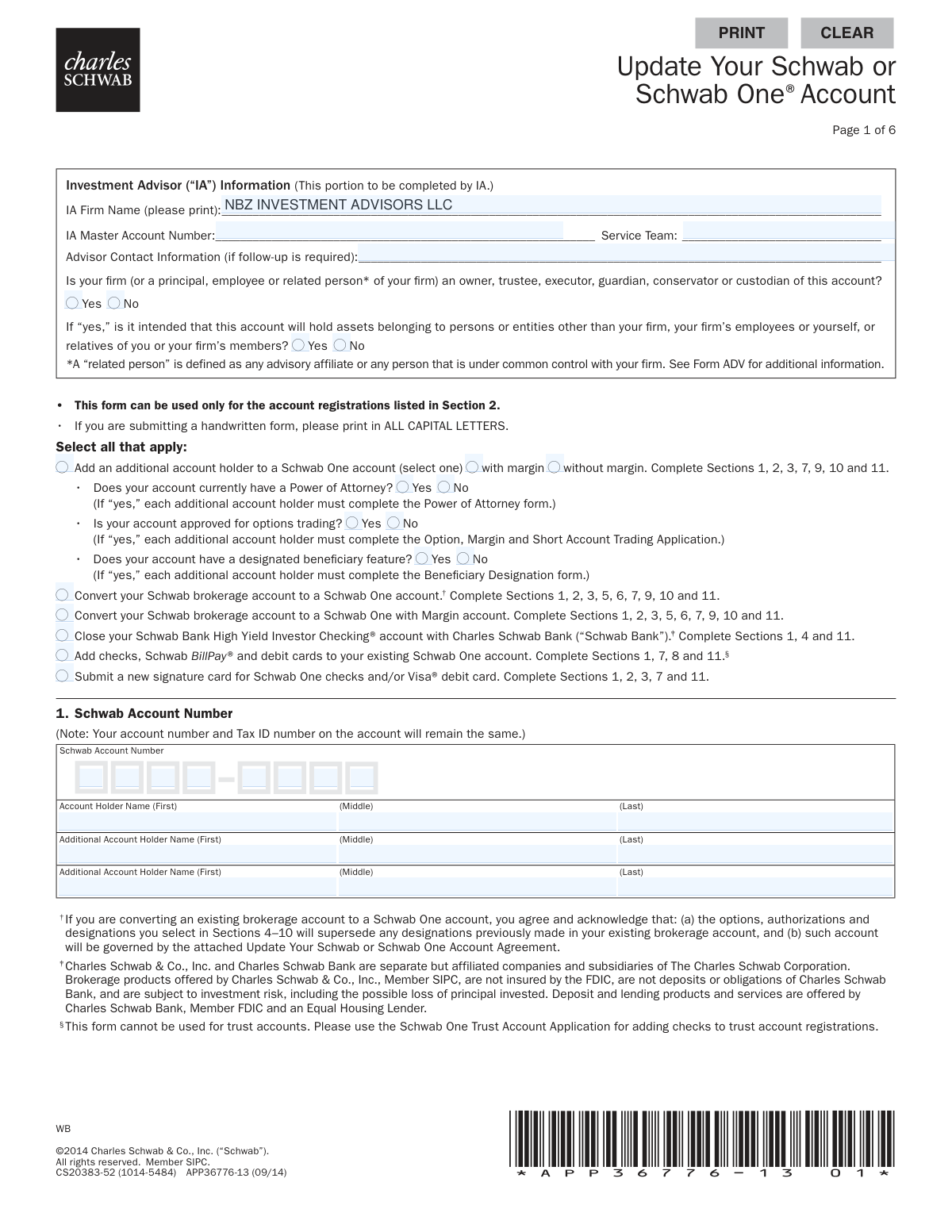
Yes! You can use AI to fill out Update Your Schwab or Schwab One® Account
This form is an application for existing Charles Schwab clients to modify their Schwab or Schwab One brokerage accounts. It allows for various updates, including adding another account holder, converting a standard brokerage account to a Schwab One account, adding checkwriting and debit card features, or closing a linked Schwab Bank checking account. Today, this form can be filled out quickly and accurately using AI-powered services like Instafill.ai, which can also convert non-fillable PDF versions into interactive fillable forms.
Our AI automatically handles information lookup, data retrieval, formatting, and form filling.
It takes less than a minute to fill out APP36776-13 using our AI form filling.
Securely upload your data. Information is encrypted in transit and deleted immediately after the form is filled out.
Form specifications
| Form name: | Update Your Schwab or Schwab One® Account |
| Number of pages: | 1 |
| Language: | English |
| Categories: | Schwab forms |
Instafill Demo: How to fill out PDF forms in seconds with AI
How to Fill Out APP36776-13 Online for Free in 2026
Are you looking to fill out a APP36776-13 form online quickly and accurately? Instafill.ai offers the #1 AI-powered PDF filling software of 2026, allowing you to complete your APP36776-13 form in just 37 seconds or less.
Follow these steps to fill out your APP36776-13 form online using Instafill.ai:
- 1 Navigate to Instafill.ai and upload or select the 'Update Your Schwab or Schwab One Account' form.
- 2 Use the AI assistant to select the specific updates you wish to make, which will highlight the required sections of the form.
- 3 Enter the personal and financial information for all account holders in the designated fields, including names, addresses, Social Security Numbers, and employment details.
- 4 Choose any optional features or authorizations, such as adding checks and a Visa debit card, enrolling in electronic delivery, or granting authority to your Investment Advisor.
- 5 Carefully review all the information entered by you and the AI for accuracy, paying close attention to account numbers, personal data, and selected options.
- 6 Electronically sign and date the form in Section 11. Ensure all required account holders provide their signatures.
- 7 Download the completed, signed form and submit it to Charles Schwab according to their instructions.
Our AI-powered system ensures each field is filled out correctly, reducing errors and saving you time.
Why Choose Instafill.ai for Your Fillable APP36776-13 Form?
Speed
Complete your APP36776-13 in as little as 37 seconds.
Up-to-Date
Always use the latest 2026 APP36776-13 form version.
Cost-effective
No need to hire expensive lawyers.
Accuracy
Our AI performs 10 compliance checks to ensure your form is error-free.
Security
Your personal information is protected with bank-level encryption.
Frequently Asked Questions About Form APP36776-13
This form is used to make various changes to an existing Schwab account managed by an Investment Advisor. This includes adding an account holder, converting account types, adding features like checks, or closing a linked checking account.
This form is intended for Schwab clients who work with an Investment Advisor (IA) and need to update their account. The first section of the form is specifically for the IA to complete.
To add an account holder, check the appropriate box on page one and complete all required sections, including personal information for the new holder. Be aware that if your account has features like options trading or a Power of Attorney, the new holder may need to complete additional forms.
Converting with margin allows you to borrow money from Schwab against the value of the securities in your account, which increases both your buying power and your risk. Converting without margin means you will not have this borrowing feature enabled.
You will need to provide standard personal details such as your full name, address, Social Security Number, date of birth, and employment information. Federal law requires this information to verify your identity.
Yes, if you are affiliated with or employed by a stock exchange or a FINRA member firm, you must attach a letter from your employer approving the establishment of your account when you submit this application.
No, this specific form cannot be used to add checks to trust accounts. The form states that you must use the 'Schwab One Trust Account Application' for that purpose.
You should submit your completed and signed form to your Investment Advisor, who will then forward it to Schwab for processing. While processing times can vary, changes are typically reflected in your account within several business days after Schwab receives the form.
All account holders, including any new account holders being added, must sign and date the form in Section 11. Your signature confirms you agree to the terms and conditions outlined in the application agreement.
Before submitting the form, you should save any needed Bill Pay information, download final transactions, destroy unused checks and debit cards, and notify anyone who makes direct deposits or debits. Your account will be fully closed 30 days after Schwab receives the form.
This optional section allows you to grant your Investment Advisor (IA) specific permissions. You can authorize them to execute trades, disburse funds for investment purposes, and/or deduct their advisory fees directly from your account.
Yes, services like Instafill.ai use AI to accurately auto-fill form fields with your information, which can save you significant time and help prevent errors. This is especially useful for lengthy forms that require repetitive personal data entry.
Simply upload the Schwab form to the Instafill.ai platform. The AI will make the document interactive and help you fill in the required fields quickly and accurately from your saved profile information.
You can use a service like Instafill.ai, which can convert flat, non-fillable PDFs into interactive, fillable forms. This allows you to type your information directly into the fields instead of printing the form and filling it out by hand.
Compliance APP36776-13
Validation Checks by Instafill.ai
1
SSN/TIN Format and Requirement
This check verifies that the Social Security Number or Tax ID Number in Section 3 is provided for each account holder and adheres to the standard 9-digit format (XXX-XX-XXXX or XX-XXXXXXX). This number is legally required for tax reporting and identity verification under federal law. A failure in this validation would prevent the account update from being processed due to non-compliance and incomplete identity verification.
2
Date of Birth and Legal Age Verification
This validation ensures the Date of Birth in Section 3 is a valid date in MM/DD/YYYY format and confirms the account holder is of legal age to own a brokerage account, typically 18 years or older. This is essential for legal and compliance reasons, as contracts with minors are generally not enforceable. If the date is invalid or the individual is underage, the application cannot be approved.
3
Signature and Account Holder Count Consistency
This check ensures that the number of signatures in Section 11 matches the number of account holders specified in Sections 1 and 3. For joint accounts, all listed holders must sign and date the form. This is critical for demonstrating that all parties consent to the account changes and agree to be bound by the terms. Missing signatures will render the authorization incomplete and legally void.
4
Conditional Requirement for Affiliation Details
This validation confirms that if an account holder answers 'Yes' to being affiliated with a stock exchange or being a director/shareholder of a public company in Section 3, the corresponding fields for the company name and trading symbol are filled out. This information is required by financial regulators (like FINRA) to monitor for potential conflicts of interest or insider trading. Failure to provide these details when required will halt the application for compliance review.
5
Registration Type and Holder Count Logic
This check verifies that the account registration type selected in Section 2 is consistent with the number of account holders provided. For example, an 'Individual' registration must have only one account holder, while joint types like 'Joint Tenants with Rights of Survivorship' must have two or more. This logic is fundamental to establishing correct account ownership and legal standing. An inconsistency would lead to rejection of the form for clarification on legal ownership.
6
Action-to-Section Completion Dependency
This validation ensures that if a primary action is selected at the top of page 1 (e.g., 'Convert your Schwab brokerage account'), all the corresponding sections listed next to that action are fully completed. This acts as a master completeness check to ensure all necessary information for the requested update is provided. If required sections are missing, the requested action cannot be performed, and the form will be returned as incomplete.
7
P.O. Box Restriction on Legal Address
This check validates that the 'Home/Legal Street Address' field in Section 3 does not contain 'P.O. Box' or a similar variation. Federal regulations, such as the USA PATRIOT Act, require financial institutions to obtain a physical residential address for identity verification purposes. Using a P.O. Box for a legal address will result in the rejection of the application until a valid physical address is provided.
8
Non-U.S. Citizen Identification Completeness
This validation is triggered if an account holder indicates non-U.S. citizenship or residence in Section 3. It ensures that the subsequent identification section (ID Type, Number, Issue Date, Expiration Date) is fully completed. This information is mandatory for compliance with international tax laws and anti-money laundering regulations. Incomplete information for non-U.S. persons will prevent the account from being updated.
9
Government ID Expiration Date Validity
For non-U.S. citizens or residents providing identification in Section 3, this check ensures the 'Expiration Date' of the passport or ID is a valid date and is not in the past. Financial institutions cannot accept expired documents for identity verification. An expired ID would cause the application to be rejected pending submission of current, valid identification.
10
Employment Details for Employed Individuals
This check verifies that if an account holder's 'Employment Status' in Section 3 is 'Employed' or 'Self-Employed,' the 'Employer Name/Industry' and 'Business Street Address' fields are completed. Regulators require this information to understand the customer's source of funds and to assess suitability. Missing employment details will result in a request for more information before the account update can proceed.
11
Schwab Account Number Presence and Format
This validation confirms that the 'Schwab Account Number' in Section 1 is present and matches the expected format (e.g., an 8-digit number). This number is the primary identifier for the account being updated, and its absence or incorrect format would make it impossible to locate and apply the requested changes. The form would be unprocessable without this key piece of information.
12
Conditional Logic for Second Debit Card
This check validates the request in Section 7 for 'Checks and two Visa debit cards.' This option should only be selectable if the account registration in Section 2 is a joint type. Issuing a second card requires a second authorized account holder. An individual account holder requesting two cards would have their request rejected or modified to a single card.
Common Mistakes in Completing APP36776-13
Applicants often select an action on the first page, such as 'Add an additional account holder,' but then fail to complete all the corresponding sections required for that action (e.g., Sections 1, 2, 3, 7, 9, 10, and 11). This happens due to the form's complexity and the need to cross-reference instructions. An incomplete form will be rejected, causing significant processing delays. To avoid this, carefully trace the required sections for your chosen action and double-check that each one is filled out before submission.
A frequent and critical error is failing to obtain signatures from all required parties in Section 11. When adding a new account holder or for any joint account update, all individuals (both existing and new) must sign and date the form. This oversight leads to immediate rejection of the application. To prevent this, ensure every person listed on the account, including new additions, provides a valid signature and date in the designated fields.
In Section 3, applicants mistakenly enter a P.O. Box for their 'Home/Legal Street Address,' despite the form explicitly stating 'no P.O. boxes, please.' This is a federal requirement for identity verification under the Patriot Act. Using a P.O. Box will halt the application process until a valid physical street address is provided. Always use your residential street address in this field and use the separate 'Mailing Address' field if you wish to receive mail at a P.O. Box.
Applicants may correctly answer 'Yes' to compliance questions in Section 3, such as being affiliated with a FINRA member or a director of a public company, but then forget to provide the mandatory follow-up details. This includes attaching a required approval letter or listing the company name and trading symbol. This omission creates a compliance issue and guarantees the form will be returned, delaying the account update. Always provide all supplementary information requested for any 'Yes' response.
In Section 9, clients may not fully grasp the difference between 'Trading Authorization' and the more powerful 'Trading and Disbursement Authorization,' potentially granting their advisor unintended permissions to move money. This confusion can arise from the dense legal language. Granting incorrect authority can have serious financial consequences. It is crucial to discuss these options with your advisor to ensure the selected level of authorization matches your intent.
The form is a flat PDF that is not digitally fillable, and it instructs users to 'print in ALL CAPITAL LETTERS' if submitting by hand. Many people use cursive or lowercase, leading to illegible entries that can be misinterpreted or cause the form to be rejected. This results in data entry errors and processing delays. To avoid this, you can use a tool like Instafill.ai to convert the non-fillable PDF into a fillable version, allowing you to type your answers clearly and ensure accuracy.
In Section 3, dual citizens often forget to list all countries of citizenship, and non-U.S. residents may fail to complete the required identification section (Passport, ID number, etc.). These details are critical for tax and regulatory compliance (e.g., FATCA). Missing this information will cause the application to be flagged and returned for correction. Ensure you list all citizenships and provide complete identification details if you are not a U.S. citizen or reside outside the U.S.
Applicants sometimes select a joint registration type in Section 2, such as 'Joint Tenants with Rights of Survivorship,' but then only provide information for a single account holder in Section 3. This creates a contradiction that makes the form invalid. This mistake happens when the applicant misunderstands the requirements for the chosen registration. To avoid this, ensure the number of account holders detailed in Section 3 matches the registration type selected in Section 2.
When requesting checks or a Visa debit card in Section 7, applicants may check a box but neglect to fill in the name and address details for how the checks or cards should be printed. This can lead to items being issued with default, potentially incorrect, information or being mailed to an old address. To ensure your new payment tools are correct and secure, always complete the name and address fields in this section precisely as you want them to appear.
Section 10, which deals with who receives proxy materials and other issuer communications, is often confusing and left blank. The form states that no selection defaults to a specific outcome that may not align with the client's wishes. This can lead to confusion about whether the client or their advisor is responsible for voting on corporate actions. To avoid this, carefully read the options and make an explicit 'Yes' or 'No' selection to ensure communications are handled according to your preference.
Saved over 80 hours a year
“I was never sure if my IRS forms like W-9 were filled correctly. Now, I can complete the forms accurately without any external help.”
Kevin Martin Green
Your data stays secure with advanced protection from Instafill and our subprocessors

Robust compliance program
Transparent business model
You’re not the product. You always know where your data is and what it is processed for.
ISO 27001, HIPAA, and GDPR
Our subprocesses adhere to multiple compliance standards, including but not limited to ISO 27001, HIPAA, and GDPR.
Security & privacy by design
We consider security and privacy from the initial design phase of any new service or functionality. It’s not an afterthought, it’s built-in, including support for two-factor authentication (2FA) to further protect your account.
Fill out APP36776-13 with Instafill.ai
Worried about filling PDFs wrong? Instafill securely fills update-your-schwab-or-schwab-one-account forms, ensuring each field is accurate.