Yes! You can use AI to fill out NextGen 529 Series Change Form

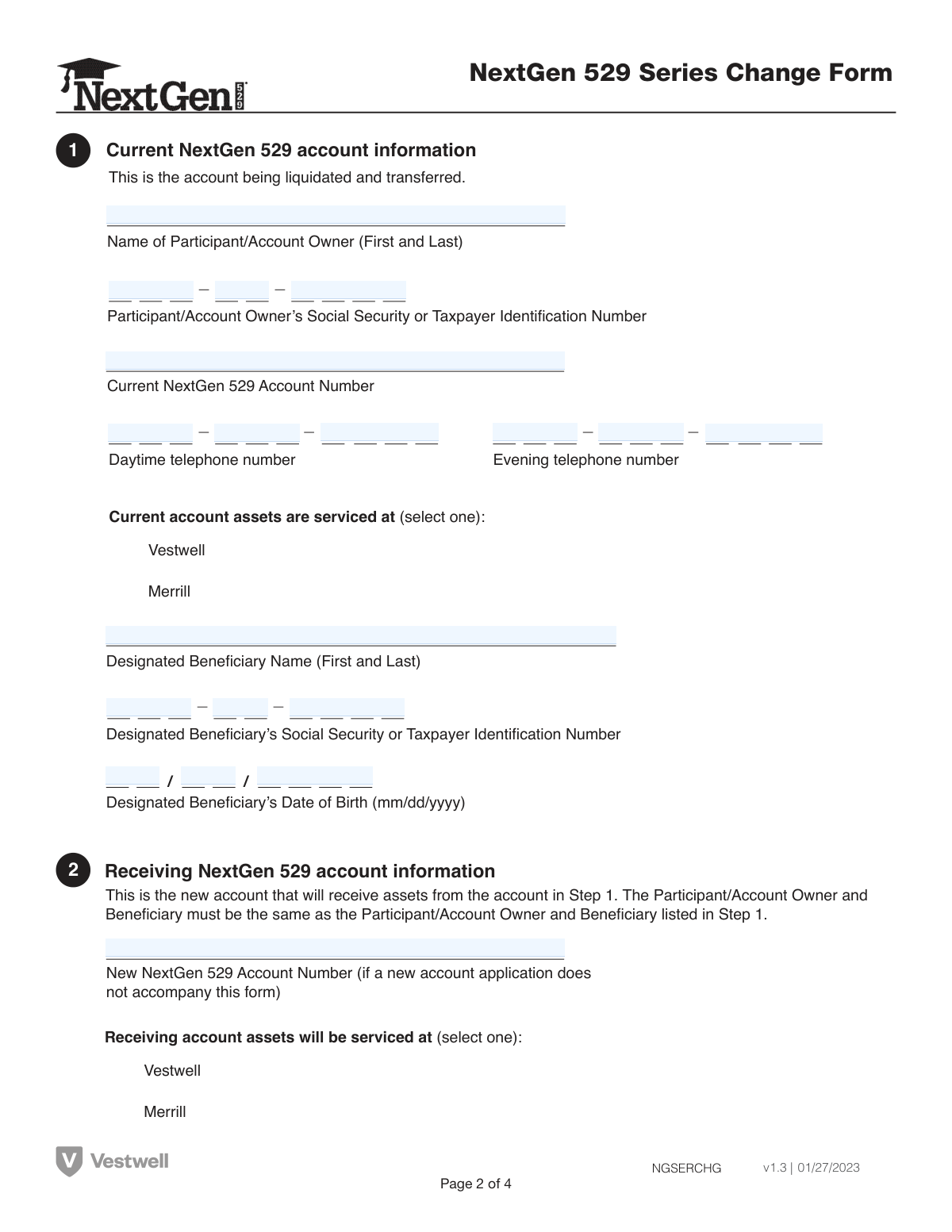
This form facilitates the transfer of all assets from one NextGen 529 account series to another (e.g., from Client Select to Client Direct) for the same account owner and beneficiary. It's important to note that this transfer counts as one of the two investment changes permitted per calendar year. Today, this form can be filled out quickly and accurately using AI-powered services like Instafill.ai, which can also convert non-fillable PDF versions into interactive fillable forms.
Our AI automatically handles information lookup, data retrieval, formatting, and form filling.
It takes less than a minute to fill out NGSERCHG using our AI form filling.
Securely upload your data. Information is encrypted in transit and deleted immediately after the form is filled out.

Form specifications

Form name: NextGen 529 Series Change Form
Number of pages: 1
Language: English
main-image

Instafill Demo: How to fill out PDF forms in seconds with AI

How to Fill Out NGSERCHG Online for Free in 2026

Are you looking to fill out a NGSERCHG form online quickly and accurately? Instafill.ai offers the #1 AI-powered PDF filling software of 2026, allowing you to complete your NGSERCHG form in just 37 seconds or less.
Follow these steps to fill out your NGSERCHG form online using Instafill.ai:
  1. 1 Navigate to Instafill.ai and upload or select the NextGen 529 Series Change Form.
  2. 2 Use the AI assistant to fill in Step 1 with your current NextGen 529 account information, including owner and beneficiary details.
  3. 3 Provide the receiving NextGen 529 account information in Step 2, specifying whether it's serviced by Vestwell or Merrill.
  4. 4 Complete the Letter of Authorization in Step 3, confirming the account numbers for the liquidation and transfer.
  5. 5 Carefully review all entered information, then electronically sign and date the form in Step 4 to authorize the transfer.
  6. 6 Download the completed form and submit it via mail or fax according to the instructions in Step 5, based on the receiving account's service provider.

Our AI-powered system ensures each field is filled out correctly, reducing errors and saving you time.

Why Choose Instafill.ai for Your Fillable NGSERCHG Form?

Speed

Complete your NGSERCHG in as little as 37 seconds.

Up-to-Date

Always use the latest 2026 NGSERCHG form version.

Cost-effective

No need to hire expensive lawyers.

Accuracy

Our AI performs 10 compliance checks to ensure your form is error-free.

Security

Your personal information is protected with bank-level encryption.

Frequently Asked Questions About Form NGSERCHG

This form is used to transfer all of your assets from one NextGen 529 series to another, for example, moving funds between the Client Select Series and the Client Direct Series.

Any NextGen 529 account owner who wishes to move their entire account balance from their current investment series to a different one within the NextGen 529 plan should use this form.

No, this form is not for changing the beneficiary. You must use the 'Change of Designated Beneficiary Form/Transfer Funds Form' to change the beneficiary.

A series change counts as one of your two allowable investment changes per calendar year. If you have already made two changes, this request will be rejected.

You must include a copy of your current account statement with the completed form. If you are opening a new account to receive the funds, a new account application may also be required.

In Step 1, you must provide the account owner's and beneficiary's full name and Social Security Number, as well as the current account number and your phone number.

If the new account is with Merrill, you must open it first and write the new number on the form. If it's with Vestwell, you can submit this form along with your new account application, leaving the number blank.

No, the account owner and beneficiary must remain the same for both the current and receiving accounts. To change the account owner, you must wait until after the series change is complete.

Step 5 provides specific mailing addresses, overnight mail addresses, and fax numbers. Be sure to use the correct one based on whether your receiving account is serviced by Merrill or Vestwell.

You can use a service like Instafill.ai, which can convert flat, non-fillable PDFs into interactive forms that you can type into directly on your computer.

Yes, services like Instafill.ai use AI to accurately auto-fill form fields. This can save you time and help you avoid common errors.

Simply upload the NextGen 529 Series Change Form to the Instafill.ai platform. The AI will make the fields fillable, allowing you to type your information, then download and print the completed form.

Any special traits of a custodial account, such as a UGMA or UTMA, must be carried over and remain in the new receiving account after the transfer.

By signing, you authorize the liquidation and transfer of your assets, confirm you agree to the terms of the receiving account, and certify that the information you provided is accurate.

Compliance NGSERCHG
Validation Checks by Instafill.ai

1
Validate Participant and Beneficiary SSN/TIN Format
This check ensures that the Social Security or Taxpayer Identification Numbers for both the Participant/Account Owner and the Designated Beneficiary in Step 1 are in a valid 9-digit format. This is critical for tax reporting and uniquely identifying individuals. If the format is incorrect, the form cannot be processed and will be rejected to prevent identity mismatches and compliance issues.
2
Verify Beneficiary's Date of Birth is a Valid Past Date
This validation confirms that the Designated Beneficiary's Date of Birth in Step 1 is provided in the 'mm/dd/yyyy' format and represents a logical date that is in the past. An invalid or future date would be a data entry error and could cause issues with age-based investment calculations or eligibility. The form will be returned for correction if the date is missing, improperly formatted, or set in the future.
3
Ensure Signature Date is Present and Not in the Future
This check verifies that the signature date in Step 4 is filled out in 'mm/dd/yyyy' format and is not a future date. The signature date legally establishes when the account owner authorized the transaction. A missing or future date invalidates the authorization, leading to the rejection of the form until a valid, current or past date is provided.
4
Confirm Account Holder and Beneficiary Consistency Across Accounts
This validation ensures the Participant/Account Owner and Designated Beneficiary on the receiving account (Step 2) are identical to those on the current account (Step 1), as explicitly required by the form's instructions. This rule prevents unauthorized changes to account ownership or beneficiaries through this specific form type. A mismatch will cause the transfer to be rejected, and the user will be instructed to use a different form or process for such changes.
5
Check for Annual Exchange Limit Exceeded
This is a crucial business rule validation that checks the account's transaction history to confirm this series change does not exceed the two investment changes allowed per calendar year. This rule is a federal regulation for 529 plans. If the account has already had two exchanges in the current year, this request will be automatically rejected and the account owner will be notified.
6
Verify Consistency of Current Account Number
This check ensures that the 'Current NextGen 529 Account Number' entered in Step 1 is identical to the account number entered in the Letter of Authorization in Step 3. This consistency is vital to ensure the correct account is being liquidated and transferred. Any discrepancy will halt the process and require correction to prevent action on the wrong account.
7
Verify Consistency of Receiving Account Number
This validation confirms that the 'New NextGen 529 Account Number' provided in Step 2 matches the 'Receiving account number' in the Letter of Authorization in Step 3. This ensures that assets are directed to the correct destination account. A mismatch would create ambiguity and risk of misdirecting funds, causing the form to be rejected.
8
Conditional Requirement for Receiving Account Number
This check enforces the rule that the 'New NextGen 529 Account Number' field in Steps 2 and 3 must be completed if a new account application is not submitted with the form. If the application is missing, this number is the only way to identify the destination account. Failure to provide the account number in this scenario will result in an incomplete request and processing will be delayed until the information is supplied.
9
Validate Presence of Account Owner's Signature
This check confirms that the signature field in Step 4 has been signed by the Participant/Account Owner or an authorized representative. The signature is the legal authorization for the liquidation and transfer of assets. A missing signature renders the entire form invalid, and the request will be rejected immediately.
10
Ensure Exclusive Selection of Servicing Institution
This validation verifies that for both the current account (Step 1) and the receiving account (Step 2), exactly one servicing institution ('Vestwell' or 'Merrill') is selected. Selecting none or both options creates ambiguity about how the account is managed and where to route the form. The form will be considered incomplete and returned for clarification if the selection is not clear.
11
Validate Current Account Number Exists
This check cross-references the 'Current NextGen 529 Account Number' from Step 1 against the system's database to confirm it is a valid, active account. This prevents attempts to transfer assets from non-existent or closed accounts. If the account number is not found or is inactive, the form will be rejected.
12
Completeness Check for All Required Fields in Step 1
This validation ensures that all mandatory fields in Step 1 are filled, including the names, SSN/TINs, account number, and beneficiary date of birth. This information is fundamental for identifying the source account and its legal parties. Missing information will result in an incomplete submission and the form will be returned to the applicant for completion.
13
Validate Phone Number Format
This check ensures that if a daytime or evening phone number is provided, it adheres to a standard format (e.g., 10 digits). While potentially optional, having a valid contact number is important for resolving any issues with the form submission. An invalid format may be flagged for review or correction to ensure the processing team can contact the account owner if needed.
14
Attachment Check for Current Account Statement
This validation verifies that a copy of the current account statement is included with the form submission, as requested in the instructions. The statement helps confirm account details and ownership, reducing the risk of errors. Submissions without the required statement may be delayed or rejected until the document is provided.

Common Mistakes in Completing NGSERCHG

Using the Form for an Incorrect Purpose

The instructions explicitly state this form is for transferring assets between the Client Select and Client Direct series, not for changing the beneficiary. Applicants often grab the first 'change form' they find without reading the fine print, leading to their request being rejected and causing significant delays. To avoid this, always read the 'Important Information' section at the top of the form to confirm its purpose and use the correct 'Change of Designated Beneficiary Form' if needed.

Exceeding the Annual Investment Change Limit

The form clearly states that a series change counts as one of the two investment changes allowed per calendar year. Account owners may forget previous changes made earlier in the year, causing the form to be automatically rejected upon submission. Before filling out the form, review your account history to confirm how many changes you've already made in the current calendar year to prevent this easily avoidable rejection.

Incorrectly Handling New Account Information

The form has different instructions for new accounts serviced by Merrill versus Vestwell. Users often miss that a new Merrill account must be opened *before* submitting this form with the new account number, while a new Vestwell account application should be submitted *with* this form. This mistake leads to processing holds and delays. Carefully follow the specific instructions for your chosen service provider in the 'Important information about completing this form' section.

Mailing the Form to the Incorrect Address

The form provides two distinct mailing addresses and fax numbers in Step 5, one for receiving accounts serviced by Merrill and another for Vestwell. Sending the completed form to the wrong location is a frequent error that causes significant processing delays as the documents must be rerouted. To avoid this, first identify the service provider for your *receiving* account in Step 2, then use only the corresponding mailing or fax information listed in Step 5.

Omitting the Required Account Statement

A common oversight is failing to include a copy of the current account statement as explicitly requested in the instructions. This document is used for verification, and its absence will halt the processing of the transfer until it is provided, delaying the transaction. To prevent this, make a copy of your most recent statement and paperclip it to the form before mailing.

Entering Inconsistent or Incorrect Account Numbers

This form requires the current and receiving account numbers to be entered in multiple sections (Steps 1, 2, and 3). It's easy to transpose digits or forget to fill in the numbers in Step 3, assuming the previous sections are sufficient. Such inconsistencies or omissions can cause the transfer to be rejected or applied to the wrong account. Double-check that all account numbers are entered correctly and consistently in all required fields before signing.

Missing Signature or Using Incorrect Date Format

Forgetting to sign the form in Step 4 is one of the most common reasons for rejection, as it invalidates the authorization. Additionally, users may write the date in a format other than the required 'mm/dd/yyyy'. An incomplete or improperly dated form cannot be processed and will be returned. AI-powered form filling tools like Instafill.ai can help prevent this by automatically formatting dates correctly and flagging missing signature fields.

Attempting to Change the Account Owner or Beneficiary

The form explicitly states that the account owner and beneficiary for the new account must be the same as the current account. Users sometimes try to use this transfer as an opportunity to update ownership or change the beneficiary, which is not permitted and will cause the request to be rejected. Any changes to the account owner or beneficiary must be done using separate, dedicated forms after the series change is complete.

Using Illegible Handwriting or Non-Black Ink

The instructions require the form to be filled out in black ink and capital letters for clarity and optical character recognition (OCR). Submissions with illegible handwriting, lowercase letters, or non-black ink can lead to data entry errors or outright rejection. To ensure accurate processing, print very clearly in all caps using a black ink pen. Since this is a non-fillable PDF, a tool like Instafill.ai can convert it into a fillable version, eliminating handwriting issues entirely.

Entering Incorrect Social Security Numbers

The form requires the SSN or TIN for both the Account Owner and the Designated Beneficiary. A frequent error is accidentally swapping these two numbers or transposing digits in one of them. An incorrect SSN will cause a data mismatch and lead to immediate rejection of the form for security and compliance reasons. Carefully verify that the correct SSN is entered in the correct field for both the owner and the beneficiary.
Saved over 80 hours a year

“I was never sure if my IRS forms like W-9 were filled correctly. Now, I can complete the forms accurately without any external help.”

Kevin Martin Green

Your data stays secure with advanced protection from Instafill and our subprocessors

Robust compliance program

Transparent business model

You’re not the product. You always know where your data is and what it is processed for.

ISO 27001, HIPAA, and GDPR

Our subprocesses adhere to multiple compliance standards, including but not limited to ISO 27001, HIPAA, and GDPR.

Security & privacy by design

We consider security and privacy from the initial design phase of any new service or functionality. It’s not an afterthought, it’s built-in, including support for two-factor authentication (2FA) to further protect your account.

Fill out NGSERCHG with Instafill.ai

Worried about filling PDFs wrong? Instafill securely fills nextgen-529-series-change-form forms, ensuring each field is accurate.