
Yes! You can use AI to fill out Fidelity Advisor Transfer Due to Divorce—IRA
Don't type 36 fields by hand. Tell our AI about yourself, or upload a document you already have, and it fills every field in seconds. You check it, then download, print or sign.
The AI does the filling. You just check it.
No typing into boxes, nothing to install.
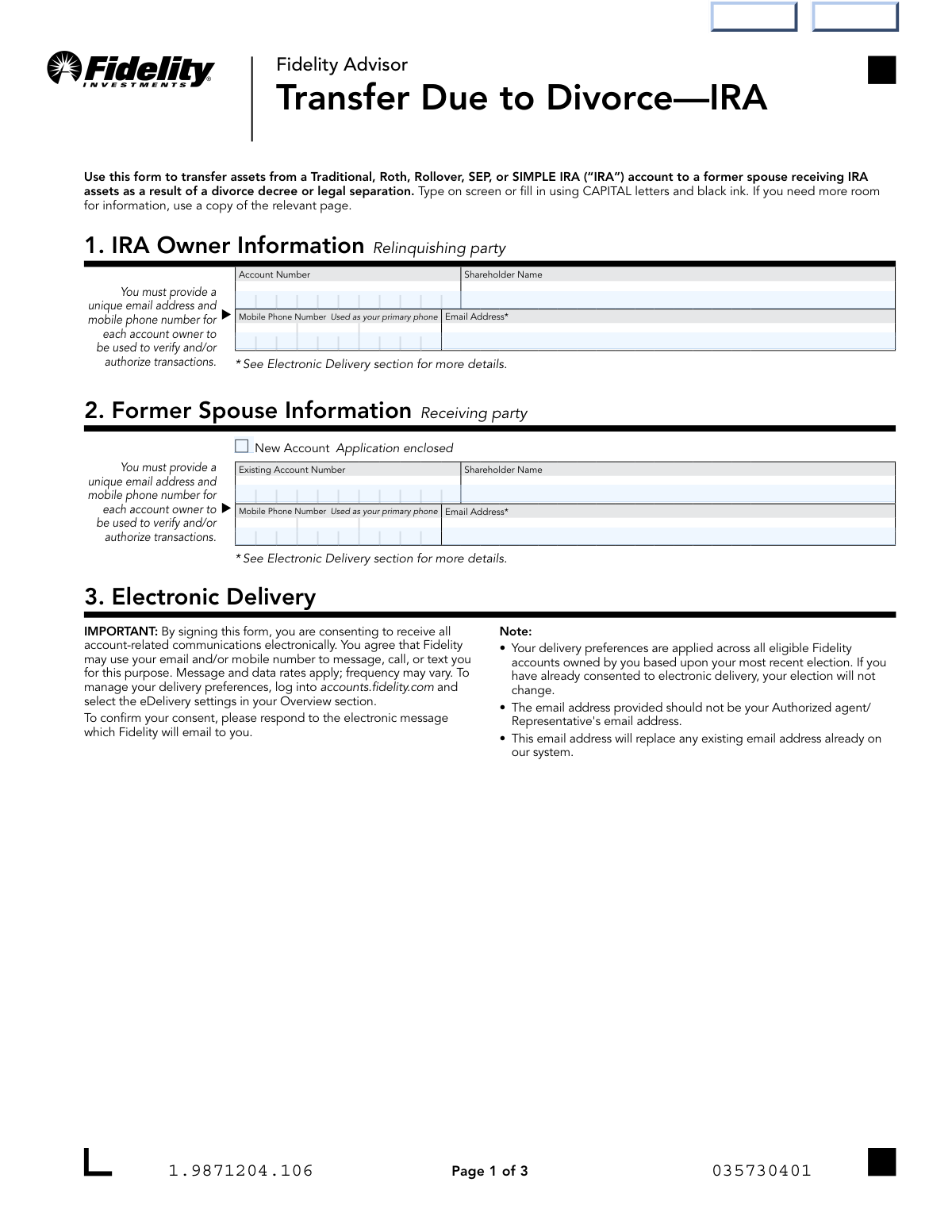
What this form asks for
The AI fills all of it, from your answers or your documents.
The AI checks your answers before you download
14 checks built for this form, so a wrong date or a missing answer is caught before anyone else sees it.
This check verifies that both the IRA Owner (relinquishing party) and the Former Spouse (receiving party) have signed and dated the form in Section 5. Signatures are required to authorize the transfer and certify the accuracy of the information provided. A submission without both signatures is invalid and cannot be processed, leading to rejection of the form.
This validation confirms that the 'Account Number' in Section 1 for the relinquishing party is not empty and corresponds to a valid, existing Fidelity Advisor IRA. This is critical for identifying the correct source account from which assets will be transferred. If the account number is missing or invalid, Fidelity cannot locate the account, and the transfer request will be rejected.
This check ensures that for the receiving party (Section 2), either an 'Existing Account Number' is provided or the 'New Account Application enclosed' box is checked. It is a logical check to confirm where the assets will be transferred to. Failure to provide one of these two options results in an incomplete instruction, as Fidelity would not know the destination for the assets, causing the form to be returned.
This validation ensures that in Section 4, either the 'Full Transfer' or 'Partial Transfer' checkbox is selected, but not both. This is crucial for providing clear and unambiguous instructions on how to divide the assets. If neither or both are selected, the instruction is considered ambiguous and the form will be rejected pending clarification.
If the 'Partial Transfer' checkbox is selected in Section 4, this check verifies that at least one fund transfer line item is completed with a fund number and either an amount or a percentage. Without these details, a partial transfer instruction is incomplete and cannot be executed. The form would be returned to the sender for completion.
For each fund listed in the 'Partial Transfer' section, this validation confirms that either a dollar 'Amount' OR a 'Percentage' is specified, but not both. Providing both creates conflicting instructions for a single fund transfer. This ambiguity would require the form to be rejected and resubmitted with clear instructions.
And 8 more checks
- Validates Email Address Format and Uniqueness
- Validates Mobile Phone Number Format
- Verifies Presence of Legal Document Reference
- Checks for Required Signature Guarantee
- Verifies Consistency of Printed Names and Signatures
- Confirms Attachment of Certified Divorce Decree
- Validates Date Format and Plausibility
- Verifies Fund Number Format and Existence
Let AI fill out your Fidelity Transfer Due to Divorce—IRA
No typing. Every field filled in seconds, checked, ready to sign.
How to Fill Out Fidelity Transfer Due to Divorce—IRA Online for Free in 2026
What the AI walks you through.
- Navigate to Instafill.ai and upload the Fidelity Advisor Transfer Due to Divorce—IRA form or select it from their template library.
- Use the AI assistant to accurately fill in the IRA Owner's (relinquishing party) information, including account number and contact details.
- Provide the Former Spouse's (receiving party) information, indicating if a new account application is also being submitted.
- Specify the transfer details in Section 4, indicating whether it's a full or partial transfer and detailing the specific funds or percentages as outlined in the divorce decree.
- Electronically sign the form. Both the IRA owner and the former spouse must provide their signatures and date the document.
- Gather and attach all required supporting documents, such as a certified copy of the divorce decree and a Letter of Acceptance if assets are moving to a new custodian.
- Review all entered information and attached documents for accuracy before submitting the completed package to Fidelity via their specified upload portal, fax, or mail.
Common Mistakes in Completing Fidelity Transfer Due to Divorce—IRA
The ones the AI is built to catch.
Submitting an Uncertified or Incomplete Divorce Decree
Incorrect Legal Language in the Divorce Decree
Confusing a QDRO with an IRA Transfer Order
Forgetting the Receiving Spouse's New Account Application
Attempting to Transfer Between Incompatible IRA Types
Missing a Required Signature
Failing to Provide a Signature Guarantee for Large Transfers
Providing Vague or Incomplete Transfer Instructions
Mismatch Between Form Instructions and Legal Documents
Entering Incomplete or Incorrect Account Numbers
Frequently Asked Questions About Fidelity Transfer Due to Divorce—IRA
Is it really free for 7 days?
Can I fill other forms too?
How do I cancel?
How does the AI fill out Fidelity Transfer Due to Divorce—IRA?
What happens to my information?
How complex is Fidelity Transfer Due to Divorce—IRA to fill out?
What is the purpose of the Fidelity Advisor 'Transfer Due to Divorce—IRA' form?
Who needs to sign this form for the transfer to be processed?
What documents are required besides this form?
Can I use a Qualified Domestic Relations Order (QDRO) for an IRA transfer?
What happens if my former spouse doesn't have a Fidelity account?
My divorce decree says the account is 'awarded to' my ex-spouse. Is that sufficient?
When is a signature guarantee required on this form?
How do I submit the completed form and required documents?
Can I transfer assets from my Traditional IRA to my former spouse's Roth IRA?
What if my divorce decree doesn't specify the account number or transfer amounts?
After the transfer is complete, what is an important next step?
Can AI tools help me fill out this form?
How can I fill out this form online instead of by hand?
The PDF version of this form I have is not fillable. What can I do?
Get your Fidelity Transfer Due to Divorce—IRA filled out by AI
$0 today. Cancel before Nov 1 and you pay nothing.
Other forms like this one
divorce forms: Transfer Due to Divorce — IRA/HSA/529, IRA/IRRA®/Roth IRA/SEP/SRA Divorce Transfer Instruction Form, Form 12.995(c), Safety-Focused Parenting Plan
IRA forms: Form 5498, IRA Contribution Information, SIRA Allied health treatment request (Catalogue no. SIRA09191), Transfer Due to Divorce — IRA/HSA/529, One-Time Withdrawal – IRA, Fidelity Investments, Fidelity Advisor IRA Distribution Request for Automatic Rollover Accounts, Fidelity Beneficiaries — IRA /HSA, Fidelity Advisor IRA Beneficiary Designation, IRA/HSA Beneficiary Designation, Fidelity IRA Beneficiary Distribution — Charity, Foundation, or a University, Form 8606, Nondeductible IRAs, Fidelity Investments Earnings Automatic Withdrawal Plan — IRA, Inherited IRA Application for Individual Beneficiaries, SIMPLE IRA Contribution Transmittal Form, IRA Distribution Form, Open a Schwab IRA, New York State Deferred Compensation Plan Direct Rollover to a Roth IRA, Charles Schwab IRA Distribution Form, Sample IRA Distribution Letter for a Qualified Charitable Distribution (QCD), Beneficiary Designation Form For IRA and 403(b)(7) Accounts, IRA Beneficiary Designation Form
Fidelity forms: Fidelity Funds Account Transfer of Assets Form, Fidelity Stock Plan Services (SPS) Transfer Request Form, How to Transfer Assets from Morgan Stanley to Fidelity Investments (Fidelity Stock Plan Services Guide), Fidelity Investments Transfer/Rollover/Exchange Form, Fidelity Investments Standing Transfer Instructions Form, Fidelity Charitable 144/145 Contribution Form, One-Time Withdrawal – IRA, Fidelity Investments, Fidelity Investments Transfer/Rollover Form, Fidelity Advisor 403(b) Distribution Request Form, Fidelity Advisor IRA Distribution Request for Automatic Rollover Accounts, Special Tax Notice: Your Rollover Options - Fidelity Investments, Fidelity Charitable Letter of Authorization, Fidelity Advisor Trading Authorization and Indemnification, Fidelity Investment-Only (Non-Prototype) Retirement Account Application, Fidelity NetBenefits Send a Document Form, Fidelity NetBenefits Auditor's Guide: An Overview of Fidelity's 2024 Plan Year Reporting Package, Fidelity NetBenefits Distribution - Recurring Payments, Fidelity Investments® Beneficiary Distribution Form, Fidelity Investments Distribution Form, Fidelity One-Time Withdrawal Form — Nonretirement
transfer forms: Form REG 227, Application for Replacement or Transfer of Title, City of Harvey Real Estate Transfer Declaration & Application (with Certificate for Exemption), DBPR ABT-6002 – Application for Transfer of Ownership of an Alcoholic Beverage License, DBPR ABT-6002, Division of Alcoholic Beverages and Tobacco Application for Transfer of Ownership of an Alcoholic Beverage License, Request for Transfer of Records (Adelaide Health Care) – AHC-0013-05-PS (Version 2), DBPR Form ABT-6002, Division of Alcoholic Beverages and Tobacco Application for Transfer of Ownership of an Alcoholic Beverage License, Pfändungs- und Überweisungsbeschluss (Garnishment and Transfer Order) – German Civil Enforcement Court Form, Fidelity Funds Account Transfer of Assets Form, Fidelity Stock Plan Services (SPS) Transfer Request Form, How to Transfer Assets from Morgan Stanley to Fidelity Investments (Fidelity Stock Plan Services Guide), Transfer Due to Divorce — IRA/HSA/529, Fidelity Investments Transfer/Rollover/Exchange Form, Fidelity Investments Standing Transfer Instructions Form, Fidelity Investments Transfer/Rollover Form, Group Transfer Form Fidelity Health Savings Account (HSA), Plan–to-Plan Transfer, Plan Exchange, or Service Credit Authorization Form, Beneficiaries — Nonretirement Transfer on Death, Transfer Shares as a Gift — Nonretirement, Form APP13017-29, Transfer Your Account to Schwab, Transfer of Assets Out - Partial Account or Charitable Gift Transfers
IRA transfer forms: IRA/IRRA®/Roth IRA/SEP/SRA Divorce Transfer Instruction Form, Transfer Due to Divorce — IRA/HSA/529, Frequently Asked Questions: Transferring to an Empower Premier IRA, TIAA IRA Transfer or Rollover Authorization, TIAA Trust, N.A. Private Asset Management, Request for a Direct Transfer From IRA Contracts, Inherited IRA Transfer of Assets/ Direct Rollover Form, Merrill Inherited IRA Transfer Instruction Form, Inherited IRA Transfer of Assets/Direct Rollover
Let AI fill out your Fidelity Transfer Due to Divorce—IRA
Your trial starts once a card is added. You pay nothing before Nov 1.
Our AI already knows this form, all 36 fields of it. Skip the typing: tell it about yourself, or upload what you have, and it fills the whole form in seconds.
- AI fills every field on all 4 pages, checkboxes included
- No typing into boxes: answer a few questions, or upload a document you already have, an old copy of this form, a photo of a document
- The AI checks the answers; you review and change anything before you download
- Download the finished PDF, print it, or sign it online
- Encrypted, and never used to train AI
Cancel before Nov 1 and you pay nothing.
A card is needed to start the trial. Cancel in two clicks from your account.
Terms · Privacy