Yes! You can use AI to fill out Bright Directions 529 Beneficiary Change Form

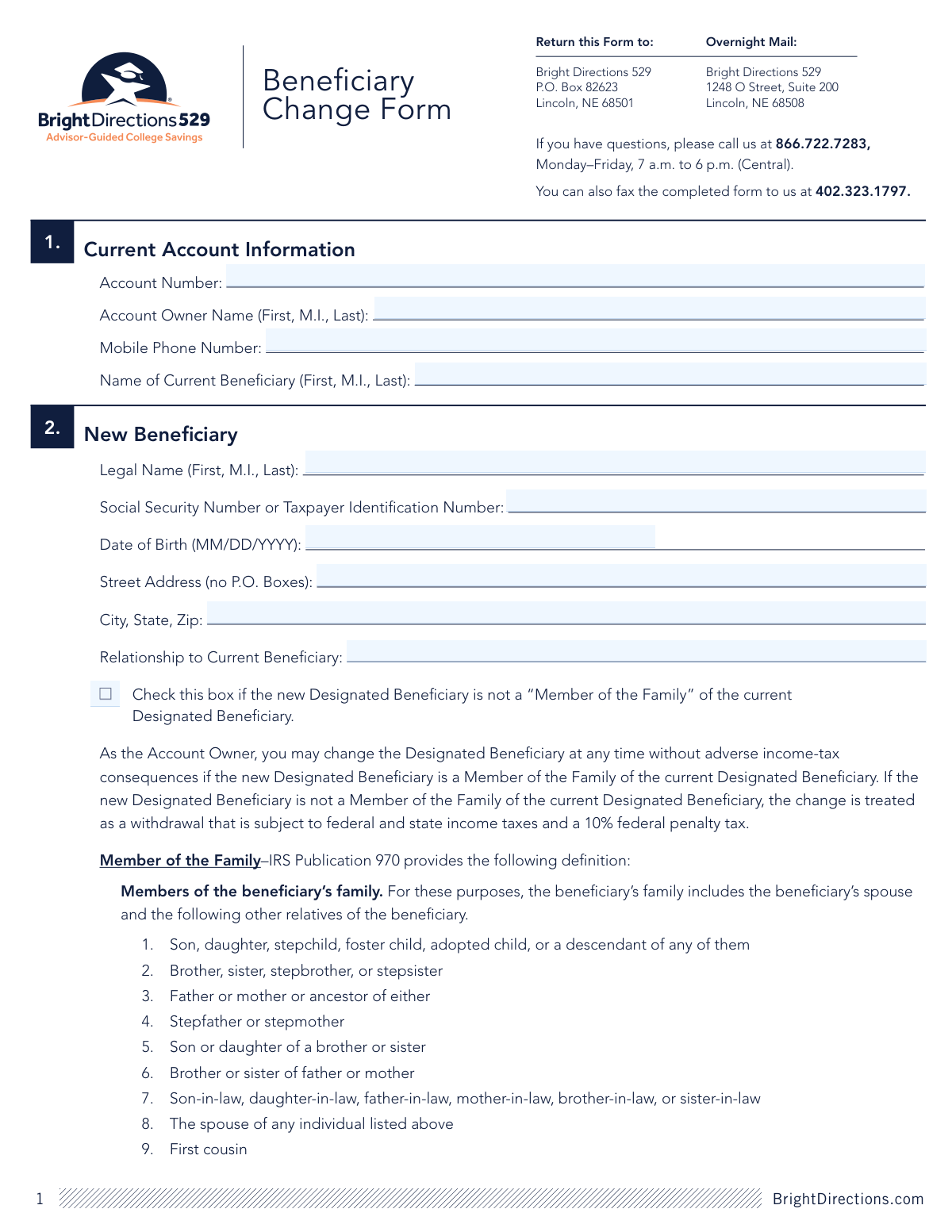
This form allows the owner of a Bright Directions 529 account to officially change the designated beneficiary. It is crucial to specify the new beneficiary's details and their relationship to the current one, as changing to a non-family member can have adverse tax consequences. Today, this form can be filled out quickly and accurately using AI-powered services like Instafill.ai, which can also convert non-fillable PDF versions into interactive fillable forms.
Our AI automatically handles information lookup, data retrieval, formatting, and form filling.
It takes less than a minute to fill out Beneficiary Change Form using our AI form filling.
Securely upload your data. Information is encrypted in transit and deleted immediately after the form is filled out.

Form specifications

Form name: Bright Directions 529 Beneficiary Change Form
Number of pages: 1
Language: English
Categories: beneficiary forms
main-image

Instafill Demo: How to fill out PDF forms in seconds with AI

How to Fill Out Beneficiary Change Form Online for Free in 2026

Are you looking to fill out a BENEFICIARY CHANGE FORM form online quickly and accurately? Instafill.ai offers the #1 AI-powered PDF filling software of 2026, allowing you to complete your BENEFICIARY CHANGE FORM form in just 37 seconds or less.
Follow these steps to fill out your BENEFICIARY CHANGE FORM form online using Instafill.ai:
  1. 1 Navigate to Instafill.ai and upload or select the Bright Directions Beneficiary Change Form.
  2. 2 Use the AI assistant to accurately fill in your current account information, including the account number, your name as the owner, and the current beneficiary's name.
  3. 3 Provide the complete legal name, Social Security Number, date of birth, address, and relationship for the new beneficiary.
  4. 4 Allocate your account balance and future contributions by selecting new investment portfolios, ensuring the percentages total 100%.
  5. 5 Carefully review all the information you've entered to ensure it is correct and complete.
  6. 6 Electronically sign and date the form in the authorization section to certify the changes.
  7. 7 Download the completed form and submit it to Bright Directions via mail or fax according to the instructions on the first page.

Our AI-powered system ensures each field is filled out correctly, reducing errors and saving you time.

Why Choose Instafill.ai for Your Fillable Beneficiary Change Form Form?

Speed

Complete your Beneficiary Change Form in as little as 37 seconds.

Up-to-Date

Always use the latest 2026 Beneficiary Change Form form version.

Cost-effective

No need to hire expensive lawyers.

Accuracy

Our AI performs 10 compliance checks to ensure your form is error-free.

Security

Your personal information is protected with bank-level encryption.

Frequently Asked Questions About Form Beneficiary Change Form

This form is used by the Account Owner of a Bright Directions 529 plan to change the designated beneficiary for their account.

You will need your account number, the current beneficiary's name, and the new beneficiary's full name, Social Security Number, date of birth, and physical address.

There are no adverse tax consequences if the new beneficiary is a 'Member of the Family' of the current one. If not, the change is considered a taxable withdrawal and may be subject to income tax and a 10% federal penalty.

According to the IRS, this includes the beneficiary's spouse, children, siblings, parents, grandparents, aunts, uncles, nieces, nephews, first cousins, and various in-laws.

Yes, Section 3 requires you to select new portfolio(s). Your entire account balance and all future contributions will be moved to the new investment allocation you choose.

You must use whole percentages, and your total investment allocation across all selected portfolios must equal 100%.

You can submit the form by mailing it to the P.O. Box, sending it via overnight mail to the street address, or faxing it. The addresses and fax number are listed at the top of the form.

The form has strict rules for electronic signatures, requiring a specific certificate-based digital signature. Standard e-sign features like Adobe's 'Fill & Sign' are not acceptable.

If you cannot locate your account number on a statement, you should call Bright Directions customer service at 866.722.7283 for assistance.

This refers to a specific type of account with its own fee structure and exclusive investment options. If you are unsure if this applies to you, contact customer service for clarification.

Yes, services like Instafill.ai use AI to accurately auto-fill form fields with your information, which can save you time and help reduce errors.

You can upload the PDF of the Beneficiary Change Form to the Instafill.ai platform. The AI will populate the fields, which you can then review, edit, and download the completed form for printing and signing.

Services like Instafill.ai can convert flat, non-fillable PDFs into interactive forms. Simply upload your form to the platform to make it fillable online.

Compliance Beneficiary Change Form
Validation Checks by Instafill.ai

1
Portfolio Allocation Total Must Equal 100%
This validation ensures that the sum of all percentages entered across all portfolio options in Section 3 equals exactly 100. This is critical for ensuring the entire account balance is allocated correctly without any portion being left unassigned or over-allocated. If the total is not 100%, the form submission will be rejected, and the user will be prompted to adjust the percentages.
2
New Beneficiary SSN/TIN Format Validation
This check verifies that the Social Security Number or Taxpayer Identification Number for the new beneficiary is entered in a valid format, typically as a 9-digit number (XXX-XX-XXXX or XXXXXXXXX). Correct tax identification is legally required for financial accounts and reporting to the IRS. An invalid format will prevent form processing and require the user to correct the entry.
3
Date of Birth Format and Plausibility
This validation confirms that the New Beneficiary's Date of Birth is in the specified MM/DD/YYYY format and represents a valid, past date. It prevents impossible dates, such as a future date or a date from over 120 years ago. This information is essential for identity verification and for certain age-based investment options, and failure will require correction.
4
Physical Street Address Requirement
This check ensures that the Street Address provided for the new beneficiary is a physical address and not a P.O. Box, as explicitly stated on the form. Financial institutions often require a physical address for legal and identity verification purposes (CIP/KYC regulations). If a P.O. Box is detected, the submission will fail, and the user must provide a valid street address.
5
Authorization Signature and Date Completion
This validation verifies that the 'Signature of Account Owner or Trustee' and the 'Date' fields in Section 4 are both completed. The signature legally authorizes the beneficiary change, and the date records when the authorization was given. Missing either of these critical elements invalidates the request, and the form will be considered incomplete and rejected.
6
Account Information Verification
This check cross-references the submitted Account Number, Account Owner Name, and Current Beneficiary Name with the system's records. It ensures the request is for a valid account and is being initiated by the authorized owner for the correct beneficiary. A mismatch indicates a potential error or unauthorized request, leading to rejection of the form pending verification.
7
Printed Name and Account Owner Consistency
This validation ensures that the name entered in the 'Print Name Here' field in Section 4 exactly matches the 'Account Owner Name' provided in Section 1. This serves as a secondary confirmation of the signer's identity and their authority to make changes to the account. A discrepancy will cause the form to be flagged for manual review or rejected.
8
New Beneficiary Information Completeness
This check confirms that all required fields in Section 2 for the New Beneficiary (Legal Name, SSN/TIN, Date of Birth, Address, and Relationship) are filled out. Incomplete information prevents the proper establishment of the new beneficiary on the account and can cause legal and tax reporting issues. The form will be rejected if any of these fields are left blank.
9
Whole Percentage Allocation Rule
This validation enforces the rule that all portfolio allocation percentages must be whole numbers, as specified in Section 3. Using decimals or fractions would complicate the allocation process and may not be supported by the system. If any non-integer values are detected, the form will be returned for correction.
10
Fee Structure F Account Verification
This check is triggered if any percentage is allocated to a portfolio under the 'FEE STRUCTURE F ACCOUNTS ONLY' heading. It verifies that the account number provided belongs to an account with Fee Structure F. Allocating to these portfolios from an ineligible account would violate the program's rules, so the submission will be rejected if the account type does not match.
11
Beneficiary Uniqueness Check
This validation ensures that the 'Legal Name' of the new beneficiary in Section 2 is not the same as the 'Name of Current Beneficiary' in Section 1. The purpose of the form is to change the beneficiary, so submitting the same person as both the current and new beneficiary is a logical error. Such a submission would be rejected as redundant and erroneous.
12
Relationship Field Presence
This check validates that the 'Relationship to Current Beneficiary' field is not empty. This information is crucial for determining the tax consequences of the beneficiary change, as changes to a 'Member of the Family' are treated differently by the IRS than changes to a non-family member. An empty field would leave the tax status ambiguous and cause the form to be rejected.

Common Mistakes in Completing Beneficiary Change Form

Using an Unapproved Electronic Signature Method

The form's authorization section explicitly forbids common e-signature tools like Adobe's 'Fill & Sign' and requires a specific certificate-based digital signature. People often miss this fine print and use the most convenient tool, which leads to immediate rejection of the form and processing delays. To avoid this, you must either use a compliant digital signature service or print the form, sign it by hand, and then scan or mail it.

Misunderstanding the 'Member of the Family' Definition

Account owners may incorrectly assume a relative qualifies as a 'Member of the Family' without consulting the specific IRS definition provided. Failing to check the box for a non-qualifying new beneficiary can result in the change being treated as a taxable withdrawal, leading to unexpected federal and state income taxes plus a 10% penalty. Always cross-reference the new beneficiary's relationship against the detailed list in Section 2 before signing.

Portfolio Allocation Percentages Not Totaling 100%

In Section 3, filers must allocate their investments across various portfolios, and the sum of these allocations must equal exactly 100%. Simple arithmetic errors are common, causing the form to be rejected and returned for correction, which delays the investment changes. Carefully double-check your math before submitting. AI-powered form filling tools like Instafill.ai can automatically perform these calculations to ensure the total is correct.

Entering an Incorrect Social Security Number (SSN)

A simple typo or transposition of digits when entering the new beneficiary's SSN in Section 2 is a frequent and serious error. An incorrect SSN will cause tax reporting issues with the IRS and can lead to significant delays or rejection of the beneficiary change. Carefully double-check the number against the beneficiary's official SSN card before submitting the form.

Leaving Portfolio Selection Blank

Some account owners assume their current investment allocation will automatically apply to the new beneficiary and leave Section 3 blank. However, the form states that a new selection is required to transfer the current balance and direct all future contributions. Leaving this section blank will make the form incomplete and lead to its rejection, halting the beneficiary change process.

Missing Signature or Date in Authorization

Forgetting to sign and date the form in Section 4 is one of the most common reasons for rejection. An unsigned or undated form is not legally valid and cannot be processed, which means the entire submission process must be repeated. Always perform a final review of the form, paying special attention to the signature and date fields before sending it.

Providing a P.O. Box for the Physical Address

The form explicitly states 'no P.O. Boxes' for the new beneficiary's street address, a requirement for identity verification and compliance. Many people overlook this instruction and enter a P.O. Box out of habit, which will result in the form being returned. Always provide a valid residential street address for the new beneficiary.

Incorrect Current Account Information

People often forget their exact account number or use a nickname instead of the full legal name listed on the account in Section 1. Any mismatch between the information provided and the data on file will prevent the firm from locating the account, causing the entire request to be rejected. To prevent this, refer to a recent account statement to get the exact account number and owner name.

Submitting a Form with Illegible Handwriting

When filling out a printed form by hand, poor or rushed handwriting can make names, numbers, and addresses impossible to read accurately. This leads to data entry errors on the processing end or causes the form to be rejected outright. To avoid this, print clearly in block letters or use a tool like Instafill.ai, which can convert the non-fillable PDF into a cleanly typed, fillable version.

Using Decimals or Fractions in Portfolio Allocations

The instructions for Section 3 clearly state to 'Use whole percentages only.' Filers sometimes attempt to be more precise by entering values like 10.5% or 25.5%, which are invalid inputs for the system. The processing system will reject these formats, requiring the form to be corrected and resubmitted. Ensure all allocation values are whole numbers.
Saved over 80 hours a year

“I was never sure if my IRS forms like W-9 were filled correctly. Now, I can complete the forms accurately without any external help.”

Kevin Martin Green

Your data stays secure with advanced protection from Instafill and our subprocessors

Robust compliance program

Transparent business model

You’re not the product. You always know where your data is and what it is processed for.

ISO 27001, HIPAA, and GDPR

Our subprocesses adhere to multiple compliance standards, including but not limited to ISO 27001, HIPAA, and GDPR.

Security & privacy by design

We consider security and privacy from the initial design phase of any new service or functionality. It’s not an afterthought, it’s built-in, including support for two-factor authentication (2FA) to further protect your account.

Fill out Beneficiary Change Form with Instafill.ai

Worried about filling PDFs wrong? Instafill securely fills bright-directions-529-beneficiary-change-form forms, ensuring each field is accurate.