Yes! You can use AI to fill out NextGen 529 Client Direct Series Incoming Rollover Form

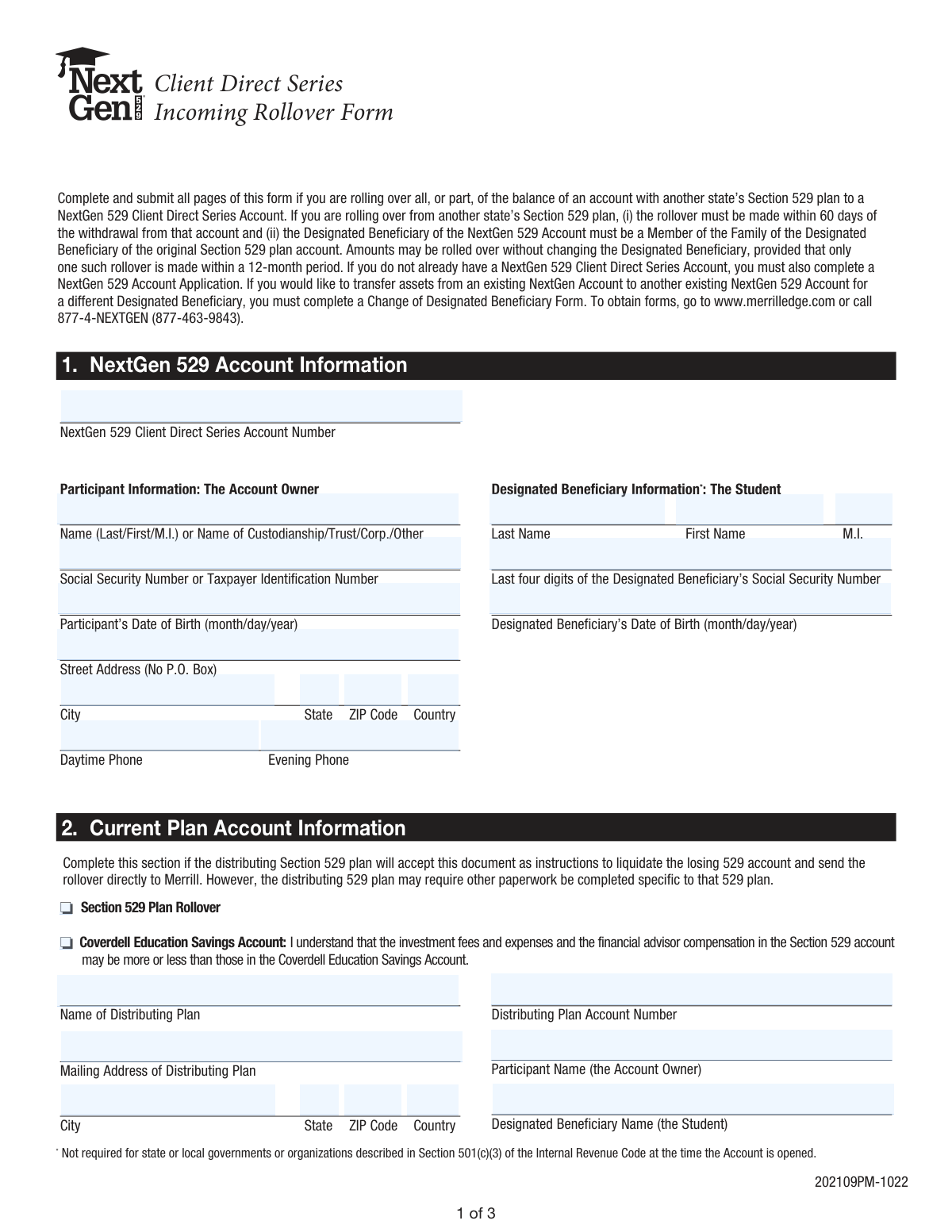
This form authorizes the liquidation and transfer of assets from an existing Section 529 plan or Coverdell Education Savings Account to a NextGen 529 Client Direct Series Account. It is essential for consolidating college savings funds into a single plan, subject to specific rollover rules. Today, this form can be filled out quickly and accurately using AI-powered services like Instafill.ai, which can also convert non-fillable PDF versions into interactive fillable forms.
Our AI automatically handles information lookup, data retrieval, formatting, and form filling.
It takes less than a minute to fill out NextGen 529 Incoming Rollover Form using our AI form filling.
Securely upload your data. Information is encrypted in transit and deleted immediately after the form is filled out.

Form specifications

Form name: NextGen 529 Client Direct Series Incoming Rollover Form
Number of pages: 1
Language: English
Categories: rollover forms
main-image

Instafill Demo: How to fill out PDF forms in seconds with AI

How to Fill Out NextGen 529 Incoming Rollover Form Online for Free in 2026

Are you looking to fill out a NEXTGEN 529 INCOMING ROLLOVER FORM form online quickly and accurately? Instafill.ai offers the #1 AI-powered PDF filling software of 2026, allowing you to complete your NEXTGEN 529 INCOMING ROLLOVER FORM form in just 37 seconds or less.
Follow these steps to fill out your NEXTGEN 529 INCOMING ROLLOVER FORM form online using Instafill.ai:
  1. 1 Navigate to Instafill.ai and upload or select the NextGen 529 Incoming Rollover Form.
  2. 2 Provide your NextGen 529 account information, including participant (account owner) and designated beneficiary details in Section 1.
  3. 3 Complete Section 2 with information about the current plan you are rolling over from, including the plan name, account number, and participant details.
  4. 4 In Section 3, specify the rollover instructions, indicating whether you are rolling over the entire account or a partial amount, and provide the principal and earnings breakdown.
  5. 5 Carefully review all the information auto-filled by the AI to ensure accuracy and completeness across all sections.
  6. 6 Electronically sign and date the form in Section 4. The AI will guide you on where to place your signature.
  7. 7 Download the completed form and follow the mailing or faxing instructions, noting that a signature guarantee may be required by your distributing plan.

Our AI-powered system ensures each field is filled out correctly, reducing errors and saving you time.

Why Choose Instafill.ai for Your Fillable NextGen 529 Incoming Rollover Form Form?

Speed

Complete your NextGen 529 Incoming Rollover Form in as little as 37 seconds.

Up-to-Date

Always use the latest 2026 NextGen 529 Incoming Rollover Form form version.

Cost-effective

No need to hire expensive lawyers.

Accuracy

Our AI performs 10 compliance checks to ensure your form is error-free.

Security

Your personal information is protected with bank-level encryption.

Frequently Asked Questions About Form NextGen 529 Incoming Rollover Form

This form is used to authorize the transfer of funds from another state's Section 529 plan or a Coverdell ESA into a NextGen 529 Client Direct Series Account.

You should complete this form if you are the account owner (Participant) of an external 529 plan or Coverdell ESA and wish to move all or part of that balance into a NextGen 529 account.

If you are establishing your first NextGen 529 account, you must also complete and submit a NextGen 529 Account Application along with this rollover form.

For a partial rollover, you must attach documentation from your old plan, like a statement or check stub, that clearly breaks down the principal and earnings amounts. Without this, the entire rollover may be treated as taxable earnings.

Yes, you should contact your distributing (old) plan provider. They may require you to complete their own specific paperwork in addition to this form to process the liquidation and rollover.

A signature guarantee is a verification of your signature by a financial institution, not a notary. You must contact your current 529 plan to determine if they require a signature guarantee to release the funds.

You can submit the form by mailing it to the P.O. Box listed in Section 3 or by faxing it to 866.994.7807. Ensure any corresponding check is made payable as instructed.

Yes, you can roll over funds to a new beneficiary, provided the new beneficiary is a 'Member of the Family' of the original one. Note that rollovers for the same beneficiary are limited to one per 12-month period.

No, this form is for funds coming from an external plan. To transfer assets between two existing NextGen 529 accounts for different beneficiaries, you must use the 'Change of Designated Beneficiary Form'.

If you do not provide appropriate documentation showing the principal and earnings breakdown, the entire amount of your rollover contribution will be treated as earnings, which may be taxable upon withdrawal.

Yes, services like Instafill.ai use AI to help you accurately auto-fill form fields, which saves time and reduces the chance of errors.

Simply upload the PDF of the Incoming Rollover Form to the Instafill.ai platform. The AI will make the document interactive, allowing you to answer simple questions to automatically and accurately fill the form.

If you have a non-fillable or 'flat' PDF, you can use a service like Instafill.ai. It can convert the document into an interactive, fillable form that you can easily complete on your computer or mobile device.

Compliance NextGen 529 Incoming Rollover Form
Validation Checks by Instafill.ai

1
SSN/TIN Format Validation
Verifies that the Social Security Number or Taxpayer Identification Number provided in Section 1 consists of exactly nine digits. This check is critical for tax reporting purposes and for uniquely identifying the participant. If the number is incorrectly formatted, the form submission will be rejected, as it can lead to failed identity verification and issues with the IRS.
2
Address P.O. Box Prohibition
Ensures the 'Street Address' field in Section 1 does not contain 'P.O. Box'. The form explicitly states 'No P.O. Box', which is a common requirement for financial institutions to comply with federal laws like the USA PATRIOT Act for identity verification. A submission with a P.O. Box will be rejected, and the participant will be required to provide a physical street address.
3
Participant Name Consistency Check
Compares the 'Participant Name (the Account Owner)' in Section 2 with the 'Participant Information' name in Section 1 to ensure they match. This logical check confirms that the owner of the distributing account is the same as the owner of the receiving NextGen 529 account. A mismatch will halt the process and trigger a manual review to prevent unauthorized transfers.
4
Rollover Amount Selection Logic
Validates that in Section 3, either the 'Entire Account Balance' checkbox or the 'Partial Account Balance' checkbox is selected, but not both. This prevents ambiguity in the rollover instructions. If neither or both options are selected, the form is considered incomplete and will be rejected, as the system cannot determine the intended rollover amount.
5
Partial Rollover Amount Requirement
Checks that if the 'Partial Account Balance' checkbox is selected in Section 3, a valid, positive monetary value is entered in the corresponding amount field. This is essential for the system to know how much money to transfer from the distributing plan. A missing or invalid amount will cause the form to be rejected for being incomplete.
6
Rollover Contribution Summation
Verifies that the sum of the 'Principal Portion' and 'Earnings Portion' fields equals the value in the 'Total Rollover Contribution' field in Section 3. This mathematical validation is crucial for correct tax basis tracking, as earnings may be taxable upon withdrawal. If the numbers do not add up, the form will be rejected until the discrepancy is corrected.
7
Beneficiary SSN Last Four Digits Format
Confirms that the 'Last four digits of the Designated Beneficiary’s Social Security Number' field in Section 1 contains exactly four numeric digits. This partial information is used as a key identifier for the beneficiary without exposing their full SSN. An entry with an incorrect number of digits or non-numeric characters will fail validation.
8
Date of Birth Validity
Ensures that both the 'Participant’s Date of Birth' and 'Designated Beneficiary’s Date of Birth' are valid dates in the past and follow the expected MM/DD/YYYY format. This is a fundamental data integrity check for legal age and identity verification. An invalid date (e.g., a future date, non-existent date like 02/30/2000) will cause the form to be rejected.
9
Completeness of Distributing Plan Information
Verifies that all fields in Section 2, such as 'Name of Distributing Plan' and 'Distributing Plan Account Number', are filled out. This information is essential for NextGen to contact the other institution and request the transfer of funds. Missing information will make it impossible to process the rollover, causing significant delays.
10
Participant Signature and Date Presence
Validates that a signature and date are provided in Section 4. The participant's signature provides the legal authorization to execute the rollover, and the date establishes when this authorization was granted. A form lacking a signature or date is legally invalid and will be rejected immediately.
11
Total vs. Partial Rollover Amount Consistency
If a partial rollover is indicated, this check ensures the amount entered in the 'Partial Account Balance' field matches the amount in the 'Total Rollover Contribution' field. This logical cross-check prevents conflicting instructions regarding the amount to be transferred. A discrepancy will flag the form for manual review or rejection to ensure the participant's intent is correctly captured.
12
Rollover Source Selection
Ensures that one of the checkboxes in Section 2 ('Section 529 Plan Rollover' or 'Coverdell Education Savings Account') is selected. This information is crucial for determining the specific rules and tax implications that apply to the incoming funds. If no source is indicated, the form is considered incomplete and cannot be processed correctly.

Common Mistakes in Completing NextGen 529 Incoming Rollover Form

Failing to Specify Principal and Earnings Portions

Applicants often leave the principal and earnings fields in Section 3 blank, assuming the plans will figure it out. The form explicitly warns that if this breakdown is not provided, the entire rollover amount will be treated as taxable earnings. To avoid severe tax consequences upon future withdrawals, you must obtain a statement from your distributing plan that clearly separates the principal (your contributions) from the earnings and enter those exact amounts on the form.

Not Attaching Proof of Principal/Earnings Breakdown

Even if the principal and earnings amounts are filled in Section 3, users frequently forget to attach the required supporting documentation. The form states that a check stub, statement, or official letterhead from the distributing plan is mandatory and that other documentation will be rejected. Failure to provide this proof will lead to processing delays and the entire contribution being treated as earnings, creating a significant future tax liability.

Submitting a Rollover Form Without an Active NextGen Account

This form is used to move money into an existing NextGen 529 account, but applicants sometimes submit it alone, believing it will also open a new account. The form cannot be processed without a valid NextGen 529 Account Number and will be rejected. To avoid this, you must first complete a 'NextGen 529 Account Application' or have an existing account ready before submitting the rollover request.

Confusing a Notary Stamp with a Signature Guarantee

The form notes that the distributing plan may require a Signature Guarantee, a specific verification from a financial institution. People often mistakenly obtain a more common notary public stamp, which is not acceptable for this purpose. Submitting a form with a notary stamp when a Signature Guarantee is required will result in the distributing plan rejecting the liquidation request, halting the entire rollover process.

Assuming This Form is Sufficient for Both Plans

Applicants often believe this 'Incoming Rollover Form' is all they need to complete the transfer. However, the form itself states that the distributing (losing) 529 plan may require its own specific paperwork to authorize the liquidation. Failing to contact the old plan and complete their required forms will cause the rollover request to be ignored, leaving the funds in the original account and delaying the transfer indefinitely.

Swapping Participant and Beneficiary Information

In Section 1, it's common for the account owner (Participant) to mistakenly enter the student's (Designated Beneficiary's) information in their section, or vice-versa. This happens because both names are on the account, but they serve different legal roles. This error will cause the account setup to fail validation, leading to rejection of the form and significant processing delays until a corrected form is submitted.

Entering a P.O. Box for the Participant's Address

The form explicitly states '(No P.O. Box)' for the participant's street address, a requirement for identity verification. Despite this instruction, users often enter a P.O. Box out of habit, which will cause an automatic rejection of the form. AI-powered form filling tools like Instafill.ai can prevent this by validating the address format and flagging prohibited entries like P.O. Boxes, ensuring compliance and avoiding resubmission delays.

Incorrect Calculation of Partial Rollover Amounts

When requesting a partial rollover in Section 3, the applicant must specify the Principal Portion, Earnings Portion, and Total Rollover Contribution. It is common for these three numbers not to add up correctly due to simple math errors. This discrepancy will cause the form to be flagged and likely rejected. Using a tool like Instafill.ai, which can be made from a flat PDF, helps by auto-calculating sums or validating that the entered numbers add up correctly.

Providing an Incomplete Name for the Distributing Plan

In Section 2, when asked for the 'Name of Distributing Plan,' people may write a generic name like 'Vanguard 529.' Financial institutions need the full, official name of the specific 529 plan to correctly process the request. An incorrect or vague name leads to processing delays while the receiving institution tries to determine the correct plan, which could have been avoided with careful data entry.

Missing the 60-Day Indirect Rollover Deadline

The instructions state that a rollover must be completed within 60 days of withdrawal from the original account, particularly if the applicant receives a check directly. If this strict 60-day deadline is missed, the IRS may treat the withdrawal as a non-qualified distribution. This makes the earnings portion subject to regular income tax plus a 10% penalty, a costly and irreversible mistake.
Saved over 80 hours a year

“I was never sure if my IRS forms like W-9 were filled correctly. Now, I can complete the forms accurately without any external help.”

Kevin Martin Green

Your data stays secure with advanced protection from Instafill and our subprocessors

Robust compliance program

Transparent business model

You’re not the product. You always know where your data is and what it is processed for.

ISO 27001, HIPAA, and GDPR

Our subprocesses adhere to multiple compliance standards, including but not limited to ISO 27001, HIPAA, and GDPR.

Security & privacy by design

We consider security and privacy from the initial design phase of any new service or functionality. It’s not an afterthought, it’s built-in, including support for two-factor authentication (2FA) to further protect your account.

Fill out NextGen 529 Incoming Rollover Form with Instafill.ai

Worried about filling PDFs wrong? Instafill securely fills nextgen-529-client-direct-series-incoming-rollover-form forms, ensuring each field is accurate.