Yes! You can use AI to fill out Fidelity Charitable 144/145 Contribution Form
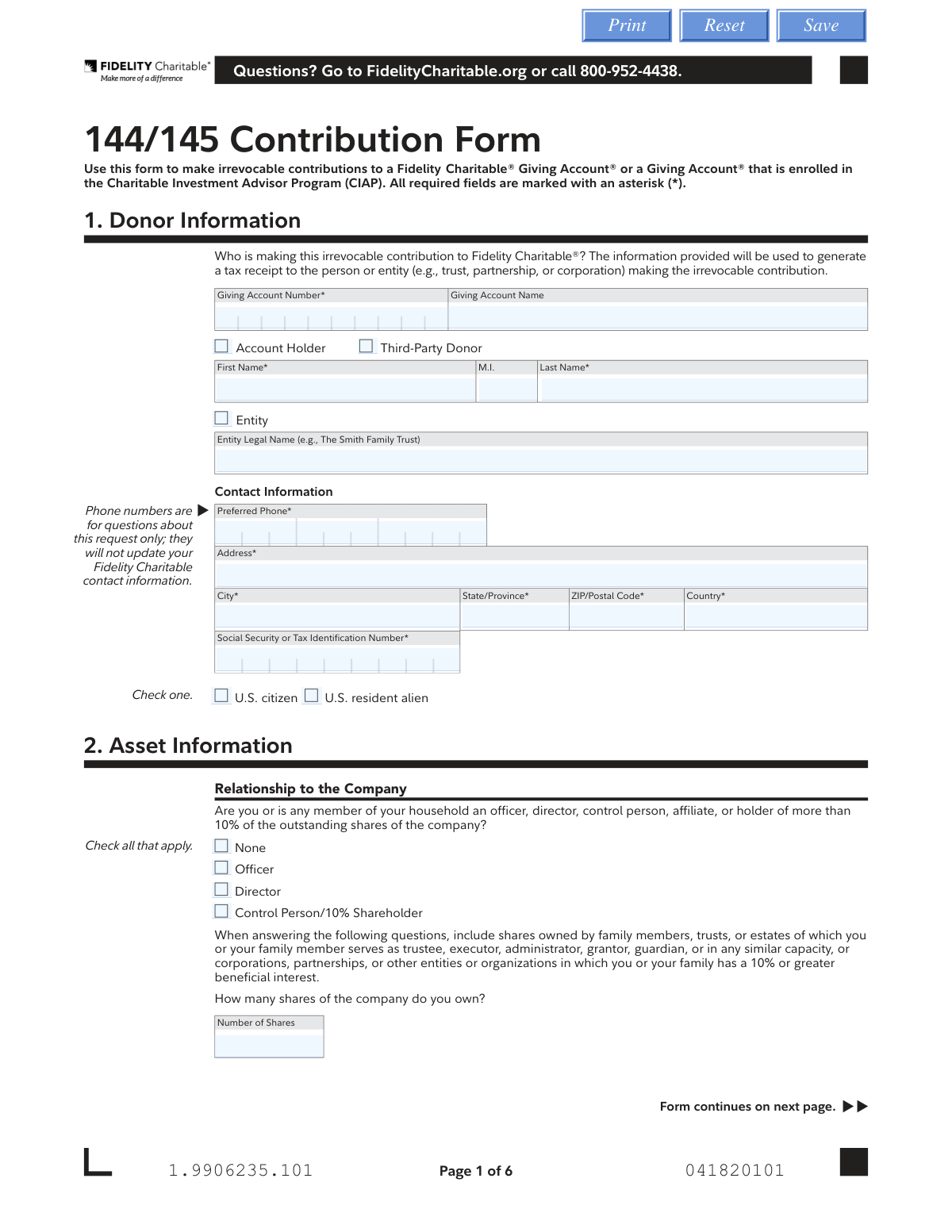
The Fidelity Charitable 144/145 Contribution Form is an official document used by donors to make irrevocable contributions of restricted or control securities (Rule 144/145 shares) to a Fidelity Charitable Giving Account or a Giving Account enrolled in the Charitable Investment Advisor Program (CIAP). The form captures donor information, asset details, acquisition history, transfer instructions, investment pool selections, and required signatures to facilitate the charitable contribution process and generate a tax receipt. It is an important document for donors wishing to contribute restricted stock or control shares to a donor-advised fund while complying with SEC regulations. Today, this form can be filled out quickly and accurately using AI-powered services like Instafill.ai, which can also convert non-fillable PDF versions into interactive fillable forms.
Our AI automatically handles information lookup, data retrieval, formatting, and form filling.
It takes less than a minute to fill out 144/145 Contribution Form using our AI form filling.
Securely upload your data. Information is encrypted in transit and deleted immediately after the form is filled out.
Form specifications
| Form name: | Fidelity Charitable 144/145 Contribution Form |
| Number of pages: | 1 |
| Filled form examples: | Form 144/145 Contribution Form Examples |
| Language: | English |
Instafill Demo: filling out a legal form in seconds
How to Fill Out 144/145 Contribution Form Online for Free in 2026
Are you looking to fill out a 144/145 CONTRIBUTION FORM form online quickly and accurately? Instafill.ai offers the #1 AI-powered PDF filling software of 2026, allowing you to complete your 144/145 CONTRIBUTION FORM form in just 37 seconds or less.
Follow these steps to fill out your 144/145 CONTRIBUTION FORM form online using Instafill.ai:
- 1 Navigate to Instafill.ai and upload the Fidelity Charitable 144/145 Contribution Form or select it from the available form library to begin filling it out online.
- 2 Complete Section 1 (Donor Information) by entering your Giving Account number, account name, personal or entity details, contact information, address, and Social Security or Tax Identification Number.
- 3 Fill out Section 2 (Asset Information) by indicating your relationship to the company whose securities you are contributing, the number of shares owned, securities sold in the past three months, any agreements or restrictions, and how and where the securities are held.
- 4 Complete Section 3 (Irrevocable Contribution) by specifying the security name, company symbol, acquisition dates, and number of shares being donated, and select the appropriate sub-section (3A for Fidelity accounts, 3B for stock certificates held personally, or 3C for assets at another financial institution) with the relevant account or certificate details.
- 5 Fill in Section 4 (Company Contact Information) with the company counsel's name, title, phone, email, and any relevant comments to confirm the shares may be gifted or re-registered.
- 6 Complete Section 5 (Investment Selection) by choosing either a managed account allocation (CIAP) or recommending how to allocate your contribution across available investment pools, ensuring the combined total equals 100%.
- 7 Review all entered information for accuracy, then complete Section 6 (Signatures and Dates) by providing the number of shares, company name, donor name, date, and required signatures before submitting or printing the form to mail or fax to Fidelity Charitable.
Our AI-powered system ensures each field is filled out correctly, reducing errors and saving you time.
Why Choose Instafill.ai for Your Fillable 144/145 Contribution Form Form?
Speed
Complete your 144/145 Contribution Form in as little as 37 seconds.
Up-to-Date
Always use the latest 2026 144/145 Contribution Form form version.
Cost-effective
No need to hire expensive lawyers.
Accuracy
Our AI performs 10 compliance checks to ensure your form is error-free.
Security
Your personal information is protected with bank-level encryption.
Frequently Asked Questions About Form 144/145 Contribution Form
The 144/145 Contribution Form is used to make irrevocable contributions of restricted or control securities to a Fidelity Charitable® Giving Account® or a Giving Account enrolled in the Charitable Investment Advisor Program (CIAP). Once accepted by the Trustees, the contribution cannot be refunded or reversed.
This form must be completed by any donor — individual, entity (such as a trust, partnership, or corporation), or third-party contributor — who wishes to contribute restricted or control shares (Rule 144/145 securities) to a Fidelity Charitable Giving Account. The information provided will be used to generate a tax receipt.
You must provide your Giving Account Number, account name, first and last name (or entity legal name), preferred phone number, address, and Social Security or Tax Identification Number. You must also indicate whether you are a U.S. citizen or U.S. resident alien.
An irrevocable contribution means that once the Trustees of Fidelity Charitable accept your contribution, it cannot be taken back, refunded, or redirected to a non-charitable purpose. You should be certain of your decision before signing and submitting this form.
Complete Section 3A by providing your Fidelity Account Number and any applicable stock certificate numbers. By signing the form, you authorize National Charitable Services LLC (NCS) to transfer cash and securities from your Fidelity nonretirement brokerage account to Fidelity Charitable without requiring additional written instructions.
Complete Section 3B and obtain a Medallion Signature Guarantee stamp on each stock certificate. When endorsing the certificate, write 'National Financial Services LLC' between the words 'appoint' and 'attorney,' then date and sign exactly as your name appears on the front. Mail the certificate along with this form via registered mail.
Transferring Restricted Stock from an outside financial institution requires you to select Option 2 in Section 3C, as Fidelity Charitable must initiate the transfer on your behalf. This process takes approximately three to six weeks to complete.
Section 5B offers four categories of investment pools: the Charitable Legacy Pool, Asset Allocation Pools (ranging from 20% to 85% equity), Sustainable and Impact Investing Pools, and Single Asset Class Pools. Your allocations across all selected pools must total 100%, and you may combine options from multiple categories.
If you do not make a recommendation, your contribution will be allocated to reflect the current pool allocation of your existing Giving Account. If your account is unfunded, the contribution will default to the Asset Allocation 20% Equity pool.
Yes, Section 2 requires you to disclose whether you or any household member is an officer, director, control person, affiliate, or holder of more than 10% of the company's outstanding shares. You must also report the total number of shares you own and any shares sold in the past three months.
You can mail the form to Fidelity Charitable at PO Box 770001, Cincinnati, OH 45277-0001 (regular mail) or 100 Crosby Parkway KC1D-FCS, Covington, KY 41015-4325 (overnight mail). You may also fax it to 877-665-4274, unless the delivering broker requires an original signature, in which case you must mail the form.
A Medallion Signature Guarantee is required when contributing stock certificates held in personal possession (Section 3B). The stamp must be obtained on the stock certificate itself. The signature section of the form also includes a space for a Medallion Signature Guarantee for authorized Fidelity use.
Yes, AI-powered services like Instafill.ai can help you accurately auto-fill the 144/145 Contribution Form, saving time and reducing errors. If you have a flat, non-fillable PDF version of the form, Instafill.ai can also convert it into an interactive fillable form so you can complete it digitally.
Visit Instafill.ai, upload the 144/145 Contribution Form PDF, and the AI will guide you through each field — including donor information, asset details, and investment pool selections — auto-filling where possible. Once complete, you can download, print, and submit the form to Fidelity Charitable by mail or fax.
For questions about the form, you can visit FidelityCharitable.org or call Fidelity Charitable directly at 800-952-4438. Note that any phone number provided on the form is for questions about the specific request only and will not update your Fidelity Charitable contact information on file.
Compliance 144/145 Contribution Form
Validation Checks by Instafill.ai
1
Giving Account Number Format and Presence Validation
Verifies that the Giving Account Number field is populated and conforms to the expected numeric format used by Fidelity Charitable. This field is required and serves as the primary identifier linking the contribution to the correct donor-advised fund. If this field is missing or incorrectly formatted, the contribution cannot be routed to the proper Giving Account, potentially causing processing delays or misallocation of donated assets.
2
Donor Identity Type Completeness Check
Ensures that exactly one donor type is selected — either 'Account Holder,' 'Third-Party Donor,' or 'Entity' — and that the corresponding name fields are fully completed. If 'Account Holder' or 'Third-Party Donor' is selected, First Name and Last Name must be present; if 'Entity' is selected, the Entity Legal Name field must be populated. Failure to correctly identify the donor type will result in an inaccurate or undeliverable tax receipt, which has direct legal and tax implications for the contributor.
3
Social Security or Tax Identification Number Format Validation
Checks that the SSN or TIN field is populated and follows the correct format — either a 9-digit SSN formatted as XXX-XX-XXXX or a 9-digit EIN formatted as XX-XXXXXXX. This number is required for IRS reporting and anti-money laundering compliance purposes. An incorrectly formatted or missing SSN/TIN will prevent Fidelity Charitable from generating a valid tax receipt and may trigger regulatory compliance failures.
4
U.S. Citizenship or Residency Status Selection Validation
Confirms that the donor has selected either 'U.S. citizen' or 'U.S. resident alien' as their citizenship/residency status. This selection is required to determine the appropriate tax treatment and reporting obligations associated with the charitable contribution. If neither option is selected, the form is incomplete and the contribution may be held pending clarification of the donor's tax status.
5
Preferred Phone Number Format Validation
Validates that the Preferred Phone field contains a properly formatted U.S. or international phone number, including the correct number of digits and, where applicable, a country code. Although the form notes that this number is for questions about the request only and will not update Fidelity Charitable contact information, a valid phone number is still required for processing follow-up. An invalid or missing phone number could delay resolution of any issues that arise during contribution processing.
6
Donor Address Completeness Validation
Ensures that all required address fields — Address, City, State/Province, ZIP/Postal Code, and Country — are populated for the donor's contact information. A complete address is necessary for generating and mailing the official tax receipt and for identity verification under anti-money laundering regulations. Missing address components will result in an incomplete submission that cannot be processed until the information is provided.
7
Acquisition Date Format Validation for Donated Securities
Verifies that the date fields for share acquisition (AcqDate1 and AcqDate2) are entered in the required MM DD YYYY format and represent valid calendar dates that are not in the future. Accurate acquisition dates are critical for determining the holding period of the donated securities, which directly affects whether the donor qualifies for a long-term capital gains deduction. Invalid or missing acquisition dates may cause the contribution to be processed incorrectly or require additional documentation from the donor.
8
Number of Shares Consistency Between Sections Validation
Cross-checks that the number of shares entered in the Asset Information section (Section 2), the Irrevocable Contribution section (Section 3), and the Signature section (Section 6) are consistent with one another. The signature section requires both a numeric entry and a written-out version of the share count, and all instances must agree. Discrepancies between these fields could indicate a data entry error and may result in the wrong number of shares being transferred, creating legal and financial complications.
9
Investment Pool Allocation Total Equals 100% Validation
Confirms that when investment pool selections are made in Section 5B, the sum of all entered pool percentages equals exactly 100%. The form explicitly states that the combined total must equal 100%, and any deviation — whether over or under — represents an invalid allocation instruction. If the percentages do not sum to 100%, the contribution cannot be properly invested, and the form must be returned to the donor for correction.
10
Restricted Stock Transfer Option Selection Validation
Checks that when the donor indicates the securities are restricted shares (via the Location of Securities field in Section 2), Option 2 is selected in Section 3C rather than Option 1. The form explicitly notes that restricted stock transfers require Fidelity Charitable to initiate the transfer, making Option 2 mandatory in this scenario. Selecting Option 1 for restricted stock would result in a failed or significantly delayed transfer, as the donor cannot independently initiate such a transfer.
11
Delivering Firm Information Completeness for Non-Fidelity Transfers
Ensures that when Section 3C is completed for assets held at a financial institution other than Fidelity, all required delivering firm fields — Delivering Firm Name, Delivering Firm Account Number, Address, City, State/Province, ZIP/Postal Code, and Country — are fully populated. These details are essential for Fidelity Charitable to locate and initiate or receive the asset transfer. Missing delivering firm information will prevent the transfer from being processed and may result in the contribution being rejected.
12
Securities Sold in Past Three Months Field Completion Validation
Verifies that the field asking how many shares of the company's securities have been sold in the past three months is completed, and that if no shares were sold, the value 'N/A' is explicitly entered as instructed. This information is required to assess Rule 144 compliance for restricted or control securities being donated. Leaving this field blank is not acceptable and could indicate an incomplete disclosure, which may expose the donor to regulatory risk and delay processing.
13
Shareholder Agreement or Restriction Disclosure Completeness Validation
Checks that when 'Yes' is selected for the question about agreements, contractual restrictions, lock-up agreements, or stop transfer orders, the Details field is populated with a description of the restriction. The form instructs donors to obtain a copy of the relevant agreement and send it to Restricted Stock Services, and the details field must not be left blank. Failing to provide details when restrictions exist could result in a legally non-compliant transfer of securities that are encumbered by undisclosed obligations.
14
Signature Date Format and Presence Validation
Confirms that the signature date field in Section 6 is completed in the required MM DD YYYY format and represents a valid, non-future date. The signature date establishes the legal date of the irrevocable contribution, which is critical for determining the tax year in which the deduction may be claimed. A missing or incorrectly formatted date renders the signature section incomplete and may invalidate the entire form submission.
15
Company Contact Information Completeness for Restricted/Control Shares
Validates that when restricted or control shares are being contributed, the Company Contact Information section (Section 4) is fully completed, including the counsel's Name, Title, Phone, and Email. Fidelity Charitable requires contact with company counsel to confirm that the shares may be gifted or re-registered before processing the transfer. If this section is left blank for restricted or control share contributions, the transfer cannot proceed, as legal confirmation of transferability is a prerequisite.
16
Managed Account Number Format Validation for CIAP Accounts
Ensures that when the Managed Account option is selected in Section 5A for CIAP-enrolled Giving Accounts, the Managed Account Number field is populated with a valid account number in the expected format. This number is required to direct the contributed assets to the correct advisor-managed account. An invalid or missing managed account number will result in the contribution being misrouted or held in a default pool, contrary to the donor's investment instructions.
Common Mistakes in Completing 144/145 Contribution Form
Many donors either leave the Giving Account Number blank or enter an incorrect number, especially when contributing on behalf of a third party. Since this number is required and directly determines which account receives the irrevocable contribution, an error here can result in the contribution being misallocated or rejected entirely. Always double-check your Giving Account Number against your most recent Fidelity Charitable statement before submitting. AI-powered form filling tools like Instafill.ai can help by auto-populating and validating account numbers to prevent transcription errors.
Donors frequently forget to check whether they are the Account Holder or a Third-Party Donor, leaving this selection blank or choosing the wrong option. This distinction is critical because it affects tax receipt generation and advisory privileges — third-party donors are eligible for a tax deduction but will not obtain Giving Account advisory privileges. Carefully read the definitions and select the appropriate option before completing the rest of Section 1. Misidentification can lead to incorrect tax documentation being issued.
A common mistake is omitting the SSN/TIN entirely or entering it in an incorrect format (e.g., missing dashes or transposing digits). This number is required for anti-money laundering compliance and tax receipt generation, and an error can delay processing or cause the form to be rejected. Ensure the number is entered in the standard format (XXX-XX-XXXX for SSN or XX-XXXXXXX for EIN) and matches exactly what is on file with the IRS. Tools like Instafill.ai can automatically format and validate tax identification numbers to prevent these errors.
Donors often report only the shares they personally own without including shares held by family members, trusts, estates, or entities in which they have a 10% or greater beneficial interest, as explicitly required by the form. This omission can constitute a material misrepresentation with serious legal and regulatory consequences under SEC Rule 144/145. Carefully review all affiliated holdings — including those held in trusts where you serve as trustee or corporations where you have a 10% interest — before entering the total number of shares. Underreporting can trigger compliance issues with Restricted Stock Services.
Many donors skip the field asking how many shares of the company's securities have been sold in the past three months, leaving it blank rather than writing 'N/A' as instructed when there are no sales. A blank field is ambiguous and may cause the form to be returned for clarification, delaying the contribution process. The form explicitly instructs donors to write 'N/A' if none apply, so always complete this field. Additionally, donors forget to include shares sold by persons they have acted in concert with, which is also required.
Donors transferring Restricted Stock frequently select Option 1 (self-initiated transfer) instead of the required Option 2 (Fidelity Charitable-initiated transfer). The form clearly notes that Restricted Stock transfers must use Option 2 because Fidelity Charitable must initiate the transfer on the donor's behalf, a process that takes approximately three to six weeks. Choosing Option 1 for Restricted Stock will result in the transfer failing or being significantly delayed. Always check the type of shares being contributed and match the correct option accordingly.
A very common error in Section 5B is allocating investment pool percentages that do not add up to exactly 100%. Donors may enter percentages that total 99% or 101% due to rounding errors, or they may partially complete the section and leave some pools blank. The form explicitly states the combined total must equal 100%, and submissions with incorrect totals will be rejected or processed using a default allocation. Double-check all percentage entries and ensure they sum to exactly 100% before submitting. Instafill.ai can automatically validate that pool percentages sum correctly.
Donors frequently leave the acquisition date (MM/DD/YYYY) or number of shares fields blank in the 'Acquisition of Shares Being Donated' section, or they enter dates in the wrong format. For assets from Fidelity Investments accounts, if tax lots are not specified, the contribution will be processed using the account's default disposal method, which may not be tax-optimal for the donor. For assets from other institutions, Fidelity Charitable cannot guarantee the specified tax lots will be delivered. Always enter complete and accurate tax lot information to ensure the most favorable tax treatment.
Donors contributing stock certificates held in personal possession (Section 3B) often forget to obtain a Medallion Signature Guarantee stamp on the certificate before mailing it. Without this stamp, the transfer cannot be processed and the certificate will be returned. Additionally, donors frequently make errors when endorsing the certificate — the form requires writing 'National Financial Services LLC' between the words 'appoint' and 'attorney,' and signing exactly as the name appears on the front of the certificate. Certificates must also be sent via registered mail, which donors sometimes overlook.
In the signature section, donors must enter the number of shares both numerically (e.g., 1,234) and written out in words (e.g., 'One thousand two hundred thirty-four'). A common mistake is leaving the written-out version blank, entering it incorrectly, or having a discrepancy between the two formats. Any inconsistency between the numeric and written-out share counts can invalidate the signature section and require the form to be resubmitted. Take extra care to ensure both representations match exactly, as this section carries legal weight as part of the irrevocable contribution authorization.
When selecting Option 2 in Section 3C to authorize Fidelity Charitable to initiate a transfer from a non-Fidelity institution, donors frequently forget to include a copy of the most recent account statement from the delivering institution. This document is explicitly required as part of Step 2 for Option 2, and without it, Fidelity Charitable cannot initiate the transfer. This oversight can delay the contribution by weeks, which may affect the tax year in which the deduction is claimed. Always gather the most recent statement before completing and submitting the form.
Section 4 requires the contact information for company counsel who can confirm the shares may be gifted or re-registered, but donors contributing restricted or control shares frequently leave this section incomplete or entirely blank. Without this information, Fidelity Charitable's Restricted Stock Services cannot verify the eligibility of the shares for transfer, causing significant processing delays or outright rejection of the contribution. Ensure you have the name, title, phone number, and email of the appropriate company counsel before submitting the form, and include any relevant comments about restrictions or agreements in the details field.
Saved over 80 hours a year
“I was never sure if my IRS forms like W-9 were filled correctly. Now, I can complete the forms accurately without any external help.”
Kevin Martin Green
Your data stays secure with advanced protection from Instafill and our subprocessors

Robust compliance program
Transparent business model
You’re not the product. You always know where your data is and what it is processed for.
ISO 27001, HIPAA, and GDPR
Our subprocesses adhere to multiple compliance standards, including but not limited to ISO 27001, HIPAA, and GDPR.
Security & privacy by design
We consider security and privacy from the initial design phase of any new service or functionality. It’s not an afterthought, it’s built-in, including support for two-factor authentication (2FA) to further protect your account.
Fill out 144/145 Contribution Form with Instafill.ai
Worried about filling PDFs wrong? Instafill securely fills fidelity-charitable-144145-contribution-form forms, ensuring each field is accurate.



