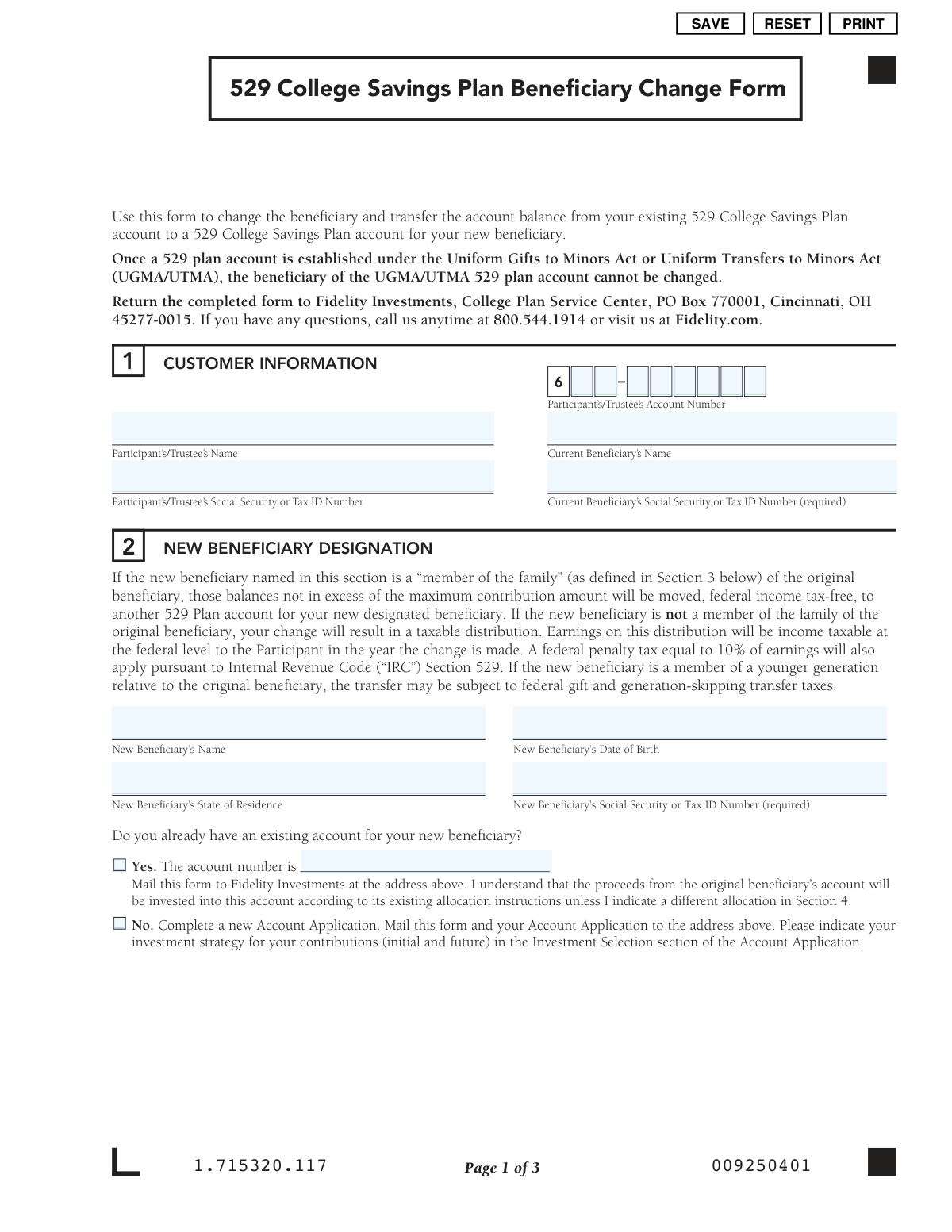
Yes! You can use AI to fill out 529 College Savings Plan Beneficiary Change Form

This form is a legal document used by a 529 college savings plan account holder to change the designated beneficiary and transfer the account balance. It is crucial for ensuring the educational savings are directed to the correct individual, and it outlines the potential tax implications based on the relationship between the old and new beneficiaries. Today, this form can be filled out quickly and accurately using AI-powered services like Instafill.ai, which can also convert non-fillable PDF versions into interactive fillable forms.
Our AI automatically handles information lookup, data retrieval, formatting, and form filling.
It takes less than a minute to fill out CIT-BCFORM-0212 using our AI form filling.
Securely upload your data. Information is encrypted in transit and deleted immediately after the form is filled out.

Form specifications

Form name: 529 College Savings Plan Beneficiary Change Form
Number of pages: 1
Language: English
Categories: beneficiary forms, college HR forms, 529 plan forms, college savings forms, savings plan forms
main-image

Instafill Demo: How to fill out PDF forms in seconds with AI

How to Fill Out CIT-BCFORM-0212 Online for Free in 2026

Are you looking to fill out a CIT-BCFORM-0212 form online quickly and accurately? Instafill.ai offers the #1 AI-powered PDF filling software of 2026, allowing you to complete your CIT-BCFORM-0212 form in just 37 seconds or less.
Follow these steps to fill out your CIT-BCFORM-0212 form online using Instafill.ai:
  1. 1 Navigate to Instafill.ai and upload the 529 Beneficiary Change Form or select it from their template library.
  2. 2 Use the AI assistant to automatically fill in the current participant and beneficiary information, including names and account numbers.
  3. 3 Enter the new beneficiary's personal details, such as their full name, date of birth, and Social Security Number.
  4. 4 Specify the relationship between the current and new beneficiaries to determine if the transfer is tax-free.
  5. 5 Indicate whether you are performing a full or partial account transfer and specify the investment allocation for the new beneficiary's account.
  6. 6 Carefully review all the information populated by the AI for accuracy, then provide your digital signature and the date.
  7. 7 Download the completed form and mail it to the address provided, such as the Fidelity Investments College Plan Service Center.

Our AI-powered system ensures each field is filled out correctly, reducing errors and saving you time.

Why Choose Instafill.ai for Your Fillable CIT-BCFORM-0212 Form?

Speed

Complete your CIT-BCFORM-0212 in as little as 37 seconds.

Up-to-Date

Always use the latest 2026 CIT-BCFORM-0212 form version.

Cost-effective

No need to hire expensive lawyers.

Accuracy

Our AI performs 10 compliance checks to ensure your form is error-free.

Security

Your personal information is protected with bank-level encryption.

Frequently Asked Questions About Form CIT-BCFORM-0212

This form is used to change the beneficiary on your existing 529 College Savings Plan and transfer the account balance to a new or existing account for the new beneficiary.

The account owner, listed as the 'Participant' or 'Trustee' in Section 1, must complete and sign the form to authorize the change.

A transfer is federal income tax-free if the new beneficiary is a 'member of the family' of the original beneficiary. If not, the change is considered a taxable distribution and may be subject to a 10% penalty on earnings.

No, the form explicitly states that once a 529 plan account is established under the Uniform Gifts to Minors Act (UGMA) or Uniform Transfers to Minors Act (UTMA), the beneficiary cannot be changed.

You must provide the new beneficiary's full name, date of birth, state of residence, and their Social Security or Tax ID number in Section 2.

If the new beneficiary does not have an existing account, you must complete a new Account Application and submit it along with this Beneficiary Change Form.

Mail the completed and signed form to the Fidelity Investments College Plan Service Center at PO Box 770001, Cincinnati, OH 45277-0015.

Yes, Section 4 provides an option for a 'Partial Account Transfer' where you can specify the exact dollar amount to move, leaving the rest in the original account.

The funds will follow the investment allocation already on file for the new beneficiary's account, unless you specify a different custom strategy in Section 4 of this form.

If you have questions, you can call Fidelity Investments at 800.544.1914 or visit their website at Fidelity.com.

Yes, services like Instafill.ai use AI to help you accurately auto-fill form fields from your saved information, which saves time and reduces potential errors.

You can upload the PDF of the form to the Instafill.ai platform. Their service will help you fill in the required fields digitally before you print the form for your signature.

Services like Instafill.ai can convert flat, non-fillable PDFs into interactive forms. Simply upload the document to their platform to make it fillable online.

This includes a wide range of relatives such as children, parents, siblings, aunts, uncles, nieces, nephews, first cousins, and various in-laws and step-relations. A complete list is available in Section 3 of the form.

Compliance CIT-BCFORM-0212
Validation Checks by Instafill.ai

1
Participant Account Verification
Validates that the Participant's Account Number exists in the system and corresponds to the provided Participant's Name and Social Security/Tax ID Number. This is a crucial first step to ensure the request is being applied to the correct account and initiated by the authorized individual. If the information does not match an existing account, the form processing will be halted and an error will be returned.
2
UGMA/UTMA Account Restriction
Checks if the specified 529 plan account is established under the Uniform Gifts to Minors Act (UGMA) or Uniform Transfers to Minors Act (UTMA). The form explicitly states that the beneficiary of such accounts cannot be changed. This validation prevents illegal or invalid transactions, and if the account is a UGMA/UTMA type, the entire request must be rejected.
3
Current Beneficiary SSN/TIN Validation
Ensures the 'Current Beneficiary’s Social Security or Tax ID Number' field is not empty and is in a valid SSN or TIN format (XXX-XX-XXXX or XX-XXXXXXX). This field is marked as required and is essential for correctly identifying the beneficiary whose account is being modified. Failure to provide a valid number will result in form rejection.
4
New Beneficiary SSN/TIN Uniqueness
Verifies that the Social Security or Tax ID Number of the 'New Beneficiary' is different from the 'Current Beneficiary'. This check prevents a user from attempting to change the beneficiary to the same person, which would be a redundant and invalid transaction. If the SSN/TINs match, the form should be flagged for review or rejected.
5
New Beneficiary Date of Birth Validity
Validates that the 'New Beneficiary’s Date of Birth' is a complete and logical date in MM/DD/YYYY format. The check ensures the date is not in the future and represents a plausible age for a beneficiary. This information is critical for age-based portfolio calculations and beneficiary identification, and an invalid date will cause the submission to fail.
6
Conditional Existing Account Number Requirement
Checks the logic for the question 'Do you already have an existing account for your new beneficiary?'. If 'Yes' is selected, the system must validate that an account number has been provided in the corresponding field. This ensures that funds are transferred to the correct, pre-existing account as intended by the participant.
7
Beneficiary Relationship Selection Completeness
Ensures that a relationship between the current and new beneficiary has been selected in Section 3. This selection is critical as it determines whether the transfer is a federal income tax-free event or a taxable distribution with potential penalties. A missing selection makes it impossible to process the transfer correctly, so the form must be returned for completion.
8
Exclusive Transfer Type Selection
Validates that the user has selected either 'Full Account Transfer' or 'Partial Account Transfer' in Section 4, but not both. This ensures there is no ambiguity in the transfer instruction. If neither or both options are selected, the form is considered incomplete and cannot be processed.
9
Conditional Partial Transfer Amount
If 'Partial Account Transfer' is selected, this check verifies that a valid, positive dollar amount has been entered. The amount must be greater than zero and less than or equal to the total account balance. Without a specified amount, a partial transfer cannot be executed.
10
Partial Transfer Liquidation Consistency
For a 'Partial Account Transfer', this validates that the sum of the dollar amounts specified in the portfolio liquidation table equals the total partial transfer amount entered. This ensures the instructions for funding the partial transfer are complete and mathematically correct. A mismatch would require the form to be rejected for correction.
11
Custom Strategy Allocation Total
If the user opts to create a 'Custom Strategy' for the new beneficiary's account, this validation ensures that the sum of all specified percentages equals exactly 100%. This is essential for ensuring the entire transferred amount is allocated correctly without any portion being left unassigned. Any total other than 100% will result in an error.
12
Custom Strategy Allocation Increments
Verifies that all percentage values entered into the 'Custom Strategy' allocation table are in increments of 5%, as instructed on the form. This rule simplifies portfolio management and aligns with the product's investment options. Any entry not divisible by 5 will cause the validation to fail.
13
Signature and Date Requirement
Confirms that the 'Signature of Participant' field is signed and that a 'Date' has been provided in the authorization section. The signature legally authorizes the transaction, and the date establishes when the authorization was given. A missing signature or date invalidates the entire form.
14
Signature Date Logical Check
Validates that the date provided in the signature section is a valid date in MM/DD/YYYY format and is not a future date. A future date would be invalid as authorization cannot be post-dated. This check ensures the form was signed on or before the date of submission.

Common Mistakes in Completing CIT-BCFORM-0212

Missing or Incorrect Social Security Numbers

The form explicitly requires the Social Security or Tax ID Number for both the current and new beneficiaries. This information is often omitted because the participant may not have it readily available when filling out the form. A missing or incorrect SSN is a primary reason for rejection, as it's essential for tax reporting and account identification, leading to significant processing delays.

Attempting to Change a UGMA/UTMA Beneficiary

The form's instructions clearly state that a beneficiary cannot be changed for an account established under the Uniform Gifts to Minors Act (UGMA) or Uniform Transfers to Minors Act (UTMA). Participants often overlook this critical restriction, wasting time and effort by submitting a form for an ineligible account. This happens because the assets legally belong to the minor beneficiary and cannot be transferred.

Incorrectly Identifying the 'Member of the Family'

Section 3 is crucial for determining if the transfer is tax-free. People may misinterpret the IRS definitions of family relationships, leading them to select the wrong option. An incorrect selection can result in an unintended taxable event, including federal income tax on earnings and a 10% penalty, which could have been avoided by carefully reviewing the provided list.

Forgetting the New Account Application

In Section 2, if the new beneficiary does not already have an account, the form instructs the participant to complete and submit a new Account Application along with the change form. It's a common mistake to only send the change form, which is incomplete on its own. This halts the entire process until the second required document is received, delaying the establishment and funding of the new account.

Ambiguous or Incomplete Transfer Instructions

In Section 4, participants must clearly choose between a 'Full' or 'Partial' account transfer. If 'Partial' is selected, they often fail to specify the exact dollar amount or which portfolios to liquidate. This ambiguity forces the financial institution to halt the request and contact the participant for clarification, delaying the investment transfer.

Investment Allocation Percentages Don't Total 100%

When choosing a custom investment strategy in Section 4, the allocations must total exactly 100%. Due to simple calculation errors, people frequently submit forms where the percentages add up to more or less than 100%. This invalidates the investment instructions, causing the form to be rejected and requiring correction.

Using Invalid Investment Increments

The custom investment allocation in Section 4 has a specific rule that all percentages must be in increments of 5%. Participants often ignore this constraint and enter other values like 8% or 12%. Any allocation that does not adhere to the 5% increment rule will be considered invalid, preventing the funds from being invested as desired until the form is corrected and resubmitted.

Missing Signature or Date

Forgetting to sign and date the form in Section 5 is one of the most common and easily avoidable mistakes. An unsigned or undated form is not legally binding and will be immediately rejected by the processing center. This simple oversight requires the participant to resubmit the entire form, causing unnecessary delays.

Confusing Participant and Beneficiary Information

In Section 1, the fields for the Participant/Trustee and the Current Beneficiary are adjacent. It's easy for an account holder to accidentally enter their own information in the beneficiary's fields or vice versa. This data mismatch will cause the form to fail validation checks, as the names and SSNs will not align with the account records.

Illegible Handwriting on a Printed Form

This form is often available as a non-fillable PDF, forcing users to print and complete it by hand. Poor handwriting can make names, numbers, and investment choices impossible to decipher, leading to data entry errors or outright rejection. To avoid this, it's best to use an AI-powered tool like Instafill.ai, which can convert the flat PDF into a digitally fillable version, ensuring all entries are clear and legible.
Saved over 80 hours a year

“I was never sure if my IRS forms like W-9 were filled correctly. Now, I can complete the forms accurately without any external help.”

Kevin Martin Green

Your data stays secure with advanced protection from Instafill and our subprocessors

Robust compliance program

Transparent business model

You’re not the product. You always know where your data is and what it is processed for.

ISO 27001, HIPAA, and GDPR

Our subprocesses adhere to multiple compliance standards, including but not limited to ISO 27001, HIPAA, and GDPR.

Security & privacy by design

We consider security and privacy from the initial design phase of any new service or functionality. It’s not an afterthought, it’s built-in, including support for two-factor authentication (2FA) to further protect your account.

Fill out CIT-BCFORM-0212 with Instafill.ai

Worried about filling PDFs wrong? Instafill securely fills 529-college-savings-plan-beneficiary-change-form forms, ensuring each field is accurate.