Yes! You can use AI to fill out Fidelity Roth IRA Conversion Form

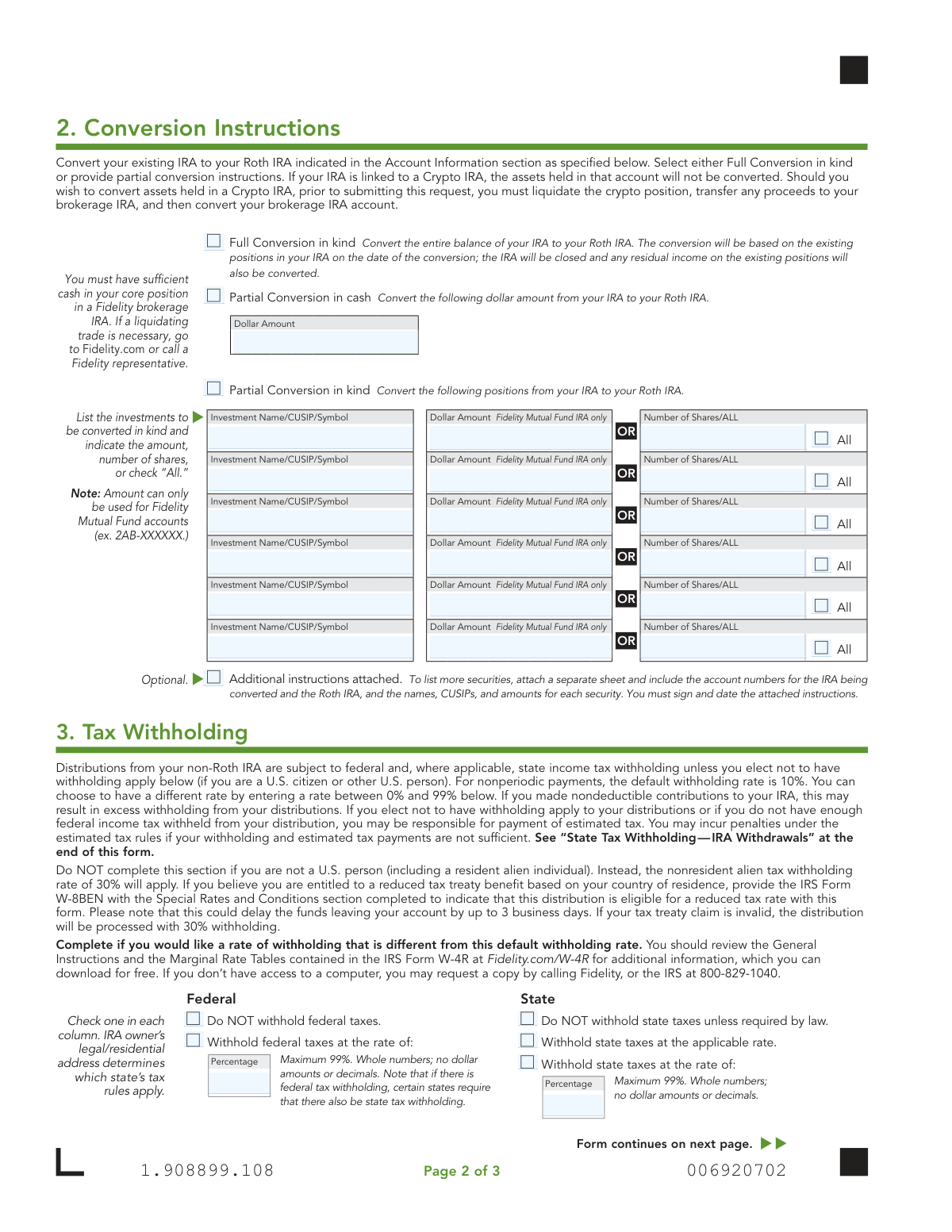
This form is used by Fidelity account holders to formally request the conversion of all or part of their existing pre-tax IRA into a post-tax Roth IRA. It's an important document because a Roth conversion is an irrevocable, taxable event, and this form captures the necessary details, including account information, conversion instructions, and tax withholding elections. Today, this form can be filled out quickly and accurately using AI-powered services like Instafill.ai, which can also convert non-fillable PDF versions into interactive fillable forms.
Our AI automatically handles information lookup, data retrieval, formatting, and form filling.
It takes less than a minute to fill out 1.908899.108 using our AI form filling.
Securely upload your data. Information is encrypted in transit and deleted immediately after the form is filled out.

Form specifications

Form name: Fidelity Roth IRA Conversion Form
Number of pages: 1
Language: English
Categories: IRA forms, Fidelity forms, Roth conversion forms
main-image

Instafill Demo: How to fill out PDF forms in seconds with AI

How to Fill Out 1.908899.108 Online for Free in 2026

Are you looking to fill out a 1.908899.108 form online quickly and accurately? Instafill.ai offers the #1 AI-powered PDF filling software of 2026, allowing you to complete your 1.908899.108 form in just 37 seconds or less.
Follow these steps to fill out your 1.908899.108 form online using Instafill.ai:
  1. 1 Navigate to Instafill.ai and upload the Fidelity Roth IRA Conversion Form or select it from their template library.
  2. 2 Provide your personal details and the account numbers for both the IRA you are converting from and the destination Roth IRA.
  3. 3 Specify your conversion instructions in Section 2, indicating whether you are performing a full or partial conversion and detailing any specific assets if necessary.
  4. 4 Complete Section 3 to make your federal and state tax withholding elections, choosing to accept the default rate or specify a different percentage.
  5. 5 Carefully review all entered information for accuracy, paying close attention to account numbers and conversion amounts.
  6. 6 Electronically sign and date the form in Section 4 to authorize the transaction and certify the information provided.
  7. 7 Download the completed form and submit it to Fidelity through their digital upload portal or by mail as instructed on the form.

Our AI-powered system ensures each field is filled out correctly, reducing errors and saving you time.

Why Choose Instafill.ai for Your Fillable 1.908899.108 Form?

Speed

Complete your 1.908899.108 in as little as 37 seconds.

Up-to-Date

Always use the latest 2026 1.908899.108 form version.

Cost-effective

No need to hire expensive lawyers.

Accuracy

Our AI performs 10 compliance checks to ensure your form is error-free.

Security

Your personal information is protected with bank-level encryption.

Frequently Asked Questions About Form 1.908899.108

This form is used to request a conversion of all or part of your existing Fidelity Traditional, Rollover, SEP, or SIMPLE IRA into a Fidelity Roth IRA. This is a taxable event that moves pre-tax retirement funds to a post-tax account.

Any Fidelity customer who wants to move assets from a Traditional, Rollover, SEP, or SIMPLE IRA to a Roth IRA must complete this form. It is not available for nonresident aliens, and SIMPLE IRAs must be held for at least two years before conversion.

Yes, the receiving Fidelity Roth IRA must be established before or at the same time you submit this form. You can open a new Roth IRA online at Fidelity.com/rothira.

A 'full conversion' moves all assets from your existing IRA to the Roth IRA and closes the original account. A 'partial conversion' allows you to move only a specific dollar amount or certain investments, leaving the original IRA open with the remaining assets.

An 'in kind' conversion means you transfer your investments, like stocks or mutual funds, directly to the Roth IRA without selling them first. This is different from a cash conversion, where you would sell assets and move the cash proceeds.

Yes, a Roth conversion is a taxable event, and the amount you convert is generally considered taxable income for the year in which the conversion occurs. You should consult a tax advisor to understand your specific tax liability.

The default federal withholding is 10%, but you can elect to have no taxes withheld or choose a different rate. If you don't withhold enough tax, you may be responsible for estimated tax payments to avoid penalties.

No, the form clearly states that Roth IRA conversions are irrevocable transactions. Once the conversion is processed, it cannot be reversed.

Crypto assets held in a Fidelity Crypto® IRA are not eligible for conversion and will not be moved. If you want to convert the value of your crypto, you must first sell the assets and transfer the cash proceeds to your brokerage IRA before submitting this form.

The fastest method is to use Fidelity's digital uploading process by scanning the QR code on the form or visiting Fidelity.com/upload-IRA-Activation. If you cannot upload it, you can find mailing instructions on Fidelity's website.

The IRS aggregation rule treats all of your non-Roth IRAs (Traditional, SEP, SIMPLE) as a single account for tax calculation purposes. This may increase the taxable amount of your conversion, as you generally cannot convert only after-tax amounts if you also have pre-tax funds.

Yes, services like Instafill.ai use AI to accurately auto-fill form fields with your information, which can save you time and help prevent errors. This is especially useful for repetitive information like your name, address, and account numbers.

You can use a service like Instafill.ai to complete the form digitally. Simply upload the PDF, and the tool will allow you to type directly into the fields, save your progress, and download the completed document for submission.

If you have a non-fillable or 'flat' PDF, you can use a tool like Instafill.ai to make it interactive. Instafill.ai can convert the static form into a fillable one, allowing you to easily type in your information online.

Compliance 1.908899.108
Validation Checks by Instafill.ai

1
Account Ownership and Consistency Verification
This check verifies that the Name and Social Security/Taxpayer ID Number provided in Section 1 match the owner of record for both the 'From' and 'To' account numbers. It is crucial for preventing fraud and ensuring the transaction is authorized by the correct individual. If the information does not match across all three points (Name, SSN/TIN, and Account Ownership), the form submission will be rejected pending correction.
2
Valid and Established 'To' Roth IRA Account
Ensures the account number provided for the 'To Fidelity Roth IRA' in Section 1 corresponds to an existing, fully established Roth IRA in Fidelity's system. The form explicitly states the receiving account must already be established. This prevents processing delays or failures that would occur if the destination account does not exist or is not the correct type, requiring the user to open a Roth IRA before resubmitting.
3
SIMPLE IRA Two-Year Holding Period
If 'SIMPLE IRA' is selected as the account type to be converted, this validation confirms that the account has been held for a minimum of two years. IRS regulations impose penalties for converting a SIMPLE IRA within the first two years of its establishment. A failure of this check will block the conversion and inform the user of the two-year rule.
4
Exclusive Conversion Instruction Selection
This check ensures that in Section 2, the user has selected either 'Full Conversion' or provided instructions for a 'Partial Conversion', but not both. Selecting both creates ambiguity and makes the request impossible to process accurately. If both are selected, the form will be flagged as invalid and require the user to clarify their intent by choosing only one conversion method.
5
Partial Conversion Specification Completeness
If 'Partial Conversion' is chosen in Section 2, this check validates that the user has provided the necessary details, either a dollar amount for a cash conversion or specific investment details for an in-kind conversion. An incomplete partial conversion request cannot be executed. The submission will be rejected with a message prompting the user to fill in the required fields.
6
Asset Availability for In-Kind Conversion
For a 'Partial Conversion in kind', this validation cross-references the specified investments (by CUSIP/Symbol) and amounts/shares with the actual holdings in the 'From' IRA. It confirms that the assets are available to be converted in the requested quantity. If the assets are not present or the quantity is insufficient, the transaction will fail, and the user will be notified to correct the instructions.
7
Nonresident Alien Status Check
This validation verifies the account holder's residency status against their profile information, as the form explicitly states it is 'Not available to nonresident aliens'. This is a critical compliance check due to different tax-withholding requirements for non-U.S. persons. If the user is identified as a nonresident alien, the submission will be rejected with an explanation of the ineligibility.
8
Federal Tax Withholding Rate Format
If the user opts to specify a federal tax withholding rate in Section 3, this check ensures the value entered is a whole number between 0 and 99. The form specifies 'Whole numbers; no dollar amounts or decimals'. This prevents data entry errors and ensures the withholding instruction is a valid percentage that can be processed by the system. Invalid formats will trigger an error message.
9
State Tax Withholding Logic Enforcement
This check applies state-specific tax withholding rules based on the account holder's legal address on file. For example, in states like Maine or Vermont, it verifies that if federal tax is withheld, state tax is also withheld as required. This ensures compliance with state law and prevents potential tax penalties for the user. A failure would prompt the user to adjust their withholding elections to comply with their state's rules.
10
Signature and Date Presence
Validates that the 'OWNER SIGNATURE' and 'DATE' fields in Section 4 are both completed. The form cannot be legally processed without the owner's authorization and the date of that authorization. A missing signature or date will result in an immediate rejection of the form, requiring the user to complete and re-submit.
11
Required Minimum Distribution (RMD) Satisfaction Check
For account holders who are of RMD age, this critical validation verifies that their RMD for the current calendar year has already been taken from the 'From' IRA. IRS rules prohibit rolling over or converting RMD amounts. If the RMD has not been satisfied, the conversion will be blocked until the RMD is distributed.
12
SSN/TIN Format Validation
This check ensures the 'Social Security or Taxpayer ID Number' in Section 1 is entered in a valid format (e.g., XXX-XX-XXXX for an SSN). It serves as a basic data quality check before more complex verification is performed. An incorrectly formatted number would cause the form to be rejected for correction, preventing downstream processing errors.
13
Partial In-Kind Instruction Exclusivity
For each investment line in the 'Partial Conversion in kind' section, this check ensures the user has specified an amount using only one of the available methods: 'Dollar Amount', 'Number of Shares', or the 'All' checkbox. Providing multiple instructions for a single asset (e.g., both a dollar amount and a share count) is ambiguous. The form would be rejected if conflicting instructions are found for the same investment.
14
Inherited IRA Spousal Requirement
If 'Inherited Traditional IRA' is selected in Section 1, this validation confirms that the account holder is the surviving spouse of the original owner. This type of conversion to an Inherited Roth IRA is only permitted for spouses under IRS rules. If the account holder is a non-spouse beneficiary, the conversion will be rejected as ineligible.

Common Mistakes in Completing 1.908899.108

Entering Incorrect 'From' or 'To' Account Numbers

This common data entry error, such as transposing digits, occurs due to manual entry. It can cause the conversion to be rejected, delayed, or in a worst-case scenario, applied to an incorrect account. To avoid this, double-check both the source IRA and destination Roth IRA account numbers against your account statements before submission. AI-powered tools like Instafill.ai can prevent this by securely auto-populating correct account information from your profile.

Forgetting to Open the Roth IRA Beforehand

Applicants sometimes submit this form assuming it will also create the new Roth IRA, leaving the 'To Fidelity Roth IRA Account Number' field blank. However, the form requires a pre-existing Roth IRA to receive the converted funds, leading to an immediate rejection of the request. Always open the destination Roth IRA account online or via a separate application first, and then use that new account number on this conversion form.

Attempting to Convert an Ineligible SIMPLE IRA

The form explicitly states that SIMPLE IRAs held for less than two years cannot be converted, a rule often overlooked by account holders. Submitting a request for such an account will result in a processing failure and rejection, wasting time. Before filling out the form, verify the opening date of your SIMPLE IRA to ensure it has met the two-year holding period requirement.

Providing Conflicting Conversion Instructions

In Section 2, users may mistakenly check the box for 'Full Conversion' while also providing details for a 'Partial Conversion'. This creates ambiguity, forcing Fidelity to halt the process and contact you for clarification, which significantly delays the transaction. You must choose only one path: either a full conversion or a partial one, but not both.

Submitting Invalid Details for In-Kind Conversions

When specifying investments for a partial in-kind conversion, errors like incorrect CUSIPs, ambiguous investment names, or filling in both 'Dollar Amount' and 'Number of Shares' are frequent. These mistakes can cause the wrong assets to be converted or the request to be rejected entirely. Carefully verify each security's CUSIP or symbol and choose to specify either a dollar amount or a share quantity, not both. AI form-fillers can help validate security identifiers.

Underestimating Tax Withholding and Incurring Penalties

Many individuals select 'Do NOT withhold federal taxes' to maximize the amount converted, without setting aside funds for the resulting tax liability. This can lead to a large, unexpected tax bill and potential underpayment penalties from the IRS at tax time. Carefully review the tax tables provided and consult a tax advisor to determine an appropriate withholding rate to avoid future financial strain.

Using an Incorrect Format for Withholding Percentages

Section 3 requires withholding rates to be entered as whole numbers only, explicitly forbidding decimals or dollar signs. Entering '15.5%' or '$500' will invalidate the instruction, likely causing the system to revert to the default 10% withholding or reject the form. Always enter a whole number, such as '15', in the percentage field. Tools like Instafill.ai can automatically format entries correctly to prevent such errors.

Ignoring Mandatory State Tax Withholding Rules

State tax laws are complex; some states mandate withholding if federal tax is withheld, while others require it regardless. Applicants often check 'Do NOT withhold state taxes' without realizing it's not an option in their state of residence, leading to processing delays and incorrect withholding. Review the 'State Tax Withholding Information' section carefully based on your legal residence to ensure compliance and avoid state tax penalties.

Forgetting to Sign or Date the Form

A missing signature or date is one of the most frequent and completely avoidable reasons for rejection. The form is a legal authorization and is invalid without a signature and date, causing the entire request to be sent back and delaying your conversion. Always perform a final check of Section 4 to ensure you have signed and dated it correctly before submission. Using digital submission methods often includes prompts that help prevent this oversight.

Attempting to Convert Ineligible Crypto Assets

The form clearly states that assets held in a Fidelity Crypto® IRA are not eligible for an in-kind conversion. Users may not read this fine print and list their crypto assets in Section 2, which will be rejected. To convert the value of these assets, you must first liquidate the crypto position, transfer the cash proceeds to your brokerage IRA, and then initiate the conversion from there.

Requesting a Partial Cash Conversion Without Sufficient Funds

A user might request a partial conversion of a specific dollar amount in Section 2 without ensuring that cash is available in the source IRA's core position. This forces a delay, as Fidelity will either reject the request or require you to liquidate other assets to cover the amount. Before submitting, log in to your account to confirm you have enough settled cash to fulfill the conversion request.

Mismatch Between Name and Social Security Number

A simple typo in the Social Security Number (SSN) or a name that doesn't exactly match the legal name on the account will cause an identity verification failure. This immediately halts the process until the discrepancy is resolved. Since this form is often a non-fillable PDF, manual entry increases this risk. Using a tool like Instafill.ai, which can make PDFs fillable and populate verified data, helps ensure your name and SSN are entered correctly every time.
Saved over 80 hours a year

“I was never sure if my IRS forms like W-9 were filled correctly. Now, I can complete the forms accurately without any external help.”

Kevin Martin Green

Your data stays secure with advanced protection from Instafill and our subprocessors

Robust compliance program

Transparent business model

You’re not the product. You always know where your data is and what it is processed for.

ISO 27001, HIPAA, and GDPR

Our subprocesses adhere to multiple compliance standards, including but not limited to ISO 27001, HIPAA, and GDPR.

Security & privacy by design

We consider security and privacy from the initial design phase of any new service or functionality. It’s not an afterthought, it’s built-in, including support for two-factor authentication (2FA) to further protect your account.

Fill out 1.908899.108 with Instafill.ai

Worried about filling PDFs wrong? Instafill securely fills fidelity-roth-ira-conversion-form forms, ensuring each field is accurate.