Yes! You can use AI to fill out Conversion Request Form – Traditional IRA to Roth IRA

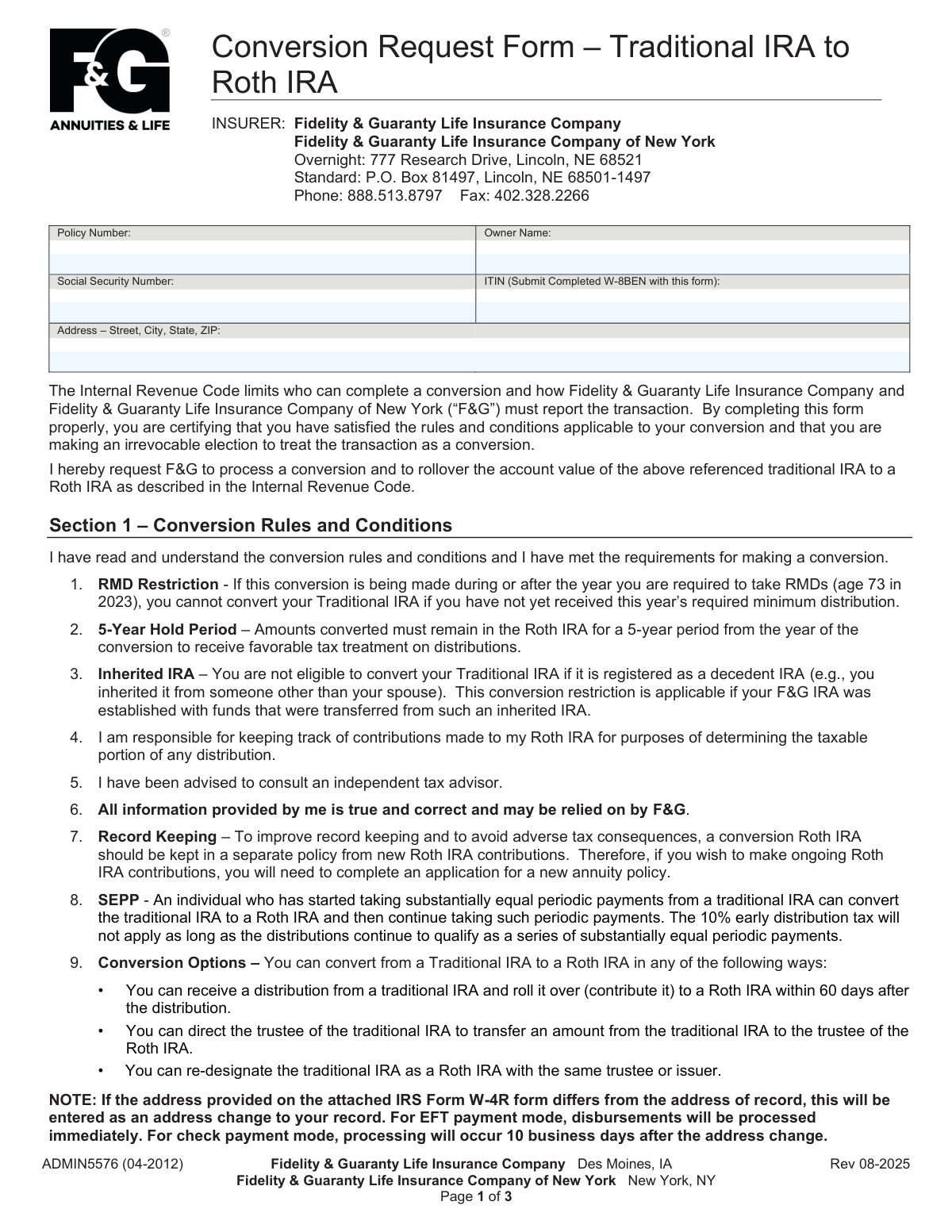
Form ADMIN5576 is a document provided by Fidelity & Guaranty Life Insurance Company for policyholders who wish to convert their Traditional IRA to a Roth IRA. It details the rules, conditions, and tax implications of the conversion, requiring the owner to certify their eligibility and make tax withholding elections. Today, this form can be filled out quickly and accurately using AI-powered services like Instafill.ai, which can also convert non-fillable PDF versions into interactive fillable forms.
Our AI automatically handles information lookup, data retrieval, formatting, and form filling.
It takes less than a minute to fill out ADMIN5576 using our AI form filling.
Securely upload your data. Information is encrypted in transit and deleted immediately after the form is filled out.

Form specifications

Form name: Conversion Request Form – Traditional IRA to Roth IRA
Number of pages: 1
Language: English
Categories: IRA forms, Roth conversion forms
main-image

Instafill Demo: How to fill out PDF forms in seconds with AI

How to Fill Out ADMIN5576 Online for Free in 2026

Are you looking to fill out a ADMIN5576 form online quickly and accurately? Instafill.ai offers the #1 AI-powered PDF filling software of 2026, allowing you to complete your ADMIN5576 form in just 37 seconds or less.
Follow these steps to fill out your ADMIN5576 form online using Instafill.ai:
  1. 1 Navigate to Instafill.ai and upload the ADMIN5576 PDF or select it from the form library.
  2. 2 Provide your personal details such as policy number, name, Social Security Number, and address for the AI to populate the initial section.
  3. 3 Carefully review the conversion rules and conditions outlined in Section 1 to confirm your eligibility.
  4. 4 Complete Section 2 by selecting your federal and state tax withholding preferences for the conversion distribution.
  5. 5 Read the certification and authorization statements in Section 3 to understand your responsibilities.
  6. 6 Review the entire form for accuracy, then download the completed document to print.
  7. 7 Physically sign and date the form as the owner and have a witness sign and date it as well, as electronic signatures are not accepted.

Our AI-powered system ensures each field is filled out correctly, reducing errors and saving you time.

Why Choose Instafill.ai for Your Fillable ADMIN5576 Form?

Speed

Complete your ADMIN5576 in as little as 37 seconds.

Up-to-Date

Always use the latest 2026 ADMIN5576 form version.

Cost-effective

No need to hire expensive lawyers.

Accuracy

Our AI performs 10 compliance checks to ensure your form is error-free.

Security

Your personal information is protected with bank-level encryption.

Frequently Asked Questions About Form ADMIN5576

This form is used to request the conversion of your Traditional IRA annuity with Fidelity & Guaranty Life (F&G) into a Roth IRA. This is an irrevocable election, meaning you cannot reverse the conversion once it's processed.

You need to complete this form if you are the owner of a Traditional IRA policy with Fidelity & Guaranty Life and wish to convert it to a Roth IRA.

Yes, but you must first take your Required Minimum Distribution (RMD) for the current year before you can process the conversion. The form states you cannot convert your Traditional IRA if you have not yet received this year's RMD.

No, you are not eligible to convert a Traditional IRA if it is an inherited (decedent) IRA, unless you inherited it from your spouse.

In Section 2, you can elect to have no federal tax withheld, withhold at the default 10% rate, or specify a different rate using IRS Form W-4R. You must also indicate your preference for state tax withholding, as rules vary by state.

If you do not check any of the boxes in the federal tax withholding section, F&G will automatically withhold at the default rate of 10% from the taxable portion of your conversion.

Yes, the form explicitly states that a physical signature from the owner is required in Section 3. Electronic signatures will not be accepted, and a witness signature is also required.

You can submit the completed and signed form to Fidelity & Guaranty Life via standard mail, overnight mail, or fax using the contact information provided at the top of the form.

This rule means that to receive favorable tax treatment on future distributions, the funds you convert must remain in the Roth IRA for a 5-year period beginning in the year of the conversion.

F&G recommends keeping your converted Roth IRA in a separate policy from new contributions. You will need to complete an application for a new annuity policy to make ongoing Roth IRA contributions.

Yes, services like Instafill.ai use AI to accurately auto-fill form fields, which can save you time and help prevent errors. This is especially useful for ensuring your personal details are entered correctly.

Simply upload the F&G conversion form PDF to the Instafill.ai platform. The AI will identify the fields, allowing you to fill them out online, review for accuracy, and then download the completed document for printing and signing.

If you have a non-fillable or 'flat' PDF, you can use a service like Instafill.ai. It can convert the static PDF into an interactive, fillable form that you can easily complete on your computer or mobile device.

F&G and its representatives cannot provide tax advice. The form strongly recommends that you consult with an independent tax advisor to understand the specific tax consequences of the conversion.

Compliance ADMIN5576
Validation Checks by Instafill.ai

1
Ensures Policy Number is Provided
This check verifies that the 'Policy Number' field (1acc.AcctNum) is not empty. The policy number is a critical identifier for locating the correct Traditional IRA account to be converted. If this field is missing, the form cannot be processed as F&G would be unable to identify which account the conversion request applies to.
2
Validates Social Security Number Format
This check ensures that the 'Social Security Number' field (1own.SSN), if provided, follows the standard 9-digit format, with or without hyphens (XXX-XX-XXXX or XXXXXXXXX). A valid SSN is required for tax reporting purposes by the IRS. An incorrectly formatted number will lead to processing delays and potential rejection of the form.
3
Validates ITIN Format and W-8BEN Requirement
This check validates that if an 'ITIN' (FDLGY34430.txt1.01.1) is provided, it is a 9-digit number starting with the number 9. The form explicitly states that a completed W-8BEN form must be submitted with an ITIN. This validation ensures compliance for non-U.S. persons, and failure to provide the correct ITIN format or the associated W-8BEN form will halt the conversion process.
4
Requires Full Owner Address
This check verifies that the 'Address – Street, City, State, ZIP' field (1own.H.FullAddr) is fully completed. A complete and valid address of record is necessary for legal correspondence, tax reporting documents, and identity verification. An incomplete or missing address will result in the form being rejected until the information is provided.
5
Exclusive Federal Withholding Selection
This check ensures that exactly one of the three federal tax withholding options in Section 2 is selected. The owner must make a clear choice whether to withhold taxes, not withhold, or provide a separate W-4R form. If zero or multiple boxes are checked, the intent is ambiguous and processing will be stopped to request clarification, as F&G cannot make this tax decision for the owner.
6
State Withholding and Applicable State Consistency
This validation confirms that if any state tax withholding option is selected, the corresponding 'Applicable State' field is also filled out. The state is required to apply the correct tax rules and rates. A missing state makes the withholding instruction impossible to execute, causing the form to be considered incomplete.
7
Mutually Exclusive State Withholding Amount
This check ensures that if the owner elects to have a specific state tax withheld, they provide either a percentage (1acc.StateWithholdPerc) or a dollar amount (1acc.StateWithholdAmt), but not both. Providing both values creates ambiguity in the withholding instruction. The form will be rejected if both fields are filled, requiring the owner to clarify their choice.
8
Validates State Abbreviation
This check verifies that any value entered in the 'Applicable State' fields (FDLGY34430.txt1.01.3, FDLGY34430.txt1.01.4) is a valid two-letter US state abbreviation. Using an incorrect or non-standard state code will cause errors in applying state-specific tax withholding rules. The system should reject invalid entries to ensure correct tax processing.
9
Owner Signature Presence
This check verifies that the 'Owner Signature' field (1own.34430.1.Sign) contains a signature. The signature is a legal requirement, certifying the owner's understanding, authorization of the conversion, and the accuracy of the provided information. A missing signature renders the entire form invalid and legally non-binding, and it will be immediately rejected.
10
Owner Signature Date Format and Presence
This check ensures the 'Date' field next to the owner's signature (1own.34430.1.SignDate) is present and formatted as MM/DD/YYYY. The date establishes when the legal authorization for the conversion was given. An invalid or missing date can create legal and compliance issues regarding the timing of the transaction, leading to rejection of the form.
11
Witness Signature Presence
This check verifies that the 'Witness Signature' field (1wit.34430.1.Sign) is not empty. A witness signature may be required by the financial institution or state regulations to attest to the identity of the signer and the voluntary nature of the signature. Failure to provide a witness signature will result in the form being rejected as incomplete.
12
Signature Date Consistency
This validation compares the 'Owner Signature' date (1own.34430.1.SignDate) and the 'Witness Signature' date (1wit.34430.1.SignDate) to ensure they are identical. The witness must sign on the same day as the owner to validly attest to the owner's act of signing. A mismatch in dates implies the witness was not present for the signing, invalidating the witness attestation and causing the form to be rejected.
13
Non-Resident Alien Certification Logic
This check verifies that if the 'I am a non-resident alien' checkbox (1own.CitizenshipType) is marked, an ITIN is provided in the taxpayer ID field, not an SSN. This ensures logical consistency, as non-resident aliens typically use an ITIN for tax purposes. The check also flags that a Form W-8BEN must be attached, as stated on the form, to prevent processing delays.

Common Mistakes in Completing ADMIN5576

Incomplete or Ambiguous Tax Withholding Elections

Users often forget to check any box in the Federal or State Tax Withholding sections, or they check multiple conflicting options. This happens due to rushing or confusion. If no selection is made, the company will apply a default withholding rate (e.g., 10% federal) which may not align with the user's financial strategy, potentially leading to an unexpected tax bill or a smaller-than-anticipated rollover amount. To avoid this, carefully read Section 2 and select only one option for federal and one for state withholding.

Using a Digital or Printed Signature

The form explicitly states 'Physical signatures required, electronic signatures will not be accepted' and 'Please do not print' in the signature line. Many people are accustomed to digital signatures or printing their name and overlook this specific requirement. Submitting a form with a digital or printed signature will result in immediate rejection and require the entire process to be restarted, causing significant delays. Always sign the physical document with a pen in cursive.

Forgetting the Witness Signature

The requirement for a witness signature and date on the final page is easily missed, as it's less common on many financial forms. People often focus on their own signature and overlook the adjacent field. A missing witness signature is a common reason for a form to be considered incomplete, leading to its rejection and delaying the conversion. Ensure you have a witness present to sign and date the form at the same time you do.

Ignoring Required Minimum Distribution (RMD) Rules

Individuals aged 73 or older may not realize they must take their current year's Required Minimum Distribution (RMD) from their Traditional IRA *before* converting the remaining balance to a Roth IRA. Attempting to convert the full amount without satisfying the RMD makes the transaction ineligible and will be rejected by the financial institution. To prevent this, confirm your RMD has been distributed for the year before submitting this conversion request.

Failing to Attach Required Supplemental Forms

The form references several other documents that may be required, such as IRS Form W-4R for custom federal withholding, Form W-8BEN for non-US persons, or specific state tax forms. Users may check the box indicating an attachment but forget to physically include the document. This omission halts the process until the missing form is received, delaying the conversion. Always double-check that any form you've indicated as 'attached' is included with your submission.

Incorrectly Entering Policy Number or SSN

Simple typographical errors, such as transposing digits in the Policy Number or Social Security Number, are very common. These mistakes prevent the company from matching the form to the correct account, leading to processing delays while they contact you for clarification. To avoid this, carefully proofread all numbers entered. AI-powered tools like Instafill.ai can help by securely storing and accurately populating this information, reducing the risk of manual entry errors.

Attempting to Convert an Ineligible Inherited IRA

The rules explicitly state that an IRA inherited from someone other than a spouse cannot be converted. Beneficiaries may not be aware of this restriction and submit the form anyway, only to have it rejected. This wastes time and can cause confusion regarding their options. Before filling out the form, confirm the origin of your Traditional IRA funds to ensure it is not an ineligible inherited account.

Providing an Outdated or Conflicting Address

A user might enter an address that doesn't match the one on file or the one provided on an attached W-4R. The form notes this will trigger an address change and a 10-business-day hold on check disbursements, causing unexpected delays. This often happens when someone has recently moved. Ensure the address is current, complete, and consistent across all submitted documents to avoid processing holds.

Improperly Certifying Backup Withholding Status

Section 3 contains a certification list and instructs the user to 'Cross out any of the above items that are incorrect.' This is an unusual instruction that is easily missed. An individual who has been notified by the IRS that they are subject to backup withholding may fail to cross out item #2, resulting in an incorrect certification and potential tax compliance issues. Carefully read all instructions in the certification section and cross out any statements that do not apply to you.

Confusing State Withholding Percentage and Dollar Amount

In the State Tax Withholding section, users are given the option to withhold a percentage OR a specific dollar amount. A common mistake is to enter values in both fields, creating ambiguity for the processor. This will likely cause a delay as the company must contact the owner for clarification. To prevent this, decide on either a percentage or a flat dollar amount and fill in only the corresponding blank. Since this form is a non-fillable PDF, a tool like Instafill.ai can convert it to a fillable version, making it easier to enter data cleanly and accurately in the correct fields.
Saved over 80 hours a year

“I was never sure if my IRS forms like W-9 were filled correctly. Now, I can complete the forms accurately without any external help.”

Kevin Martin Green

Your data stays secure with advanced protection from Instafill and our subprocessors

Robust compliance program

Transparent business model

You’re not the product. You always know where your data is and what it is processed for.

ISO 27001, HIPAA, and GDPR

Our subprocesses adhere to multiple compliance standards, including but not limited to ISO 27001, HIPAA, and GDPR.

Security & privacy by design

We consider security and privacy from the initial design phase of any new service or functionality. It’s not an afterthought, it’s built-in, including support for two-factor authentication (2FA) to further protect your account.

Fill out ADMIN5576 with Instafill.ai

Worried about filling PDFs wrong? Instafill securely fills conversion-request-form-traditional-ira-to-roth-ira forms, ensuring each field is accurate.