Yes! You can use AI to fill out Nest 529 Beneficiary Change Form
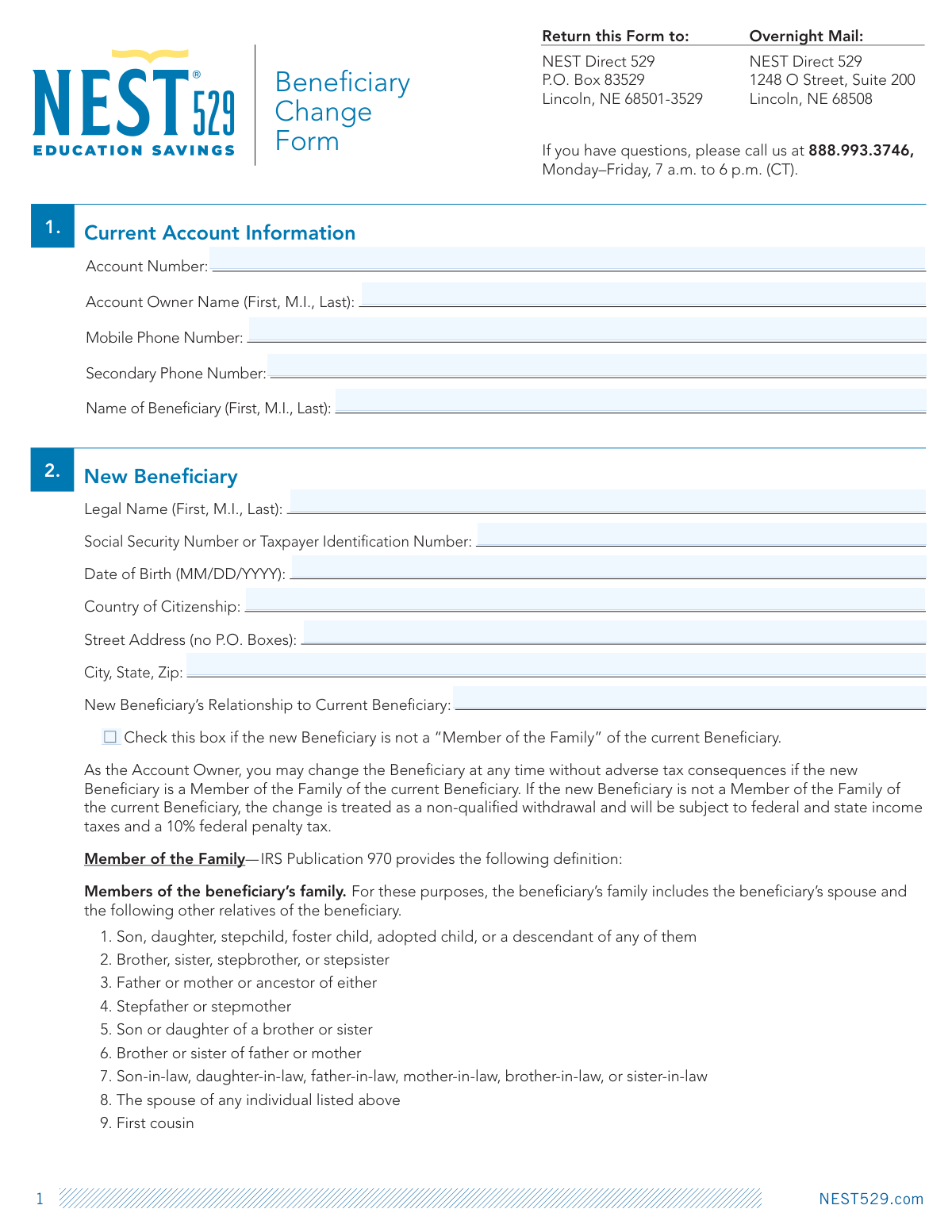
This form allows the owner of a NEST 529 college savings plan to change the designated beneficiary. It is a critical document as changing a beneficiary to someone who is not a 'Member of the Family' of the current beneficiary can trigger adverse tax consequences, such as being treated as a non-qualified withdrawal. Today, this form can be filled out quickly and accurately using AI-powered services like Instafill.ai, which can also convert non-fillable PDF versions into interactive fillable forms.
Our AI automatically handles information lookup, data retrieval, formatting, and form filling.
It takes less than a minute to fill out Nest 529 Beneficiary Change Form using our AI form filling.
Securely upload your data. Information is encrypted in transit and deleted immediately after the form is filled out.
Form specifications
| Form name: | Nest 529 Beneficiary Change Form |
| Number of pages: | 1 |
| Language: | English |
| Categories: | beneficiary forms |
Instafill Demo: How to fill out PDF forms in seconds with AI
How to Fill Out Nest 529 Beneficiary Change Form Online for Free in 2026
Are you looking to fill out a NEST 529 BENEFICIARY CHANGE FORM form online quickly and accurately? Instafill.ai offers the #1 AI-powered PDF filling software of 2026, allowing you to complete your NEST 529 BENEFICIARY CHANGE FORM form in just 37 seconds or less.
Follow these steps to fill out your NEST 529 BENEFICIARY CHANGE FORM form online using Instafill.ai:
- 1 Navigate to Instafill.ai and upload or select the Nest 529 Beneficiary Change Form.
- 2 Use the AI assistant to fill in your current account information, including the account number, your name as the Account Owner, and the current beneficiary's name.
- 3 Provide the complete legal name, Social Security Number, date of birth, and address for the new beneficiary.
- 4 Indicate the new beneficiary's relationship to the current one and check the box if they are not considered a 'Member of the Family' per IRS guidelines.
- 5 Review or update the investment option selections for the account, ensuring the allocation totals 100% if changes are made.
- 6 Carefully review all entered information for accuracy, then digitally sign and date the authorization section to certify the request.
- 7 Download the completed form and mail it to the NEST Direct 529 address provided on the document.
Our AI-powered system ensures each field is filled out correctly, reducing errors and saving you time.
Why Choose Instafill.ai for Your Fillable Nest 529 Beneficiary Change Form Form?
Speed
Complete your Nest 529 Beneficiary Change Form in as little as 37 seconds.
Up-to-Date
Always use the latest 2026 Nest 529 Beneficiary Change Form form version.
Cost-effective
No need to hire expensive lawyers.
Accuracy
Our AI performs 10 compliance checks to ensure your form is error-free.
Security
Your personal information is protected with bank-level encryption.
Frequently Asked Questions About Form Nest 529 Beneficiary Change Form
This form is used by the Account Owner to change the designated beneficiary for their Nest 529 college savings plan.
The Account Owner must complete and sign the form. If the account is owned by a trust or entity, an authorized representative must sign.
You must provide the new beneficiary's full legal name, Social Security or Taxpayer ID Number, date of birth, country of citizenship, and full street address.
If the new beneficiary is not a family member, the change is treated as a non-qualified withdrawal, which is subject to income taxes and a 10% federal penalty tax.
This includes the beneficiary's spouse, children, siblings, parents, nieces, nephews, aunts, uncles, in-laws, and first cousins.
No, you can keep your current investment selections. However, if you use an Age-Based option, the account will automatically adjust to the new beneficiary's age band.
Any automatic investment plans you have in place will continue for the new beneficiary unless you provide different instructions.
You can mail the form to the P.O. Box listed or send it via overnight mail to NEST Direct 529, 1248 O Street, Suite 200, Lincoln, NE 68508.
If you have questions, you can call customer support at 888.993.3746, Monday through Friday, between 7 a.m. and 6 p.m. Central Time.
Yes, services like Instafill.ai use AI to accurately auto-fill form fields, which can save you time and help reduce errors.
Upload the PDF to the Instafill.ai platform. The service will make the document interactive, and its AI will guide you in completing the required fields quickly.
You can use a service like Instafill.ai, which specializes in converting non-fillable PDFs into interactive, fillable forms that you can easily complete online.
You only need to complete Section 3 if you wish to change your current investment allocation. Otherwise, you can check the box for 'No change to current investment selections'.
Compliance Nest 529 Beneficiary Change Form
Validation Checks by Instafill.ai
1
New Beneficiary SSN/TIN Format Validation
This check verifies that the Social Security Number or Taxpayer Identification Number entered for the new beneficiary in Section 2 follows the correct format (e.g., XXX-XX-XXXX for SSN or XX-XXXXXXX for TIN). This is critical for tax reporting and legal identification of the beneficiary. If the format is incorrect, the submission will be rejected, and the user will be prompted to enter a valid number.
2
Date of Birth Validity Check
This validation ensures the Date of Birth entered for the new beneficiary is a valid calendar date, is in the past, and follows the MM/DD/YYYY format. An invalid or future date would make the beneficiary's age calculation impossible, which is crucial for age-based investment options and legal compliance. A failure will prevent form submission until a valid past date is provided.
3
Investment Allocation Total Check
If the user opts to change investment selections in Section 3, this check confirms that the sum of all entered percentages equals exactly 100%. This is essential to ensure the account funds are fully allocated without error. If the total is not 100%, an error message will be displayed, requiring the user to adjust the percentages before proceeding.
4
Investment Allocation Whole Percentage Check
This validation ensures that all percentages entered for the new investment allocation in Section 3 are whole numbers, as specified by the form. Using fractional percentages could lead to processing errors and incorrect fund allocation. The system should reject any input with decimals and prompt the user to enter only whole numbers.
5
Authorization Signature and Date Presence
This check confirms that the 'Signature of Account Owner' and 'Date' fields in Section 4 are not empty. The signature and date are legally required to authorize the beneficiary change and certify the correctness of the provided information. A missing signature or date will render the form invalid and block the submission.
6
Street Address P.O. Box Restriction
This validation scans the 'Street Address' field for the new beneficiary to ensure it does not contain 'P.O. Box' or similar variations. A physical address is often required for legal and identity verification purposes. If a P.O. Box is detected, the user will be notified that it is not permitted and must provide a physical street address.
7
Account Number Completeness and Format
This check verifies that the 'Account Number' field in Section 1 is filled out and conforms to the expected format (e.g., specific length, numeric or alphanumeric pattern). The account number is the primary identifier for the account being modified, and an incorrect or missing number would prevent the system from locating the correct record. Failure will result in an error message asking for a valid account number.
8
Investment Selection Exclusivity
This validation ensures the user makes a single, unambiguous choice in Section 3. The user must either check the 'No change to current investment selections' box OR fill out the new percentage allocations, but not both. Allowing both would create a logical conflict, so the form should display an error if both options are selected simultaneously.
9
Printed Name and Account Owner Consistency
This check compares the 'Print Name Here' field in the Authorization section with the 'Account Owner Name' provided in Section 1. This helps verify that the person signing the form is the actual account owner, reducing the risk of fraud. A mismatch should trigger a warning or require additional verification before the change can be processed.
10
Signature Date Not in Future
This validation ensures that the date provided next to the signature in Section 4 is not a future date. A post-dated signature is legally invalid for authorizing a current transaction. The system should reject any future date and require the user to enter the current date or a date in the recent past.
11
New Beneficiary Information Completeness
This is a comprehensive check to ensure all required fields in Section 2 for the 'New Beneficiary' are completed, including Legal Name, SSN/TIN, Date of Birth, Country of Citizenship, and full address. Incomplete information would prevent the legal and financial establishment of the new beneficiary on the account. The form submission will be blocked until all mandatory fields in this section are filled.
12
Phone Number Format Validation
This check validates that if the 'Mobile Phone Number' or 'Secondary Phone Number' fields are filled, they adhere to a standard phone number format (e.g., 10 digits, with or without common separators like hyphens or parentheses). While optional, ensuring correct formatting for provided numbers is important for data integrity and successful communication. An invalid format would prompt the user for correction.
Common Mistakes in Completing Nest 529 Beneficiary Change Form
Account owners often assume a relative qualifies as a 'Member of the Family' without consulting the specific IRS definition provided on the form. This mistake can lead to unintentionally triggering a non-qualified withdrawal, resulting in federal and state income taxes plus a 10% federal penalty. To avoid this, carefully review the list of qualifying relatives in Section 2 before determining the new beneficiary's relationship and checking the appropriate box.
When changing investment options in Section 3, a frequent error is making a mathematical mistake where the selected fund percentages do not add up to exactly 100%. This happens due to rushing or miscalculation. A form with an incorrect total will be rejected, delaying the entire beneficiary change and investment reallocation process. Always double-check your math to ensure the percentages sum precisely to 100%.
Forgetting to sign or date the form in Section 4 is one of the most common reasons for immediate rejection. An unsigned form is legally invalid and cannot be processed. This oversight requires the firm to return the form, significantly delaying the beneficiary update. To prevent this, make a final check of the authorization section to ensure your signature and the current date are present before mailing.
In Section 3, users sometimes check the box for 'No change to current investment selections' while also filling out new allocation percentages below it. This creates ambiguity and forces the processing agent to halt the request and contact the account owner for clarification. To avoid this delay, you must choose only one option: either keep the existing investments or specify a completely new allocation that totals 100%.
The account number is the primary identifier for your request, but it's easy to transpose digits or forget the number entirely. An incorrect or missing account number in Section 1 means the firm cannot locate your account, and the form will be returned as unprocessable. Always verify your account number against a recent account statement to ensure accuracy.
The form explicitly requires a physical street address and states 'no P.O. Boxes' in Section 2. This is often a legal requirement for identity verification purposes under federal law. Submitting a P.O. Box will lead to the form being rejected. Always provide a complete physical residential address for the new beneficiary.
A simple typo when entering the new beneficiary's Social Security Number (SSN) or Taxpayer Identification Number (TIN) is a critical error. This number is essential for tax reporting and properly establishing the new beneficiary on the account. An incorrect SSN can cause significant processing delays and future tax reporting problems, so it's vital to copy it carefully from an official source.
While the signature is crucial, the 'Print Name Here' line below it in Section 4 is also mandatory but often overlooked. An illegible signature without a printed name can cause verification issues. This can lead to processing delays while the firm attempts to confirm the signer's identity. Always ensure you both sign and clearly print your name as the Account Owner.
Section 3 clearly states that only 'whole percentages' are allowed for investment allocations. Some users may attempt to be more precise by using decimals (e.g., 20.5%) or fractions, which will cause the form to be rejected. To avoid this, round all your desired allocations to the nearest whole number and adjust as needed to ensure the total still equals 100%.
The name of the Account Owner provided in Section 1 must exactly match the printed name and signature in Section 4. A mismatch can occur if a different person signs the form or if the owner's legal name has changed but not been updated on the account. This will cause the form to fail signature verification and be rejected. Ensure the authorized Account Owner is the one signing and that their name is consistent across the document.
Saved over 80 hours a year
“I was never sure if my IRS forms like W-9 were filled correctly. Now, I can complete the forms accurately without any external help.”
Kevin Martin Green
Your data stays secure with advanced protection from Instafill and our subprocessors

Robust compliance program
Transparent business model
You’re not the product. You always know where your data is and what it is processed for.
ISO 27001, HIPAA, and GDPR
Our subprocesses adhere to multiple compliance standards, including but not limited to ISO 27001, HIPAA, and GDPR.
Security & privacy by design
We consider security and privacy from the initial design phase of any new service or functionality. It’s not an afterthought, it’s built-in, including support for two-factor authentication (2FA) to further protect your account.
Fill out Nest 529 Beneficiary Change Form with Instafill.ai
Worried about filling PDFs wrong? Instafill securely fills nest-529-beneficiary-change-form forms, ensuring each field is accurate.