Yes! You can use AI to fill out Premiere Select Roth IRA Conversion
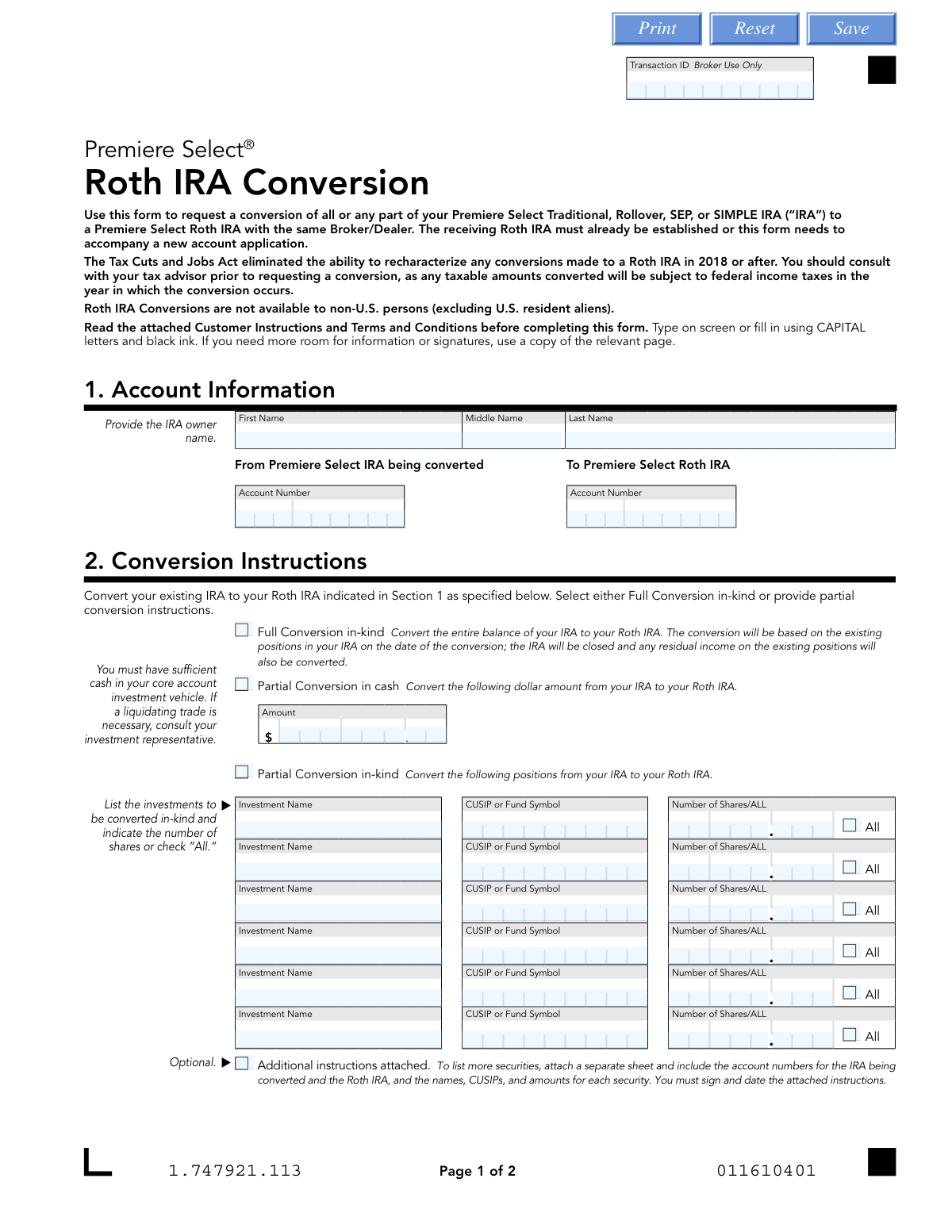
This form facilitates the process of converting all or part of a Premiere Select Traditional, Rollover, SEP, or SIMPLE IRA into a Premiere Select Roth IRA. It is an important document for individuals looking to change their retirement savings strategy, but it's crucial to understand the tax implications as converted amounts are subject to income tax in the year of conversion. Today, this form can be filled out quickly and accurately using AI-powered services like Instafill.ai, which can also convert non-fillable PDF versions into interactive fillable forms.
Our AI automatically handles information lookup, data retrieval, formatting, and form filling.
It takes less than a minute to fill out 1.747921.113 using our AI form filling.
Securely upload your data. Information is encrypted in transit and deleted immediately after the form is filled out.
Form specifications
| Form name: | Premiere Select Roth IRA Conversion |
| Number of pages: | 1 |
| Language: | English |
| Categories: | IRA forms, Roth conversion forms |
Instafill Demo: How to fill out PDF forms in seconds with AI
How to Fill Out 1.747921.113 Online for Free in 2026
Are you looking to fill out a 1.747921.113 form online quickly and accurately? Instafill.ai offers the #1 AI-powered PDF filling software of 2026, allowing you to complete your 1.747921.113 form in just 37 seconds or less.
Follow these steps to fill out your 1.747921.113 form online using Instafill.ai:
- 1 Navigate to Instafill.ai and upload the Premiere Select Roth IRA Conversion form or select it from their template library.
- 2 Provide your personal and account information in Section 1, including the account numbers for the IRA being converted and the receiving Roth IRA.
- 3 Complete Section 2 with your conversion instructions, specifying whether it's a full or partial conversion and detailing any specific investments if applicable.
- 4 Indicate your tax withholding preferences for both federal and state taxes in Section 3.
- 5 Carefully review all the information auto-filled by the AI to ensure accuracy and completeness.
- 6 Electronically sign and date the form in Section 4 to authorize the conversion and agree to the terms.
- 7 Download the completed form to submit to your Broker/Dealer or financial institution.
Our AI-powered system ensures each field is filled out correctly, reducing errors and saving you time.
Why Choose Instafill.ai for Your Fillable 1.747921.113 Form?
Speed
Complete your 1.747921.113 in as little as 37 seconds.
Up-to-Date
Always use the latest 2026 1.747921.113 form version.
Cost-effective
No need to hire expensive lawyers.
Accuracy
Our AI performs 10 compliance checks to ensure your form is error-free.
Security
Your personal information is protected with bank-level encryption.
Frequently Asked Questions About Form 1.747921.113
This form is used to request the conversion of funds from a Premiere Select Traditional, Rollover, SEP, or SIMPLE IRA into a Premiere Select Roth IRA with the same Broker/Dealer.
You should fill out this form if you own a Premiere Select IRA and wish to convert all or a portion of its assets to a Roth IRA. Note that non-U.S. persons, excluding U.S. resident aliens, are not eligible for Roth IRA conversions.
Yes, the receiving Premiere Select Roth IRA must already be established. If you do not have one, you must submit a new account application along with this conversion form.
A 'full conversion in-kind' moves all existing investments from your traditional IRA to your Roth IRA as they are. A 'partial conversion' allows you to move only a specific dollar amount in cash or specific investments and share amounts.
Yes, the amount you convert is generally considered taxable income for the year in which the conversion occurs. You should consult with a tax advisor to understand the specific tax implications for your situation.
No, the Tax Cuts and Jobs Act eliminated the ability to recharacterize (undo) Roth conversions made in 2018 or later. This action is permanent.
You can choose to have federal and state taxes withheld, but this is optional. If you elect withholding, you must have sufficient cash in your account, and be aware that the withheld amount itself may be subject to tax penalties.
Yes, you can only convert assets from a SIMPLE IRA to a Roth IRA after the expiration of the two-year period beginning on the date your employer first made contributions to your account.
You must satisfy your RMD for the current year from your IRA *before* you can convert any funds to a Roth IRA. The RMD amount itself is not eligible for conversion.
You will need your personal information, the account numbers for both your existing IRA and your Roth IRA, and the CUSIP or fund symbols and number of shares for any specific investments you wish to convert.
If you do not make a choice, federal income tax will be withheld at a rate of at least 10%. State tax withholding may also apply depending on your state of residence.
Yes, services like Instafill.ai use AI to accurately auto-fill form fields from your saved profile. This can save you time and help reduce errors when completing the form.
You can use a service like Instafill.ai to upload the PDF and fill it out electronically. The platform allows you to type directly into the fields, sign, and then download the completed form for submission.
If you have a non-fillable or 'flat' PDF, you can use a tool like Instafill.ai. It can convert the document into an interactive, fillable form for you to complete and sign online.
Compliance 1.747921.113
Validation Checks by Instafill.ai
1
Account Information Completeness and Validity
This check ensures that the account owner's first and last name are provided, and that both the 'From' and 'To' account numbers are filled in. It also verifies that these account numbers exist and are active within the system. Failure to provide complete and valid account information will prevent the system from identifying the correct accounts for the conversion, leading to immediate rejection of the form.
2
Account Type and Ownership Consistency
This validation verifies that the 'From' account is an eligible IRA type (Traditional, Rollover, SEP, or SIMPLE) and the 'To' account is a Roth IRA. It also confirms that both accounts are registered to the same individual as named in Section 1. This is critical to ensure the conversion is legally permissible and processed for the correct owner, preventing misdirected funds or compliance breaches.
3
Exclusive Conversion Method Selection
This check ensures that the user has selected exactly one conversion instruction in Section 2: 'Full Conversion in-kind', 'Partial Conversion in cash', or 'Partial Conversion in-kind'. The form cannot be processed if no option is selected or if multiple conflicting options are chosen. This prevents ambiguity and ensures the user's intent is clear before any assets are moved.
4
Partial Cash Conversion Amount Validation
If 'Partial Conversion in cash' is selected, this validation confirms that a valid, positive dollar amount has been entered. It also triggers a backend check to ensure the specified amount does not exceed the available cash balance in the source IRA's core account. If the amount is invalid or exceeds available cash, the transaction will be halted to prevent an overdraft or processing failure.
5
Partial In-Kind Asset Specification
For a 'Partial Conversion in-kind', this check verifies that for each security listed, a CUSIP or Fund Symbol is provided and either a specific 'Number of Shares' is entered or the 'All' box is checked. It also confirms the specified assets and share quantities exist in the source IRA. Incomplete or inaccurate information would make it impossible to identify which assets to convert, causing the request to be rejected.
6
SIMPLE IRA Two-Year Rule Compliance
If the 'From' account is identified as a SIMPLE IRA, this validation confirms that the two-year period, starting from the date of the first employer contribution, has passed. Attempting to convert a SIMPLE IRA before this two-year period has expired is prohibited by IRS rules and can result in significant tax penalties. The system will block the conversion if the account is not yet eligible.
7
Required Minimum Distribution (RMD) Fulfillment
This check verifies that if the account owner is subject to a Required Minimum Distribution (RMD) for the current year, they have already taken it from their IRA before this conversion request. IRS rules mandate that RMDs must be satisfied before any other distributions, including conversions, can occur. Failure to do so is a compliance violation, so the system will flag or block the conversion until the RMD is fulfilled.
8
Federal Withholding Percentage Validation
If the user elects to withhold federal taxes at a specific rate, this check ensures the entered percentage is a whole number between 10% and 99%, inclusive, as specified on the form. Entering a value outside this range or a non-whole number would be an invalid instruction. This validation prevents processing errors and ensures compliance with the form's stated rules.
9
State-Dependent Withholding Logic
This validation cross-references the account owner's state of legal residence (from their account profile) with the state tax withholding election in Section 3. It enforces mandatory withholding rules, such as for residents of Arkansas or Kansas where state withholding is required if federal withholding is elected. This check is crucial for tax compliance and prevents rejections or penalties from state tax authorities.
10
Sufficient Cash for Tax Withholding
If the user elects to have federal or state taxes withheld, this validation confirms that the source IRA has sufficient cash in its core account to cover the total tax amount. The conversion itself may be in-kind, but taxes must be paid from cash. If funds are insufficient, the transaction is rejected to prevent a cash deficit in the account, prompting the user to liquidate assets or deposit funds.
11
Signature and Date Completeness
This check verifies that the form has been signed and dated by the account owner in Section 4. A missing signature or date invalidates the authorization to perform the conversion. The form is legally non-binding without these elements, and processing will be halted until a properly executed form is received.
12
Date Field Format and Validity
This validation ensures the date provided in Section 4 is in the correct MM-DD-YYYY format and represents a valid, logical date. The check would flag dates in the future or dates that are excessively old (e.g., more than 30-60 days in the past). This ensures the instructions are current and prevents the processing of stale or erroneously dated requests.
13
Non-U.S. Person Eligibility Check
Based on the form's instructions, this validation verifies the account holder's residency status in the system. It confirms the individual is not a non-U.S. person (excluding U.S. resident aliens), as they are ineligible for Roth IRA conversions. This is a fundamental eligibility requirement to prevent processing a transaction for an unqualified individual.
Common Mistakes in Completing 1.747921.113
Users often forget to enter both the 'From' and 'To' account numbers in Section 1, or the names and numbers provided do not match the accounts on file. This happens due to oversight or having multiple accounts. Mismatched information will cause the form to be rejected, delaying the conversion process. To avoid this, carefully verify both account numbers and ensure the owner's name is written exactly as it appears on the account statements.
A frequent error is selecting both 'Full Conversion' and providing instructions for a 'Partial Conversion' in Section 2. This creates ambiguity for the processor, who cannot determine the user's intent, leading to rejection of the form and processing delays. You must choose only one conversion method; either convert the entire account or specify the exact assets or dollar amount for a partial conversion.
Applicants may elect to have taxes withheld (Section 3) or request a partial cash conversion (Section 2) without ensuring sufficient cash is available in their core account. This forces a delay as the financial institution may need to contact the user to authorize a liquidating trade, or they may reject the form outright. Before submitting, always check your account's cash balance to ensure it can cover any requested cash conversion and tax withholding amounts.
When specifying a partial in-kind conversion, people often enter incorrect CUSIPs or fund symbols, or they forget to enter the number of shares while also not checking the 'All' box. These data entry errors make it impossible to identify the correct assets to convert, causing the request to fail. It is crucial to copy the CUSIP/Symbol and share quantity directly from your account statement to ensure accuracy. AI-powered tools like Instafill.ai can help prevent this by auto-populating and validating such data.
The tax withholding rules are complex and vary by state, as shown in the instructions. A common mistake is making an election that violates state law, such as opting out of state withholding in a state where it's mandatory if federal taxes are withheld (e.g., Arkansas, Kansas). This can lead to processing delays and incorrect tax withholding. Carefully read the 'Notice of Withholding' section for your state of residence or consult a tax advisor to ensure compliance.
Account holders who are of RMD age often forget they must take their required distribution for the current year *before* converting funds to a Roth IRA. The form requires you to attest that you have done so, and failure to comply can result in significant IRS penalties. Always confirm with your financial or tax advisor that your RMD has been satisfied for the year prior to submitting a conversion request.
Submitting the form without a signature and date in Section 4 is one of the most common and easily avoidable mistakes. The form explicitly states it cannot be processed without this information, making the entire submission invalid. This oversight brings the conversion process to a complete halt until a properly signed form is received. Always perform a final check to ensure you have signed and dated the document in the correct format (MM-DD-YYYY).
Users with SIMPLE IRAs sometimes try to convert them to a Roth IRA before meeting the required two-year waiting period. The instructions clearly state that assets can only be converted after two years from the date the first employer contribution was made. Submitting the form prematurely will result in an automatic rejection. It is essential to verify the age of your SIMPLE IRA before initiating a conversion.
In Section 3, users may enter a federal withholding percentage below the 10% minimum or use decimal points or dollar amounts instead of whole numbers. The form has specific formatting rules for these fields that are easily missed. An invalid entry will cause the form to be rejected. Ensure you enter a whole number of 10% or greater for federal withholding and follow the specific guidance for state withholding.
A person might fill out this form to convert funds into a Roth IRA that has not been opened yet, without attaching a new account application. The instructions specify that the receiving Roth IRA must already be established or a new application must accompany this form. This mistake leads to rejection, as there is no destination account for the funds. Always ensure your Roth IRA is active or submit the required new account paperwork simultaneously. If the form is a non-fillable PDF, a tool like Instafill.ai can make it fillable to streamline this process.
Saved over 80 hours a year
“I was never sure if my IRS forms like W-9 were filled correctly. Now, I can complete the forms accurately without any external help.”
Kevin Martin Green
Your data stays secure with advanced protection from Instafill and our subprocessors

Robust compliance program
Transparent business model
You’re not the product. You always know where your data is and what it is processed for.
ISO 27001, HIPAA, and GDPR
Our subprocesses adhere to multiple compliance standards, including but not limited to ISO 27001, HIPAA, and GDPR.
Security & privacy by design
We consider security and privacy from the initial design phase of any new service or functionality. It’s not an afterthought, it’s built-in, including support for two-factor authentication (2FA) to further protect your account.
Fill out 1.747921.113 with Instafill.ai
Worried about filling PDFs wrong? Instafill securely fills premiere-select-roth-ira-conversion forms, ensuring each field is accurate.