Yes! You can use AI to fill out Premiere Select Roth IRA Conversion

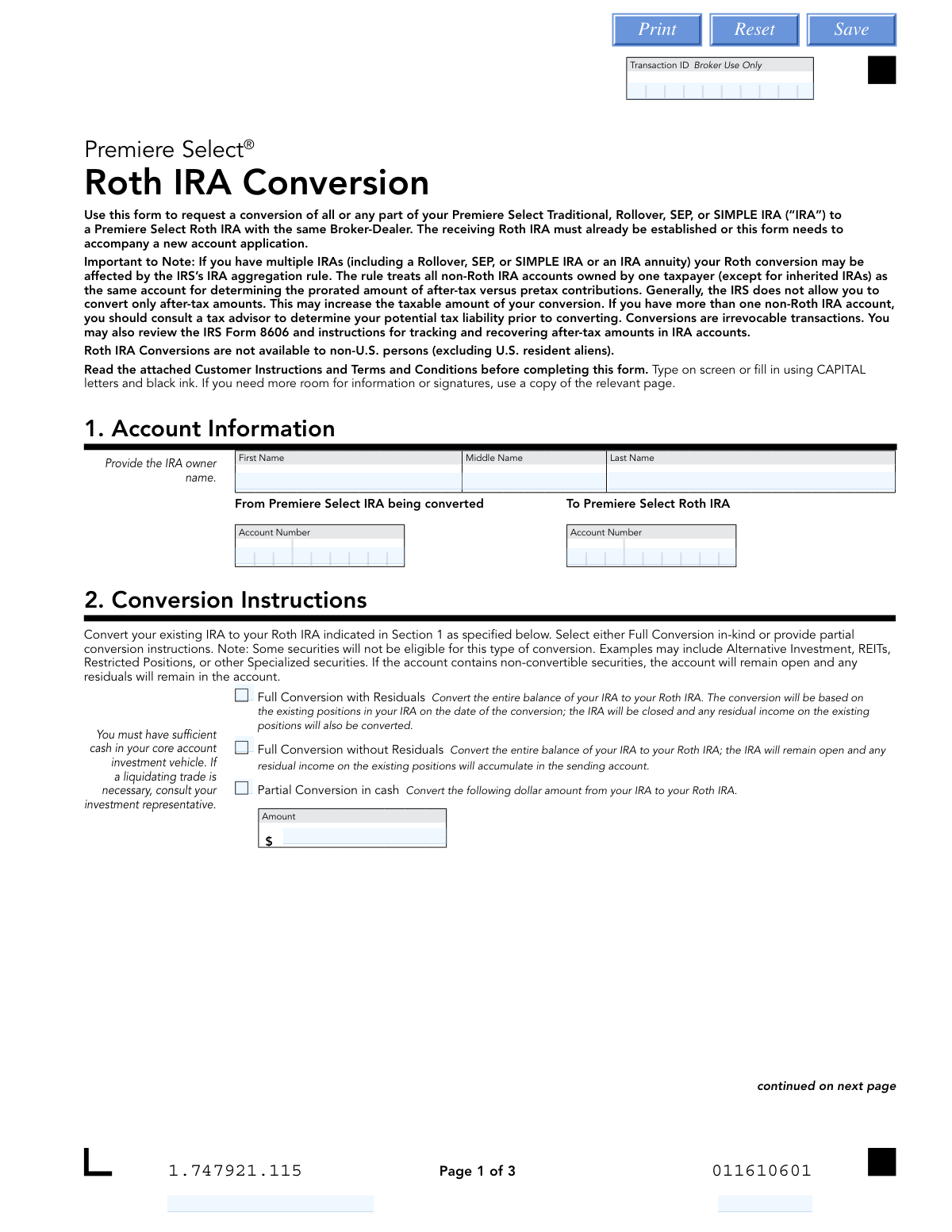
The Premiere Select Roth IRA Conversion form is a financial document used to authorize the transfer of assets from a pre-tax retirement account (like a Traditional, SEP, or SIMPLE IRA) into a post-tax Roth IRA. This conversion is a taxable event and is irrevocable, making it crucial to understand the tax implications before proceeding. Today, this form can be filled out quickly and accurately using AI-powered services like Instafill.ai, which can also convert non-fillable PDF versions into interactive fillable forms.
Our AI automatically handles information lookup, data retrieval, formatting, and form filling.
It takes less than a minute to fill out 1.747921.115 using our AI form filling.
Securely upload your data. Information is encrypted in transit and deleted immediately after the form is filled out.

Form specifications

Form name: Premiere Select Roth IRA Conversion
Number of pages: 1
Language: English
Categories: IRA forms, Roth conversion forms
main-image

Instafill Demo: How to fill out PDF forms in seconds with AI

How to Fill Out 1.747921.115 Online for Free in 2026

Are you looking to fill out a 1.747921.115 form online quickly and accurately? Instafill.ai offers the #1 AI-powered PDF filling software of 2026, allowing you to complete your 1.747921.115 form in just 37 seconds or less.
Follow these steps to fill out your 1.747921.115 form online using Instafill.ai:
  1. 1 Navigate to Instafill.ai and upload the Premiere Select Roth IRA Conversion form or select it from their template library.
  2. 2 Provide your personal and account information in Section 1, including the account numbers for the IRA being converted and the receiving Roth IRA.
  3. 3 In Section 2, specify the conversion instructions, choosing between a full or partial conversion and detailing any specific investments to be moved.
  4. 4 Complete Section 3 to make your federal and state tax withholding elections, carefully considering the tax implications of the conversion.
  5. 5 Review all the information you've entered, ensuring account numbers, conversion amounts, and tax elections are correct.
  6. 6 Electronically sign and date the form in Section 4 to certify your request and acknowledge the terms and conditions of the conversion.

Our AI-powered system ensures each field is filled out correctly, reducing errors and saving you time.

Why Choose Instafill.ai for Your Fillable 1.747921.115 Form?

Speed

Complete your 1.747921.115 in as little as 37 seconds.

Up-to-Date

Always use the latest 2026 1.747921.115 form version.

Cost-effective

No need to hire expensive lawyers.

Accuracy

Our AI performs 10 compliance checks to ensure your form is error-free.

Security

Your personal information is protected with bank-level encryption.

Frequently Asked Questions About Form 1.747921.115

This form is used to request the conversion of a Premiere Select Traditional, Rollover, SEP, or SIMPLE IRA into a Premiere Select Roth IRA with the same Broker-Dealer.

This form is for U.S. persons (including resident aliens) who own a Premiere Select IRA and wish to convert it to a Premiere Select Roth IRA. You must already have an established Roth IRA or submit a new account application with this form.

No, the form explicitly states that conversions are irrevocable transactions and cannot be recharacterized once completed.

A 'Full Conversion with Residuals' will close the original IRA and move any future income (like dividends) to the Roth IRA. A conversion 'without Residuals' keeps the original IRA open to collect any future income from the old positions.

Yes, Section 2 provides options for a 'Partial Conversion' where you can specify a dollar amount to convert in cash or list specific investments and share amounts to convert in-kind.

No, you can elect not to have federal or state taxes withheld. However, if you do not make a selection, a default federal rate of 10% will be withheld, and state withholding may also apply.

If your account contains non-convertible securities like certain Alternative Investments or REITs, the original IRA will remain open and those specific securities will not be converted.

Yes, assets in a SIMPLE IRA can only be converted to a Roth IRA after two years have passed from the date your employer first made contributions to the account.

Yes, if you are required to take an RMD for the current year, you must take it from your IRA before you can convert any funds to a Roth IRA.

Yes, the taxable amount you convert will be subject to federal income taxes, and potentially state taxes, in the year the conversion occurs. You should consult a tax advisor to understand your specific tax liability.

Yes, AI-powered services like Instafill.ai can help you accurately auto-fill form fields with your personal information, saving you time and reducing the risk of errors.

You can use a service like Instafill.ai to upload the PDF and fill it out online. The platform allows you to type your information directly onto the form, add signatures, and then download the completed document.

If you have a non-fillable or 'flat' PDF, you can use a tool like Instafill.ai. It can convert the static PDF into an interactive, fillable form that you can easily complete on your computer.

Compliance 1.747921.115
Validation Checks by Instafill.ai

1
Account Number Existence and Type Verification
This check verifies that the 'From' and 'To' account numbers provided in Section 1 exist and are active. It also confirms that the 'From' account is a valid Traditional, Rollover, SEP, or SIMPLE IRA and the 'To' account is a Roth IRA, both registered to the same owner. This is critical to ensure the conversion is processed between the correct and eligible accounts, preventing transaction failure or misdirection of funds.
2
Distinct Source and Destination Accounts
Validates that the account number for the 'From Premiere Select IRA' is different from the account number for the 'To Premiere Select Roth IRA'. A conversion must move assets from one account to another, not within the same account. If the numbers are identical, the form submission is invalid and must be rejected to prevent a logical processing error.
3
Exclusive Conversion Method Selection
Ensures that only one conversion instruction is selected in Section 2. The user must choose one option from 'Full Conversion with Residuals', 'Full Conversion without Residuals', 'Partial Conversion in cash', or 'Partial Conversion in-kind', but not a combination. This prevents ambiguity and ensures the transaction is processed according to a single, clear instruction.
4
Partial Cash Conversion Amount Validation
If 'Partial Conversion in cash' is selected, this check confirms that the 'Amount' field contains a positive, numeric dollar value. It also cross-references the 'From' account to ensure sufficient cash is available for the conversion. This prevents overdraft situations and ensures the requested cash amount is valid and transferrable.
5
Partial In-Kind Instruction Completeness
When 'Partial Conversion in-kind' is chosen, this validation ensures at least one investment line item is completed. For each specified investment, it verifies that a valid CUSIP or Fund Symbol is provided along with either a number of shares, a dollar amount, or the 'All' checkbox is selected. This check guarantees that the instructions to convert specific securities are complete and actionable.
6
U.S. Person Eligibility for Conversion
This check confirms the account holder's status as a U.S. person or a U.S. resident alien based on information on file. The form explicitly states that Roth IRA conversions are not available to non-U.S. persons. Failing this validation results in immediate rejection of the request to comply with eligibility rules.
7
Federal Withholding Rate Format
If the user elects to withhold federal taxes at a specific rate in Section 3, this validation ensures the entered value is a whole number between 0 and 99. The form specifies 'Whole numbers, no dollar amounts or decimals'. This prevents data entry errors and ensures the withholding instruction sent for processing is in the correct format.
8
State Withholding Rate Format
If the user elects to withhold state taxes at a specific rate in Section 3, this check validates that the input is a whole number between 0 and 99. Incorrect formats like decimals or dollar signs would cause processing failures. This rule ensures the state tax withholding instruction is valid and can be correctly interpreted by the system.
9
Conditional State Withholding Logic
This validation applies state-specific rules based on the account owner's residential address. For example, for residents of states like Connecticut or Michigan, it verifies that a mandatory state withholding option is selected. For other states like Arkansas or California, it checks that if federal tax is withheld, state tax is also withheld as required. This ensures compliance with diverse state tax regulations.
10
SIMPLE IRA Two-Year Rule Verification
If the 'From' account is identified as a SIMPLE IRA, this check verifies that the account has met the two-year holding period requirement, which begins on the date the employer first made contributions. Attempting to convert a SIMPLE IRA before this period expires is not permitted by the IRS and can result in penalties. This validation prevents premature and non-compliant conversions.
11
Signature Presence
Verifies that the 'Account Owner Signature' field in Section 4 has been completed. The form explicitly states it cannot be processed without a signature, as the signature legally authorizes the transaction and confirms the owner's agreement to all terms. A missing signature renders the entire form invalid and must halt processing.
12
Date Field Format and Validity
This check ensures the 'Date' field in Section 4 is filled out, is in the specified MM-DD-YYYY format, and represents a valid, non-future date. An invalid or future date can cause legal and processing issues, as the signature date must accurately reflect when the authorization was given. This validation maintains the integrity and legal standing of the document.

Common Mistakes in Completing 1.747921.115

Forgetting to Take Required Minimum Distribution (RMD) First

Individuals of RMD age often forget that they must satisfy their annual RMD from their traditional IRA before converting any funds to a Roth IRA. The signature section requires attesting that this has been done, and failure to comply is a serious violation of IRS rules. This can lead to significant tax penalties and complications. To avoid this, always confirm your RMD status for the year and take the required distribution before initiating a conversion.

Entering Incorrect or Mismatched Account Numbers

Users frequently transpose digits or enter the wrong account number for either the source IRA or the destination Roth IRA. This can happen due to simple typographical errors when manually filling out the form. The consequence is a failed transaction or, in a worst-case scenario, a conversion from an unintended account, leading to significant delays and complex corrections. To prevent this, double-check all account numbers against your statements before submission; AI-powered tools like Instafill.ai can help by auto-populating and validating this information from saved records.

Misunderstanding Tax Withholding Consequences

Many people elect to have taxes withheld directly from the conversion amount, not realizing this can be a costly mistake. The amount withheld is considered a distribution, and if you are under 59.5, it may be subject to a 10% early withdrawal penalty on top of regular income tax. This happens because the user is trying to pay the tax bill conveniently, without understanding the penalty implications. To avoid this, it is often better to pay the conversion taxes from a separate, non-retirement account and elect 0% withholding on the form.

Ignoring State-Specific Tax Withholding Rules

The form details complex, state-specific rules for tax withholding, such as mandatory withholding in states like Connecticut and Michigan. Users often overlook this section or apply the federal rules to their state election, choosing an option that is not valid for their state of residence. This results in the financial institution overriding the user's choice to comply with state law, causing an unexpected amount of tax to be withheld. Carefully review the 'State Tax Withholding Information' table and select an option valid for your legal state of residence.

Providing Ambiguous or Conflicting Conversion Instructions

In Section 2, users sometimes select both a 'Full Conversion' option and a 'Partial Conversion' option, or they check 'Partial Conversion' but fail to list the specific investments or dollar amounts. This ambiguity makes it impossible for the processor to know the user's intent. As a result, the form will be rejected or put on hold until the user can be contacted for clarification, delaying the entire conversion process. To avoid this, select only one conversion type and provide all required details for that choice.

Forgetting to Sign or Date the Form

Forgetting to provide a signature and date in Section 4 is one of the most common and easily avoidable errors. People are often focused on the financial details and simply overlook the final authorization step. The form explicitly states it cannot be processed without a signature and date, so leaving them blank results in an automatic rejection and requires you to resubmit the entire form. Always perform a final review of the completed form, paying special attention to the signature block before sending it.

Attempting to Convert an IRA from an External Custodian

A user might try to use this form to convert an IRA held at another company (e.g., Vanguard, Schwab) directly into a Premiere Select Roth IRA. The instructions clearly state this form is only for converting existing Premiere Select IRAs and that external assets must first be transferred using a separate 'Transfer of Assets' form. This mistake leads to an immediate rejection, as the form is inapplicable to the requested transaction, wasting time and effort.

Using Incorrect Formatting in Withholding Percentage Fields

In the Tax Withholding section, the form specifies that percentage rates must be whole numbers without decimals or dollar signs. Users may enter '10.5%' or '$500' out of habit or misunderstanding, which can cause automated processing systems to fail. This data entry error requires manual intervention and correction, delaying the transaction. To avoid this, enter only whole numbers (e.g., '10' for 10%) as instructed in the field's guidance.

Submitting the Form Without an Established Roth IRA

Users sometimes submit the conversion request without having an existing Premiere Select Roth IRA to receive the funds. The form instructions state the receiving Roth IRA must already be established or a new account application must accompany the form. This oversight halts the process, as there is no destination for the converted assets, forcing the firm to hold the request until the new account is opened and linked.

Listing Ineligible Securities for an In-Kind Conversion

When completing a partial in-kind conversion, a user might list securities that are not eligible for conversion, such as certain REITs or alternative investments, as noted in the form's instructions. This happens when the user is not aware of the specific restrictions on their holdings. The consequence is that the conversion will only be partially successful, leaving the ineligible assets behind in the original IRA and preventing the user from fully closing the account as intended. Before filling out the form, confirm the eligibility of all securities with your investment representative.
Saved over 80 hours a year

“I was never sure if my IRS forms like W-9 were filled correctly. Now, I can complete the forms accurately without any external help.”

Kevin Martin Green

Your data stays secure with advanced protection from Instafill and our subprocessors

Robust compliance program

Transparent business model

You’re not the product. You always know where your data is and what it is processed for.

ISO 27001, HIPAA, and GDPR

Our subprocesses adhere to multiple compliance standards, including but not limited to ISO 27001, HIPAA, and GDPR.

Security & privacy by design

We consider security and privacy from the initial design phase of any new service or functionality. It’s not an afterthought, it’s built-in, including support for two-factor authentication (2FA) to further protect your account.

Fill out 1.747921.115 with Instafill.ai

Worried about filling PDFs wrong? Instafill securely fills premiere-select-roth-ira-conversion-1 forms, ensuring each field is accurate.