Yes! You can use AI to fill out TIAA Beneficiary Designation Form (F11468)
Form F11468 is a crucial document for TIAA retirement plan holders to officially name the individuals, trusts, or organizations who will receive their account assets upon their death. Properly completing this form ensures your wishes are carried out and can prevent legal complications for your heirs. Today, this form can be filled out quickly and accurately using AI-powered services like Instafill.ai, which can also convert non-fillable PDF versions into interactive fillable forms.
F11468 is part of the
beneficiary forms, beneficiary designation forms, TIAA forms, retirement account forms and financial planning forms categories on Instafill.
Rather not fill this in by hand? Instafill is an online form filler that completes PDF forms automatically — upload the blank form, answer a few questions, and the AI fills every field.
Form specifications
| Form name: | TIAA Beneficiary Designation Form (F11468) |
| Number of pages: | 1 |
| Language: | English |
Our AI automatically handles information lookup, data retrieval, formatting, and form filling.
It takes less than a minute to fill out F11468 using our AI form filling.
Securely upload your data. Information is encrypted in transit and deleted immediately after the form is filled out.
Instafill Demo: How to fill out PDF forms in seconds with AI
How to Fill Out F11468 Online for Free in 2026
Are you looking to fill out a F11468 form online quickly and accurately? Instafill.ai offers the #1 AI-powered PDF filling software of 2026, allowing you to complete your F11468 form in just 37 seconds or less.
Follow these steps to fill out your F11468 form online using Instafill.ai:
- 1 Navigate to Instafill.ai and upload your TIAA Beneficiary Designation Form F11468, or select it from their template library.
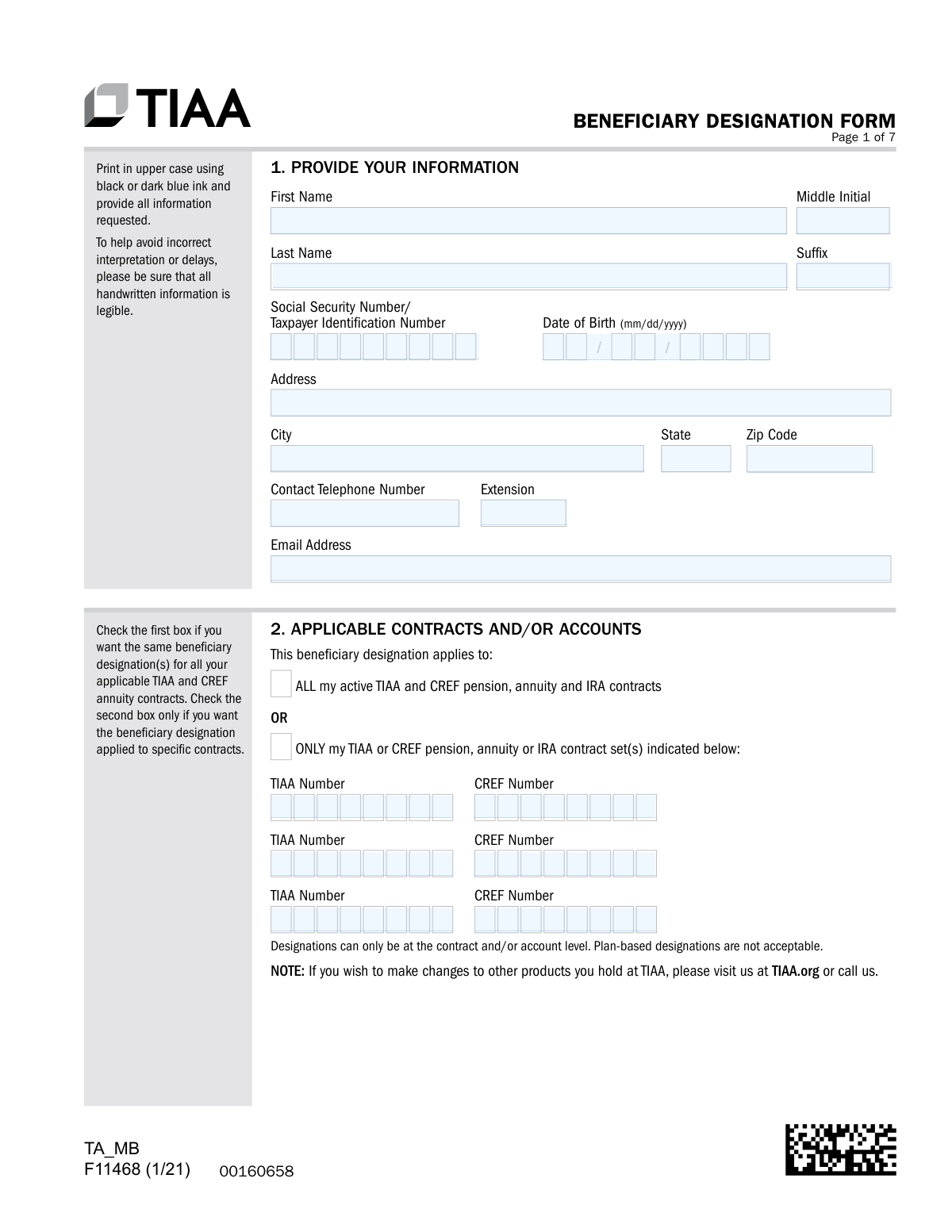
- 2 Use the AI assistant to fill in your personal information in Section 1, including your name, Social Security Number, and address.
- 3 In Section 2, specify whether the designation applies to all your TIAA and CREF contracts or only to specific ones by providing the contract numbers.
- 4 Enter the full details for each primary beneficiary in Section 3, including their name, relationship, contact information, and the percentage of benefits they should receive.
- 5 Optionally, repeat the process in Section 4 to designate contingent beneficiaries who will inherit if the primary beneficiaries are no longer living.
- 6 Carefully review all entered information, then electronically sign and date the form in Section 5.
- 7 Complete Section 6 based on your marital status. If you are married and naming someone other than your spouse as a primary beneficiary, ensure your spouse completes the consent section, which may require notarization.
Our AI-powered system ensures each field is filled out correctly, reducing errors and saving you time.
Why Choose Instafill.ai for Your Fillable F11468 Form?
Speed
Complete your F11468 in as little as 37 seconds.
Up-to-Date
Always use the latest 2026 F11468 form version.
Cost-effective
No need to hire expensive lawyers.
Accuracy
Our AI performs 10 compliance checks to ensure your form is error-free.
Security
Your personal information is protected with bank-level encryption.
Frequently Asked Questions About F11468
This form is used to designate new beneficiaries or update existing ones for your TIAA retirement plan accounts. It ensures your assets are distributed according to your wishes after your death.
A primary beneficiary is the first person or entity to receive your account balance. A contingent beneficiary only receives the balance if all primary beneficiaries have passed away before you.
Yes, if you are married and designate someone other than your spouse as more than 50% primary beneficiary, your spouse must consent. They must sign Section 6B in the presence of a Notary Public or Plan Representative.
To ensure your beneficiaries can be located, you must provide their full name, address, phone number, email, date of birth, and Social Security Number or Taxpayer Identification Number.
You can upload the form through the TIAA mobile app or on the TIAA.org website. Alternatively, you can submit it via fax or mail to the addresses listed on the form's checklist page.
Yes, in Section 2 you can choose to apply the designation to 'ALL' your TIAA and CREF contracts or select 'ONLY' and list the specific contract numbers you wish to update.
If you do not specify percentages for your primary beneficiaries, the benefits will be divided equally among those who are living at the time of your death.
If you check this box and a beneficiary passes away before you, their share of the benefits will be paid directly to their children. If unchecked, their share is divided among the other surviving primary beneficiaries.
Yes, you can name an individual, institution, trust, or your estate as a beneficiary. However, TIAA cannot accept a 'Will' as a designation, but you can name a Testamentary Trust if you provide its creation date.
Your new beneficiary designation becomes effective on the date that TIAA receives your completed form in good order.
Your spouse's signature must be witnessed by a Notary Public or a Plan Representative. The form suggests you can use a convenient remote online notary service like Notarize.com.
Yes, services like Instafill.ai use AI to accurately auto-fill form fields with your personal information, which can save time and help reduce errors.
You can use a service like Instafill.ai to upload the PDF, fill it out interactively on your computer, and then download the completed document for submission to TIAA.
If you have a flat, non-fillable PDF, you can use a tool like Instafill.ai to instantly convert it into an interactive form that you can easily fill out online.
Compliance F11468
Validation Checks by Instafill.ai
1
Primary Beneficiary Percentage Summation
This check verifies that the sum of the percentages assigned to all listed primary beneficiaries equals exactly 100%. This is critical to ensure the account holder's assets are distributed precisely as intended, without ambiguity. If the percentages do not total 100%, the form submission will be rejected, and the user will be prompted to correct the allocation.
2
Contingent Beneficiary Percentage Summation
If contingent beneficiaries are designated with specific percentages, this check ensures their allocated shares sum to exactly 100%. This rule prevents disputes and processing delays if the primary beneficiaries are unable to inherit. A failure in this validation will require the user to adjust the contingent percentages before the form can be accepted.
3
Contract Application Selection Logic
This validation ensures that the user has made a clear choice in Section 2 regarding which contracts the designation applies to. The user must select either the 'ALL my active TIAA and CREF...' checkbox OR provide specific contract numbers, but not both. If the 'ONLY' option is chosen, at least one contract number must be entered. This prevents ambiguity in applying the new beneficiary designations.
4
Account Holder Information Completeness
Verifies that all fields in Section 1, 'PROVIDE YOUR INFORMATION', are filled out, including full name, SSN/TIN, and Date of Birth. This information is essential for correctly identifying the account holder and linking the form to the right accounts. An incomplete section will halt processing and require the user to provide the missing data.
5
SSN/TIN Format Validation
This check ensures that the Social Security Number or Taxpayer Identification Number for both the account holder and any listed beneficiaries is a valid 9-digit number. A correctly formatted number is crucial for tax reporting and for uniquely identifying individuals. An invalid format will trigger an error, requiring the user to re-enter the number correctly.
6
Date Field Format and Plausibility
Ensures all date fields (Date of Birth, Signature Dates, Trust Dates) are entered in the required 'mm/dd/yyyy' format and represent a valid, plausible date. For example, a date of birth cannot be in the future. This validation maintains data integrity and prevents errors in record-keeping and eligibility calculations.
7
Spousal Consent Requirement Trigger
This is a conditional check that activates if the account holder is married and designates someone other than their spouse as a primary beneficiary for 50% or more of the benefit. It verifies that the spousal consent in Section 6B is fully completed, including the spouse's signature and notarization. This is a legal requirement under ERISA and state laws to protect spousal rights, and failure to comply will invalidate the non-spouse designation.
8
Spousal Consent Date Chronology
This check confirms that the date of the spouse's signature in Section 6B is the same as or later than the account holder's signature date in Section 5. This is required to prove that the spouse is consenting to a designation that has already been made by the account holder. If the spouse's signature is dated earlier, the consent is considered invalid and the form will be rejected.
9
Account Holder Signature and Date Presence
Validates that the account holder has provided a signature and the current date in Section 5. The signature legally authorizes the beneficiary changes, making it one of the most critical components of the form. A missing signature or date will render the entire form invalid and legally non-binding.
10
Minimum Primary Beneficiary Designation
This check ensures that at least one primary beneficiary has been designated in Section 3. A beneficiary designation form without a beneficiary is incomplete and cannot be processed. If no primary beneficiary is listed, the form will be returned to the user for completion.
11
Marital Status Declaration
Verifies that the user has completed Section 6 by checking either the 'I am not married' box (6A) or by providing the necessary information if married (6B). This declaration is mandatory to determine if spousal consent rules apply. Failure to declare marital status will result in the form being flagged as incomplete.
12
Trust Designation Date Requirement
If a beneficiary's relationship is listed as 'Trust', this validation confirms that a date has been entered in the 'Date of Birth/Date of Trust/Issue Date of Will' field. The form explicitly states that a 'Will' designation is not acceptable, but a Testamentary Trust is, provided the creation date is given. This ensures the designated trust is identifiable and valid.
13
Email Address Format Validation
This check verifies that any email address provided for the account holder or beneficiaries follows the standard '[email protected]' format. While not always mandatory, a valid email is important for future communication regarding the account. An invalid format would prompt a warning or require correction to ensure contact information is accurate.
14
Attachment Indication for Additional Beneficiaries
This validation checks if the box indicating an attached letter for additional beneficiaries is ticked. If it is, the system flags the submission to ensure a corresponding document is received and processed with the form. This prevents additional instructions or beneficiaries from being overlooked during processing.
Common Mistakes in Completing F11468
This mistake occurs when the percentages assigned to beneficiaries in the primary or contingent sections do not total exactly 100%. People often make simple math errors or leave the fields blank, assuming an equal split. An incorrect total will cause the form to be rejected, delaying the update and leaving the previous designation in effect. Always double-check that the percentages for all primary beneficiaries add up to 100%, and do the same for all contingent beneficiaries.
This is a critical error for married individuals in community property states or under ERISA plans who name someone other than their spouse as the primary beneficiary for over 50% of the assets. Filers may forget to have their spouse sign, fail to get the signature witnessed by a Notary Public, or have the spouse sign before the account holder signs. An invalid spousal waiver means the designation will be overridden by law, and the spouse will receive the death benefit regardless of the form's instructions.
Filers often provide only a name for a beneficiary, omitting crucial details like their Social Security Number, date of birth, and current address. This happens because people may not have the information on hand and intend to add it later, or they underestimate its importance. Without this data, TIAA may face significant delays or even be unable to locate the beneficiary, potentially leading to the assets being paid to the estate and causing legal complications for your heirs.
In Section 2, filers must choose whether the designation applies to 'ALL' contracts or only specific ones. A common mistake is to check the 'ONLY' box but then fail to list any contract numbers, or to write them illegibly or incorrectly. This ambiguity can cause the form to be rejected or, worse, result in the new beneficiary designation not being applied to the intended accounts, leaving old, outdated designations in place.
The form requires checking a specific box ('Payments made to this deceased beneficiary’s children') to ensure a deceased beneficiary's share passes to their children. Many people assume this happens automatically and overlook the checkbox. If this box is not checked and a primary beneficiary predeceases you, their share will be divided among the other surviving primary beneficiaries, not their own children, which may contradict your wishes.
When filling out a printed PDF by hand, people often use handwriting that is difficult to read, fail to use uppercase letters as requested, or use the wrong color ink. This can lead to clerical errors when the data is entered into the system, such as misspelled names or incorrect Social Security Numbers, which can cause major problems later. To avoid this, print clearly or use a tool like Instafill.ai, which can convert a non-fillable PDF into a fillable one, allowing you to type your entries for perfect legibility.
Forgetting to sign and date the form in Section 5 is one of the most frequent and easily avoidable mistakes. An unsigned or undated form is legally invalid and will be immediately rejected by the processing department. This means your beneficiary designation will not be updated, and your previous designation (or the plan's default rules) will remain in effect. Always perform a final review of the form, paying special attention to the signature block before submission.
The form has very specific rules for naming a trust and explicitly forbids naming a 'Will' as a beneficiary. People often make mistakes like writing 'My Testamentary Trust' without providing the creation date of the will, or simply writing 'See my will for details'. These designations are invalid and will be rejected, leaving no beneficiary on file. When naming a trust, you must provide the full legal name of the trust and the date it was created.
The form instructions explicitly state to 'Please return ALL numbered pages, including any pages you did not need to complete.' People often assume they only need to send back the pages they filled out, discarding the instructional or blank pages. Submitting an incomplete set of pages can cause the entire submission to be flagged as incomplete and rejected, forcing you to restart the process.
Filers sometimes misunderstand the distinct roles of primary and contingent beneficiaries, listing the same individuals in both sections or failing to name any contingent beneficiaries at all. A contingent beneficiary only inherits if all primary beneficiaries have predeceased the account holder. Failing to name a contingent beneficiary means that if your primary beneficiaries are not alive at the time of your death, the proceeds will go to your estate, which can result in a lengthy and costly probate process.
Saved over 80 hours a year
“I was never sure if my IRS forms like W-9 were filled correctly. Now, I can complete the forms accurately without any external help.”
Kevin Martin Green
Your data stays secure with advanced protection from Instafill and our subprocessors




Robust compliance program
Transparent business model
You’re not the product. You always know where your data is and what it is processed for.
ISO 27001, HIPAA, and GDPR
Our subprocesses adhere to multiple compliance standards, including but not limited to ISO 27001, HIPAA, and GDPR.
Security & privacy by design
We consider security and privacy from the initial design phase of any new service or functionality. It’s not an afterthought, it’s built-in, including support for two-factor authentication (2FA) to further protect your account.
Fill out F11468 with Instafill.ai
Worried about filling PDFs wrong? Instafill securely fills tiaa-beneficiary-designation-form-f11468 forms, ensuring each field is accurate.
