Yes! You can use AI to fill out Form F1387, Designating Beneficiaries for Your TIAA-CREF Accounts
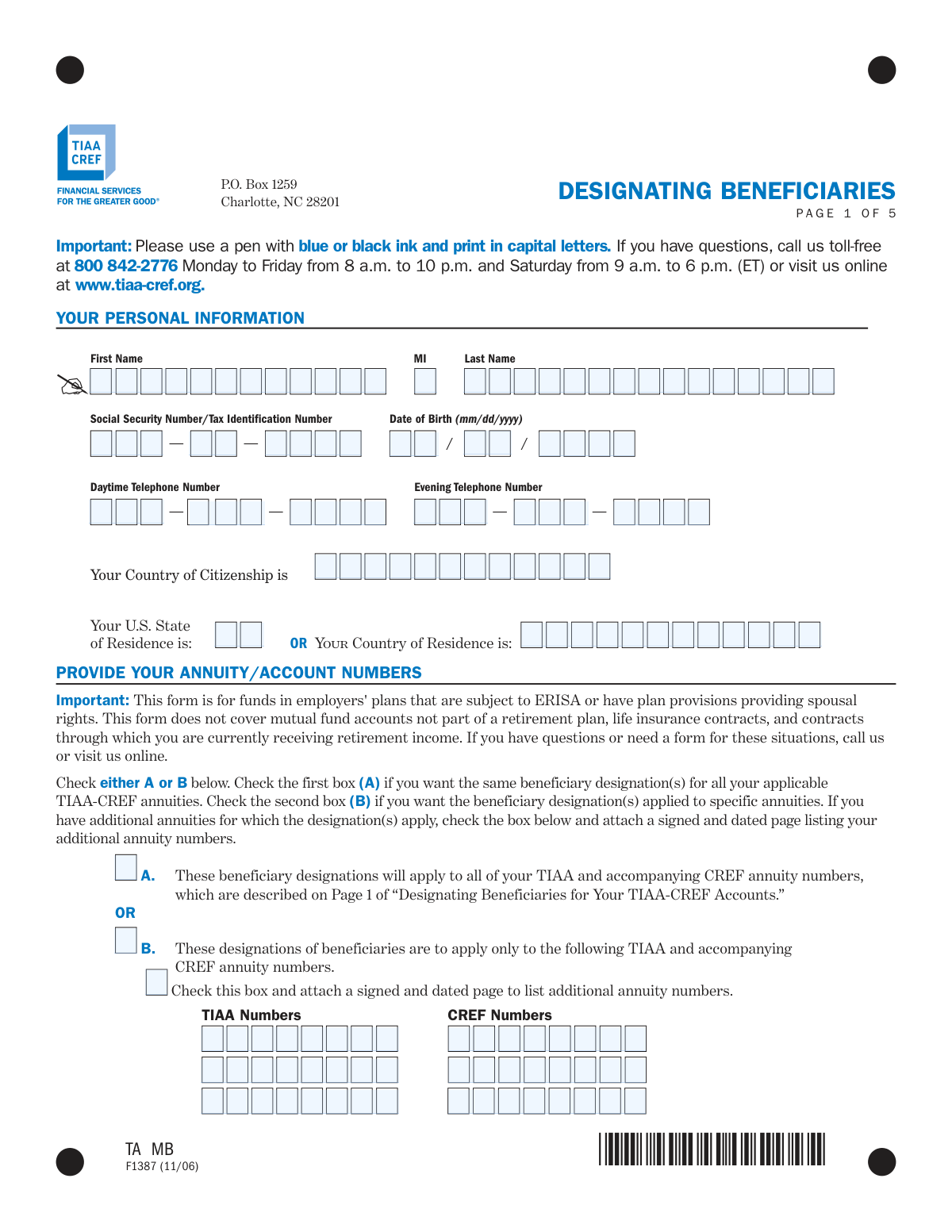
This form, officially titled 'Designating Beneficiaries for Your TIAA-CREF Accounts,' allows account holders to specify who will receive the value of their retirement funds as a death benefit. It is a critical component of estate planning, ensuring your assets are distributed according to your wishes for plans like Retirement Annuities and Supplemental Retirement Annuities. Today, this form can be filled out quickly and accurately using AI-powered services like Instafill.ai, which can also convert non-fillable PDF versions into interactive fillable forms.
F1387 is part of the
beneficiary designation forms, TIAA forms, retirement account forms, TIAA-CREF forms and financial planning forms categories on Instafill.
Rather not fill this in by hand? Instafill is an online form filler that completes PDF forms automatically — upload the blank form, answer a few questions, and the AI fills every field.
Form specifications
| Form name: | Form F1387, Designating Beneficiaries for Your TIAA-CREF Accounts |
| Number of pages: | 1 |
| Language: | English |
Our AI automatically handles information lookup, data retrieval, formatting, and form filling.
It takes less than a minute to fill out F1387 using our AI form filling.
Securely upload your data. Information is encrypted in transit and deleted immediately after the form is filled out.
Instafill Demo: How to fill out PDF forms in seconds with AI
How to Fill Out F1387 Online for Free in 2026
Are you looking to fill out a F1387 form online quickly and accurately? Instafill.ai offers the #1 AI-powered PDF filling software of 2026, allowing you to complete your F1387 form in just 37 seconds or less.
Follow these steps to fill out your F1387 form online using Instafill.ai:
- 1 Navigate to Instafill.ai and upload or select the TIAA-CREF Form F1387.
- 2 Provide your personal information, including your full name, Social Security Number, date of birth, and contact details.
- 3 Indicate which TIAA-CREF annuity or account numbers this beneficiary designation will apply to.
- 4 Enter the full details for your Primary (Class I) and Contingent (Class II) beneficiaries, specifying their names, relationship, SSN/TIN, and the percentage of benefits for each.
- 5 Complete the optional sections if you wish to apply provisions for 'Payment to children of a deceased child' or 'Payment to children of a deceased beneficiary'.
- 6 Review all information, then sign and date the 'Your Agreement' section. If you are married and naming someone other than your spouse for more than 50% of the benefits, your spouse must complete and sign the Spousal Waiver section, which requires notarization.
- 7 Download the completed, signed, and notarized (if applicable) form and mail it to the TIAA-CREF address provided.
Our AI-powered system ensures each field is filled out correctly, reducing errors and saving you time.
Why Choose Instafill.ai for Your Fillable F1387 Form?
Speed
Complete your F1387 in as little as 37 seconds.
Up-to-Date
Always use the latest 2026 F1387 form version.
Cost-effective
No need to hire expensive lawyers.
Accuracy
Our AI performs 10 compliance checks to ensure your form is error-free.
Security
Your personal information is protected with bank-level encryption.
Frequently Asked Questions About F1387
This form is used to name or update the people, trusts, or entities who will receive the funds from your TIAA-CREF retirement accounts if you pass away before starting to receive retirement income.
You should use this form if you have funds in an employer-sponsored retirement plan subject to federal pension law (ERISA) or plans with spousal rights provisions. Do not use this form if your funds are only in an IRA; use Form 11136 for that.
Yes, you can designate beneficiaries online at tiaa-cref.org, but you must use this paper form if you are naming an irrevocable beneficiary or if your designation requires a spousal waiver.
Primary beneficiaries are the first in line to receive your benefits. Contingent beneficiaries will only receive benefits if all of your primary beneficiaries have passed away at the time of your death.
Under federal law, your spouse is entitled to at least 50% of the death benefit from applicable plans. To give more than 50% to someone else, your spouse must formally agree by signing the 'Spouse's Waiver' section of this form.
The Spouse's Waiver is a legal consent your spouse must sign if you name someone other than them as the primary beneficiary for more than 50% of your benefits. The signature must be witnessed by a plan representative or a Notary Public.
You will need to provide the beneficiary's full name, Social Security Number or Tax ID Number, date of birth, gender, and their relationship to you. You must also specify the percentage of benefits they should receive.
If you do not specify percentages, the benefits will be divided equally among all the living beneficiaries you have listed within that same class (e.g., all primary beneficiaries).
This special provision ensures that if one of your children named as a beneficiary dies before you, their share of the benefits will automatically pass to their children (your grandchildren).
After completing and signing the form, mail it to TIAA-CREF, P.O. Box 1259, Charlotte, NC 28201.
Yes, you can designate a trust as a beneficiary. Use the optional 'Designating a Trust' page to provide the trust's official name, Tax Identification Number, and the date it was established.
Yes, services like Instafill.ai use AI to help you accurately auto-fill forms with your saved personal information. This can save time and help you avoid common mistakes.
Simply upload the TIAA-CREF beneficiary form PDF to the Instafill.ai platform. The AI will make the form fillable, and you can then type in your information or use the auto-fill feature to populate your details before downloading the completed document for printing and signing.
If you have a non-fillable or 'flat' PDF, you can use a service like Instafill.ai to instantly convert it into an interactive, fillable form. This allows you to easily type your information into the fields.
Compliance F1387
Validation Checks by Instafill.ai
1
Ensures Primary Beneficiary Percentages Sum to 100%
This check verifies that the 'Percentage' fields for all listed Primary Beneficiary (Class I) individuals sum to exactly 100%. This is critical to ensure the entire death benefit is allocated without ambiguity or error. If the total is not 100%, the form is considered incomplete and will be rejected, requiring the user to correct the allocations before the designation can be processed.
2
Ensures Contingent Beneficiary Percentages Sum to 100%
This check validates that the 'Percentage' fields for all listed Contingent Beneficiary (Class II) individuals sum to exactly 100%. This ensures that if no primary beneficiaries are living, the benefit is fully and correctly distributed among the secondary designees. A failure to sum to 100% will result in form rejection, as the contingent designation is legally unclear.
3
Validates Spousal Waiver Requirement for Married Individuals
This is a conditional logic check. If the account holder is married (i.e., the 'I am not married' box is unchecked) and designates a non-spouse as a primary beneficiary for more than 50% of the benefits, this validation ensures the 'Spouse's Waiver' section is fully completed. This is a legal requirement under ERISA to protect spousal rights. Failure to provide a completed waiver when required will render the non-compliant portion of the designation invalid, and benefits may default to the spouse per plan rules.
4
Verifies Spousal Waiver Signature Date is On or After Account Holder's Signature Date
This check compares the date the spouse signed the waiver with the date the account holder signed the main agreement. The spouse's signature date must be the same as or later than the account holder's signature date. This confirms the spouse is waiving their rights based on the final designation made by the account holder. An incorrectly dated waiver is legally invalid and will cause the form to be rejected.
5
Confirms Account Holder Signature and Date are Present
This validation ensures that the account holder has signed the form and provided a valid date in the 'Your Agreement' section. The signature and date are required to execute the legal revocation of prior designations and establish the new ones. A missing signature or date makes the entire form invalid and unenforceable, leading to immediate rejection.
6
Validates Social Security Number (SSN) / Tax Identification Number (TIN) Format
This check ensures that the SSN provided for the account holder and each individual beneficiary is in the correct XXX-XX-XXXX format, and any Trust TIN is in the XX-XXXXXXX format. Correct identification numbers are essential for tax reporting and for locating beneficiaries. An incorrectly formatted number will cause a processing failure and require correction.
7
Validates Date of Birth (DOB) Format and Plausibility
This check verifies that the Date of Birth for the account holder and all beneficiaries is entered in the correct 'mm/dd/yyyy' format and represents a plausible date (e.g., not in the future, and the person is not over 120 years old). This data is crucial for identity verification and for determining eligibility for certain payout options. An invalid date will halt processing until it is corrected.
8
Ensures Annuity Designation Selection is Made
This validation confirms that the user has selected either Box A (apply to all annuities) or Box B (apply to specific annuities). This choice is fundamental as it defines the scope of the beneficiary designation. If neither box is checked, the form is ambiguous and cannot be processed, resulting in rejection.
9
Verifies Annuity Numbers are Provided for Specific Designation
If the user selects Box B to apply the designation to specific annuities, this check ensures that at least one TIAA or CREF annuity number has been entered. Without specific account numbers, the designation has no target and is meaningless. The form will be rejected if Box B is checked but no numbers are listed.
10
Requires Declaration of Marital Status
This check ensures the user has made a determination of their marital status by either checking the 'I am not married' box or leaving it unchecked (implying they are married). This information is legally required to determine if spousal consent rules apply to the designation. Ambiguity in marital status will prevent the form from being processed due to legal compliance risks.
11
Validates Completeness of Spousal Waiver Witness Information
If the Spousal Waiver is required and completed, this check ensures that either the 'Plan Representative' section or the 'Notary Public' section is fully filled out, but not both. A spouse's signature on the waiver is only valid if properly witnessed. Incomplete witness information will invalidate the waiver and, consequently, the beneficiary designation that required it.
12
Ensures Residence Information is Mutually Exclusive
This validation checks that the account holder has provided either a 'U.S. State of Residence' or a 'Country of Residence', but not both. This information is important for legal jurisdiction and tax purposes. Providing both creates ambiguity, which would require clarification and delay processing.
13
Verifies Trust Establishment Date is Valid
If a trust is designated as a beneficiary, this check ensures the 'Date Trust was established' is a valid date that occurs before the form submission date. A trust cannot be a beneficiary if it was not legally established before the designation was made. An invalid or future date will cause the designation to the trust to fail.
Common Mistakes in Completing F1387
A married individual designating more than 50% of benefits to a non-spouse beneficiary often fails to have the spousal waiver section completed correctly. Common errors include the spouse signing before the account holder, the signature not being properly notarized or witnessed by a plan representative, or the dates being incorrect. An improperly executed waiver invalidates the non-spouse designation, and by law, 50% or more of the assets will automatically go to the spouse, regardless of the account holder's wishes.
When a married participant in an ERISA-covered plan names someone other than their spouse as a primary beneficiary for more than 50% of the assets, they often forget that their spouse must formally consent by signing the waiver. Failure to obtain this waiver means the designation will be legally overridden upon death, and the spouse will receive their statutory share. To avoid this, always review the spousal rights section and secure a notarized waiver if your designations require it.
Users often make mathematical errors when assigning percentages to multiple beneficiaries within a single class (Primary or Contingent), resulting in a total that is not exactly 100%. This ambiguity forces the financial institution to seek clarification, delaying the processing of the form. If the error isn't caught until after death, it can lead to disputes and delays in distributing assets. Always double-check that percentages for all beneficiaries in Class I equal 100%, and similarly for Class II.
Leaving fields like a beneficiary's Social Security Number (SSN), Tax ID Number, or Date of Birth blank is a frequent mistake. This information is critical for the financial institution to positively identify and locate the beneficiary, especially if they have a common name. Missing data can cause significant delays or complications in paying out death benefits. AI-powered tools like Instafill.ai can help prevent this by flagging incomplete fields before submission.
Many people only fill out the Primary Beneficiary (Class I) section and leave the Contingent (Class II) section blank. If all primary beneficiaries predecease the account holder, the assets will go to the owner's estate by default. This can trigger a lengthy and costly probate process, which a proper contingent designation would have avoided. Always name at least one contingent beneficiary to ensure a smooth transfer of assets.
On Page 1 of 5, users must choose between applying the designation to all applicable annuities (Box A) or only specific ones (Box B). A common error is checking Box B but failing to list the specific TIAA and CREF annuity numbers, or leaving both boxes unchecked. This makes the form invalid as it's unclear which accounts the designation applies to. Carefully decide the scope and ensure all required account numbers are listed if selecting Box B.
Forgetting to sign and date the 'YOUR AGREEMENT' section on Page 3 of 5 is a simple but critical error that completely invalidates the form. The signature legally confirms the designations, and the date is essential for establishing when the designation was made, which is particularly important relative to the spousal waiver date. Since this is a flat PDF, tools like Instafill.ai can convert it to a fillable version, making it easier to spot and complete mandatory fields like signatures and dates.
The instructions clearly state this form (F1387) is for employer plans subject to ERISA or with spousal rights, and that a different form (11136) should be used for IRAs or plans without these provisions. Using the incorrect form will result in an automatic rejection and require the entire process to be restarted. It is crucial to read the 'GETTING STARTED' section to confirm you are using the appropriate document for your specific account types.
The provisions on Page 3 of 5 for 'Payment to children of a deceased child of mine' (per stirpes) or 'Payment to children of a deceased beneficiary' are powerful estate planning tools, but are often misunderstood or checked incorrectly. Users may not realize this changes the distribution flow, potentially bypassing contingent beneficiaries. This can lead to unintended consequences and asset distributions that don't align with the user's true wishes. These complex options should only be selected after careful consideration of their impact.
The form only has space for two primary and two contingent beneficiaries. If designating more, the user must check a box and attach a separate, signed, and dated page. People often forget to check the box, attach the page, or, most critically, sign the attached page. An unsigned attachment is invalid, meaning any beneficiaries listed on it will not be recognized, potentially disinheriting intended recipients.
Saved over 80 hours a year
“I was never sure if my IRS forms like W-9 were filled correctly. Now, I can complete the forms accurately without any external help.”
Kevin Martin Green
Your data stays secure with advanced protection from Instafill and our subprocessors




Robust compliance program
Transparent business model
You’re not the product. You always know where your data is and what it is processed for.
ISO 27001, HIPAA, and GDPR
Our subprocesses adhere to multiple compliance standards, including but not limited to ISO 27001, HIPAA, and GDPR.
Security & privacy by design
We consider security and privacy from the initial design phase of any new service or functionality. It’s not an afterthought, it’s built-in, including support for two-factor authentication (2FA) to further protect your account.
Fill out F1387 with Instafill.ai
Worried about filling PDFs wrong? Instafill securely fills form-f1387-designating-beneficiaries-for-your-tiaa-cref-accounts forms, ensuring each field is accurate.
