Yes! You can use AI to fill out Request for Required Minimum Distribution (RMD) - IRA Owner/Plan Participant
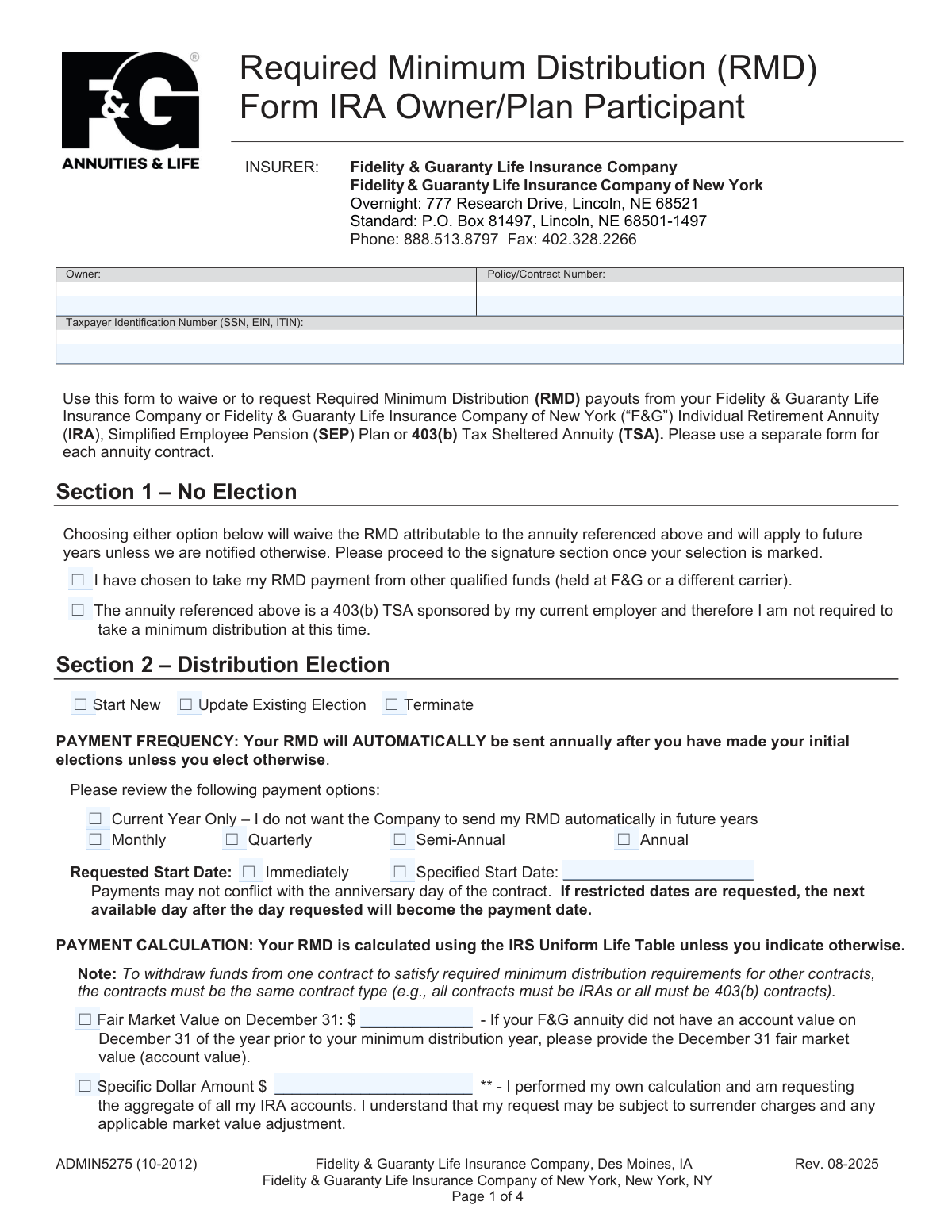
This form, ADMIN5275, allows an IRA Owner or Plan Participant to either waive or request Required Minimum Distribution (RMD) payments from their Fidelity & Guaranty Life Insurance Company annuity contract. It is used to start, update, or terminate RMDs, specify payment frequency, and set tax withholding preferences. Today, this form can be filled out quickly and accurately using AI-powered services like Instafill.ai, which can also convert non-fillable PDF versions into interactive fillable forms.
Our AI automatically handles information lookup, data retrieval, formatting, and form filling.
It takes less than a minute to fill out ADMIN5275 using our AI form filling.
Securely upload your data. Information is encrypted in transit and deleted immediately after the form is filled out.
Form specifications
| Form name: | Request for Required Minimum Distribution (RMD) - IRA Owner/Plan Participant |
| Number of pages: | 1 |
| Language: | English |
| Categories: | IRA forms, distribution forms |
Instafill Demo: How to fill out PDF forms in seconds with AI
How to Fill Out ADMIN5275 Online for Free in 2026
Are you looking to fill out a ADMIN5275 form online quickly and accurately? Instafill.ai offers the #1 AI-powered PDF filling software of 2026, allowing you to complete your ADMIN5275 form in just 37 seconds or less.
Follow these steps to fill out your ADMIN5275 form online using Instafill.ai:
- 1 Navigate to Instafill.ai and upload the Request for RMD form or select it from their template library.
- 2 Provide your personal information, including your name, policy/contract number, and Taxpayer Identification Number (SSN/TIN).
- 3 In Section 1 or 2, indicate whether you are waiving the RMD or electing a distribution. If electing, specify the frequency, start date, and calculation method.
- 4 Choose your method of distribution (check or Electronic Funds Transfer) and provide banking details if EFT is selected.
- 5 Complete Section 3 to make your federal and state tax withholding elections. Attach a separate IRS Form W-4R if you are choosing a custom federal withholding amount.
- 6 Carefully review the Substitute W-9 certification in Section 4, then provide your signature, date, and phone number to finalize the request.
- 7 Download the completed form and submit it to Fidelity & Guaranty Life via mail or fax as per the instructions on the form.
Our AI-powered system ensures each field is filled out correctly, reducing errors and saving you time.
Why Choose Instafill.ai for Your Fillable ADMIN5275 Form?
Speed
Complete your ADMIN5275 in as little as 37 seconds.
Up-to-Date
Always use the latest 2026 ADMIN5275 form version.
Cost-effective
No need to hire expensive lawyers.
Accuracy
Our AI performs 10 compliance checks to ensure your form is error-free.
Security
Your personal information is protected with bank-level encryption.
Frequently Asked Questions About Form ADMIN5275
This form is used to manage your Required Minimum Distribution (RMD) from a Fidelity & Guaranty Life (F&G) annuity. You can use it to either request your RMD payment or to inform F&G that you are taking your RMD from another account.
You should fill out this form if you own an F&G Individual Retirement Annuity (IRA), SEP Plan, or 403(b) Tax Sheltered Annuity (TSA) and need to take your RMD or waive the distribution from that specific contract.
If you are satisfying your RMD requirement from other qualified funds, check the first box in Section 1, sign the form, and submit it. This waives the RMD payout from this specific F&G annuity for the current year and future years.
To set up payments, complete Section 2. Unless you select 'Current Year Only,' your RMD will be sent automatically each year based on the frequency (e.g., monthly, quarterly, annual) you choose.
Yes, in Section 2 under 'Method of Distribution,' select 'Electronic Funds Transfer (EFT)' and provide your bank's routing and account numbers. If you don't make a selection, a check will be mailed to your address on file.
If you do not complete the tax withholding section, F&G will automatically withhold federal income tax at the default rate of 10%. For certain distributions, like an eligible rollover distribution, the mandatory withholding is 20%.
You must attach a current year IRS Form W-4R if you want to elect a federal tax withholding amount that is different from the default 10% or $0. Otherwise, no other forms are typically required for U.S. persons.
No, the instructions state that you must complete and submit a separate RMD request form for each individual annuity contract you have with F&G.
You can mail the form via standard mail to P.O. Box 81497, Lincoln, NE 68501-1497, or via overnight mail to 777 Research Drive, Lincoln, NE 68521. You can also fax it to 402-328-2266.
No, the form explicitly states that physical signatures are required. Electronic signatures will not be accepted, so you must print the form and sign it by hand.
Yes, for IRAs you can request a specific dollar amount in Section 2, but it may be subject to surrender charges. This option is not available for 403(b) TSA contracts; for those, you must use a separate distribution form for amounts exceeding the calculated RMD.
Yes, services like Instafill.ai use AI to accurately auto-fill form fields with your personal information, which can save you time and help prevent errors. However, you will still need to print the completed form to provide a physical signature.
Simply upload the form to the Instafill.ai platform. The AI will identify the fields, allowing you to securely fill them in online, review for accuracy, and then download the completed document for printing and signing.
If you have a non-fillable or 'flat' PDF, you can use a service like Instafill.ai. It can convert the static PDF into an interactive, fillable form online, making it easy to complete before you print it for your signature.
Compliance ADMIN5275
Validation Checks by Instafill.ai
1
Ensures Taxpayer Identification Number (TIN) is Valid
This check validates that the Taxpayer Identification Number field contains a correctly formatted 9-digit number, consistent with SSN, EIN, or ITIN formats. This is critical for accurate tax reporting to the IRS and proper identification of the owner. A failure would prevent form processing until a valid TIN is provided.
2
Verifies Signature Date is Within 60 Days of Receipt
This validation confirms that the date the owner signed the form is no more than 60 days prior to the date the form is received for processing. This ensures the owner's intent is current and the request is still valid under company policy. If the date is stale, the form will be rejected and a newly signed form will be required.
3
Mutually Exclusive Election Sections (Section 1 vs. Section 2)
This check ensures that the user has made a selection in either Section 1 (No Election) or Section 2 (Distribution Election), but not in both. These sections are mutually exclusive choices for managing an RMD. If selections are present in both sections, the form is considered ambiguous and will be rejected for clarification.
4
Completeness of Electronic Funds Transfer (EFT) Details
If 'Electronic Funds Transfer (EFT)' is chosen as the distribution method, this validation ensures that the account type (Checking or Savings), the 9-digit routing number, and the bank account number are all provided. Missing any of this information makes it impossible to process the electronic payment. The submission will be held until the complete and correct banking information is supplied.
5
Validates Bank Routing Number Format and Checksum
This check verifies that the provided bank routing number is exactly 9 digits and passes the standard ABA routing number checksum algorithm. This is crucial to prevent payment failures and misdirected funds. An invalid routing number will cause the transaction to be rejected by the banking system, delaying the distribution.
6
Conditional Requirement for Specified Start Date
If the user selects 'Specified Start Date' in Section 2, this validation ensures that a valid, future date is entered in the corresponding date field. This prevents ambiguity and ensures the distribution begins on the date intended by the owner. If the date is missing, in the past, or invalid, the form will be returned for correction.
7
Mandatory Federal Tax Withholding Election
This check confirms that one of the three federal tax withholding options in Section 3 has been selected, as the form explicitly states this section must be completed. This is a legal requirement for processing distributions and ensures compliance with IRS regulations. Failure to make a selection will result in applying the default withholding rate and may not reflect the owner's preference.
8
State Withholding Requires Applicable State
If the user chooses either to 'Do not withhold any state taxes' or to 'Withhold state taxes at the following rate or amount', this validation ensures the 'Applicable State' field is also filled. The state is required to determine the correct tax rules and jurisdiction. A missing state makes the withholding instruction incomplete and will halt processing.
9
Exclusive State Withholding Value (Percent or Amount)
When a user elects to have state taxes withheld, this check ensures that either a percentage or a specific dollar amount is provided, but not both. Providing both values creates a conflict that cannot be resolved without clarification from the owner. The form will be considered invalid if both fields are filled.
10
Conditional Requirement for Spouse's Date of Birth
If the 'Joint Life Expectancy' calculation method is selected in Section 2, this validation confirms that the 'Spouse’s Date of Birth' field is completed with a valid date. This information is essential for the company to perform the correct RMD calculation based on IRS joint life tables. The form cannot be processed with this election if the spouse's date of birth is missing.
11
Presence of Policy/Contract Number
This validation ensures the 'Policy/Contract Number' field is not empty. This number is the primary identifier for the annuity account from which the distribution is being requested. Without it, the company cannot locate the correct account, making the entire request impossible to fulfill.
12
Signature and Signature Date Fields are Completed
This check verifies that both the owner's signature and the signature date fields are filled, as they are marked as required for the form to be legally binding. The signature authorizes the transaction, and the date establishes its timeliness. A missing signature or date will result in immediate rejection of the form.
13
403(b) TSA Restriction on Specific Dollar Amount
This is a context-aware check that verifies if the 'Specific Dollar Amount' option in Section 2 is selected for a 403(b) TSA contract. The form explicitly states this option is not available for 403(b) contracts. If this rule is violated, the request will be rejected, and the user will be instructed to submit the correct form for that type of withdrawal.
14
Distribution Election Type is Selected
If the user fills out Section 2, this validation ensures that one of the primary actions ('Start New', 'Update Existing Election', or 'Terminate') is selected. This choice defines the core purpose of the request. Without this selection, the company does not know how to apply the other details provided in the section, leading to rejection for clarification.
Common Mistakes in Completing ADMIN5275
The form explicitly states 'Physical signatures required, electronic signatures will not be accepted.' In an age of digital convenience, many people overlook this requirement and use an e-signature, which will cause the form to be rejected. To avoid this, you must print the completed form and sign it by hand with a pen. While AI tools like Instafill.ai can perfectly fill out the form fields, the final step must be a physical signature on the printed document.
A frequent error is selecting an option in Section 1 to waive the RMD and also filling out Section 2 to request a distribution. This creates a conflicting instruction, forcing the processing agent to either reject the form or contact the owner for clarification, causing significant delays. To prevent this, carefully decide if you are waiving your RMD or taking it, and fill out only the corresponding section (Section 1 or Section 2), not both.
When selecting Electronic Funds Transfer (EFT) in Section 2, individuals often forget to enter their bank routing and account numbers, or they accidentally transpose digits. This incomplete or incorrect information makes the direct deposit impossible, leading to processing failure and a delay in receiving funds. To avoid this, double-check your routing and account numbers against a check or bank statement. Using a tool like Instafill.ai can help by validating the format of these numbers and saving them securely for future use.
Section 3 is mandatory, but people often skip it, assuming no action is needed. If no federal tax withholding option is checked, the company will apply a default withholding of 10% (or 20% for rollovers), which may be more or less than desired and can result in an unexpected payment amount and tax liability. Always make an explicit choice in Section 3. If you are unsure, consult a tax advisor, and consider attaching a completed IRS Form W-4R for specific instructions.
The signature section on Page 4 notes that the date signed 'must be within 60 days of receipt.' People sometimes fill out and sign a form but delay sending it in, causing it to become 'stale' by the time it arrives. This will invalidate the request, requiring a new form to be completed and signed. To prevent this, mail or fax the form promptly after signing and dating it.
In Section 3, a user might check the box indicating they have 'attached a current year IRS Form W-4R' to specify a custom federal withholding amount but then forget to actually include the document. This leads to the company disregarding the intended custom withholding and applying the default rate. Always double-check that any documents you've indicated will be attached are physically included with your submission.
The Policy/Contract Number is the primary identifier for the account. Omitting this number or writing it incorrectly makes it impossible for the company to locate the correct annuity and process the RMD request. This is a simple oversight that brings the entire process to a halt until the information can be verified. Ensure this number is copied accurately onto the form. AI form-fillers like Instafill.ai can store this information to prevent transcription errors on future forms.
The form clearly states that requesting a 'Specific Dollar Amount' is not available for 403(b) TSA contracts. However, owners of these contracts may overlook this footnote and attempt to request a custom amount, which will be rejected. For a 403(b) TSA, only the calculated RMD amount can be paid via this form. To avoid this, 403(b) owners must understand this limitation and use a separate distribution request form for any amounts in excess of the calculated RMD.
The instructions at the top of the form state, 'Please use a separate form for each annuity contract.' Some individuals with multiple contracts may try to save time by listing several contract numbers on one form or submitting one form with the intention of it applying to all their holdings. This will lead to rejection or processing for only the first valid contract number found. You must complete and sign a unique form for each individual contract from which you wish to take an RMD.
The state tax withholding section is complex, as rules vary by state and may require specific state forms. A common mistake is to request a withholding percentage that is not permissible in one's state or to simply check 'Do not withhold' when the state mandates withholding. This can lead to incorrect state tax payments and potential penalties. It is crucial to check your state's specific tax authority website for the correct rules and forms before completing this section.
Saved over 80 hours a year
“I was never sure if my IRS forms like W-9 were filled correctly. Now, I can complete the forms accurately without any external help.”
Kevin Martin Green
Your data stays secure with advanced protection from Instafill and our subprocessors

Robust compliance program
Transparent business model
You’re not the product. You always know where your data is and what it is processed for.
ISO 27001, HIPAA, and GDPR
Our subprocesses adhere to multiple compliance standards, including but not limited to ISO 27001, HIPAA, and GDPR.
Security & privacy by design
We consider security and privacy from the initial design phase of any new service or functionality. It’s not an afterthought, it’s built-in, including support for two-factor authentication (2FA) to further protect your account.
Fill out ADMIN5275 with Instafill.ai
Worried about filling PDFs wrong? Instafill securely fills request-for-required-minimum-distribution-rmd-ira-ownerplan-participant forms, ensuring each field is accurate.