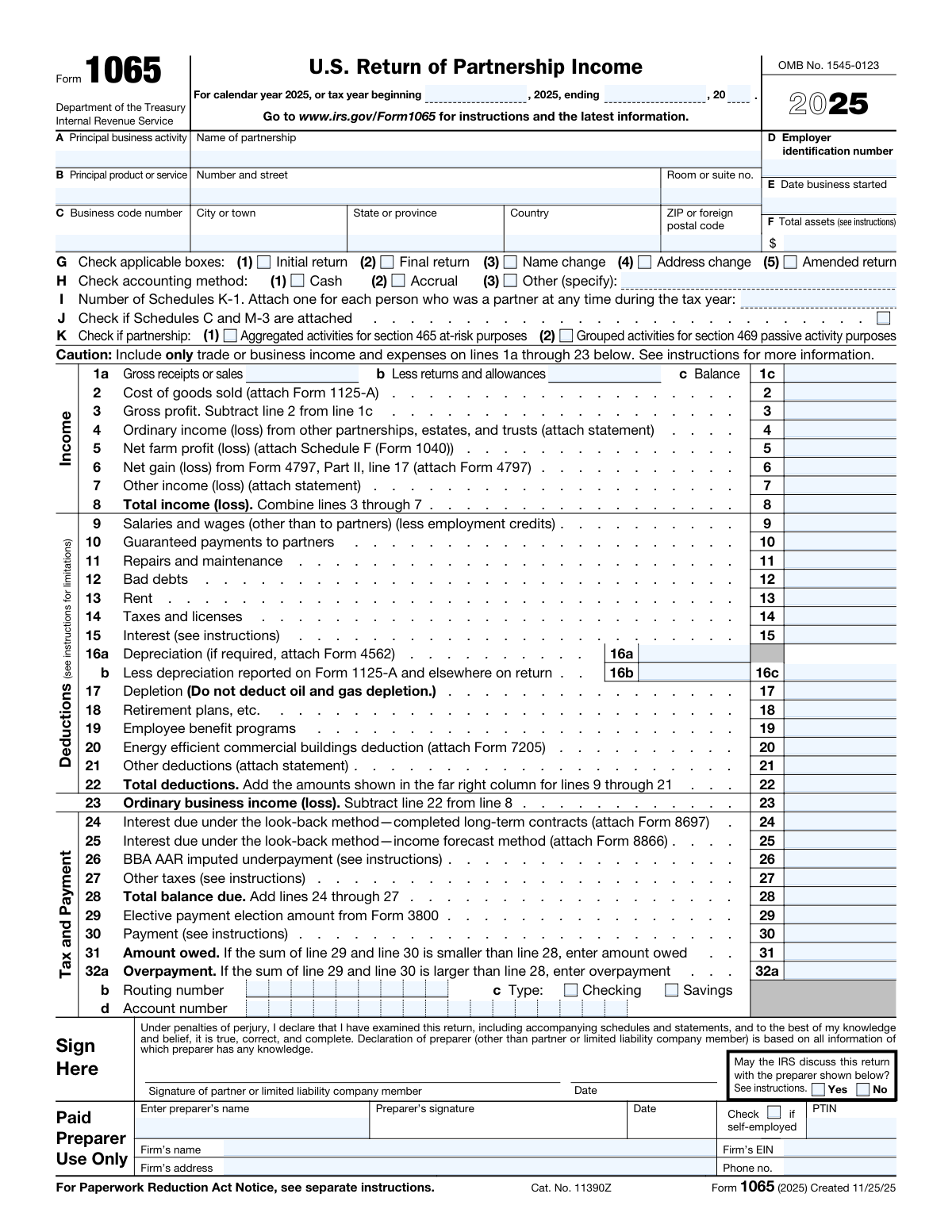
Yes! You can use AI to fill out Form 1065, U.S. Return of Partnership Income

Form 1065, U.S. Return of Partnership Income, is an information return filed with the IRS by domestic partnerships to report their income, deductions, gains, and losses. While the partnership itself does not typically pay tax, this form is crucial for calculating and passing through the financial results to the individual partners, who report their share on their personal tax returns via Schedule K-1. Today, this complex form can be filled out quickly and accurately using AI-powered services like Instafill.ai, which can also convert non-fillable PDF versions into interactive fillable forms.
Our AI automatically handles information lookup, data retrieval, formatting, and form filling.
It takes less than a minute to fill out Form 1065 using our AI form filling.
Securely upload your data. Information is encrypted in transit and deleted immediately after the form is filled out.

Form specifications

Form name: Form 1065, U.S. Return of Partnership Income
Number of fields: 440
Number of pages: 6
Language: English
Categories: income forms, partnership forms
main-image

Instafill Demo: How to fill out PDF forms in seconds with AI

How to Fill Out Form 1065 Online for Free in 2026

Are you looking to fill out a FORM 1065 form online quickly and accurately? Instafill.ai offers the #1 AI-powered PDF filling software of 2026, allowing you to complete your FORM 1065 form in just 37 seconds or less.
Follow these steps to fill out your FORM 1065 form online using Instafill.ai:
  1. 1 Navigate to Instafill.ai and upload your Form 1065 PDF or select the form from the template library.
  2. 2 Provide the partnership's identifying information, including its name, address, Employer Identification Number (EIN), and business activity codes, into the guided interface.
  3. 3 Enter the partnership's income and cost of goods sold on the main form. The AI will automatically calculate gross profit and total income.
  4. 4 Input all business deductions, such as salaries, rent, interest, and depreciation. Instafill's AI helps categorize expenses and ensures you claim all eligible deductions.
  5. 5 Complete Schedule B (Other Information) and Schedule K, which summarizes each partner's share of income and deductions. The system will use this to generate individual Schedule K-1s.
  6. 6 Use the AI-powered review feature to check the entire return for errors, omissions, and inconsistencies, ensuring accuracy and compliance.
  7. 7 Once reviewed and verified, provide a digital signature and download the completed, ready-to-file Form 1065 and accompanying schedules.

Our AI-powered system ensures each field is filled out correctly, reducing errors and saving you time.

Why Choose Instafill.ai for Your Fillable Form 1065 Form?

Speed

Complete your Form 1065 in as little as 37 seconds.

Up-to-Date

Always use the latest 2026 Form 1065 form version.

Cost-effective

No need to hire expensive lawyers.

Accuracy

Our AI performs 10 compliance checks to ensure your form is error-free.

Security

Your personal information is protected with bank-level encryption.

Frequently Asked Questions About Form Form 1065

Form 1065, U.S. Return of Partnership Income, is an information return used by domestic partnerships to report their income, gains, losses, deductions, and credits for the tax year. All domestic partnerships, including limited liability companies (LLCs) classified as partnerships, must file this form.

Schedule K-1 is a crucial document that the partnership must prepare for each partner. It reports each partner's individual share of the partnership's income, deductions, credits, and other items, which they then use to file their personal tax returns.

Salaries and wages on line 9 are for payments to employees who are not partners. Guaranteed payments on line 10 are payments made to partners for services or the use of capital, without regard to the partnership's income.

Schedule B asks a series of 'Yes' or 'No' questions to gather more details about the partnership's structure and activities. This includes ownership details, foreign accounts or partners, and elections made by the partnership.

Not always. According to question 4 on Schedule B, if your partnership's total receipts were less than $250,000 and total assets were less than $1 million (and you meet two other conditions), you are not required to complete Schedules L, M-1, and M-2.

The Partnership Representative (PR) is an individual or entity designated by the partnership to act on its behalf during an IRS audit. This person has the sole authority to bind the partnership and its partners in an examination.

For calendar year partnerships, Form 1065 is generally due by the 15th day of the 3rd month after the tax year ends, which is March 15. An extension can be filed to move the deadline to September 15.

No, a partnership is a 'pass-through' entity, meaning it does not pay income tax itself. The profits or losses are 'passed through' to the partners, who report them on their personal tax returns and pay the tax.

Yes, a domestic partnership must file Form 1065 unless it neither receives income nor incurs any expenditures treated as deductions or credits for federal income tax purposes. It's best to file a return showing zero activity to avoid potential penalties.

If your partnership's name or address has changed since the last return was filed, you should check the appropriate box in section G on page 1 of the form. This notifies the IRS of the change.

Under the cash method, you report income in the tax year you receive it and deduct expenses in the tax year you pay them. Under the accrual method, you generally report income in the year you earn it and deduct expenses in the year you incur them, regardless of when money changes hands.

If you have a non-fillable or 'flat' PDF, you can use a service like Instafill.ai to convert it into an interactive, fillable form. This allows you to easily type your information directly into the fields before printing or saving.

Yes, AI-powered services like Instafill.ai can significantly speed up the process of filling out Form 1065. These tools use AI to accurately auto-fill form fields from your saved data, reducing manual entry and saving you time.

To fill out Form 1065 with Instafill.ai, you can upload the form to their platform. The AI will identify the fields, and you can then type your information, use saved data to auto-fill sections, and securely complete the entire return online.

Compliance Form 1065
Validation Checks by Instafill.ai

1
Validates Employer Identification Number (EIN) Format
This check ensures that the Employer Identification Number (EIN) in field D is entered in the correct XX-XXXXXXX format. The EIN is a unique nine-digit number assigned by the IRS to business entities, and its accuracy is critical for identifying the partnership. If the format is incorrect, the return cannot be processed correctly, leading to rejection and potential delays.
2
Verifies 'Date Business Started' is Chronologically Correct
This validation confirms that the 'Date Business Started' (Field E) is not a future date and is on or before the tax year ending date. This is a logical check to prevent data entry errors and ensure the partnership was in existence during the period for which it is filing. An invalid date could lead to questions about the validity of the entire return.
3
Ensures 'Other' Accounting Method is Specified
This check is triggered if the 'Other' box is checked for the accounting method in Item H. It validates that the corresponding text field specifying the method is not empty. Failing to specify the 'Other' method makes the return incomplete and prevents the IRS from understanding how income and expenses are being reported, which could trigger an audit or inquiry.
4
Confirms Calculation of Net Sales on Line 1c
This validation verifies the arithmetic on the income section, ensuring that Line 1c (Balance) is exactly equal to Line 1a (Gross receipts or sales) minus Line 1b (Less returns and allowances). This is a fundamental calculation for determining gross profit and overall income. A miscalculation here would cause all subsequent income and profit figures on the return to be incorrect.
5
Validates Calculation of Total Income on Line 8
This check ensures that the amount on Line 8 (Total income (loss)) is the correct sum of lines 3 through 7. This calculation aggregates various sources of income to arrive at a total income figure before deductions. An error would fundamentally misstate the partnership's income and lead to an incorrect calculation of ordinary business income.
6
Verifies Calculation of Total Deductions on Line 22
This validation confirms that the amount on Line 22 (Total deductions) is the correct sum of all deduction lines from 9 through 21. This is a critical summation that determines the total expenses offset against income. An incorrect total would lead to an inaccurate ordinary business income calculation and could result in an underpayment or overpayment of tax.
7
Confirms Calculation of Ordinary Business Income on Line 23
This check ensures that Line 23 (Ordinary business income (loss)) is correctly calculated by subtracting Line 22 (Total deductions) from Line 8 (Total income (loss)). This is the final calculation on the first page and represents the primary operating result for the partnership. An error here invalidates the core financial reporting of the return and will cause mismatches with Schedule K.
8
Mutually Exclusive Amount Owed or Overpayment
This validation ensures that the form does not contain values for both Line 31 (Amount owed) and Line 32a (Overpayment). Based on the comparison of the total balance due (Line 28) and total payments (Lines 29 + 30), only one of these outcomes is possible. Having both fields filled indicates a severe calculation or data entry error that makes the tax due/refund status ambiguous.
9
Conditional Requirement for Partnership Representative Information
This check validates that if 'No' is selected for Question 33 (electing out of the centralized audit regime), then the Partnership Representative (PR) and, if applicable, Designated Individual (DI) information is fully provided. The BBA rules require a designated PR if the partnership does not elect out. Failure to provide this information makes the return incomplete and non-compliant with federal audit procedures.
10
Validates Schedule K-1 Count
This check ensures that the 'Number of Schedules K-1' entered in Item I is a positive integer. Every partnership must have at least two partners, so this number should typically be 2 or greater. This count is critical for the IRS to verify that a corresponding Schedule K-1 has been filed for every partner, ensuring proper allocation of income, deductions, and credits.
11
Verifies Balance Sheet Equality on Schedule L
This validation confirms that for Schedule L, Total Assets (Line 14) equals Total Liabilities and Capital (Line 22) for both the beginning-of-year columns (a) and (b) and the end-of-year columns (c) and (d). This is a fundamental accounting equation (Assets = Liabilities + Equity) and a failure indicates the partnership's books are out of balance. Such an error would immediately flag the return for review and likely rejection.
12
Reconciles Schedule M-2 with Schedule L
This check ensures that the 'Balance at end of year' from Schedule M-2, Line 9, exactly matches the 'Partners’ capital accounts' value on Schedule L, Line 21, column (d). This confirms that the detailed analysis of changes in the partners' capital accounts reconciles with the ending balance sheet figure. A mismatch indicates an error in tracking capital contributions, distributions, or net income allocations.
13
Reconciles Schedule M-1 with Analysis of Net Income
This validation verifies that the income (loss) amount on Schedule M-1, Line 9, is equal to the amount on the 'Analysis of Net Income (Loss) per Return', Line 1. Schedule M-1 is designed to reconcile book income with tax return income, and this check ensures the reconciliation correctly ties back to the calculated net income figure. A discrepancy suggests the reconciliation of book-tax differences is flawed.
14
Conditional Requirement for Foreign Partner Form Count
This check is triggered if 'Yes' is selected for Schedule B, Question 14, indicating the partnership has foreign partners. It validates that the number entered for Forms 8805 filed is a positive integer (greater than zero). If the partnership has foreign partners, it is generally required to file Form 8805 for withholding tax, and failing to provide a count makes the response inconsistent and incomplete.

Common Mistakes in Completing Form 1065

Using an Incorrect or Outdated Business Code Number

Filers often select a business code number (NAICS code) in Box C that doesn't accurately reflect the partnership's primary business activity, or they use a code from a previous year that is no longer valid. This can lead to the IRS flagging the return for review, incorrect statistical analysis, and potential questions about the nature of the partnership's income and deductions. To avoid this, carefully review the latest IRS instructions for Form 1065 to find the code that best describes the business's main source of revenue.

Incorrectly Claiming Exemption from Filing Schedules L, M-1, and M-2

Partnerships often incorrectly answer 'Yes' to Schedule B, Question 4, believing they are exempt from completing the balance sheet and reconciliation schedules. This exemption only applies if the partnership meets all four specific conditions regarding receipts, assets, and K-1 filing. Answering 'Yes' incorrectly leads to an incomplete return, which can result in penalties and require filing an amended return. Carefully verify that all four conditions are met before checking 'Yes'.

Filing an Unbalanced Balance Sheet (Schedule L)

A fundamental accounting principle is that Total Assets must equal Total Liabilities and Capital. On Schedule L, this means Line 14 must exactly match Line 22 for both the beginning and end of the tax year. Manual data entry often leads to errors that cause these lines to not match, resulting in an invalid return that will be questioned by the IRS. To avoid this, use software that performs validation checks or meticulously review the totals. AI-powered tools like Instafill.ai can help prevent these errors by automatically validating calculations.

Discrepancies Between Schedule K Totals and Partner K-1 Allocations

The total amounts for each line item on Schedule K must equal the sum of the amounts allocated for that same line item across all individual partner Schedules K-1. Manual calculations often lead to rounding errors or misallocations, causing a mismatch that the IRS will detect automatically, guaranteeing an inquiry. To prevent this, use tax software or an AI-powered form filling tool like Instafill.ai that automatically reconciles these schedules and validates the data to ensure consistency.

Incomplete or Incorrect Partnership Representative (PR) Designation

Unless a partnership elects out of the centralized audit regime, it must designate a Partnership Representative (PR). Common mistakes include leaving this section blank, or failing to name a Designated Individual (DI) when the PR is an entity. An invalid PR designation can complicate future communications with the IRS and may lead to the IRS appointing a PR for the partnership. Ensure all required fields for the PR (and DI, if applicable) are filled out completely and accurately.

Misclassifying Guaranteed Payments vs. Distributions

Partnerships often confuse guaranteed payments (deductible by the partnership) with distributions (generally not deductible). Guaranteed payments are reported on Page 1, Line 10, while distributions are reported on Schedule M-2, Line 6. Misclassifying these payments affects the partnership's ordinary business income and the partners' individual tax liabilities, potentially leading to underpayment of taxes and penalties. Clearly distinguish between payments for services/capital and returns of capital.

Inconsistent Beginning and End-of-Year Balances on Schedule L

The beginning-of-year balance sheet figures on the current year's Form 1065 must match the end-of-year figures from the prior year's filed return. This discrepancy is a major red flag for the IRS, suggesting accounting irregularities, and will likely trigger a notice. This often happens when switching accounting systems or making retroactive adjustments. Always use the prior year's filed return as the definitive source for the current year's beginning balances.

Failure to Reconcile Book Income with Tax Income (Schedules M-1/M-2)

Schedules M-1 and M-2 reconcile book income and capital with tax amounts, and errors are common. Key checks are often missed: Schedule M-1, Line 9 must match the 'Analysis of Net Income (Loss)', and Schedule M-2, Line 9 must match the partners' capital account on Schedule L, Line 21. Failure to properly account for book-to-tax differences like non-deductible expenses indicates poor record-keeping and invites IRS scrutiny. Meticulous tracking of these differences is crucial.

Forgetting to Attach Required Forms and Statements

Form 1065 frequently requires other forms or statements to be attached, such as Form 4562 for depreciation or statements for 'Other Deductions'. Forgetting to include these attachments is a common oversight that results in an incomplete return, triggering IRS notices and processing delays. If the form is a non-fillable PDF, tools like Instafill.ai can convert it into a fillable version and help manage required attachments. Always use a checklist to ensure all necessary documents are included.

Incorrectly Answering the Digital Asset Question

The question on Schedule B, Line 30, asking about digital asset transactions is frequently overlooked or misunderstood. Filers may not realize that receiving cryptocurrency as payment, or exchanging one type of digital asset for another, constitutes a reportable transaction. Incorrectly checking 'No' when the partnership did engage in such activities can lead to an inaccurate return and potential penalties. Partnerships must review all transactions to determine if they involved digital assets and answer this question accurately.
Saved over 80 hours a year

“I was never sure if my IRS forms like W-9 were filled correctly. Now, I can complete the forms accurately without any external help.”

Kevin Martin Green

Your data stays secure with advanced protection from Instafill and our subprocessors

Robust compliance program

Transparent business model

You’re not the product. You always know where your data is and what it is processed for.

ISO 27001, HIPAA, and GDPR

Our subprocesses adhere to multiple compliance standards, including but not limited to ISO 27001, HIPAA, and GDPR.

Security & privacy by design

We consider security and privacy from the initial design phase of any new service or functionality. It’s not an afterthought, it’s built-in, including support for two-factor authentication (2FA) to further protect your account.

Fill out Form 1065 with Instafill.ai

Worried about filling PDFs wrong? Instafill securely fills form-1065-us-return-of-partnership-income-2 forms, ensuring each field is accurate.