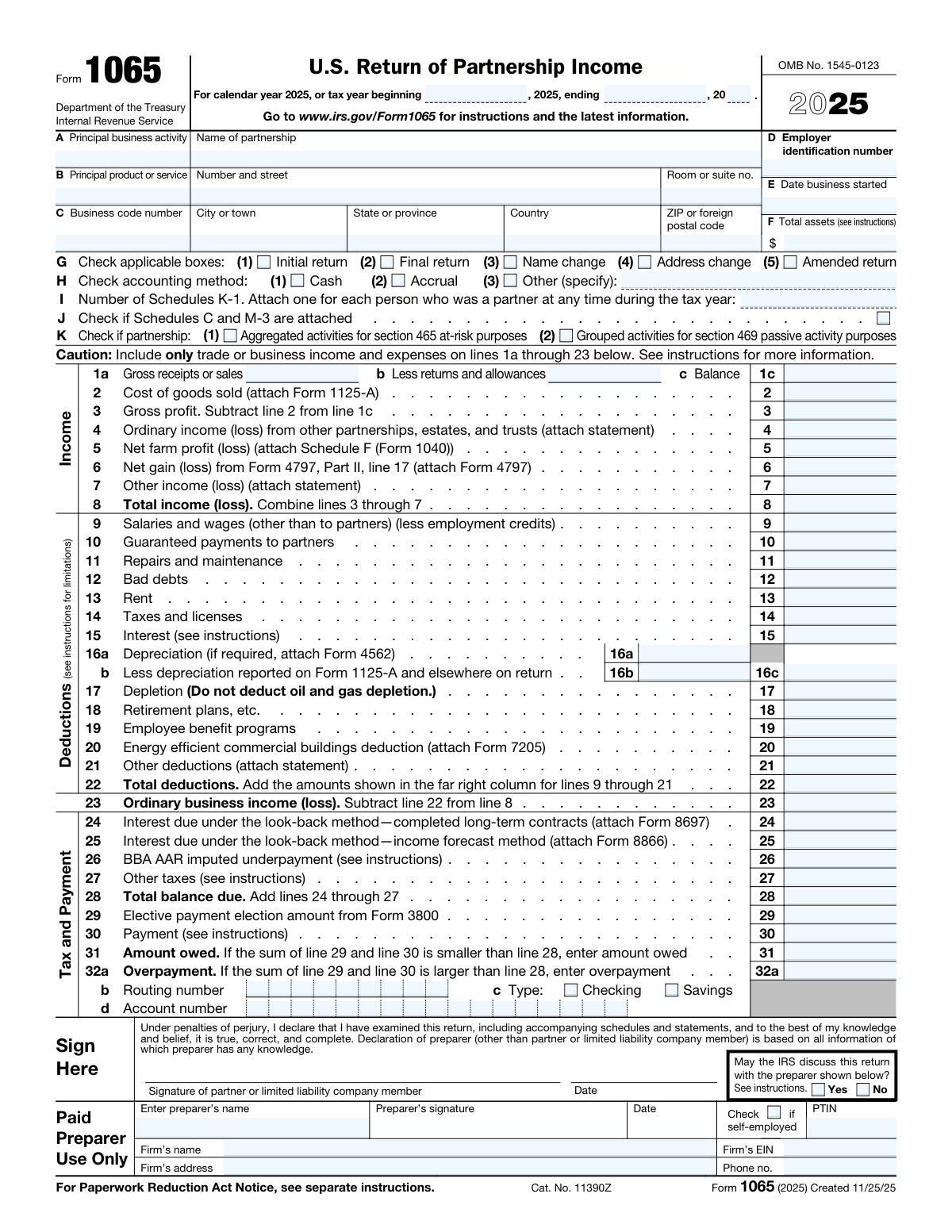
Yes! You can use AI to fill out Form 1065, U.S. Return of Partnership Income

Form 1065 is an information return used by domestic partnerships to report their financial activity to the Internal Revenue Service (IRS). It details the partnership's income, deductions, gains, and losses for the tax year. This form is crucial because partnerships are pass-through entities; the profits and losses are not taxed at the partnership level but are passed to the individual partners, who report them on their personal tax returns using the information from Schedule K-1, which is generated from Form 1065. Today, this form can be filled out quickly and accurately using AI-powered services like Instafill.ai, which can also convert non-fillable PDF versions into interactive fillable forms.
Our AI automatically handles information lookup, data retrieval, formatting, and form filling.
It takes less than a minute to fill out Form 1065 using our AI form filling.
Securely upload your data. Information is encrypted in transit and deleted immediately after the form is filled out.

Form specifications

Form name: Form 1065, U.S. Return of Partnership Income
Number of pages: 9
Language: English
main-image

Instafill Demo: How to fill out PDF forms in seconds with AI

How to Fill Out Form 1065 Online for Free in 2026

Are you looking to fill out a FORM 1065 form online quickly and accurately? Instafill.ai offers the #1 AI-powered PDF filling software of 2026, allowing you to complete your FORM 1065 form in just 37 seconds or less.
Follow these steps to fill out your FORM 1065 form online using Instafill.ai:
  1. 1 Navigate to Instafill.ai and upload your PDF of Form 1065 or select it from the template library.
  2. 2 Provide the partnership's basic information, including its name, address, Employer Identification Number (EIN), and business start date in the designated fields.
  3. 3 Enter the partnership's income details, such as gross receipts, returns and allowances, cost of goods sold, and any other income or losses.
  4. 4 Input all applicable business deductions, including salaries and wages, guaranteed payments to partners, rent, taxes, interest, and depreciation.
  5. 5 Complete the required schedules, such as Schedule B (Other Information) and Schedule K (Partners' Distributive Share Items), using the AI assistant to guide you through the questions.
  6. 6 Generate and review the individual Schedule K-1 forms for each partner, ensuring the AI has accurately allocated the shares of income, deductions, and credits.
  7. 7 Review the entire completed Form 1065 and all associated schedules for accuracy, then e-sign and download the final document for filing with the IRS.

Our AI-powered system ensures each field is filled out correctly, reducing errors and saving you time.

Why Choose Instafill.ai for Your Fillable Form 1065 Form?

Speed

Complete your Form 1065 in as little as 37 seconds.

Up-to-Date

Always use the latest 2026 Form 1065 form version.

Cost-effective

No need to hire expensive lawyers.

Accuracy

Our AI performs 10 compliance checks to ensure your form is error-free.

Security

Your personal information is protected with bank-level encryption.

Frequently Asked Questions About Form Form 1065

Form 1065, U.S. Return of Partnership Income, is an information return used by domestic partnerships and LLCs treated as partnerships to report their income, deductions, gains, and losses. The partnership itself does not pay tax on its income but instead 'passes through' any profits or losses to its partners on a Schedule K-1.

Form 1065 reports the total income and expenses for the entire partnership for the tax year. A Schedule K-1 is a separate document prepared for each individual partner, detailing their specific share of the partnership's financial results, which they then use to file their personal tax returns.

The Partnership Representative (PR) is an individual or entity with a substantial presence in the U.S. designated by the partnership to represent it in all dealings with the IRS. This person has the sole authority to act on behalf of the partnership during an audit.

Guaranteed payments are payments a partnership makes to a partner for services or the use of capital, determined without regard to the partnership's income. These payments are deductible by the partnership and must be reported as income by the partner receiving them.

You may be exempt from completing Schedules L, M-1, and M-2 if the partnership meets all four conditions listed in Schedule B, question 4, which include having total receipts under $250,000 and total assets under $1 million. If you do not meet all conditions, these schedules are required.

Yes, you must answer the question on Schedule B, line 30, regarding digital asset transactions. Any income, gains, or losses from these activities must be reported on the appropriate lines of Form 1065 and the corresponding schedules.

The business code number is a six-digit code that identifies your partnership's principal business activity. You can find the correct code for your business in the official Instructions for Form 1065 provided by the IRS.

For a calendar-year partnership, Form 1065 is due by the 15th day of the 3rd month after the tax year ends, which is typically March 15. If you need more time, you can file for a six-month extension.

If you have foreign partners, you must indicate this on Schedule B, question 14, and may need to file additional forms like Form 8805 and Forms 1042/1042-S. You will also likely need to complete and attach Schedule K-3 for each partner.

You should check the 'Final return' box in item G if this is the last return the partnership will file because it has been terminated or ceased all business operations. A final Schedule K-1 must also be issued to each partner.

Yes, services like Instafill.ai use AI to auto-fill form fields accurately and save time. This technology can help reduce manual data entry and minimize errors, especially for complex returns with multiple schedules.

You can use a service like Instafill.ai to easily complete Form 1065 online. Simply upload the form, and the platform will make it interactive and guide you through the fields, helping you complete it quickly and accurately.

If you have a non-fillable or 'flat' PDF, tools like Instafill.ai can convert it into an interactive, fillable form. This allows you to type your information directly into the fields, saving you from having to print and complete it by hand.

Compliance Form 1065
Validation Checks by Instafill.ai

1
EIN Format and Consistency
This check verifies that the Employer Identification Number (EIN) in Box D of Form 1065 is present and follows the standard XX-XXXXXXX format. It also cross-references this EIN with the one listed in Box A of every attached Schedule K-1 to ensure they match. An incorrect or inconsistent EIN can lead to processing delays, misidentification of the entity, and rejection of the filing by the IRS.
2
Form 1065, Line 23 Calculation Accuracy
This validation ensures that the Ordinary Business Income (Loss) on Line 23 is correctly calculated by subtracting Total Deductions (Line 22) from Total Income (Loss) (Line 8). This is a fundamental calculation for the entire return, as this figure is the starting point for allocations to partners. A miscalculation here would render the entire return and all subsequent partner-level reporting incorrect.
3
Schedule K to Form 1065 Reconciliation
This check confirms that the amount reported for Ordinary Business Income (Loss) on Schedule K, Line 1, is identical to the amount calculated on Form 1065, Line 23. Schedule K summarizes the amounts to be distributed among the partners, so it must perfectly align with the main form's income calculation. A discrepancy indicates a critical error in the return's preparation that must be resolved before filing.
4
Schedule K-1 Aggregation vs. Schedule K Totals
This validation aggregates the amounts from a specific line item across all individual Schedule K-1s and verifies that the sum equals the corresponding total on Schedule K. For example, the sum of all partners' shares of 'Ordinary business income (loss)' from Part III, Line 1 of their K-1s must equal the total on Schedule K, Line 1. Failure to balance indicates that partner allocations are incorrect, which will cause issues for every partner's personal tax return.
5
Partner Share Percentage Summation
This check sums the 'Ending' share percentages for Profit, Loss, and Capital from Box J across all attached Schedule K-1s. Each of these three sums must equal 100%. If any sum is over or under 100%, it signifies an error in the allocation of partnership items and an incomplete or inaccurate representation of the partnership agreement.
6
Schedule B, Item 4 Exemption Logic
This validation enforces the rule stated in Schedule B, Item 4. If the partnership answers 'Yes' to all four conditions (receipts < $250k, assets < $1M, etc.), it is not required to complete Schedules L, M-1, and M-2. The check ensures these schedules are blank if the exemption is taken, and conversely, ensures they are completed if the partnership does not meet all four conditions. Filing unnecessary schedules or omitting required ones can lead to processing errors or IRS inquiries.
7
Schedule L Balance Sheet Equality
This validation confirms that the balance sheet on Schedule L is in balance for both the beginning and end of the tax year. It checks that Total Assets (Line 14) equals Total Liabilities and Capital (Line 22) in both column (b) and column (d). An out-of-balance sheet is a fundamental accounting error and will result in the rejection of the tax return.
8
Schedule M-2 and Schedule L Capital Account Reconciliation
This check ensures that the partnership's total ending capital is consistent across schedules. It verifies that the 'Balance at end of year' from Schedule M-2 (Analysis of Partners' Capital Accounts), Line 9, exactly matches the 'Partners' capital accounts' figure on Schedule L (Balance Sheets), Line 21, column (d). A mismatch points to an error in tracking capital contributions, distributions, or net income.
9
Number of Schedules K-1 Count Match
This validation verifies that the number entered in Form 1065, Box I ('Number of Schedules K-1') is a positive integer that precisely matches the actual count of attached Schedule K-1 forms. This is a crucial completeness check for the IRS to ensure that all partners' distributive shares are accounted for. An incorrect count can halt processing and trigger a notice from the IRS.
10
Foreign Partner Reporting Consistency
This check ensures consistent reporting of foreign partners. If any attached Schedule K-1 has the 'Foreign partner' box checked in Part II, Box H1, this validation confirms that 'Yes' is checked for Item 14 on Schedule B of Form 1065. This is important because the presence of foreign partners triggers additional reporting requirements, and inconsistent flagging can lead to missed obligations and potential penalties.
11
Centralized Audit Regime and PR Designation Logic
This validation checks the response to Schedule B, Item 33, regarding the centralized partnership audit regime. If the partnership answers 'No' (is not electing out), the check ensures the 'Designation of Partnership Representative' section is fully completed with a name and address. If 'Yes' is answered, it verifies that a value is present for the total from Schedule B-2. Failure to properly designate a representative when required can create significant administrative problems if the partnership is audited.
12
Schedule K-1 Capital Account Calculation
This check validates the arithmetic within each partner's capital account analysis in Schedule K-1, Box L. It ensures the 'Ending capital account' is the correct result of the beginning balance, plus contributions and income/loss, less withdrawals and other decreases. This calculation is vital for the partner to correctly track their tax basis in the partnership, and an error can lead to incorrect gain/loss reporting on a future disposition.

Common Mistakes in Completing Form 1065

Mismatching Business Activity and Code

Filers often enter a narrative description of their business in boxes A and B but then select an incorrect or outdated Principal Business Activity (PBA) code for box C. This happens because the list of codes is long and can be confusing. An incorrect code can trigger IRS scrutiny or lead to incorrect statistical profiling of the business, potentially increasing audit risk. To avoid this, carefully review the latest PBA codes in the IRS instructions for Form 1065 to find the one that most accurately reflects the partnership's primary source of revenue.

Forgetting Required Attachments and Statements

Many lines on Form 1065, such as Line 2 (Cost of Goods Sold), Line 6 (Net gain/loss), and Line 21 (Other deductions), explicitly state 'attach Form' or 'attach statement'. Forgetting to include these required documents, like Form 1125-A or Form 4797, is a frequent oversight that results in an incomplete return. This can cause significant processing delays, IRS notices requesting the missing information, and potential disallowance of the related deductions until the documentation is provided. Always use a checklist to ensure all required forms and statements are included with the filing.

Confusing Partner Payments: Salaries, Guaranteed Payments, and Distributions

A common error is misclassifying payments to partners. Payments to partners for services or capital are 'guaranteed payments' (Line 10), not 'salaries' (Line 9, which is for employees only), and are reported on the partner's K-1. Simple withdrawals are 'distributions' (Schedule M-2 and K-1, Box 19) and are not deducted on page 1. This confusion leads to incorrect calculation of ordinary business income and can result in improper tax treatment for both the partnership and the partners, often leading to amendments and penalties.

Failure to Reconcile Schedules K and K-1

The total amounts for each line item on Schedule K must equal the sum of the amounts from the corresponding line item across all individual partner Schedules K-1. Manual allocation and data entry often lead to rounding errors or typos, causing a mismatch. The IRS's automated systems will flag this discrepancy immediately, halting the processing of the return and guaranteeing a notice. To prevent this, use tax software that automatically allocates and reconciles these schedules, or meticulously double-check the math before filing.

Incorrect Partner Capital Account Analysis

The partner's capital account analysis on Schedule K-1 (Item L) and Schedule M-2 is a frequent source of errors, as partnerships must now report these on a tax basis. Mistakes include using an incorrect beginning balance (which must match the prior year's ending balance), miscalculating the effect of contributions and distributions, or incorrectly reporting the current year net income/loss. These errors can affect the partner's basis calculation and the taxability of distributions, leading to incorrect personal tax returns and future complications. AI-powered form filling tools like Instafill.ai can help maintain consistency and perform calculations correctly.

Improperly Answering Schedule B, Question 4

Partnerships often incorrectly answer 'Yes' to Schedule B, Question 4, believing they are a small partnership exempt from filing Schedules L, M-1, and M-2. However, a partnership must meet all four specific conditions (related to receipts, assets, and K-1 filing) to qualify for this exemption. Answering 'Yes' incorrectly results in an incomplete return, which can lead to processing rejections and penalties for failure to file a complete return. Carefully verify that all four conditions are met before skipping these critical schedules.

Inaccurate Reporting of Self-Employment Earnings

Determining and reporting the correct amount of net earnings from self-employment on Schedule K-1, Box 14, is a critical and often-erred task. The calculation depends on the partner's status (general vs. limited) and the nature of the partnership's income. An incorrect amount directly impacts the partner's self-employment tax liability on their Form 1040, which can result in underpayment penalties for the partner or an overpayment of tax. It is crucial to understand the rules distinguishing general partner income from limited partner investment income.

Failing to Designate a Partnership Representative (PR)

Unless a partnership is eligible and elects out of the centralized partnership audit regime (BBA), it must designate a Partnership Representative (PR) on page 4. Many filers either leave this section blank or provide incomplete information, assuming it is optional. Failure to designate a valid PR (which can be an individual or an entity) can make it difficult for the IRS to communicate with the partnership and can complicate any future audit process. This is a mandatory field for partnerships under the BBA rules.

Incorrectly Reporting Foreign Partner Information

On Schedule B, partnerships with foreign partners must answer 'Yes' to question 14 and report the number of Forms 8805 filed. Common mistakes include answering 'No' despite having foreign partners or failing to file the required Forms 8805 and 8804 for withholding tax. These errors can lead to significant penalties for failure to file and failure to withhold, as the IRS has strict compliance measures for cross-border transactions. If the form is a non-fillable PDF, a tool like Instafill.ai can convert it to a fillable version, making it easier to manage complex entries.

Balance Sheet Errors on Schedule L

Two prevalent mistakes occur on the Schedule L balance sheet: the beginning-of-year balances do not match the end-of-year balances from the prior year's return, and the balance sheet does not balance (i.e., Total Assets do not equal Total Liabilities plus Capital). These errors often happen due to manual data entry mistakes or accounting software sync issues. An unbalanced or inconsistent balance sheet is a major red flag for the IRS and will likely result in a notice or rejection. AI-powered tools like Instafill.ai can help prevent these errors by validating data and ensuring consistency across forms and years.
Saved over 80 hours a year

“I was never sure if my IRS forms like W-9 were filled correctly. Now, I can complete the forms accurately without any external help.”

Kevin Martin Green

Your data stays secure with advanced protection from Instafill and our subprocessors

Robust compliance program

Transparent business model

You’re not the product. You always know where your data is and what it is processed for.

ISO 27001, HIPAA, and GDPR

Our subprocesses adhere to multiple compliance standards, including but not limited to ISO 27001, HIPAA, and GDPR.

Security & privacy by design

We consider security and privacy from the initial design phase of any new service or functionality. It’s not an afterthought, it’s built-in, including support for two-factor authentication (2FA) to further protect your account.

Fill out Form 1065 with Instafill.ai

Worried about filling PDFs wrong? Instafill securely fills form-1065-us-return-of-partnership-income-1 forms, ensuring each field is accurate.