Yes! You can use AI to fill out Partnership Tax Return 2019 (NAT 0659)
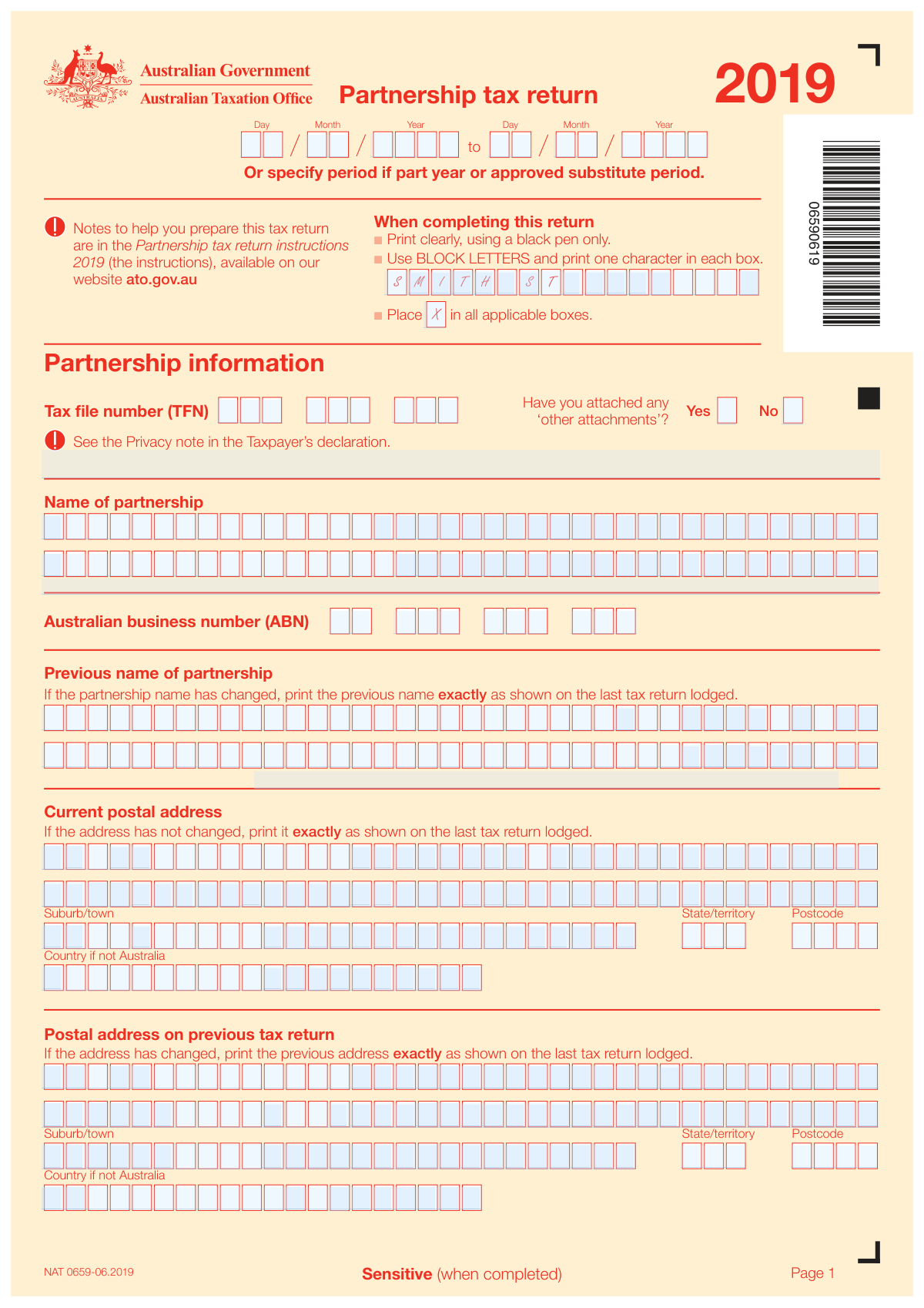
The Partnership Tax Return 2019 (NAT 0659) is an official Australian Taxation Office (ATO) form that partnerships must lodge to report their business income, expenses, deductions, foreign income, and the distribution of net income or loss to each partner. It is a critical compliance document required under the Income Tax Assessment Act 1936 and 1997, ensuring that each partner's share of income is correctly identified and assessed. The form covers business and professional items, capital allowances, overseas transactions, personal services income, and key financial information. Today, this form can be filled out quickly and accurately using AI-powered services like Instafill.ai, which can also convert non-fillable PDF versions into interactive fillable forms.
Our AI automatically handles information lookup, data retrieval, formatting, and form filling.
It takes less than a minute to fill out NAT 0659 using our AI form filling.
Securely upload your data. Information is encrypted in transit and deleted immediately after the form is filled out.
Form specifications
| Form name: | Partnership Tax Return 2019 (NAT 0659) |
| Number of pages: | 16 |
| Language: | English |
Instafill Demo: filling out a legal form in seconds
How to Fill Out NAT 0659 Online for Free in 2026
Are you looking to fill out a NAT 0659 form online quickly and accurately? Instafill.ai offers the #1 AI-powered PDF filling software of 2026, allowing you to complete your NAT 0659 form in just 37 seconds or less.
Follow these steps to fill out your NAT 0659 form online using Instafill.ai:
- 1 Navigate to Instafill.ai and upload or select the Partnership Tax Return 2019 (NAT 0659) form to begin filling it out online.
- 2 Enter the partnership's identifying information, including the full partnership name, Australian Business Number (ABN), Tax File Number (TFN), current postal address, and contact partner details.
- 3 Complete the business information section by describing the main business activity, entering the industry code, indicating business status (commenced, ceased, or multiple businesses), and answering questions about internet sales and consolidation status.
- 4 Fill in all income and expense sections, including business income and expenses (Items 5–6), partnerships and trusts distributions (Item 8), rent, interest, dividends, and other Australian income (Items 9–15), as well as deductions and foreign income (Items 16–24).
- 5 Complete the business and professional items section (Items 36–49), including business address, opening and closing stock, trade debtors and creditors, salary expenses, capital allowances, and small business entity depreciation details.
- 6 Complete the Statement of Distribution (Item 51) for each partner, providing their full name, TFN or ABN, residential and business addresses, date of birth, and their respective shares of income, credits, and offsets.
- 7 Review all entries for accuracy, ensure all required attachments are included, then have a partner sign the Taxpayer's Declaration (or have the tax agent complete the Tax Agent's Declaration) before lodging the return with the ATO.
Our AI-powered system ensures each field is filled out correctly, reducing errors and saving you time.
Why Choose Instafill.ai for Your Fillable NAT 0659 Form?
Speed
Complete your NAT 0659 in as little as 37 seconds.
Up-to-Date
Always use the latest 2026 NAT 0659 form version.
Cost-effective
No need to hire expensive lawyers.
Accuracy
Our AI performs 10 compliance checks to ensure your form is error-free.
Security
Your personal information is protected with bank-level encryption.
Frequently Asked Questions About Form NAT 0659
The Partnership Tax Return 2019 (NAT 0659) is an Australian Taxation Office (ATO) form that must be lodged by all partnerships operating in Australia for the 2018–19 income year. It reports the partnership's income, deductions, and distributes net income or loss to each partner, who then includes their share in their individual tax returns.
You will need the partnership's Tax File Number (TFN), Australian Business Number (ABN), current postal address, details of all partners (including their TFNs or ABNs, addresses, and dates of birth), business income and expense figures, details of any foreign income, and key financial information such as total assets and liabilities. You should also have the Partnership tax return instructions 2019 available from ato.gov.au to help complete the form accurately.
The form must be completed using a black pen, printed clearly in BLOCK LETTERS with one character per box. Place an X in all applicable checkboxes. All dollar amounts should be entered in whole dollars only. If completing a paper version, follow the character-box format carefully as shown in the example on page 1 of the form.
The Statement of Distribution records each partner's share of the partnership's income, credits, and other amounts for the income year. It must include each partner's full name, TFN or ABN, address, date of birth, and their allocated shares of primary production income, non-primary production income, franking credits, and other relevant amounts. This information is essential because each partner uses it to complete their own individual tax return.
While it is not an offence to omit TFNs, providing them helps the ATO correctly identify each partner's tax records and reduces the risk of delays or errors in assessments. The ATO is authorised under the Income Tax Assessment Acts 1936 and 1997 to request TFNs. If a partner is a company or trust, their ABN can be provided instead.
If the partnership name has changed, print the previous name exactly as it appeared on the last tax return lodged in the 'Previous name of partnership' field. If the postal address has changed, enter the new current address in the 'Current postal address' section and record the old address in the 'Postal address on previous tax return' section, again exactly as it appeared on the last return.
An Interposed Entity Election allows partners to specify an income year for certain tax arrangements. If partners have an existing election, write the earliest income year specified. If making new elections, write the earliest income year and complete a separate 'Interposed entity election or revocation 2019' form for each election. If revoking an election, print 'R' in the relevant box and attach the completed revocation form.
Personal Services Income (PSI) is income earned mainly from an individual's personal skills or efforts. If the partnership's income includes an individual's PSI, you must answer the PSI questions at Item 30, including whether the results test was satisfied, whether a PSB determination is held, and which personal services business tests apply. The total PSI amounts and related deductions must also be reported.
Yes, if the partnership had overseas transactions, foreign income, or dealings with international related parties exceeding $2 million in aggregate, you must complete and attach an International Dealings Schedule 2019. You must also answer questions about overseas branch operations, interests in foreign trusts or companies, and whether thin capitalisation provisions applied.
The Taxpayer's Declaration must be signed by a partner of the partnership. By signing, the partner declares that all information on the return, including attached schedules and documents, is true and correct. The declaration also notes that heavy penalties apply under income tax law for false or misleading statements.
Yes, AI-powered services like Instafill.ai can help you fill out the Partnership Tax Return 2019 accurately and efficiently. Instafill.ai uses AI to auto-fill form fields based on the information you provide, saving time and reducing the risk of errors. This is especially helpful given the large number of fields and character boxes in this form.
To fill in the form online using Instafill.ai, visit instafill.ai and upload the Partnership Tax Return 2019 PDF. The AI will guide you through each section, auto-filling fields with your partnership's details, income, deductions, and partner information. Once complete, you can review, download, and print the filled form ready for lodgement with the ATO.
If you have a flat, non-fillable PDF version of the Partnership Tax Return 2019, Instafill.ai can convert it into an interactive fillable form. Simply upload the PDF to Instafill.ai and the platform will make all fields editable so you can type directly into the form, rather than having to print and handwrite your answers.
The 'Final Tax Return' option should be marked 'Yes' if this is the last tax return the partnership will lodge — for example, if the partnership has been dissolved or has ceased to exist. If the partnership is continuing, mark 'No'. This helps the ATO update its records accordingly.
The Partnership tax return instructions 2019 are available on the ATO website at ato.gov.au. These instructions provide detailed guidance on how to complete each item in the return, including explanations of income types, allowable deductions, industry codes, and how to handle special circumstances such as foreign income or personal services income.
Compliance NAT 0659
Validation Checks by Instafill.ai
1
Partnership Tax File Number (TFN) Format Validation
Validates that the partnership's TFN entered across the three part fields (Part 1, Part 2, Part 3) combines to form a valid 8 or 9-digit numeric Australian Tax File Number with no alphabetic or special characters. The TFN is a critical identifier used by the ATO to match the return to the correct partnership records. If the TFN is missing, incorrectly formatted, or fails the ATO's modulus-11 check digit algorithm, the return may be delayed, misallocated, or rejected, potentially resulting in penalties for late lodgement.
2
Australian Business Number (ABN) Format and Check Digit Validation
Validates that the ABN entered across the four digit blocks (parts 1–4) forms an 11-digit numeric value and passes the ATO's standard ABN check digit algorithm (subtract 1 from the first digit, then apply weighted sum modulus 89). An invalid or missing ABN can prevent the ATO from correctly identifying the partnership entity and may trigger compliance reviews. This check applies both to the partnership's own ABN on page 1 and to any partner company or trust ABN entered in the Statement of Distribution.
3
Specified Income Period Date Range Logical Consistency
Validates that the 'From' date (day, month, year) is earlier than or equal to the 'To' date (day, month, year) when a part-year or approved substitute period is specified, and that both dates fall within a plausible range (e.g., the 'To' year does not exceed 2019 for this return). Each date component must also be individually valid — day between 1 and 31, month between 1 and 12, and the combination must represent a real calendar date (e.g., not 31 February). An invalid or reversed date range would make the return period indeterminate and could cause the ATO to reject or query the submission.
4
Partnership Name Completeness and Character Format Check
Validates that at least one line of the partnership name field is populated and that all entered characters are printable alphanumeric or standard punctuation characters consistent with a legal entity name. The partnership name must not be left entirely blank, as it is a mandatory identifier on the return. If the partnership name has changed since the last return, the previous name field must also be populated to allow the ATO to reconcile the change; if no name change has occurred, the previous name field should remain blank.
5
Current Postal Address Completeness and Australian Postcode Format
Validates that the current postal address includes at minimum Address Line 1 and either a valid Australian suburb/town with a 4-digit numeric postcode and a recognised state/territory abbreviation (ACT, NSW, NT, QLD, SA, TAS, VIC, WA), or a country name if the address is outside Australia. The state/territory and postcode fields are conditionally required only when the country is Australia; if a non-Australian country is entered, the state/territory and postcode fields should be left blank. An incomplete or incorrectly formatted postal address will prevent the ATO from delivering correspondence to the partnership.
6
Mutually Exclusive 'Other Attachments' Checkbox Selection
Validates that exactly one of the 'Have you attached any other attachments? — Yes' or 'No' checkboxes is selected, and that both are not simultaneously checked or both left blank. This is a required binary question on the return and leaving it unanswered or double-marking it creates an ambiguous submission. If 'Yes' is selected, the system should also verify that the full Tax File Number field is populated as indicated by the conditional fill rule associated with that response.
7
Business Status Checkbox Mutual Exclusivity (B1, B2, B3)
Validates that at most one of the business status checkboxes B1 (Multiple business), B2 (Ceased business), or B3 (Commenced business) is selected, as the instructions state to print X at the first applicable option only. Selecting more than one of these options is contradictory and would make the reported business status ambiguous for ATO processing. Additionally, if B2 (Ceased business) is selected, the 'Final tax return — Yes' checkbox should also be checked to ensure logical consistency between the business status and the final return indicator.
8
Net Income/Loss Arithmetic Consistency Check (Item 15 vs Items 5–14)
Validates that the value entered at Item 15 (Total of items 5 to 14) equals the arithmetic sum of the income amounts reported at Items 5 through 14, including business income, partnerships and trusts distributions, rent, forestry scheme income, gross interest, dividends, and other Australian income. Discrepancies between the sum of component items and the stated total indicate either a data entry error or an omitted income item. If Item 15 does not reconcile, the subsequent calculation of Net Australian Income or Loss at Item 20 (Item 15 minus Item 19) will also be incorrect, cascading errors through the return.
9
Total Assets Must Be Greater Than or Equal to Total Current Assets
Validates that the value entered at Item 33 (Total assets) is greater than or equal to the value at Item 32 (All current assets), since current assets are a subset of total assets. Similarly, Item 35 (Total liabilities) must be greater than or equal to Item 34 (All current liabilities). A violation of either of these relationships indicates a data entry error in the key financial information section and would produce an internally inconsistent balance sheet that the ATO may flag for review or audit.
10
Partner Date of Birth Validity Check
Validates that each partner's date of birth entered in the Statement of Distribution (day, month, year) represents a real calendar date — with day between 1 and 31, month between 1 and 12, and the combination forming a valid date (e.g., not 30 February or 31 April). The year must be plausible for a living individual (e.g., not in the future and not before 1900). An invalid date of birth will prevent the ATO from correctly matching the partner's distribution details to their individual tax records, potentially causing assessment errors.
11
Partner Identification Completeness — Individual vs Non-Individual Mutual Exclusivity
Validates that for each partner in the Statement of Distribution, either the individual fields (TFN, Surname, First given name, Date of birth, Residential address) or the non-individual fields (ABN, Entity name) are completed, but not both simultaneously. A partner must be classified as either an individual or a non-individual entity, and mixing fields from both categories creates an ambiguous record. If the individual path is chosen, at minimum the surname and first given name must be populated; if the non-individual path is chosen, the entity name must be populated.
12
Statement of Distribution Partner Income Shares Sum to Total Net Income
Validates that the sum of all partners' primary production and non-primary production income shares (Items A and B across all partners in Item 51) equals the total net income or loss reported at Item 24 (Total net income or loss). The partnership's net income must be fully distributed among the partners with no unexplained residual, as Australian partnership tax law requires all income to be allocated to partners in the income year it is earned. A mismatch between distributed amounts and total net income will cause discrepancies in each partner's individual tax assessments.
13
Internet Sales Question Mandatory Response Validation
Validates that exactly one of the 'Did you sell any goods or services using the internet? — Yes' or 'No' checkboxes at Item 4 is selected and that both are not simultaneously checked or both left blank. This is a required question for all partnerships lodging the 2019 return and an unanswered or ambiguous response will result in an incomplete return. The question is used by the ATO for statistical and compliance purposes, and failure to answer may trigger a follow-up query from the ATO.
14
Tax Agent Declaration Completeness When Agent Lodges Return
Validates that when a tax agent is lodging the return, the agent's declaration section is fully completed, including the agent's signature date (a valid day, month, year combination), the agent's reference number, contact name, and phone number (which must contain only digits and an area code). The taxpayer's declaration date must also be present and represent a valid calendar date that is on or before the agent's declaration date. Missing or invalid declaration information renders the return legally incomplete and may expose both the agent and the partnership to penalties.
15
Overseas Transactions and International Dealings Schedule Conditional Requirement
Validates that if either the 'Transactions with specified countries — Yes' (label W) or 'Thin capitalisation — Yes' (label O) checkboxes are selected at Item 29, or if any value is entered in the Interest expenses overseas (label D) or Royalty expenses overseas (label E) fields, then an International Dealings Schedule 2019 must be indicated as attached. Similarly, if 'Did you have overseas branch operations or a direct or indirect interest in a foreign trust...' is answered Yes (label S at Item 22), the International Dealings Schedule attachment is required. Failure to attach the required schedule when triggered by these conditions constitutes an incomplete return and may result in ATO compliance action.
16
Opening Stock, Purchases, and Closing Stock Arithmetic Consistency with Cost of Sales
Validates that for partnerships carrying on a business (Items 38–40), the cost of sales figure reported at Item 5 (label E) is arithmetically consistent with the formula: Opening Stock (Item 38) plus Purchases and other costs (Item 39) minus Closing Stock (Item 40). A significant unexplained variance between the calculated cost of sales and the reported figure may indicate a data entry error or an omitted adjustment. This check is important because cost of sales directly affects the net income or loss from business, which flows through to each partner's taxable income.
Common Mistakes in Completing NAT 0659
People frequently transpose digits or enter an outdated TFN/ABN when completing the partnership identification fields. Because the TFN and ABN are split across multiple separate character boxes (three groups for TFN, four groups for ABN), it is easy to misalign digits between groups. An incorrect TFN or ABN can cause the ATO to be unable to match the return to the correct entity, leading to processing delays or incorrect assessments. Always verify the TFN and ABN against the partnership's official ATO correspondence before entering, and use a tool like Instafill.ai to auto-populate and validate these numbers to prevent transposition errors.
A common mistake is entering the partnership name in a slightly different format than what is registered with the ATO — for example, abbreviating 'and' to '&', omitting punctuation, or using lowercase letters instead of BLOCK LETTERS. The form requires one character per box in BLOCK LETTERS, and any deviation from the registered name can cause a mismatch in ATO records. This can result in the return being linked to the wrong entity or requiring manual correction. Always cross-check the partnership name against the ABN registration on the ABN Lookup website, and ensure every character is entered in the correct box using capital letters only.
When the partnership name or postal address has changed since the last return, many filers leave the 'Previous name of partnership' or 'Postal address on previous tax return' fields blank, or vice versa — they fill them in even when nothing has changed. The instructions are clear: the previous name must be printed exactly as shown on the last return lodged only if the name has changed, and the previous address must be completed only if the address has changed. Failing to follow these rules can cause confusion in the ATO's records and may trigger unnecessary correspondence. Carefully read the conditional instructions for each field before completing or leaving it blank.
Item 2 requires filers to mark only the first applicable status among B1 (Multiple business), B2 (Ceased business), and B3 (Commenced business), or leave it blank if none apply. A frequent error is marking more than one of these boxes, or marking B3 (Commenced business) when the business actually ceased, or leaving the field blank when a status does apply. Selecting the wrong status can affect how the ATO processes the return and may trigger unnecessary audits or reviews. Read the instructions carefully to determine which label — if any — is the first applicable option, and mark only that single box.
Many filers leave the industry code (Item 1, label A) blank or enter an incorrect code that does not accurately reflect the partnership's main business activity. The industry code is a specific numeric classification that must be sourced from the ATO's industry code list in the Partnership tax return instructions 2019. Using the wrong code or leaving it blank can affect statistical reporting and may flag the return for review. Always refer to the instructions or the ATO website to find the correct industry code for the partnership's primary activity, and double-check that the code entered matches the description provided.
Item 5 (Business income and expenses) has separate columns for primary production and non-primary production, and multiple specific labels (e.g., gross payments where ABN not quoted, assessable government industry payments, cost of sales, depreciation). Filers often enter amounts in the wrong label — for example, putting all income under 'Other business income' instead of correctly categorising it, or omitting the reconciliation adjustments at labels A and B. Misclassification can result in incorrect net income calculations and potential penalties. Carefully read the instructions for each label and ensure amounts are categorised correctly; AI-powered tools like Instafill.ai can help map income and expense categories to the correct labels.
The Statement of Distribution must be completed for every partner, including their full name, TFN or ABN, date of birth, address, and their individual share of income, credits, and offsets. A common mistake is completing the distribution for only some partners, omitting partner TFNs (even though it is not an offence, it can cause delays), or entering the trust name instead of the trustee's name (the form specifically requires the trust name, not the trustee's name, when the partner is a trustee). Incomplete distribution statements can delay partner assessments and cause mismatches. Ensure every partner section is fully completed and that shares of income across all partners add up to the total partnership income.
Item 5 (Business income and expenses) explicitly states 'WHOLE DOLLARS ONLY', yet many filers enter amounts including cents (e.g., $12,345.67 instead of $12,346). Other items throughout the form use '.00' fields indicating cents should be entered as zero. Entering cents in whole-dollar fields can cause calculation errors and may result in the return being rejected or requiring amendment. Always round amounts to the nearest whole dollar for fields marked 'WHOLE DOLLARS ONLY', and enter '.00' in the cents portion of fields that display a decimal point.
Items 29 and 30 require specific Yes/No answers about overseas transactions, dealings with international related parties, thin capitalisation, and personal services income. Filers often skip these questions or answer 'No' without properly considering whether any transactions meet the thresholds (e.g., the $2 million aggregate threshold for international related party dealings). Failing to answer 'Yes' when required and attach the International dealings schedule 2019 can constitute a false or misleading statement, which carries heavy penalties under tax law. Review all overseas transactions and related party dealings carefully against the thresholds specified in the instructions before answering these questions.
The taxpayer's declaration at the end of the return must be signed by a partner — not by an accountant, bookkeeper, or other representative (who has a separate tax agent declaration). A common mistake is having the tax agent sign the taxpayer's declaration, or leaving it unsigned altogether, which renders the return invalid. The declaration confirms that all information is true and correct, and an unsigned return will not be accepted by the ATO. Ensure a partner reviews the completed return and personally signs and dates the taxpayer's declaration before lodgement.
The interposed entity election section requires filers to enter the earliest income year if an existing or new election applies, or to print 'R' and attach the Interposed entity election or revocation 2019 form if revoking an election. Many filers leave this section blank when an election exists, enter the wrong income year, or forget to attach the required form when making or revoking an election. This can result in the election not being recorded or revoked correctly, with significant tax consequences for the partners. Consult the Partnership tax return instructions 2019 and any prior election documentation to ensure this section is completed accurately.
For each partner in Item 51, filers must choose between the INDIVIDUAL section (with surname, given names, TFN, and date of birth) and the NON-INDIVIDUAL section (with entity name and ABN). A frequent error is completing the individual section for a corporate partner or trust, or entering the trustee's personal name instead of the trust name. The form specifically states that if the partner is a trustee (including a trustee company), the name of the trust — not the trustee — must be shown. Misidentifying the partner type can cause ATO records to be incorrectly updated and may delay the processing of partner assessments. Carefully identify each partner's legal status before completing their section.
Saved over 80 hours a year
“I was never sure if my IRS forms like W-9 were filled correctly. Now, I can complete the forms accurately without any external help.”
Kevin Martin Green
Your data stays secure with advanced protection from Instafill and our subprocessors
Robust compliance program
Transparent business model
You’re not the product. You always know where your data is and what it is processed for.
ISO 27001, HIPAA, and GDPR
Our subprocesses adhere to multiple compliance standards, including but not limited to ISO 27001, HIPAA, and GDPR.
Security & privacy by design
We consider security and privacy from the initial design phase of any new service or functionality. It’s not an afterthought, it’s built-in, including support for two-factor authentication (2FA) to further protect your account.
Fill out NAT 0659 with Instafill.ai
Worried about filling PDFs wrong? Instafill securely fills partnership-tax-return-2019-nat-0659 forms, ensuring each field is accurate.