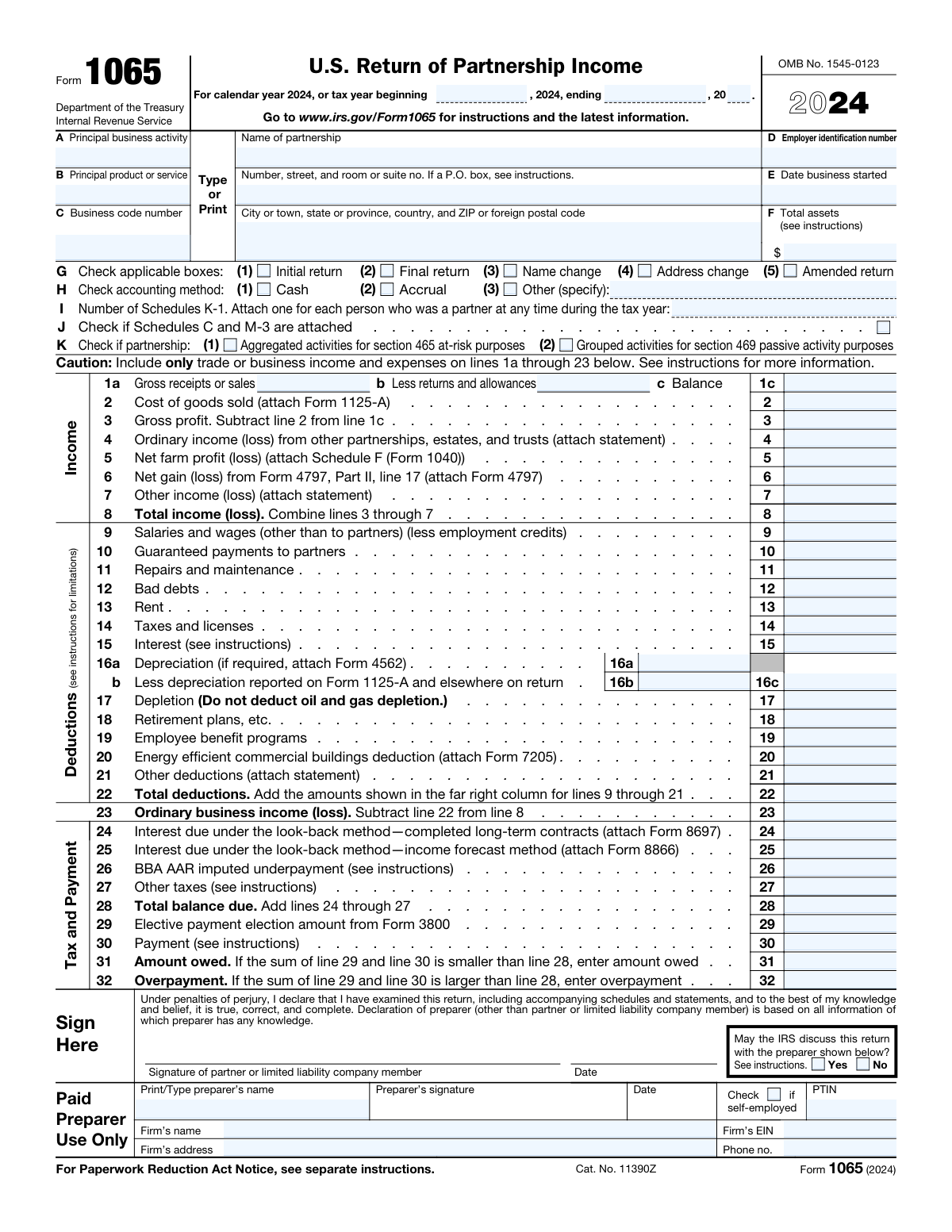
Yes! You can use AI to fill out Form 1065, U.S. Return of Partnership Income
Form 1065 (U.S. Return of Partnership Income) is the primary federal information return that most partnerships file each year to report the partnershipâs financial results and tax attributes to the IRS. It summarizes business income and deductions, includes key entity details (EIN, address, accounting method, business activity), and supports the preparation of Schedule K-1s that pass through items to partners for their individual returns. Accurate completion is important because the figures and elections reported on Form 1065 affect partner reporting, IRS matching, and potential penalties for incorrect or late filings. Today, this form can be filled out quickly and accurately using AI-powered services like Instafill.ai, which can also convert non-fillable PDF versions into interactive fillable forms.
Our AI automatically handles information lookup, data retrieval, formatting, and form filling.
It takes less than a minute to fill out Form 1065 using our AI form filling.
Securely upload your data. Information is encrypted in transit and deleted immediately after the form is filled out.
Form specifications
| Form name: | Form 1065, U.S. Return of Partnership Income |
| Number of pages: | 6 |
| Language: | English |
| Categories: | business tax forms, tax forms, IRS forms, partnership tax forms, income forms |
Instafill Demo: filling out a legal form in seconds
How to Fill Out Form 1065 Online for Free in 2026
Are you looking to fill out a FORM 1065 form online quickly and accurately? Instafill.ai offers the #1 AI-powered PDF filling software of 2026, allowing you to complete your FORM 1065 form in just 37 seconds or less.
Follow these steps to fill out your FORM 1065 form online using Instafill.ai:
- 1 Go to Instafill.ai and upload the Form 1065 PDF (or select Form 1065 from the form library).
- 2 Let the AI detect and map fields, then provide the tax period dates and basic partnership identity details (name, EIN, address, business start date, principal activity/product, and business code).
- 3 Confirm return-type and method selections (initial/final/amended/name or address change; cash/accrual/other accounting method) and enter total assets and the number of Schedules K-1 attached.
- 4 Enter or import the partnership’s income items (gross receipts, returns/allowances, COGS, other income items) and review calculated totals such as gross profit and total income.
- 5 Enter deductions and adjustments (wages, guaranteed payments, rent, taxes, interest, depreciation, other deductions) and verify totals and ordinary business income (loss).
- 6 Complete the balance due/overpayment section (look-back interest, other taxes, payments, amount owed/overpayment) and answer the required yes/no questions and elections (foreign accounts, ownership questions, Section 754/743(b) items, etc.).
- 7 Review the AI validation checks, attach required supporting statements/forms as prompted, add paid preparer information if applicable, then export the completed, signed-ready PDF for filing.
Our AI-powered system ensures each field is filled out correctly, reducing errors and saving you time.
Why Choose Instafill.ai for Your Fillable Form 1065 Form?
Speed
Complete your Form 1065 in as little as 37 seconds.
Up-to-Date
Always use the latest 2026 Form 1065 form version.
Cost-effective
No need to hire expensive lawyers.
Accuracy
Our AI performs 10 compliance checks to ensure your form is error-free.
Security
Your personal information is protected with bank-level encryption.
Frequently Asked Questions About Form Form 1065
This is a partnership tax return (Form 1065) used to report the partnershipâs income, deductions, and other tax items for the tax year. The information reported is used to prepare Schedule K-1s for each partner.
Generally, any business treated as a partnership for federal tax purposes must file Form 1065 for the year, even if it had no income or had a loss. The form is filed at the partnership level, and partners receive Schedule K-1s to report on their own returns.
Enter the beginning and ending dates of the tax year you are reporting (for example, 01/01/2024 to 12/31/2024). For the two-digit end year field, enter the last two digits of the year the period ends (for example, â24â for 2024).
Use the partnershipâs full legal name and the mailing address that should appear on IRS records. If the partnership uses a P.O. box for mail, you can enter the P.O. box in the street address field.
These fields describe what the partnership primarily does and what it mainly sells or provides. The business code number is the industry code (often NAICS/IRS business code) selected from the formâs instructions or code list that best matches the activity.
The EIN is the Employer Identification Number issued by the IRS (often found on the EIN confirmation letter or prior tax filings). The business start date is the date the partnership began operations, typically found in formation documents or internal records.
Check âInitial returnâ if this is the first Form 1065 the partnership has filed for the year; check âFinal returnâ if the partnership is terminating and wonât file again. Check âName changeâ or âAddress changeâ if those details changed since the last filing, and check âAmended returnâ only when correcting a previously filed Form 1065.
Select the method the partnership uses to keep its books and report income/expenses for the year. If you select âOther,â you must specify the method name in the âAccounting method â Other (specify)â field.
Enter the total number of Schedule K-1s for all partners who were partners at any time during the tax year. If there is exactly one partner and you are attaching exactly one K-1, you can also check the âNumber of Schedules K-1 â 1â box.
Line 1a is total gross receipts or sales before returns/allowances, and line 1b is returns and allowances. Line 1c is the net amount (line 1a minus line 1b).
Line 3 is generally line 1c minus line 2 (cost of goods sold). Line 8 combines the income items (lines 3 through 7) to show total income (or loss) from the partnershipâs activities reported on this page.
Depreciation on line 16a typically comes from Form 4562, and certain gains/losses may require Form 4797; other income (line 7) and other deductions (line 21) generally require a supporting statement describing the components. If you report look-back method interest, you may need to attach Form 8697 (line 24) or Form 8866 (line 25).
If you check âYes,â you authorize the IRS to contact the paid preparer listed to discuss questions about the return. If you check âNo,â the IRS will not discuss the return with the preparer.
YesâAI tools can help organize your information and auto-fill form fields to reduce manual entry errors. Services like Instafill.ai use AI to auto-fill form fields accurately and save time, but you should still review the final numbers and attachments for correctness.
Upload the Form 1065 PDF to Instafill.ai, provide or connect your source data (e.g., bookkeeping reports, prior return details), and let the AI map and auto-fill the fields for review before exporting. If the PDF is flat/non-fillable, Instafill.ai can convert non-fillable PDFs into interactive fillable forms so you can complete and sign them more easily.
Compliance Form 1065
Validation Checks by Instafill.ai
1
Validates tax period start/end date format and existence
Checks that both the tax period start date and tax period end date are provided and are valid calendar dates in an accepted format (e.g., MM/DD/YYYY). This is essential because the tax period drives filing requirements, due dates, and many downstream computations. If either date is missing or not parseable as a real date, the submission should be rejected or returned for correction.
2
Ensures tax period end date is on/after start date and period length is reasonable
Verifies that the end date is not earlier than the start date and that the period length is plausible for a Form 1065 filing (typically 12 months, with allowance for short-year initial/final returns). This prevents nonsensical periods that can break validations, schedules, and IRS acceptance rules. If the period is negative or unreasonably long, flag an error and require corrected dates and/or confirmation of short-year status.
3
Cross-checks two-digit tax period end year against tax period end date
Validates that the 'Tax period end year (two-digit)' matches the last two digits of the year in the tax period end date. This is important because mismatches can cause IRS processing errors and misclassification of the filing year. If inconsistent, the system should block submission and prompt the filer to correct either the end date or the two-digit year.
4
Validates partnership legal name completeness and character rules
Ensures the partnership name is present, not just initials, and does not contain invalid characters (e.g., control characters) or excessive punctuation. The legal name is a primary identifier used for matching IRS records and preventing duplicate/incorrect entity filings. If the name is missing or fails character/length rules, the form should be rejected until corrected.
5
Validates partnership mailing address completeness and ZIP/postal code format
Checks that street address and the city/state/ZIP (or foreign postal code) fields are complete and consistent with a US or foreign address pattern. For US addresses, validate state as a valid USPS abbreviation and ZIP as 5 digits or ZIP+4; for foreign addresses, require country and allow alphanumeric postal codes. If address components are missing or the ZIP/postal code format is invalid, flag an error because notices and correspondence may be undeliverable.
6
Validates business code number format (NAICS/IRS code) and length
Ensures the business code number is present and matches expected numeric formatting (commonly 6 digits for NAICS/IRS business codes) and is not all zeros. This matters because the code is used for classification, analytics, and certain compliance checks. If the code is missing or malformed, require correction before acceptance.
7
Validates partnership EIN format and disallows SSN-like entries
Checks that the Employer Identification Number is exactly 9 digits (optionally displayed as XX-XXXXXXX) and is not entered in an SSN pattern (XXX-XX-XXXX) or with invalid characters. EIN accuracy is critical for IRS matching and payment/credit application. If the EIN fails format validation, the submission should be blocked and the user prompted to re-enter the EIN.
8
Validates date business started is a valid date and logically consistent with tax period
Ensures the 'Date business started' is a valid calendar date and is not after the tax period end date. This helps prevent impossible timelines and supports short-year/initial return logic. If the start date is invalid or occurs after the reported tax period, flag an error and require correction or explanation.
9
Enforces mutual exclusivity and dependency for accounting method selection
Validates that exactly one accounting method is selected: Cash, Accrual, or Other. If 'Other (specify)' is checked, the 'Accounting method â Other (specify)' text must be populated and non-trivial (not 'N/A' or blank). If multiple methods are selected or 'Other' lacks a specification, the system should reject the submission due to ambiguous accounting basis.
10
Validates return type checkbox logic (initial/final/amended/name change/address change)
Checks that return-type indicators are logically consistent (e.g., 'Initial return' and 'Final return' should not both be selected unless explicitly allowed by business rules for a short-lived entity, which should be flagged for review). Also ensures that 'Amended return' is not selected without an indication that it corrects a previously filed return (at minimum, a warning). If conflicting selections occur, block submission or route to manual review depending on policy.
11
Validates Schedules K-1 count and the 'exactly one K-1' indicator consistency
Ensures the 'Number of Schedules K-1 attached' is a non-negative integer and aligns with the 'Number of Schedules K-1 â 1' checkbox (if checked, the count must equal 1; if count equals 1, the checkbox should be checked or a warning raised). This is important because K-1 counts drive partner reporting completeness. If inconsistent, raise an error to prevent missing partner statements.
12
Validates Line 1c net receipts calculation (Line 1a minus Line 1b)
Checks that Line 1c equals Line 1a minus Line 1b within rounding tolerance, and that Line 1b is not negative and does not exceed Line 1a unless explicitly allowed (typically returns/allowances should not exceed gross receipts). This prevents arithmetic errors that cascade into total income and taxable computations. If the calculation fails, block submission and require corrected amounts.
13
Validates Line 3 gross profit calculation (Line 1c minus Line 2)
Ensures Line 3 equals Line 1c minus Line 2 within rounding tolerance and that inputs are numeric currency values. This is a core income statement relationship and is frequently used in downstream totals and analytics. If the computed value does not match the entered value, the system should flag an error and prompt recalculation.
14
Validates Line 8 total income calculation (sum of Lines 3 through 7)
Verifies that Line 8 equals the sum of Lines 3, 4, 5, 6, and 7 (allowing negative values where applicable) within rounding tolerance. This ensures the income section is internally consistent before deductions are applied. If Line 8 does not reconcile, the submission should be rejected until corrected.
15
Validates Line 22 total deductions calculation (sum of Lines 9 through 21)
Checks that Line 22 equals the sum of Lines 9â21 within rounding tolerance and that each deduction line is a valid numeric currency amount (allowing zero, disallowing non-numeric text). This prevents incorrect ordinary business income/loss and balance due computations. If the total does not match, flag an error and require correction.
16
Validates balance due / payment / overpayment arithmetic and conditional field completion
Ensures Line 28 equals the sum of Lines 24â27, and that Line 31 (amount owed) and Line 32 (overpayment) follow the stated conditional logic based on the relationship between Line 28 and the sum of credits/payments (Lines 29 and 30). Only one of Line 31 or Line 32 should be populated (or both zero) depending on whether there is a net amount owed or overpaid. If arithmetic is inconsistent or conditional fields are filled incorrectly, block submission to prevent misapplied payments or refunds.
17
Validates paid preparer section completeness and identifier formats (PTIN, firm EIN, phone) when present
If a preparer name is provided (or the IRS discussion authorization is selected), validate that PTIN follows IRS PTIN format (commonly 'P' followed by 8 digits), firm EIN is 9 digits (XX-XXXXXXX optional), and firm phone number is a valid 10-digit US number (or accepted international format if supported). This is important for compliance and for IRS contact authorization workflows. If identifiers are missing or malformed when the preparer section is used, reject or require correction before filing.
Common Mistakes in Completing Form 1065
People often enter a start and end date that donât match a full tax year, overlap incorrectly, or donât align with the partnershipâs accounting period (e.g., fiscal year vs. calendar year). This can trigger IRS processing delays, mismatch notices, or cause downstream calculations and schedules to be associated with the wrong period. Double-check that the beginning date is earlier than the ending date and that the period matches the entityâs established tax year. AI-powered tools like Instafill.ai can validate date logic and standardize date formatting before submission.
The âTax period end year (two-digit)â field is frequently misunderstood, with filers entering four digits (e.g., 2024), the start year instead of the end year, or leaving it blank. A wrong two-digit year can cause the return to be indexed to the wrong tax year, leading to correspondence and delays. Always enter only the last two digits of the calendar year that corresponds to the tax period end date (e.g., end date 12/31/2024 â â24â). Instafill.ai can auto-derive the two-digit year from the end date to prevent this mismatch.
Filers commonly use a DBA/trade name, abbreviations, or omit punctuation/suffixes (LLC, LP, LLP) that differ from the IRS-registered legal name. Even small discrepancies can cause e-file rejections or IRS matching issues, especially when paired with the EIN. Use the exact legal name as shown on IRS notices/CP letters or the EIN assignment confirmation, and keep it consistent year to year unless âName changeâ is checked. Instafill.ai can help by reusing verified entity identity data and flagging name/EIN inconsistencies.
A frequent issue is mixing street address and P.O. box incorrectly, omitting suite/room numbers, or entering an incomplete city/state/ZIP (or foreign postal code/country). This can lead to undeliverable IRS mail, missed notices, and processing delays if the IRS canât confirm the mailing address. Follow USPS formatting for U.S. addresses and include country and full foreign postal code for non-U.S. addresses. Instafill.ai can standardize address formatting and validate ZIP/postal code structure to reduce returned mail risk.
Many filers guess the business code, use an outdated code, or enter a description instead of the numeric code. The wrong code can affect IRS classification, analytics, and may increase the chance of follow-up questions if the activity doesnât match reported income/expenses. Use the code list in the form instructions and select the code that best matches the principal business activity, not a secondary line of business. Instafill.ai can suggest and validate codes based on the activity/product text to prevent mismatches.
Itâs common to accidentally enter an SSN/ITIN, transpose digits, or omit the EINâs standard formatting, especially when copying from prior documents. An incorrect EIN can cause e-file rejection, misapplied payments, or IRS matching failures with prior-year filings. Confirm the EIN from the IRS EIN assignment letter (CP 575) or prior accepted return and enter all 9 digits accurately. Instafill.ai can apply formatting and run basic checksum/length validation to catch common EIN entry errors.
Filers often check âAmended returnâ when they are simply filing late, forget to check âFinal returnâ when the partnership terminates, or fail to mark âName change/Address changeâ after updates. Incorrect selections can route the return through the wrong processing path and may cause missing-attachment requests or confusion about filing obligations in future years. Only check boxes that truly apply for the specific filing event and ensure they align with the entityâs status and history. Instafill.ai can prompt logic-based confirmations (e.g., termination indicators â suggest âFinal returnâ) to reduce checkbox errors.
A common mistake is checking both Cash and Accrual, choosing a method that doesnât match the books, or checking âOtherâ without specifying the method in the required text field. This can create inconsistencies with financial statements and prior-year filings, potentially triggering IRS questions or requiring corrections. Select exactly one method and, if âOtherâ is used, clearly name the method exactly as intended for recordkeeping. Instafill.ai can enforce single-choice selection and require the âOther (specify)â text when that option is selected.
People frequently enter the number of current partners at year-end rather than the number of partners who were partners at any time during the year, or they check the âexactly one K-1â box while entering a different count. This can lead to IRS correspondence, partner reporting issues, and delays if the IRS expects more K-1s than provided. Count every partner who held an interest at any point in the tax year and ensure the numeric count and any âone K-1â indicator are consistent. Instafill.ai can cross-check partner lists against the entered K-1 count to flag discrepancies.
Filers often compute line 1c incorrectly (forgetting to subtract returns/allowances), calculate gross profit (line 3) with the wrong direction, or enter losses as positive numbers (or vice versa). These errors cascade into total income (line 8), total deductions (line 22), and balance due/overpayment (lines 28â32), potentially resulting in incorrect tax due, notices, or amended filings. Recalculate each dependent line from its components and use negative amounts only where the form expects them (e.g., âlossâ). Instafill.ai can automatically compute dependent totals and validate that line relationships (like 1c = 1a â 1b) are correct.
A frequent issue is entering amounts that explicitly require supporting forms or statements (e.g., COGS from Form 1125-A, depreciation from Form 4562, look-back interest from Forms 8697/8866, or âOther income/deductionsâ without itemized statements) but not attaching them. This can delay processing, prompt IRS requests for additional information, or cause disallowance until substantiated. Review each lineâs âattachâ instruction and include itemized statements for line 7 and line 21 that clearly describe sources/components. Instafill.ai can generate attachment checklists based on populated fields and remind you when a line entry implies a required form or statement.
Saved over 80 hours a year
âI was never sure if my IRS forms like W-9 were filled correctly. Now, I can complete the forms accurately without any external help.â
Kevin Martin Green
Your data stays secure with advanced protection from Instafill and our subprocessors

Robust compliance program
Transparent business model
Youâre not the product. You always know where your data is and what it is processed for.
ISO 27001, HIPAA, and GDPR
Our subprocesses adhere to multiple compliance standards, including but not limited to ISO 27001, HIPAA, and GDPR.
Security & privacy by design
We consider security and privacy from the initial design phase of any new service or functionality. Itâs not an afterthought, itâs built-in, including support for two-factor authentication (2FA) to further protect your account.
Fill out Form 1065 with Instafill.ai
Worried about filling PDFs wrong? Instafill securely fills form-1065-us-return-of-partnership-income forms, ensuring each field is accurate.