Yes! You can use AI to fill out CLETS-001, Confidential Information for Law Enforcement (Judicial Council of California)
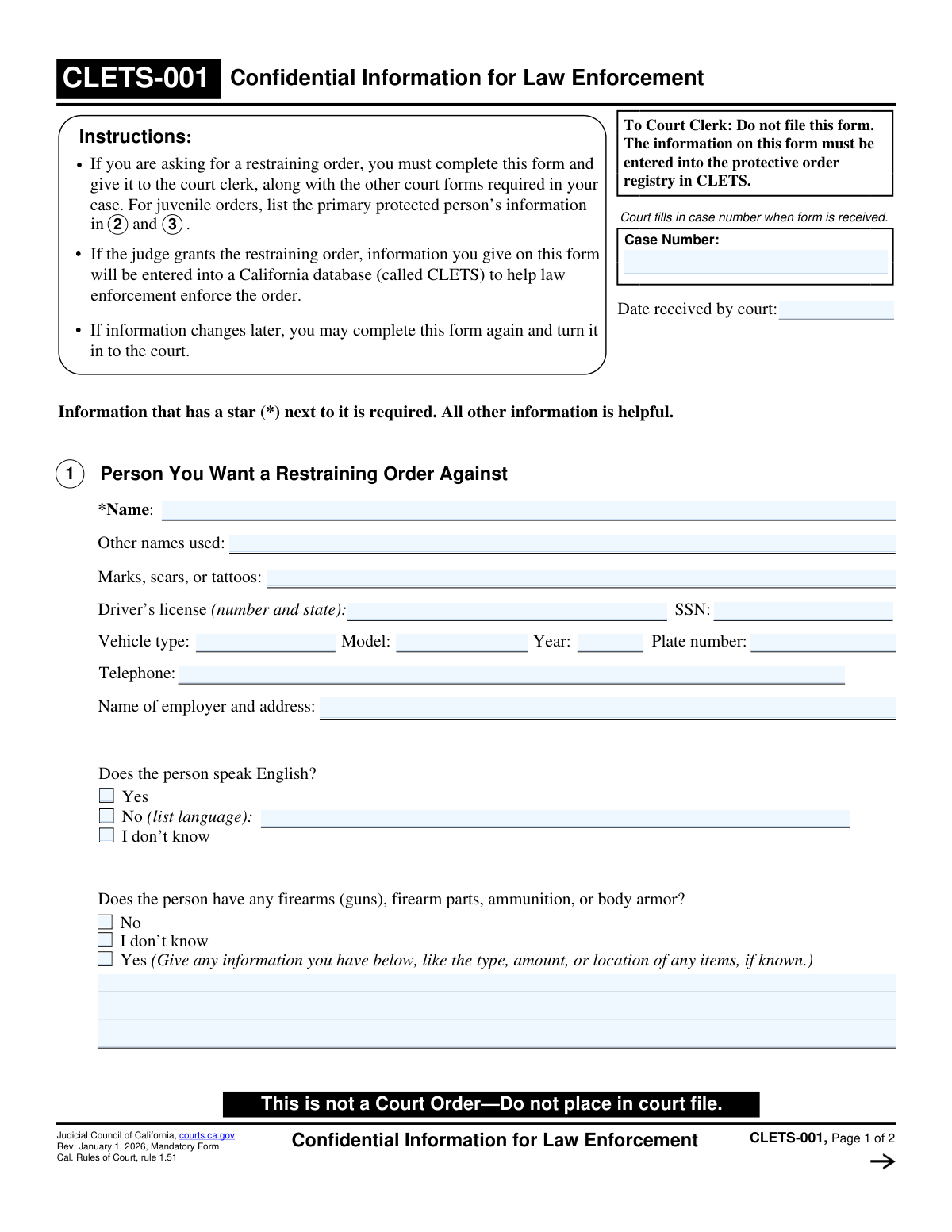
CLETS-001 is a mandatory California Judicial Council form submitted with a restraining order request to provide confidential identifying information about the restrained person, the protected person(s), and related details (such as vehicles, employer, language, and firearms information). The court does not file this form in the public case file; instead, the information is entered into the California Law Enforcement Telecommunications System (CLETS) protective order registry to help law enforcement identify parties and enforce the order. Keeping this information complete and up to date is important because changes can affect effective service and enforcement, including outside California when federal database entry is involved. Today, this form can be filled out quickly and accurately using AI-powered services like Instafill.ai, which can also convert non-fillable PDF versions into interactive fillable forms.
Our AI automatically handles information lookup, data retrieval, formatting, and form filling.
It takes less than a minute to fill out CLETS-001 using our AI form filling.
Securely upload your data. Information is encrypted in transit and deleted immediately after the form is filled out.
Form specifications
| Form name: | CLETS-001, Confidential Information for Law Enforcement (Judicial Council of California) |
| Number of pages: | 2 |
| Language: | English |
| Categories: | California court forms, Judicial Council forms, legal forms, law enforcement forms |
Instafill Demo: filling out a legal form in seconds
How to Fill Out CLETS-001 Online for Free in 2026
Are you looking to fill out a CLETS-001 form online quickly and accurately? Instafill.ai offers the #1 AI-powered PDF filling software of 2026, allowing you to complete your CLETS-001 form in just 37 seconds or less.
Follow these steps to fill out your CLETS-001 form online using Instafill.ai:
- 1 Go to Instafill.ai and upload the CLETS-001 PDF (or select CLETS-001 from the form library).
- 2 Let the AI detect and map the form fields, then confirm the form version (Rev. January 1, 2026) and jurisdiction (California).
- 3 Enter the case filing details if available (case number and date received by court, if known/required for your workflow).
- 4 Provide information about the person you want a restraining order against (name, aliases, identifiers, vehicle/employer details, language, and any firearms/body armor information).
- 5 Complete your information (your name, age, date of birth, telephone, language, gender, and race as requested).
- 6 List all other protected people (names, gender, race, and dates of birth), and add an attachment page through Instafill.ai if more people must be included.
- 7 Review for accuracy and required starred items, generate the final completed PDF, then print or save it for delivery to the court clerk as instructed (and use the form’s clear/reset option after printing if needed).
Our AI-powered system ensures each field is filled out correctly, reducing errors and saving you time.
Why Choose Instafill.ai for Your Fillable CLETS-001 Form?
Speed
Complete your CLETS-001 in as little as 37 seconds.
Up-to-Date
Always use the latest 2026 CLETS-001 form version.
Cost-effective
No need to hire expensive lawyers.
Accuracy
Our AI performs 10 compliance checks to ensure your form is error-free.
Security
Your personal information is protected with bank-level encryption.
Frequently Asked Questions About Form CLETS-001
CLETS-001 provides identifying and safety-related information to law enforcement so a restraining order can be entered into the California CLETS database and enforced. It is not itself a restraining order.
If you are asking the court for a restraining order, you must complete CLETS-001 and submit it with your other required restraining order forms. The court uses it to enter information into the protective order registry.
No. The form says âDo not file this formâ and âThis is not a Court OrderâDo not place in court file.â It is kept confidential and used for law enforcement database entry.
Fields marked with a star (*) are required. Common required items include the restrained personâs name, your name, your age, and the names and genders of any additional protected people you list.
Noâthose fields are helpful but not required unless marked with a star (they are not starred on this form). Provide any identifying details you know to help law enforcement correctly identify the person.
Fill in what you know and leave unknown items blank. Even partial details (like a vehicle type, approximate year, or workplace name) can help law enforcement.
Check âYes,â âNo,â or âI donât know.â If you check âNo,â write the language the person speaks in the space provided.
If you are unsure, check âI donât know.â If you have any information (type, amount, or location), include it in the details box because it may affect officer safety and enforcement.
Your date of birth helps law enforcement enter your information into databases; the form notes it can also be entered into a federal database to help enforcement outside California. Provide it if you can; your age is required, and the date of birth is strongly recommended for enforcement purposes.
Check the box indicating you have more people to list, then attach a separate sheet labeled âItem 4â at the top. Include each additional personâs name, gender, race (if known), and date of birth (if known).
For juvenile orders, the instructions say to list the primary protected personâs information in items 2 and 3. That ensures the correct protected person is entered into CLETS.
Submit it to the court clerk along with the other forms required for your restraining order request. The court fills in the case number and the date received when the form is received.
You can complete CLETS-001 again and turn in the updated form to the court. This helps keep the CLETS entry accurate for enforcement.
Yes. Services like Instafill.ai can use AI to help auto-fill form fields based on the information you provide, reducing errors and saving timeâespecially when you have many details to enter.
You can upload the CLETS-001 PDF to Instafill.ai, answer prompts or provide your details, and the AI will map them into the correct fields for you to review before downloading. If the PDF is flat/non-fillable, Instafill.ai can convert it into an interactive fillable form so you can complete it electronically.
Compliance CLETS-001
Validation Checks by Instafill.ai
1
Required field presence for starred (*) items
Validates that all fields marked as required on the form are provided: Subject's Name, Your Name, Your Age, and each listed protected personâs Name and Gender. This is critical because CLETS entry and law enforcement identification depend on these minimum identifiers. If any required field is missing, the submission should be rejected or routed to a correction workflow with clear field-level error messages.
2
Case Number format and consistency across duplicate case number fields
Checks that the Court Case Number/Case Number is present when required by the receiving workflow and matches across all case number fields shown on the form (e.g., header and page 2). This prevents mis-association of confidential data with the wrong court case in downstream systems. If the case number is missing or inconsistent, block submission and require the user/court clerk to correct it before processing.
3
Date Received by Court is a valid date and not in the future
Validates that 'Date Received by Court' is a real calendar date in an accepted format (e.g., MM/DD/YYYY) and is not later than today. This matters for auditability and for determining timeliness of entry into CLETS. If invalid or future-dated, flag for clerk review or reject depending on business rules.
4
Subject’s full legal name completeness and character validation
Ensures the Subject's Name contains at least a first and last name, is not placeholder text (e.g., 'unknown'), and uses allowable characters (letters, spaces, hyphens, apostrophes). Accurate naming is essential for law enforcement identification and avoiding false matches. If the name fails validation, require correction and prevent CLETS export.
5
SSN format and disallowed values check
If an SSN is provided, validates it matches a 9-digit pattern (XXX-XX-XXXX or XXXXXXXXX) and rejects known invalid patterns (e.g., all zeros, 123-45-6789). This reduces entry errors that can cause misidentification or failed database matching. If invalid, the SSN should be cleared/flagged and the user prompted to correct it rather than silently accepting it.
6
Driver’s license number and issuing state validation
If a driverâs license is provided, checks that both the license number and issuing state are present, and that the state is a valid US state/territory abbreviation (e.g., CA, NV). This is important because a license number without a state is ambiguous and canât be reliably used for identification. If either component is missing or the state is invalid, fail validation and request correction.
7
Vehicle year is numeric and within a plausible range
If Vehicle Year is provided, validates it is a 4-digit number within a reasonable range (e.g., 1900 through next calendar year). This prevents typos (e.g., 2205 or 20) that reduce the usefulness of vehicle identification for enforcement. If out of range or non-numeric, flag the field and require correction or removal.
8
License plate number format and minimum content check
If Plate Number is provided, validates it meets minimum length and character rules (e.g., 2â8 alphanumeric characters, allowing spaces/hyphens if your system supports them). Plate numbers are frequently used by law enforcement; malformed values reduce searchability and can cause failed lookups. If invalid, prompt for correction and do not export the plate value to CLETS until fixed.
9
Employer name and address completeness when provided
If Employer Name and Address is filled, checks that it includes at least an employer name plus a minimally complete address (street and city, and preferably state/ZIP if collected). Partial entries like only a business name or only a city are less actionable for locating the restrained person. If incomplete, warn the user and require either completion or clearing the field to avoid misleading data.
10
Mutually exclusive selection for 'Does the person speak English?'
Validates that exactly one option is selected among Yes / No / I donât know for the subjectâs English proficiency question. This prevents contradictory entries that could mislead responding officers. If multiple or none are selected, block submission and require a single selection.
11
Language required when 'No (list language)' is selected (subject)
If the subjectâs English proficiency is marked 'No', validates that the Language field is populated with a non-empty value (e.g., 'Spanish', 'ASL'). This is important for officer safety and effective communication during service/enforcement. If missing, fail validation and prompt for the language or change the selection.
12
Mutually exclusive selection for firearms possession question
Validates that exactly one option is selected among Firearms Possession No / I Donât Know / Yes. This ensures the record is unambiguous for enforcement and firearm relinquishment considerations. If multiple or none are selected, block submission and require a single definitive selection.
13
Firearms details required when firearms possession is 'Yes'
If Firearms Possession is marked 'Yes', validates that Firearms Information contains some descriptive detail (type, amount, location, or other identifying info) and is not just 'yes' or blank. This improves officer preparedness and supports appropriate enforcement actions. If missing or too vague, require additional detail or route to review before CLETS entry.
14
Telephone number format validation (all telephone fields)
For each telephone number field (subject telephone, your telephone), validates acceptable formats (e.g., 10-digit US numbers with optional country code, parentheses, spaces, or hyphens) and rejects clearly invalid lengths. Reliable phone numbers are important for contact and follow-up, and malformed values can break downstream integrations. If invalid, prompt correction and prevent saving/exporting the phone value.
15
Your age and date of birth logical consistency
Validates that Your Information Age is a positive integer within a plausible range (e.g., 0â120) and, if Date of Birth is provided, that it corresponds to the stated age within an acceptable tolerance (e.g., +/- 1 year depending on whether birthday has occurred). This reduces data entry errors that can cause misidentification in law enforcement databases. If inconsistent or implausible, require correction and flag for review.
16
Protected persons list integrity (name/gender pairing and no empty rows)
For each protected person row, validates that if any field in the row is filled (race or DOB), then the required fields for that row (Name and Gender) are also filled, and that Gender is one of the allowed values (M/F/X nonbinary as applicable). This prevents partial records that cannot be reliably entered or searched in CLETS. If a row is partially completed without required identifiers, block submission and highlight the specific row needing completion.
Common Mistakes in Completing CLETS-001
People often enter a guessed case number or todayâs date because these fields appear at the top, but the form states the court fills them in when received. Incorrect entries can cause clerks to question the submission or create mismatches with the courtâs record. Leave these fields blank unless the clerk or your filed paperwork already provides the official case number. AI-powered tools like Instafill.ai can detect âcourt use onlyâ fields and prevent accidental entry.
Applicants frequently enter a nickname (e.g., âMikeâ) or omit middle names/suffixes, which reduces the ability of law enforcement to correctly identify the person in CLETS. This can delay service and enforcement or lead to confusion with someone else who has a similar name. Use the personâs full legal name as it appears on ID or official records, and include middle name/initial and suffix (Jr., III) if known. Instafill.ai can help standardize name formatting and prompt for missing components.
Many people skip aliases, maiden names, or alternate spellings because they think itâs optional or theyâre unsure. Missing alternate names can prevent law enforcement from finding the correct record or linking the order to the right individual. List all known prior names, nicknames used publicly, and common misspellings; if youâre unsure, include what you have rather than leaving it empty. Instafill.ai can remind you to add known aliases and keep them consistently formatted.
A common error is writing generic entries like âtattoosâ without location, size, or description, or leaving the field blank even when marks are known. Vague descriptions reduce the usefulness of the form for identification during enforcement. Include specifics such as location (left forearm), type (dragon), color, and any distinctive scars. Instafill.ai can guide you with structured prompts so the description is detailed and consistent.
People often type partial SSNs, add extra characters, or put a driverâs license number in the SSN field (or forget the issuing state). Incorrect or incomplete government ID data can prevent accurate database matching and slow enforcement. Enter SSN as 9 digits (if known) and driverâs license as the number plus the issuing state; if unknown, leave blank rather than guessing. Instafill.ai can validate expected formats and flag mismatches before submission.
Applicants frequently confuse âvehicle typeâ with âmodel,â omit the year, or enter an incorrect plate format (e.g., including spaces or the wrong state). Inaccurate vehicle details can hinder locating the restrained person or verifying identity. Provide the vehicle type (SUV/sedan/truck), the model (Camry), the year (2018), and the plate exactly as shown on the plate/registration, including the correct state if relevant. Instafill.ai can help map details into the correct fields and normalize plate formatting.
A frequent mistake is listing only the employer name without a full address, or mistakenly entering the personâs home address instead of the employerâs location. Missing or incorrect employer details can reduce the ability to locate the restrained person for service or enforcement. Provide the employerâs full business name and complete address (street, city, state, ZIP) if known; if the person is self-employed, note that and provide the business address. Instafill.ai can prompt for missing address components and format them consistently.
People sometimes check multiple boxes, skip the question, or select âNoâ but forget to write the language. This can lead to communication barriers during service and enforcement and may delay appropriate interpreter support. Select exactly one option (Yes / No / I donât know), and if âNo,â clearly list the primary language spoken. Instafill.ai can enforce single-choice selection and require the language field when âNoâ is chosen.
Applicants often check âYesâ but leave the details blank, or check both âNoâ and âI donât knowâ due to uncertainty. Incomplete or conflicting firearm information can reduce officer safety planning and weaken enforcement of firearm-related restrictions. Choose only one checkbox and, if âYes,â provide any known details (type, approximate amount, where kept, vehicles/addresses). Instafill.ai can prevent contradictory selections and prompt for details when âYesâ is selected.
A common issue is entering an age that doesnât match the date of birth, or using an ambiguous date format (e.g., 03/07/24) instead of month/day/year. Because DOB may be entered into state and federal databases, errors can cause misidentification and make the order harder to enforce outside California. Enter DOB clearly as month, day, year (e.g., 02/18/1990) and ensure the age matches your current age. Instafill.ai can validate date formats and cross-check age vs. DOB for consistency.
People often list additional protected persons but omit required items like gender, or they have more than four people and forget to check the âmore peopleâ box and attach an âItem 4â page. Missing required details can delay processing and may result in some protected persons not being properly entered into CLETS. Complete each protected personâs required fields and, if you need more space, check the box and attach a separate page labeled âItem 4â with the same fields. Instafill.ai can help ensure required fields are completed for each person and generate properly labeled continuation pages.
Saved over 80 hours a year
âI was never sure if my IRS forms like W-9 were filled correctly. Now, I can complete the forms accurately without any external help.â
Kevin Martin Green
Your data stays secure with advanced protection from Instafill and our subprocessors

Robust compliance program
Transparent business model
Youâre not the product. You always know where your data is and what it is processed for.
ISO 27001, HIPAA, and GDPR
Our subprocesses adhere to multiple compliance standards, including but not limited to ISO 27001, HIPAA, and GDPR.
Security & privacy by design
We consider security and privacy from the initial design phase of any new service or functionality. Itâs not an afterthought, itâs built-in, including support for two-factor authentication (2FA) to further protect your account.
Fill out CLETS-001 with Instafill.ai
Worried about filling PDFs wrong? Instafill securely fills clets-001-confidential-information-for-law-enforcement-judicial-council-of-california-2 forms, ensuring each field is accurate.