Yes! You can use AI to fill out Form CLETS-001, Confidential Information for Law Enforcement
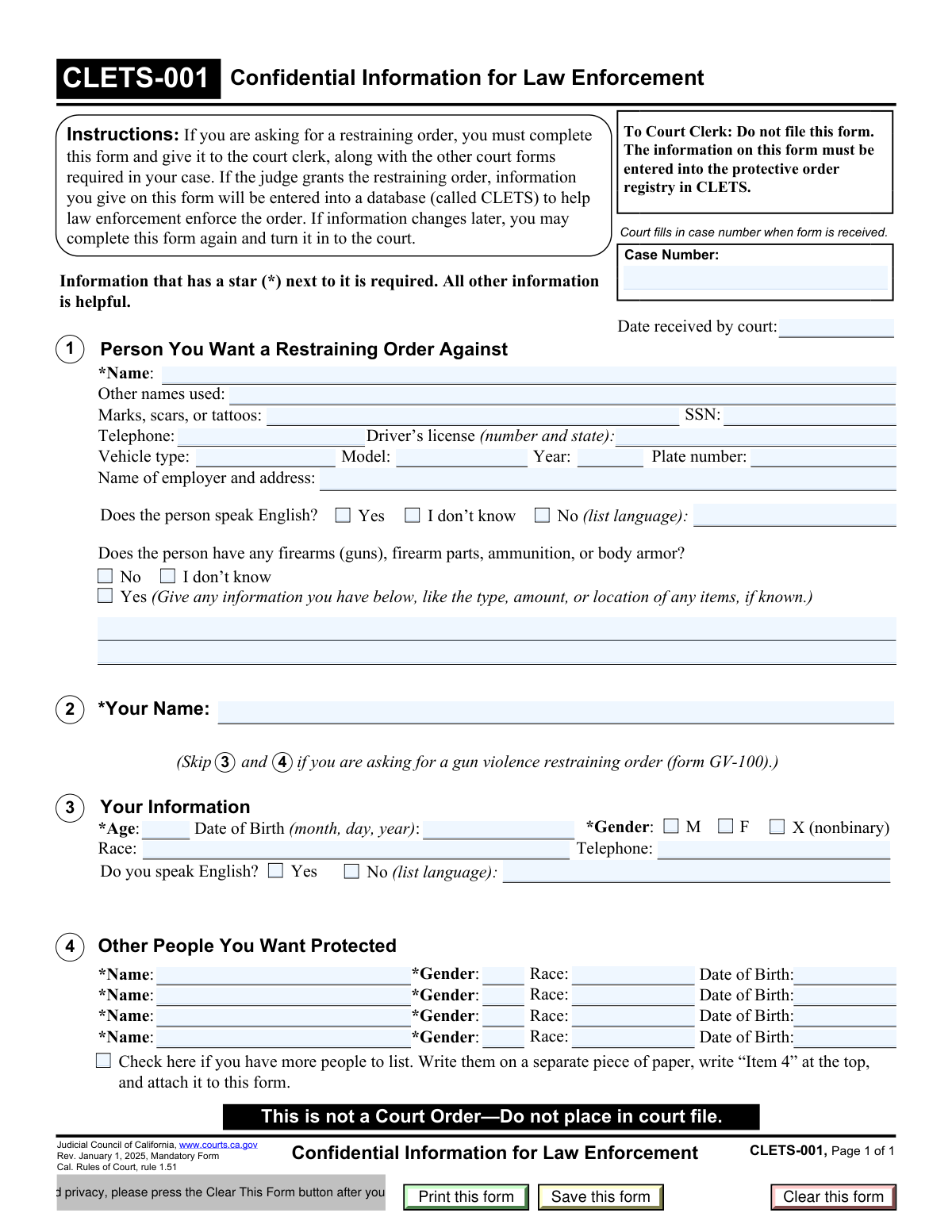
Form CLETS-001, Confidential Information for Law Enforcement, is a crucial document in California used to collect identifying details about the person being restrained and the individuals seeking protection. This information is entered into the California Law Enforcement Telecommunications System (CLETS) to help police enforce the restraining order. Today, this form can be filled out quickly and accurately using AI-powered services like Instafill.ai, which can also convert non-fillable PDF versions into interactive fillable forms.
Our AI automatically handles information lookup, data retrieval, formatting, and form filling.
It takes less than a minute to fill out CLETS-001 using our AI form filling.
Securely upload your data. Information is encrypted in transit and deleted immediately after the form is filled out.
Form specifications
| Form name: | Form CLETS-001, Confidential Information for Law Enforcement |
| Number of fields: | 53 |
| Number of pages: | 1 |
| Language: | English |
More forms in CLETS forms
Instafill Demo: How to fill out PDF forms in seconds with AI
How to Fill Out CLETS-001 Online for Free in 2026
Are you looking to fill out a CLETS-001 form online quickly and accurately? Instafill.ai offers the #1 AI-powered PDF filling software of 2026, allowing you to complete your CLETS-001 form in just 37 seconds or less.
Follow these steps to fill out your CLETS-001 form online using Instafill.ai:
- 1 Navigate to Instafill.ai and upload or select the CLETS-001 form.
- 2 Use the AI assistant to provide identifying information about the person you want the restraining order against, including their name, physical description, and vehicle details.
- 3 Enter your personal information as the person requesting the order, such as your name, date of birth, and contact details.
- 4 List the full names, genders, and birth dates of all other people you want the restraining order to protect.
- 5 Disclose any known information about firearms, ammunition, or body armor in the possession of the restrained person.
- 6 Carefully review all the entered information for accuracy and completeness before finalizing the document.
- 7 Download and print the completed form to give to the court clerk with your other restraining order paperwork.
Our AI-powered system ensures each field is filled out correctly, reducing errors and saving you time.
Why Choose Instafill.ai for Your Fillable CLETS-001 Form?
Speed
Complete your CLETS-001 in as little as 37 seconds.
Up-to-Date
Always use the latest 2026 CLETS-001 form version.
Cost-effective
No need to hire expensive lawyers.
Accuracy
Our AI performs 10 compliance checks to ensure your form is error-free.
Security
Your personal information is protected with bank-level encryption.
Frequently Asked Questions About Form CLETS-001
This form collects confidential information about the person you want a restraining order against. This data is entered into the California Law Enforcement Telecommunications System (CLETS) to help police identify the person and enforce the order if it is granted.
Anyone requesting a restraining order in California must complete and submit this form to the court clerk along with their other required court documents.
No, the information is confidential and is not filed in the public court record. It is used by the court and law enforcement specifically for entering the protective order into the secure CLETS database.
CLETS stands for the California Law Enforcement Telecommunications System. It is a statewide database that allows law enforcement officers to quickly access information, including details about active restraining and protective orders.
You must provide the information marked with a star (*), such as the person's name. For all other fields, provide as much information as you know, as any detail can help law enforcement enforce the order.
Your information is needed to identify you as the protected person in the law enforcement database. This helps officers confirm the details of the order when they need to enforce it.
If you need to list more than four additional protected people, check the box at the end of Section 4. Then, list the additional names and their information on a separate piece of paper, write āItem 4ā at the top, and attach it to the form.
You must give the completed form to the court clerk when you file your request for a restraining order. The clerk will ensure the information is processed correctly without placing it in the public case file.
If you learn new information or if details like the person's address or vehicle change, you can fill out a new CLETS-001 form and submit it to the court clerk to update the database.
If you are specifically filing for a Gun Violence Restraining Order (using form GV-100), you are instructed to skip providing your own personal details in sections 3 and 4 of this CLETS-001 form.
Yes, services like Instafill.ai use AI to help you accurately auto-fill form fields from your saved profile information, which can save time and reduce errors.
You can use a service like Instafill.ai to upload the form and fill it out electronically. The platform allows you to type directly into the fields, save your progress, and print the completed document for submission.
If you have a non-fillable PDF, you can upload it to a service like Instafill.ai. It can convert flat PDFs into interactive, fillable forms that you can complete on your computer.
Compliance CLETS-001
Validation Checks by Instafill.ai
1
Ensures Restrained Person's Name is Provided
This check verifies that the 'Name' field for the person the restraining order is against is not empty. This name is the primary identifier for law enforcement to locate and serve the order, and for the CLETS system to function. If this field is left blank, the form submission must be rejected as it is impossible to process an order without knowing who it is against.
2
Validates Petitioner's Required Information
This validation ensures that the petitioner's 'Name', 'Age', 'Date of Birth', and 'Gender' are all provided, unless the filing is for a gun violence restraining order (GV-100). This information is crucial for court records and for law enforcement to verify the identity of the protected person. A failure will prompt the user to complete the required fields before submission.
3
Cross-Validates Petitioner's Age and Date of Birth
This validation compares the petitioner's entered 'Age' with their 'Date of Birth' to ensure they are logically consistent. This check helps catch simple typos or miscalculations, improving data accuracy for the court and law enforcement. If a discrepancy is found, the user will be alerted to review and correct either the age or the date of birth.
4
Validates Date of Birth Format and Plausibility
This check ensures that all date of birth fields are entered in a valid format (e.g., MM/DD/YYYY) and represent a plausible date in the past. This prevents data entry errors and ensures the data is usable for age calculation and identification purposes in the CLETS system. An invalid date, such as a future date or a nonsensical entry like '02/30/2000', would trigger an error message asking the user to correct the entry.
5
Validates Social Security Number Format
This check verifies that if a Social Security Number is entered, it follows the standard 9-digit format, with or without hyphens (e.g., XXX-XX-XXXX or XXXXXXXXX). While the field is optional, ensuring correct formatting for any provided data is crucial for its integrity within law enforcement databases. An incorrectly formatted SSN will be flagged for correction, preventing bad data from being stored.
6
Validates Telephone Number Format
This check verifies that any telephone numbers entered adhere to a standard 10-digit format, potentially allowing for common separators. This ensures the numbers are valid and can be used by the court or law enforcement if contact is necessary. An invalid format would prompt the user to correct the entry to a standard US phone number format.
7
Conditional Requirement for Language Specification
This validation checks that if the 'No' option is selected for 'Does the person speak English?', the corresponding text field for listing the language is not left empty. This information is vital for law enforcement or court personnel who may need to arrange for an interpreter. If the language field is empty after selecting 'No,' the user will be prompted to specify the language.
8
Conditional Requirement for Firearms Details
This check ensures that if the user indicates 'Yes' to the question about firearms, the corresponding details text box is not empty. This information is a critical officer safety issue for law enforcement when serving the order. A validation failure would prompt the user to provide any known details or explicitly state that no details are known.
9
Validates Completeness of Other Protected Persons
This validation rule checks that if a name is entered for an additional protected person in Section 4, the corresponding 'Gender' and 'Date of Birth' fields for that person are also completed. This prevents incomplete records for protected individuals, which could hinder the enforcement of the order for them. The system should flag any incomplete rows in this section for completion.
10
Validates Vehicle Year Format and Plausibility
This check ensures the 'Vehicle year' field is a 4-digit number and falls within a logical range (e.g., between 1900 and the current year plus one). This prevents typos like '202' or '99' and ensures the vehicle information is accurate and useful for identification purposes. An invalid year would trigger an error message requesting a valid 4-digit year.
11
Ensures State is Provided with Driver's License Number
This validation ensures that if a driver's license number is entered, the issuing state is also provided. A license number without the state is often ambiguous and not searchable in law enforcement databases. If the number field is filled but the state is empty, the user will be prompted to add the state.
12
Validates Gun Violence Restraining Order Skip Logic
This check enforces the instruction to skip petitioner information (Section 3) and other protected people (Section 4) if the filing is for a gun violence restraining order (GV-100). If the case type is GV-100, the system should not require these fields. Conversely, if data is entered in these fields for a GV-100 case, it may flag a potential filing error to the user or clerk.
Common Mistakes in Completing CLETS-001
This occurs when a filer uses a nickname or partial name for the restrained person instead of their full legal name, or omits known aliases. This often happens because the filer is in a hurry or only knows the person by a nickname. The consequence is severe: law enforcement may be unable to accurately identify the individual in their system, rendering the restraining order unenforceable. To avoid this, always use the person's full legal name and list all known aliases, maiden names, or nicknames in the 'Other names used' field.
Filers often overlook the asterisk (*) and leave mandatory fields blank, such as their own name, age, or the name of the person to be restrained. This mistake typically stems from rushing or not carefully reviewing the form before submission. A form with missing required information will likely be rejected by the court clerk, causing significant delays in getting the protective order entered into the law enforcement database (CLETS) and leaving the filer unprotected.
The form requires filers to enter both their 'Age' and 'Date of Birth' in Section 3, but people often provide conflicting information or fill in only one. For example, they might write age '40' but a date of birth from 30 years ago. This creates data inconsistencies that can delay processing or cast doubt on the accuracy of the entire form. To prevent this, carefully fill in both fields and double-check that the age provided correctly corresponds to the date of birth.
Many filers skip non-starred fields like the restrained person's vehicle information, employer address, or Social Security Number, assuming they are unimportant. This information, however, is critically important for law enforcement to locate, identify, and serve the order to the correct person. Leaving these fields blank when the information is known severely hampers enforcement efforts. Always provide as much detail as possible, as every piece of information helps law enforcement do their job effectively.
When a form is only available as a non-fillable PDF, people often print it and fill it out by hand, which can result in illegible handwriting. A poorly written name, license plate number, or address can be easily misread by the clerk, leading to incorrect data entry into the CLETS system. This could make it impossible for an officer to find the order or identify the right person. To avoid this, use tools like Instafill.ai, which can convert flat PDFs into fillable versions, ensuring all your entries are typed, legible, and accurate.
Section 4 provides space for four protected people and instructs the filer to check a box and attach a separate page for more. A common error is attaching a list of names without checking the box or labeling the attachment 'Item 4' as required. This can lead to the attachment being lost or ignored by the clerk, meaning those additional individuals will not be included in the protective order in the CLET S database. Always follow the attachment instructions precisely to ensure everyone is protected.
The form includes a specific instruction to skip Sections 3 and 4 if filing for a gun violence restraining order (GV-100). This note is small and easily missed by filers who don't read every detail. While filling out these sections is not a fatal error, it creates unnecessary information for the clerk to process and indicates a lack of attention to detail. To avoid this, carefully read all instructions, including parenthetical notes, to ensure you are filling out the form correctly for your specific case type.
In fields like 'Marks, scars, or tattoos' or firearm details, filers often provide uselessly vague information like 'has a tattoo' or 'owns a gun'. This happens when they don't understand the level of detail needed for law enforcement identification. Such descriptions are not actionable; 'dragon tattoo on left forearm' is useful, while 'a tattoo' is not. Be as specific as possible with any known detailsālocation, type, color, amountāto give law enforcement the best chance of positive identification.
The information on this form is a snapshot in time, but people move, change cars, and switch jobs. A frequent and dangerous mistake is failing to submit an updated form when new information about the restrained person becomes available. The original order in CLETS becomes outdated, and law enforcement may be unable to locate the person during an incident. If you learn of changes, you must complete and file a new CLETS-001 form to keep the database current and the order effective.
Filers often enter data in inconsistent or incomplete formats, such as writing a driver's license number without the issuing state or using non-standard date formats. A license number is useless for a national search without the state, and inconsistent dates can cause data entry errors in the CLETS system. To prevent this, always use a standard MM/DD/YYYY format for dates and always include the state with a driver's license number. AI-powered tools like Instafill.ai can help by automatically validating and formatting this data correctly.
Saved over 80 hours a year
āI was never sure if my IRS forms like W-9 were filled correctly. Now, I can complete the forms accurately without any external help.ā
Kevin Martin Green
Your data stays secure with advanced protection from Instafill and our subprocessors

Robust compliance program
Transparent business model
Youāre not the product. You always know where your data is and what it is processed for.
ISO 27001, HIPAA, and GDPR
Our subprocesses adhere to multiple compliance standards, including but not limited to ISO 27001, HIPAA, and GDPR.
Security & privacy by design
We consider security and privacy from the initial design phase of any new service or functionality. Itās not an afterthought, itās built-in, including support for two-factor authentication (2FA) to further protect your account.
Fill out CLETS-001 with Instafill.ai
Worried about filling PDFs wrong? Instafill securely fills form-clets-001-confidential-information-for-law-enforcement forms, ensuring each field is accurate.