
Yes! You can use AI to fill out Form CLETS-002, Confidential Information for Law Enforcement—Criminal
Don't type 55 fields by hand. Tell our AI about yourself, or upload a document you already have, and it fills every field in seconds. You check it, then download, print or sign.
The AI does the filling. You just check it.
No typing into boxes, nothing to install.
What this form asks for
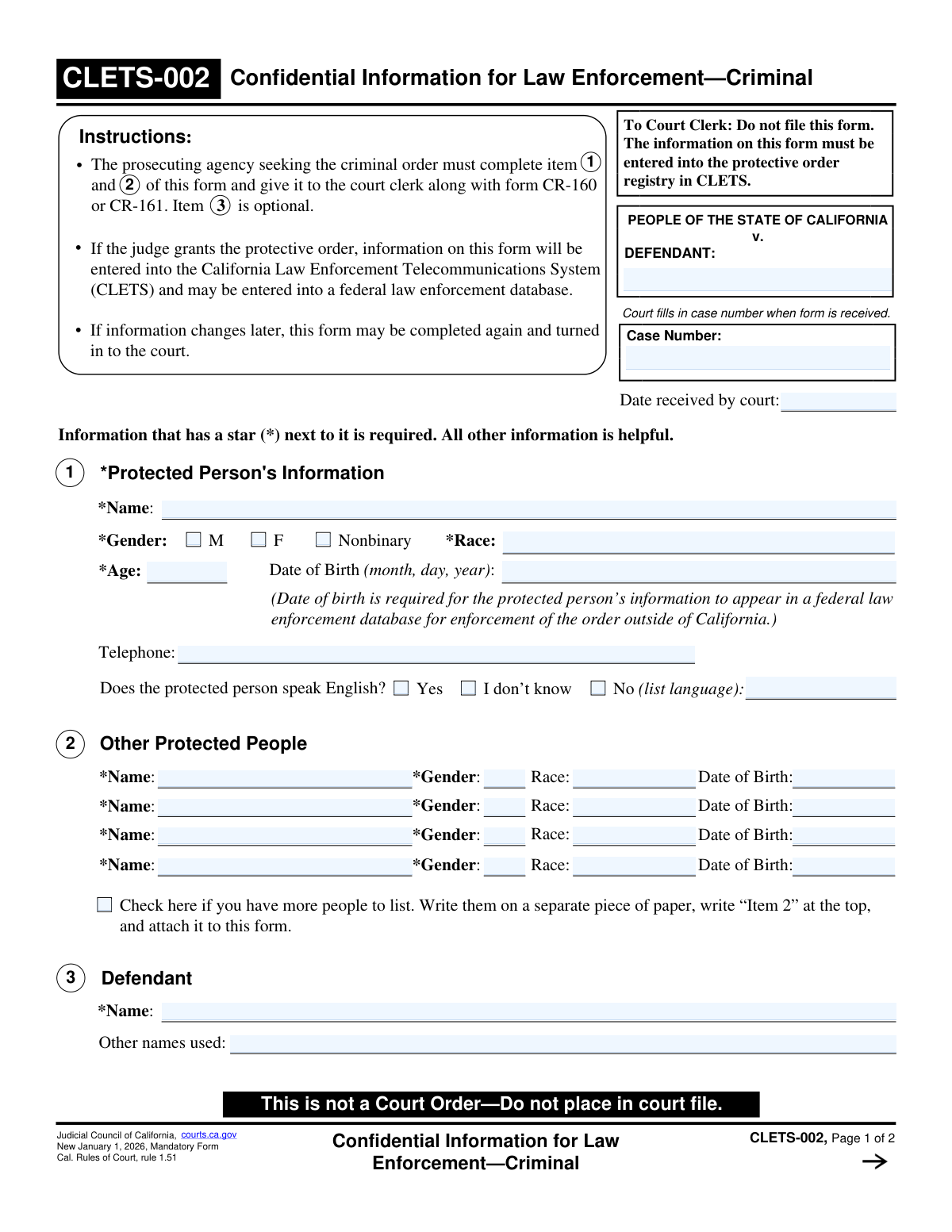
The AI fills all of it, from your answers or your documents.
The AI checks your answers before you download
13 checks built for this form, so a wrong date or a missing answer is caught before anyone else sees it.
Validates that the 'Name' field for the primary protected person in Section 1 is not empty. This field is marked as required (*) and is essential for identifying the individual who needs protection. A failure to provide this information would make the protective order unenforceable and the form submission will be rejected.
This check cross-references the 'Age' and 'Date of Birth' fields in Section 1. It calculates the age based on the provided date of birth and verifies that it matches the number entered in the 'Age' field. This is important for data accuracy and helps prevent typographical errors that could impact law enforcement databases. If they do not match, the user is prompted to correct one of the fields.
Ensures that all 'Date of Birth' fields on the form are entered in a valid date format (e.g., MM/DD/YYYY). The validation also checks that the date is not in the future and is a plausible birth date. This is critical for federal database entry and accurate identification of individuals, as noted on the form.
Verifies that a 'Gender' has been selected for the primary protected person and for any additional protected people listed in Section 2. This is a required field (*) used for identification purposes in law enforcement systems. Submissions will be blocked if this required information is missing for any listed protected person.
Checks that the 'Race' field for the primary protected person in Section 1 is not empty. As a required field marked with a star, this information is considered mandatory for the CLETS system. A submission with this field left blank will be considered incomplete and rejected.
This is a conditional validation for both the protected person (Section 1) and the defendant (Section 3). If the 'No' option is selected for the question 'Does the... speak English?', this check ensures the adjacent text field specifying the language is not left empty. This information is vital for ensuring effective communication during law enforcement interactions.
And 7 more checks
- Other Protected People Row Completeness
- Defendant Name Required
- SSN Format Validation
- Driver's License Completeness
- Vehicle Year Format and Plausibility
- Phone Number Format
- Case Number Consistency Across Pages
Let AI fill out your CLETS-002
No typing. Every field filled in seconds, checked, ready to sign.
How to Fill Out CLETS-002 Online for Free in 2026
What the AI walks you through.
- Navigate to Instafill.ai and upload or select Form CLETS-002.
- Use the AI assistant to fill in the case information, including the defendant's name.
- Enter the required information for the primary protected person in Section 1, including their name, age, date of birth, gender, and race.
- List any other protected people in Section 2, providing their name, gender, race, and date of birth.
- Complete Section 3 with all known identifying information about the defendant, such as aliases, physical descriptors, vehicle details, and firearm possession status.
- Carefully review all entered information for accuracy, ensuring all mandatory fields (marked with a star) are complete.
- Securely download or print the completed form to be provided to the court clerk along with the corresponding protective order form (CR-160 or CR-161).
Common Mistakes in Completing CLETS-002
The ones the AI is built to catch.
Omitting the Protected Person's Date of Birth
Incorrectly Filing the Confidential Form
Failing to List All Defendant Aliases
Providing Vague Defendant Descriptions
Submitting an Illegible Handwritten Form
Entering Incomplete Vehicle Information
Omitting the Case Number on Page Two
Not Specifying the Language for a Non-English Speaker
Providing Ambiguous Information About Firearms
Forgetting to Attach a Sheet for Additional Protected People
Frequently Asked Questions About CLETS-002
Is it really free for 7 days?
Can I fill other forms too?
How do I cancel?
How does the AI fill out CLETS-002?
What happens to my information?
How complex is CLETS-002 to fill out?
What is the purpose of the CLETS-002 form?
Who is responsible for filling out this form?
Is this form the actual protective order?
What happens to the information on this form after it's submitted?
What information is required versus optional?
Why is the protected person's date of birth required for federal databases?
What if I need to list more protected people than there is space for in Item 2?
What should I do if the defendant's information, like their address or vehicle, changes?
Do I have to provide the defendant's Social Security Number or driver's license?
Can I use an AI tool to help fill out this form?
How can I fill out the CLETS-002 form online?
The PDF version of this form I have is not fillable. What can I do?
Why is this form labeled 'Confidential' and instructed not to be filed?
Get your CLETS-002 filled out by AI
$0 today. Cancel before Nov 1 and you pay nothing.
Other forms like this one
California court forms: Judicial Council of California Form SC-105, Request for Court Order and Answer (Small Claims), Judicial Council of California Form SC-120, Defendant’s Claim and ORDER to Go to Small Claims Court (Small Claims), Judicial Council of California Form SER-001, Request for Sheriff to Serve Court Papers, Judicial Council of California Form SER-001, Request for Sheriff to Serve Court Papers, Affidavit for Collection of Personal Property California Probate Code Section 13100, Form POS-040, Proof of Service—Civil, Declaration of Facts of Death (California Superior Court), declaration-of-marriage-for-court-proceeding-california-family-law, ADOPT-200, Adoption Request, ADOPT-200, Stepparent Adoption Request, ADOPT-210, Adoption Agreement, ADOPT-310, Contact After Adoption Agreement, Judicial Council of California Form ADOPT-200, Adoption Request, Form ADR-107, Mediation Attendance Sheet, Form ADR-110, Order Appointing Referee, Form ADR-109, Stipulation or Motion for Order Appointing Referee, Form ADR-102, Request for Trial De Novo After Judicial Arbitration, Form ADR-108, Referee's Report (Code Civ. Proc., §§ 638, 639), Form ADR-106, Petition to Confirm, Correct, or Vacate Contractual Arbitration Award, Form ADR-104, Rejection of Award and Request for Trial After Attorney-Client Fee Arbitration
law enforcement forms: Form 79, Law Enforcement Officers Safety Act Application, CLETS-001, Confidential Information for Law Enforcement (Judicial Council of California), CLETS-001, Confidential Information for Law Enforcement (Judicial Council of California), CLETS-001, Confidential Information for Law Enforcement (Judicial Council of California), Florida Supreme Court Approved Family Law Form 12.902(d), Uniform Child Custody Jurisdiction and Enforcement Act (UCCJEA) Affidavit, Florida Supreme Court Approved Family Law Form 12.941(a), Petition for Enforcement of Out-of-State Custody Decree and for Order to Pick Up Minor Child(ren), Form CLETS-001, Confidential Information for Law Enforcement, TCOLE Personal History Statement for Texas Law Enforcement, Form SUM-145, Summons—Enforcement of State Housing Law
Let AI fill out your CLETS-002
Your trial starts once a card is added. You pay nothing before Nov 1.
Our AI already knows this form, all 55 fields of it. Skip the typing: tell it about yourself, or upload what you have, and it fills the whole form in seconds.
- AI fills every field on both pages, checkboxes included
- No typing into boxes: answer a few questions, or upload a document you already have, an old copy of this form, a photo of a document
- The AI checks the answers; you review and change anything before you download
- Download the finished PDF, print it, or sign it online
- Encrypted, and never used to train AI
Cancel before Nov 1 and you pay nothing.
A card is needed to start the trial. Cancel in two clicks from your account.
Terms · Privacy