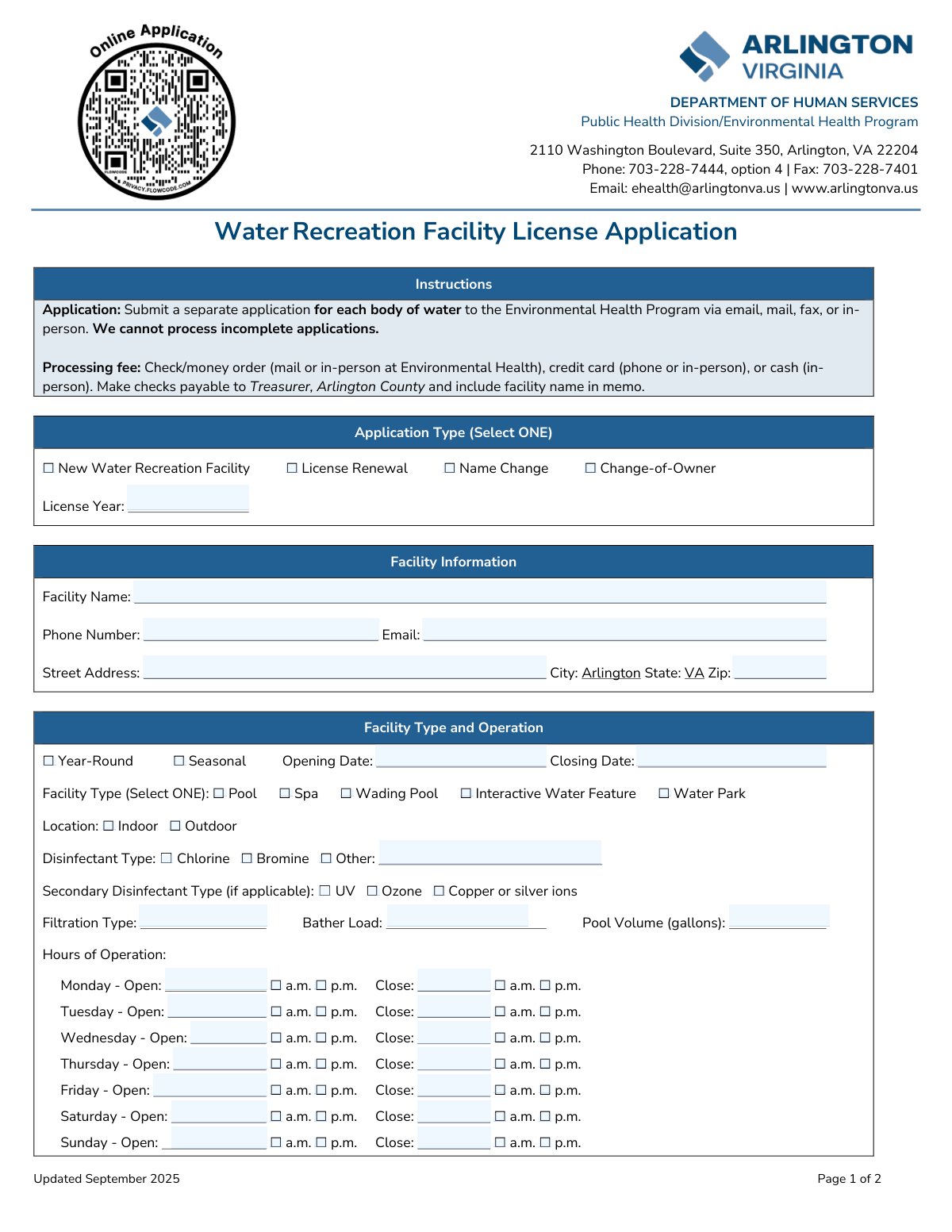
Yes! You can use AI to fill out Arlington County Department of Human Services, Water Recreation Facility License Application
The Water Recreation Facility License Application is a mandatory document for any entity wishing to operate a public pool, spa, or similar facility within Arlington County, Virginia. Submitting this form is crucial for legal compliance, as it certifies that the facility meets all local health codes and federal safety standards like the Virginia Graeme Baker Act. Today, this form can be filled out quickly and accurately using AI-powered services like Instafill.ai, which can also convert non-fillable PDF versions into interactive fillable forms.
Our AI automatically handles information lookup, data retrieval, formatting, and form filling.
It takes less than a minute to fill out Arlington VA Water Recreation Facility License Application using our AI form filling.
Securely upload your data. Information is encrypted in transit and deleted immediately after the form is filled out.
Form specifications
| Form name: | Arlington County Department of Human Services, Water Recreation Facility License Application |
| Number of fields: | 112 |
| Number of pages: | 2 |
| Language: | English |
| Categories: | human services forms |
Instafill Demo: How to fill out PDF forms in seconds with AI
How to Fill Out Arlington VA Water Recreation Facility License Application Online for Free in 2026
Are you looking to fill out a ARLINGTON VA WATER RECREATION FACILITY LICENSE APPLICATION form online quickly and accurately? Instafill.ai offers the #1 AI-powered PDF filling software of 2026, allowing you to complete your ARLINGTON VA WATER RECREATION FACILITY LICENSE APPLICATION form in just 37 seconds or less.
Follow these steps to fill out your ARLINGTON VA WATER RECREATION FACILITY LICENSE APPLICATION form online using Instafill.ai:
- 1 Navigate to Instafill.ai and upload or select the Arlington County Water Recreation Facility License Application.
- 2 Select the application type (e.g., New, Renewal) and provide detailed facility information, including name, address, contact details, and hours of operation.
- 3 Specify the facility type (e.g., pool, spa), location (indoor/outdoor), and technical details like disinfectant types, filtration, and pool volume.
- 4 Enter the complete contact and address information for the building management, property owner, and billing contact.
- 5 If a separate company manages the pool, provide the full details for the Pool Management Company.
- 6 Carefully review all the information populated by the AI for accuracy, then have the owner or authorized person electronically sign and date the certification section.
- 7 Download the completed application and submit it to the Arlington County Environmental Health Program via email, mail, or in-person along with the required processing fee.
Our AI-powered system ensures each field is filled out correctly, reducing errors and saving you time.
Why Choose Instafill.ai for Your Fillable Arlington VA Water Recreation Facility License Application Form?
Speed
Complete your Arlington VA Water Recreation Facility License Application in as little as 37 seconds.
Up-to-Date
Always use the latest 2026 Arlington VA Water Recreation Facility License Application form version.
Cost-effective
No need to hire expensive lawyers.
Accuracy
Our AI performs 10 compliance checks to ensure your form is error-free.
Security
Your personal information is protected with bank-level encryption.
Frequently Asked Questions About Form Arlington VA Water Recreation Facility License Application
This form is used to apply for a new license, renew an existing one, or report a name or ownership change for a water recreation facility like a pool or spa in Arlington County, VA.
Any owner or operator of a public or semi-public water recreation facility in Arlington, VA, must submit this application to legally operate their facility.
Yes, the instructions state that you must submit a separate application for each individual body of water. You will need to complete one form for the pool and another for the spa.
You can submit the form via email, mail, fax, or in-person. Fees can be paid by check, money order, credit card (phone or in-person), or cash (in-person only).
The Environmental Health Program cannot process incomplete applications. To avoid delays, ensure every required field is filled out before you submit the form.
Select 'Name Change' if only the facility's name is changing while ownership stays the same. Select 'Change-of-Owner' if the facility has been sold or transferred to a new legal owner.
Bather load is the maximum number of people allowed in the water at one time. This information is typically found in your facility's design specifications or previous inspection reports.
By signing, you certify that all information is accurate, you will comply with county and federal safety laws, and your facility has a functioning anti-entrapment system as required by the Virginia Graeme Baker Act.
This ensures the county can contact the correct person for different issues, such as operational questions, ownership matters, or billing inquiries. Provide the most accurate contact for each section.
Yes, services like Instafill.ai use AI to auto-fill form fields accurately and save time. This is especially helpful for renewals, as the AI can pre-populate information from previous applications.
Simply upload the PDF of the application to the Instafill.ai platform. The service will make the document interactive, allowing you to easily type in your information, save, and print the completed form.
You can use a service like Instafill.ai, which converts flat, non-fillable PDFs into interactive forms. This allows you to type your information directly into the fields on your computer.
No, you only need to complete the separate 'Billing Information' section if the billing contact and address are different from the Building Management or Owner information provided earlier on the form.
You should select 'Year-Round' if the facility remains open, even with reduced hours. The 'Seasonal' option is for facilities that completely close for a portion of the year.
Compliance Arlington VA Water Recreation Facility License Application
Validation Checks by Instafill.ai
1
Exclusive Application Type Selection
This validation ensures that the applicant has selected exactly one checkbox from the 'Application Type' section (New, Renewal, Name Change, Change-of-Owner). Since these options are mutually exclusive, selecting more than one or none at all would make the application's purpose unclear. If this check fails, the form submission is rejected with an error message prompting the user to select only one application type.
2
Conditional License Year Entry
This check verifies that the 'License Year' field is completed if and only if the 'License Renewal' application type is selected. The license year is irrelevant for new applications, name changes, or owner changes. This prevents unnecessary data entry and ensures data integrity for renewal tracking. A failure would prompt the user to either enter a valid four-digit year for the renewal or clear the field for other application types.
3
Seasonal Operation Dates Logic
This validation confirms that if the 'Seasonal' operation type is selected, both the 'Opening Date' and 'Closing Date' fields are filled with valid dates. Conversely, if 'Year-Round' is selected, these fields should be empty. This is crucial for inspectors to know the facility's operational period. If the check fails, the user will be prompted to provide the missing dates for a seasonal facility or clear them for a year-round one.
4
Closing Date After Opening Date
This check ensures that for a seasonal facility, the 'Closing Date' is chronologically after the 'Opening Date'. An opening date that occurs after the closing date is a logical impossibility and indicates a data entry error. This validation is important for defining a valid operational season. If this rule is violated, the system will display an error asking the user to correct the dates.
5
Exclusive Facility Type Selection
This validation ensures that the applicant has selected exactly one checkbox from the 'Facility Type' section (Pool, Spa, Wading Pool, etc.). A single application is for a single body of water, so it must be uniquely classified. This check prevents ambiguity in licensing and inspection requirements. A failure would result in an error message instructing the user to select one and only one facility type.
6
Conditional 'Other' Disinfectant Specification
This check verifies that if the 'Other' checkbox is selected under 'Disinfectant Type', the corresponding text field is not empty. This ensures that the specific type of 'other' disinfectant is captured, which is critical for health and safety assessments. If the 'Other' box is checked but the field is blank, the submission will be blocked until the disinfectant name is provided.
7
Numeric Value for Pool Volume and Bather Load
This validation ensures that the 'Pool Volume (gallons)' and 'Bather Load' fields contain only numeric characters. These values are used in critical safety and chemical calculations, so they must be valid numbers. Any non-numeric input (e.g., 'approx. 50,000', 'one hundred') would cause calculation errors. If the check fails, the user is prompted to enter a valid number.
8
Logical Hours of Operation
For each day of the week where hours are provided, this check validates that the 'Close' time is later than the 'Open' time. It prevents illogical entries like a facility closing before it opens. This is important for public information and for scheduling inspections. An error will be flagged if, for any given day, the open time is not before the close time.
9
AM/PM Exclusivity for Time Entries
This validation ensures that for each 'Open' and 'Close' time entered, exactly one of the corresponding 'a.m.' or 'p.m.' checkboxes is selected. This prevents ambiguity in the hours of operation, as a time without an AM/PM designation is incomplete. If a time is entered but neither or both a.m./p.m. are checked, the form will prompt the user to make a single, valid selection.
10
Conditional Billing Information Requirement
This check validates that if the 'Billing Address: No' box is checked for both the 'Building Management' and 'Owner' sections, then the separate 'Billing Information' section must be filled out completely. This ensures that the county has a valid address for sending invoices. If this condition is met and the billing section is empty, the form will be rejected until the required billing contact information is provided.
11
Valid Email Address Format
This validation checks all email address fields on the form (Facility, Management, Owner, Billing, Pool Management Co.) to ensure they conform to a standard email format (e.g., '[email protected]'). This is crucial for ensuring that electronic communications, notifications, and invoices are successfully delivered. An invalid format would trigger an error message asking the user to correct the entry.
12
Standard Phone Number Format
This check ensures that all phone number fields are entered in a consistent, valid format (e.g., 10 digits, possibly with parentheses or dashes like (703) 228-7444). This helps maintain data consistency and ensures the numbers are dialable by county staff. If a phone number does not match the expected format, the user will be prompted to correct it.
13
Single Preferred Mailing Address
This validation verifies that only one address across the entire application (Building Management or Owner) is designated as the 'Preferred Mailing Address'. Having multiple preferred addresses would create confusion for sending official correspondence. If more than one 'Preferred Mailing Address: Yes' box is checked, the system will prompt the user to select only one.
14
Mandatory Certification Fields
This validation ensures that the 'Owner Printed Name' and 'Date' fields in the Certification section are completed before submission. These fields, along with the signature, legally attest to the accuracy of the application and compliance with safety acts. An incomplete certification section renders the application invalid, so the submission will be blocked until these required fields are filled.
Common Mistakes in Completing Arlington VA Water Recreation Facility License Application
The form instructions explicitly state to submit a separate application for each body of water, such as a pool and a separate spa. Applicants often miss this and submit a single form for an entire complex, which leads to immediate rejection and processing delays. To avoid this, you must complete and submit one full application for each individual pool, spa, or interactive water feature at the location.
Applicants frequently enter a time in the 'Hours of Operation' section but forget to check the corresponding 'a.m.' or 'p.m.' box. This ambiguity makes the hours unclear and can delay license approval, as the department cannot verify compliance with regulations. Always double-check that for every time entered, an a.m./p.m. designation is selected to ensure the information is complete and accurate.
The form has fields that are only required if a specific box is checked, such as providing dates for a 'Seasonal' facility or specifying the disinfectant type when 'Other' is selected. People often check the box but forget to provide the required follow-up information. This renders the application incomplete and requires follow-up from the health department, delaying the entire process.
The form requests separate details for Facility, Building Management, Owner, and Billing contacts, which can be confusing. Applicants may enter the same information in all sections, enter information in the wrong section, or leave critical sections like 'Owner Information' blank. This can lead to communication breakdowns and legal notices being sent to the wrong party, so it's vital to read each section heading carefully.
In the Management and Owner sections, applicants often overlook the 'Yes/No' checkboxes for 'Billing Address' and 'Preferred Mailing Address'. Failing to correctly designate these preferences can result in invoices and official correspondence being sent to the wrong location, causing payment delays and missed communications. Always review these checkboxes to ensure all mail is routed correctly, especially if billing information is different from the primary address.
An unsigned or undated application is legally invalid and will be immediately rejected, yet it is one of the most common errors. Applicants, especially when filling out forms in a hurry, often forget to print their name, sign, and date the certification section. This simple oversight requires the form to be resubmitted, significantly delaying the license issuance.
For sections like 'Application Type' and 'Facility Type,' the form instructs the user to 'Select ONE.' However, applicants sometimes check multiple boxes (e.g., both 'New' and 'Renewal'), which creates a contradiction. This causes confusion and requires the department to contact the applicant for clarification, halting the review process until the correct single choice is confirmed.
Fields like 'Pool Volume (gallons)' and 'Bather Load' require a numeric value only. Applicants often mistakenly include units, commas, or text (e.g., '50,000 gallons' instead of '50000'), which can cause data entry errors for the county. To prevent this, enter only digits in these fields. AI-powered form-filling tools like Instafill.ai can help prevent these errors by automatically validating and formatting data correctly.
When submitting a 'License Renewal,' it is crucial to enter the upcoming 'License Year' for which the renewal is intended. Applicants often overlook this field, creating ambiguity about which licensing period the application applies to, especially if submitted near the end of a year. This can lead to processing delays or the application being misapplied to the wrong term.
Many applicants print the form, fill it out by hand, and submit a low-quality scan or photo, resulting in illegible handwriting that makes the application impossible to process. This forces the department to request a resubmission, causing significant delays. If the provided PDF is not fillable, a tool like Instafill.ai can convert it into an interactive, fillable version to ensure all entries are clear and legible before submission.
If the billing address is different from the management or owner address, the separate 'Billing Information' section must be fully completed. Applicants often check 'No' on the 'Billing Address' question in a previous section but then fail to provide the correct billing contact and address in the designated area. This omission guarantees that invoices will be sent to the wrong place, leading to payment delinquencies.
The 'Facility Name' should be the official name as it should appear on the license and as it's known in county records. Applicants sometimes use informal names or abbreviations, which can cause issues with record matching for renewals or when cross-referencing permits. Always use the full, official name of the facility to ensure consistency and avoid administrative hurdles.
Saved over 80 hours a year
“I was never sure if my IRS forms like W-9 were filled correctly. Now, I can complete the forms accurately without any external help.”
Kevin Martin Green
Your data stays secure with advanced protection from Instafill and our subprocessors

Robust compliance program
Transparent business model
You’re not the product. You always know where your data is and what it is processed for.
ISO 27001, HIPAA, and GDPR
Our subprocesses adhere to multiple compliance standards, including but not limited to ISO 27001, HIPAA, and GDPR.
Security & privacy by design
We consider security and privacy from the initial design phase of any new service or functionality. It’s not an afterthought, it’s built-in, including support for two-factor authentication (2FA) to further protect your account.
Fill out Arlington VA Water Recreation Facility License Application with Instafill.ai
Worried about filling PDFs wrong? Instafill securely fills arlington-county-department-of-human-services-water-recreation-facility-license-application forms, ensuring each field is accurate.