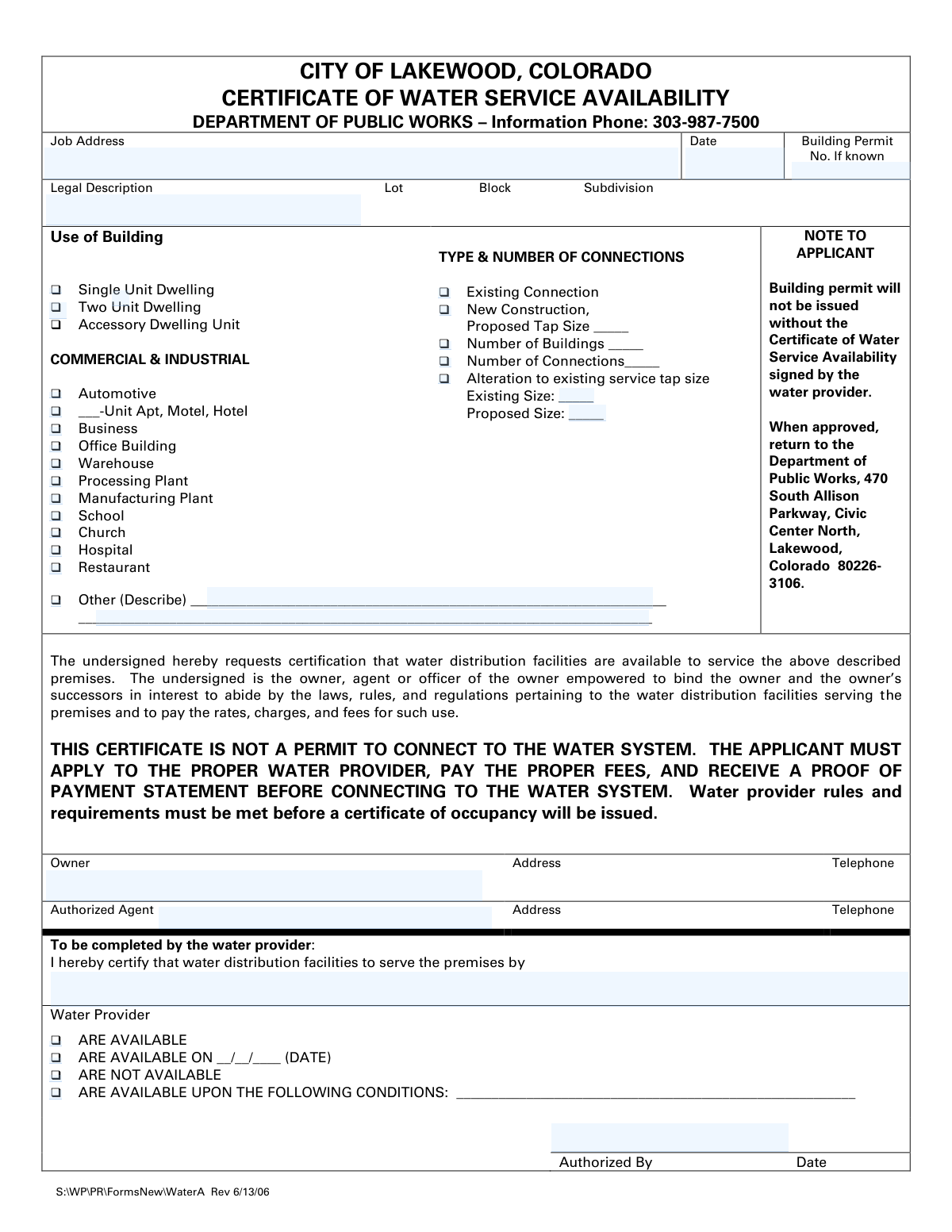
Yes! You can use AI to fill out City of Lakewood, Colorado, Certificate of Water Service Availability
This form is a formal request submitted to the designated water provider in Lakewood, Colorado, to certify the availability of water service for a specific property. It is a mandatory prerequisite for obtaining a building permit, confirming that the infrastructure exists to support the proposed construction or alteration. Today, this form can be filled out quickly and accurately using AI-powered services like Instafill.ai, which can also convert non-fillable PDF versions into interactive fillable forms.
Our AI automatically handles information lookup, data retrieval, formatting, and form filling.
It takes less than a minute to fill out WaterA using our AI form filling.
Securely upload your data. Information is encrypted in transit and deleted immediately after the form is filled out.
Form specifications
| Form name: | City of Lakewood, Colorado, Certificate of Water Service Availability |
| Number of pages: | 1 |
| Language: | English |
Instafill Demo: How to fill out PDF forms in seconds with AI
How to Fill Out WaterA Online for Free in 2026
Are you looking to fill out a WATERA form online quickly and accurately? Instafill.ai offers the #1 AI-powered PDF filling software of 2026, allowing you to complete your WATERA form in just 37 seconds or less.
Follow these steps to fill out your WATERA form online using Instafill.ai:
- 1 Navigate to Instafill.ai and upload or select the Certificate of Water Service Availability form.
- 2 Use the AI assistant to automatically populate the applicant section, including the job address, legal description, and building permit number if known.
- 3 Select the appropriate checkboxes to indicate the building's intended use, such as a single-unit dwelling, office building, or restaurant.
- 4 Specify the type and number of water connections needed, indicating if it's for new construction, an alteration, or an existing connection.
- 5 Enter the full name and contact information for the property owner and any authorized agent.
- 6 Review all AI-populated fields for accuracy, make any necessary corrections, and then download the completed applicant portion of the form.
- 7 Submit the form to the appropriate water provider for them to complete their certification section before returning it to the Department of Public Works.
Our AI-powered system ensures each field is filled out correctly, reducing errors and saving you time.
Why Choose Instafill.ai for Your Fillable WaterA Form?
Speed
Complete your WaterA in as little as 37 seconds.
Up-to-Date
Always use the latest 2026 WaterA form version.
Cost-effective
No need to hire expensive lawyers.
Accuracy
Our AI performs 10 compliance checks to ensure your form is error-free.
Security
Your personal information is protected with bank-level encryption.
Frequently Asked Questions About Form WaterA
This form is used to verify that water distribution facilities are available to service a property in Lakewood, Colorado. It is a required document that must be approved by your water provider before the city will issue a building permit.
Any property owner or their authorized agent applying for a building permit for new construction, an alteration to an existing water service, or a change in building use needs to complete this form.
No, the form clearly states that a building permit will not be issued without a Certificate of Water Service Availability that has been signed by the water provider.
The legal description, including the lot, block, and subdivision, can be found on your property's deed or title insurance documents.
After you complete the applicant portion, you must submit the form to your water provider. They will complete the bottom section to certify the availability of water service and sign it.
No, this certificate only confirms water service availability. You must still apply to your water provider, pay all fees, and receive a proof of payment before connecting to the water system.
Select 'New Construction' for a property requiring a brand new water connection. Choose 'Alteration' if you are only changing the size of an existing water tap on the property.
Once approved and signed by the water provider, the certificate must be returned to the City of Lakewood Department of Public Works at 470 South Allison Parkway, Civic Center North, Lakewood, Colorado 80226-3106.
Under the 'Use of Building' section, you should check the box for 'Accessory Dwelling Unit' to accurately describe your project.
Yes, an authorized agent, such as your contractor, can sign the form on your behalf. They must fill in their contact information in the 'Authorized Agent' section.
Yes, services like Instafill.ai use AI to accurately auto-fill form fields, which can save you time and help prevent errors.
You can upload the PDF of the form to the Instafill.ai platform. The service will make the document fillable online, allowing you to type your information, save your progress, and download the completed form.
You can use a service like Instafill.ai to convert the non-fillable PDF into an interactive, fillable form. This allows you to easily type your information into the fields before printing it for submission.
Compliance WaterA
Validation Checks by Instafill.ai
1
Required Fields Completeness
This check ensures that all mandatory fields, such as 'Job Address', 'Application Date', 'Owner Name', 'Owner Address', and 'Owner Telephone', are filled out. Submitting an incomplete form can cause processing delays or rejection. If any of these fields are empty, the system will prevent submission and highlight the missing fields for the user to complete.
2
Application Date Format and Range
Validates that the 'Application Date' is entered in a valid date format (e.g., MM/DD/YYYY) and represents a realistic date. The date should not be in the future or in the distant past. This ensures accurate record-keeping and timeline management for the application. An invalid date format or an out-of-range date will trigger an error message prompting the user to correct the entry.
3
Building Use Selection Requirement
Verifies that at least one checkbox under the 'Use of Building' section has been selected. This information is critical for the water provider to assess demand and determine appropriate service requirements. If no building use is selected, the form submission will be blocked until the user specifies the intended use of the property.
4
Multi-Unit Count for Apartments/Hotels
This check is triggered if the '___-Unit Apt, Motel, Hotel' checkbox is selected. It validates that the corresponding text field contains a positive integer greater than one. This count is essential for calculating water usage and tap fees, and a missing or invalid number would make an accurate assessment impossible.
5
Conditional Requirement for 'Other' Building Use Description
Ensures that if the 'Other (Describe)' checkbox is selected under 'Use of Building', the associated description text field is not empty. This provides necessary context for non-standard building uses. If the checkbox is ticked but the description is blank, the user will be prompted to provide details before they can proceed.
6
Connection Type Selection Requirement
Validates that at least one option under 'Type & Number of Connections' is selected. This information defines the core purpose of the application, whether it's for a new service, an existing one, or an alteration. Failure to select a connection type would make the application's intent unclear, so submission is blocked until a choice is made.
7
Proposed Tap Size for New Construction
If the 'New Construction' checkbox is selected, this validation ensures that the 'Proposed Tap Size' field is filled out. The proposed size is a critical piece of technical data needed by the water provider to plan for the new connection. The form will be considered incomplete if 'New Construction' is indicated without a specified tap size.
8
Completeness of Alteration Tap Sizes
This check verifies that if 'Alteration to existing service tap size' is selected, both the 'Existing Size' and 'Proposed Size' fields are completed. Comparing the old and new sizes is fundamental to processing an alteration request. If either size is missing, the system will flag the fields as required.
9
Logical Consistency for Connection Type
Prevents the user from selecting logically inconsistent options, such as checking both 'Existing Connection' and 'New Construction' simultaneously. A property cannot have an existing connection and be a new construction at the same time for the purpose of this form. If conflicting options are chosen, an error message will explain the conflict and require the user to select only one.
10
Owner Telephone Number Format
Validates that the 'Telephone' number provided for the owner follows a standard format (e.g., 10 digits, with or without hyphens or parentheses). A valid contact number is crucial for the Public Works department to communicate with the owner regarding the application. An improperly formatted number will result in a validation error, asking the user to correct the entry.
11
Legal Description Completeness
Ensures that at least one of the fields within the 'Legal Description' section (Lot, Block, or Subdivision) is filled out. The legal description is the official identifier for the property and is more precise than a street address for legal and utility purposes. An empty legal description would prevent the city from accurately locating and certifying the property.
12
Numeric Value for Buildings and Connections
If the 'Number of Buildings' or 'Number of Connections' checkboxes are selected, this check ensures the corresponding input is a positive integer. This data is used to understand the scope of the service request. A non-numeric or zero/negative value would be invalid, and the system would prompt for a valid number.
Common Mistakes in Completing WaterA
Applicants often confuse the common street address with the property's official legal description. Submitting an incomplete or inaccurate legal description (Lot, Block, Subdivision) will cause processing delays, as the city cannot officially identify the property parcel for water service verification. To prevent this, you must carefully copy the full legal description exactly as it appears on the property's deed or title insurance documents.
A frequent error is checking the box for '___-Unit Apt, Motel, Hotel' but forgetting to write the total number of units in the blank space. This number is critical for the water provider to calculate the building's total water demand and assess the correct system development fees. An omission will halt the application until the information is provided, delaying the entire certification process.
Applicants often misunderstand the difference between a new service and a modification. For instance, they might select 'New Construction' when they are only increasing the size of an existing water tap, which should be classified as an 'Alteration'. This error leads to incorrect internal processing and can result in miscalculated fees and project delays. Carefully review your project scope to ensure you select the correct connection type.
For new construction projects, applicants sometimes leave the 'Proposed Tap Size' field blank because they are unsure of the requirement. This is essential engineering information that the water provider needs to approve the service and confirm system capacity. Submitting the form without this detail will stop the approval process until the applicant consults a plumber or engineer and provides the necessary specification.
The 'Job Address' field must contain the physical address of the property where the work will occur, not a P.O. Box or the owner's primary residence. Using an incorrect address can cause the certificate to be associated with the wrong property, leading to significant issues with permitting, inspections, and billing. Always double-check that the address entered is the specific site of construction or alteration.
When a building's purpose doesn't fit the predefined categories, applicants may check 'Other (Describe)' but then provide a vague or one-word description. This ambiguity prevents the water provider from accurately assessing the building's water consumption needs, leading to follow-up questions and delays. If you select 'Other,' provide a clear, specific description of the intended use, such as '150-seat movie theater' or 'self-storage facility with office'.
A critical procedural error is when an applicant fills out their section and submits the form directly to the Department of Public Works. The form explicitly states it is not valid until signed by the water provider. An uncertified form is incomplete and will be immediately rejected, wasting time and delaying the building permit issuance.
When requesting an 'Alteration to existing service tap size,' applicants sometimes only fill in the 'Proposed Size' and forget to specify the 'Existing Size,' or vice-versa. Both values are required for the water provider to evaluate the impact of the change on the water main and bill for the upgrade correctly. Ensure both the current and proposed tap sizes are entered accurately to avoid rejection.
This form is often distributed as a non-fillable PDF, leading to messy, illegible handwritten submissions that can be misinterpreted or rejected. This manual process is prone to data entry errors and can be time-consuming. To avoid this, AI-powered tools like Instafill.ai can convert the flat PDF into an interactive, fillable form, ensuring all entries are clean, legible, and correctly formatted.
The form has distinct fields for the property owner and an authorized agent, but people may fill them out incorrectly, such as an agent listing themselves as the owner. This creates legal and communication ambiguity regarding who is responsible for the application and future water service obligations. The legal property owner should always be listed in the 'Owner' field, while a contractor or representative should be listed as the 'Authorized Agent'.
Saved over 80 hours a year
“I was never sure if my IRS forms like W-9 were filled correctly. Now, I can complete the forms accurately without any external help.”
Kevin Martin Green
Your data stays secure with advanced protection from Instafill and our subprocessors

Robust compliance program
Transparent business model
You’re not the product. You always know where your data is and what it is processed for.
ISO 27001, HIPAA, and GDPR
Our subprocesses adhere to multiple compliance standards, including but not limited to ISO 27001, HIPAA, and GDPR.
Security & privacy by design
We consider security and privacy from the initial design phase of any new service or functionality. It’s not an afterthought, it’s built-in, including support for two-factor authentication (2FA) to further protect your account.
Fill out WaterA with Instafill.ai
Worried about filling PDFs wrong? Instafill securely fills city-of-lakewood-colorado-certificate-of-water-service-availability forms, ensuring each field is accurate.