
Yes! You can use AI to fill out Form 2106, Employee Business Expenses (2025)
Don't type 87 fields by hand. Tell our AI about yourself, or upload a document you already have, and it fills every field in seconds. You check it, then download, print or sign.
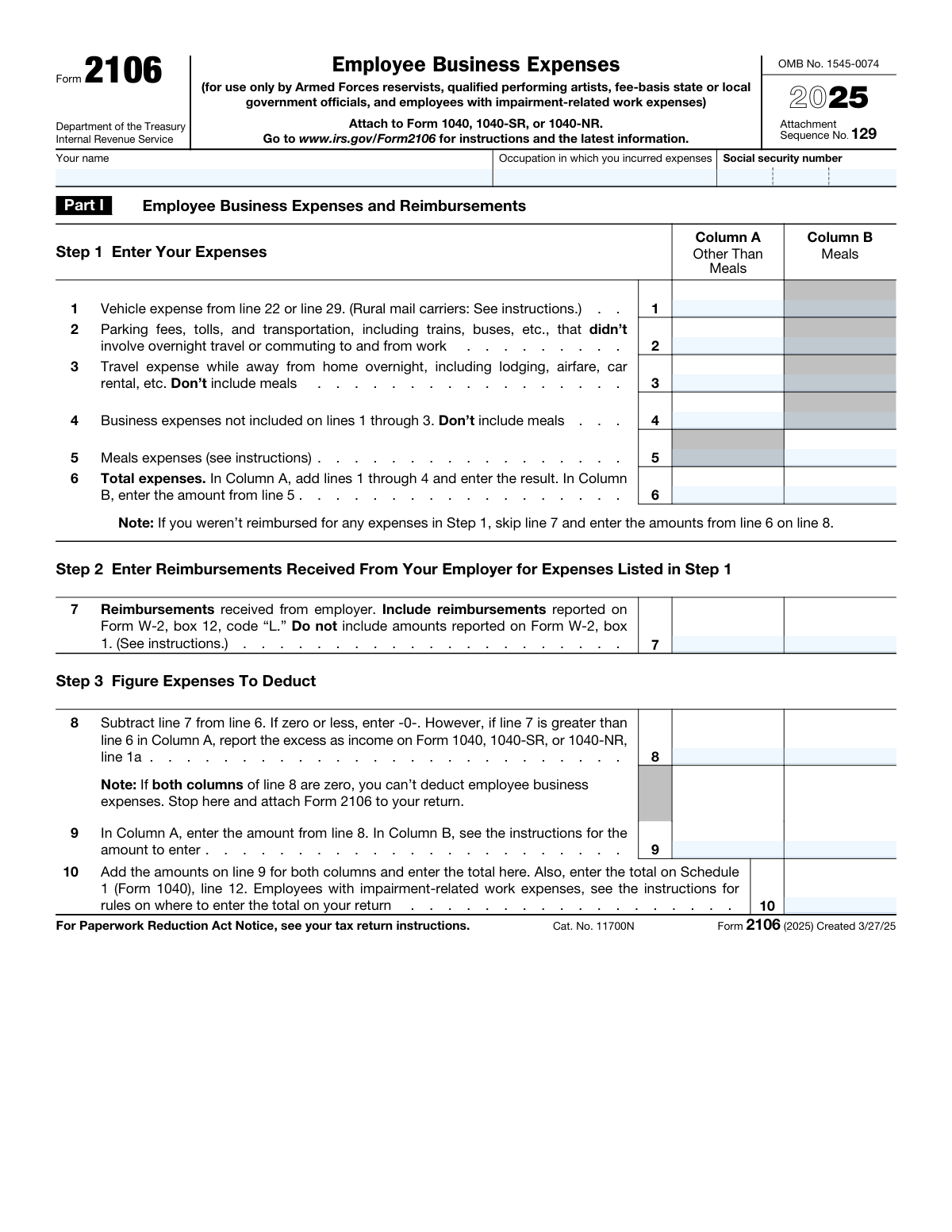
The AI does the filling. You just check it.
No typing into boxes, nothing to install.
What this form asks for
The AI fills all of it, from your answers or your documents.
The AI checks your answers before you download
16 checks built for this form, so a wrong date or a missing answer is caught before anyone else sees it.
Validates that the three SSN fields together form a complete 9-digit Social Security Number in the standard XXX-XX-XXXX format, with the first group containing exactly 3 digits, the middle group exactly 2 digits, and the last group exactly 4 digits. The area number (first group) must not be 000, 666, or in the range 900–999, and the group and serial numbers must not be all zeros. An invalid or incomplete SSN will prevent the IRS from properly identifying the taxpayer and processing the return.
Validates that the 'Your name' field is populated with a non-empty string representing the taxpayer's full legal name as it appears on their tax return. The name should include at least a first and last name and should not consist solely of whitespace or special characters. A missing or invalid name makes it impossible for the IRS to associate the form with the correct taxpayer account.
Validates that the 'Occupation in which you incurred expenses' field is filled in with a meaningful job title or occupational description and is not left blank or filled with placeholder text. The occupation must correspond to one of the eligible categories for Form 2106 (Armed Forces reservist, qualified performing artist, fee-basis state or local government official, or employee with impairment-related work expenses). Leaving this field blank or entering a non-qualifying occupation could result in the deduction being disallowed upon IRS review.
Validates that the value entered on Line 6, Column A (Total expenses, Other Than Meals) is mathematically equal to the sum of Lines 1, 2, 3, and 4 in Column A. This arithmetic check ensures the taxpayer has correctly totaled all non-meal business expenses before proceeding to the reimbursement and deduction steps. A discrepancy between the entered total and the computed sum indicates a data entry error that would cause downstream calculations on Lines 8, 9, and 10 to be incorrect.
Validates that the value entered on Line 6, Column B (Total expenses, Meals) matches exactly the amount entered on Line 5, Column B, as required by the form instructions. Column B of Line 6 is not a sum of multiple lines but a direct carry-forward of the meals expense amount. Any deviation between these two fields indicates a transcription error that would distort the meals expense deduction calculation.
Validates that Line 8 in each column equals Line 6 minus Line 7 for that column, and that if the result is zero or negative, the field contains zero (not a negative number). Additionally, if Line 7 Column A exceeds Line 6 Column A, the form should flag that the excess must be reported as income on Form 1040/1040-SR/1040-NR Line 1a. Failure to correctly compute Line 8 will result in an overstated or understated deduction and potential underreporting of income.
And 10 more checks
- Ensures Line 10 equals the sum of Line 9 Column A and Line 9 Column B
- Ensures Vehicle miles on Lines 12, 13, 16, and 17 are internally consistent
- Ensures the Vehicle Business-Use Percentage on Line 14 is correctly calculated
- Ensures the Vehicle Placed-in-Service Date is a valid calendar date not later than December 31, 2025
- Ensures Question 21 (Written Evidence) is answered only when Question 20 (Evidence) is answered Yes
- Ensures Line 22 (Standard Mileage Rate) is correctly computed as Line 13 multiplied by $0.70
- Ensures Line 24c equals Line 24a minus Line 24b for each vehicle
- Ensures Line 26 equals the sum of Lines 23, 24c, and 25 for each vehicle
- Ensures Line 38 (Allowable Depreciation) is the smaller of Line 35 or Line 37, or equals Line 35 if Lines 36 and 37 are skipped
- Ensures that Section B (Standard Mileage) and Section C (Actual Expenses) are not both completed for the same vehicle
Let AI fill out your Form 2106
No typing. Every field filled in seconds, checked, ready to sign.
How to Fill Out Form 2106 Online for Free in 2026
What the AI walks you through.
- Navigate to Instafill.ai and search for or upload IRS Form 2106 to begin filling it out online with AI-powered assistance.
- Enter your personal information in Part I, including your full name, occupation in which you incurred expenses, and Social Security Number.
- Complete Step 1 by entering all employee business expenses in the appropriate columns—Column A for expenses other than meals and Column B for meal expenses—covering vehicle expenses, parking fees, travel, and other business costs on lines 1 through 6.
- Complete Step 2 by entering any reimbursements received from your employer on line 7, then complete Step 3 by calculating the net deductible expenses on lines 8 through 10.
- If claiming vehicle expenses, complete Part II, Section A by entering general vehicle information such as dates placed in service, total miles driven, business miles, commuting miles, and answering the yes/no questions about vehicle availability and supporting evidence.
- If using the standard mileage rate, complete Section B (line 22); if using actual expenses, complete Section C and, if applicable, Section D for vehicle depreciation, entering all relevant cost, percentage, and depreciation figures.
- Review all entries for accuracy, then attach the completed Form 2106 to your Form 1040, 1040-SR, or 1040-NR and transfer the total from line 10 to Schedule 1 (Form 1040), line 12.
Common Mistakes in Completing Form 2106
The ones the AI is built to catch.
Filing Form 2106 when not eligible to do so
Including meals expenses in Column A instead of Column B
Incorrectly handling employer reimbursements on line 7
Claiming commuting miles as business miles on lines 12–13
Mixing standard mileage rate and actual expense methods incorrectly
Failing to calculate the business-use percentage correctly on line 14
Omitting or incorrectly entering the vehicle's date placed in service on line 11
Ignoring the luxury vehicle depreciation limits on lines 36–38
Failing to report excess reimbursements as income
Entering the wrong occupation or leaving it blank
Including personal or commuting transportation costs on line 2
Failing to attach Form 2106 to the tax return or transfer line 10 correctly
Frequently Asked Questions About Form 2106
Is it really free for 7 days?
Can I fill other forms too?
How do I cancel?
How does the AI fill out Form 2106?
What happens to my information?
How complex is Form 2106 to fill out?
Who is eligible to use Form 2106 to deduct employee business expenses?
What is the purpose of Form 2106?
Where do I attach Form 2106, and where does the final deduction go?
What expenses can I report on Form 2106?
How do I handle employer reimbursements on Form 2106?
What is the standard mileage rate for 2025, and how do I calculate it?
Should I use the standard mileage rate or actual expenses for my vehicle?
What records do I need to keep to support my vehicle deduction?
What is the 'inclusion amount' on Line 24b for vehicle rentals?
Can I claim depreciation on my vehicle using Form 2106?
What happens if both columns of Line 8 are zero?
Can I use Form 2106 for commuting expenses?
Can AI tools help me fill out Form 2106?
How can I fill out Form 2106 online using Instafill.ai?
What if my Form 2106 PDF is not fillable?
Get your Form 2106 filled out by AI
$0 today. Cancel before Nov 17 and you pay nothing.
Other forms like this one
VA forms: Ankle Conditions Disability Benefits Questionnaire, Shoulder and Arm Conditions Disability Benefits Questionnaire, VA Form 10-7959f-2, Foreign Medical Program (FMP) Claim Cover Sheet, VA Form 21-0781a, Statement in Support of Claim for Service Connection for Post-Traumatic Stress Disorder (PTSD) Secondary to Personal Assault, VA Form 21-0788, Information Regarding Apportionment of Beneficiary's Award, VA Form 21-4138, Statement in Support of Claim, Wrist Conditions Disability Benefits Questionnaire (DBQ), VA Form 21-0781, Statement in Support of Claimed Mental Health Disorder(s) Due to an In-Service Traumatic Event(s), VA Form 29-357, Claim for Disability Insurance Benefits (Government Life Insurance), VA Form 21-686c, Declaration of Status of Dependents, Form #170, Voluntary Account Withdrawal Request Form, Meritain Health Claim Form (Health Claim Form), Form 4852, Substitute for Form W-2 or 1099-R, Meritain Health Claim Form (Health Claim Form), PSA Form/K/II/052025 - Formulir Pembukaan Rekening / Account Opening Form, Form WH-347, Davis-Bacon and Related Acts Weekly Certified Payroll Form, Vanguard IRA Distribution Kit (including IRA Distribution Form RRDFT and Form W-4R), Davis-Bacon and Related Acts Weekly Certified Payroll Form (Form WH-347), Uniform Underwriting and Transmittal Summary (Fannie Mae Form 1008 / Freddie Mac Form 1077), Form 5385BSP, Behavioral Health Utilization Management Applied Behavioral Analysis (ABA) Initial Request Form
business forms: Form 8829, Expenses for Business Use of Your Home, Form 990-T, Exempt Org Business Income Tax Return, Form 1415, Visitor Visa - Business Stream, Form 2553, Election by a Small Business Corporation, Form 0896A, Report of Subcontracts to Small and Veteran-Owned Business, Lifestyle Protector – Risk New Business for Multiple Lives Assured (LPMLA 04/2024), Form 5472 (Rev. December 2023), Information Return of a 25% Foreign-Owned U.S. Corporation or a Foreign Corporation Engaged in a U.S. Trade or Business, DBPR CILB 6-B, Application for Certified Building Contractor Who is Qualifying a Business, Schedule C (Form 1040), Profit or Loss From Business (Sole Proprietorship) (2017), Form 8822-B, Change of Address or Responsible Party — Business, Form 8822-B (Rev. December 2019), Change of Address or Responsible Party — Business, DBPR CILB 6-A, Application for Certified General Contractor Who is Qualifying a Business, Schedule C (Form 1040), Profit or Loss From Business (Sole Proprietorship), American Express Business Travel Account Set-Up Form Hong Kong, American Express Business Travel Account Set-Up Form Hong Kong, Transamerica Life Insurance Company - New Business Cover Sheet, Fidelity® Brokerage Business Account Certification, Merrill Edge® Self‑Directed Business Investor Account (BIA Account) Account Application Booklet and Agreements, Merrill Business Investor Account (BIA) and Working Capital Management Account (WCMA) Account Application Booklet and Agreements, Application for business rates for self-catering properties in England
HR forms: U.S. Equal Employment Opportunity Commission (EEOC) Form 453, Recommendation for Recognition, U.S. Equal Employment Opportunity Commission (EEOC) Form 453, Recommendation for Recognition, EzB – Erklärung zum Beschäftigungsverhältnis (02/2024), New York State Employment Application Form, A Place for Mom 401(k) Plan Request for Rollover Contribution Form, ADP Compensation and Fee Disclosure Statement, ADP Leave Management Application for Leave of Absence, ADP Retirement Services Beneficiary Designation Form, ADP Year-End Seminar Handout Manual, AeroVironment Profit Sharing and Salary Deferral 401(k) Plan In-Service Withdrawal Form, Albany Medical Center 2024 Benefits Guide, Authorization Agreement for Direct Deposit, Beneficiary Designation 401(k) Plan, ENVIRONMENTAL MONITORING LABORATORY, LLC Employment Application, Earnings and Deductions Quick Reference, Employee Direct Deposit Banking Authorization Form (RUN Powered by ADP®), Employee’s Frequently Asked Questions: Leave of Absence, Form 2938, Hardship Withdrawal Request, Form I-9, Employment Eligibility Verification, Group Life Conversion FAQ Sheet
employee forms: Form 1099-NEC, Nonemployee Compensation, Form W-4, Employee's Withholding Certificate, Form CA-1, Federal Employee's Notice of Traumatic Injury, Form 5884-A, Employee Retention Credit, Form 1099-NEC, Nonemployee Compensation, Form 1099-NEC, Nonemployee Compensation, Form 1099-NEC, Nonemployee Compensation, HR-Pol-Rec&Res-04 Employment Application Form (Recruitment of Permanent Employees), Commonwealth of Massachusetts Department of Industrial Accidents Form 110, Employee’s Claim, Commonwealth of Massachusetts Department of Industrial Accidents (DIA) Form 110, Employee’s Claim, Form 1099-NEC, Nonemployee Compensation, WTIA 401(k) Plan Rollover Contribution Employee Certification, BNSF Investment and Retirement Plan [401(k) Plan for Salaried Employees], Form 5500, Annual Return/Report of Employee Benefit Plan, Form 5500, Annual Return/Report of Employee Benefit Plan, The Principal Pension Plan Summary Plan Description: Cash Balance Formula for Employees and Individual Field, The Principal Pension Plan Summary Plan Description: Traditional and Cash Balance Formulas for Employees and Individual Field, Sensus USA Inc. 401(k) Plan Summary Plan Description (For Non-Union Employees), Paychex Retirement Services Employee Rollover Form, Employee’s Frequently Asked Questions: Leave of Absence
employee expense forms: Form 2106, Employee Business Expenses (2023)
business expense forms: Form 8829, Expenses for Business Use of Your Home, ACORD 810, Business Income / Extra Expense / Rental Value, Form 2106, Employee Business Expenses (2023)
Let AI fill out your Form 2106
Your trial starts once a card is added. You pay nothing before Nov 17.
Your bank declined that card, so the trial did not start and nothing was charged. Please try another card.
Our AI already knows this form, all 87 fields of it. Skip the typing: tell it about yourself, or upload what you have, and it fills the whole form in seconds.
- AI fills every field on both pages, tables and checkboxes included
- No typing into boxes: answer a few questions, or upload a document you already have, an old copy of this form, a photo of a document
- The AI checks the answers; you review and change anything before you download
- Download the finished PDF, print it, or sign it online
- Encrypted, and never used to train AI
Cancel before Nov 17 and you pay nothing.
A card is needed to start the trial. We check it with a $19.99 hold that is released right away. Cancel in two clicks from your account.
Terms · Privacy