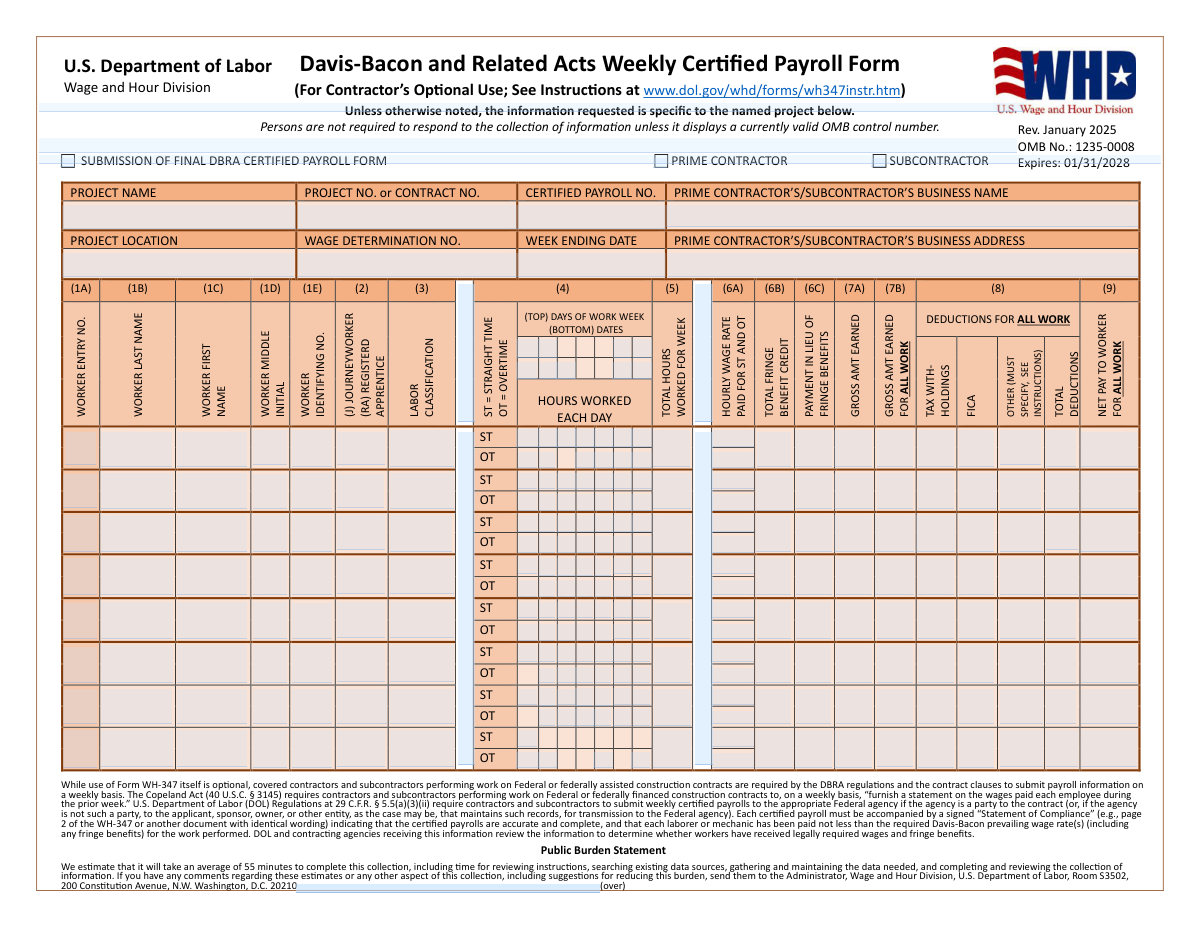
Yes! You can use AI to fill out Davis-Bacon and Related Acts Weekly Certified Payroll Form (Form WH-347)

Form WH-347 is a Wage and Hour Division certified payroll reporting form used on covered federal or federally assisted construction projects subject to the Davis-Bacon and Related Acts (DBRA). Although use of the WH-347 template itself is optional, DBRA regulations and contract clauses require contractors and subcontractors to submit weekly payroll information and a signed Statement of Compliance attesting that workers were paid at least the applicable prevailing wage and fringe benefits. Agencies review these certified payrolls to verify compliance and to help enforce wage protections, and willful falsification can lead to civil/criminal penalties and debarment. Today, this form can be filled out quickly and accurately using AI-powered services like Instafill.ai, which can also convert non-fillable PDF versions into interactive fillable forms.
Our AI automatically handles information lookup, data retrieval, formatting, and form filling.
It takes less than a minute to fill out WH-347 using our AI form filling.
Securely upload your data. Information is encrypted in transit and deleted immediately after the form is filled out.

Form specifications

Form name: Davis-Bacon and Related Acts Weekly Certified Payroll Form (Form WH-347)
Number of pages: 2
Language: English
main-image

Instafill Demo: filling out a legal form in seconds

How to Fill Out WH-347 Online for Free in 2026

Are you looking to fill out a WH-347 form online quickly and accurately? Instafill.ai offers the #1 AI-powered PDF filling software of 2026, allowing you to complete your WH-347 form in just 37 seconds or less.
Follow these steps to fill out your WH-347 form online using Instafill.ai:
  1. 1 Go to Instafill.ai and upload the WH-347 PDF (or select WH-347 from the form library).
  2. 2 Let the AI detect and map the form fields, then confirm the project header details (project name, contract number, payroll number, location, wage determination number, and week ending date).
  3. 3 Choose the submission/contractor type (prime contractor or subcontractor) and indicate whether this is the final DBRA certified payroll submission for the project.
  4. 4 Enter worker-by-worker payroll line data (name/ID, classification, journeyworker/apprentice status, daily straight-time and overtime hours, total weekly hours, and hourly wage rates).
  5. 5 Add fringe benefit information (cash in lieu, fringe benefit credits, and—if applicable—plan names/numbers and whether plans are funded or unfunded) and have the AI calculate totals and check for inconsistencies.
  6. 6 Complete the Statement of Compliance section by checking the required certifications (accuracy/completeness, records availability, correct classifications, apprenticeship verification if applicable, and full payment/no improper deductions) and add any additional remarks.
  7. 7 Review the completed form for accuracy, apply the certifying official’s signature and contact details, then download/export and submit the certified payroll to the appropriate agency/recipient as required.

Our AI-powered system ensures each field is filled out correctly, reducing errors and saving you time.

Why Choose Instafill.ai for Your Fillable WH-347 Form?

Speed

Complete your WH-347 in as little as 37 seconds.

Up-to-Date

Always use the latest 2026 WH-347 form version.

Cost-effective

No need to hire expensive lawyers.

Accuracy

Our AI performs 10 compliance checks to ensure your form is error-free.

Security

Your personal information is protected with bank-level encryption.

Frequently Asked Questions About Form WH-347

This form is used to report weekly payroll information for laborers and mechanics working on covered federal or federally assisted construction projects. Agencies use it to verify workers were paid at least the required Davis-Bacon prevailing wage rates (including fringe benefits).

Both prime contractors and subcontractors performing covered work must submit weekly certified payroll information. On the form, check the box for either “Prime Contractor” or “Subcontractor” to identify who is submitting the payroll.

Use of the WH-347 template is optional, but submitting weekly certified payroll information (with a signed Statement of Compliance) is required under DBRA regulations and contract clauses. You may use another format as long as it contains all required information and the identical compliance statement.

Check this box when the payroll you are submitting is the last certified payroll for the project (or for your company’s work on the project). It helps the contracting agency know your weekly submissions are complete.

You must provide the Project Name, Project/Contract Number, Certified Payroll Number (Payroll No.), Project Location, Wage Determination Number, and Week Ending Date. You also need the submitting company’s legal business name and business address.

It is the identifier for the Davis-Bacon wage decision incorporated into your contract. You can usually find it in the contract documents or in the wage determination provided by the contracting agency/owner.

Use an employer-assigned identifying number (such as an employee ID, badge number, or payroll number). Many contractors use only the last four digits of the SSN or another internal ID to avoid sharing full SSNs.

Enter the worker’s hours in the “Hours Worked Each Day” grid, separating ST and OT as applicable for each day of the week shown. Then make sure the “Total Hours Worked for Week” equals the sum of all daily ST and OT hours.

Enter “J” for a journeyworker or “RA” (or the form’s apprentice indicator) for a registered apprentice, consistent with your payroll records. If you list apprentices, you must also complete the apprenticeship verification section on page 2.

Use “Total Fringe Benefit Credit” for fringe amounts credited through bona fide benefit plans (or allowable anticipated costs) and “Payment in Lieu of Fringe Benefits” for cash paid directly to the worker instead of benefits. If you claim hourly fringe credits, page 2 asks for plan names, plan numbers, funded/unfunded status, and the hourly credit by worker.

List any non-tax, non-FICA deductions (for example, union dues, garnishments, or other authorized deductions) and specify what they are as required by the instructions. Only permissible deductions under 29 CFR part 3 should be taken.

Yes—those columns are intended to reflect the worker’s totals for all work performed during the week, not just the covered project. This helps agencies reconcile weekly pay and deductions across the full payroll period.

A certifying official (someone who paid or supervised payment) must sign and date page 2 and provide contact information. By signing, they certify the payroll is accurate and complete, workers were paid required wage/fringe rates, classifications reflect actual work performed, records are available, and deductions are permissible.

Submit it weekly to the appropriate federal agency if the agency is a party to the contract, or otherwise to the applicant/sponsor/owner/entity that maintains the records for transmission to the federal agency. Processing time varies by agency and project, so confirm the submission method (portal, email, or hard copy) and review timeline with your contracting agency.

Yes—AI tools can help reduce manual entry and errors; for example, Instafill.ai can auto-fill form fields accurately using your payroll data and save time. If your WH-347 PDF is flat/non-fillable, Instafill.ai can convert it into an interactive fillable form and then guide you to complete and export it for submission.

Compliance WH-347
Validation Checks by Instafill.ai

1
Ensures exactly one contractor type is selected (Prime vs Subcontractor)
Validate that the submission indicates whether the filer is a Prime Contractor or a Subcontractor, and that both boxes are not selected at the same time. This is important because downstream routing, responsibility, and compliance expectations differ for primes vs subs. If validation fails, block submission and prompt the user to select exactly one contractor type.
2
Validates required project header fields are complete and non-placeholder
Check that Project Name, Project/Contract Number, Certified Payroll Number, Project Location, Wage Determination Number, Week Ending Date, and Prime/Subcontractor Business Name are present and not blank/whitespace. These fields are essential to identify the contract, wage decision, and payroll period being certified. If any are missing, reject the submission and highlight the missing header fields.
3
Validates Week Ending Date format and plausible payroll period alignment
Ensure Week Ending Date is a valid date (e.g., MM/DD/YYYY or ISO per system standard) and is not an impossible date. Additionally, validate it is not unreasonably far in the future and aligns to a weekly payroll concept (e.g., not earlier than project start if known, and consistent with the 7-day grid). If invalid, prevent submission and request correction of the payroll period end date.
4
Validates Certified Payroll Number is a positive integer and consistent with 'Final' flag
Check that Certified Payroll Number is numeric, positive, and within a reasonable length (e.g., 1–6 digits) to prevent malformed identifiers. If 'Submission of Final DBRA Certified Payroll Form' is checked, optionally enforce that the payroll number is the last in sequence for the project when prior payrolls exist in the system. If validation fails, require a corrected payroll number or confirmation of final status.
5
Validates business address completeness when contractor type is selected
When Prime or Subcontractor is selected, require the Prime/Subcontractor Business Address to be complete enough for identification (street, city, state, ZIP if captured) and not just a partial entry. This supports auditability and contactability for compliance reviews. If incomplete, block submission and request a full business address.
6
Validates each worker row has a complete identity set when any pay/hours are entered
For each payroll table row where any hours, wage, gross, deductions, or net pay fields are populated, require Worker Entry Number, Last Name, First Name, Worker Identifying Number, Journeyworker/Registered Apprentice indicator, and Labor Classification. This prevents orphaned pay lines that cannot be tied to a specific worker and classification. If validation fails, reject the row and require completion or removal of partial entries.
7
Validates Worker Entry Numbers are unique and sequential within the payroll
Ensure Worker Entry Number values are unique across all worker rows on the submission and follow a consistent pattern (commonly sequential integers starting at 1). Duplicate or non-numeric entry numbers can cause misattribution of wages and fringe credits. If validation fails, require the user to renumber or correct duplicates before submission.
8
Validates worker name fields and middle initial formatting
Enforce that First and Last Name contain alphabetic characters (allowing common punctuation like hyphens/apostrophes) and are not purely numeric. Middle Initial, if provided, must be exactly one letter (optionally allowing a trailing period). If invalid, prompt correction to ensure consistent identity matching and reporting.
9
Validates Worker Identifying Number format (no full SSN; last-4 or employer ID)
Check that Worker Identifying Number matches the system’s allowed pattern (e.g., last 4 digits of SSN or an employer-assigned ID) and does not contain a full 9-digit SSN unless explicitly permitted by policy. This reduces privacy risk and aligns with common WH-347 practices. If a full SSN pattern is detected, block submission and require masking/ID substitution.
10
Validates Journeyworker/Registered Apprentice indicator is an allowed code and triggers apprenticeship requirements
Restrict the status indicator to allowed values (e.g., J for Journeyworker, RA for Registered Apprentice, or other configured codes) and disallow free-text variants. If any worker is marked as an apprentice/RA, require the apprenticeship certification checkbox and at least one Apprenticeship Program entry (program name, labor classification, and OA or SAA selection). If validation fails, prevent submission until apprenticeship documentation is completed or the worker status is corrected.
11
Validates daily hours entries are numeric, non-negative, and within daily limits
For each worker/day cell used, validate hours are numeric (supporting decimals if allowed), non-negative, and do not exceed a reasonable maximum per day (commonly 24, or a stricter business rule such as 16). Also ensure that if an hours-worked checkbox is checked, a corresponding numeric hours value exists (and vice versa). If invalid, flag the specific day cell and require correction.
12
Validates weekly total hours equal sum of daily straight-time and overtime hours
Compute the sum of all daily ST and OT hours for the worker and compare it to the reported Total Hours Worked for Week. This catches arithmetic errors that can cascade into incorrect gross pay and fringe calculations. If totals do not match (within a small rounding tolerance), block submission or require the user to reconcile totals.
13
Validates hourly wage rate is numeric, positive, and consistent with overtime rules
Ensure Hourly Wage Rate is numeric and greater than zero, with appropriate precision (e.g., two decimals). If overtime hours are reported, validate that the effective OT rate used in gross calculations is at least 1.5x the straight-time base rate (or that the form’s combined ST/OT rate field is supported by additional fields/notes per system design). If validation fails, require correction of wage rate and/or OT computation inputs.
14
Validates gross pay calculations and internal consistency (this work vs all work)
Check that Gross Amount Earned (This Work) is consistent with hours and wage rate (and OT premium where applicable), allowing for configured rounding rules. Validate that Gross Amount Earned (All Work) is greater than or equal to Gross Amount Earned (This Work), since 'all work' includes the project work plus any other work in the week. If inconsistencies are found, flag the row and require recalculation or explanation per business rules.
15
Validates deductions and net pay arithmetic (gross - deductions = net)
Verify that Total Deductions equals the sum of Tax Withholdings + FICA + Other Deductions (within rounding tolerance), and that Net Pay equals Gross (All Work) minus Total Deductions. This is critical to ensure the payroll is mathematically correct and auditable. If validation fails, prevent submission and identify which component(s) do not reconcile.
16
Validates 'Other Deductions' are specified when non-zero
If Other Deductions has a non-zero amount, require an accompanying specification/label per the form instruction (e.g., union dues, garnishment, etc.) in the designated field or remarks area (depending on implementation). This supports compliance with permissible deductions under 29 CFR part 3 and enables reviewers to assess legitimacy. If missing, block submission until the deduction type is provided.
17
Validates fringe benefit credit and hourly credit table reconciliation
If any worker has a Total Fringe Benefit Credit (6B) amount, require corresponding entries in the Hourly Credit for Fringe Benefits table for that worker, and validate that the worker’s 'Total Hourly Credit' equals the sum of the plan hourly credits entered. Also enforce that each plan column used has a Plan Name, Plan Number, and exactly one of Funded/Unfunded selected. If validation fails, require completion/correction of fringe plan details and totals before submission.
18
Validates certification section completeness: checkboxes, signature, date, and contact info formats
Require the key certification checkboxes (payroll correct/complete, records available, classifications accurate, and no improper rebates/deductions) to be checked before allowing submission. Validate Signature of Certifying Official is present, Certification Date is a valid date, Telephone Number matches a valid US format (area code/prefix/line number), and Email Address matches a standard email pattern. If any element is missing or malformed, block submission because the payroll is not legally certified without a complete statement of compliance.

Common Mistakes in Completing WH-347

Not indicating Prime Contractor vs. Subcontractor (or checking both)

People often overlook the contractor-type checkboxes at the top or mistakenly check both, especially when multiple entities are involved on the same project. This can cause the agency/prime to reject the submission or misfile it under the wrong employer, delaying compliance review. Always check exactly one box (Prime Contractor or Subcontractor) that matches the entity whose payroll records are being reported, and ensure the business name/address match that selection. AI-powered tools like Instafill.ai can help by prompting for the correct role and preventing conflicting checkbox selections.

Forgetting to mark “Submission of Final DBRA Certified Payroll Form” on the last payroll

Contractors frequently submit the final week’s payroll without checking the “final” box because it looks optional or is separated from the weekly data table. If the final indicator is missing, the contracting agency may continue to expect additional weekly payrolls and flag the project as noncompliant. Only check this box on the last payroll for the project/contract and confirm it aligns with the final week ending date. Instafill.ai can reduce this error by tracking payroll sequences and reminding you when a submission appears to be the final period.

Project identifiers don’t match the contract (Project Name/Project No./Wage Determination No.)

A very common issue is entering an internal job nickname, the wrong contract number, or an outdated wage determination number copied from a prior project. Mismatched identifiers can lead to rejection, misrouting, or a finding that the wrong wage decision was applied, which can trigger back-wage calculations. Use the exact Project Name and Project/Contract Number as shown in the contract documents and confirm the Wage Determination Number is the one incorporated into the contract for that location and scope. Instafill.ai can auto-populate and validate these fields against saved project profiles to prevent inconsistencies.

Week Ending Date entered in the wrong format or not aligned to the payroll week

Users often enter a pay date instead of the week ending date, use inconsistent date formats (e.g., 1/5/25 vs. 05-Jan-2025), or pick a week ending day that doesn’t match the contractor’s established payroll week. This creates confusion when auditors reconcile daily hours and can cause the payroll to be treated as covering the wrong period. Follow your contract/agency guidance for the payroll week ending day and use a consistent, unambiguous date format (MM/DD/YYYY is commonly expected). Instafill.ai can format dates consistently and flag week-ending dates that don’t match the expected weekly cadence.

Worker Identifying Number entered as a full SSN or left blank

Because the form asks for a “Worker Identifying No.,” some filers mistakenly enter a full Social Security Number, while others leave it empty due to privacy concerns. Full SSNs increase privacy and breach risk, and missing identifiers make it difficult for reviewers to confirm worker continuity across weeks. Use an employer-assigned ID or only the last four digits of the SSN if permitted by your agency/prime’s instructions, and apply the same identifier consistently each week. Instafill.ai can enforce masking rules and ensure the identifier is present and consistently formatted.

Incorrect Journeyworker/Registered Apprentice indicator (J vs. RA) and missing apprenticeship details

Filers frequently mark someone as an apprentice without confirming they are registered, or they forget to complete the apprenticeship program section (OA/SAA, program name, classification) when apprentices appear on page 1. This can result in disallowed apprentice rates, back wages owed, and heightened scrutiny of the contractor’s payrolls. Only use the Registered Apprentice indicator for workers who are duly registered and ensure the apprenticeship program information is completed and matches the classification actually performed. Instafill.ai can prompt for required apprenticeship details whenever an apprentice code is selected and prevent submission when the supporting section is incomplete.

Labor Classification doesn’t reflect the work actually performed (or is too generic)

A common misunderstanding is listing a worker’s company job title (e.g., “Foreman” or “Operator”) or a generic label (e.g., “Labor”) instead of the Davis-Bacon classification tied to the wage determination and the tasks performed that week. Misclassification can lead to underpayment findings and required restitution if the listed classification has a lower prevailing rate than the actual work performed. Use the wage determination classifications and report the classification(s) of work actually performed; if a worker performed multiple classifications, use proper split classification reporting per instructions. Instafill.ai can help by mapping common job titles to wage-determination classifications and flagging entries that don’t match the project’s wage decision.

Daily ST/OT hours don’t add up to the weekly total hours

Because the form has a daily grid plus a weekly total, people often enter daily hours but forget to update the weekly total, or they place overtime hours in straight-time boxes (or vice versa). These math inconsistencies are a top reason payrolls get returned for correction and can also create wage calculation errors. Reconcile each worker’s daily ST and OT hours so they sum exactly to the “Total Hours Worked for Week,” and ensure OT is recorded in the OT row/boxes. Instafill.ai can automatically sum daily hours, separate ST vs. OT, and validate that totals match before submission.

Hourly Wage Rate field filled with only one rate or the wrong OT calculation

The “Hourly Wage Rate Paid for ST and OT” area is often misunderstood—filers may enter only the straight-time rate, forget to reflect the overtime rate, or incorrectly compute overtime (e.g., not applying the correct premium). This can lead to apparent underpayment during review even when the contractor intended to pay correctly. Follow the instructions for how to show ST and OT rates (and ensure OT is paid at the required premium) and keep the rate consistent with the classification and wage determination. Instafill.ai can format the rate field consistently and flag OT entries that don’t align with expected premium rules.

Fringe benefits misreported (credit vs. cash-in-lieu vs. plan details missing)

Many submissions confuse (6B) “Total Fringe Benefit Credit” with (6C) “Payment in Lieu of Fringe Benefits,” or they claim fringe credit on page 1 but fail to complete the hourly credit plan table (plan name/type/number and funded vs. unfunded). This can cause the fringe credit to be disallowed, resulting in back wages owed and a requirement to resubmit corrected payrolls. If you take fringe credit, document the plan(s), whether funded/unfunded, and the hourly credit per worker; if you pay fringes in cash, report it as cash-in-lieu and ensure it’s included in gross pay as required. Instafill.ai can guide the correct allocation between credit and cash-in-lieu and ensure the plan table is completed whenever fringe credit is entered.

Deductions section incomplete or “Other” deductions not specified

Filers often enter a number under “Other” deductions without describing what it is, or they forget to ensure Total Deductions equals the sum of Tax Withholdings + FICA + Other. Unspecified deductions can raise Copeland Act concerns and trigger requests for backup documentation or disallowance of deductions. Always specify the type of “Other” deduction (e.g., union dues, garnishment, voluntary benefits) per the instructions and verify totals reconcile to net pay. Instafill.ai can require a description when “Other” has an amount and can auto-calculate totals to prevent reconciliation errors.

Statement of Compliance not properly completed (missing checkboxes, signature, date, or contact info)

A frequent rejection reason is submitting the payroll table without a fully executed Statement of Compliance—people miss one or more certification checkboxes, forget the certifying official’s printed name/title, omit the signature/date, or provide an incomplete phone number/email. Without a valid certification, the payroll is not considered “certified,” which can halt payment processing and create compliance findings. Ensure all required certification boxes are checked as applicable, the certifying official is authorized, and signature/date/phone/email are complete and legible. Instafill.ai can validate that all required certification elements are present and correctly formatted (and if you’re working from a flat, non-fillable PDF, Instafill.ai can convert it into a fillable version to reduce missed fields).
Saved over 80 hours a year

“I was never sure if my IRS forms like W-9 were filled correctly. Now, I can complete the forms accurately without any external help.”

Kevin Martin Green

Your data stays secure with advanced protection from Instafill and our subprocessors

Robust compliance program

Transparent business model

You’re not the product. You always know where your data is and what it is processed for.

ISO 27001, HIPAA, and GDPR

Our subprocesses adhere to multiple compliance standards, including but not limited to ISO 27001, HIPAA, and GDPR.

Security & privacy by design

We consider security and privacy from the initial design phase of any new service or functionality. It’s not an afterthought, it’s built-in, including support for two-factor authentication (2FA) to further protect your account.

Fill out WH-347 with Instafill.ai

Worried about filling PDFs wrong? Instafill securely fills davis-bacon-and-related-acts-weekly-certified-payroll-form-form-wh-347 forms, ensuring each field is accurate.