Yes! You can use AI to fill out Paychex Retirement Services Employee Rollover Form
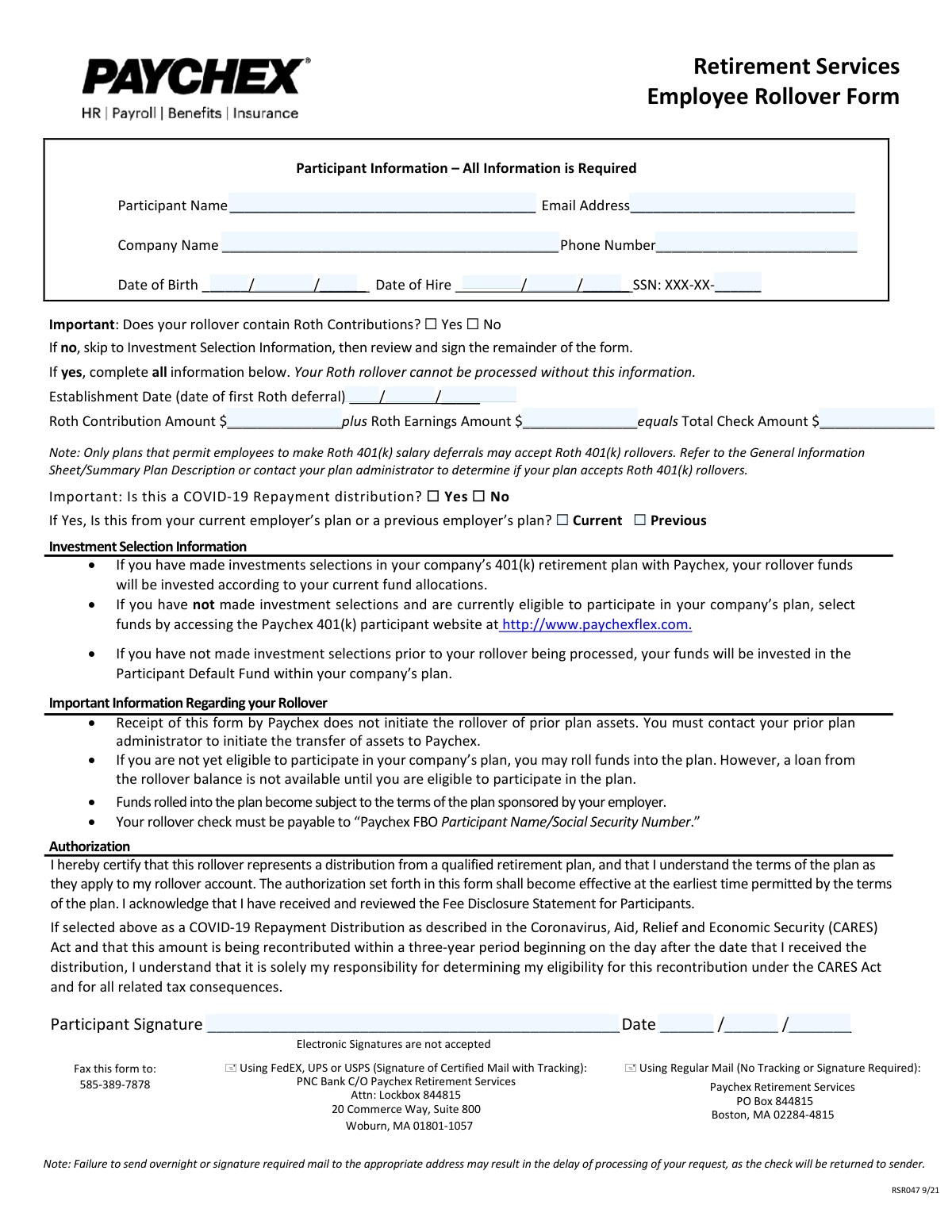
This form authorizes Paychex to accept a rollover of funds from an employee's prior qualified retirement plan into their current company's 401(k) plan. It collects essential participant information, details about any Roth contributions being rolled over, and provides instructions for investment selections. Today, this form can be filled out quickly and accurately using AI-powered services like Instafill.ai, which can also convert non-fillable PDF versions into interactive fillable forms.
Rather not fill this in by hand? Instafill is an online form filler that completes PDF forms automatically — upload the blank form, answer a few questions, and the AI fills every field.
Form specifications
| Form name: | Paychex Retirement Services Employee Rollover Form |
| Number of pages: | 1 |
| Language: | English |
Our AI automatically handles information lookup, data retrieval, formatting, and form filling.
It takes less than a minute to fill out RSR047 using our AI form filling.
Securely upload your data. Information is encrypted in transit and deleted immediately after the form is filled out.
Instafill Demo: How to fill out PDF forms in seconds with AI
How to Fill Out RSR047 Online for Free in 2026
Are you looking to fill out a RSR047 form online quickly and accurately? Instafill.ai offers the #1 AI-powered PDF filling software of 2026, allowing you to complete your RSR047 form in just 37 seconds or less.
Follow these steps to fill out your RSR047 form online using Instafill.ai:
- 1 Navigate to Instafill.ai and upload or select the Paychex Employee Rollover Form.
- 2 Use the AI assistant to automatically fill in the 'Participant Information' section, including your name, company, date of birth, and SSN.
- 3 Answer the questions regarding Roth contributions and COVID-19 repayments, providing specific amounts and dates if applicable.
- 4 Review the 'Investment Selection Information' to understand how your rollover funds will be allocated.
- 5 Read the 'Important Information' and 'Authorization' sections carefully to understand the terms of the rollover.
- 6 Electronically sign and date the form in the authorization section to certify the information provided.
- 7 Download the completed form and mail it to the appropriate Paychex address listed on the document.
Our AI-powered system ensures each field is filled out correctly, reducing errors and saving you time.
Why Choose Instafill.ai for Your Fillable RSR047 Form?
Speed
Complete your RSR047 in as little as 37 seconds.
Up-to-Date
Always use the latest 2026 RSR047 form version.
Cost-effective
No need to hire expensive lawyers.
Accuracy
Our AI performs 10 compliance checks to ensure your form is error-free.
Security
Your personal information is protected with bank-level encryption.
Frequently Asked Questions About RSR047
This form is used to provide Paychex with the necessary information to accept a rollover of funds from your previous employer's qualified retirement plan into your current company's 401(k) plan.
You should fill out this form if you are an employee at a company that uses Paychex for its 401(k) plan and you wish to transfer funds from a previous retirement account into this new plan.
No, submitting this form only notifies Paychex to expect the funds. You must contact your prior plan administrator separately to initiate the actual transfer of your retirement assets.
You must check 'Yes' in the Roth section and provide the date of your first Roth deferral, the Roth contribution amount, and the Roth earnings amount. Your rollover cannot be processed without this specific information.
You should refer to your plan's General Information Sheet or Summary Plan Description (SPD). You can also contact your plan administrator directly to confirm if Roth 401(k) rollovers are permitted.
The check must be made payable to 'Paychex FBO [Your Name]/[Your Social Security Number]'. Be sure to include your full name and Social Security Number as indicated on the form.
Send both the form and check to the PNC Bank lockbox address listed on the form; use the Woburn, MA address for tracked mail (FedEx/UPS) and the Boston, MA P.O. Box for regular mail. You can also fax the form separately.
Your rollover funds will be invested according to your current investment selections on file with Paychex. If you haven't made selections, you should log in to the Paychex Flex website to do so, otherwise your funds will be placed in the plan's default fund.
Yes, you can roll funds into the plan even if you are not yet eligible to make your own contributions. However, you will not be able to take a loan from the rollover balance until you become eligible to participate in the plan.
No, the form explicitly states that electronic signatures are not accepted. You must print the form and provide a physical, 'wet' signature.
This option is for individuals recontributing a Coronavirus-Related Distribution taken under the CARES Act. It is your responsibility to determine your eligibility for this special recontribution.
Yes, services like Instafill.ai use AI to accurately auto-fill form fields with your information, which can save you time and help prevent errors.
Simply upload the Paychex Rollover Form to the Instafill.ai platform. The AI will identify the fields, allowing you to quickly and accurately fill in your information before printing the form for your signature.
You can use a service like Instafill.ai, which can convert flat, non-fillable PDFs into interactive forms. This allows you to type your information directly onto the form before printing it.
Compliance RSR047
Validation Checks by Instafill.ai
1
Participant Information Completeness
This check verifies that all fields in the 'Participant Information' section (Participant Name, Email Address, Company Name, Phone Number, Date of Birth, Date of Hire, and SSN) are filled out. This information is fundamental for identifying the participant and their associated plan. A failure to provide any of this required information will prevent the form from being processed, as the participant's account cannot be accurately located or updated.
2
Email Address Format Validation
This validation ensures that the value entered in the 'Email Address' field follows the standard email format (e.g., '[email protected]'). A valid email is crucial for communication regarding the rollover status, confirmations, and any potential issues. If the format is invalid, the system will reject the entry and prompt the user for a correctly formatted email address to ensure deliverability.
3
SSN Last 4 Digits Format
This check confirms that the value provided for the last four digits of the Social Security Number consists of exactly four numeric digits. The SSN is a critical identifier for matching the rollover to the correct participant account and for tax reporting purposes. An entry with non-numeric characters, or fewer/more than four digits, will be flagged as an error to prevent account mismatches and processing delays.
4
Date of Birth and Age Verification
This validation ensures the 'Date of Birth' is a valid calendar date and that the calculated age of the participant is reasonable for employment (e.g., over 18 years old). This helps prevent data entry errors and confirms the participant meets the legal age requirements for having a retirement account. An invalid date or an age outside the expected range would trigger an error, requiring correction before submission.
5
Date of Hire Logical Consistency
This check verifies that the 'Date of Hire' is a valid date that occurs after the participant's 'Date of Birth'. It is a logical impossibility for an individual to be hired before they were born, so this check prevents significant data entry errors. If the hire date is not chronologically after the birth date, the form submission will fail, prompting the user to review and correct the dates.
6
Roth Information Conditional Requirement
This validation enforces a conditional rule: if the participant answers 'Yes' to the question 'Does your rollover contain Roth Contributions?', then the 'Establishment Date', 'Roth Contribution Amount', 'Roth Earnings Amount', and 'Total Check Amount' fields must be completed. This information is mandatory for correctly processing and allocating Roth funds. If 'Yes' is selected but the required fields are empty, the submission will be blocked until the information is provided.
7
Roth Financials Calculation Verification
This check validates the mathematical accuracy of the Roth rollover amounts. It ensures that the 'Roth Contribution Amount' plus the 'Roth Earnings Amount' correctly equals the 'Total Check Amount'. This is critical for financial integrity and ensuring the rollover is balanced and processed for the correct total value. A mismatch in this calculation will result in a validation error, requiring the user to correct the financial figures.
8
Roth Establishment Date Logic
This validation ensures the 'Establishment Date' (date of first Roth deferral) is on or after the participant's 'Date of Hire'. A Roth deferral cannot logically occur before an employee is hired and eligible to contribute to a plan. This check prevents chronological errors in the participant's contribution history. If the establishment date precedes the hire date, an error will be shown.
9
COVID-19 Repayment Conditional Logic
This check enforces that if a user selects 'Yes' for 'Is this a COVID-19 Repayment distribution?', they must then specify whether it is from a 'Current' or 'Previous' employer's plan. This detail is necessary for proper tracking and application of the CARES Act provisions. Failure to select one of the two options after indicating 'Yes' will halt the submission process until the required selection is made.
10
Signature Presence Check
This validation verifies that the 'Participant Signature' field has been signed. A signature is a legal requirement that authorizes Paychex to act on the participant's behalf and certifies the accuracy of the provided information. Since the form states electronic signatures are not accepted, a digital submission system would check for the presence of an uploaded signature image, and a missing signature would prevent the form from being accepted.
11
Signature Date Validity and Logic
This check ensures the 'Date' field next to the signature is filled with a valid date that is not in the future. The signature date documents when the authorization was given and should be current. A missing, invalid, or future date would cause the form to be rejected, as it calls into question the validity and timing of the authorization.
12
Phone Number Format Validation
This check ensures the 'Phone Number' field contains a valid phone number format, such as a 10-digit number. A valid contact number is essential for the plan administrator to reach the participant if there are questions or issues with the rollover request. An incorrectly formatted number could lead to communication delays and slow down the processing of the rollover.
Common Mistakes in Completing RSR047
Participants often instruct their prior plan administrator to make the rollover check payable directly to them, rather than the required format. The form specifies the check must be payable to 'Paychex FBO Participant Name/Social Security Number'. An incorrectly named check cannot be deposited, leading to its rejection and requiring the participant to request a new check, causing significant delays. To avoid this, provide the exact payee information from the form to your previous plan administrator.
A frequent error is submitting this form to Paychex and assuming Paychex will then contact the prior institution to start the transfer. The form clearly states that the participant is responsible for contacting their prior plan administrator to initiate the rollover. Failure to do so means the funds will never be sent to Paychex, and the rollover process will stall indefinitely. Always contact your old provider to 'push' the funds after submitting this form.
In an age of digital documents, many people default to using an electronic or typed signature. However, this form explicitly states 'Electronic Signatures are not accepted'. Submitting a form with an e-signature will result in its immediate rejection, forcing the participant to print, physically sign, and resubmit the document. To prevent this, always print the form and provide a 'wet' ink signature in the designated field.
The form provides two separate mailing addresses: one for express services like FedEx/UPS and another for regular mail. Sending a tracked, signature-required package to the P.O. Box address will cause it to be returned to the sender. This mistake, explicitly warned against on the form, can delay the processing of the rollover by weeks. Carefully match your shipping method to the correct address provided.
If a rollover contains Roth 401(k) funds, participants often fail to provide the mandatory breakdown of the contribution amount, earnings amount, and the original establishment date. This information is critical for tax purposes and is often not readily available, leading people to leave it blank. An incomplete Roth section will halt the processing of the rollover until the correct information is provided, requiring you to contact your prior administrator for a detailed statement.
Omitting the signature or date is one of the most common and basic errors. An unsigned form is not legally binding and provides no authorization for Paychex to act on your behalf. This oversight will always lead to the form being rejected, requiring you to resubmit it and delaying the entire rollover process. Always double-check the authorization section before sending the form.
Since this form may be printed and filled out by hand, poor or unclear handwriting can cause significant issues. A misread name, Social Security Number, or dollar amount can lead to processing errors, account mismatches, or rejection of the form. This can be avoided by writing slowly and clearly in block letters. AI-powered tools like Instafill.ai can also convert flat PDFs into fillable forms, allowing you to type information for perfect clarity.
When filling out the Roth information, a simple arithmetic error can occur where the 'Roth Contribution Amount' plus the 'Roth Earnings Amount' does not equal the 'Total Check Amount'. This discrepancy signals an error and will cause the form to be flagged for review, pausing the rollover process. To avoid this, carefully verify the amounts from your prior plan's statement and double-check your math before submitting.
The form shows 'SSN: XXX-XX-____', which visually suggests only the last four digits are needed. However, for setting up a financial account, the full Social Security Number is almost always required for identity verification, even if not explicitly stated. Providing only partial information can lead to processing delays while the administrator requests the full SSN. It is best practice to confirm if the full SSN is needed or to write it in clearly.
The form requires the 'Establishment Date (date of first Roth deferral)' if the rollover includes Roth money. This specific date can be difficult to recall or find, leading participants to guess or leave it blank. An incorrect date can cause tax-tracking complications, and a blank field will stop the process. Before filling out the form, contact your previous plan administrator to obtain this exact date from your records.
Saved over 80 hours a year
“I was never sure if my IRS forms like W-9 were filled correctly. Now, I can complete the forms accurately without any external help.”
Kevin Martin Green
Your data stays secure with advanced protection from Instafill and our subprocessors




Robust compliance program
Transparent business model
You’re not the product. You always know where your data is and what it is processed for.
ISO 27001, HIPAA, and GDPR
Our subprocesses adhere to multiple compliance standards, including but not limited to ISO 27001, HIPAA, and GDPR.
Security & privacy by design
We consider security and privacy from the initial design phase of any new service or functionality. It’s not an afterthought, it’s built-in, including support for two-factor authentication (2FA) to further protect your account.
Fill out RSR047 with Instafill.ai
Worried about filling PDFs wrong? Instafill securely fills paychex-retirement-services-employee-rollover-form forms, ensuring each field is accurate.
