Fill out Paychex forms
with AI.
Paychex forms are a vital component of modern human resources and payroll management, serving as the bridge between employees and their essential benefits. This category encompasses a wide range of documentation required to manage retirement plans, employee benefits, and various HR administrative tasks. Because these forms often involve sensitive financial data and long-term planning, accuracy and timely submission are critical for maintaining compliance and ensuring that employee accounts are managed correctly.
By continuing, you acknowledge Instafill's Privacy Policy and agree to get occasional product update and promotional emails.
About Paychex forms
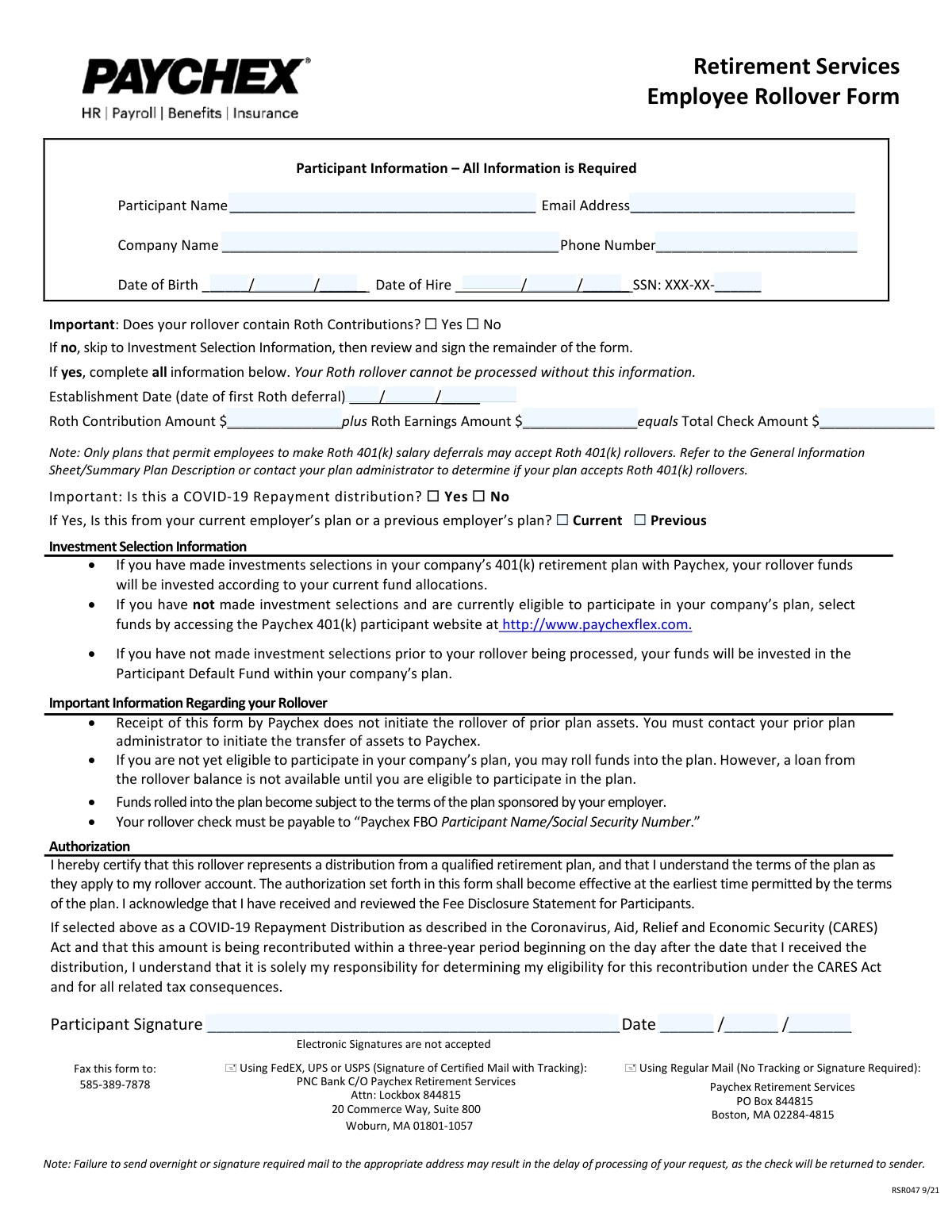
These forms are most commonly used by employees during onboarding or when making significant changes to their benefit elections. For example, individuals moving between companies often need to manage their retirement savings by utilizing documents like the Paychex Retirement Services Employee Rollover Form to consolidate funds into a new 401(k) plan. HR administrators also rely on these documents to facilitate smooth transitions for their staff and to keep corporate records up to date with the latest participant information.
Navigating the complexities of payroll and retirement paperwork can be time-consuming, but modern technology has simplified the process. Tools like Instafill.ai use AI to fill these forms in under 30 seconds, handling your data accurately and securely to ensure every field is completed correctly without the manual effort.
Every form on this page can be completed without typing. Instafill is form filling software that reads a PDF and fills it for you — including flat and scanned documents that carry no fillable fields at all.
Forms in This Category
| Form Name | Pages | FCI | |
|---|---|---|---|
| 1. | Paychex Retirement Services Employee Rollover Form | 1 | – |
- Enterprise-grade security & data encryption
- 99%+ accuracy powered by AI
- 1,000+ forms from all industries
- Complete forms in under 60 seconds
How to Choose the Right Form
Navigating Paychex Retirement and HR Forms
Paychex is a leading provider of human resources, payroll, and benefits administration services. When managing your employee benefits, choosing the correct documentation is essential for ensuring your financial data is processed accurately and your retirement savings remain intact during career transitions.
Consolidating Your Retirement Savings
The primary document available in this category is the Paychex Retirement Services Employee Rollover Form. This form is specifically designed for employees who wish to consolidate their retirement savings by moving funds from a previous employer's qualified plan (such as a 401(k), 403(b), or governmental 457(b)) into their current employer's Paychex-administered 401(k) plan.
You should choose this form if:
- You have a prior retirement balance: You have funds sitting in a former employer's plan and want to manage all your retirement assets in one place.
- You are a new hire: You recently joined a company that uses Paychex for retirement services and want to initiate a "direct rollover" to your new account.
- You want to avoid tax penalties: Using the official rollover form ensures the transfer is handled as a non-taxable event, preventing unnecessary tax withholding or early withdrawal penalties.
Key Information You Will Need
Before you begin filling out the Paychex Retirement Services Employee Rollover Form via Instafill.ai, ensure you have the following details ready to make the process as smooth as possible:
- Participant Information: Your social security number, contact details, and current employer information.
- Prior Plan Details: Information regarding the distributing institution and the type of plan you are moving funds from (e.g., Traditional 401(k) vs. Roth).
- Roth Contribution Data: If you are rolling over Roth 401(k) funds, you will need to specify the amount of basis and the start date of your 5-year aging period.
- Investment Selections: Instructions on how you want the rolled-over funds to be allocated among your current plan's investment options.
By using Instafill.ai, you can quickly turn this often complex PDF into a fillable document, allowing our AI tools to help you complete the required fields with precision and speed.
Form Comparison
| Form | Purpose | Key Information Required | Frequency |
|---|---|---|---|
| Paychex Retirement Services Employee Rollover Form | Authorizes the transfer of retirement funds from a previous plan to a current 401(k). | Participant details, Roth contribution history, and specific investment allocation instructions. | Used once per rollover event when an employee consolidates their retirement assets. |
Tips for Paychex forms
Ensure the plan name and account number from your previous employer match your latest statement exactly. Mismatched account details are the most common cause of processing delays when moving funds into a Paychex retirement account.
AI-powered tools like Instafill.ai can complete these complex forms in under 30 seconds with high accuracy. Your sensitive financial data stays secure during the process, providing a fast and reliable way to manage multiple HR and retirement documents.
If your rollover includes Roth funds, you must provide the original contribution date and the total cost basis. This information is critical for Paychex to track your tax-free growth and prevent future tax complications during retirement.
Confirm whether the check from your previous provider should be mailed directly to Paychex or sent to you for forwarding. If the check is sent to you, ensure it is made payable to the new plan trustee to avoid accidental tax withholding or penalties.
Don't assume your rolled-over funds will automatically follow your current contribution settings. Use the investment selection section of the form to specify exactly how the new balance should be distributed across your available funds.
Always save a copy of the completed form and any confirmation receipts provided by your previous plan administrator. These records are essential for verifying that your full balance was transferred correctly and for reconciling your annual tax documents.
Frequently Asked Questions
Paychex forms are primarily used by employees and employers to manage payroll, human resources, and retirement benefits. They facilitate essential administrative tasks like setting up direct deposits, updating tax withholdings, and managing contributions to corporate 401(k) plans.
This form is designed for employees who wish to transfer funds from a previous employer's retirement plan into their current company's Paychex-managed 401(k). It ensures that the funds are correctly identified and allocated according to the participant's specific investment preferences.
You will generally need your personal identification details, such as your Social Security number and contact information, along with specific plan details from your previous provider. For rollover forms, you will also need the exact dollar amount or percentage you intend to transfer and your current company's plan ID.
Yes, AI tools like Instafill.ai can be used to fill out Paychex forms in under 30 seconds. These tools accurately extract data from your source documents, such as previous account statements or payroll records, and place the information directly into the correct fields on the PDF.
While manual entry can take 15 to 20 minutes depending on the complexity of the retirement data, using an AI-powered service can reduce this time significantly. Most users can complete the process in less than a minute by simply uploading their supporting documents for automatic data extraction.
Most Paychex forms should be submitted directly to your company's HR department or plan administrator for internal processing. In some cases, specific instructions on the form may direct you to mail or upload the document directly to the Paychex Retirement Services portal or a specific third-party administrator.
Yes, investment selections can typically be updated at any time through the Paychex participant website. The rollover form provides the initial instructions for the incoming funds, but your ongoing portfolio management is handled via your secure online account dashboard.
A direct rollover moves funds directly from one plan provider to another, usually avoiding immediate tax implications. An indirect rollover involves the funds being paid to you first, which requires you to deposit them into the new plan within a specific timeframe to avoid taxes and potential penalties.
Many modern HR and retirement processes allow for electronic signatures to speed up administration. However, you should always verify with your employer's HR policy or check the specific instructions on the form to ensure a digital signature meets their internal compliance requirements.
Your company's plan ID is usually found in your benefits enrollment package or on your internal employee HR portal. If you cannot locate it, your HR representative or benefits coordinator can provide this number to ensure your rollover is credited to the correct corporate account.
Double-checking your previous plan's closing statement is the best way to ensure accuracy regarding fund totals. Using AI-driven filling services can also help minimize human error by pulling data directly from official documents rather than relying on manual transcription.
Glossary
- Direct Rollover
- A transfer of retirement funds directly from one plan provider to another, ensuring the money remains tax-deferred and avoids automatic tax withholding.
- Qualified Plan
- A retirement savings plan, such as a 401(k) or 403(b), that meets specific IRS tax code requirements to provide tax benefits to employers and employees.
- Roth Contribution
- Retirement savings made with after-tax dollars, where the principal and earnings can generally be withdrawn tax-free during retirement if specific conditions are met.
- Plan Administrator
- The individual or entity responsible for managing the day-to-day operations of a retirement plan and ensuring it complies with federal regulations.
- Trustee-to-Trustee Transfer
- A method of moving retirement funds where the money is sent directly between financial institutions, preventing the account holder from ever taking possession of the funds.
- Investment Election
- A section on the form where the employee specifies how their rolled-over funds should be distributed among the various investment options offered by the new plan.
- Distribution
- The withdrawal of funds from a retirement account, which must be correctly identified as a rollover on tax forms to avoid being taxed as early withdrawal income.
- Pre-tax Contribution
- Money deposited into a retirement account before federal and state taxes are calculated, which reduces the employee's current taxable income.