Yes! You can use AI to fill out CV-ODL-100, Petition for Occupational Driver's License

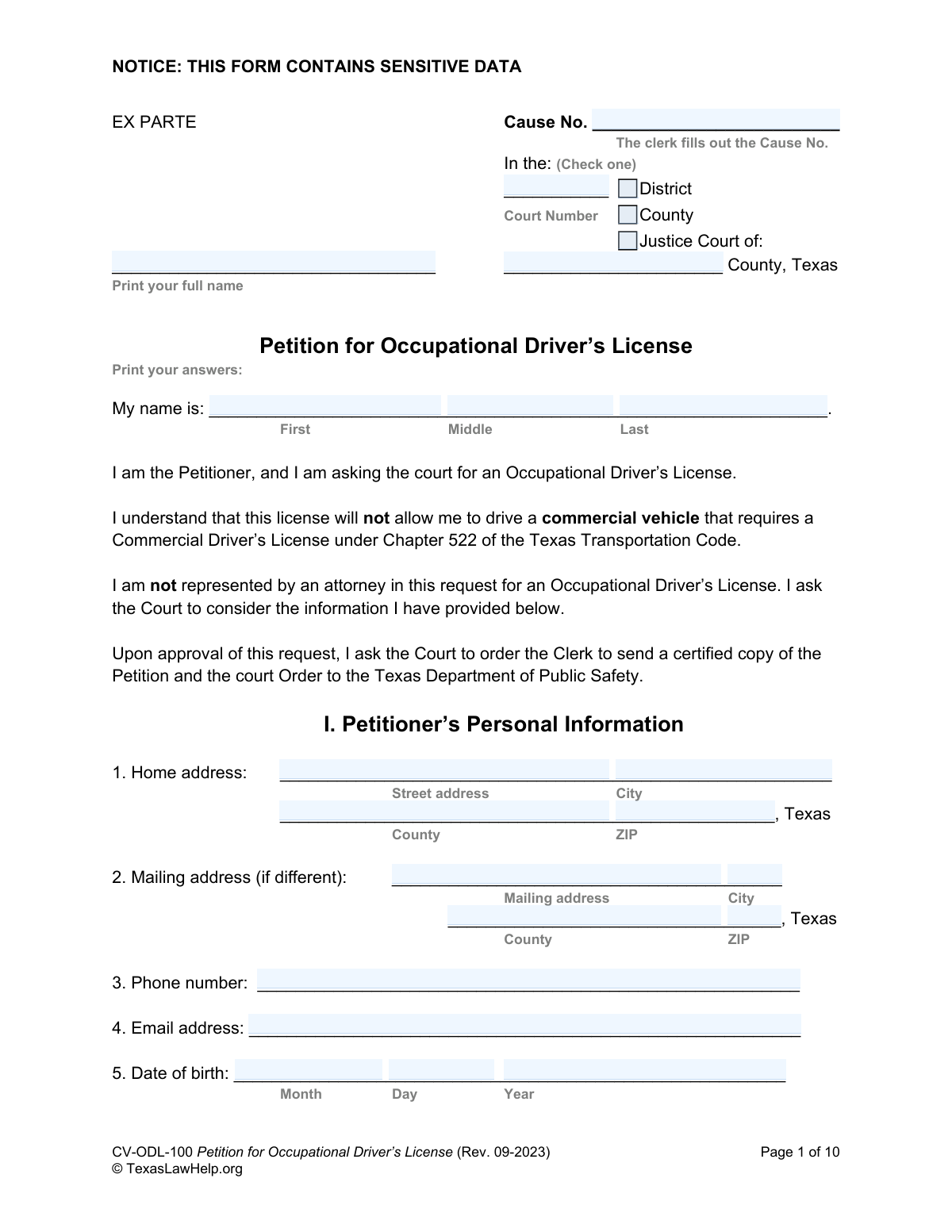
Form CV-ODL-100, Petition for Occupational Driver's License, is a legal document filed in a Texas court by an individual whose driver's license has been suspended or revoked. The petitioner uses this form to demonstrate an 'essential need' to drive for work, school, or other vital household duties, requesting a special, restricted license from the judge. Today, this form can be filled out quickly and accurately using AI-powered services like Instafill.ai, which can also convert non-fillable PDF versions into interactive fillable forms.
CV-ODL-100 is part of the driver license forms category on Instafill.
Our AI automatically handles information lookup, data retrieval, formatting, and form filling.
It takes less than a minute to fill out CV-ODL-100 using our AI form filling.
Securely upload your data. Information is encrypted in transit and deleted immediately after the form is filled out.

Form specifications

Form name: CV-ODL-100, Petition for Occupational Driver's License
Number of fields: 233
Number of pages: 1
Language: English
main-image

Instafill Demo: How to fill out PDF forms in seconds with AI

How to Fill Out CV-ODL-100 Online for Free in 2026

Are you looking to fill out a CV-ODL-100 form online quickly and accurately? Instafill.ai offers the #1 AI-powered PDF filling software of 2026, allowing you to complete your CV-ODL-100 form in just 37 seconds or less.
Follow these steps to fill out your CV-ODL-100 form online using Instafill.ai:
  1. 1 Navigate to Instafill.ai and upload or select the Petition for Occupational Driver's License (Form CV-ODL-100).
  2. 2 Use the AI assistant to automatically populate your personal information, including your name, address, contact details, and driver's license number.
  3. 3 Provide detailed information about your current license suspension or revocation, including the reasons, relevant dates, and any associated court cases.
  4. 4 Clearly define your 'essential need' to drive by inputting details about your employment, school schedule, or other necessary travel, and specify the exact hours and counties you need to drive in.
  5. 5 Indicate whether you are requesting a waiver for an ignition interlock device or substance abuse counseling and provide the required justifications.
  6. 6 Gather and attach all required supporting documents, such as a certified abstract of your driving record (Type AR), an SR-22 insurance form, and proof of interlock installation if applicable.
  7. 7 Carefully review all entered information for accuracy, then complete the verification section by either signing the unsworn declaration or having the document notarized before filing it with the court.

Our AI-powered system ensures each field is filled out correctly, reducing errors and saving you time.

Why Choose Instafill.ai for Your Fillable CV-ODL-100 Form?

Speed

Complete your CV-ODL-100 in as little as 37 seconds.

Up-to-Date

Always use the latest 2026 CV-ODL-100 form version.

Cost-effective

No need to hire expensive lawyers.

Accuracy

Our AI performs 10 compliance checks to ensure your form is error-free.

Security

Your personal information is protected with bank-level encryption.

Frequently Asked Questions About Form CV-ODL-100

This form is used to petition a Texas court for a special, restricted license that allows you to drive for essential needs, like work or school, while your regular driver's license is suspended or revoked.

You should fill out this form if your Texas driver's license has been suspended, canceled, or revoked, and you have an essential need to drive for work, school, or other vital household duties.

You must attach a certified abstract of your driver's license record (Type AR) and an SR-22 form from your insurance company. Depending on your case, you may also need to provide proof of an ignition interlock device installation.

An SR-22 is a certificate proving you have current auto liability insurance, which you must obtain from your insurance company. It is a required attachment for this petition.

In Section V, you must provide specific details about your work, school, or other essential household duties that require you to drive. Include employer information, work hours, and school addresses to justify your need for the license.

You should leave the 'Cause No.' field blank. The form indicates that the court clerk will fill in this number when you file your petition.

Yes, you can ask the court to allow up to 12 hours of driving in a 24-hour period by checking the box in question 16. You must provide a written explanation of why the additional driving time is necessary.

An ignition interlock device is a breathalyzer connected to your vehicle's ignition that you must blow into before starting the car. It is often required for individuals with alcohol-related license suspensions.

No, it is not required if you complete and sign the 'Unsworn Declaration' under penalty of perjury in Section IX. If you choose not to use that option, you must sign the form in the presence of a notary public.

You must file the petition in the appropriate Justice, County, or District court. This is typically in the county where you reside or where the incident that led to your license suspension occurred.

No, the form clearly states that this license will not allow you to drive a commercial vehicle that requires a Commercial Driver's License (CDL).

Yes, services like Instafill.ai use AI to accurately auto-fill form fields with your personal information, which can save time and help prevent errors.

You can upload the PDF of the petition to the Instafill.ai platform. The service will make the form interactive, allowing you to type your answers directly into the fields before printing for submission.

If you have a non-fillable or 'flat' PDF, you can use a tool like Instafill.ai to convert it into an interactive, fillable form. This allows you to easily type your information instead of filling it out by hand.

Compliance CV-ODL-100
Validation Checks by Instafill.ai

1
Jurisdiction Selection and Completeness
This check ensures that at least one checkbox is selected in Section 7 (Jurisdiction). If the option 'My license was suspended... due to another court' is checked, the validation also confirms that the court type, name, and county fields are filled. This is critical for establishing the court's authority to hear the case. A failure means the petition cannot be filed as the legal basis for jurisdiction is unclear.
2
Exclusive Driver's License Status
Validates that in Question 8, the petitioner has selected exactly one of the three options: 'I have never had a Texas Driver’s License,' 'My Texas Driver’s License # is,' or 'My non-Texas Driver’s License...'. Selecting none or multiple options creates ambiguity about the petitioner's license history. If validation fails, the user must correct their selection to proceed, ensuring clarity for the court and DPS.
3
Conditional Driver's License Details
This check is triggered by the selection in Question 8. If 'Texas Driver’s License' is checked, the license number and expiration date fields become mandatory. If 'non-Texas Driver’s License' is checked, the state, number, and expiration date become mandatory. This ensures that all necessary data is captured for the specific license type, which is essential for DPS to process the order.
4
Date Field Format and Plausibility
Verifies that all date fields (e.g., Date of Birth, License Expiration, Arrest Date, Conviction Date) are entered in a valid MM/DD/YYYY format and represent a logical date. For example, the Date of Birth must result in an age that is legally old enough to drive, and dates of conviction cannot be in the future. This prevents data entry errors and ensures the timeline of events is accurate and legally sound.
5
SSN Last Four Digits Format
Ensures the field for 'The last four digits of my Social Security Number' contains exactly four numeric digits. This is a common identifier used by state agencies like the DPS. An incorrect format would lead to record-matching failures and processing delays for the petition.
6
Reason for Suspension Completeness
In Section IV (Prior History), this validation confirms that at least one checkbox from A to H is selected to explain the license suspension. If 'H. Other' is checked, it also ensures the corresponding explanation text box is not empty. This is a core requirement of the petition, as the reason for suspension dictates legal requirements, such as the potential need for an interlock device.
7
Essential Need Justification
Verifies that in Section V, at least one checkbox for 'essential need' is selected (e.g., work, school). It then confirms that if a category is selected, the corresponding details (e.g., Employer Name and Address, School Name) are filled out. The entire basis for an occupational license is 'essential need,' so failure to provide this information and supporting details will result in the petition being rejected.
8
Driving Schedule Logic
For the schedule in Question 15, this check validates that for any given day, the 'To' time is chronologically after the 'From' time. It also ensures that if a 'From' time is entered, a corresponding 'To' time is also provided. This prevents illogical or incomplete schedule requests that the court cannot grant.
9
Driving Hours Limit and Justification
This check validates two things for Question 16. First, if the checkbox to request more than four hours of driving is checked, the explanation field becomes mandatory. Second, it calculates the total time requested for each day and flags any request that exceeds the statutory maximum of 12 hours in a 24-hour period. This ensures the request is compliant with Texas Transportation Code.
10
Waiver Explanation Requirement
In Sections VI and VII, if the petitioner checks 'I do ask the court to waive...' for either the interlock or counseling requirement and then selects the 'Other' checkbox, this validation ensures the corresponding explanation text field is filled out. A request for a waiver without a specific, articulated reason will be denied by the court, so this check prevents an incomplete filing.
11
Verification Method Integrity
This check ensures that the petitioner has completed either 'Option #1: Unsworn Declaration' or 'Option #2: Notarization', but not both. The form must be legally verified to be considered by the court. This validation prevents submission of a legally invalid document or a confusing one with conflicting verification methods.
12
Unsworn Declaration Data Consistency
If the 'Unsworn Declaration' (Option #1) is used for verification, this check cross-references the petitioner's name, date of birth, and address against the information provided in Section I. Any mismatch would indicate a data entry error or a more serious issue. This ensures the identity of the person signing under penalty of perjury is consistent throughout the document.
13
Phone and Email Format Validation
This check ensures the phone number and email address provided in Section I conform to standard formats (e.g., (XXX) XXX-XXXX for phone, [email protected] for email). This is crucial for the court clerk and other parties to communicate with the petitioner regarding hearing dates and other important matters. An invalid format could lead to the petitioner missing critical information.

Common Mistakes in Completing CV-ODL-100

Failing to Attach Required Supporting Documents

Applicants frequently forget to include mandatory documents listed in Section VIII, such as the certified Type AR driver record and the SR-22 insurance form. This often happens because they are unsure what these documents are or where to get them. Submitting an incomplete petition will lead to immediate rejection by the court clerk or denial by the judge, causing significant delays and requiring the applicant to refile. To avoid this, use Section VIII as a checklist and gather all required documents before submitting the petition.

Providing a Vague 'Essential Need' Justification

In Section V, many petitioners fail to provide specific, verifiable details to prove their 'essential need' to drive, simply writing 'for work' or 'for school'. The court requires complete employer information (name, address, hours) and school details to grant a petition. A vague or incomplete justification is a primary reason for denial. To prevent this, meticulously fill out all fields for each employer, school, or other essential activity, explaining exactly why driving is necessary and other transport is not an option.

Creating an Unrealistic or Invalid Driving Schedule

When completing the driving schedule in Section V, #15, petitioners often request 24/7 access, exceed the maximum allowed hours (typically 12 hours in a 24-hour period), or use incorrect time formats. This signals to the judge that the applicant does not understand the restrictions of an occupational license, leading to rejection of the proposed schedule. To avoid this, create a specific schedule that only covers essential travel, double-check that you have selected 'a.m.' or 'p.m.' for every time, and ensure the total hours are within the legal limit.

Incorrectly Signing or Verifying the Petition

The verification section on pages 9-10 is a major source of errors. Applicants may sign the notarization block without a notary present, fill out both the unsworn declaration and the notary section, or forget to sign at all. An improperly executed legal document is invalid and will be rejected by the court. To avoid this, carefully choose only one verification method and follow its instructions precisely, ensuring you sign in the correct place, on the correct date, and in front of a notary if required.

Selecting the Incorrect Court or Jurisdiction

Petitioners often get confused about which court (District, County, or Justice) has jurisdiction, as the arrest, conviction, and residence may be in different counties. Selecting the wrong court in the header or in Section I, #7 will cause the petition to be dismissed for being filed in the wrong venue. This forces the applicant to start over, wasting both time and filing fees. Before filing, carefully review the jurisdiction criteria to confirm the correct court for your specific situation.

Providing Inaccurate or Incomplete Legal History

Sections III and IV require precise details about convictions, arrest dates, and court case numbers, which applicants may not have readily available. Guessing, omitting information, or confusing an arrest date with a conviction date can be viewed as an attempt to mislead the court, resulting in denial. To prevent this, gather all your official court and DPS records before filling out the form to ensure every date, court name, and offense is entered accurately.

Writing in Fields Reserved for Court Staff

The top of the form includes a field for the 'Cause No.' with a clear instruction that 'The clerk fills out the Cause No.' Some applicants fill this in anyway, which can disrupt the court's filing process. While a seemingly minor error, it shows a lack of attention to detail. To avoid this, carefully read all instructions on the form, including notes in the margins, and only enter information in fields designated for the petitioner.

Inconsistent Personal Information Across the Form

The petition asks for name and address in multiple locations, such as the first page and the verification section on page 9. Applicants sometimes enter slight variations, like using a middle initial in one spot and a full middle name in another. This inconsistency can cause confusion and lead to important court notices being mailed to the wrong address. Ensure your full legal name and current address are entered identically in every section to prevent processing delays.

Failing to Explain 'Other' or 'Explain' Sections

Throughout the form, there are several fields that say 'Other (Explain)' or simply 'Explain' (e.g., Section V, #13). Many applicants check a box but then leave the required explanation blank. These explanations are critical for providing context to the judge about your unique situation, and failing to provide them weakens your petition. Always provide a clear, concise, and complete explanation whenever prompted to do so.

Submitting a Poorly Scanned or Illegible Form

This form is often available as a non-fillable PDF, leading people to print it, fill it out by hand, and then scan it for electronic filing. Common mistakes include illegible handwriting, dark or blurry scans, and pages being scanned out of order. A document that is difficult or impossible for the clerk and judge to read may be rejected outright. To avoid this, print legibly in black ink. Better yet, use a tool like Instafill.ai, which can convert the non-fillable PDF into an easily fillable format, ensuring a clean, professional, and legible submission.
Saved over 80 hours a year

“I was never sure if my IRS forms like W-9 were filled correctly. Now, I can complete the forms accurately without any external help.”

Kevin Martin Green

Your data stays secure with advanced protection from Instafill and our subprocessors

Robust compliance program

Transparent business model

You’re not the product. You always know where your data is and what it is processed for.

ISO 27001, HIPAA, and GDPR

Our subprocesses adhere to multiple compliance standards, including but not limited to ISO 27001, HIPAA, and GDPR.

Security & privacy by design

We consider security and privacy from the initial design phase of any new service or functionality. It’s not an afterthought, it’s built-in, including support for two-factor authentication (2FA) to further protect your account.

Fill out CV-ODL-100 with Instafill.ai

Worried about filling PDFs wrong? Instafill securely fills cv-odl-100-petition-for-occupational-drivers-license forms, ensuring each field is accurate.