Yes! You can use AI to fill out DCFS Caseworker Recommendation for Use of Child's Funds for Special Needs

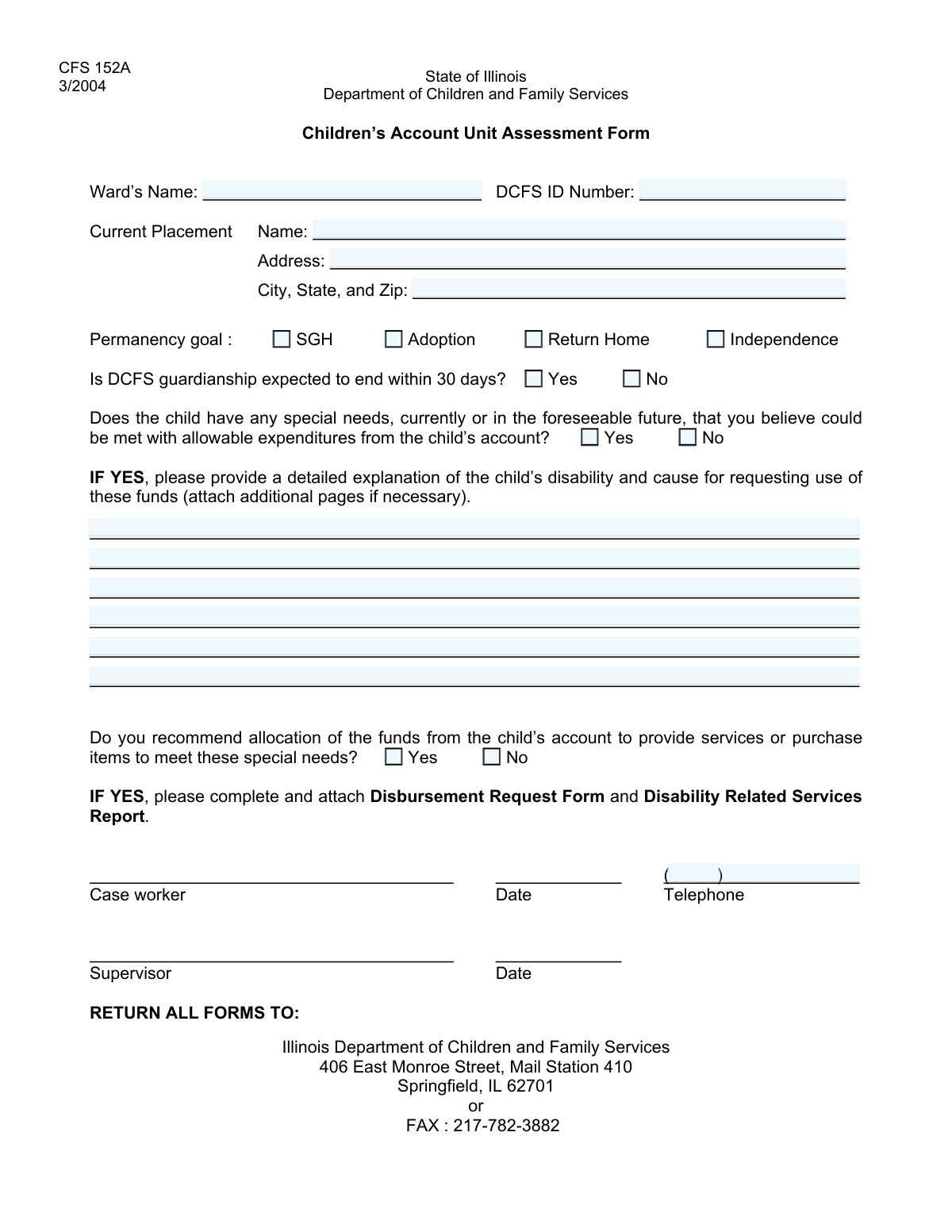
The DCFS Caseworker Recommendation for Use of Child's Funds for Special Needs is a critical document used by caseworkers within the Department of Children and Family Services. Its purpose is to formally assess a child's permanency goal and recommend the use of funds from the child's personal account to meet specific special needs or address a disability. This process is vital for ensuring children in care receive necessary support not covered by other resources. Today, this form can be filled out quickly and accurately using AI-powered services like Instafill.ai, which can also convert non-fillable PDF versions into interactive fillable forms.
DCFS Special Needs Fund Recommendation is part of the special needs forms category on Instafill.
Our AI automatically handles information lookup, data retrieval, formatting, and form filling.
It takes less than a minute to fill out DCFS Special Needs Fund Recommendation using our AI form filling.
Securely upload your data. Information is encrypted in transit and deleted immediately after the form is filled out.

Form specifications

Form name: DCFS Caseworker Recommendation for Use of Child's Funds for Special Needs
Number of fields: 24
Number of pages: 1
Filled form examples: Form DCFS Special Needs Fund Recommendation Examples
Language: English
main-image

Instafill Demo: How to fill out PDF forms in seconds with AI

How to Fill Out DCFS Special Needs Fund Recommendation Online for Free in 2026

Are you looking to fill out a DCFS SPECIAL NEEDS FUND RECOMMENDATION form online quickly and accurately? Instafill.ai offers the #1 AI-powered PDF filling software of 2026, allowing you to complete your DCFS SPECIAL NEEDS FUND RECOMMENDATION form in just 37 seconds or less.
Follow these steps to fill out your DCFS SPECIAL NEEDS FUND RECOMMENDATION form online using Instafill.ai:
  1. 1 Navigate to Instafill.ai and upload or select the DCFS Special Needs Fund Recommendation form.
  2. 2 Use the AI assistant to automatically populate the Child Identification and Current Placement information from your case files.
  3. 3 Select the appropriate checkboxes to indicate the child's permanency goal and the expected status of DCFS guardianship.
  4. 4 Indicate if the child has special needs that can be met by their account. If yes, provide a detailed explanation of the disability and the justification for using the funds.
  5. 5 Formally recommend for or against the allocation of funds from the child's account to meet these special needs by checking the appropriate box.
  6. 6 Enter your caseworker contact details, including your full telephone number.
  7. 7 Review all entered information for accuracy, then securely sign and submit the completed form according to your agency's protocol.

Our AI-powered system ensures each field is filled out correctly, reducing errors and saving you time.

Why Choose Instafill.ai for Your Fillable DCFS Special Needs Fund Recommendation Form?

Speed

Complete your DCFS Special Needs Fund Recommendation in as little as 37 seconds.

Up-to-Date

Always use the latest 2026 DCFS Special Needs Fund Recommendation form version.

Cost-effective

No need to hire expensive lawyers.

Accuracy

Our AI performs 10 compliance checks to ensure your form is error-free.

Security

Your personal information is protected with bank-level encryption.

Frequently Asked Questions About Form DCFS Special Needs Fund Recommendation

This form is used to assess and request the use of funds from a child's personal account to meet their special needs. It documents the child's current situation, permanency goal, and provides justification for the expenditure.

This form is typically completed by the child's case worker, guardian, or another responsible party familiar with the child's needs and case plan. It requires detailed knowledge of the child's situation and permanency goals.

The 'child's account' refers to personal funds belonging to the child, which may come from sources like Social Security benefits, inheritance, or other assets. This form is used to request permission to spend that money on the child's behalf.

A special need is any physical, developmental, mental, or emotional condition that requires specific services, items, or treatments. This can range from medical equipment and therapy to educational resources not covered by other means.

In this section, you must clearly describe the child's disability or condition and explain how the requested funds will be used to purchase specific items or services to address it. Be as specific as possible to justify the expenditure.

These options describe the long-term plan for the child's living situation. 'Return Home' means returning to parents, 'Adoption' or 'Subsidized Guardianship (SGH)' refer to permanent placement with another family, and 'Independence' is for older youth preparing for adulthood.

If the child does not have special needs that could be met with their account funds, you should check the 'No' box for the question 'Special Needs Met by Child's Account'. This indicates that no expenditure is being requested at this time.

This information helps determine the urgency and long-term planning for the child's financial resources. The management of the child's account may change once they are no longer under DCFS guardianship.

After submission, the request will be reviewed by the appropriate authority, likely a supervisor or a financial unit within the agency. They will approve or deny the recommendation to allocate funds based on the justification provided.

Yes, services like Instafill.ai use AI to help you accurately auto-fill form fields, which can save time and reduce errors. This is especially useful for repetitive information like names, addresses, and case numbers.

You can use a service like Instafill.ai to easily fill out this form online. Simply upload the form, and the platform will make it interactive so you can type your answers directly into the fields.

If you have a non-fillable or 'flat' PDF, you can use a tool like Instafill.ai to convert it into an interactive, fillable form. This allows you to easily type your information without needing to print and write by hand.

The form itself does not specify, but it is good practice to attach supporting documents like price quotes for items, reports from therapists, or medical records that substantiate the special need and requested expenditure. Check with your agency's specific guidelines.

Compliance DCFS Special Needs Fund Recommendation
Validation Checks by Instafill.ai

1
Exclusive Permanency Goal Selection
Validates that only one permanency goal (SGH, Adoption, Return Home, or Independence) is selected. This is critical for ensuring the case plan has a single, clear objective, preventing ambiguity in legal and care proceedings. If more than one goal is selected, the form submission should be blocked with an error message prompting the user to choose only one.
2
Required Permanency Goal Selection
Ensures that at least one permanency goal checkbox is selected. A permanency goal is a fundamental piece of information for this form, defining the long-term plan for the child. Failure to provide this information would render the form incomplete and unusable for case planning, so the submission must be rejected until a goal is specified.
3
Exclusive Guardianship Status Selection
Verifies that exactly one of the two 'Guardianship Expected to End' options (Yes or No) is selected. This provides a definitive answer regarding the short-term status of DCFS guardianship, which is crucial for planning and resource allocation. The form should not be submittable if neither or both options are checked.
4
Exclusive Special Needs Status Selection
Checks that exactly one of the 'Special Needs Met by Child’s Account' options (Yes or No) is selected. This is a mandatory declaration that determines whether subsequent sections related to fund allocation are applicable. An ambiguous or missing answer would break the form's logic, so a clear choice is required for submission.
5
Conditional Requirement for Special Needs Explanation
This validation ensures the 'Detailed Explanation' field is not empty if the user has checked 'Yes' for 'Special Needs Met by Child’s Account'. This explanation is essential for justifying the use of funds and is required for the request to be reviewed. If the condition is met but the field is empty, the user should be prompted to provide the necessary details before they can submit the form.
6
Logical Consistency for Fund Allocation
This check ensures that if 'No' is selected for 'Special Needs Met by Child’s Account', the user cannot select 'Yes' for 'Recommend Allocation for Special Needs'. It is logically inconsistent to recommend allocating funds when no special needs have been identified for fund use. This validation prevents contradictory data entry and ensures the integrity of the request.
7
Complete Placement Information
Verifies that the 'Placement Name', 'Placement Address', and 'Placement City, State, and Zip' fields are all filled out. The child's current physical location is critical information for welfare checks, service delivery, and emergency contact. An incomplete address would make it difficult to locate the child, so the form must be rejected until all parts of the address are provided.
8
Valid Placement Zip Code Format
Validates that the zip code provided in the 'Placement City, State, and Zip' field is a valid 5-digit or 9-digit (ZIP+4) numerical format. A correct zip code is essential for mail delivery, geographic data analysis, and verifying the rest of the address. The system should reject submissions with improperly formatted zip codes to ensure data accuracy.
9
Complete Case Worker Telephone Number
Ensures that both the 'Case Worker Telephone Area Code' and 'Case Worker Telephone Number' fields are filled out. A complete phone number is vital for communication and follow-up on the case. If either part is missing, the form submission should be blocked until a full 10-digit number can be formed.
10
Numeric Case Worker Telephone Number
This check validates that the 'Case Worker Telephone Area Code' (3 digits) and 'Case Worker Telephone Number' (7 digits) fields contain only numeric characters. This prevents data entry errors like including parentheses or dashes, ensuring the phone number is stored in a clean, standardized format. An error should be shown if non-numeric characters are entered.
11
Required Child Identification
Ensures that the primary child identification fields ('Text1' and 'Text2') are not empty. The entire form is meaningless without knowing which child it pertains to, making this a critical validation. If these fields are left blank, the submission must be rejected with a clear error message indicating that the child must be identified.
12
Exclusive Allocation Recommendation
Verifies that exactly one of the 'Recommend Allocation for Special Needs' options (Yes or No) is selected. This provides a clear recommendation from the caseworker regarding the use of funds. An ambiguous or missing recommendation would require manual follow-up, so the form should enforce a clear choice when the section is applicable.

Common Mistakes in Completing DCFS Special Needs Fund Recommendation

Incomplete or Incorrect Child Identification

Users often enter partial identification numbers or make typos in the 'Child Identification' fields (Text1, Text2). Because these IDs are the primary way to link the form to the correct child's case file, any error can lead to significant delays or the form being rejected entirely. Always double-check the numbers against the official case file to ensure accuracy before submission.

Using Ambiguous Placement Names

In the 'Placement Name' field, people may use informal names or abbreviations for a foster home or facility (e.g., 'The Smith's house' instead of 'Smith Family Foster Home'). This ambiguity can make it difficult for the agency to officially identify the location, leading to delays in communication, verification, and service delivery. Always use the full, official name of the placement as registered with the agency.

Incorrect or Incomplete Placement Address

Data entry errors are very common in address fields, including typos in the street name, wrong street numbers, or omitting apartment/unit numbers. An incorrect address can cause official mail to be returned, prevent case workers from completing scheduled visits, and misdirect services. Using an AI-powered tool like Instafill.ai can help prevent these errors by validating the address against a database and ensuring it is formatted correctly.

Selecting Multiple or Conflicting Permanency Goals

The form asks for the child's permanency goal via separate checkboxes (Adoption, Return Home, etc.), implying a single choice is required. A common mistake is to select multiple, conflicting goals, which creates confusion about the primary case plan and can stall legal or administrative proceedings. You should select only the one, primary permanency goal that is currently documented in the official case plan.

Omitting the Permanency Goal Entirely

Some users, perhaps unsure of the current goal, will leave all permanency goal checkboxes ('SGH', 'Adoption', 'Return Home', 'Independence') blank. This is a critical omission, as the permanency goal dictates the direction of all case activities and services. An incomplete form will be returned for correction, delaying progress on the child's case.

Ignoring Conditional Field Requirements

A frequent error is checking 'Yes' for 'Special Needs Met by Child's Account' but then failing to provide the mandatory 'Detailed Explanation'. The system or reviewer cannot process a request for funds without the required justification, so the request will be automatically denied or delayed. Always ensure you complete all follow-up fields that become required based on your answers.

Providing Insufficient Justification for Fund Use

When filling out the 'Detailed Explanation' for special needs funds, users often provide vague or incomplete information, such as 'for child's well-being'. This is not enough to justify an expenditure and will lead to the request being rejected. The explanation must be specific about the disability or need, and clearly state how the requested item or service will address it.

Forgetting to Formally Recommend Allocation

After providing a detailed explanation for a special needs request, the case worker may forget to check 'Yes' on the 'Recommend Allocation for Special Needs' field. This final checkbox serves as the official recommendation and is a required part of the approval workflow. Without this checked, the request is considered incomplete and will not move forward, regardless of how well-justified it is.

Leaving Mutually Exclusive Options Blank

For questions with mandatory 'Yes' or 'No' options, such as 'Guardianship Expected to End', users sometimes fail to check either box. This leaves the question unanswered and makes the form incomplete, requiring the reviewer to follow up for clarification. This simple oversight can halt the processing of the entire form until the information is provided.

Incorrectly Formatting the Phone Number

The form splits the 'Case Worker Telephone' into separate fields for the area code and the number, which often leads to errors. People may enter the full 10-digit number in the second field or transpose the area code and prefix. This can cause data validation failures or make it impossible to contact the case worker. AI form-fillers like Instafill.ai can automatically parse and format phone numbers correctly to prevent this issue, even on flat PDFs it makes fillable.
Saved over 80 hours a year

“I was never sure if my IRS forms like W-9 were filled correctly. Now, I can complete the forms accurately without any external help.”

Kevin Martin Green

Your data stays secure with advanced protection from Instafill and our subprocessors

Robust compliance program

Transparent business model

You’re not the product. You always know where your data is and what it is processed for.

ISO 27001, HIPAA, and GDPR

Our subprocesses adhere to multiple compliance standards, including but not limited to ISO 27001, HIPAA, and GDPR.

Security & privacy by design

We consider security and privacy from the initial design phase of any new service or functionality. It’s not an afterthought, it’s built-in, including support for two-factor authentication (2FA) to further protect your account.

Fill out DCFS Special Needs Fund Recommendation with Instafill.ai

Worried about filling PDFs wrong? Instafill securely fills dcfs-caseworker-recommendation-for-use-of-childs-funds-for-special-needs forms, ensuring each field is accurate.